
Alacrity Handheld PDA
5.0Editor score
Advanced Android 14 OS
80mm thermal printing
Dual-band Wi-Fi and 4G
Handheld POS systems have revolutionized how businesses process transactions on the go. These portable devices allow you to accept payments anywhere, from food trucks to retail floors. A good system combines reliability, speed, and ease of use to keep your operations running smoothly without interruptions.
We evaluated ten leading handheld POS terminals based on performance, connectivity, and user experience. Our analysis covers everything from battery life and print quality to software compatibility and network support. Each product was assessed to ensure it meets the diverse needs of modern mobile merchants.
Each pick in this guide highlights specific strengths and ideal use cases for different business types. You will find options ranging from budget-friendly terminals to advanced models with full network support. Please note that prices and availability change frequently, so verify details before purchasing.
5.0Editor score

4.7Editor score

4.0Editor score
As an Amazon Associate we earn from qualifying purchases.
This side-by-side comparison highlights the key specifications and capabilities of each handheld POS system reviewed in this guide. Use this table to quickly identify which device best matches your specific business requirements and operational needs.




The Square Handheld is a premier mobile point of sale device designed for businesses that need flexibility and reliability. With a 4.7 rating, it stands out for its ability to accept payments anywhere, whether you are at a restaurant table or a retail counter. Its slim design makes it easy to carry in your pocket or palm.
We may earn a commission when you buy through this link, at no additional cost to you.
Key strengths include its robust battery life and offline payment capabilities, ensuring you never miss a sale due to connectivity issues. The built-in barcode scanner allows for quick inventory checks and sales processing. It supports all major credit and debit cards with no hidden fees or long-term contracts required.
While it lacks a built-in receipt printer, this trade-off keeps the device lightweight and portable. Most businesses can opt for email or text receipts, which aligns with modern paperless trends. The durable build ensures it can withstand everyday wear and tear in busy environments.
This device is ideal for mobile vendors, service providers, and small retailers who prioritize portability and simplicity. If you value a sleek design and reliable payment processing without complex setups, the Square Handheld is a top recommendation for your business needs.
Its slim and lightweight profile allows staff to move freely around customers without being tethered to a counter.
The ability to store transactions offline ensures business continuity even when internet connections are unstable or unavailable.
We may earn a commission when you buy through this link, at no additional cost to you.
The H10 Android Terminal represents a high-end solution for businesses requiring advanced features and robust performance. Powered by Android 14, it offers a smooth interface and compatibility with a wide range of business applications. The integrated thermal printer and NFC reader make it a complete transaction machine.
We may earn a commission when you buy through this link, at no additional cost to you.
Its standout feature is the all-day battery life, providing up to 14 hours of runtime to cover long shifts without interruption. The dual-band Wi-Fi and 4G LTE connectivity ensure you stay connected wherever your business takes you. The clear 720×1440 touchscreen display enhances usability during peak hours.
While it is heavier than simpler handhelds, the trade-off is justified by the comprehensive feature set. The included SDK allows for custom software integration, making it suitable for specialized business workflows. This device is built for professionals who need power and versatility in a single unit.
Choose the H10 if you need a full-featured terminal that can handle complex operations and custom apps. It is particularly well-suited for logistics, retail chains, and service providers who require detailed data capture and printing capabilities on the go.
Support for dual-band Wi-Fi and 4G LTE ensures stable connections in diverse environments from urban stores to rural sites.
The available SDK enables businesses to build tailored applications that meet unique operational requirements and workflows.
We may earn a commission when you buy through this link, at no additional cost to you.
The Bisofice POS Receipt Printer offers a cost-effective entry point for businesses seeking a handheld mobile point of sale solution. Running on Android 8.1, it provides stable operation for essential tasks like printing receipts and managing sales. Its compact design makes it easy to carry around for on-the-spot transactions.
We may earn a commission when you buy through this link, at no additional cost to you.
This device excels in value, combining a built-in thermal printer with wireless connectivity options like 3G and WiFi. The 5000mAh battery supports extended working time, reducing the need for frequent charging. It is particularly useful for small businesses like cafes or boutiques where budget constraints are a priority.
While the operating system is not the latest version, it remains sufficient for basic POS functions. The lack of advanced features like high-speed 4G is a trade-off for the lower price. However, for users needing simple, reliable printing and payment capabilities, it delivers solid performance.
Select this unit if you need an affordable terminal that gets the job done without frills. It is ideal for startups or small operations looking to digitize their payment process without a significant upfront investment in hardware.
The integrated thermal printer allows for immediate physical receipts without requiring separate peripherals or add-ons.
Support for multiple connectivity protocols ensures flexibility in various network environments and setup scenarios.
We may earn a commission when you buy through this link, at no additional cost to you.
The Bisofice 4G PDA balances modern technology with practical functionality for various business environments. Running Android 13, it ensures compatibility with current apps and security standards. The device features a powerful processor and sufficient memory to handle smooth operations during busy shifts.
We may earn a commission when you buy through this link, at no additional cost to you.
One of its main advantages is the full network compatibility, including 4G, which keeps you connected anywhere. The 5MP rear camera serves as both a barcode scanner and a camera, capable of reading 1D and 2D codes efficiently. The built-in thermal printer adds convenience for immediate customer receipts.
The 3000mAh battery is adequate for moderate use but may require mid-shift charging for high-volume operations. The 5-inch HD+ screen provides clear visuals, though it is not the largest on the market. Overall, it offers a well-rounded package for those needing connectivity and versatility.
This model is well-suited for logistics, inventory management, and mobile retail where network independence is crucial. If you need a device that can scan diverse codes and print on the fly with reliable connectivity, the Bisofice 4G PDA is a strong contender.
The camera-based scanner handles both 1D and 2D codes, speeding up inventory checks and sales transactions significantly.
With full 4G support, you can process transactions and sync data even in areas without Wi-Fi access.
We may earn a commission when you buy through this link, at no additional cost to you.
The Square Terminal is designed for businesses that want a unified device for ringing up sales and accepting payments at a counter. It accepts all major credit and debit cards and processes chip cards in just two seconds. The built-in battery allows for cordless use, though it is larger than typical handhelds.
We may earn a commission when you buy through this link, at no additional cost to you.
Its primary strength lies in its simplicity and integration with the Square ecosystem. You get fast payouts, often as soon as the next business day, and no hidden fees or long-term contracts. The included receipt printer ensures you can provide customers with physical proof of transaction easily.
While it is less portable than a true handheld device, it offers the convenience of a full terminal without extra hardware. The design is sturdy and fits well on counters. It is not ideal for mobile staff but perfect for a centralized checkout area in retail or hospitality.
Choose this device if you have a fixed location and need a reliable, all-in-one solution. It simplifies checkout processes and ensures customers can pay securely with any card type they prefer without needing additional terminals.
This device combines sales ringing and payment acceptance into a single interface, reducing complexity for staff.
With funds available as soon as the next business day, businesses can manage cash flow more effectively.
We may earn a commission when you buy through this link, at no additional cost to you.
The Q2i Mobile POS Terminal is designed to integrate seamlessly with popular point-of-sale applications like Square and Loyverse. It features a 5.5-inch HD capacitive touchscreen and an integrated thermal printer that eliminates the need for ink. This makes it a practical choice for retail environments needing quick receipt generation.
We may earn a commission when you buy through this link, at no additional cost to you.
Its integrated camera scanner allows for reading standard 1D barcodes, which covers most retail products. The dual-band Wi-Fi ensures stable connectivity for processing transactions. The package includes a complete retail kit with power adapter and paper roll, ready to use out of the box.
One limitation is that it does not read QR codes or 2D barcodes, which may restrict its use for businesses relying on digital payments. The user rating reflects mixed experiences, suggesting potential software inconsistencies. However, for basic retail needs, it offers a complete hardware solution.
Consider this terminal if you need a ready-to-use device that supports major POS software without extra peripherals. It is well-suited for small retail shops or mobile vendors who do not require advanced scanning capabilities beyond standard UPC codes.
The device supports multiple major POS platforms, allowing you to use the software you already trust and manage.
Everything needed to start selling is included, reducing setup time and additional costs for the business.
We may earn a commission when you buy through this link, at no additional cost to you.
The P1 Touchscreen Terminal is a powerful countertop solution designed for high-volume environments that demand speed and reliability. It supports all modern payment types including tap, chip, and mobile wallets. The hybrid connectivity ensures you never miss a sale due to network drops.
We may earn a commission when you buy through this link, at no additional cost to you.
Its secure processing platform provides a safe environment for transactions, backed by dedicated customer support. The physical keypad complements the HD touchscreen, making it easy for staff to enter amounts quickly. The built-in high-speed thermal printer keeps counters uncluttered and efficient.
While it is designed for fixed locations rather than mobile use, its performance in busy checkout lines is exceptional. The 5-inch display offers a vibrant interface for both staff and customers. However, lack of cellular means it relies on wired or Wi-Fi connections.
Ideal for retail stores, salons, and small restaurants with a fixed checkout counter, this terminal maximizes efficiency. If you prioritize processing speed, security, and hardware reliability in a stable location, the P1 is an outstanding choice.
Dual Ethernet and Wi-Fi capabilities ensure transaction stability even in busy environments with network congestion.
Built with trusted hardware and software, it protects customer data and ensures compliant payment handling.
We may earn a commission when you buy through this link, at no additional cost to you.
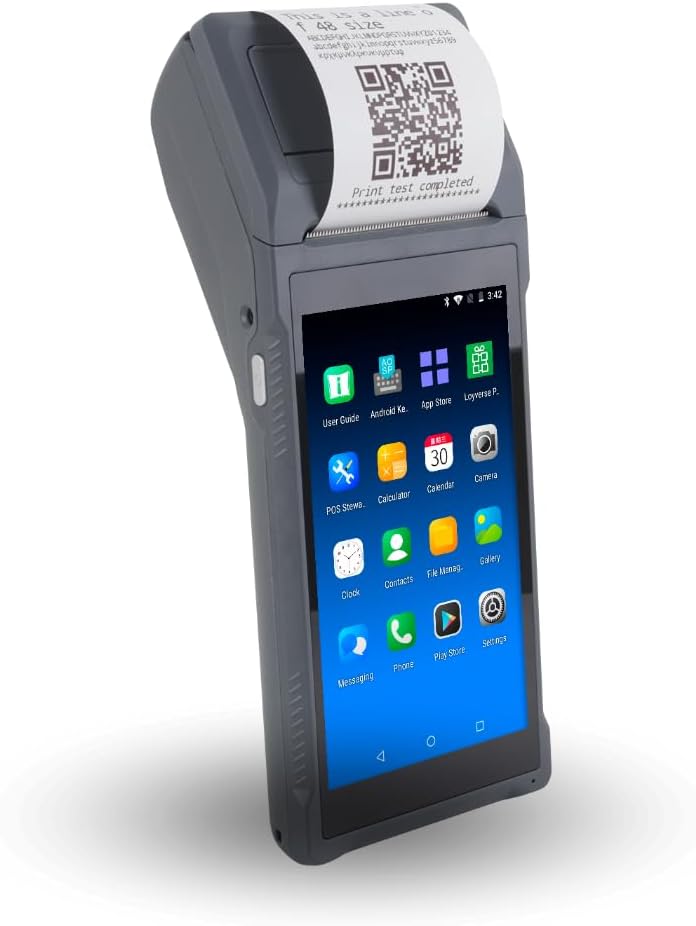
The Alacrity Handheld PDA is a top-tier device offering premium features for demanding business operations. Running Android 14 with an 8-core processor, it ensures ultra-fast transaction processing and smooth application execution. The 6.5-inch HD+ screen provides a vibrant display for clear data interaction.
We may earn a commission when you buy through this link, at no additional cost to you.
One standout feature is the adjustable 80mm thermal printer, which offers flexibility for printing receipts or labels. The 6400mAh battery provides extended working hours, reducing interruptions. Additionally, it includes NFC, Wi-Fi, GPS, and 4G, ensuring comprehensive connectivity options for any scenario.
The device is larger than standard handhelds due to its advanced components, which may be heavier for some users. However, the performance and versatility justify the size for professional use. It is ideal for logistics, manufacturing, and high-volume retail requiring robust data capture.
Select this terminal if you need a powerhouse device that combines speed, storage, and versatile printing. With its high user rating and premium specifications, it is designed for businesses that cannot afford downtime or performance bottlenecks.
Adjustable print width allows for versatile output options beyond standard receipts, supporting labels and tickets efficiently.
The massive battery capacity supports full shifts or multiple shifts on a single charge for uninterrupted productivity.
We may earn a commission when you buy through this link, at no additional cost to you.
The Alacrity Q50 PDA is optimized for high-speed environments such as food service or queue management. Powered by a 10-core CPU, it delivers seamless performance even during peak hours. The 5.9-inch screen offers precision display for staff to manage orders and customer data efficiently.
We may earn a commission when you buy through this link, at no additional cost to you.
Its thermal print head achieves 80mm/s speed with a zigzag-edge paper cutter, ensuring quick and neat ticket delivery. The professional 2D scan engine easily reads damaged or stained codes. However, note that it is not a dedicated payment terminal and requires a separate PCI-certified card reader.
While the lack of integrated payment processing may seem like a drawback, it allows flexibility in choosing payment providers. The focus remains on speed and order management. It is particularly useful for takeaway orders or busy counters where ticket printing is critical.
Use this device for order processing and inventory where speed is paramount. If you need a reliable scanner and printer combo that can keep up with rapid workflows, the Q50 provides the efficiency required for busy commercial kitchens and retail floors.
The advanced print head and cutter ensure rapid ticket delivery, reducing wait times for customers during rush periods.
The 2D scan engine captures data accurately even from damaged barcodes, maintaining workflow efficiency in tough conditions.
We may earn a commission when you buy through this link, at no additional cost to you.
The Clover GO (3rd Generation) serves as a powerful mobile payment reader that pairs wirelessly with your smartphone. This allows you to accept credit and debit cards anywhere without needing a separate terminal. It features end-to-end security to protect customer data throughout every transaction.
We may earn a commission when you buy through this link, at no additional cost to you.
Its key strengths include customizable tipping and tax settings, and the ability to send paperless receipts via email or text. The device also allows for employee permissions management, giving you control over who can see sensitive business data. It is a compact and simple solution for mobile payments.
It is important to note that this device requires new processing through SwyftPAY, limiting flexibility for those already using other processors. Additionally, it is a reader that depends on your phone for interface and apps, not a standalone screen device.
Choose the Clover GO if you want a lightweight, secure card reader that integrates with your existing smartphone. It is perfect for small businesses needing reliable mobile payment acceptance with basic management features without bulky hardware.
Data is protected from the moment of acceptance, ensuring compliance and safety for both merchant and customer.
Manage employee access and customize financial settings to suit your specific operational and business needs.
We may earn a commission when you buy through this link, at no additional cost to you.
Selecting the right handheld POS system requires careful consideration of your business needs and technical requirements. This guide outlines the key factors to help you make an informed decision.
The operating system determines which applications your device can run. Modern systems like Android 13 or 14 offer better security and app support. Ensure the OS is compatible with your preferred POS software and any third-party tools you use for inventory or accounting.
Choose a device with the latest OS version available to ensure long-term support and access to new features.
Connectivity is critical for processing payments reliably. Look for devices with dual-band Wi-Fi and cellular support like 4G LTE. This ensures you can stay connected even when Wi-Fi is weak or unavailable in remote locations.
Prioritize models with multiple connectivity options to guarantee uninterrupted service during critical business hours.
For mobile businesses, battery life is a top priority. Aim for terminals that offer at least 8 to 14 hours of runtime on a single charge. Fast charging capabilities can also minimize downtime when you need to recharge quickly during busy shifts.
Select a device with a high capacity battery to avoid interruptions during peak sales periods.
Some handhelds include built-in thermal printers for receipts or labels. Consider whether you need physical receipts or if digital options are sufficient. If printing is necessary, check the paper width and print speed to ensure it meets your volume requirements.
Decide early if an integrated printer is essential to avoid needing extra peripherals later.
Ensure the device supports the payment types you need, such as contactless tap, chip cards, or mobile wallets. Security standards like PCI compliance are vital to protect sensitive customer data. Some devices require a separate card reader, while others integrate processing directly.
Verify the processing fees and security features to maintain trust and compliance with payment regulations.
Handheld devices are often used in various environments, from kitchens to warehouses. Look for models that are water resistant, dust proof, and have a comfortable grip for extended use. A durable build reduces maintenance costs and extends the lifespan of your hardware.
Choose a ruggedized design if you work in challenging conditions to protect your investment.
Built-in barcode scanners streamline inventory management and sales. Ensure the device can read both 1D and 2D barcodes efficiently. High-quality cameras with autofocus help in capturing data accurately even in poor lighting or with damaged labels.
Opt for a device with advanced scanning capabilities if inventory tracking is a significant part of your workflow.
Advanced business needs may require custom software solutions. Check if the device offers an SDK or allows easy installation of third-party apps. Flexibility in software integration can help you tailor the POS experience to your unique operational model.
Consider future growth needs by choosing a platform that supports scalable software integration.
To begin using your handheld POS system, charge the battery fully and connect to a stable network. Install the required POS applications and configure your business settings such as tax rates and product catalog. Ensure all connectivity options like Wi-Fi and Bluetooth are enabled for seamless operation.
During daily operations, keep the device clean and free from dust or food particles. Use the built-in scanner carefully to avoid dropping the device. Regularly update the software to maintain security and performance levels. Avoid exposing the device to extreme temperatures or moisture unless rated for it.
Store the terminal in a protective case when not in use to prevent accidental damage. Keep spare batteries or charging cables on hand for busy periods. Periodically check for firmware updates and restart the device to clear any memory issues. Proper care extends the lifespan and reliability of your system.
A handheld POS system is portable and battery-powered, designed to move with you around your business. A countertop system is stationary and usually plugged in. Handhelds are ideal for service tables or remote work, while countertop units are better for fixed checkout locations.
Not all handheld systems come with built-in printers. Some rely on cloud printing or digital receipts sent to customer devices. If you require physical receipts on the go, check the specifications carefully before purchasing to ensure a thermal printer is included.
Many modern handheld devices offer offline mode that allows you to accept payments and store them locally. Once the connection is restored, the transactions sync to the system. This ensures you do not miss sales even when the internet is temporarily down.
Battery life typically ranges from 8 to 14 hours depending on usage and model. High-end models often support fast charging to minimize downtime. For businesses with long shifts, always check the milliamperes and usage estimates to ensure it meets your daily needs.
Most standalone handheld terminals run on Android and have their own interface. However, some mobile readers like Clover GO pair via Bluetooth with both iOS and Android smartphones. Verify connectivity specifications to ensure compatibility with your existing hardware.
Reputable devices use end-to-end encryption to protect card data during transactions. Look for PCI compliance certification to ensure the hardware meets industry security standards. Avoid using unverified devices that do not explicitly state their security protocols.
Common accessories include protective cases, spare batteries, USB chargers, and paper rolls for thermal printers. Depending on your business, you might also need stands or belts for hands-free operation. Ensure all accessories are compatible with your specific model to avoid fit issues.
Yes, most modern Android-based terminals receive regular system and application updates over the air. This helps maintain security and performance over time. Always keep your device connected to Wi-Fi to download and install the latest patches automatically.
We reviewed ten top handheld POS systems ranging from budget-friendly printers to high-performance PDAs. The Square Handheld leads for portability, while the Alacrity models offer advanced features for heavy-duty tasks. Each device serves distinct needs depending on your industry and workflow requirements.
When choosing, prioritize connectivity options and battery life to ensure your business runs smoothly without interruption. Consider whether you need integrated printing or can rely on digital receipts. Matching the device specs to your specific operational demands is key to long-term satisfaction.
Prices and availability can change quickly in the fast-moving tech market. Always verify the latest model number and specifications on the retailer's page before finalizing your order. Investing time in research will save you money and ensure you get the right tool for your business.