
NetumScan USB 1D Barcode Scanner
4.4Editor score
Plug and play USB connection
Durable anti-shock design
Fast CCD image scanning technology
This comprehensive guide compares the top barcode scanners for library use, evaluating wireless connectivity, battery life, durability, and decoding speed to
Finding the right barcode scanner for library operations requires balancing portability, battery life, and reliable decoding speed. Libraries handle thousands of items daily, so your scanner must read worn ISBN codes quickly without frustrating staff or patrons during peak hours.
We evaluated ten top-rated models based on real-world performance metrics like wireless range, drop resistance, and compatibility with library management systems. Our analysis focuses on scanners that offer hands-free options, long battery life, and quiet operation suitable for quiet study environments.
Each product entry below highlights key specifications, pros and cons, and ideal use cases for different library sizes. Please note that product prices fluctuate frequently, so always check the current listing before making your final purchasing decision to ensure you get the best value available today.
4.4Editor score

4.4Editor score

4.3Editor score
The following table provides a side-by-side comparison of all ten selected barcode scanners, highlighting their primary connection types, battery capabilities, decoding technologies, and specific features that make them suitable for diverse library environments.




The NETUM Bluetooth Barcode Scanner stands out as our top choice for libraries due to its exceptional battery life and versatile connectivity options. With a rating of 4.4 stars, this device promises reliable performance for daily circulation tasks without constant recharging interruptions.
We may earn a commission when you buy through this link, at no additional cost to you.
Its 2600mAh battery allows for continuous scanning up to 200,000 times on a single charge, making it ideal for busy libraries or mobile book carts that may not have access to power outlets throughout the day. The high-resolution CCD sensor ensures it rapidly decodes worn or damaged ISBN codes commonly found in older book collections.
While the scanner offers robust features like storage mode for offline use and programmable prefixes, users must note that it is not compatible with Square POS systems which some modern library kiosks might use. Additionally, the initial setup involves scanning setting barcodes from the manual, which might be a slight hurdle for non-technical staff.
Librarians looking for a reliable workhorse that balances cost with high performance should prioritize this model. Its ability to operate quietly in mute mode ensures that circulation desks remain peaceful for patrons trying to study or read nearby.
The 2600mAh battery supports weeks of usage on a single charge, reducing downtime significantly compared to standard scanners.
Users can disable the buzzer to ensure scanning happens without audible beeps, maintaining a quiet environment for readers.
We may earn a commission when you buy through this link, at no additional cost to you.
For libraries on a strict budget or those needing a dedicated scanner for a main circulation desk, the NetumScan USB 1D Barcode Scanner offers excellent value. It has earned a 4.4-star rating from users who appreciate its simplicity and rugged build quality for daily heavy use.
We may earn a commission when you buy through this link, at no additional cost to you.
This device utilizes advanced CCD sensor technology to capture 1D codes quickly from paper or screens, including deformed barcodes that laser scanners might miss. Its ergonomic ABS design is built to withstand drops from up to 2 meters, ensuring it survives accidental falls in busy library environments.
The primary limitation is its wired nature, meaning you are tethered to the computer port and cannot use it for mobile inventory checks or outdoor library events. However, for fixed stations where reliability and ease of setup are paramount, this scanner delivers consistent performance without software installation headaches.
We recommend this model for small public libraries or school branch offices that need a reliable tool for book check-ins without the added cost of wireless features they might not use.
Built with high-quality ABS plastic, this scanner handles physical stress well while remaining one of the most affordable options available.
CCD technology allows for faster and more accurate reading of standard library barcodes compared to traditional laser scanners.
We may earn a commission when you buy through this link, at no additional cost to you.
The Tera Barcode Scanner Wireless with Screen introduces a unique interface that allows librarians to customize settings directly on the device without needing a computer connection. This premium model is rated 4.3 stars and is designed for institutions needing advanced features like 2D scanning for modern ID cards.
We may earn a commission when you buy through this link, at no additional cost to you.
Its superior global CMOS imaging allows it to read high-density codes and formats like PDF417 found on driver licenses, which is increasingly useful for library card verification. The built-in 2.4G receiver in the charging cradle eliminates the need for separate USB dongles, simplifying setup and reducing the risk of losing small parts.
While the extra features come at a higher cost, the convenience of on-device configuration and the included cradle make it a worthwhile investment for larger libraries. The only trade-off is the increased weight compared to mini scanners, which might affect comfort during extended handheld use.
This scanner is best suited for libraries upgrading to modern circulation systems that require flexibility in scanning types and wish to minimize external hardware clutter at workstations.
Adjust language, volume, and connection settings directly on the scanner screen for immediate customization without software.
Capable of reading both traditional book barcodes and complex 2D codes like PDF417 for comprehensive identification tasks.
We may earn a commission when you buy through this link, at no additional cost to you.
When space is tight or staff need to move freely across the library, the Eyoyo Mini 1D Bluetooth Barcode Scanner provides unmatched portability. Weighing only 35 grams, it is designed for users who value weight and size over raw battery capacity or heavy-duty industrial features.
We may earn a commission when you buy through this link, at no additional cost to you.
The device offers a vibration mode instead of audio beeps, ensuring that staff can confirm successful scans silently in quiet zones without disturbing readers. Its wireless range extends up to 50 meters in Bluetooth mode, allowing significant freedom of movement while staying connected to the central computer.
However, the smaller 650mAh battery means more frequent charging compared to larger models, which could be inconvenient for all-day shifts without access to charging stations. It also does not support scanning from screens, limiting its utility for digital inventory checks.
This scanner is ideal for librarians who conduct shelf reads or mobile patrols where a large device would be cumbersome and discreet operation is preferred.
At just 35 grams, this scanner reduces hand fatigue significantly during long periods of continuous handheld use.
Vibration alerts allow for silent confirmation of scans, maintaining a peaceful environment for patrons.
We may earn a commission when you buy through this link, at no additional cost to you.
The Tera Barcode Scanner with Battery Indicator stands out for its ergonomic design that reduces hand strain during repetitive scanning tasks. With a 4.5-star rating, it has been praised for its smooth flat trigger and extended handle that fits comfortably in various hand sizes.
We may earn a commission when you buy through this link, at no additional cost to you.
A unique battery indicator light eliminates guesswork about charge levels, allowing staff to charge proactively rather than waiting for unexpected shutdowns. The IP54 protection ensures the device withstands dust common in older buildings, while the silicone cover prevents scratches from daily handling.
While it lacks a screen for settings adjustment, the straightforward plug and play setup makes it easy to deploy quickly. The only minor downside is that color options like purple may vary based on stock availability, which might not suit specific branding needs.
Libraries prioritizing staff comfort and device longevity should consider this model for high-traffic circulation desks where reliability and user satisfaction are critical.
The widened handle and smooth trigger are designed to reduce fatigue during long shifts of continuous scanning.
An indicator light shows remaining battery levels, preventing unexpected shutdowns during important tasks.
We may earn a commission when you buy through this link, at no additional cost to you.
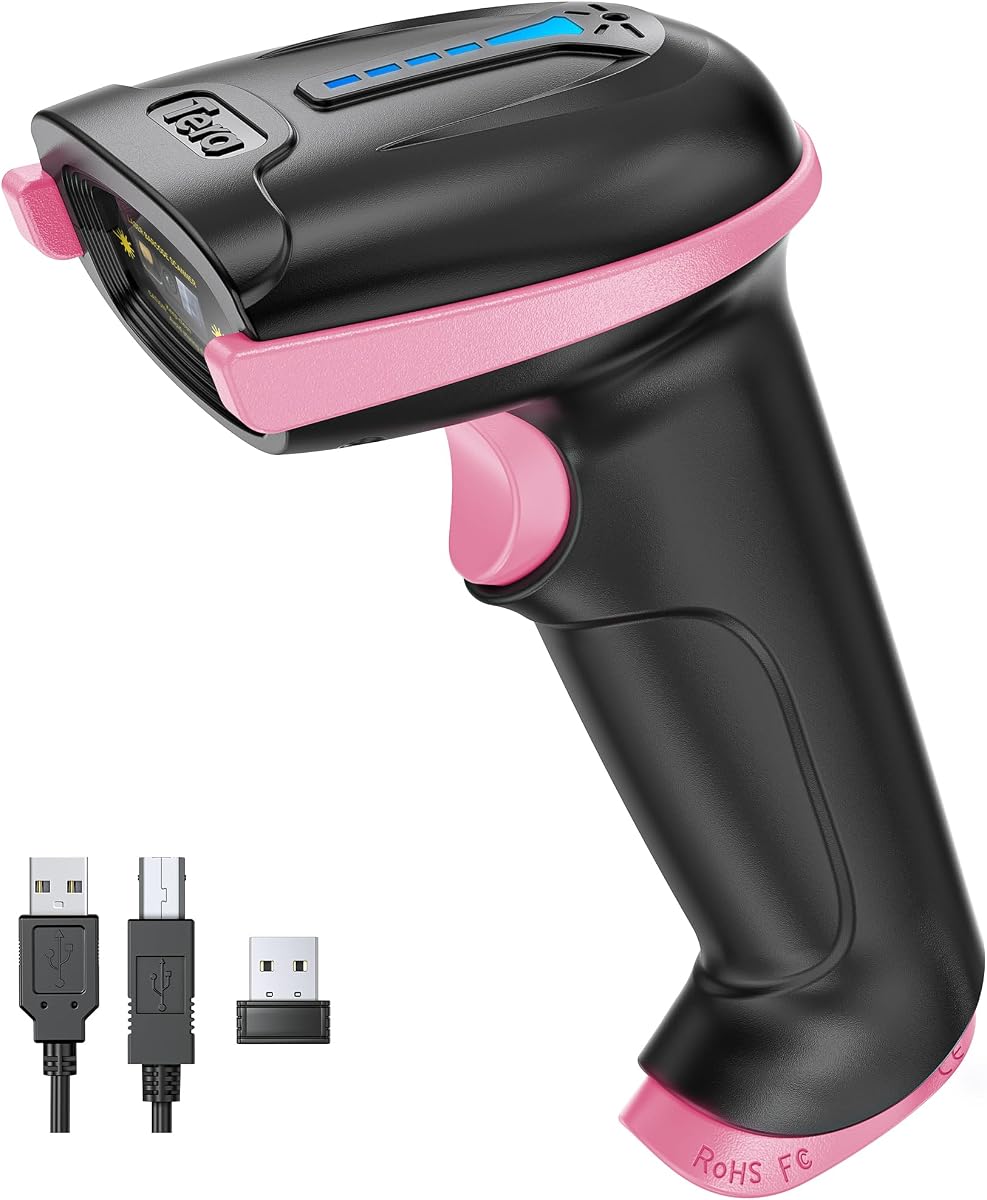
This pink variant of the Tera Barcode Scanner offers the same robust functionality as the purple model while providing a distinctive visual option for staff teams. It maintains the high 4.5-star rating for comfort and reliability, making it a practical choice for library staff who appreciate color variety.
We may earn a commission when you buy through this link, at no additional cost to you.
Like its counterpart, it features a widened handle and smooth trigger to reduce hand fatigue. The battery indicator light remains a key feature, ensuring staff are never caught off guard by a dead battery during peak hours of patron service.
The IP54 dust protection and protective silicone cover ensure durability in active library environments. The main limitation is the lack of a configuration screen, requiring computer access for advanced settings changes which might be a minor inconvenience.
Ideal for libraries wanting to brighten their equipment aesthetic or provide a specific color for certain departments without sacrificing performance.
The pink version offers a unique look for library equipment while maintaining all technical features.
Wireless connectivity ensures freedom of movement around the library shelves without losing connection.
We may earn a commission when you buy through this link, at no additional cost to you.
The WoneNice USB Laser Barcode Scanner offers fast scanning speeds and reliable performance for fixed library workstations. Its 4.5-star rating reflects strong user satisfaction with its speed and ease of use for basic circulation tasks.
We may earn a commission when you buy through this link, at no additional cost to you.
With a scanning speed of 200 scans per second, this laser scanner quickly processes high volumes of book returns. The visible laser light source is effective for standard 1D codes, and the configurable options allow users to turn off the beep for a quieter environment.
However, laser technology is generally less effective at reading damaged or smudged codes compared to CCD sensors, and it cannot read barcodes from screens. This limitation makes it less suitable for diverse modern inventory tasks.
For libraries needing a straightforward, affordable, and fast tool for standard book check-ins at a desk, this model delivers consistent results.
Capable of 200 scans per second, this scanner keeps lines moving quickly during busy return times.
Users can disable the audio beep to maintain a quiet atmosphere while still confirming scans.
We may earn a commission when you buy through this link, at no additional cost to you.
The Symcode Wireless Barcode Scanner is designed for larger library facilities where staff need to move far from the main desk during inventory tasks. Rated 4.4 stars, it excels in wireless range, allowing staff to cover vast areas without connectivity drops.
We may earn a commission when you buy through this link, at no additional cost to you.
Its standout feature is the offline storage mode, which can hold up to 100,000 barcodes if the scanner leaves the wireless range temporarily. This ensures that data is never lost even in large buildings or outdoor events where signal strength might fluctuate.
The device supports multiple scanners connecting to one receiver, making it ideal for large-scale library stocktakes. However, as a laser scanner, it may struggle with damaged labels or codes printed on reflective materials compared to CCD models.
We recommend this for large academic or municipal libraries that require extended coverage areas and robust data storage capabilities.
Stores up to 100,000 codes offline, ensuring no data loss even when out of wireless range.
Reaches up to 328 feet in open air, allowing staff to scan from distant shelves easily.
We may earn a commission when you buy through this link, at no additional cost to you.
This pink version of the Eyoyo Mini 1D Bluetooth Barcode Scanner combines portability with a distinct aesthetic appeal. It shares the same lightweight features as its counterpart, making it perfect for staff who need to carry the device during mobile library tours.
We may earn a commission when you buy through this link, at no additional cost to you.
The 650mAh battery supports up to 5 hours of continuous use, which is suitable for shifts with breaks for charging. The vibration mode ensures that staff can scan silently in quiet zones without disturbing patrons.
Like other mini models, it lacks the ability to scan from screens, and battery life is shorter than bulkier options. The unique color helps in easy identification on shared desks.
This is an excellent choice for small libraries or personal use where portability and design preferences are key factors.
The pink finish makes this scanner easy to spot and adds a touch of color to library equipment.
Switching between Bluetooth and wired modes ensures compatibility with different devices.
We may earn a commission when you buy through this link, at no additional cost to you.
The Barcode Scanner with Stand is designed for hands-free operation, allowing staff to focus on handling books rather than the scanner itself. It earns a 4.0 rating for its convenience in high-traffic areas where both hands are needed for packaging or sorting items.
We may earn a commission when you buy through this link, at no additional cost to you.
Equipped with an advanced CMOS sensor, it handles both 1D and 2D codes effectively, offering broader utility than basic laser models. The auto-sensing scanning mode means items can be passed over the scanner quickly without needing to pull a trigger.
The adjustable stand allows users to set the perfect angle for their workflow, but the wired nature limits placement to near a computer port. This might be a constraint for flexible library layouts.
This scanner is ideal for packing stations or dedicated circulation desks where hands-free speed and multi-code support are essential.
The adjustable stand and auto-sensing feature allow staff to scan items while using both hands for other tasks.
Supports 2D codes like QR, offering more versatility than standard 1D only scanners.
We may earn a commission when you buy through this link, at no additional cost to you.
Choosing the right barcode scanner for library use requires balancing several key factors such as connection type, battery life, and decoding capability to match your specific operational needs.
Determine whether you need wireless freedom for mobile patrols or a fixed wired connection for desk work. Bluetooth offers better range than 2.4G wireless, but wired options provide constant power without battery concerns.
Consider staff mobility needs: wireless scanners allow scanning in aisles, while wired ones stay at desks.
For mobile use, look for scanners with at least 2000mAh capacity to ensure they last through a full shift. Models with storage mode are ideal for environments where you might leave the wireless range temporarily.
Prioritize high-capacity batteries if your staff does not have easy access to charging stations during the day.
CCD sensors are generally better at reading worn or damaged barcodes common in libraries, while laser scanners are faster for clean codes. CMOS sensors offer the versatility of reading both 1D and 2D codes.
Choose a sensor that matches the condition of your book spines and the types of codes you scan most often.
Librarians use these devices for hours, so an ergonomic handle and lightweight design are essential to prevent fatigue. Look for durable materials and protective covers that can withstand accidental drops on hard floors.
Select a model with a comfortable grip and rugged build to ensure long-term staff comfort and device reliability.
Ensure the scanner supports HID and SPP modes to work seamlessly with your library's existing software. Check if the device is compatible with your specific POS or inventory systems like Square or custom databases.
Verify software compatibility before purchasing to avoid integration issues with your library's current management platform.
If your library has a quiet zone, choose a scanner with a mute or vibration mode to avoid disturbing patrons. Dust protection ratings like IP54 are valuable in older buildings or outdoor book drives.
Opt for silent operation features and protective ratings to maintain a pleasant library atmosphere and device longevity.
For large inventories or temporary network outages, a scanner with offline storage can save up to 100,000 codes locally. This ensures data integrity even if the wireless signal is lost in remote parts of the library.
Look for storage mode features to safeguard your data during scanning tasks outside your standard wireless range.
Set a realistic budget based on your needs; basic wired models are cheaper, while premium ones offer screens and 2D scanning. Prioritize the features that save the most time daily to justify higher costs.
Choose a balance between price and functionality that aligns with your daily operational demands and long-term goals.
To begin using your barcode scanner, connect it to your computer via the USB receiver, Bluetooth, or cable depending on the model. Once connected, test it by scanning a sample barcodes to ensure the system recognizes the input correctly.
For optimal performance, keep the scanning window clean and free of dust or fingerprints that might interfere with the sensor. Regularly charge the device before battery levels drop too low to extend the lifespan of the internal cells.
When not in use, store the scanner in a dry and cool place to protect internal electronics from humidity or heat. Use protective covers or sleeves if the scanner is carried in a bag to prevent scratches and accidental drops.
Yes, many Bluetooth scanners are fully compatible with tablets and smartphones running iOS or Android. Ensure your device supports the necessary SPP or BLE modes to establish a stable connection for scanning books on the go.
CCD sensors can read barcodes from screens and are better at handling damaged or smudged codes. Laser sensors are typically faster and more cost-effective for clean printed codes but cannot read digital screens.
Battery life varies by model, ranging from 5 hours for mini devices to several weeks for high-capacity ones like the NETUM. Continuous use typically requires charging once or twice a week depending on the volume of scanning.
Most scanners support HID and SPP modes, making them compatible with Windows-based library software. Always verify with your vendor if the scanner works with specific platforms like Follett or Polaris before purchasing.
Only CCD or image-based sensors can read barcodes displayed on computer screens. Laser scanners cannot read digital images, so check the specifications to ensure the scanner supports screen scanning if you need this feature.
Wireless scanners with 2.4G or Bluetooth connectivity typically offer ranges up to 100 feet or more, which is sufficient for most library spaces. For very large buildings, consider models with offline storage to prevent data loss during movement.
The NETUM Bluetooth Barcode Scanner offers the best balance of features, making it our top choice for most library settings. Its robust battery life, versatile connectivity, and quiet operation make it a reliable tool for daily circulation and inventory tasks.
If your budget is limited, the NetumScan USB 1D Barcode Scanner provides exceptional value with durable performance for fixed workstations. For those needing advanced 2D scanning and on-device configuration, the Tera Barcode Scanner with Screen stands out as a premium option.
Always verify current pricing and availability before purchasing to ensure you get the best deal. Remember to consider your specific library size and staff workflow when selecting a model to maximize efficiency and user satisfaction.