
TK Node Mini PC – Zorin OS Core Linux
4.5Editor score
AMD Ryzen R2314 Option
Zorin OS Core Included
Dual NVMe SSD Slots
Discover the best Linux Mini Pcs for 2026. This guide compares top models for performance, connectivity, and value to help you choose the right compact desktop.
Linux Mini Pcs offer a compact alternative to traditional desktops. They provide robust performance for development, media, and general use. Selecting the right model depends on your specific workflow and budget constraints.
We evaluated ten top models based on processor power, memory, and port options. Each unit runs Linux natively or supports it well. Our analysis highlights strengths in cooling, connectivity, and overall build quality.
Every pick includes detailed specs, pros, and cons to guide your decision. These devices cover various needs from budget home labs to premium workstations. Prices fluctuate frequently so verify current listings before purchasing.
4.5Editor score

4.8Editor score

4.0Editor score
This side-by-side comparison highlights key specifications across all ten models. Compare processors, memory options, storage, and display capabilities to find the perfect fit for your Linux environment.


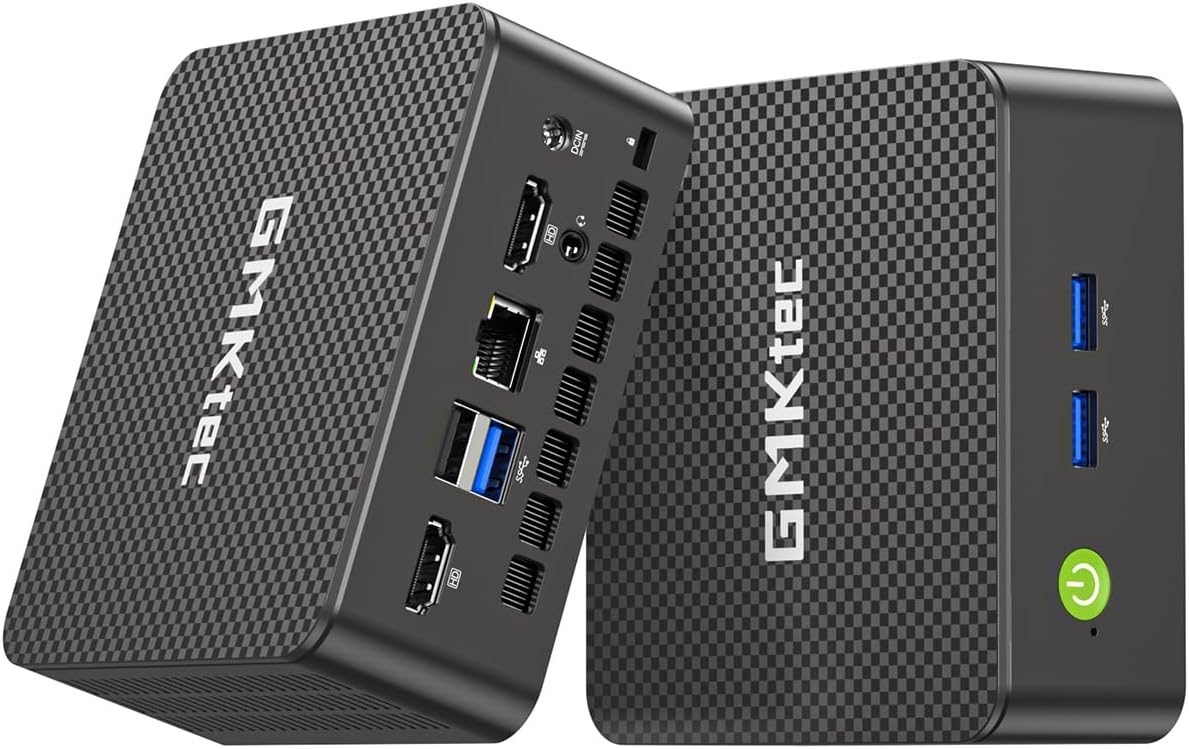
The TK Node Mini PC is a strong contender for Linux users seeking reliable performance. It features an AMD Ryzen R2314 processor paired with Zorin OS Core. This setup ensures a familiar and secure desktop experience right out of the box.
We may earn a commission when you buy through this link, at no additional cost to you.
Its standout quality is the flexibility for expansion. You can upgrade RAM up to 64GB and add storage via dual NVMe slots. The triple 4K display support makes it ideal for multitasking workflows and professional setups.
The trade-off is the default memory configuration. Starting with 8GB might require an immediate upgrade for heavy multitasking. However, the expandable design mitigates this limitation effectively for most users.
Developers and home lab enthusiasts should consider this model. It offers a great balance of power, connectivity, and Linux support. The US assembly and warranty add significant value for long-term use.
Zorin OS Core provides a seamless transition for Windows users moving to Linux.
Dual slots for RAM and SSD allow for significant performance upgrades over time.
We may earn a commission when you buy through this link, at no additional cost to you.
The Beelink SER3 Mini PC offers solid performance for general computing tasks. It comes with 16GB of DDR4 RAM which is rare at this price point. The Ryzen 3 3200U handles daily productivity efficiently.
We may earn a commission when you buy through this link, at no additional cost to you.
Its key strength lies in memory capacity. Having 16GB out of the box means you can run multiple applications smoothly. The dual HDMI ports allow for a dual-monitor setup easily.
However, the processor architecture is older. It may struggle with modern heavy workloads compared to newer chips. Storage expansion is also limited to one M.2 slot.
This model is perfect for home offices or students. It provides enough power for web browsing and light development. The lifetime support adds peace of mind for users.
16GB RAM ensures smooth multitasking without immediate upgrade needs.
Vega 3 graphics handle light media tasks and video playback well.
We may earn a commission when you buy through this link, at no additional cost to you.
The ASUS NUC 14 Pro represents the peak of Linux Mini Pcs. It features an Intel Ultra 7 processor with 64GB of DDR5 RAM. This configuration handles AI tasks and heavy development environments effortlessly.
We may earn a commission when you buy through this link, at no additional cost to you.
Linux Mint pre-installed ensures a secure and open-source environment. The cooling system supports 24/7 operation without throttling. Connectivity is unmatched with Thunderbolt 4 and WiFi 6E.
The main trade-off is the cost. It is significantly more expensive than other options. Casual users may not need this level of performance.
AI researchers and developers should consider this device. It offers professional-grade reliability and expandability. The inclusion of Linux Mint adds immediate value for users.
Integrated AI acceleration enables faster model training and inference tasks.
Silent cooling keeps the system stable during long workloads.
We may earn a commission when you buy through this link, at no additional cost to you.
The Beelink Mini S12 Pro is designed for efficiency. The Intel N100 processor balances performance and power usage perfectly. It includes 16GB RAM which is generous for this class.
We may earn a commission when you buy through this link, at no additional cost to you.
Its strengths include support for dual 4K displays. This makes it great for media centers or home offices. The cooling system is upgraded to handle sustained loads quietly.
Expansion options are somewhat limited. The single RAM slot means you must choose your memory carefully. It lacks Thunderbolt connectivity for high-speed peripherals.
This unit works well for light servers or NAS setups. Its low TDP reduces electricity costs over time. It is a smart choice for budget-conscious users.
Low power usage makes it ideal for always-on server applications.
WiFi 6 and USB 3.2 ports ensure fast data transfer speeds.
We may earn a commission when you buy through this link, at no additional cost to you.
The KAMRUI Pinova P2 brings strong graphical performance. It uses the Ryzen 7 3300U with modern Zen 3 architecture. The Radeon graphics handle video editing and rendering better than many rivals.
We may earn a commission when you buy through this link, at no additional cost to you.
Its standout feature is the triple 4K display support. You can connect three screens without extra adapters. This is highly useful for trading or data visualization tasks.
Storage is limited to 256GB initially. You will need to add external storage for large projects. The LPDDR4X memory is fast but soldered to the board.
Creators needing multiple screens should look at this model. It offers a unique balance of portability and power. The compact design fits easily into travel bags.
Three 4K ports enable complex workstation setups in a small box.
Zen 3 architecture delivers faster single-core performance for apps.
We may earn a commission when you buy through this link, at no additional cost to you.
The GMKtec G11 is tailored for network tasks. It features dual 2.5GbE Ethernet ports which are rare. This makes it ideal for routing or firewall duties using Linux.
We may earn a commission when you buy through this link, at no additional cost to you.
The R2514 processor offers robust performance for its class. Dual-channel RAM helps with data throughput. It supports continuous 24/7 operation without thermal issues.
It is not designed for high-end gaming. The embedded chip limits raw computational power. Storage expansion is limited to one slot.
Home lab enthusiasts will appreciate the networking features. It simplifies complex setups by removing the need for external hardware. Linux support is solid for server tasks.
Dual ports allow direct connection to WAN and LAN networks.
Designed for commercial environments ensuring long uptime reliability.
We may earn a commission when you buy through this link, at no additional cost to you.
The CyberGeek Mini PC targets heavy computing tasks. It uses an i9 processor which offers 8 cores and 16 threads. This provides substantial power for virtualization and development.
We may earn a commission when you buy through this link, at no additional cost to you.
Its standout quality is raw CPU performance. It handles complex compilation and rendering tasks effectively. The cooling system is designed to manage high heat output.
The iGPU is not strong for gaming. You will need external graphics for intensive 3D work. It is primarily a productivity machine.
Software engineers should consider this model for speed. It offers a desktop-class experience in a compact form. Linux support is excellent for command-line workflows.
High core count significantly reduces build times for large codebases.
Multiple USB ports allow extensive peripheral connectivity.
We may earn a commission when you buy through this link, at no additional cost to you.
The BOSGAME E5 is a balanced choice for offices. It includes 16GB RAM and 512GB storage by default. The dual 2.5G LAN ports support high-speed networking tasks.
We may earn a commission when you buy through this link, at no additional cost to you.
Its strength lies in storage and network speed. The NVMe SSD ensures quick boot times. You can expand RAM to 64GB for heavier workloads.
Wi-Fi 5 is standard here rather than 6. It is still fast but not the latest standard. Wireless users should check their router compatibility.
Network admins and office workers will find it useful. The combination of storage and connectivity is strong. Linux installation is supported and smooth.
Dual 2.5G ports enable faster file transfers between devices.
Dual RAM slots allow for significant memory upgrades.
We may earn a commission when you buy through this link, at no additional cost to you.
The BOSGAME E4 Air offers entry-level performance. It uses a Ryzen 5 processor which handles basic tasks well. Triple 4K support is available for multi-monitor setups.
We may earn a commission when you buy through this link, at no additional cost to you.
Its main benefit is the price and size. It is compact enough for travel and light office work. The 8GB RAM is sufficient for web browsing.
Storage speed is limited to SATA SSDs. This makes boot times slower than NVMe models. 8GB RAM limits heavy multitasking capabilities.
Students or home users on a budget might like it. It provides essential functionality without bulk. Linux distributions run well on this hardware.
Lightweight construction allows easy transport between locations.
Triple screen support aids productivity without extra hardware.
We may earn a commission when you buy through this link, at no additional cost to you.
The GMKtec G3S is an entry-level option. It features an Intel N95 processor which improves on older chips. Dual HDMI outputs allow for basic dual-monitor setups.
We may earn a commission when you buy through this link, at no additional cost to you.
Its strength is the price-to-performance ratio. It handles basic office tasks and web browsing well. The SSD ensures decent load times for applications.
Memory is capped at 8GB standard. This limits future-proofing for more demanding tasks. Graphics are sufficient for media but not gaming.
Budget users should consider this for light use. It is a reliable replacement for old bulky desktops. Linux compatibility is generally good for this chipset.
New architecture provides better speed than previous entry models.
Dual HDMI ports simplify setting up multiple displays.
We may earn a commission when you buy through this link, at no additional cost to you.
Choosing the right Linux Mini Pc requires evaluating hardware and features. This guide outlines the key factors to consider for your specific needs.
Select a processor that matches your workflow. Intel and AMD offer different strengths. High core counts are vital for virtualization and compiling.
Match the CPU to your daily tasks.
RAM is critical for multitasking. Minimum 16GB is recommended for modern usage. Ensure the slots are accessible for upgrades.
Check if the RAM is soldered.
Fast storage improves system responsiveness. Look for NVMe SSD slots. Dual slots allow for OS and data separation.
Opt for expandable storage solutions.
Ports determine how you connect peripherals. USB-C and HDMI are essential. Gigabit Ethernet ensures stable network links.
Verify all required ports are present.
Multiple monitors boost productivity. Check for triple display support. Resolution limits affect clarity for work.
Ensure GPU handles your monitor setup.
Cooling prevents performance throttling. Silent fans are ideal for offices. Ventilation design impacts longevity.
Choose a model with efficient cooling.
Some units come with Linux installed. Others require manual setup. Pre-installed options save time.
Verify driver support before buying.
Warranty length varies by manufacturer. Local support helps with repairs. Look for reliable after-sales service.
Consider the warranty terms carefully.
Connect your mini PC to a display and power source. Use a USB keyboard and mouse to begin setup. Ensure the system boots correctly into Linux.
Keep the device in a well-ventilated area. Regularly clean dust from vents to prevent overheating. Use a surge protector for stable power.
Update your Linux system regularly for security. Manage storage space by clearing unused files. Maintain system backups for important data.
Some models include a Linux distribution like Ubuntu or Mint. Others require you to install it yourself. Check the product description before buying.
Most units have at least one upgradeable slot. Memory may be soldered on some budget models. Check the specs for dual slots.
They handle light gaming well. Integrated graphics are not for heavy titles. External GPUs are often needed for advanced play.
Ubuntu and Mint are widely supported. Debian works well for stability. Always verify hardware compatibility lists.
Most support dual or triple displays. HDMI and USB-C ports are key. Check the maximum resolution limits.
Major brands have good Linux support. Community forums help with troubleshooting. Look for models with active user bases.
Well-maintained units last years. Thermal management affects longevity. Regular software updates keep systems running.
We reviewed ten top models to help you find the right device. From budget options to premium workstations there is a fit for everyone.
Prioritize memory and CPU power for your workload. Connectivity and storage options also play major roles in daily use.
Always check current listings for the latest deals. Prices fluctuate so verify specifications before purchasing.