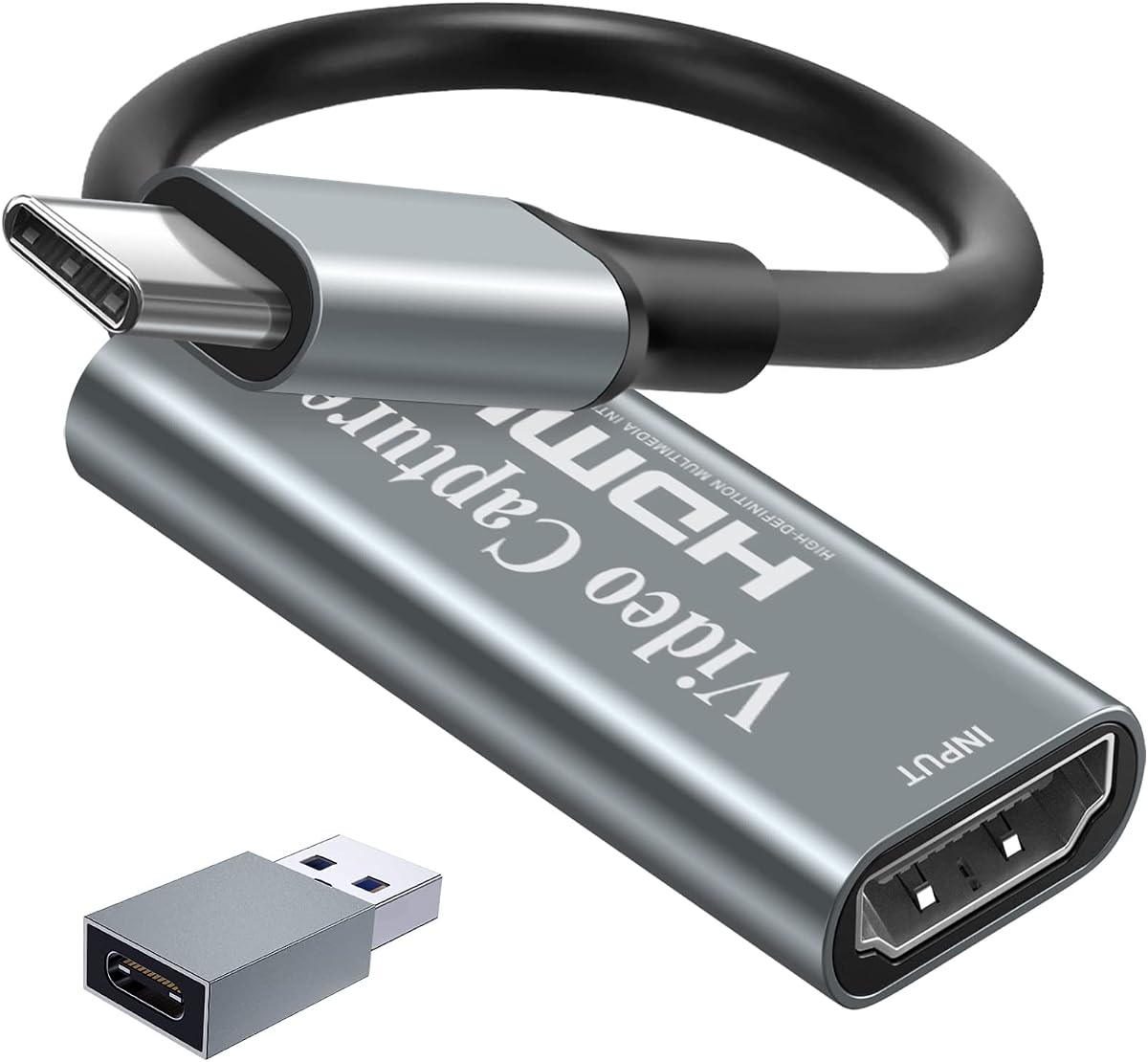
Papeaso Video Capture Card
4.2Editor score
4K HDMI input support
1080P 60FPS output
USB-C and USB-A ports
Discover the top capture cards for Linux users. This guide compares ten models for performance compatibility and features to help you stream or record content
Finding a reliable capture card for Linux can be challenging. You need hardware that works seamlessly with open-source software and delivers high-quality video without frustrating driver issues.
We compared ten popular models based on compatibility resolution and latency. Each option supports common Linux tools like OBS and ensures smooth streaming or recording for creators and gamers.
Every pick highlights key strengths and potential trade-offs. Prices vary by retailer and feature set so always check current listings before buying to get the best value for your needs.
4.2Editor score

4.5Editor score

4.2Editor score
This side-by-side comparison shows key specifications for all ten capture cards. Use it to quickly identify which model meets your specific Linux streaming or recording requirements.







This UGREEN capture card stands out as the top choice for Linux users seeking reliable performance. It delivers smooth video capture with minimal driver setup required for open-source systems.
We may earn a commission when you buy through this link, at no additional cost to you.
The device supports 4K input and 2K output ensuring sharp visuals for streaming and recording. Its USB 3.0 interface provides fast data transfer rates essential for high frame rates.
While it lacks 4K output capability the 2K resolution balances quality and system load. Consoles need HDCP turned off which is a common requirement for budget-friendly capture devices.
Creators who prioritize stability and Linux support should consider this model. It handles various HDMI sources well and works seamlessly with OBS and other recording software.
The card works without extra drivers on Linux systems ensuring quick setup and stable performance during long recording sessions.
Built with aluminum alloy the casing dissipates heat effectively preventing overheating during extended streaming or gaming capture.
We may earn a commission when you buy through this link, at no additional cost to you.
This premium capture card offers top-tier performance with 4K60 HDR and VRR passthrough capabilities. It is ideal for users needing professional-grade features and reliable hardware.
We may earn a commission when you buy through this link, at no additional cost to you.
The device supports RGB24 color formats which is rare and beneficial for color accuracy in high-end workflows. Audio capture extends to 5.1 channels for immersive sound.
Though it is more expensive the features justify the cost for serious streamers. Linux support exists but may require checking specific driver compatibility for full functionality.
Investors in this card gain future-proof hardware that handles high frame rates and resolutions without compromise. It is a solid choice for advanced content production.
Capture gameplay at 4K60 or 1080p240 ensuring smooth and detailed video suitable for competitive gaming streams.
Capture up to 5.1 channel audio providing rich soundscapes for viewers and post-production needs.
We may earn a commission when you buy through this link, at no additional cost to you.
The Papeaso capture card offers an affordable entry point for Linux users. It handles 1080P 60FPS recording well and supports 4K input for future expansion.
We may earn a commission when you buy through this link, at no additional cost to you.
Its USB-C port ensures compatibility with modern laptops and devices. The card works without drivers on Linux making it easy to set up quickly.
While it lacks premium features like mic-in the video quality is solid for the price. Users may need external audio solutions for commentary.
Beginners or casual streamers will find this model sufficient. It balances cost and functionality effectively for standard streaming needs.
This card provides essential capture features at a very competitive price point suitable for budget-conscious creators.
Modern USB-C support ensures it works well with newer devices without needing extra adapters.
We may earn a commission when you buy through this link, at no additional cost to you.
The acer capture card is designed for straightforward streaming and recording tasks. It supports 4K input and 1080P output ensuring good visual quality for most users.
We may earn a commission when you buy through this link, at no additional cost to you.
Its mic-in port simplifies setup by allowing direct headset connection. This reduces the need for extra audio gear during live sessions.
Users appreciate the loop-out feature for real-time monitoring without latency. Linux support is solid with no drivers needed for standard operations.
This model is best for those needing basic yet reliable capture. It covers essential features without unnecessary complexity or cost.
The built-in mic-in lets you plug in a headset directly for synchronized audio capture.
YUY2 technology ensures richer colors and better detail than standard MJPEG formats.
We may earn a commission when you buy through this link, at no additional cost to you.
This UGREEN model offers flexible connectivity with both USB-A and USB-C ports. It supports 4K input and 2K output which suits various streaming setups.
We may earn a commission when you buy through this link, at no additional cost to you.
The loop-out feature allows zero-latency monitoring on an external display. This is essential for gamers wanting to avoid lag while capturing gameplay.
Linux users find it works seamlessly without extra drivers. The aluminum casing helps with heat dissipation during long sessions.
It is a solid mid-range choice for those needing versatile ports and monitoring. The balance of features makes it popular among streamers.
Supports both USB-A and USB-C ensuring compatibility with older and newer devices.
Loop-out allows real-time preview of captured video without delay for precise control.
We may earn a commission when you buy through this link, at no additional cost to you.
The Guermok capture card is lightweight and easy to carry. It supports 4K input and 1080P 60FPS output ideal for mobile streaming setups.
We may earn a commission when you buy through this link, at no additional cost to you.
Built with aluminum alloy it manages heat well during use. The USB-C connection ensures modern device compatibility without adapters.
It works on Linux systems without drivers and supports major streaming platforms. Users note it is a one-way transmission device only.
This model suits travelers needing reliable capture on the go. It is a straightforward tool for recording without extra accessories.
Small size makes it easy to pack in a bag for outdoor or travel streaming.
Aluminum alloy casing prevents overheating ensuring stable performance over time.
We may earn a commission when you buy through this link, at no additional cost to you.
This Newhope card offers 4K pass-through allowing high-res gameplay while recording in 1080P. It includes a mic-in port for easy audio setup.
We may earn a commission when you buy through this link, at no additional cost to you.
The device works instantly on Linux without drivers. It is lightweight and suitable for home or light travel use.
Pass-through ensures you can view full-resolution content on your monitor. This avoids lag during gameplay while streaming or recording.
Ideal for users wanting pass-through without premium costs. It delivers basic needs effectively with straightforward operation.
Play in 4K on your display while capturing video simultaneously without lag.
Use a standard 3.5mm headset to capture voice commentary directly.
We may earn a commission when you buy through this link, at no additional cost to you.
This basic capture card delivers reliable 1080P 60FPS recording. It works with Linux and supports common streaming software like OBS and XSplit.
We may earn a commission when you buy through this link, at no additional cost to you.
Users praise its simplicity and low latency. It is portable enough for occasional use or home setups.
The 4K input allows compatibility with high-end consoles. Though it records at 1080P it remains smooth and clear.
Best for those needing a simple tool without extra features. It provides consistent performance for standard streaming needs.
No drivers or setup needed start capturing video immediately upon connection.
Works with most streaming platforms ensuring your content reaches the intended audience.
We may earn a commission when you buy through this link, at no additional cost to you.
This model includes both mic and headphone jacks for flexible audio control. It works on Linux and delivers smooth 1080P recording.
We may earn a commission when you buy through this link, at no additional cost to you.
The package includes HDMI and USB cables making it ready to use. An 18-month warranty adds peace of mind for buyers.
Input supports up to 4K ensuring compatibility with latest consoles. The headphone jack helps monitor audio levels during streaming.
Good for users wanting audio flexibility and included accessories. It is a well-rounded option for general capture tasks.
Monitor audio via headphone jack while recording for precise sound control.
Includes HDMI and USB cables so you have everything needed to start.
We may earn a commission when you buy through this link, at no additional cost to you.
This AVerMedia card focuses on low latency and HDR passthrough. It supports 4K60 HDR input and records in 1080p60.
We may earn a commission when you buy through this link, at no additional cost to you.
Streaming Center simplifies setup for beginners. Linux support is available though users may prefer OBS for flexibility.
The ultra-low latency ensures responsive gameplay streaming. Formats like NV12 allow tailored workflows for editing.
Best for users needing HDR and low lag. It is a robust choice for professional streaming setups.
Pass-through allows playing in HDR while recording for vibrant visuals.
Near-instant response ensures no lag during competitive gaming streams.
We may earn a commission when you buy through this link, at no additional cost to you.
Selecting the right capture card requires understanding key technical factors that affect performance and compatibility on Linux systems.
Linux compatibility is critical. Look for capture cards that support UVC or UAC protocols which allow plug-and-play recognition without proprietary drivers.
Verify that your chosen model works with OBS Studio or other Linux tools before buying.
Resolution affects how clear your stream or recording looks. Ensure the card supports your desired input like 4K and output like 1080P 60FPS.
Higher frame rates are better for fast-paced gaming content to reduce motion blur.
Latency is the delay between video input and capture. Low latency is vital for real-time streaming and gameplay to avoid sync issues.
USB 3.0 generally offers lower latency than USB 2.0 so prioritize USB 3.0 ports.
Check available ports like HDMI and USB-A or USB-C. Dual USB ports provide flexibility for different devices and setups.
USB-C is useful for modern laptops without extra adapters.
Some cards include mic-in or headphone jacks which simplify audio setup. This is helpful for commentary without extra audio hardware.
Ensure the card supports audio pass-through if you need synchronized sound.
Aluminum alloy casings help dissipate heat during long recording sessions. Good build quality prevents signal loss or device failure over time.
Look for reviews that mention heat management during extended use.
Compatibility with streaming software like OBS or VLC is essential. Some brands offer proprietary tools but open-source options are preferred on Linux.
Ensure the card works with standard software to avoid restrictions.
Prices vary based on features like 4K or HDR. Determine your budget and prioritize features you actually need for your workflow.
Mid-range models often offer the best balance between cost and performance.
Connect the capture card to your computer via USB 3.0 and plug in the HDMI source device. Ensure your Linux system recognizes the USB device automatically.
Open OBS or your preferred software and select the capture card as the video source. Adjust resolution settings to match your source input.
Keep the device in a well-ventilated area to prevent overheating. Store it in a protective case when not in use to avoid physical damage.
Most modern capture cards support UVC protocols which allow plug-and-play on Linux. However some models may require specific drivers for full functionality.
Some cards support 4K input but output resolution may be limited to 1080P or 2K. Check product specs carefully before purchasing.
OBS Studio is the most popular option due to its compatibility and flexibility. VLC and other tools may also work depending on the hardware.
Yes USB 3.0 is recommended for higher bandwidth and lower latency. Using USB 2.0 may limit resolution or frame rates.
Check OBS audio settings to ensure input and source clocks match. Some cards have built-in audio sync features you can enable.
Yes most support consoles like PS5 and Xbox. However you may need to disable HDCP on the console for capture to work.
The UGREEN 2K@30Hz model stands out for Linux users with its driver-free operation and balanced features. It delivers reliable performance without unnecessary complexity.
Prioritize resolution latency and port compatibility when selecting a card. These factors ensure smooth streaming and recording tailored to your workflow.
Always verify current specs and availability before purchase. Models may change over time so confirm details match your needs.