
SteelSeries Apex 3 Gaming Keyboard – Black
4.6Editor score
Water resistant design protects spills
Whisper quiet switches reduce noise
Dedicated media controls included
Discover the best Mac gaming keyboard options for 2026. This guide compares top mechanical, wireless, and wired keyboards optimized for macOS performance and
Finding the right Mac gaming keyboard can transform your setup. Look for compatibility, tactile feedback, and durable builds that handle long sessions without fatigue or lag during intense play.
We compared ten top-rated models based on switch type, connectivity, layout, and build quality. Each entry offers unique features tailored to gamers who demand precision and seamless integration with macOS systems.
Each pick highlights key strengths and ideal use cases to help you choose quickly. Prices and availability fluctuate often, so verify current details before purchasing to ensure you get the best value available today.
4.6Editor score
4.3Editor score

4.2Editor score
This side by side comparison highlights key specifications across all ten models. Evaluate layout, connectivity, switch type, and special features to find the perfect match for your Mac gaming needs.




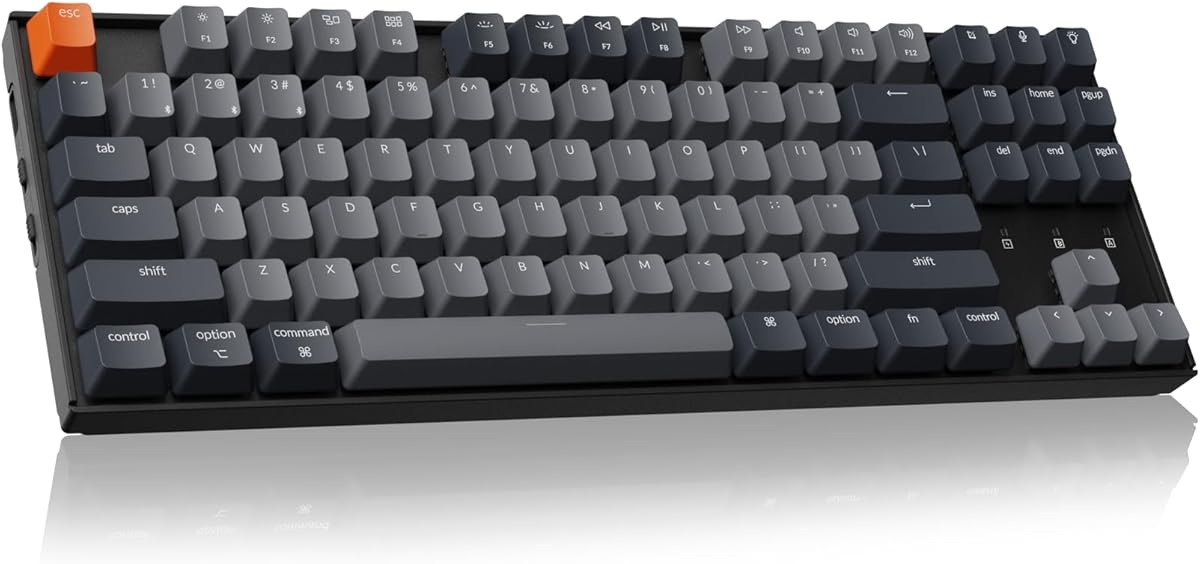
The Keychron K8 stands out as the top pick for Mac gamers seeking a reliable wireless mechanical experience. With a 4.3 rating from verified users, it delivers consistent performance and comfort during extended sessions.
We may earn a commission when you buy through this link, at no additional cost to you.
Its dedicated Mac layout ensures all function keys align perfectly with macOS requirements. The tactile brown switches provide clear feedback without excessive noise, making it suitable for both gaming and typing tasks.
While it offers excellent battery life and robust connectivity, some users notice minor latency in competitive online play via Bluetooth. Switching to wired mode resolves this, but it adds a cable to your desk setup.
If you prioritize seamless macOS compatibility and versatile connectivity, the K8 is an ideal choice. It balances premium features with practical design for most Mac gaming environments.
The included Mac-specific keycaps and layout eliminate the need for software remapping or workarounds when using system shortcuts.
With up to 200 hours of use without backlight, the K8 minimizes charging interruptions during long gaming nights.
We may earn a commission when you buy through this link, at no additional cost to you.
The SteelSeries Apex 3 offers impressive value for budget-conscious Mac gamers. Rated 4.6 by users, it combines practical durability with basic RGB flair and a magnetic wrist rest for comfort.
We may earn a commission when you buy through this link, at no additional cost to you.
Its IP32 water resistance protects against accidental spills, a common issue in gaming setups. The whisper quiet switches ensure minimal noise, ideal for shared spaces or late-night sessions.
While the membrane switches lack the tactile feedback of mechanical options, they remain responsive enough for casual gaming. Software customization is limited compared to premium brands, but core functions work well.
For those seeking a reliable, spill-resistant keyboard under fifty dollars, the Apex 3 is a strong contender. It prioritizes longevity and comfort over high-end gaming features.
The IP32 rating safeguards internal circuits from minor liquid exposure, extending the keyboard's lifespan significantly.
The included magnetic wrist rest provides full palm support, reducing strain during extended typing or gaming marathons.
We may earn a commission when you buy through this link, at no additional cost to you.
The Logitech MX Mechanical elevates the typing experience with its low-profile tactile switches and smart illumination. While rated 4.2, it excels in comfort and seamless integration with multiple devices via Bluetooth.
We may earn a commission when you buy through this link, at no additional cost to you.
Its smart backlight adjusts automatically based on hand proximity and ambient light, saving battery and enhancing usability. The ergonomic layout reduces wrist strain, making it perfect for mixed work and gaming use.
Gaming enthusiasts might find the switches slightly less responsive than dedicated gaming keyboards, and the price is steep. However, for professionals who game occasionally, the comfort and customization justify the investment.
Choose this keyboard if you value ergonomics and cross-platform versatility. It bridges the gap between office productivity and leisure gaming with unmatched style.
Backlight activates upon hand approach and dims when idle, balancing visibility with energy efficiency.
Keycaps sit lower than standard mechanical switches, reducing finger travel and fatigue during repetitive typing.
We may earn a commission when you buy through this link, at no additional cost to you.
The EPOMAKER X Aula F75 MAX offers a unique blend of compact design and advanced customization features. With a 4.6 rating, it impresses with its TFT screen, knob, and gasket-mounted structure for refined sound and feel.
We may earn a commission when you buy through this link, at no additional cost to you.
Its hot-swappable switches allow easy upgrades, while the included software supports key remapping and macro editing. The 75% layout saves desk space without sacrificing essential keys for gaming or productivity.
Customizing the TFT display and macros may require time investment, and software support isn't as polished as top brands. Still, enthusiasts appreciate the flexibility to tailor every aspect of the typing experience.
If you love tinkering with your peripherals, the F75 MAX is a top choice. It delivers premium sound and feel at a competitive price for those willing to explore its features.
Separates the PCB from the case to absorb shock and soften bottom-out impacts during intense use.
Shows battery status, connectivity, and custom animations for enhanced visual interaction and system monitoring.
We may earn a commission when you buy through this link, at no additional cost to you.
The Logitech G915 X delivers full-size functionality with a sleek low-profile design tailored for precision. Rated 4.0, it offers next-gen engineering with robust key remapping and premium build materials like sand-blasted aluminum.
We may earn a commission when you buy through this link, at no additional cost to you.
Its LIGHTSYNC RGB allows deep color customization synchronized with other G gear, creating an immersive gaming atmosphere. The low-profile switches reduce travel distance for faster reaction times during competitive play.
Despite its premium feel, the high price and wired-only connectivity may deter some users. It lacks wireless flexibility compared to other models, which could limit placement options on larger desks.
Choose this keyboard if you prioritize performance and aesthetics in a traditional layout. It suits gamers who want maximum key availability with Logitech's renowned build quality.
KEYCONTROL technology lets you assign up to fifteen functions per key for complex command setups.
Sand-blasted aluminum construction ensures longevity and resistance to wear over years of daily gaming.
We may earn a commission when you buy through this link, at no additional cost to you.
The Logitech G413 TKL SE focuses on durability and performance with its PBT keycaps and tactile mechanical switches. Rated 4.6, it appeals to users who value consistency and long-term reliability over flashy features.
We may earn a commission when you buy through this link, at no additional cost to you.
Its brushed aluminum top case provides a sturdy base that resists flex during intense typing. The tenkeyless layout saves space while retaining navigation keys, perfect for compact Mac setups.
Although it lacks advanced software for macro programming, the keyboard performs reliably for direct key inputs. The tactile switches offer clear feedback without excessive noise, balancing gaming and office needs effectively.
Ideal for those seeking a no-frills, high-durability keyboard, this model delivers consistent quality. It stands out for its robust construction and straightforward user experience.
Resists wear and heat better than standard ABS plastics, maintaining texture and color over time.
Aluminum-magnesium alloy top case ensures minimal flex and stability during aggressive typing or gaming sessions.
We may earn a commission when you buy through this link, at no additional cost to you.
The Redragon K742 packs impressive features into a compact design, earning a 4.6 rating for its gasket structure and tri-mode connectivity. It suits Mac users seeking affordability without sacrificing customization or versatility.
We may earn a commission when you buy through this link, at no additional cost to you.
Its QMK/VIA support allows deep key remapping and macro editing, rare in this price range. The hot-swappable sockets and included sound-absorbing paddings enhance the typing experience significantly.
Initial software configuration might challenge casual users, and the build feels lighter than premium aluminum options. However, the performance and feature set justify its position as a top budget-friendly contender.
If you want advanced customization and wireless flexibility under sixty dollars, the K742 excels. It balances performance and cost for gamers who enjoy tweaking their peripherals.
Switch between three devices seamlessly via Bluetooth or 2.4GHz wireless, ideal for Mac and PC setups.
Five-layer padding absorbs vibration, creating a satisfying thocky sound ideal for quiet environments.
We may earn a commission when you buy through this link, at no additional cost to you.
The Keychron K4 offers a unique 96% layout that includes a number pad within a compact footprint. Rated 4.4, it combines Mac-specific keycaps with solid wireless performance and durable Super Switches for daily use.
We may earn a commission when you buy through this link, at no additional cost to you.
Its layout saves significant desk space while retaining essential numeric functions for productivity or games requiring them. The included Mac keycaps ensure intuitive operation without needing software adjustments for system shortcuts.
Some users find the number pad keys slightly crowded, and wireless customization is limited compared to wired modes. Still, the long battery life and robust build make it a practical choice for hybrid users.
Choose this keyboard if you need number pad functionality without the bulk of a full-size board. It balances Mac optimization with efficient space management.
Compresses a full numeric keypad into a compact design, ideal for smaller desks or portable setups.
Includes specific function keys for macOS, ensuring seamless integration with system commands and shortcuts.
We may earn a commission when you buy through this link, at no additional cost to you.
The GravaStar Mercury K1 impresses with its futuristic aluminum alloy design and high 4.7 rating. It delivers smooth linear switches and robust connectivity options, appealing to gamers who value aesthetics and performance.
We may earn a commission when you buy through this link, at no additional cost to you.
Its gasket-mounted structure ensures a comfortable typing feel by absorbing vibrations, while tri-mode connectivity allows seamless switching between devices. The customizable RGB lighting adds visual flair to any Mac setup.
Though the software lacks some advanced macro features, the keyboard excels in physical build and visual impact. The price reflects its premium materials, which may limit appeal to budget buyers.
Opt for this keyboard if design and tactile feel are your priorities. It stands out for its unique construction and high-quality components in the Mac gaming market.
Flexible mounting structure softens keystrokes and reduces bottom-out impact during rapid typing or gaming.
Switch between USB-C, Bluetooth, or 2.4GHz wireless for flexible connectivity across multiple platforms.
We may earn a commission when you buy through this link, at no additional cost to you.
The Logitech G213 Prodigy offers an accessible entry point into gaming keyboards with a 4.2 rating. It combines full-sized functionality with dedicated media controls and an integrated palm rest for comfort during long sessions.
We may earn a commission when you buy through this link, at no additional cost to you.
Its anti-ghosting gaming matrix ensures reliable key input for games that require simultaneous presses. The spill-resistant design handles accidental drips, making it suitable for casual use in shared spaces.
While the membrane switches lack mechanical feedback, they remain responsive for general use. Customization is limited without macOS support for advanced macro software, but core features work well out of the box.
Ideal for new gamers seeking a comfortable and affordable keyboard, this model delivers essential features without a steep price tag. It serves well for casual gaming and general productivity.
Built-in rest reduces wrist strain during extended gaming sessions, improving overall comfort and posture.
Designed to repel liquids and crumbs, ensuring easier cleanup and prolonged device longevity.
We may earn a commission when you buy through this link, at no additional cost to you.
Selecting the right Mac gaming keyboard involves evaluating several key factors. This section breaks down what to consider before purchasing.
Ensure the keyboard supports macOS fully, including function keys and system shortcuts. Some models include specific keycaps for Mac to streamline usability without extra software setup.
Prioritize keyboards that explicitly state Mac compatibility to avoid layout issues.
Mechanical switches offer better feedback and durability than membrane options. Choose tactile switches for clear feedback or linear switches for smoother, quieter keypresses during gaming.
Match switch type to your preference for noise and responsiveness.
Decide between wired, Bluetooth, or hybrid options based on your setup. Wired offers zero latency, while wireless provides flexibility and cleaner desk aesthetics.
Dual-mode keyboards give the best of both worlds for versatile use cases.
Full-size keyboards include a numpad but take up more space. Tenkeyless or compact layouts save room while retaining essential keys, ideal for smaller desks.
Choose based on how much desk space you need to keep free.
Look for features like water resistance and PBT keycaps to extend the keyboard's lifespan. Aluminum builds resist wear better than plastic alternatives over time.
Invest in robust materials if you use the keyboard daily.
Advanced users may want hot-swappable switches and software for macros. RGB lighting customization adds visual flair but check if software works on macOS.
Verify macOS support before purchasing keyboards with proprietary software.
Wrist rests and adjustable feet help reduce strain during long sessions. Low-profile designs can also improve comfort by lowering finger travel distance.
Prioritize ergonomic features if you type or game frequently.
Set a price limit based on needed features. Entry models cover basics, while premium keyboards offer advanced customization and build quality.
Balance cost with desired performance and long-term value.
Connect the keyboard to your Mac via Bluetooth or USB-C cable depending on the model. Ensure the Mac is set to recognize the layout, switching system settings if needed.
Clean regularly using a soft brush or compressed air to remove dust from keys. Wipe surfaces with a slightly damp cloth for stubborn marks to maintain performance.
Store in a cool, dry place when not in use. Avoid direct sunlight or moisture exposure to prevent material degradation and ensure longevity.
Yes, mechanical keyboards provide faster response times and clearer key feedback than membrane ones. They also last longer, which suits the frequent key usage in gaming sessions.
Most modern keyboards support macOS via USB or Bluetooth. However, verify that specific function keys and media controls align with your Mac's OS version for full usability.
You can, but some keys like Command or Option may differ in layout. Using a Mac-specific layout helps avoid confusion and ensures system shortcuts work properly during play.
Linear switches generally produce less noise than tactile ones. Look for keyboards labeled whisper quiet or low noise if you need a peaceful environment for both work and games.
Restart both the keyboard and Mac, then re-pair the device. Ensure the keyboard has sufficient battery and that no other devices are conflicting with the Bluetooth signal.
Yes, especially those with metal frames and PBT keycaps. They are designed for high keystroke counts, making them suitable for both professional work and intense gaming.
Yes, RGB lighting consumes significant power. Turn off effects or use static lighting when not needed to extend battery life during wireless gaming sessions.
We have reviewed ten standout models ranging from budget-friendly picks to premium options. Each offers unique strengths like Mac compatibility, customizable features, or robust builds.
Prioritize compatibility, comfort, and connectivity when making your choice. Decide whether you need wireless flexibility or wired precision based on your gaming habits and workspace.
Remember that prices and stock change often. Verify current offers and details on the product pages before purchasing to ensure you secure the best deal available now.