
Redragon K618 PRO Wireless Ultra-Thin Gaming Keyboard, Macro & Media Scroll
4.1Editor score
Tri-Mode Connectivity
Dedicated Macro Zone
Low Profile Design
Compare the top low profile mechanical keyboards for speed and comfort. This guide reviews ten models focusing on build quality, switch feel, and wireless
Low profile mechanical keyboards offer a unique blend of speed and comfort for modern users. They feature shorter travel distances that reduce finger fatigue during long sessions. These keyboards are ideal for professionals and gamers seeking a streamlined typing experience without sacrificing tactile feedback.
We evaluated ten top models based on build quality, connectivity options, and switch performance. Our analysis covers wireless capabilities, customization features, and overall durability. Each product was selected for its ability to deliver a premium typing experience in a compact form factor.
Each pick highlights specific strengths like unique layouts or advanced customization tools. We focus on real-world usability to help you find the right fit. Please note that availability and details may change over time, so verify specifications before purchasing.
4.1Editor score

4.7Editor score

4.4Editor score
This side-by-side comparison highlights key specifications across all ten models. We focus on connectivity, switch types, and layout sizes to help you make an informed decision based on your specific needs.


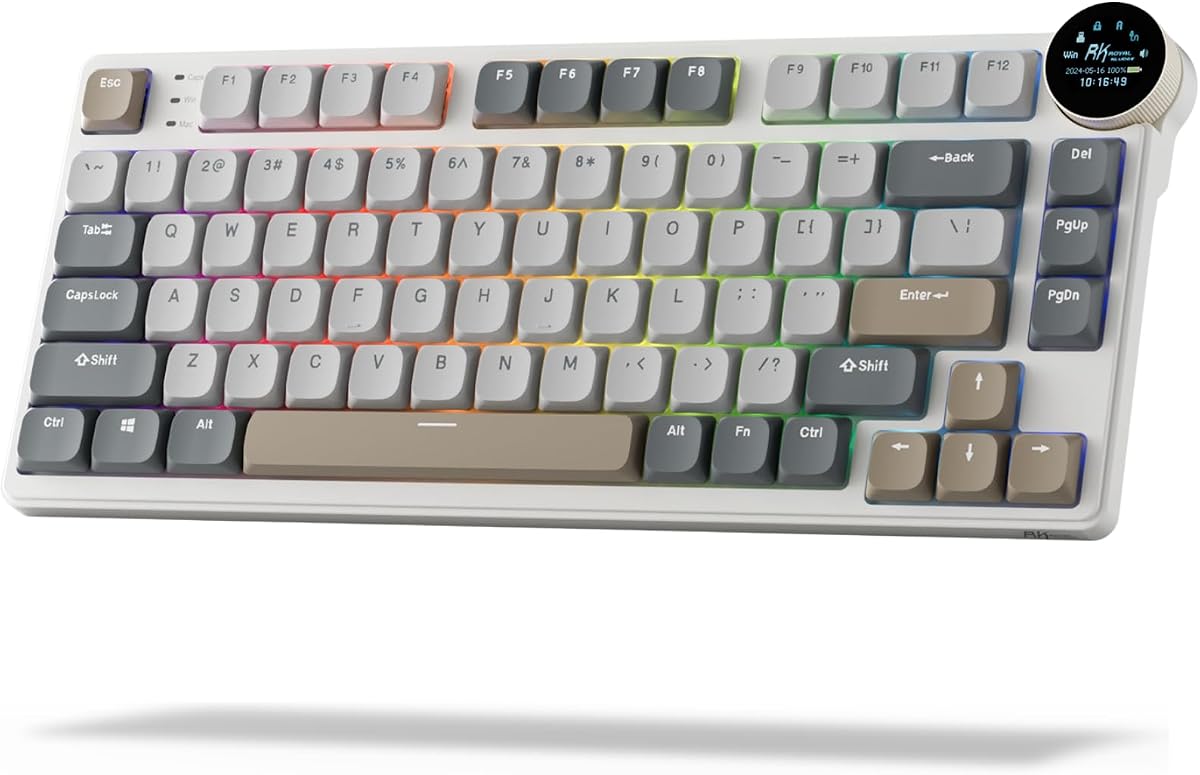


The Redragon K618 PRO stands out as an affordable entry into low profile mechanical keyboards. It boasts a solid 4.1 rating from users who appreciate its slim design and wireless capabilities. The device combines practicality with speed, making it suitable for both office work and casual gaming.
We may earn a commission when you buy through this link, at no additional cost to you.
Its standout feature is the dedicated macro zone, which allows users to record commands without software. The tri-mode connectivity ensures you can switch between devices seamlessly. The linear feedback switches provide smooth keystrokes that reduce fatigue over long periods of typing.
Trade-offs include basic software customization compared to high-end models. The battery life is functional but not exceptional for extended wireless use. However, these compromises are acceptable given the accessible price point and the solid performance it delivers.
This keyboard is ideal for budget-conscious users needing a reliable wireless solution. It offers a strong balance of features without breaking the bank. For those seeking a practical tool for daily tasks, the K618 PRO is a recommended choice.
The macro zone allows you to record complex command sequences instantly. This feature enhances productivity for tasks requiring repetitive input without installing software.
Tri-mode connectivity supports USB-C, Bluetooth, and 2.4GHz wireless. This ensures you can connect to laptops, tablets, and PCs with zero lag.
We may earn a commission when you buy through this link, at no additional cost to you.
The Keychron K3 Version 2 is a compact powerhouse designed for productivity. With a 4.3 rating, it is praised for its slim profile and excellent tactile experience. The keyboard supports up to three devices via Bluetooth, making it perfect for multitasking across platforms.
We may earn a commission when you buy through this link, at no additional cost to you.
Its QMK firmware offers endless possibilities for remapping keys and creating shortcuts. The reinforced aluminum body adds durability while keeping the unit lightweight. The unique Mac layout ensures all multimedia keys are present, with extra keycaps for Windows compatibility.
Some users may find that firmware updates are required for perfect match. The keycap legends can be small for those with larger fingers. These issues are manageable and do not detract from the overall high quality of the device.
This model suits professionals who value customization and portability. It bridges the gap between Mac and Windows users seamlessly. The combination of build quality and open-source firmware makes it a top-tier wireless option.
QMK firmware enables complex macro programming and key remapping. You can tailor every key to fit your specific workflow without technical barriers.
Bluetooth 5.1 allows switching between three devices instantly. This reduces clutter by eliminating the need for multiple keyboards.
We may earn a commission when you buy through this link, at no additional cost to you.
The Keychron K1 Ultra 8K is a standout for users seeking speed and customization. It holds a 4.7 rating due to its exceptional 8K polling rate and solid construction. The keyboard combines premium materials with advanced features like hot-swappable switches and multi-system support.
We may earn a commission when you buy through this link, at no additional cost to you.
Its hot-swappable sockets allow you to change switches without soldering. This feature extends the lifespan of the board and lets you tailor the typing feel. The north-facing RGB lighting ensures visibility and aesthetic appeal without obstruction from tall keycaps.
The price is higher than budget options, and ZMK software may require a learning curve. However, the performance and build quality justify the investment. These compromises are minor for users prioritizing precision and durability.
This model is perfect for gamers and enthusiasts who need fast response times. It supports Linux, Mac, and Windows seamlessly. If you value flexibility and high-end specs, the K1 Ultra 8K is an excellent choice.
The 8K polling rate offers unprecedented input speed and responsiveness. This ensures minimal lag during high-intensity gaming scenarios.
Multiple layers reduce noise and resonance during typing. This creates a more pleasant auditory experience for shared workspaces.
We may earn a commission when you buy through this link, at no additional cost to you.
The Cherry MX 10.0N offers a sleek, ultra-thin profile at just 0.87 inches. It receives a 4.3 rating for its sturdy build and smooth linear switches. The aluminum housing provides durability while maintaining a premium look suitable for any desk setup.
We may earn a commission when you buy through this link, at no additional cost to you.
Its integrated stand allows for ergonomic typing positions to reduce wrist strain. The RGB backlighting is fully customizable to match your aesthetic preferences. Cherry MX Low Profile Speed switches ensure rapid actuation for gaming and productivity.
It lacks wireless capabilities which may limit portability. The price reflects the brand reputation and build quality. These factors are acceptable if you prioritize wired stability and a minimalist design.
Ideal for desktop users who want a compact, high-quality keyboard. The metal body and smooth switches provide a reliable typing experience. It is a strong choice for those valuing brand heritage and slim aesthetics.
The aluminum housing ensures the keyboard withstands daily use. It provides a solid, rattle-free feel that many mechanical users seek.
An integrated stand allows you to adjust the typing angle. This helps maintain a natural hand position during long work sessions.
We may earn a commission when you buy through this link, at no additional cost to you.
The RK ROYAL KLUDGE N80 introduces a unique smart display screen to the mix. It rates 4.1 based on user feedback regarding its versatility. The screen shows connection modes, battery status, and custom GIFs for a personalized look.
We may earn a commission when you buy through this link, at no additional cost to you.
The intuitive knob control allows for easy volume and brightness adjustments. The tri-mode connectivity ensures stable connections across different devices. Sound-absorbing layers effectively minimize hollow sounds for a quieter typing experience.
The display can be complex to set up initially. Some users may find the screen distracting during work. However, these issues are outweighed by the customization potential and solid build quality.
This keyboard suits tech enthusiasts who appreciate unique features. The display adds a modern touch to any setup. If you want a device that stands out visually and functionally, the N80 is worth considering.
The small screen displays custom GIFs and system info. It enhances the visual appeal of your desk setup significantly.
Triple sound-absorbing layers reduce noise and hollow resonances. This creates a smoother sound profile for typing.
We may earn a commission when you buy through this link, at no additional cost to you.
The Flow Lite 84 Keys is designed with ergonomics and comfort in mind. It has a 4.3 rating from users who enjoy its natural typing position. The keyboard features a lower front height that aligns well with your wrists for extended use.
We may earn a commission when you buy through this link, at no additional cost to you.
Specter linear switches reduce finger fatigue with a lower operating force. The PBT double-shot keycaps offer durability and a matte texture. A gasket design provides a soft, cushioned feel that enhances the typing experience.
The ABS body material feels less premium than aluminum options. Switch availability is limited compared to other hot-swappable boards. These are minor trade-offs for a keyboard prioritizing comfort and affordability.
Best for users who type for long hours and need wrist support. The battery life supports all-day use on a single charge. It offers a refined typing experience that balances softness and precision.
The low front height allows for a natural wrist angle. This design reduces strain during prolonged typing sessions.
The ABS body with textured surface maintains a soothing touch. It keeps the weight light for easy transport.
We may earn a commission when you buy through this link, at no additional cost to you.
The Keychron K17 Max offers a rare 96% layout in a slim package. It earns a 4.4 rating for its balance of function and form. The aluminum frame makes it one of the thinnest wireless keyboards on the market.
We may earn a commission when you buy through this link, at no additional cost to you.
Its compact layout saves desk space while retaining numpad functionality. The QMK firmware allows deep customization for productivity workflows. Double-shot PBT keycaps ensure longevity and resistance to shine over time.
It has a larger footprint than 75% options. The weight is higher due to the aluminum construction. These trade-offs are acceptable for users needing numbers keys without a full keyboard.
Ideal for professionals who need a numpad in a compact size. The slim design ensures it fits under most monitor setups. The combination of QMK and build quality makes it a top premium choice.
The 96% layout saves desk space without losing the numpad. It fits in tight spaces while maintaining productivity.
Double-shot PBT keycaps resist shine and wear. They ensure the legends stay sharp for years of use.
We may earn a commission when you buy through this link, at no additional cost to you.
The Flow Lite 100 Keys provides a full-size experience in a low-profile form. It holds a 4.4 rating from users who appreciate its comfort. The device combines a full number pad with ergonomic design features.
We may earn a commission when you buy through this link, at no additional cost to you.
Its large 3000mAh battery supports up to 100 hours of use. The gasket mount design ensures a soft, cushioned typing feel. PBT keycaps maintain texture and durability for consistent performance.
It requires significant desk space and is less portable. The extra size might not suit smaller desks. These trade-offs are reasonable if you need full functionality without extra accessories.
Best for desktop users needing a complete keyboard layout. The battery life ensures minimal charging interruptions. It offers a complete, comfortable typing solution for everyday work.
The 3000mAh battery supports over 100 hours of use. This ensures reliable operation throughout the week.
The 100 key layout includes a full number pad. It meets all needs without requiring external devices.
We may earn a commission when you buy through this link, at no additional cost to you.
The Keychron K3 Max SE delivers high performance with its 2.4 GHz wireless support. It achieves a 4.6 rating for its responsiveness and build quality. The device combines open-source customization with a refined design.
We may earn a commission when you buy through this link, at no additional cost to you.
Enhanced acoustics and redesigned stabilizers ensure a smooth experience. Hot-swappable switches allow for quick customization. The slim profile is ideal for those seeking speed without bulk.
It carries a premium price compared to standard models. Availability might be limited due to high demand. These factors are acceptable given the advanced features and quality.
Perfect for competitive gamers and productivity users alike. The wireless connection rivals wired latency. If you need speed and customizability, the K3 Max SE is a top contender.
Advanced acoustic foam reduces noise significantly. This provides a quieter environment for focused work.
2.4 GHz wireless offers 1000Hz polling rate. This ensures precise and responsive input for gaming.
We may earn a commission when you buy through this link, at no additional cost to you.
The Razer Ornata V3 blends mechanical feedback with membrane familiarity. It rates 4.5 for its comfort and unique mecha-membrane switches. The device offers a low-profile design that suits extended gaming sessions.
We may earn a commission when you buy through this link, at no additional cost to you.
UV-coated keycaps ensure durability and fade resistance. The magnetic wrist rest provides essential support for wrists. Dedicated media keys allow for quick adjustments without breaking flow.
It is not a full mechanical keyboard which may deter enthusiasts. Software reliance is necessary for advanced customization. These trade-offs are acceptable for users prioritizing comfort.
Best for gamers who want a mechanical feel without the noise. The soft rest reduces fatigue during long play. It is a practical choice for those seeking comfort and durability.
The mecha-membrane switches offer snappy feedback. It blends the best of both mechanical and membrane styles.
The magnetic wrist rest snaps on easily for support. It ensures comfort during marathon gaming sessions.
We may earn a commission when you buy through this link, at no additional cost to you.
Choosing the right low profile mechanical keyboard involves considering layout, switches, and connectivity. Here are key factors to help you select the perfect match.
Switch type defines the tactile feel and sound. Low profile switches come in linear, tactile, and clicky options. Choose linear for speed or tactile for feedback.
Match the switch type to your primary use case like gaming or typing.
Layout size determines desk space usage. Common options include 60%, 75%, 80%, and 96%. A smaller layout saves space while retaining essential keys.
Select a layout that balances comfort and portability.
Connectivity options include wired, Bluetooth, and 2.4GHz wireless. Wireless allows for a cleaner setup but adds latency. Wired offers stable performance for competitive gaming.
Choose based on whether you prioritize mobility or stability.
Build material affects durability and weight. Aluminum frames offer premium feel while ABS keeps it light. Consider how much weight you can handle daily.
Durability ensures the keyboard lasts through heavy daily use.
Customization options include hot-swappable switches and firmware support. QMK or ZMK firmware allows deep remapping. Hot-swappable features simplify maintenance and upgrades.
Prioritize customization if you want to tweak performance over time.
Battery life impacts wireless usage frequency. Larger batteries support longer operation but add weight. Consider how often you can plug in for charging.
Aim for a battery that supports your typical work week.
Ergonomic features like low height and wrist rests reduce strain. Proper alignment prevents fatigue during long sessions. Look for designs that match your hand position.
Comfort should be a top priority to prevent repetitive strain.
Clean your keyboard regularly with compressed air to remove debris. This maintains smooth key movement and prevents sticking. Use soft brushes for hard-to-reach areas.
Update firmware through the manufacturer's app to ensure compatibility. New updates often improve stability and add features. Follow instructions carefully during the process.
Store the keyboard in a dry environment to prevent damage. Avoid direct sunlight or extreme temperatures. Proper storage extends the lifespan of all components.
Yes, low profile keyboards are excellent for gaming due to their fast actuation. The reduced travel distance allows for quicker inputs. They are especially useful for competitive titles requiring speed.
They can reduce wrist strain by allowing a more natural typing position. The shorter key height aligns better with wrists. Combined with wrist rests, they improve ergonomics.
Most low profile keyboards support Mac with specific layouts. Models like Keychron include dedicated Mac keys. Always check compatibility before purchasing.
Use compressed air to blow out dust and debris. Avoid harsh chemicals or liquids near switches. Regular cleaning keeps performance consistent.
QMK firmware allows deep customization of key mapping. It supports complex macros and shortcuts. It is open-source and highly flexible.
They are generally quieter due to reduced travel distance. However, switch type still affects noise levels. Tactile switches are quieter than clicky ones.
These ten models offer a wide range of features for every user. From budget-friendly to premium options, there is something for everyone. Consider your needs to find the perfect fit.
Prioritize factors like switch feel and connectivity when deciding. A good keyboard should match your workflow and style. Balance comfort with performance for best results.
Always check current availability and details before buying. Specs may change over time. Make sure the model suits your current setup.