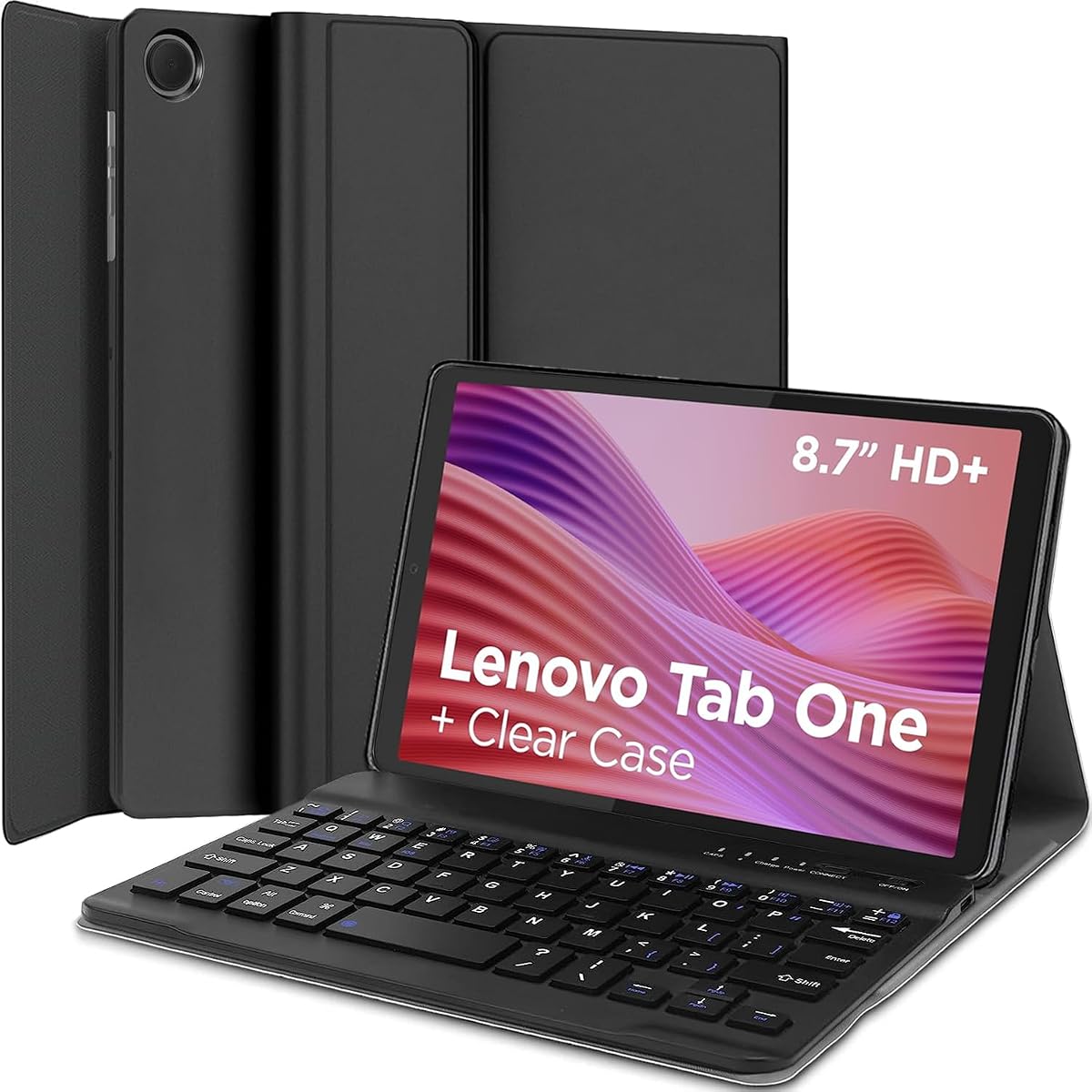
Case with Keyboard for Lenovo Tab One 8.7 Inch
5.0Editor score
Magnetically detachable keyboard
Slim PU stand cover
Up to 100 hour battery
Finding the right keyboard for your Lenovo Tab One can transform your tablet into a powerful productivity machine. Whether you are working on the go or typing documents at home, a reliable keyboard case provides comfort and efficiency. This guide explores the best options available to enhance your typing experience.
We have carefully compared ten top-rated keyboard accessories designed specifically for the Lenovo Tab One and related models. Our analysis focuses on build quality, connection stability, battery life, and additional features like trackpads or backlighting. Each product was evaluated based on user feedback and technical specifications to ensure accuracy.
Each pick in this list highlights specific strengths such as durability, portability, or premium typing feel. We include detailed reviews, comparison tables, and buying advice to streamline your decision process. Please note that product availability and pricing may fluctuate, so check current listings before purchasing.
5.0Editor score

4.8Editor score

4.3Editor score
As an Amazon Associate we earn from qualifying purchases.
This table provides a side-by-side comparison of all ten keyboard options reviewed in this guide. Each entry lists key specifications to help you quickly identify the model that fits your specific needs and budget requirements.


This keyboard case stands out as the top choice for Lenovo Tab One users seeking a balance of functionality and style. With a high rating of 4.8 stars, it offers a versatile solution for typing and protection. The seven color backlight options add a unique flair to your setup.
We may earn a commission when you buy through this link, at no additional cost to you.
The design allows for a seamless transition from a compact tablet to a laptop-like workstation. You can detach the wireless keyboard magnetically to adjust angles or use it separately. The premium PU leather cover ensures your device stays safe from dust and minor impacts.
While the battery life is impressive at up to 90 hours without backlight, using the colors will reduce this time. However, the convenience of adjustable brightness levels mitigates this concern. The connection is stable and quick via Bluetooth.
If you want a complete package that enhances typing comfort and protects your device, this is the ideal pick. It suits students and professionals who need reliability on the go. Verify your model number before ordering to ensure compatibility.
Choose from seven vibrant colors and three brightness levels to match your environment or mood effectively.
Remove the keyboard to use the case as a folio or adjust viewing angles freely without restraints.
We may earn a commission when you buy through this link, at no additional cost to you.
This option earns the budget badge while delivering a perfect 5.0 user rating. It proves you do not need expensive features to get a reliable typing experience. The slim profile and wood grain texture give it a sophisticated look.
We may earn a commission when you buy through this link, at no additional cost to you.
The keyboard uses high-quality ABS material instead of cheap silicone, ensuring a tactile response for faster typing. This distinction helps reduce errors common with touchscreen input. The spring mechanism under keys adds to the satisfying feedback.
Battery performance is exceptional, offering up to 100 hours of continuous use. It also includes smart sleep features to conserve power when not in use. This efficiency makes it ideal for travelers or long work sessions.
If you prefer simplicity and maximum battery life over flashy lights, this case is the smart choice. It transforms your tablet into a laptop setup instantly. Ensure your model matches TB-305FU or TB-305XU before buying.
Experience laptop-like key response with ABS material and spring mechanisms that prevent typing errors.
Enjoy up to 100 hours of usage thanks to efficient power management and quick wake-up features.
We may earn a commission when you buy through this link, at no additional cost to you.
This pack represents a premium solution designed for Lenovo Idea Tab Pro users rather than the One series. It offers features like a built-in trackpad that significantly boost productivity. The pogo pin connection eliminates the need for pairing or charging.
We may earn a commission when you buy through this link, at no additional cost to you.
The ergonomic design includes 1.5mm key travel for a comfortable and precise typing experience. Large trackpad gestures allow for smooth navigation and multitasking without switching to touch. This setup is closest to a true laptop feel.
While it is not compatible with the Tab One, its high-end features justify the investment for supported devices. The adjustable kickstand and shortcut keys enhance usability for work or study. It is a robust choice for power users.
If you own a compatible Idea Tab Pro, this pack is the ultimate productivity upgrade. It saves time on setup and offers a unified hardware experience. Always check device compatibility before purchase to ensure fit.
The large one-piece trackpad supports intuitive gestures for effortless scrolling and navigation on Android systems.
Pogo pins provide instant data and power transfer without needing Bluetooth pairing or separate charging.
We may earn a commission when you buy through this link, at no additional cost to you.
This standalone keyboard is designed for users who work across multiple devices like phones and tablets. It allows seamless switching between Android, iOS, and Windows systems with ease. The slim design makes it highly portable for professionals.
We may earn a commission when you buy through this link, at no additional cost to you.
Typing comfort is maintained with a quiet mechanism and 1.3mm travel distance. It supports both Bluetooth and USB-C connections for versatile setups. The battery lasts up to 60 hours on a single charge.
Since it does not include a case, you will need separate protection for your tablet. However, the flexibility to pair with other gadgets adds significant value. It suits those who prioritize connectivity over integrated storage.
Choose this if you need a versatile typing solution for various devices. It fits well into a travel kit or office desk setup. Verify the connection options match your specific workflow needs.
Effortlessly switch between up to three devices to maintain productivity across your entire tech ecosystem.
Use either Bluetooth for wireless freedom or USB-C for secure direct connections based on your needs.
We may earn a commission when you buy through this link, at no additional cost to you.
This case is perfect for the Lenovo Idea Tab 11, offering comprehensive protection including a screen guard. The tempered glass layer adds durability against scratches while maintaining clarity. It mirrors the features of the Tab One models with color backlighting.
We may earn a commission when you buy through this link, at no additional cost to you.
The detachable keyboard allows flexibility in how you use your tablet. You can use it as a folio stand or a laptop. The backlighting helps visibility in low light settings effectively.
Users appreciate the added value of the screen protector which prevents unnecessary costs elsewhere. However, the combined components might make the setup slightly heavier. Ensure your tablet matches the specific model number.
If you need screen protection alongside keyboard functionality, this is the right pick. It simplifies your accessory shopping by combining essentials. Check compatibility carefully to avoid fit issues.
Get built-in 9H hardness tempered glass protection to prevent scratches without extra purchases.
Switch between seven backlight colors and brightness levels to create your ideal typing environment.
We may earn a commission when you buy through this link, at no additional cost to you.
This model adds a unique feature: a multi-touch trackpad that adapts to Android gestures. It allows for navigation without lifting your hands from the keyboard. The three-zone backlighting offers a distinct visual style.
We may earn a commission when you buy through this link, at no additional cost to you.
Despite the extra features, user ratings suggest mixed experiences compared to other options. The trackpad responsiveness might depend on specific system settings. It is a feature-rich option for those needing mouse-like control.
The case design remains consistent with other folio styles, providing protection and multiple angles. The keyboard is detachable for flexibility. Review recent feedback carefully to ensure the trackpad works well with your software version.
Consider this if a built-in trackpad is essential for your workflow. It eliminates the need for an external mouse. Be mindful of potential compatibility nuances with the gesture system.
The integrated trackpad supports scrolling and clicking for a more fluid user experience.
Three distinct backlight zones add visual appeal and help visibility across the key layout.
We may earn a commission when you buy through this link, at no additional cost to you.
This case offers a stylish alternative with pink color options for personal expression. It features a premium PU leather build that resists water and dust easily. The Type-C charging ensures faster and more compatible power delivery.
We may earn a commission when you buy through this link, at no additional cost to you.
The magnetic keyboard detaches securely, allowing for versatile use as a stand or standalone unit. It is slim enough to fit in bags without bulk. The setup is simple and stable for daily tasks.
Since ratings are limited, it may be a newer option. However, the build quality and protection features are solid. It is a good choice if you want something visually distinct from standard black cases.
If you prefer a unique look and reliable protection, this model is worth considering. It balances functionality with aesthetic appeal. Check for recent reviews to confirm performance stability.
Select from stylish color variants to match your personal style while keeping your device safe.
Use Type-C charging for faster and more convenient power management with your devices.
We may earn a commission when you buy through this link, at no additional cost to you.
This set includes a wireless mouse, offering precise control alongside the keyboard. It is designed for the Idea Tab 11-inch, making it ideal for larger tablets. The backlighting allows for comfortable typing in any light.
We may earn a commission when you buy through this link, at no additional cost to you.
The cover is ultra-thin yet durable, with a pen slot for easy access. It supports multiple viewing angles for comfort during media consumption or work. The mouse enhances navigation without needing trackpad gestures.
While trackpads are common, a dedicated mouse can feel more familiar for some users. It is especially useful for detailed tasks like graphic design or long emails. Ensure your model matches the TB-336FU series.
If you prefer a mouse over a trackpad for navigation, this set is a great choice. It provides a full workstation experience in a portable package. Check current stock as colors may vary.
Use the included wireless mouse for precise control and smoother navigation without touch gestures.
The built-in pen slot keeps your stylus secure and ready whenever you need it for notes.
We may earn a commission when you buy through this link, at no additional cost to you.
This keyboard is a standalone portable option without a protective case. It focuses on slimness and ease of use. The LED backlighting adds style and utility for night typing sessions.
We may earn a commission when you buy through this link, at no additional cost to you.
Bluetooth 3.0 ensures stable pairing quickly. A physical power switch helps conserve battery when not in use. It fits well into small bags for commuters or travelers.
Without a case, you must handle the tablet separately. However, the convenience of a pure keyboard form factor is appealing. It suits users who already have a stand or sleeve.
Choose this if portability is your top priority and you want a simple lighting effect. It works well for temporary setups or travel. Ensure your device supports the required Bluetooth version.
Pack this slim keyboard anywhere without adding bulk to your travel or work kit.
Use the dedicated on/off switch to extend battery life during periods of inactivity.
We may earn a commission when you buy through this link, at no additional cost to you.
This version of the BoxWave keyboard removes backlighting for a minimalist look. It focuses on chiclet-style keys for comfortable typing. The ultra-thin design makes it one of the slimmest options available.
We may earn a commission when you buy through this link, at no additional cost to you.
Battery efficiency is prioritized with power-saving features. It pairs quickly via Bluetooth 3.0 for reliable connections. The profile is low enough to fit almost anywhere in a bag.
If you do not need lights, this saves weight and cost. It is a practical tool for typing notes on the go. Keep in mind it does not protect the device from drops.
Pick this for a no-frills typing solution that travels light. It complements a dedicated tablet case or stand. Ensure you want a sleek look over lighting effects.
Enjoy a clean, ultra-thin profile that slips easily into bags without bulk.
Chiclet-style keys provide a responsive tactile feel for extended typing sessions.
We may earn a commission when you buy through this link, at no additional cost to you.
Selecting the right keyboard involves understanding your specific needs for protection, typing comfort, and features. This section breaks down the key factors to consider before making a purchase.
The most critical step is confirming that the keyboard case matches your specific tablet model. Lenovo Tab One comes in variants like TB305FU and TB-305XU, and mismatches lead to poor fit or non-functioning keys.
Always check the model number in Settings about Device before ordering any accessory. This prevents returns and ensures ports align correctly with the case cutouts.
Bluetooth is the standard for detachable keyboards, offering wireless freedom. Some premium packs use pogo pins for instant connection without pairing, but these are usually brand-specific.
Decide if you prefer the simplicity of a physical connection or the flexibility of Bluetooth pairing for use across devices.
Backlighting helps visibility in low-light environments. Options range from single color to seven colors with brightness adjustment. While useful, backlighting consumes more battery power.
Choose a model with lighting if you often type in dark rooms. Otherwise, a non-lit model offers better battery life.
Battery life varies by usage and features like backlighting. Most rechargeable keyboards last between 60 to 100 hours on a single charge. Charging methods typically include USB-C or magnetic contacts.
Look for sleep modes that save power when the keyboard is idle. Long battery life ensures you are not tethered to a charger during long work sessions.
A good case should offer full protection from drops and dust. Premium materials like PU leather with rubberized interiors are durable and scratch-resistant.
Ensure the design locks the tablet securely so it does not slip out during transport. Check for waterproof or dustproof properties if you work in varied environments.
Some options come with extras like trackpads, mice, or screen protectors. Trackpads add navigation ease, while mice offer precise control. Screen protectors prevent damage to the display.
Decide which accessories you truly need. Bundles can save money but may limit versatility compared to standalone products.
Key travel distance and mechanism affect comfort. Look for ABS material keys or scissor mechanisms that mimic laptop typing. Soft silicone keys can lead to fatigue over time.
If you type frequently, prioritize models with tactile feedback. A comfortable typing experience reduces errors and strain on your fingers.
Portable designs are slim and light for travel. Detachable keyboards allow you to carry less weight when needed. However, integrated stands add bulk.
Balance protection with weight. A lightweight case is better for daily commuting, while a heavier one offers more protection for office use.
When using a detachable keyboard, ensure the magnetic connectors or Bluetooth are properly paired before typing. This prevents disconnection issues during use. For pogo pin models, align the keyboard correctly with the tablet for a firm snap.
To maintain battery life, enable sleep modes or turn off the backlight when not in use. Regularly charge the keyboard using the provided cables to avoid deep discharge. Avoid leaving it in extreme temperatures.
Clean the keyboard with a soft, dry cloth to prevent debris from entering key gaps. For the case surface, use a slightly damp cloth with mild soap if needed. Keep the device away from liquids to protect electronic components.
You must verify the exact model number of your tablet. Some keyboards are designed for specific 2025 releases like TB305FU. Check the settings on your device to ensure compatibility before purchasing to avoid fit issues.
Most models offer between 60 to 100 hours of continuous use depending on backlight usage. Models without lights typically last longer. Check the specific specs for the expected range on a single charge.
Most keyboards in this list are detachable and can be used independently via Bluetooth. However, without the case, your tablet remains unprotected. Ensure you have a separate sleeve if removing it.
Models with ABS material keys and mechanical-like feel usually offer better typing speed and accuracy. The Lenovo Multi-Device keyboard and the Idea Tab Pro pack are good examples of high-quality tactile keys.
Yes, the Lenovo Multi-Device Wireless Bluetooth Keyboard supports switching between up to three devices. Other standard models connect to one device at a time. Check the connectivity specs if you need multi-device support.
Backlighting is useful if you work in dimly lit environments or at night. However, it consumes more battery. If you mostly type in well-lit areas, a non-backlit model saves power and money.
This guide has reviewed ten top keyboard options for the Lenovo Tab One and related tablets, balancing features and price. The top picks offer distinct advantages like trackpads, backlighting, or multi-device support.
Prioritize compatibility and battery life when selecting an accessory. A keyboard that fits perfectly and lasts long on a charge ensures a smooth workflow without interruptions. Match the features to your daily usage needs.
Remember to check current pricing and availability before buying as these change frequently. We hope this comparison helps you find the perfect accessory to transform your tablet into a powerful tool.