
HiLetgo MAX7219 Dot Matrix Module
4.4Editor score
Simple 5-pin SPI interface
5V operating voltage compatible
Compact 8×8 matrix design
Discover the best LCD Dot Matrix Modules for projects. This guide compares top displays for microcontrollers, features, and value.
LCD Dot Matrix Modules are essential components for visual feedback in embedded systems and DIY electronics. They provide clear text and graphics output for projects ranging from simple status displays to complex user interfaces.
We evaluated ten top-rated products based on compatibility, display quality, and ease of integration. Our analysis focuses on modules that offer reliable performance with common microcontrollers like Arduino and ESP32.
Each selection highlights unique strengths such as backlight options, driver chips, or included enclosures. Prices may vary over time so check current listings for the most up-to-date offers before purchasing.
4.4Editor score

4.1Editor score
4.5Editor score
This table compares all ten selected LCD Dot Matrix Modules side by side. It highlights key specifications to help you choose the right display for your specific electronics project needs.




The Ximimark 12864 LCD Module offers a solid graphic display solution with a 128×64 dot matrix. It holds a 4.1 rating and stands out for its integrated contrast control.
We may earn a commission when you buy through this link, at no additional cost to you.
Its key strength is the availability of Arduino libraries and examples which simplifies project setup significantly. The dimmable LED backlight ensures visibility in various lighting conditions.
A trade-off is the single blue color option which limits aesthetic variety compared to white or amber displays. The contrast control is functional but lacks advanced digital adjustment features.
This module is ideal for makers needing a reliable graphic screen for Arduino projects. We recommend it for users prioritizing ease of use and clear visual output.
The included Arduino Library and Examples make it easy to start displaying graphics without complex driver code.
An integrated potentiometer allows you to fine tune the display contrast for better readability in different environments.
We may earn a commission when you buy through this link, at no additional cost to you.
This 5V 12864 Graphic LCD provides a bright high contrast display suitable for various microcontroller projects. It features a wide viewing angle for better visibility from different positions.
We may earn a commission when you buy through this link, at no additional cost to you.
Its compatibility with controllers like MEGA 2560 and Nano Due makes it versatile for advanced projects. The module includes 1×20 pin headers for convenient board mounting.
While it shares a resolution with other 12864 modules it emphasizes high contrast which improves readability in bright light. However specific details on included software are less comprehensive.
Buyers should choose this for projects needing high visibility and robust controller support. It is a practical choice for embedded systems requiring clear text and graphics output.
The wide viewing angle ensures that the display remains clear even when viewed from the sides or above.
Compatibility with popular boards like MEGA 2560 allows flexible integration into complex project setups.
We may earn a commission when you buy through this link, at no additional cost to you.
The 2PCS Blue 1602 LCD Module offers a cost effective solution for text based displays with two units included. It provides 16 characters per line across two blue lines.
We may earn a commission when you buy through this link, at no additional cost to you.
Operating at 5V with a parallel port interface it is straightforward to connect to traditional microcontrollers. The dimensions ensure a standard footprint for breadboards and custom enclosures.
Its main benefit is buying two modules at once which is convenient for projects needing multiple displays. However parallel interfaces may be less modern than serial options.
This pack is best suited for hobbyists needing multiple simple text displays. We recommend it for budget conscious projects requiring reliable character output.
Receiving two modules in one package saves time and money for projects requiring redundant or secondary displays.
The 1602 format and parallel interface are widely supported ensuring ease of integration with existing projects.
We may earn a commission when you buy through this link, at no additional cost to you.
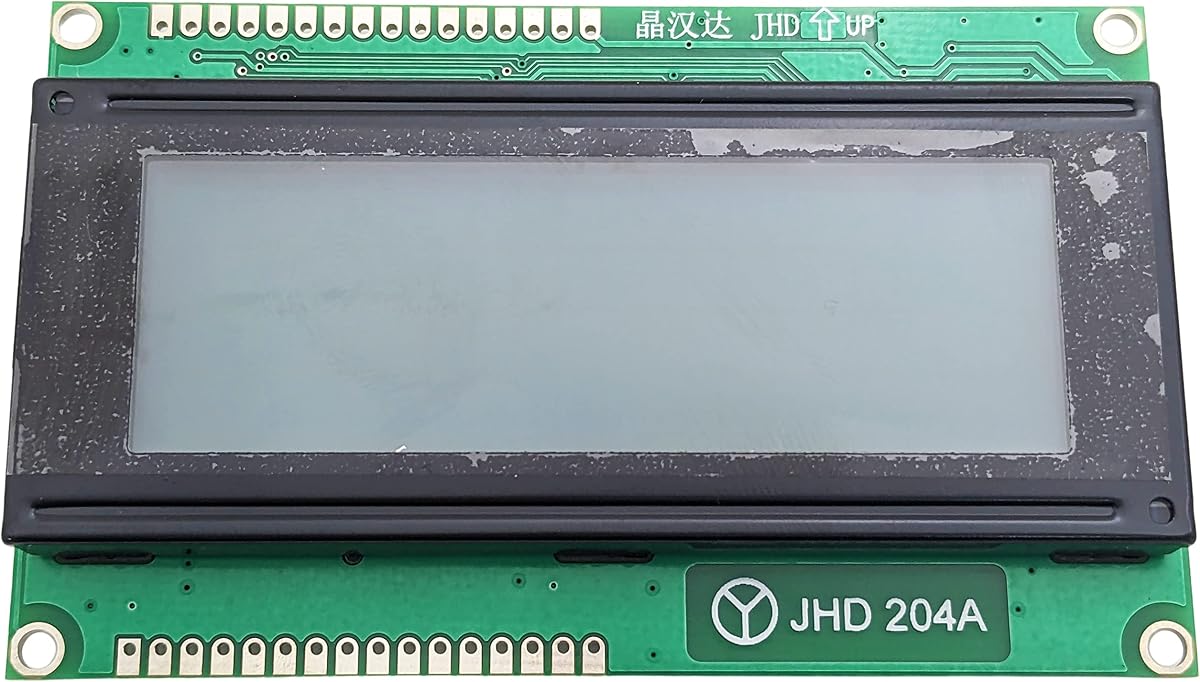
This 20×4 Dot Matrix module allows displaying more text on screen with 20 characters across four lines. It features a reflective gray positive display for good contrast.
We may earn a commission when you buy through this link, at no additional cost to you.
The module size measures 98x60x9.5mm offering a robust physical presence suitable for industrial panels. It includes the necessary driver and controller for immediate use.
While larger than standard 1602 screens it offers significantly more screen real estate for data logging or multi line messages. The reflective nature may require external lighting in dark settings.
Ideal for industrial or large interface applications needing substantial text capacity. We recommend this for projects requiring four lines of detailed text display.
With twenty characters per line and four lines total this module handles significantly more text than standard displays.
The built in driver and controller simplify wiring and setup reducing the need for additional components.
We may earn a commission when you buy through this link, at no additional cost to you.
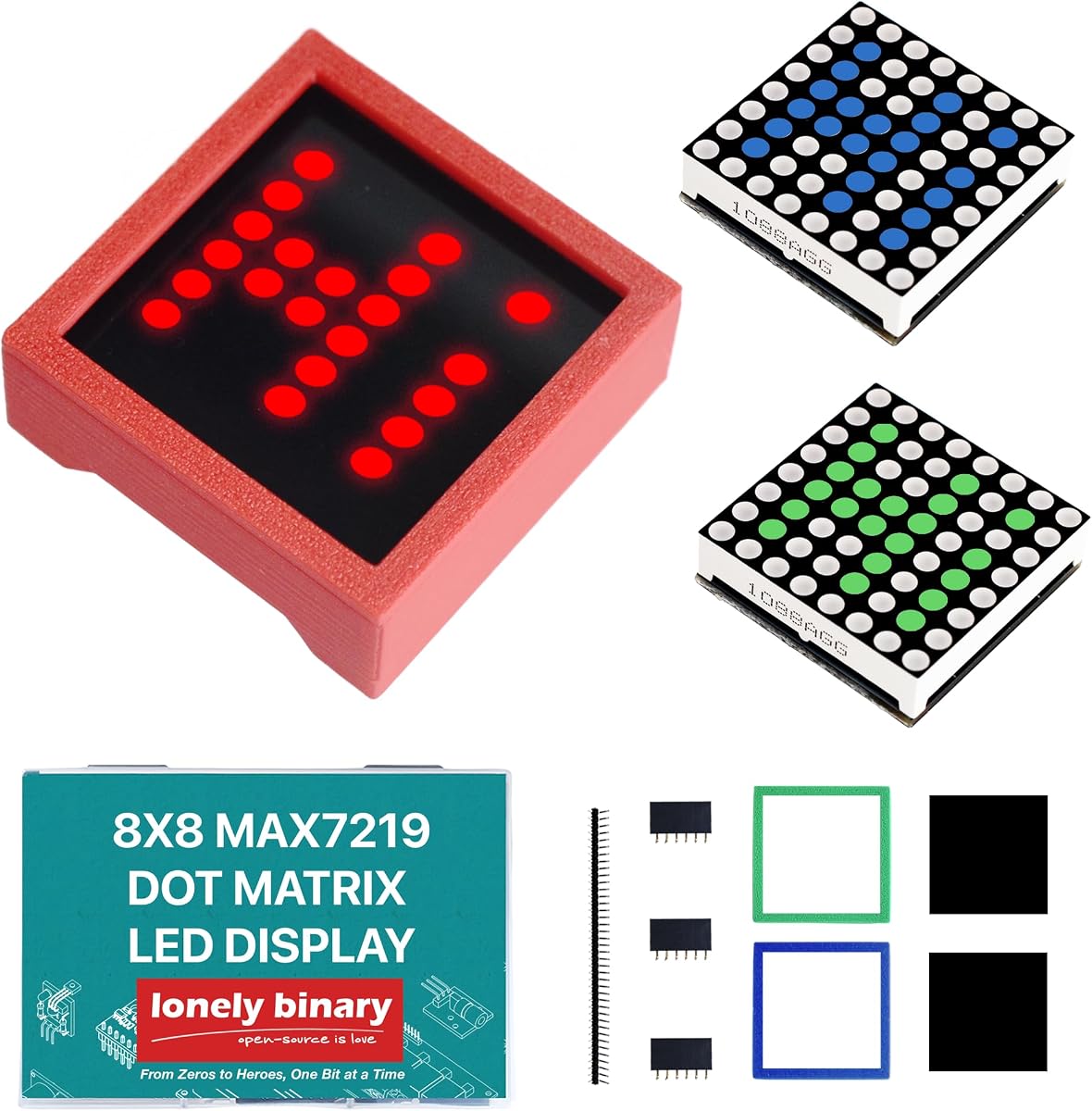
The Lonely Binary 3-Pack 8×8 LED Matrix brings variety with Red Green and Blue modules. Each module features an onboard MAX7219 driver for simple SPI control.
We may earn a commission when you buy through this link, at no additional cost to you.
Innovative 3D-printed enclosures protect the modules and provide a finished look without exposed PCB. This design is perfect for desktop displays or wall mounted projects.
Chaining allows creating wider displays like 24×8 for scrolling text. A trade-off is basic soldering requirements for headers and chain connections which beginners should know.
This pack is perfect for makers wanting colorful pixel art. We recommend it for projects needing customizable animations with included protective cases.
Having Red Green and Blue modules allows mixing colors for complex status indicators or pixel art projects.
The included 3D printed cases protect your investment and provide a polished finished look for your build.
We may earn a commission when you buy through this link, at no additional cost to you.
This HiLetgo module offers a cost effective solution with an 8×8 dot matrix and 5-pin line for easy wiring. It holds a 4.4 rating and features common cathode LED control.
We may earn a commission when you buy through this link, at no additional cost to you.
Its compact design includes 64 fixing holes allowing secure panel mounting. The SPI interface makes it highly compatible with standard microcontrollers and drivers.
While it lacks premium features like enclosures its simplicity and low cost make it great for prototypes. A trade-off is the standard housing which may not be as robust.
Best for budget constrained projects or prototyping phases. We recommend this for users needing a simple reliable matrix display without extra frills.
The simple 5-pin line setup reduces wiring complexity making it ideal for quick prototyping and testing.
With 64 fixing holes available this module offers excellent flexibility for secure mounting in custom enclosures.
We may earn a commission when you buy through this link, at no additional cost to you.
This module focuses on an 8-digit 2×4 display board controlled by an integrated MAX7219 driver. It supports serial interface connection for quick setup.
We may earn a commission when you buy through this link, at no additional cost to you.
Features include scan limit settings brightness control and a test mode. The low power shutdown mode ensures energy efficiency for portable systems.
Its strength is precise digit control suitable for counters or clocks. A trade-off is the fixed 8-digit format which limits graphical pixel manipulation compared to matrix versions.
Choose this for precise numeric output applications. We recommend it for projects needing clear digit display with efficient power management.
Individual digit control and test modes allow for precise configuration and easy troubleshooting during development.
Low power shutdown mode ensures the display consumes minimal energy when not in active use.
We may earn a commission when you buy through this link, at no additional cost to you.
The SunFounder LCD2004 Module displays 20 characters across four lines with white characters on a blue background. It features a bright backlight for clear visibility.
We may earn a commission when you buy through this link, at no additional cost to you.
Its module dimensions are 97x59x12mm providing a comfortable viewing area. The 50K potentiometer allows precise contrast adjustment for different lighting.
This model offers more line capacity than standard 1602 screens. A trade-off is similar dimensions which might not fit smaller spaces despite extra text.
Ideal for projects needing more data on screen. We recommend this for interfaces requiring four lines of readable text output.
With twenty characters per line and four rows this module provides significantly more screen space for data.
The onboard potentiometer allows precise contrast tuning ensuring readability in various environmental conditions.
We may earn a commission when you buy through this link, at no additional cost to you.
This 32×8 LED Matrix pack offers a wider display area than standard 8×8 modules. Each module includes a MAX7219 driver and color-matched 3D-printed enclosure.
We may earn a commission when you buy through this link, at no additional cost to you.
The cascading design lets you build displays up to 96×8 pixels or larger. It supports SPI control making it compatible with ESP32 and Raspberry Pi boards.
Strengths include the large width and included cases. A trade-off is the requirement to solder headers which might deter absolute beginners.
Best for large scrolling text or animation projects. We recommend this for advanced makers needing wide display flexibility with protective cases.
The 32×8 pixel resolution provides ample space for scrolling messages and complex animations without needing multiple boards.
Standard daisy-chain design allows easy expansion to create large display banners or scoreboards.
We may earn a commission when you buy through this link, at no additional cost to you.
This 2-Pack MAX7219 4-in-1 Dot Matrix Module offers great value with two units included. It features a slim 13mm profile suitable for space efficient displays.
We may earn a commission when you buy through this link, at no additional cost to you.
Its universal mounting design includes 64 pre-drilled 3mm holes for secure installation. The 5-pin SPI interface ensures compatibility with Arduino and other microcontrollers.
Key benefits are the dual unit pack and compact profile. A trade-off is standard housing that may need customization for professional enclosures.
Ideal for projects requiring two displays or future expansion. We recommend this for makers needing reliable dual matrix outputs in a slim design.
The slim 13mm profile allows for space efficient embedded displays where vertical clearance is limited.
With 64 pre-drilled holes you can easily secure the modules into custom panels or enclosures for stability.
We may earn a commission when you buy through this link, at no additional cost to you.
Selecting the right module depends on your project requirements. Consider resolution, compatibility, and physical size.
Resolution determines how much text or graphics you can show. Choose 128×64 for graphics and 1602 or 2004 for text.
Higher resolution offers more versatility but may require more complex code.
Ensure the module works with your microcontroller like Arduino or ESP32. Check if it needs specific libraries or drivers.
SPI or I2C interfaces simplify wiring compared to parallel ports.
Most modules operate at 5V but some support 3.3V for newer boards. Verify voltage requirements before connecting power.
Mismatched voltage can damage the module or microcontroller.
Backlight brightness affects readability in different environments. Adjustability via potentiometer is a useful feature for varying conditions.
Look for blue or white backlight options depending on your preference.
Check the module size to ensure it fits your enclosure or PCB. Some modules like 20×4 are longer than standard ones.
Standard footprints are easier to mount on breadboards.
Some packages include enclosures or pin headers which save extra costs. Others require you to source these separately.
Value packs can be cheaper for multiple projects.
Modules with onboard drivers like MAX7219 simplify software integration. They handle display logic reducing microcontroller load.
This is crucial for complex animations or scrolling text.
If you plan to expand your display check for daisy-chain capabilities. Modules that support chaining allow wider displays.
This helps in creating scrolling tickers or large scoreboards.
Connect power pins to VCC and GND ensuring correct voltage. Link data pins to your controller via SPI or parallel interface.
Install the necessary libraries for your specific module type. This ensures smooth communication between the code and hardware.
Clean the display with a soft dry cloth. Avoid water or harsh chemicals that might damage the screen or connectors.
LCD modules use liquid crystals for text while LED modules use tiny bulbs for graphics. LEDs are brighter and better for animations but consume more power.
Yes many modules support daisy-chaining or parallel connections. This allows you to create wider displays by linking data outputs to inputs.
Check the voltage supply and pin connections. Some modules have dedicated backlight pins that need power to light up the LEDs.
The 1602 or 2004 LCD modules are ideal for simple text. They are easy to use and widely supported by Arduino libraries.
Some modules come with headers but many require soldering. Basic soldering skills are needed to connect the module securely to your project.
These modules typically last thousands of hours of operation. Proper voltage handling and avoiding physical stress ensure maximum longevity.
We have reviewed ten reliable LCD Dot Matrix Modules ranging from simple text displays to advanced graphic options. Each offers unique benefits for different project needs.
Prioritize compatibility and resolution to ensure the module fits your application. Consider value packs if you plan on building multiple projects.
Always check current prices and stock before purchasing to get the best deal. With the right module your project will have clear and effective visual output.