
HUANUO Laptop Desk Mount
4.5Editor score
Ventilated tray with 240 holes
Supports monitors 15 to 32 inches
Simple clamp and grommet install
Transform your workspace with a Laptop Tray Desk Mount that elevates your device to eye level. These mounts free up desk space and reduce strain during long work sessions by providing adjustable height and angles for your screen.
We analyzed ten highly rated products based on build quality, adjustability, and cooling features. Our selection includes versatile 2-in-1 mounts that support both laptops and monitors, ensuring you find the perfect fit for your specific setup and budget requirements.
Each pick highlights unique strengths like ventilation designs, heavy-duty clamps, or compact under-desk options. Please note that prices and availability change frequently, so check the latest offers before making your final decision on which model to buy.
4.5Editor score

4.6Editor score

4.6Editor score
As an Amazon Associate we earn from qualifying purchases.
This side-by-side comparison evaluates all ten products based on their mounting options, weight capacity, and adjustability features to help you make an informed choice for your specific office environment.

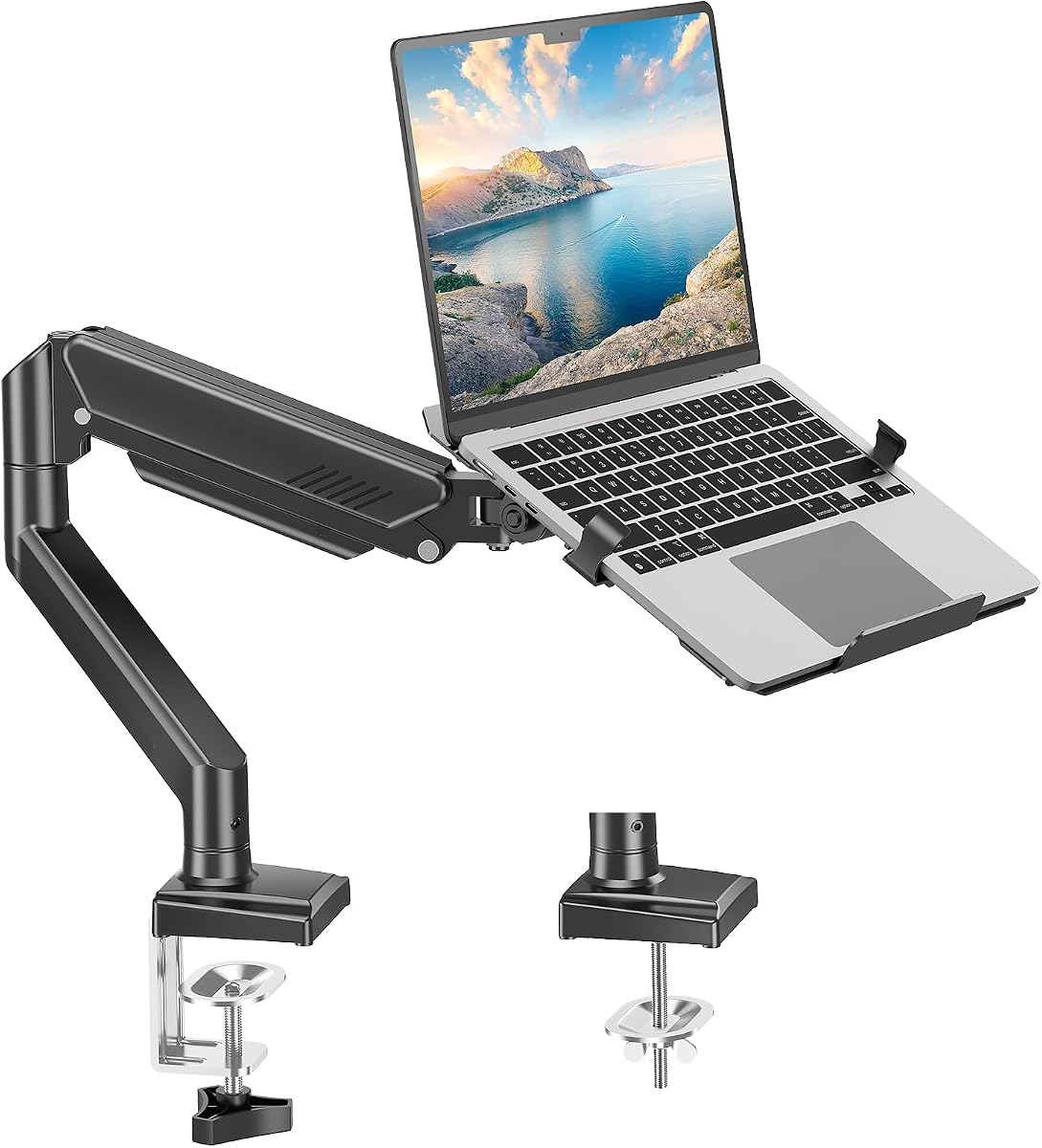


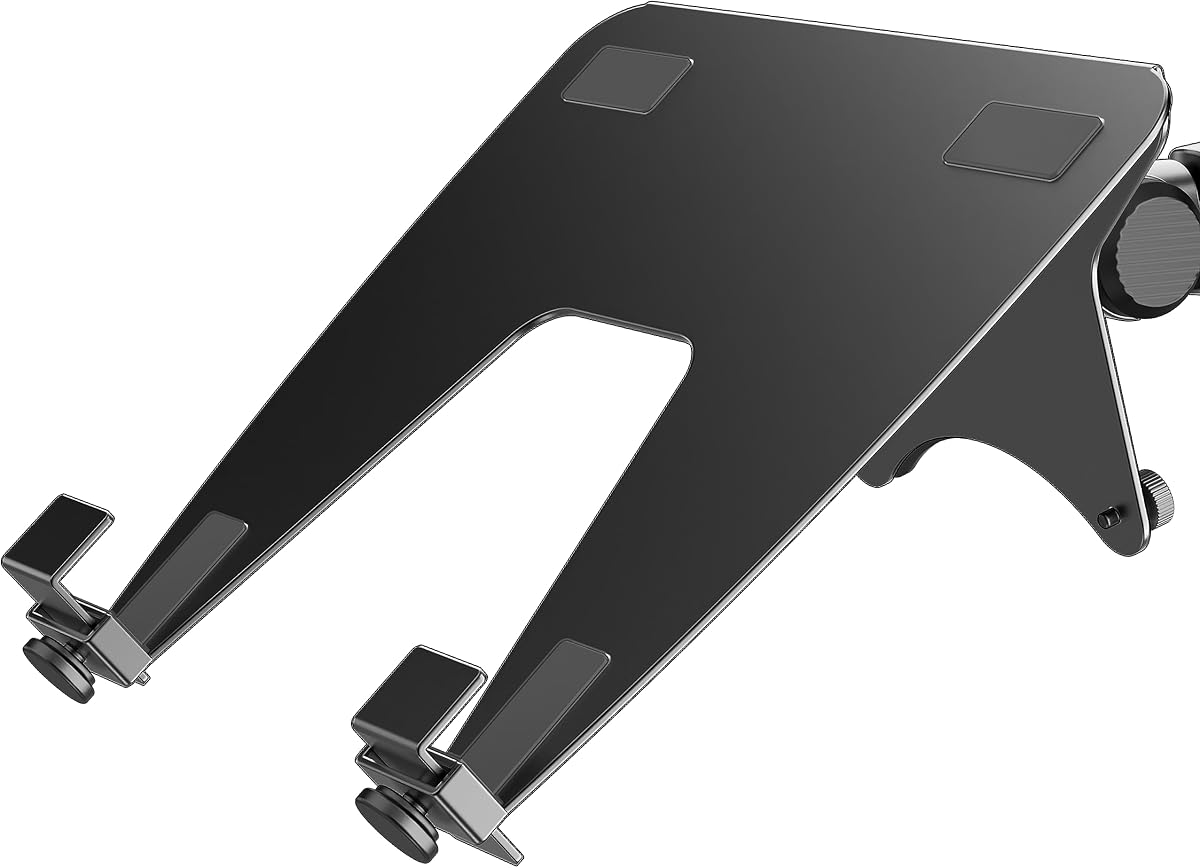
The VIVO Single Laptop Notebook Desk Mount Stand stands out as the top choice for its balance of stability and versatility. With a high rating of 4.6, users praise its ability to hold devices up to 22 pounds securely while allowing full motion adjustments.
We may earn a commission when you buy through this link, at no additional cost to you.
Its key strength lies in the flexible articulation, offering a range from plus 90 to minus 90 degrees of tilt, plus 180 degrees of swivel, and a full 360-degree rotation. The tray extends up to 16.5 inches, ensuring you can position your screen exactly where you need it without compromising desk space.
While the mounting options are robust with both C-clamp and grommet bases, the C-clamp requires a desk thickness up to 3.4 inches which may not fit all furniture. Additionally, the assembly process is straightforward but requires careful attention to tightening screws for optimal stability.
This mount is ideal for professionals who need a reliable, adjustable workspace solution. Whether you use a laptop or switch to a monitor, this model provides the ergonomic support needed to reduce strain during long work hours.
The full range of motion allows you to tilt and rotate your device to match your eye level, significantly reducing neck and back fatigue over time.
Detachable cable clips on the arms and center pole keep your power and AV cords neatly organized and out of the way for a cleaner setup.
We may earn a commission when you buy through this link, at no additional cost to you.
The HUANUO Laptop Desk Mount offers exceptional value for budget-conscious buyers seeking a reliable solution. Its design focuses on functionality with a ventilated tray that features 240 holes to prevent overheating while supporting devices up to 17 inches.
We may earn a commission when you buy through this link, at no additional cost to you.
Users appreciate the flexibility to switch between laptop and monitor modes easily. The arm extends on a 15-inch pole with tilt and swivel adjustments that help maintain a healthy posture. The installation is simplified with clear instructions and labeled hardware for both clamp and grommet setups.
The main trade-off is the material quality which may not feel as premium as higher-end models. Additionally, the clamp requires a flat wooden desk surface to function correctly. However, for the price, the performance and ergonomic benefits are hard to beat.
This model is perfect for students or remote workers who need an affordable way to improve their workspace ergonomics without spending a lot of money on accessories.
The ventilated tray with 240 holes ensures improved airflow to your laptop preventing overheating and extending the device lifespan effectively.
By freeing up valuable desk space underneath you can place your keyboard and mouse comfortably while keeping wires tidy with included cable management clips.
We may earn a commission when you buy through this link, at no additional cost to you.
The monTEK 2-in-1 Laptop & Monitor Desk Mount is a premium option designed for those who demand durability and style. Constructed from durable steel and aluminum, it supports laptops from 12 to 18 inches and monitors up to 32 inches with ease.
We may earn a commission when you buy through this link, at no additional cost to you.
Its full motion adjustment capabilities allow you to find the perfect ergonomic posture for any task. The hollow metal detachable tray provides excellent heat dissipation and stability while built-in cable management keeps your setup organized. The reversible support plate ensures laptops of various sizes sit securely.
While the price is higher than budget models, the build quality and flexibility justify the cost. The assembly may take a bit longer due to the precision required for the clamp and grommet options but the result is a robust and stable mount.
Ideal for professional office environments or home offices where aesthetics and reliability are paramount, this mount delivers a high-end experience that enhances daily productivity.
The hollow metal detachable tray design allows for excellent heat dissipation keeping your device cool during intense gaming or work sessions.
Compatible with laptops from 12 to 18 inches and monitors up to 32 inches this mount adapts to your changing workspace needs effortlessly.
We may earn a commission when you buy through this link, at no additional cost to you.
The WALI Adjustable Laptop Desk Mount is designed to support both laptops and monitors with a strong build quality. With a rating of 4.5, it offers dual mounting options and a height adjustment range that fits most desk setups comfortably.
We may earn a commission when you buy through this link, at no additional cost to you.
Its innovative cooling design features venting holes on the tray to absorb cooling air from the laptop fan ensuring your device runs efficiently. The mount plates are detachable allowing you to switch between a notebook or a monitor with VESA patterns 75x75mm and 100x100mm.
The main limitation is that the tray size is fixed at 14 by 11 inches which might not suit larger laptops. Also, the clamp works best on wood and may slip on glass surfaces. However, for standard desks it provides a secure and organized workspace.
This product is a solid choice for users who need a dependable mount with versatile adjustment capabilities without requiring premium features.
Dual mounting options include a C-clamp and a Grommet mount ensuring easy installation on different surfaces with various thicknesses.
Venting holes on the laptop tray absorb cooling air from the laptop fan keeping your device cool and running efficiently.
We may earn a commission when you buy through this link, at no additional cost to you.
The MOUNT PRO Laptop Arm Mount for Desk is a versatile 2-in-1 solution compatible with laptops and monitors up to 32 inches. Its aluminum construction provides stability while offering full-motion adjustments for a comfortable viewing experience.
We may earn a commission when you buy through this link, at no additional cost to you.
The arm extends and retracts with a range from minus 45 to plus 90 degrees of tilt and 360-degree rotation. Built-in cable management guides keep wires organized and out of sight. The ventilated tray maximizes airflow and includes anti-slip pads and clever latches to lock your laptop in place.
Some users report that the assembly instructions could be more detailed for first-time setup. Additionally, while it holds up to 22 pounds, very heavy laptops might require extra caution. Overall it is a great tool for enhancing productivity in any workspace.
This mount is ideal for home office professionals and students who need a reliable and adjustable stand to keep their workspace tidy and ergonomic.
Built-in cable management guides wires along the arms keeping cords out of sight and out of the way for a tidy modern workstation.
The tray includes 6 anti-slip pads and clever latches to lock your laptop in place preventing slips or falls during work or gaming.
We may earn a commission when you buy through this link, at no additional cost to you.
The HUANUO Adjustable Monitor Arm with Laptop Tray combines functionality with design. The ventilated tray features a 0.8-inch protruding bottom lip to secure laptops while preventing overheating. It supports monitors up to 32 inches with standard VESA mounts.
We may earn a commission when you buy through this link, at no additional cost to you.
The arm extends up to 16 inches and offers flexible adjustments including 45 degrees of tilt and 360-degree rotation. Installation is easy with C-clamp or grommet options for wooden desks. Integrated cable management keeps wires neat and organized.
The clamp is limited to wooden desks and does not fit beveled or lipped edges. Also tightening screws tightly is essential for maintaining the angle which might require periodic checks. Despite this, it remains a strong option for desk space optimization.
This mount is perfect for users seeking a versatile solution that allows switching between a laptop and a monitor without cluttering the workspace.
The tray features a breathable design to help avoid overheating while a protruding lip keeps the device secure in place.
Integrated cable management allows you to keep wires neat organized and out of the way for a cleaner desktop environment.
We may earn a commission when you buy through this link, at no additional cost to you.
The HUANUO 2 in 1 Function Laptop Mount with Tray supports a wide range of devices from 13 to 34-inch monitors and 17-inch notebooks. Its full range of motion allows for effortless adjustment of tilt, swivel, and rotation to suit any posture.
We may earn a commission when you buy through this link, at no additional cost to you.
The ventilated tray features airflow-enhancing holes and anti-slip pads with Velcro straps to hold the laptop securely. The arm extends up to 18.1 inches and reaches a maximum height of 17.5 inches ensuring the screen is at eye level. Installation is quick with pre-assembled parts.
The grommet mount works with desks up to 2.95 inches thick which limits some installations. Also, the C-clamp is designed for wooden desks only. For those with a standard desk setup, this mount offers excellent flexibility and stability.
This is a great choice for professionals who need a versatile mount that can handle both a large monitor and a notebook efficiently.
Tilt up to plus or minus 45 degrees swivel plus or minus 90 degrees and rotate 360 degrees for ultimate positioning flexibility.
The ventilated tray includes anti-slip pads and Velcro straps to hold your laptop securely while airflow holes keep it cool.
We may earn a commission when you buy through this link, at no additional cost to you.
The VIVO Black Clamp-on 12 x 9 in Rotating Laptop Tray is designed to save desk space by holding your laptop below the desk. It features a rotating clamp that allows the tray to pivot a full 360 degrees providing ultimate flexibility.
We may earn a commission when you buy through this link, at no additional cost to you.
The platform holds up to 11 pounds and fits up to 17-inch laptops. The sturdy C-clamp attaches to desks up to 2 inches thick without damaging the top. When not in use, you can rotate the tray under the desk for discreet storage.
The weight capacity is lower than other models which might not suit heavier laptops. Also, it requires a 31-inch clearance to accommodate the rotation circumference. Despite these limits, it is an excellent space saver for compact offices.
This mount is perfect for users with small desks who need a reliable way to store their laptop securely when not in use.
The single desk clamp allows the tray to pivot a full 360 degrees providing ultimate flexibility for customized placement and storage.
Attach the tray to a desk without damaging the top with a solid C-clamp that holds everything tightly in place and easily adjusts.
We may earn a commission when you buy through this link, at no additional cost to you.
The Suptek Single Laptop Notebook Desk Mount with Tray is designed to relieve fatigue by positioning your screen at the optimal height. The arm supports notebooks up to 17 inches and monitors from 13 to 27 inches with VESA compatibility.
We may earn a commission when you buy through this link, at no additional cost to you.
It offers full independent adjustability with joints swiveling 180 degrees and rotating 360 degrees. The height adjustment of 400mm provides various positions for comfort. The tray includes venting holes and a bottom edge lip to prevent overheating and falling.
The weight capacity of 15.6 lbs is moderate and may not support heavy gaming laptops. Installation takes about 10 minutes with included accessories. For lightweight devices, it is a cost-effective and ergonomic solution.
This mount is suitable for students or office workers who need a flexible stand to keep their workspace organized and comfortable.
This monitor arm with laptop tray helps relieve fatigue by allowing you to position your monitor screen at the optimal viewing height and angle.
Choose between a C-clamp or grommet base for your desk thickness to ensure a secure and stable installation.
We may earn a commission when you buy through this link, at no additional cost to you.
The ergounion Laptop Tray for Monitor Arm is a heavy-duty option designed to support the heaviest gaming laptops up to 28.6 pounds. It features a hollow design that helps dissipate heat and prevent overheating during intense use.
We may earn a commission when you buy through this link, at no additional cost to you.
Its unique design uses bottom-edge clips instead of side clamps ensuring all side ports remain accessible for a cleaner cable-managed setup. The tray offers a fixed 30-degree ergonomic slant when placed on a desk reducing wrist and neck strain. Constructed from heavy-duty alloy steel it is built for the long haul.
This tray requires an existing VESA monitor arm with 100x100mm holes so it cannot be used as a standalone desk mount. The price is higher due to its industrial-grade build quality. For gamers and power users this tray adds stability to their monitor setup.
This product is ideal for those who already have a monitor arm but want a secure and durable way to mount their laptop for a dual-screen setup.
Featuring secure bottom-edge clips instead of side clamps this design ensures all your laptop's side ports are 100% accessible without obstruction.
Crafted from heavy-duty alloy steel this tray is built for the long haul ensuring your device remains safe and jitter-free at any station.
We may earn a commission when you buy through this link, at no additional cost to you.
Selecting the right mount depends on several key factors that affect ergonomics, device safety, and workspace organization. Understanding these elements will help you choose a model that meets your specific needs.
Most mounts come with C-clamp and grommet options. C-clamps are easy to install but require a desk edge. Grommets drill a hole in the desk and are better for thicker surfaces. Check your desk thickness and material before buying.
Choose the mounting method that fits your desk structure securely without causing damage.
Ensure the mount supports your device weight including accessories like mice or adapters. Heavy laptops may need higher capacity models to avoid sagging or instability. Always check the specified limits before purchase.
Adequate weight capacity ensures your device stays secure and the mount lasts longer.
Look for models with full tilt, swivel, and rotation features. A wide adjustment range helps you find the perfect viewing angle to reduce strain. Some mounts offer height adjustments along a pole which adds versatility.
Prioritize full motion adjustability for a comfortable and ergonomic workspace setup.
Ventilated trays with holes or hollow designs improve airflow and prevent overheating. A bottom lip or anti-slip pads keep your device from sliding. Some trays also allow port access without obstruction.
A well-designed tray with cooling features protects your device during long sessions.
Integrated cable management clips or guides keep wires organized and out of sight. This feature is essential for maintaining a clean and professional workspace. Look for models that allow easy routing of power and data cables.
Effective cable management prevents tangles and makes your desk look neater.
Steel or aluminum construction offers durability and stability. Plastic parts may wear out over time with heavy use. High-quality materials ensure the mount holds your device securely without wobbling.
Invest in a mount with solid build quality for long-term reliability.
Check if the tray fits your laptop size or if it supports VESA monitors. Some models are 2-in-1 allowing you to switch between laptop and monitor modes. Ensure the VESA pattern matches if you plan to use a monitor.
Device compatibility ensures you get the most value out of your purchase.
Look for mounts with clear instructions and labeled hardware. Pre-assembled parts can reduce setup time. Some models are more complex and may require tools or extra effort to install.
Easy installation saves time and reduces frustration when setting up your workspace.
Start by reading the manual carefully to understand the assembly steps. Use the provided tools to attach the clamp or grommet securely to your desk. Ensure all screws are tightened properly to avoid wobbling.
Regularly check the joints and clamps for looseness. Tighten them as needed to maintain stability. Clean the tray and arms with a soft dry cloth to remove dust and debris that could affect performance.
Adjust the height and angle of the mount to suit your posture. Sit with your screen at eye level to reduce strain. If you move desks, disassemble the mount carefully to avoid damaging components.
Most mounts are compatible with standard wooden desks. However, check the thickness limits for clamps and grommets. Glass or metal desks may require specific hardware or might not be supported by all models.
Check the weight capacity and tray dimensions before buying. Heavy laptops may need models with higher weight limits and larger trays. Some mounts support laptops up to 17 inches or more.
Many modern trays use bottom clips instead of side clamps to allow full port access. Verify the design specifications to ensure your charging and data ports remain accessible.
Choose a model with a ventilated or hollow tray design. These features improve airflow around the device. Additionally, ensure the fan vents are not blocked by the tray surface.
Many 2-in-1 models support monitors with standard VESA patterns. Simply remove the tray and attach the monitor mount plates. Check the compatibility list for your monitor size.
Use a soft dry cloth to wipe down the surfaces. Avoid harsh chemicals that could damage the metal or plastic parts. Regular dusting helps maintain the finish and function.
Most mounts come with step-by-step instructions and labeled hardware. Assembly typically takes 10 to 20 minutes. If you find it complex, watch online tutorials for visual guidance.
Periodically check the clamp screws and tighten them if they loosen. Ensure the clamp sits on a flat surface without debris. Avoid moving the mount frequently to maintain stability.
We reviewed ten top-rated Laptop Tray Desk Mounts ranging from budget-friendly to premium options. The VIVO Single Laptop Notebook Desk Mount Stand stands out as the Editor's Choice for its versatile adjustability and stability.
When selecting a model, prioritize factors like weight capacity, cooling design, and mounting options that fit your desk. Ensure the tray supports your device size and allows for proper airflow to prevent overheating.
Prices and availability may change so verify the current offers before purchasing. By choosing the right mount, you can create a healthier and more productive workspace for daily work or gaming.