
BENFEI USB 3.0 Switch
4.1Editor score
Affordable 2-in-4-out design
Plug-and-play compatibility
LED indicator for status
This guide compares the top keyboard and mouse switch for 2 computers to help you find the perfect USB sharing solution for your dual PC setup needs today.
Finding a reliable keyboard and mouse switch for 2 computers is essential for seamless productivity across dual PC setups. These devices allow you to share peripherals like keyboards, mice, and printers without constantly unplugging cables.
We evaluated ten top-rated USB switchers based on data transfer speeds, port configurations, build quality, and ease of use. Our comparison covers models ranging from basic 2-in-2-out switches to advanced multi-port solutions.
Each pick highlights specific strengths such as plug-and-play compatibility, external controllers, and power support for high-demand devices. Please note that availability and pricing may change over time as we update this guide regularly.
4.1Editor score

4.0Editor score

4.3Editor score
This side-by-side comparison reviews all ten selected USB switchers to highlight their unique features, compatibility, and ideal use cases for shared peripherals.


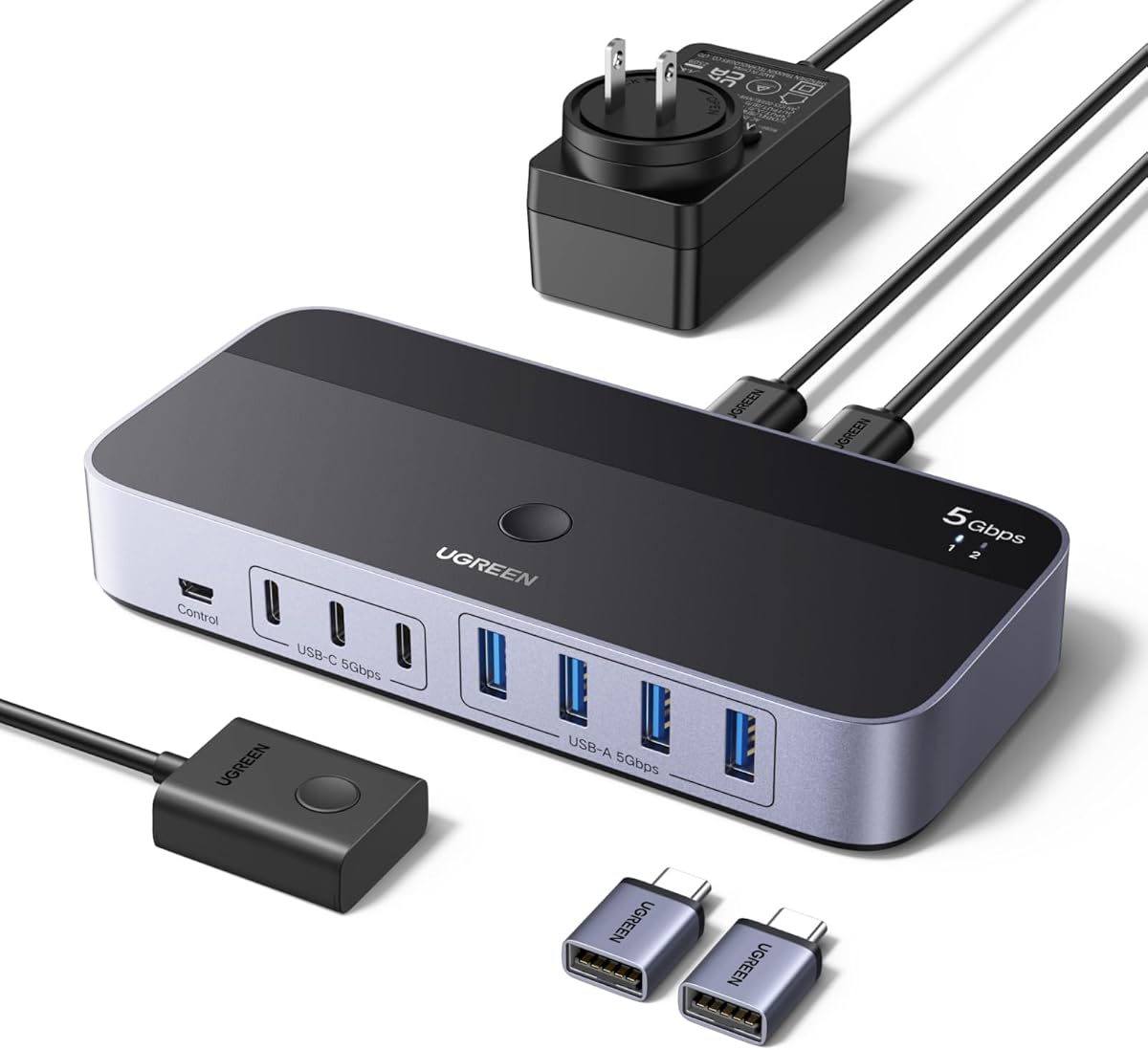

The UGREEN USB 3.0 Switch allows two computers to share up to four USB devices seamlessly. It stands out by supporting both USB C and USB A connections, making it versatile for modern setups.
We may earn a commission when you buy through this link, at no additional cost to you.
Users appreciate the external controller that keeps their desk tidy. The device supports high-speed data transfer at 5Gbps, ensuring quick file movements between systems without bottlenecks.
While it does not support video transmission, this limitation is standard for USB sharing switches. It is essential for users who only need to share peripherals like keyboards and mice.
This model is ideal for professionals managing dual PCs. The optional power supply ensures stable performance with high-draw devices like external drives.
This switch bridges the gap between legacy USB A and modern USB C devices effectively.
External controllers allow you to switch computers without reaching behind your desk constantly.
We may earn a commission when you buy through this link, at no additional cost to you.
The BENFEI USB 3.0 Switch offers an affordable entry into USB sharing technology. It supports four USB devices for two computers, making it great for basic office setups.
We may earn a commission when you buy through this link, at no additional cost to you.
Its LED indicator provides clear visual feedback on which computer is active. The 5Gbps transfer speed ensures that file sharing is efficient and fast.
Power stability can be a concern with high-demand devices since the power adapter is not included. However, standard peripherals work well without extra power.
Budget-conscious users will find this switch offers excellent value. It simplifies dual computer management without breaking the bank.
The LED indicator helps you confirm the active computer instantly.
You get reliable switching capabilities at a very competitive price range.
We may earn a commission when you buy through this link, at no additional cost to you.
This compact switch is designed for simple dual PC sharing needs. It features a durable aluminum alloy shell that helps with heat dissipation during operation.
We may earn a commission when you buy through this link, at no additional cost to you.
The one-button switching mechanism with an LED indicator makes it very user-friendly. You can toggle between computers quickly without software installation.
It supports printer sharing which is a valuable feature for home offices. The included USB 3.0 cables are ready for immediate use.
Users seeking a no-frills solution will appreciate its reliability. It is perfect for those who only need to share a keyboard and mouse.
The aluminum alloy shell ensures longevity and better heat management.
Cables included in the box mean you can start using it immediately.
We may earn a commission when you buy through this link, at no additional cost to you.
UGREEN is known for reliable connectivity products. This 2-in-2-out switch supports sharing keyboards, mice, and printers between two systems effectively.
We may earn a commission when you buy through this link, at no additional cost to you.
File transfers happen quickly thanks to USB 3.0 technology. The device works seamlessly across Windows, macOS, and Linux environments.
It lacks USB C connectivity which might be a limitation for newer laptops. However, adapters can bridge this gap if needed.
This model is a solid choice for small offices. It provides essential sharing features with a trusted brand warranty.
UGREEN offers dependable support and build quality for all their peripherals.
You can share one printer between two PCs without buying a second one.
We may earn a commission when you buy through this link, at no additional cost to you.
This unit goes beyond USB sharing by including HDMI video switching. It allows you to control two computers with one monitor and set of peripherals.
We may earn a commission when you buy through this link, at no additional cost to you.
The 4K resolution support ensures high-quality visuals for content creators. An included remote switch helps keep your desk organized during switching.
It is more complex than a standard USB switch and may require HDMI ports on your PCs. The setup is straightforward once cables are connected.
For users wanting a true KVM experience, this is an excellent choice. It saves desk space by consolidating peripherals and video inputs.
This switch handles both video and peripheral sharing in one device.
The remote allows you to switch computers without leaning over your desk.
We may earn a commission when you buy through this link, at no additional cost to you.
This USB 2.0 switch is designed for older peripherals or basic tasks. It supports four devices and includes optional power for stability.
We may earn a commission when you buy through this link, at no additional cost to you.
The one-button swapping feature makes it easy to toggle between systems quickly. It is fully plug-and-play with no software needed.
Data transfer is limited compared to USB 3.0 models. However, for keyboards and mice, speed is rarely an issue.
Budget buyers with legacy hardware will find this ideal. It provides a simple way to share basic inputs without extra cost.
Perfect for older devices that do not require high-speed data transfer.
You can add extra power to ensure stable performance for multiple devices.
We may earn a commission when you buy through this link, at no additional cost to you.
This model offers a balanced feature set for general use. It supports high-power devices like hard drives effectively with its extra power port.
We may earn a commission when you buy through this link, at no additional cost to you.
The 5Gbps speed ensures smooth file transfers between two PCs. Users appreciate the straightforward plug-and-play installation process.
While it lacks a USB C port, adapters are widely available to bridge the gap. This makes it flexible for modern laptop connections.
It is a strong contender for office environments. The combination of speed and power support handles most peripheral needs well.
An extra power port ensures that heavy devices do not disconnect unexpectedly.
Works seamlessly with Windows, Mac, and Linux without extra steps.
We may earn a commission when you buy through this link, at no additional cost to you.
This switch offers maximum connectivity with seven output ports for two computers. It supports both USB C and A types for versatile sharing.
We may earn a commission when you buy through this link, at no additional cost to you.
Included accessories like the power adapter and controller make setup effortless. You do not need to buy extra items for stable operation.
The size and cost are higher than simpler models. However, the flexibility is unmatched for users with many peripherals to manage.
Tech enthusiasts with many devices will love this setup. It keeps everything organized and accessible without cluttering the workspace.
With seven ports you can connect almost every peripheral you own.
Everything from cables to adapters is included for immediate use.
We may earn a commission when you buy through this link, at no additional cost to you.
This basic switch is designed for fundamental input sharing between two computers. It relies on USB power so no extra adapter is needed.
We may earn a commission when you buy through this link, at no additional cost to you.
The external desktop switch controller helps keep your setup neat. You can place the controller right next to your keyboard for easy access.
It is not recommended for heavy storage devices. The design focuses on light-duty peripherals like mice and keyboards.
Home users with simple needs will find this practical. It offers a quick fix for shared input devices without complexity.
The external controller keeps the main unit hidden while staying accessible.
Powered directly by the computers so no additional power source is needed.
We may earn a commission when you buy through this link, at no additional cost to you.
This model pushes transfer speeds to 10Gbps using USB 3.2 technology. It is ideal for users who move large files between two machines.
We may earn a commission when you buy through this link, at no additional cost to you.
With seven ports and a type C converter, it handles almost any device. The included power adapter ensures stable operation for drives.
The high speed and versatility come with a higher cost. However, the performance is significantly better than standard USB 3.0 switches.
Power users needing speed and capacity will prefer this model. It future-proofs your setup for faster data transfer needs.
Moving large files happens twice as fast with 10Gbps speeds.
USB 3.2 Gen 2 support ensures compatibility with modern high speed devices.
We may earn a commission when you buy through this link, at no additional cost to you.
Choosing the right USB switch involves considering your specific device needs, transfer speed requirements, and budget constraints for seamless multi-computer workflows.
Determine how many devices you need to share between your two computers. Models range from 2-in-2-out to 7-out configurations to suit different setups.
Select a model with enough ports for all your peripherals without needing extra hubs.
USB 2.0 is sufficient for basic input devices but slower for data transfer. USB 3.0 offers speeds up to 5Gbps which is ideal for file sharing.
Choose USB 3.0 or higher if you frequently transfer large files between systems.
High-power devices like external hard drives may need an external power supply for stable operation. Some switches include power ports while others do not.
Check if the switch supports external power if you plan to connect demanding peripherals.
Manual buttons on the switch are common but may be hard to reach. External controllers allow switching from your desk without moving your hands.
Prioritize models with external controllers for better ergonomics and convenience.
Most USB switches are plug-and-play and work with Windows, Mac, and Linux. Ensure the switch supports your specific operating systems without drivers.
Look for plug-and-play features to avoid installation hassles on all your PCs.
Most USB switches do not support video or monitor connections. If you need to share a monitor you will need a full KVM switch instead.
Verify the switch capabilities to avoid purchasing one that does not support your video needs.
Included cables vary in quality and length. Poor cables can lead to connection drops during critical tasks.
Select a switch that includes high-quality cables to ensure reliable connectivity immediately.
Aluminum or sturdy plastic housings improve durability and heat dissipation. Metal builds often last longer under daily use conditions.
Invest in a switch with a robust build to ensure it withstands frequent switching.
Connect your keyboard and mouse to the output ports labeled for peripherals then connect the switch inputs to your computers using the provided cables. Ensure connections are secure to avoid loose contacts.
Use the physical button or external controller to toggle between active computers. The indicator light usually shows which system is currently active to prevent confusion.
Keep the switch in a well-ventilated area to prevent overheating during extended use. Avoid placing heavy objects on top of the device to protect the ports and casing.
Yes most USB switches are plug-and-play and work seamlessly across Windows macOS and Linux systems. Ensure your devices use standard USB A or C connections for compatibility.
Many modern switches support USB 3.0 or 3.2 speeds allowing for fast file transfers. Check the specs to confirm speeds up to 5Gbps or 10Gbps depending on the model.
An external controller lets you switch computers from your desk without reaching behind the device. It improves workflow and keeps your workspace organized while switching.
Yes USB switches allow multiple computers to access a shared printer easily. Just ensure the printer drivers are installed on both systems for smooth operation.
Wireless keyboards and mice using USB dongles work fine with a USB switch. Connect the dongles to the switch ports to share them across computers effectively.
Some switches have external power ports to support high-demand devices like hard drives. Without external power drives may disconnect so check for power ports.
Standard USB switches are for data devices like keyboards and not video. If you need to share a monitor you should look for a KVM switch instead.
Most switches feature an LED indicator that lights up for the active computer. This visual cue helps prevent confusion when switching between multiple systems.
Our top picks highlight the UGREEN 3.0 Switch for versatility, the BENFEI model for budget, and the UGREEN 3.2 for speed. Each offers unique strengths for different user needs.
Prioritize USB speed, power support, and switching convenience when selecting a unit. These factors ensure that your workflow remains efficient across both machines.
Always check current availability and compatibility before purchase. Prices and stock levels change so verify details directly on the product page.