
CENMATE Aluminum 4 Bay
4.3Editor score
Affordable 4-bay design
Aluminum alloy cooling
USB A and C ports
Finding the right Jbod Enclosure is essential for expanding your storage without complex RAID setups. These devices allow you to connect multiple drives directly to your computer for simple and effective data management.
We compared ten leading models based on drive capacity, interface speed, cooling performance, and build quality. Our analysis highlights the strengths and weaknesses of each unit to help you make an informed decision.
Each pick below shows key specifications and real-world performance details. Prices and availability change frequently, so verify current stock before purchasing to ensure you get the best value for your needs.
4.3Editor score

4.2Editor score
4.1Editor score
As an Amazon Associate we earn from qualifying purchases.
This side-by-side comparison table lists all ten selected Jbod Enclosure models. It highlights drive capacity, interface type, bay count, and key features to help you choose the right unit.




The TERRAMASTER D4-320 stands out as a top choice for users needing fast and quiet external storage. With a rating of 4.2 stars, it delivers reliable performance for professionals who prioritize speed and efficiency in their workflow.
We may earn a commission when you buy through this link, at no additional cost to you.
Its USB 3.2 Gen2 interface supports transfer speeds up to 10Gbps, allowing quick backups of large media files. The tool-free design and hot swap capability make it easy to manage drives without shutting down the system.
While it does not support RAID, which limits redundancy options, this trade-off keeps the device simpler and more cost-effective. The intelligent temperature control ensures fans only run when needed to maintain a quiet environment.
This enclosure is ideal for content creators and IT professionals who need a straightforward way to expand storage. Its compatibility across multiple operating systems ensures seamless integration with existing setups.
Achieve read/write speeds up to 1,016 MB/s when using four 8TB hard drives together for maximum performance.
Noise levels drop below 21 dB(A) in standby mode thanks to sound-absorbing panels and vibration damping measures.
We may earn a commission when you buy through this link, at no additional cost to you.
The CENMATE Aluminum 4 Bay offers excellent value for those seeking an affordable way to expand storage. With a 4.3 star rating, it provides solid performance for personal or business use without breaking the bank.
We may earn a commission when you buy through this link, at no additional cost to you.
Constructed from aluminum-alloy materials, this enclosure helps maximize heat dissipation to protect your data. It supports 2.5 and 3.5 inch drives with a total capacity of up to 80TB across four bays.
The main drawback is the fan noise level which may be noticeable in quiet environments. However, the tool-free design and plug-and-play compatibility make it a convenient choice for daily tasks.
Consider this unit if you need a reliable DAS on a budget. Its universal compatibility with Windows Mac and Linux ensures it fits easily into diverse computing environments.
Ideal for personal or enterprise use with support for up to 20TB per drive and 80TB total capacity.
Equipped with a DC 12V power adapter to provide stability for high-speed transmission during heavy use.
We may earn a commission when you buy through this link, at no additional cost to you.
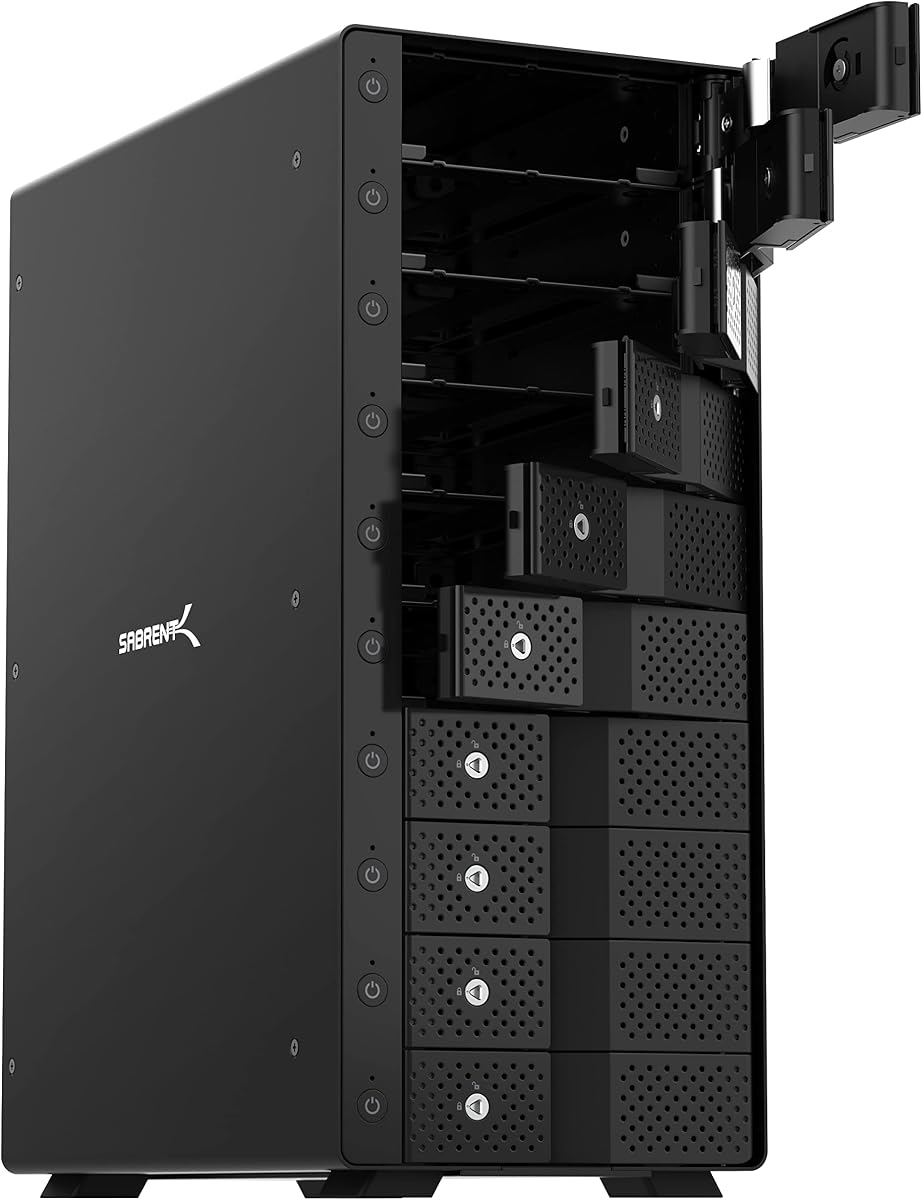
The SABRENT 10-Bay is a powerhouse for users needing massive storage expansion. With a 4.1 star rating, it delivers professional-grade reliability for backups media servers and IT workflows.
We may earn a commission when you buy through this link, at no additional cost to you.
Its tray-less design allows you to slide drives in and out without tools. Each bay has its own ON/OFF switch so you can power only the drives you need at any given time.
While the price is higher, the aluminum build and dual cooling fans justify the investment for heavy usage. The ASMedia controller ensures stable independent access to all ten drives simultaneously.
This enclosure is perfect for professionals with growing data needs. Its support for up to 20TB per drive means you can expand capacity as your requirements increase.
Connect up to ten 3.5 inch SATA drives with a total capacity of 200TB for extensive backup and media libraries.
Dual 120mm fans move air across all drives to hold temperatures under sustained load effectively.
We may earn a commission when you buy through this link, at no additional cost to you.
The IO CREST 8-Bay provides substantial storage capacity for users with large datasets. Rated 4.0 stars, it balances functionality and affordability with a focus on high drive counts.
We may earn a commission when you buy through this link, at no additional cost to you.
Each drive has an independent control switch allowing you to power off unused drives to save energy. The smart fan function adjusts speed based on temperature to ensure quiet operation.
Although the USB 3.0 speed is lower than newer standards it remains sufficient for most file transfer needs. The steel housing provides durability and helps move heat away from critical components.
Consider this model if you need eight drives in a single unit. Its broad compatibility with SATA I II III drives ensures it works with older and newer hardware alike.
Switch off individual drives to reduce power consumption and noise when they are not in use.
Built-in thermal sensor supports auto and manual modes with three levels of fan speed.
We may earn a commission when you buy through this link, at no additional cost to you.
The QNAP TR-004 is unique for offering hardware RAID in a direct-attached enclosure. With a 4.2 star rating, it appeals to users who need redundancy without a full NAS system.
We may earn a commission when you buy through this link, at no additional cost to you.
You can configure RAID 0 1 5 or JBOD via hardware switches. This flexibility makes it suitable for both performance and safety needs depending on your specific workflow requirements.
It works best with QNAP NAS systems for expansion but acts as standalone storage for PCs. Note that some QNAP NAS models may need firmware updates to ensure compatibility with this unit.
Choose this if you want RAID capabilities in a simple enclosure. Its lockable bays prevent accidental drive removal adding a layer of physical security to your setup.
Supports RAID 0 1 5 JBOD and individual disks for flexible data management and protection.
Connects via USB Type-C for fast data transfer with Windows macOS and Linux systems easily.
We may earn a commission when you buy through this link, at no additional cost to you.
The QNAP TL-R1200C-RP is designed for server environments needing reliable massive storage. With a 4.1 star rating, it offers professional reliability for businesses with critical data demands.
We may earn a commission when you buy through this link, at no additional cost to you.
Its rackmount form factor saves space in server rooms while the redundant power supply keeps systems running during outages. Twelve bays allow significant scaling without adding multiple units.
This enclosure excels when paired with QNAP NAS systems. The USB 3.2 Gen2 Type-C port ensures fast data flow between the storage and your main server or workstation.
Ideal for enterprise users expanding existing infrastructure. It provides a clean way to add capacity without complex configuration or new hardware beyond the enclosure itself.
Equipped with a 250W redundant power supply unit to maintain operation during power failures.
Fits standard server racks and supports expansion for QNAP NAS computers and servers.
We may earn a commission when you buy through this link, at no additional cost to you.
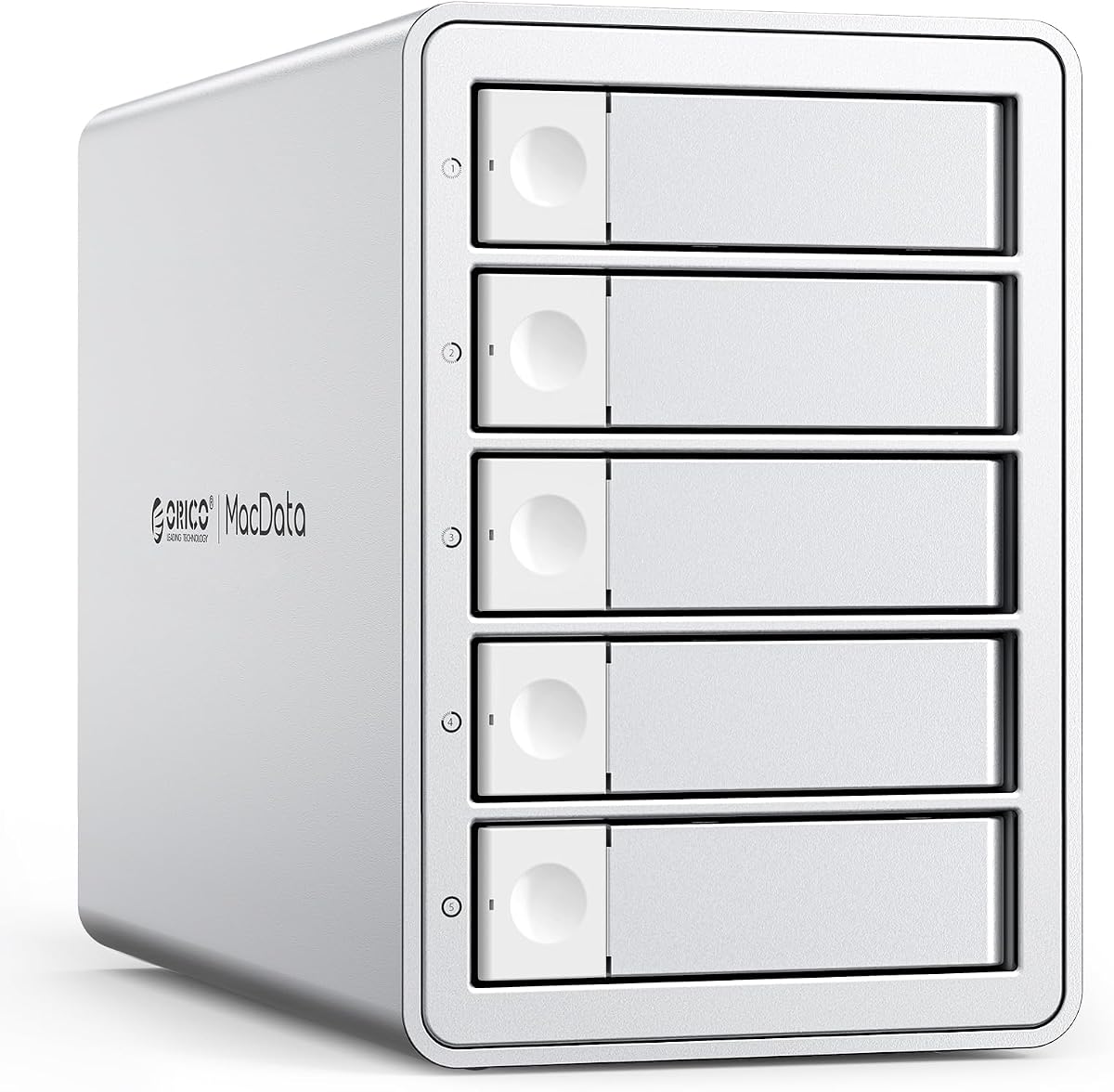
The ORICO 5 Bay RAID offers versatile RAID modes and impressive capacity. With a 4.7 star rating, it is highly rated for users needing flexibility in data management.
We may earn a commission when you buy through this link, at no additional cost to you.
It supports RAID 0 1 3 5 10 JBOD Clone and Clear modes via hardware switches. This allows quick configuration without complex software tools or technical expertise.
The built-in 150W power supply ensures stability when running multiple high-consumption drives. The aluminum alloy shell with honeycomb vents aids efficient heat dissipation during heavy loads.
Select this for large backup projects or media libraries. Its universal compatibility with Windows Mac and Linux makes it a convenient choice for diverse environments.
Support RAID 0 1 3 5 10 JBOD Clone and Clear modes for flexible data management.
150W internal power ensures peak voltage stability for running five drives simultaneously.
We may earn a commission when you buy through this link, at no additional cost to you.
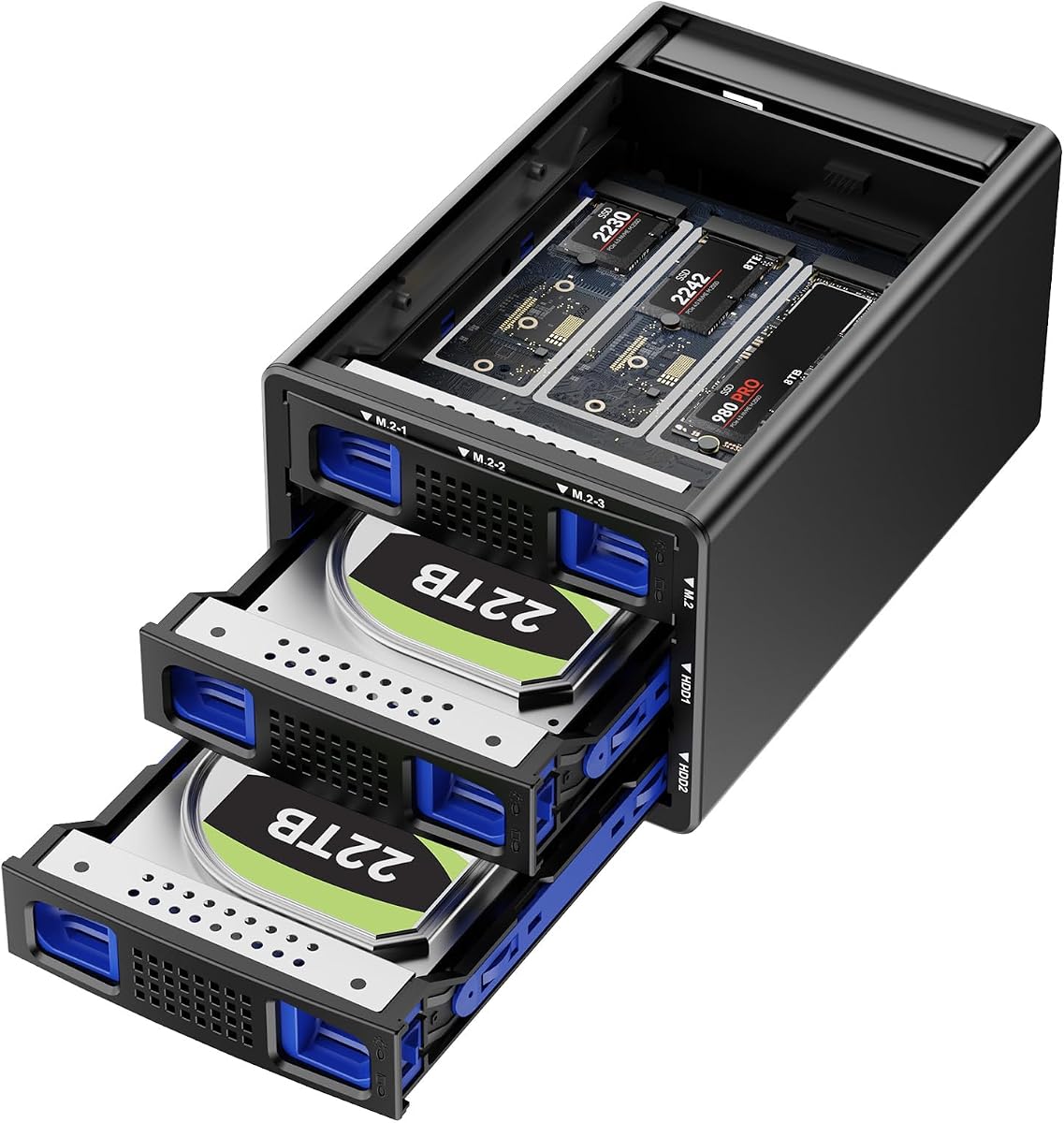
The Hybrid HDD NVMe Enclosure stands out for combining storage types in one unit. With a 4.6 star rating, it allows users to mix massive HDD capacity with high-speed NVMe performance.
We may earn a commission when you buy through this link, at no additional cost to you.
It holds two SATA drives and three M.2 NVMe SSDs with flexible RAID modes. The USB 3.2 Gen2 interface delivers up to 10Gbps ensuring fast transfers for all connected drives.
Noise from the continuous fan may be a concern in quiet spaces. However the tool-free design and wide compatibility make it a powerful choice for advanced workflows.
This solution is ideal for users needing both capacity and speed. By mixing drive types you can optimize performance for different tasks within a single enclosure.
Holds two SATA and three NVMe drives offering up to 68TB total capacity and flexibility.
USB 3.2 Gen2 provides full load read rates of 200 to 300MB/s outside RAID modes.
We may earn a commission when you buy through this link, at no additional cost to you.
The ORICO 4 Bay RAID provides versatile RAID options for varied storage needs. With a 4.3 star rating, it balances performance and reliability effectively for many users.
We may earn a commission when you buy through this link, at no additional cost to you.
You can choose from RAID 0 1 3 5 10 JBOD CLONE and CLEAR modes via hardware switches. This flexibility allows you to tailor protection and speed based on project requirements.
The aluminum alloy housing with silent cooling fans ensures stable operation. The built-in 150W power supply eliminates the need for external adapters keeping your desk tidy.
Choose this for scalable storage with built-in redundancy. Its safety lock prevents accidental ejection securing your data during normal use and transport.
Support eight modes including RAID 0 1 3 5 10 and JBOD for personalized needs.
Built-in 150W power supply ensures smooth data transfer during multi-disk reading.
We may earn a commission when you buy through this link, at no additional cost to you.
The OWC Mercury Elite Pro Quad is a compact high-performance option for desktop use. With a 3.7 star rating, it offers solid speed for users prioritizing small form factor and connectivity.
We may earn a commission when you buy through this link, at no additional cost to you.
Its universal drive bays support both 2.5 and 3.5 inch drives with a 10Gb/s USB-C interface. This ensures compatibility with modern Mac and Windows systems without extra dongles.
Softer RAID software is not included meaning you may need third-party tools for advanced setups. The warranty offers basic protection though the unit's reliability varies among users.
Choose this for a small high-speed storage solution. It is ideal for editors needing quick access to media files without the bulk of larger enclosure systems.
Delivers up to 947MB/s transfer speeds for fast access to large media and backup files.
Four bays support both 2.5 and 3.5 inch drives for flexible configuration options.
We may earn a commission when you buy through this link, at no additional cost to you.
Choosing the right Jbod Enclosure depends on your specific storage and performance requirements. This guide outlines key factors to consider before making a purchase.
Determine how many drives you need and the total capacity required. Enclosures range from 2 to 12 bays allowing you to scale storage based on your data needs.
Check the maximum drive size supported per bay to ensure future expansion remains possible without replacing the enclosure.
USB 3.0 and USB-C options vary in speed from 5Gbps to 10Gbps. Faster interfaces ensure quicker transfers for large files and backups.
Verify that your computer has the necessary ports to match the enclosure speed for optimal performance.
JBOD treats drives as individual units while RAID offers redundancy or performance. Decide if you need data protection or just simple storage expansion.
Some enclosures offer hardware RAID which is more reliable than software-based solutions found in cheaper models.
Multiple drives generate heat which can affect lifespan. Look for enclosures with aluminum housings and active cooling fans.
Consider noise levels if the unit will sit on a desk where fan noise might be disruptive during use.
Some units have built-in power supplies while others use external adapters. Built-in supplies reduce cable clutter and improve reliability.
Check wattage ratings to ensure the unit can support multiple high-capacity drives running simultaneously.
Tool-free tray designs allow quick drive swaps without removing the enclosure. Hot-swappable units let you change drives without powering down.
These features save time and effort especially for users who frequently update their storage setup.
Most Jbod Enclosures work with Windows Mac and Linux out of the box. Ensure the enclosure supports your primary operating system.
Some enclosures may require formatting or specific drivers for certain OS features to work correctly.
Metal enclosures offer better protection and heat dissipation than plastic ones. Look for sturdy materials that can protect drives from physical damage.
Additional features like safety locks can prevent accidental drive removal adding another layer of security.
Start by installing your drives into the bays following the manufacturer instructions. Most models have tool-free trays that snap into place securely without screws.
Connect the enclosure to your computer using the appropriate cable. Use high-quality cables to ensure stable power and data transmission during operation.
Keep the enclosure in a well-ventilated area to prevent overheating. Regularly clean dust from vents and fans to maintain optimal cooling performance.
A Jbod Enclosure allows you to connect multiple hard drives to a computer without RAID. Each drive acts as a separate volume giving you flexible storage expansion for backups or media.
Standard Jbod does not support RAID as it treats drives independently. Some enclosures offer optional RAID modes but true Jbod is designed for simple individual disk access.
Many modern Jbod Enclosures support hot swapping which lets you remove or add drives without powering off. Check your model specifications to confirm this feature is available.
USB-C cables are preferred for their speed and durability. Always use high-quality cables that support the maximum speed your enclosure and computer can handle.
After connecting the enclosure format the drives using your operating system. tools. Ensure you choose a file system compatible with all devices you plan to use.
Multiple drives generate significant heat during operation. Good airflow and cooling fans are essential to prevent overheating and maintain the longevity of your drives.
Most Jbod Enclosures are compatible with Mac systems out of the box. You may need to format drives to APFS or ExFAT for full Mac compatibility.
Most enclosures come with a one to two-year warranty covering manufacturing defects. Always register your product to ensure valid warranty claims if needed.
We reviewed ten top models including the TERRAMASTER D4-320 and SABRENT 10-Bay. Each offers unique strengths for different storage needs and budgets.
Prioritize speed capacity and cooling when selecting your unit. Ensure your chosen model matches your drive sizes and interface requirements.
Prices and availability change often so check current listings before finalizing your purchase. This ensures you get the best value for your specific storage goals.