
Zalman T6 ATX Mid-Tower
4.3Editor score
Optimized cooling performance
Powder coated steel
Versatile internal layout
This guide compares the top 10 industrial PC cases for performance storage and reliability helping you choose the right chassis for your specific computing
Industrial PC cases are essential for protecting critical hardware in demanding environments. They provide robust cooling, secure mounting, and expandability for servers workstations and specialized computing systems.
We evaluated ten leading models based on airflow design build quality and compatibility. Our analysis focuses on features that matter most for industrial applications like dust resistance and component support.
Each pick highlights specific strengths for different use cases from rackmount servers to modular towers. Prices and availability change so verify details before purchasing to ensure the best fit.
4.3Editor score

4.8Editor score

4.6Editor score
This side-by-side comparison highlights key specifications across all ten models to help you quickly identify the best fit for your industrial computing requirements.


This model offers exceptional cooling performance with its oversized fan configuration. It earns a high rating for users needing robust thermal management in industrial settings.
We may earn a commission when you buy through this link, at no additional cost to you.
The split-level cable management optimizes routing space while the MasterRail mounting system supports various fan sizes. This flexibility ensures sustained performance under heavy computational loads.
While the case is large and heavy, the benefits of superior airflow justify the trade-off. It handles high-end hardware without compromising on stability or access.
Ideal for workstations running intensive tasks, this case provides the reliability needed for professional environments. We recommend it for those prioritizing cooling and expandability.
The dual fan setup ensures cool air reaches all critical components effectively.
Multiple mounting points allow customization for different hardware configurations.
We may earn a commission when you buy through this link, at no additional cost to you.
This premium tower offers expansive internal layouts for large motherboards and storage. Its build quality and silent features make it a top choice for high-end industrial use.
We may earn a commission when you buy through this link, at no additional cost to you.
Users can install up to eighteen hard drives and convert layouts for water cooling. The brushed aluminum front adds a refined look while maintaining robust protection.
Though expensive, the versatility and storage options provide long-term value. It suits facilities needing significant capacity without noise disruptions.
Best for data centers or labs requiring maximum storage and quiet operation. This case stands out for its balance of form and function.
Supports massive drive arrays for archival or high-demand data needs.
Sound dampening materials ensure quiet performance in sensitive areas.
We may earn a commission when you buy through this link, at no additional cost to you.
An affordable option delivering reliable cooling and durability. It suits basic industrial workstations needing essential features without breaking the budget.
We may earn a commission when you buy through this link, at no additional cost to you.
The hairline front mesh and preinstalled fan provide optimal air circulation. High strength steel sheets withstand pressure and heat effectively.
It lacks advanced features found in pricier models but covers essentials well. Users should note the SATA port caution for some motherboards.
Best for entry-level setups or secondary systems where cost matters most. It offers solid value for straightforward computing tasks.
Mesh panels ensure adequate cooling for standard components.
Powder coating protects the chassis from wear and rust over time.
We may earn a commission when you buy through this link, at no additional cost to you.
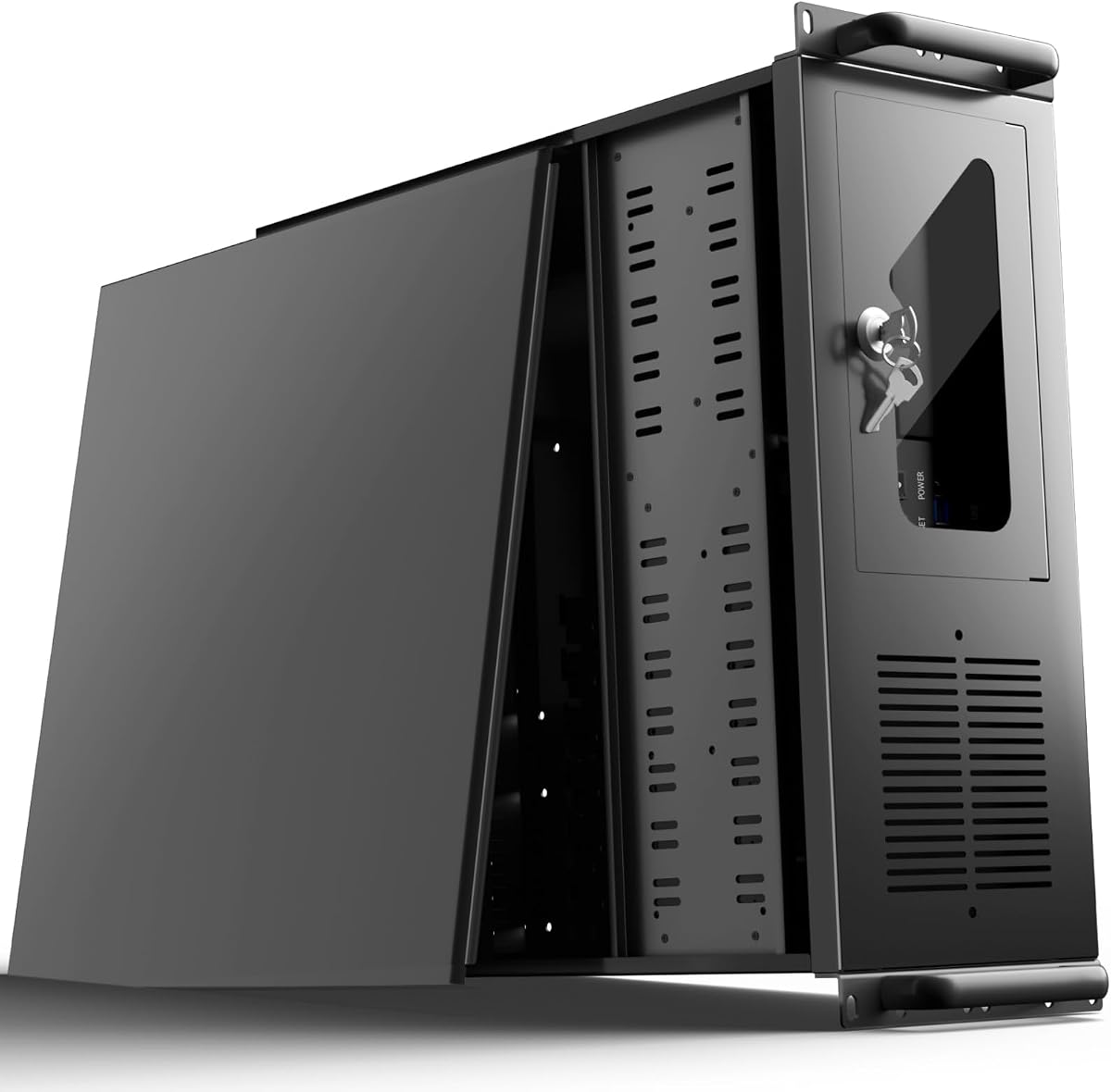
Designed for server environments requiring massive storage and expansion. It houses critical data securely with a rugged rack mount design.
We may earn a commission when you buy through this link, at no additional cost to you.
The chassis supports standard power supplies and multiple motherboard types. Key lock mechanisms protect against unauthorized access in shared spaces.
Dust filters help maintain a cleaner internal environment for longevity. However, users might need additional cooling for high-load scenarios.
Suitable for home labs or office setups needing rack integration. It balances scalability with security for reliable server operations.
Tailored for data centers and intensive storage workloads.
Robust locking protects valuable internal components effectively.
We may earn a commission when you buy through this link, at no additional cost to you.
A solid utility case built with SGCC steel for durability. It provides ample bays for storage needs in various setups.
We may earn a commission when you buy through this link, at no additional cost to you.
Front ports include USB 3.0 for fast data transfers. The layout supports common ATX configurations without issue.
Airflow is adequate for standard loads but may need upgrades for intense tasks. It remains a straightforward choice for general use.
Best for users needing reliable storage capacity without extra frills. It serves well as a secondary or workhorse system.
SGCC steel resists corrosion and handles daily wear well.
Multiple bays allow extensive HDD and ODD options.
We may earn a commission when you buy through this link, at no additional cost to you.
This case blends aesthetics with performance for gaming stations. Wood and alloy details enhance the look while supporting robust hardware.
We may earn a commission when you buy through this link, at no additional cost to you.
It fits large GPUs and supports high-end liquid cooling options. Three 140mm fans ensure strong airflow out of the box.
The unique style may require maintenance to keep wood clean. Still, it offers a premium experience for visible industrial setups.
Ideal for offices wanting a sleek but capable workstation. It stands out for combining design with serious technical specs.
Wood elements add a distinctive touch to standard designs.
Supports massive radiators for extreme thermal management needs.
We may earn a commission when you buy through this link, at no additional cost to you.
A retro-inspired tower with modern performance capabilities. The turbo button offers instant full-speed cooling when needed.
We may earn a commission when you buy through this link, at no additional cost to you.
Supports large liquid coolers and maintains expansion options for older drives. Front USB-C ports ensure compatibility with new peripherals.
The unique style may not fit every industrial setting but offers charm. It balances old-school bays with new tech effectively.
Best for enthusiasts needing specific expansion in a stylish package. It delivers high performance without sacrificing its distinct look.
Turbo button switches to max speed for heavy loads.
Supports older drive formats alongside modern storage options.
We may earn a commission when you buy through this link, at no additional cost to you.
Built for high-performance computing with E-ATX support and liquid cooling. It enables sustained performance under heavy computational loads.
We may earn a commission when you buy through this link, at no additional cost to you.
Triple PWM fans and direct AIO support ensure components stay cool. Front USB-C ports drastically improve transfer efficiency for large files.
The professional design ensures seamless integration into server racks. It is a solid foundation for rendering or virtualization servers.
Best for IT facilities needing robust and efficient server solutions. It balances advanced cooling with professional connectivity options.
Designed for rendering, AI training, and virtualization tasks.
USB-C front ports support rapid large file transfers.
We may earn a commission when you buy through this link, at no additional cost to you.
The FRAME system gives new meaning to customization for growing needs. It includes high-performance fans that support zero RPM modes.
We may earn a commission when you buy through this link, at no additional cost to you.
InfiniRail mounting offers flexibility for fan configurations anywhere needed. Clean lines or turbo options suit various cooling preferences.
Modularity might seem complex initially but pays off with upgrades. It is a versatile pick for dynamic industrial workstations.
Best for users planning future component swaps or customization. It provides a strong foundation for evolving computing environments.
Upgrade trays and panels to match changing hardware needs.
Y-pattern front panel ensures minimal restriction for intake.
We may earn a commission when you buy through this link, at no additional cost to you.
A compact case designed for exceptional airflow and GPU cooling. It fits 360mm radiators for powerful liquid cooling potential.
We may earn a commission when you buy through this link, at no additional cost to you.
Ultra-fine mesh on all panels creates maximum airflow while filtering dust. Pre-installed fans offer solid out-of-the-box performance.
The size limits storage but benefits tight spaces well. It is an efficient choice for streamlined workstations.
Best for users needing a smaller footprint without thermal compromise. It delivers performance and cleanliness in a neat package.
Small size maximizes space in crowded industrial areas.
Dust filters protect internals while maintaining strong airflow.
We may earn a commission when you buy through this link, at no additional cost to you.
Selecting the right industrial PC case involves evaluating several critical factors to ensure durability and performance.
Ensure the case supports your motherboard size such as ATX or E-ATX. Mismatched sizes can lead to installation issues or wasted space.
Always check compatibility charts before purchasing to confirm your hardware fits securely.
Look for designs with ample mesh and fan mounts to handle heat generation. Industrial workloads often demand sustained cooling to prevent throttling.
Prioritize cases with proven airflow paths and dust filters for long-term reliability.
Consider how many graphics cards or drives your setup requires. More slots allow for future upgrades without replacing the chassis.
Count drive bays carefully to ensure you can store all necessary data locally.
Steel cases offer better durability and shielding against electromagnetic interference. Aluminum provides lighter weight but may dent easier.
Choose materials that withstand the environmental stresses of your workspace.
If integrating into server racks, verify standard rackmount dimensions and mounting points. This ensures seamless installation in data center environments.
Look for chassis labeled explicitly as rackmount compatible for easier deployment.
Check for modern USB ports like USB-C and USB 3.2 for fast data access. Audio jacks are also important for maintenance work.
More ports reduce the need for extension cables and improve workflow efficiency.
Clean routing prevents airflow blockage and makes future upgrades easier. Look for wide channels and hooks inside the chassis.
Proper cable management helps maintain a professional and safe workstation environment.
Industrial settings often require quiet operation to avoid distraction. Look for models with sound dampening or quiet fans.
Balancing airflow with acoustic control ensures a comfortable workspace.
Install components carefully following static safety measures. Ensure all screws are tightened properly to prevent vibration damage.
Regularly clean dust filters and vents to maintain optimal airflow. Use compressed air or a soft brush for safe cleaning.
Monitor cable organization periodically to avoid accidental disconnections. Keeping wires neat ensures easier troubleshooting when needed.
Industrial cases often feature rugged construction and better dust protection. They typically offer more expansion slots and rackmount compatibility for professional environments.
Check your motherboard specifications for ATX, Micro-ATX, or E-ATX support. Ensure the case listing explicitly mentions compatibility with your board size.
Many industrial cases support liquid radiators. Look for specific radiator size ratings in the product specs to confirm compatibility.
High-performance hardware generates significant heat that must be dissipated efficiently. Good airflow prevents overheating and extends component lifespan.
Most cases allow fan swaps if sizes match the mounting points. Check dimensions before purchasing new fans to ensure a proper fit.
Steel offers high strength and shielding but aluminum is lighter. Consider your environment when choosing materials for durability.
We reviewed ten top models offering diverse options for storage cooling and build quality. Each pick brings unique strengths for different industrial applications.
Prioritize airflow and expansion based on your specific workload needs. A well-matched case ensures long-term reliability and performance.
Always verify current specifications and availability before purchasing. Features and compatibility can vary between models and batches.