
Netgate 1100 pfSense+ Security Gateway
4.1Editor score
Pre-loaded pfSense+ software
Near gigabit routing speed
Compact silent operation design
This guide compares the top 10 hardware firewalls for 2026, evaluating performance, security features, and management tools to help businesses choose the best
Hardware firewalls provide essential network security by filtering traffic before it reaches your internal devices. They offer robust protection against threats like malware, unauthorized access, and data exfiltration without relying on software installed on individual endpoints.
We evaluated ten leading hardware firewall appliances based on throughput, security features, ease of management, and value. Our analysis covers models suitable for small offices to enterprise branches, ensuring you find a solution matching your specific network demands.
Each pick highlights key specifications and ideal use cases to guide your decision. Note that prices fluctuate regularly due to market conditions and subscription bundles, so verify current costs before purchasing to ensure budget alignment with your needs.
4.1Editor score

5.0Editor score

This side-by-side comparison highlights the core specifications and unique strengths of each selected hardware firewall, helping you quickly identify which model aligns with your performance and security requirements.


The Fortinet FortiGate-70G Firewall stands out as the premier choice for modern branch offices needing robust security and high-speed connectivity. With a perfect five-star rating from users, it delivers industry-leading performance through next-generation firewall and intrusion prevention systems built directly into the appliance.
We may earn a commission when you buy through this link, at no additional cost to you.
Its standout quality lies in the Secure SD-WAN capability which significantly improves cloud and SaaS application performance while maintaining consistent security policies across distributed networks. Deep visibility through SSL inspection and application control ensures you can identify and govern encrypted traffic effectively without sacrificing speed.
While the appliance itself is powerful, remember that full protection requires appropriate subscription licenses for FortiGuard services. Some users may find the initial configuration interface complex if they are new to Fortinet products, though the centralized management via FortiManager simplifies ongoing operations.
Buy this if you run a small to medium business requiring future-proofed Gigabit speeds and advanced threat protection. It integrates seamlessly with FortiSwitch and FortiAP devices, making it the ideal centerpiece for a unified, secure wired and wireless network infrastructure.
This feature ensures optimal routing for cloud applications by intelligently managing traffic across multiple WAN links without compromising security policies.
Deep SSL inspection allows administrators to inspect encrypted traffic for threats, preventing malware from hiding inside secure connections.
We may earn a commission when you buy through this link, at no additional cost to you.
The Netgate 1100 pfSense+ Security Gateway offers an outstanding entry point for organizations seeking enterprise-grade firewall features without breaking the budget. Its pre-loaded pfSense+ software ensures you get powerful routing and security capabilities right out of the box without needing separate licensing fees.
We may earn a commission when you buy through this link, at no additional cost to you.
Key strengths include the reliable ARM Cortex-A53 dual core processor which delivers near gigabit routing performance for common traffic types. The compact form factor and silent operation make it easy to place on a desktop or mount in a wall cabinet where space is limited.
Although it provides solid performance, heavy users might notice limits during intense VPN or inspection loads compared to higher-end models. Additionally, while TAC support is included, customizing complex network policies may require familiarity with pfSense configuration options.
Purchase this device if you need a reliable firewall for small offices or home labs with moderate internet speeds. The included lifetime software updates and expert help resources make it a smart long-term investment for tech-savvy network administrators.
Leverages the robust pfSense+ platform which offers extensive customization and community support for tailored security rules and network policies.
Ensures your firmware and security definitions remain current without recurring subscription costs for software licensing on the appliance itself.
We may earn a commission when you buy through this link, at no additional cost to you.
The SonicWall TZ680 Next-Gen Firewall Appliance is designed for high-end small medium businesses that demand exceptional performance and advanced threat protection. With up to five Gbps firewall inspection speeds and dedicated 10 Gigabit ports, it handles heavy network loads without bottlenecks.
We may earn a commission when you buy through this link, at no additional cost to you.
Its patented Reassembly-Free Deep Packet Inspection engine ensures comprehensive threat detection while maintaining low latency. The appliance supports Secure SD-WAN and Zero-Trust Network Access, making it suitable for distributed sites and remote workers needing secure cloud edge protection.
The device is sold as hardware only, meaning you must purchase separate subscriptions to enable threat prevention and content filtering services. The premium price may not suit very small offices unless they specifically need the ten Gigabit fiber connectivity capabilities.
Buy this if you manage a growing organization requiring multi-gigabit throughput and robust security for distributed environments. The flexible port configuration allows seamless integration with high-speed network infrastructures while future-proofing your perimeter security investments.
Provides two 10 Gigabit SFP+ ports that accommodate high-speed fiber connections for backbone links or high-bandwidth applications.
Capture ATP multi-engine sandboxing identifies zero-day threats by analyzing suspicious files in a secure environment before they reach your network.
We may earn a commission when you buy through this link, at no additional cost to you.
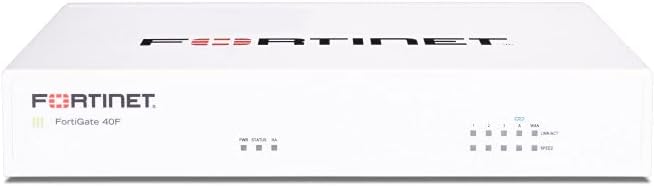
The FortiGate 40F is a compact firewall appliance tailored for small to mid-sized businesses requiring reliable security in a space-saving form factor. It delivers high-performance security through purpose-built security processor technology that handles encrypted traffic efficiently without slowing down your network.
We may earn a commission when you buy through this link, at no additional cost to you.
Standout features include the fanless design that ensures quiet operation perfect for office environments, and the user-friendly management console that simplifies network automation. AI-powered FortiGuard Labs integration provides comprehensive cybersecurity that identifies both known and unknown threats automatically.
Users should note this appliance is sold without a subscription, so additional costs apply for full threat protection services. The limited number of ports may require switches for larger LAN configurations compared to models with more built-in interfaces.
Choose this if you need a silent, efficient firewall for branch offices or small business locations. Its Zero Touch Integration with Fortinet’s Security Fabric makes deployment incredibly simple for network teams wanting quick setup and consistent policy enforcement.
Dedicated hardware accelerates inspection tasks to maintain high throughput speeds even when deep packet inspection is active on all traffic.
Allows automated deployment and policy synchronization with other Fortinet devices to reduce manual configuration time significantly.
We may earn a commission when you buy through this link, at no additional cost to you.
The Zyxel USGFLEX700 ZyWALL Cyber Security Firewall is a robust solution designed for mid-size offices needing to secure up to 500 users reliably. It offers outstanding throughput with 5400 Mbps SPI firewall performance ensuring fast network speeds while maintaining rigorous security standards.
We may earn a commission when you buy through this link, at no additional cost to you.
Key strengths include the inclusion of a 1-year UTM Security Pack covering anti-malware ransomware blocking and IDP services. The award-winning Nebula Cloud Management solution provides centralized control and easy configuration making network administration much more efficient for IT teams.
Some advanced features like web filtering require additional Gold Security Pack licenses beyond the entry-level package. The high port count offers flexibility but may require careful planning during initial VLAN and WAN configuration to avoid network complexity.
Buy this if your organization supports hundreds of users and needs flexible connectivity options. The comprehensive security bundle ensures you get immediate protection against common threats while benefiting from scalable management tools that grow with your business.
Delivers 5400 Mbps SPI firewall speeds to prevent bottlenecks even when multiple users are accessing bandwidth-intensive applications simultaneously.
Centralizes security policy management across multiple devices allowing remote monitoring and configuration without onsite physical access.
We may earn a commission when you buy through this link, at no additional cost to you.
The Zyxel USGFLEX100H Firewall balances powerful throughput with flexible configuration options ideal for businesses growing beyond basic router capabilities. It supports up to 50 users and provides four Gbps SPI firewall throughput ensuring stable performance for small to medium office networks.
We may earn a commission when you buy through this link, at no additional cost to you.
Its standout feature is the flexible software-defined ports that allow you to assign any of the eight RJ-45 ports as WAN or LAN dynamically. Offline-capable setup and updates ensure you can manage firmware securely without relying on external internet connectivity for configuration changes.
The Entry Defense Pack includes reputation filtering and visibility but lacks full anti-malware and sandboxing which require the Gold Security Pack license. Setup via Nebula portal wizard is simple but may lack depth for complex enterprise policy requirements without additional subscriptions.
Select this if you want a compact, fanless unit that supports scalable software-defined networking needs. Its centralized configuration and policy sync features streamline network administration for IT professionals managing multiple security endpoints remotely.
Allows dynamic allocation of network ports to WAN or LAN roles reducing the need for physical re-cabling during network changes.
Enables secure maintenance via local FTP ensuring your firewall remains updated even if internet access is temporarily restricted for security.
We may earn a commission when you buy through this link, at no additional cost to you.
The SonicWall TZ280 Next-Gen Firewall Appliance is engineered to provide enterprise-grade security features for small to medium businesses seeking a reliable network defense. It delivers up to 2.5 Gbps firewall inspection speed powered by SonicWall’s patented Reassembly-Free Deep Packet Inspection engine.
We may earn a commission when you buy through this link, at no additional cost to you.
A key strength is the zero-touch deploy capability that simplifies installation and management on-box or via the cloud Network Security Manager. Secure SD-WAN capabilities plus Zero-Trust Network Access keep distributed sites and remote workers protected consistently across different locations.
While the hardware is robust note that security services and firmware updates must be purchased separately to activate full protection. The limited number of gigabit ports may require additional switches if your office requires extensive wired connections.
Buy this if you need a compact desktop firewall that balances performance and ease of use for distributed sites. The combination of strong inspection speeds and cloud management tools makes it a solid choice for growing businesses prioritizing remote worker security.
Patented engine technology accelerates packet inspection by bypassing traditional reassembly steps to maintain high speeds during deep scans.
Allows initial configuration to be pushed remotely saving time and technical resources during the initial installation phase.
We may earn a commission when you buy through this link, at no additional cost to you.
The FortiGate-60F Hardware Bundle provides medium-sized businesses with comprehensive security services bundled directly with the appliance for immediate deployment. It includes 36 months of FortiCare Premium and FortiGuard Unified Threat Protection ensuring you have essential defenses active from day one.
We may earn a commission when you buy through this link, at no additional cost to you.
This solution delivers unified threat protection that secures against advanced online threats with comprehensive web filtering and anti-botnet technologies. FortiCare Premium ensures high-quality support and service continuity which is vital for maintaining uptime in business-critical environments.
The hardware capacity is tailored for medium businesses so larger enterprises may find it insufficient for high-volume traffic. The premium bundle price reflects the included services but may exceed budgets for organizations that prefer hardware-only purchases.
Purchase this if you need immediate protection without worrying about separate subscription management. The reliable customer support and advanced filtering technologies make it an excellent choice for organizations wanting to simplify their security procurement process.
Combines multiple security layers including anti-malware web filtering and intrusion prevention into a single comprehensive service package.
Offers priority access to Fortinet experts ensuring rapid resolution of technical issues and continuous service continuity.
We may earn a commission when you buy through this link, at no additional cost to you.
The Sophos XGS 128 (Gen2) is a purpose-built next-generation firewall appliance designed for high performance and reliable operation in larger business networks. It provides up to 19.1 Gbps firewall throughput and nine 2.5 GE copper ports supporting heavy network loads with ease.
We may earn a commission when you buy through this link, at no additional cost to you.
Key features include resilient SD-WAN connectivity and intelligent traffic routing across multiple WAN connections. The VPN ready architecture ensures secure site-to-site networking and encrypted remote employee access which is essential for modern distributed workforces.
This model is sold as hardware only meaning you must add a Sophos subscription to enable IPS, web security, and advanced threat defenses. The high port count and throughput make it less suitable for very small offices with limited connectivity requirements.
Select this if you manage a larger office needing extensive 2.5 Gigabit connectivity and high speed. The resilient connectivity features make it ideal for enterprises that cannot afford downtime and require intelligent traffic routing capabilities.
Provides nine copper ports supporting 2.5GE speeds delivering flexible high-bandwidth connections without requiring additional switches.
Automatically directs network traffic across multiple WAN links based on performance metrics ensuring optimal application speed.
We may earn a commission when you buy through this link, at no additional cost to you.
The Cisco ASA5525-X Security Appliance Firewall offers a cost-effective solution for businesses needing reliable enterprise-grade security without buying new hardware. As a renewed unit it provides the classic Cisco firewall platform known for stability and robust security management features.
We may earn a commission when you buy through this link, at no additional cost to you.
Its standout feature is the eight gigabit Ethernet ports providing versatile connectivity for various network segments at a very competitive price point. This appliance is designed for users familiar with Cisco security configurations who prefer legacy hardware stability over the latest interfaces.
Older hardware may lack support for modern high-speed encryption standards and newer features found in next-generation models. Renewed products rely on third-party refurbishment quality so warranty terms may differ from new equipment purchases.
Choose this if you operate a budget-conscious environment requiring proven Cisco security performance. The classic platform ensures compatibility with existing infrastructure while delivering essential firewall protection at a fraction of the cost of current models.
Delivers the mature and proven Cisco ASA operating system which offers deep customization options for complex network security rules.
Provides access to trusted enterprise hardware features at a significantly lower price point for organizations prioritizing cost savings.
We may earn a commission when you buy through this link, at no additional cost to you.
Selecting the right hardware firewall involves balancing performance, security features, and cost to meet your specific network demands.
Throughput measures how much data the firewall can inspect per second. High bandwidth applications and cloud services require appliances with higher throughput to prevent bottlenecks. Always choose a model rated above your maximum internet speed to ensure consistent performance.
Prioritize hardware that supports your current speeds plus future growth to avoid premature upgrades.
Next-generation firewalls include intrusion prevention systems (IPS) and malware protection that go beyond basic packet filtering. Advanced models offer sandboxing to detect zero-day threats and SSL inspection to analyze encrypted traffic for hidden risks.
Ensure the appliance includes essential IPS features or supports subscriptions to enable advanced threat protection layers.
Check the number and type of ports available on the device. Look for multiple Gigabit or 2.5 Gigabit Ethernet ports to support high-speed LAN and WAN connections. SFP ports provide flexibility for fiber optic links if needed for backbone networks.
Verify that the port count matches your network layout to reduce the need for additional switches or complex cabling.
A user-friendly management interface simplifies configuration and ongoing monitoring. Cloud-based management options allow remote administration which is vital for distributed networks. Consider models with centralized consoles if you manage multiple devices.
Opt for intuitive software that reduces the learning curve and minimizes configuration errors in your network.
SD-WAN functionality allows intelligent routing across multiple WAN links improving reliability and application performance. This feature is crucial for businesses relying on cloud applications and remote connections. Ensure the firewall supports secure SD-WAN if you have multiple ISPs.
Choose appliances with integrated SD-WAN to avoid the complexity of separate routing devices.
Your firewall should accommodate future growth in users and bandwidth without needing replacement. Look for hardware with expandable licensing options and upgradeable firmware support. Consider the device's maximum session limits compared to your current needs.
Investing in a scalable appliance ensures your security infrastructure evolves alongside your business requirements efficiently.
Many firewalls are sold without service subscriptions which are required for updates and threat intelligence. Factor in the long-term cost of licenses for anti-malware and web filtering when comparing prices. Some vendors offer bundled packages with longer terms.
Calculate total cost of ownership including hardware and recurring service fees to avoid budget surprises.
The physical size and mounting options determine where you can place the firewall. Desktop units save rack space while rackmountable models offer better organization in server closets. Ensure ventilation requirements are met for reliable operation.
Select a form factor that fits your available space and cooling environment to maintain hardware stability.
Begin by connecting your internet line to the designated WAN port and your internal network to LAN ports. Power on the device and access the web interface using the default credentials provided in the documentation. Change these default passwords immediately to prevent unauthorized access.
Configure your security policies based on your business needs defining which traffic is allowed or blocked. Enable intrusion prevention and malware protection to ensure comprehensive coverage. Regularly update firmware to patch vulnerabilities and maintain optimal security posture.
Monitor logs and alerts daily to identify potential threats or configuration issues. Schedule regular performance reviews to ensure the appliance handles traffic efficiently as your network grows. Proper maintenance ensures your firewall remains effective against evolving cyber threats.
Hardware firewalls are physical devices that protect an entire network by filtering traffic before it reaches internal devices. Software firewalls are installed on individual computers and protect only that specific endpoint. Hardware firewalls offer broader protection and better performance for multiple users.
Many hardware firewalls require subscriptions for advanced features like threat protection updates and cloud management. Basic hardware-only units may function without subscriptions but lack the latest security definitions. Check vendor policies to understand ongoing costs.
Firewalls inspect incoming traffic for known malicious signatures and suspicious patterns. Next-generation models include anti-malware and sandboxing that can detect ransomware before it infects your systems. Regular updates ensure protection against emerging variants.
Yes, advanced firewalls offer SSL inspection to decrypt and analyze encrypted traffic for threats. This feature prevents malware from hiding inside secure connections but requires proper configuration. Not all models support deep inspection of encrypted protocols.
SD-WAN enables intelligent routing across multiple internet connections to improve speed and reliability. Firewalls with SD-WAN support allow seamless failover and application prioritization without additional hardware. This is ideal for businesses with multiple ISPs.
Updates are typically applied through the web management interface by checking for new versions online. Some models support offline updates via USB or local network transfer. Always backup configurations before updating to prevent data loss.
Yes, hardware firewalls provide essential network protection that software alone cannot match. They defend all devices on your network from external attacks consistently. Small businesses are often targets so dedicated hardware security is critical.
With proper care and regular updates most hardware firewalls last five to seven years before becoming obsolete. Performance needs and software support limits usually dictate replacement cycles. Invest in models with long-term vendor support.
The top picks highlight excellent options for various needs with Fortinet FortiGate-70G leading in overall performance. Budget-conscious buyers will appreciate the Netgate 1100 pfSense+ for its flexibility and cost savings.
Prioritize features like throughput and SD-WAN capabilities to match your business size and growth plans. Ensure you account for ongoing subscription costs to maintain full protection.
Prices fluctuate regularly so always verify current offers before purchasing. Selecting the right appliance ensures robust security and reliable network performance for your organization.