
Acer Nitro V Gaming Laptop
4.6Editor score
RTX 4050 GPU
165Hz Refresh Rate
1TB Gen 4 SSD
Thunderbolt 4 Port
Finding the right gaming laptop for Diablo 4 requires balancing raw power with portability. This guide compares leading models equipped with high refresh displays and strong GPUs to ensure smooth combat.
We evaluated each system based on thermal performance, display quality, and processing power. Our list covers diverse options from budget friendly picks to premium machines built for long gaming sessions.
Each pick highlights key strengths and potential trade offs for players. Note that prices change frequently so check current listings before making your final decision for the best deal available today.
4.6Editor score

4.4Editor score

4.3Editor score
As an Amazon Associate we earn from qualifying purchases.
This side by side comparison highlights key specifications across all ten selected laptops to help you quickly identify the model that best fits your performance needs and budget constraints.




This ASUS ROG Strix G16 delivers exceptional performance for Diablo 4 with its RTX 5060 and 165Hz display. It ranks first due to its balanced specs and reliable thermal management.
We may earn a commission when you buy through this link, at no additional cost to you.
The 16 inch screen offers smooth visuals essential for fast paced combat. DLSS 4 technology boosts frame rates allowing you to enjoy high settings without lag during intense dungeon raids.
While 16GB RAM is standard it might need upgrades for heavy multitasking. The cooling keeps temps low but fans can get loud under full load for extended sessions.
Gamers seeking a reliable machine will appreciate the robust build and features. This model stands out as the top pick for balanced power and portability in current market options.
The 165Hz screen ensures fluid motion which is crucial for precise aiming in Diablo 4.
ROG intelligent cooling keeps the system quiet and efficient during long gaming marathons.
We may earn a commission when you buy through this link, at no additional cost to you.
The Acer Nitro V 16S stands out with 32GB of RAM making it ideal for multitasking gamers. Its AI enhanced CPU provides excellent support for modern game engines and streaming.
We may earn a commission when you buy through this link, at no additional cost to you.
With a 180Hz display you get incredibly smooth visuals. The RTX 5060 handles ray tracing well ensuring that dark areas in Sanctuary look immersive without stuttering frames.
Although it lacks Wi-Fi 7 the connection remains stable for online play. The chassis is slightly bulkier which might matter if you plan to travel frequently with your laptop.
This system is perfect for streamers who need extra memory headroom. It offers a powerful setup at a competitive price point for those prioritizing performance over portability.
32GB DDR5 ensures you can run Discord Chrome and the game simultaneously without slowdown.
The Ryzen AI cores help with background tasks improving overall system responsiveness.
We may earn a commission when you buy through this link, at no additional cost to you.
This Acer Nitro V offers an affordable entry into high performance gaming. It handles Diablo 4 well at lower settings thanks to its solid processor and display capabilities.
We may earn a commission when you buy through this link, at no additional cost to you.
The 165Hz screen provides fluid motion which is key for dodging attacks. With a TB drive you have plenty of space for your game and other titles without immediate upgrades.
The RTX 4050 is capable but limits ultra settings. It remains a strong choice for budget conscious gamers who want a reliable machine for casual and competitive play.
Ideal for students or casual gamers this model delivers value. Its Thunderbolt 4 port adds versatility for connecting external monitors or docks when needed at home.
Gen 4 SSD ensures quick load times into worlds and fast booting for daily use.
Thunderbolt 4 allows for fast data transfer and external display support easily.
We may earn a commission when you buy through this link, at no additional cost to you.
This premium ROG Strix G16 pushes limits with its RTX 5070 Ti and 240Hz screen. It delivers stunning visuals that make Diablo 4 look incredibly detailed and vibrant.
We may earn a commission when you buy through this link, at no additional cost to you.
The 2.5K resolution enhances texture quality significantly. You can spot enemies easier in dark caves while maintaining high frame rates thanks to the powerful GPU.
The Ultra 9 processor ensures smooth multitasking. However the high performance comes at a cost and battery life will be short when gaming unplugged.
Recommended for enthusiasts who demand the best experience. This machine is perfect for stationary setups where power and display quality are your main priorities for gameplay.
2.5K resolution brings sharp details to every character and environment in the game.
RTX 5070 Ti ensures you can max out settings without worrying about performance drops.
We may earn a commission when you buy through this link, at no additional cost to you.
The MSI Cyborg 17 offers a massive 17.3 inch screen for immersive gaming. It packs strong performance in a surprisingly thin chassis making it unique for its class.
We may earn a commission when you buy through this link, at no additional cost to you.
Diablo 4 looks expansive on this larger display. The RTX 5060 keeps frame rates steady ensuring that you never miss a boss attack due to lag.
While thin it is heavy at 5.5 lbs so portability is relative. The fans can get noisy when pushed but the cooling ensures the system stays stable.
Great for home use or casual gaming on the go. If screen real estate is your priority this model delivers a desktop like experience in a laptop form.
17.3 inches provides a wider field of view which enhances immersion in the game.
Cooler Boost shared-pipe design helps maintain performance during long gaming sessions.
We may earn a commission when you buy through this link, at no additional cost to you.
The HP Victus is a reliable mid range laptop with strong specs. Its 32GB RAM allows for smooth multitasking which is useful for background apps while playing Diablo 4.
We may earn a commission when you buy through this link, at no additional cost to you.
The 144Hz display is good though not the fastest available. It provides clear visuals and the RTX 4050 handles the game well at medium settings easily.
This model scores high on reliability and stability. It might lack flashy features but it delivers consistent performance for those who want a no fuss gaming experience.
Perfect for casual gamers and productivity users alike. The balanced mix of memory and speed makes it a versatile choice for various tasks beyond just gaming.
32GB RAM ensures you have plenty of headroom for heavy multitasking needs.
The IPS panel offers consistent colors and viewing angles for comfortable gaming.
We may earn a commission when you buy through this link, at no additional cost to you.
This budget Acer Nitro V offers a low cost entry into gaming. It handles Diablo 4 adequately for casual play though you may need to upgrade RAM eventually.
We may earn a commission when you buy through this link, at no additional cost to you.
The 165Hz display provides smooth motion even with limited power. The 512GB SSD is fast but fills up quickly with modern game sizes and updates.
While 8GB RAM is minimal it works for basic gaming. Expect to see reduced settings for smooth performance but the visual experience remains decent for the price.
Best for students or casual users on a tight budget. It serves as a solid starter laptop that can handle your gaming needs while you save for future upgrades.
The i5 processor handles entry level gaming tasks efficiently for casual users.
165Hz ensures motion blur is minimized even with mid tier hardware capabilities.
We may earn a commission when you buy through this link, at no additional cost to you.
This Nitro V model brings a modern 180Hz display to the mid range. It offers a great balance between cost and visual quality for Diablo 4 players.
We may earn a commission when you buy through this link, at no additional cost to you.
The RTX 5050 is capable for 1080p gaming. You get DLSS support which helps maintain frame rates without sacrificing too much visual fidelity during battles.
The WUXGA resolution provides sharp details on a 16 inch screen. It ensures text and enemy models are clear enough for competitive play in dungeons.
Ideal for gamers who value smooth visuals over raw power. This laptop is a great choice for those who want a premium display experience on a reasonable budget.
WUXGA resolution offers sharper images than standard Full HD panels.
Dual-fan cooling ensures the system remains stable under gaming loads.
We may earn a commission when you buy through this link, at no additional cost to you.
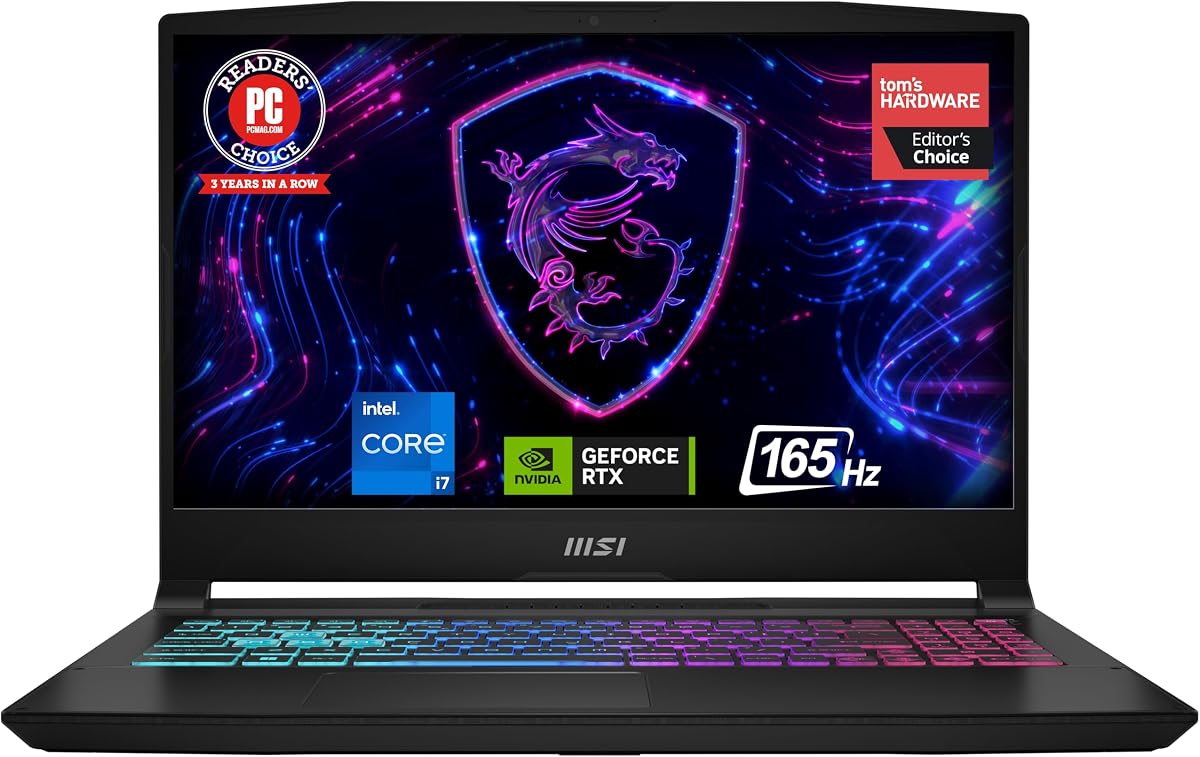
The MSI Katana 15 stands out for its RTX 4070 at this price point. It provides excellent power for Diablo 4 ensuring high frame rates even at QHD resolution.
We may earn a commission when you buy through this link, at no additional cost to you.
The 165Hz QHD screen brings vivid colors and detail. This setup is great for those who want sharp visuals without moving to a heavier 17 inch chassis.
Cooler Boost 5 keeps the system running smoothly. It helps manage heat well though fans can become audible during intense raid bosses or high load sessions.
Recommended for gamers focused on performance. It delivers strong raw power making it a great option for those prioritizing GPU capability over battery life.
QHD resolution enhances visual fidelity significantly for immersive gameplay experiences.
RTX 4070 delivers high frame rates suitable for competitive gaming needs.
We may earn a commission when you buy through this link, at no additional cost to you.
The GIGABYTE Gaming A16 offers a slim profile with modern tech. It combines an RTX 5060 with a Ryzen 7 processor for solid performance in Diablo 4.
We may earn a commission when you buy through this link, at no additional cost to you.
The 180-degree hinge makes sharing screens easy. This design is practical for collaboration and the slim chassis makes it easy to transport compared to bulkier models.
Performance is consistent with the RTX 5060 GPU. While it is powerful enough for high settings battery life will be limited during intensive gaming sessions unplugged.
Great for users needing a thin laptop for gaming. It balances portability and power making it a strong contender for those who value sleek design.
19.45mm thin chassis makes this laptop easy to carry anywhere.
180-degree hinge allows for flexible positioning during work or play.
We may earn a commission when you buy through this link, at no additional cost to you.
Choosing the right gaming laptop for Diablo 4 involves balancing graphics power display quality and budget. This section details the key factors to consider.
The GPU is the most critical component for smooth gameplay. Aim for at least an RTX 4050 or higher to handle ray tracing and DLSS features effectively.
Look for models with RTX 50 series GPUs for future proofing and better AI driven rendering.
A high refresh rate is essential for fast paced action. At least 144Hz is recommended but 165Hz or higher provides smoother motion during combat.
Prioritize displays with low response times to reduce ghosting during fast movements.
16GB of RAM is the sweet spot for modern gaming. More memory helps with background tasks and multitasking without performance hits.
Ensure you have at least 1TB of SSD storage to hold large game files and updates.
Modern multi core CPUs like the Intel Core i7 or Ryzen 7 series are ideal. They handle game physics and AI smoothly.
Avoid older generations if possible to ensure longevity and better efficiency.
Effective cooling prevents throttling during long gaming sessions. Look for systems with vapor chambers or multiple fans.
Check reviews regarding fan noise to ensure comfort during extended use.
If you plan to travel with your laptop consider weight and battery life. Thinner models are better for carrying but may have reduced cooling.
Balance size with performance needs based on where you play most often.
Wi-Fi 6E or 7 ensures stable online connections. This is crucial for multiplayer modes and updates.
Check for USB ports to connect controllers or external storage devices easily.
A comfortable keyboard is important for long gaming sessions. Look for good key travel and a backlit option.
A full size numpad can be useful for productivity tasks after gaming.
Always keep your laptop on a hard flat surface to ensure proper airflow. This prevents overheating and extends the life of internal components.
Use a cooling pad if you plan to game for more than an hour. This helps maintain low temperatures and keeps fans running quietly.
Regularly update your GPU drivers and Windows to get the latest performance fixes. Keeping software current ensures you can run Diablo 4 without compatibility issues.
Yes most gaming laptops can run Diablo 4 effectively. You may need to adjust settings depending on your GPU and display capabilities.
An RTX 4050 or higher is recommended for smooth gameplay. This ensures you can utilize ray tracing and DLSS features.
Yes 16GB is sufficient for gaming alone. If you multitask with many apps you might prefer 32GB.
Yes higher refresh rates reduce motion blur making fast combat smoother. Look for at least 144Hz for best results.
Very important. A strong CPU ensures stable frame rates during intense battles. Look for modern Core i7 or Ryzen 7 processors.
A dedicated gaming laptop ensures the best performance. Integrated graphics may struggle with high settings and updates.
Many allow RAM upgrades. Check the specific model details to see if you can add more memory later.
We reviewed ten top laptops for Diablo 4 ranging from budget friendly picks to premium machines. Each offers distinct benefits depending on your specific needs.
Prioritize the GPU and display refresh rate for the best experience. These factors directly impact your gameplay fluidity and visual quality.
Remember that prices change so check current listings before buying. This guide helps you narrow down the best choice for your gaming setup.