
Motherboard USB 2.0 to Type C Front Panel Cable
4.8Editor score
Affordable 9pin USB 2.0 adapter
Compact 6.6 inch cable length
Simple plug and play installation
Front Panel USB C Headers allow modern connectivity on older desktop cases by converting internal motherboard ports to accessible front panel slots. These adapters ensure your PC supports the latest high speed devices without needing a full system upgrade or complex internal cabling solutions.
We evaluated ten top rated options based on data transfer speeds compatibility with various motherboard headers and physical build quality. Our analysis focuses on real world performance reliability and ease of installation to help you find the most suitable solution for your specific build requirements.
Each pick highlights unique strengths such as budget friendly pricing premium multi port hub capabilities or specialized high speed support. Please note that product availability and pricing can change frequently so verify current details before making your final purchase decision online.
4.8Editor score

4.6Editor score

4.6Editor score
As an Amazon Associate we earn from qualifying purchases.
The following table provides a side by side comparison of all ten selected Front Panel USB C Headers focusing on their key specifications and compatibility requirements to help you make an informed decision.


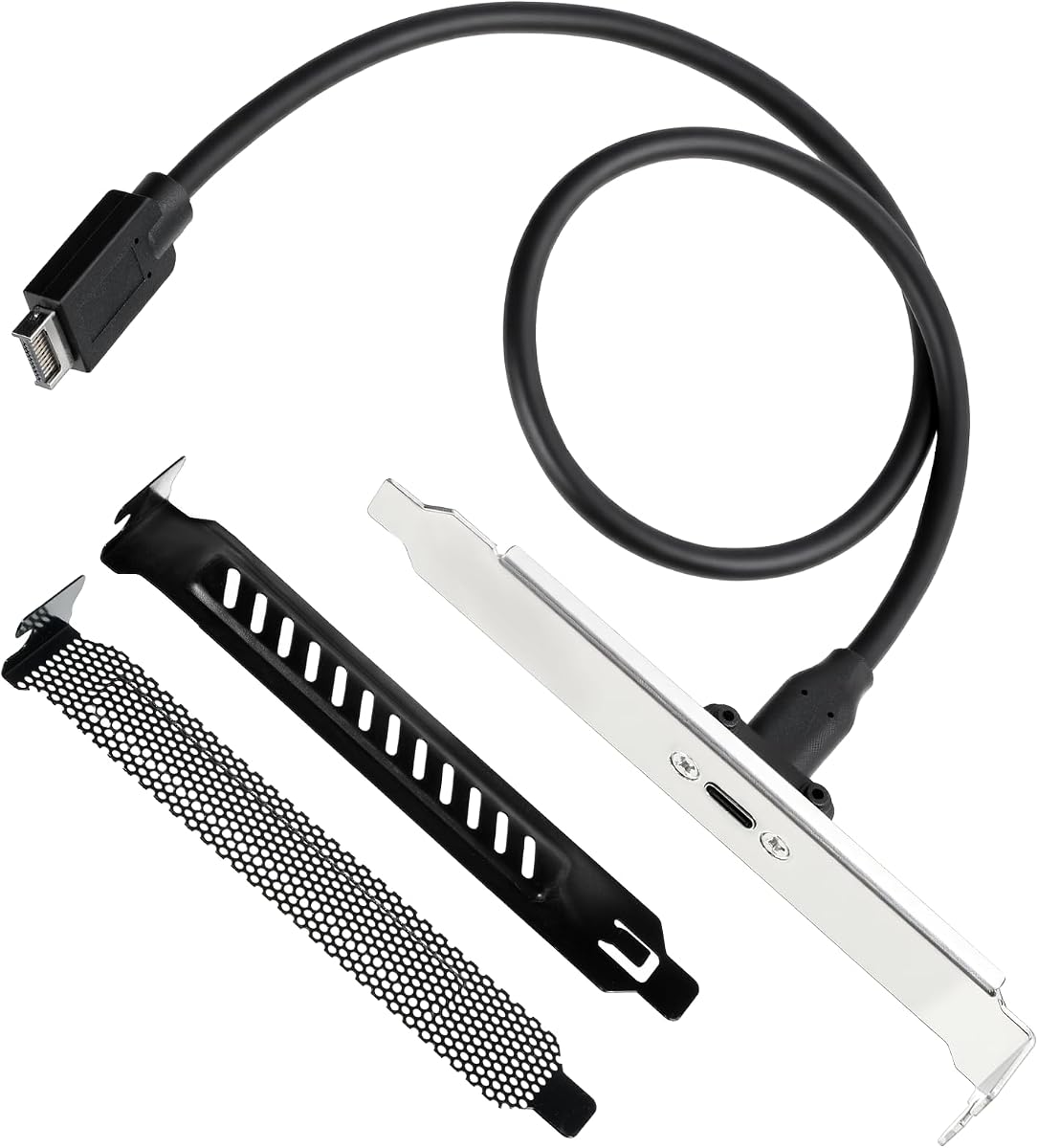


This GRAUGEAR adapter stands out as the top choice for users seeking high speed connectivity. It supports the latest USB 3.2 Gen2x2 standard delivering up to 20Gbps transfer speeds when compatible with your motherboard.
We may earn a commission when you buy through this link, at no additional cost to you.
Its sturdy metal construction and included PCIe bracket ensure a secure fit in your case. The fully double shielded EMI/EFI wires protect data integrity by preventing internal and external noise interference during use.
While it requires a specific Type-E header which some older motherboards lack the performance benefits are significant. Users needing fast external storage or high bandwidth peripherals will find this speed essential.
This product is ideal for modern builds requiring reliable front panel USB-C access. It offers a perfect balance of speed durability and ease of installation for demanding users.
Supports USB 3.2 Gen 2×2 for up to 20Gbps speeds ideal for large files.
Sturdy metal construction and shielded wires ensure durability and signal stability.
We may earn a commission when you buy through this link, at no additional cost to you.
This adapter is designed for users who need reliable high speed connectivity. It supports USB 3.2 Gen2x2 providing up to 20Gbps transfer speeds for compatible devices.
We may earn a commission when you buy through this link, at no additional cost to you.
The build quality is solid with a sturdy metal construction and included bracket for secure mounting. Shielded wires help prevent noise interference ensuring stable data transmission.
Installation is straightforward with plug and play functionality requiring no drivers. However users should verify their motherboard has the required Type-E header before purchasing.
It is a great choice for expanding front panel ports with high performance capabilities. This product ensures modern devices can connect efficiently to your desktop PC.
Provides 20Gbps speeds suitable for modern USB-C devices and high bandwidth tasks.
Includes a PCI bracket for stable installation in your PC case.
We may earn a commission when you buy through this link, at no additional cost to you.
This adapter offers flexibility with both USB-C and USB-A front panel options. It supports up to 20Gbps on the USB-C side making it suitable for fast data transfer.
We may earn a commission when you buy through this link, at no additional cost to you.
The inclusion of both 20-pin Type-E and 19-pin USB3.0 connectors allows it to work with a wider range of motherboards. Shielded wires ensure reliable signal integrity.
Installation requires checking for both headers on your motherboard which might be tricky on older systems. The metal construction adds durability to the unit.
It is a strong choice for users wanting both modern USB-C and traditional USB-A access. This adapter expands your connectivity options significantly.
Offers both USB-C and USB-A front panel ports for diverse device connectivity.
Includes adapters for both Type-E and USB3.0 headers for broader support.
We may earn a commission when you buy through this link, at no additional cost to you.
This hub provides four ports in a compact form factor replacing your old floppy drive bay. It delivers 10Gbps speeds on both USB-C and USB-A ports.
We may earn a commission when you buy through this link, at no additional cost to you.
The metal build ensures durability while included safety features like over-current and over-voltage protection protect your devices. Six screws are included for stable mounting.
Users need to ensure their power supply has a SATA connector which might limit older systems. The performance and capacity make it worth the extra requirement.
Ideal for users needing multiple high speed connections simultaneously. This hub turns an unused bay into a powerful connection station.
Converts a 3.5 inch bay into four high-speed USB ports for multiple devices.
Includes over-current and over-voltage protection for safe device connection.
We may earn a commission when you buy through this link, at no additional cost to you.
This expansion card offers a unique solution by using a PCIe slot rather than a motherboard header. It provides both USB 3.0 and USB-C front panel access.
We may earn a commission when you buy through this link, at no additional cost to you.
It supports 5Gbps speeds and does not require external power which simplifies installation. The explosion-proof capacitors help ensure stable operation under load.
While it works well on most systems Windows XP and Vista may need drivers. Users with available PCIe slots will find this a convenient upgrade path.
It is perfect for systems lacking USB-C headers but having PCIe slots. This card effectively adds modern connectivity options to your machine.
Uses PCIe x1 slot to add USB-C ports without motherboard header dependency.
Explosion-proof capacitors regulate voltage for reliable device operation.
We may earn a commission when you buy through this link, at no additional cost to you.
This hub delivers high speed connectivity with 20Gbps support on the USB-C port. It includes multiple USB 3.0 ports for versatile device connection.
We may earn a commission when you buy through this link, at no additional cost to you.
Built with sturdy materials it includes over-current and over-voltage protection for safety. Mounting screws are included for secure installation in the case.
Note that it requires both Type-E and USB3.0 headers which limits motherboard compatibility. Performance is excellent for users who meet the hardware requirements.
It is a great choice for those needing multiple high speed front panel ports. This hub significantly enhances your desktop connectivity.
USB-C port supports 20Gbps speeds for rapid file transfers and device sync.
Includes multiple safety measures to protect connected devices from power issues.
We may earn a commission when you buy through this link, at no additional cost to you.
This budget friendly cable brings USB-C connectivity to older motherboards easily. It connects to standard 9pin USB 2.0 headers for basic data transfer needs.
We may earn a commission when you buy through this link, at no additional cost to you.
It offers a simple plug and play experience with no driver installation required. The compact 17cm length fits well in most standard cases.
While it is limited to 480Mbps speeds it works great for charging and low bandwidth devices. The low price makes it accessible for basic users.
Ideal for users on a tight budget needing USB-C access. This cable provides a cost effective way to upgrade front panel options.
Affordable solution to add USB-C ports to older motherboards.
Plug and play design requires no drivers for immediate use.
We may earn a commission when you buy through this link, at no additional cost to you.
This adapter supports high speed data transfer up to 20Gbps for modern devices. It includes metal PCI brackets and covers for a clean look.
We may earn a commission when you buy through this link, at no additional cost to you.
The PVC insulated wiring is durable and flexible enough for most case layouts. Clear labeling ensures correct orientation during motherboard connection.
Some users reported mixed experiences so checking recent reviews is wise before buying. The included covers help maintain dust protection for unused slots.
It is a solid option for users wanting a complete package with covers. This adapter offers good value for standard high speed needs.
Includes PCI slot covers to protect internal ports when not in use.
Made with metal and PVC materials for long-term use and flexibility.
We may earn a commission when you buy through this link, at no additional cost to you.
This cable features an ultra-thin flat TPE design that is highly flexible for routing. It supports up to 10Gbps speeds for USB 3.2 Gen 2 devices.
We may earn a commission when you buy through this link, at no additional cost to you.
The double shielding layer ensures stable signal transmission by reducing interference. Silver plated materials help lower impedance for faster speeds.
The reversible USB-C connector simplifies plug-in convenience without worrying about orientation. It is durable enough to withstand repeated bending and folding.
Ideal for tight case layouts where thick cables are problematic. This cable offers reliable performance with flexible installation options.
Flat TPE cable design allows for easy bending and routing in tight spaces.
Double shielding and silver plating ensure stable fast data transmission.
We may earn a commission when you buy through this link, at no additional cost to you.
This adapter supports 20Gbps speeds and offers multiple USB and USB-C options. It includes sturdy metal construction for long lasting durability.
We may earn a commission when you buy through this link, at no additional cost to you.
Double shielded wires prevent noise interference for stable data transfer. The PCIe bracket ensures secure mounting in your computer case.
Check that your motherboard has both headers before buying to ensure compatibility. The high rating reflects strong user satisfaction with its performance.
It is a great choice for users needing diverse front panel port options. This adapter provides excellent speed and reliability.
Delivers up to 20Gbps speeds for modern USB 3.2 Gen 2×2 devices.
Metal construction and shielded wires ensure reliable long-term operation.
We may earn a commission when you buy through this link, at no additional cost to you.
Selecting the right Front Panel USB C Header requires evaluating several technical and practical factors. This guide breaks down key considerations to help you choose a compatible and high quality adapter.
The most critical factor is ensuring your motherboard has the correct internal header. Modern high speed adapters typically require a USB 3.2 Type-E Key-A 20-pin header while budget options may use older 9pin USB 2.0 headers. Always check your motherboard manual to confirm available headers before purchasing.
Verify your motherboard has the matching header type to ensure the adapter will physically connect and function correctly.
Speed requirements depend on your usage scenarios. If you use external SSDs or high speed peripherals look for adapters supporting USB 3.2 Gen 2×2 for up to 20Gbps. Basic devices like keyboards or mice may only need USB 2.0 speeds which are cheaper.
Choose a speed rating that matches your fastest device to avoid bottlenecks and wasted performance.
The physical length of the internal cable matters for routing inside your PC case. Longer cables like 23.6 inches offer more flexibility but might create clutter. Flat TPE cables are easier to route around components and reduce obstruction.
Select a cable length that fits your case size without blocking airflow or other components.
Quality adapters use shielded wires to prevent EMI and RFI interference which can affect signal integrity. Look for double shielded EMI/EFI cables and sturdy metal brackets that secure the port firmly to the case panel.
Prioritize shielded cables and metal construction to ensure stable and interference-free connections.
Decide whether you need a single USB-C port or multiple ports including USB-A. Some adapters offer hubs that provide several ports replacing old drive bays. Consider how many devices you need to connect simultaneously.
Choose a single port adapter for simple upgrades or a hub for multiple connection options.
Most basic adapters draw power from the motherboard header without extra cables. However larger hubs may require a SATA power connector for stable high current delivery. Ensure your power supply has the necessary connectors if needed.
Check if the adapter needs additional power cables and confirm your PSU has them available.
Most Front Panel USB C Headers are plug and play requiring no driver installation. Look for clear labeling on connectors to avoid incorrect orientation. Some kits include screws or brackets for simpler mounting.
Opt for plug and play solutions with included mounting hardware for a smoother setup experience.
Prices range from affordable basic cables to premium hubs with multiple ports. Higher priced options typically offer better speed support build quality and additional features like protection circuits. Balance cost with your specific needs.
Evaluate your budget against performance needs to find the best value for your build.
Always power down and unplug your computer before opening the case to install the adapter. Connect the internal cable to the motherboard header carefully ensuring correct pin orientation to avoid damage.
Mount the front panel adapter into your chosen slot such as a 3.5 inch bay using the included screws. Secure the metal bracket to the back panel to keep the USB ports stable during use.
Plug in USB-C devices and check connection speeds in your system settings. Avoid bending the internal cables sharply and clean ports regularly to prevent dust accumulation.
Most modern Front Panel USB C Headers operate on a plug and play basis requiring no driver installation for Windows 10 and above. Older operating systems like Windows XP or Vista might need specific drivers from the adapter manufacturer for full functionality.
Compatibility depends on your motherboard having the specific internal header like the Type-E 20-pin port. Older boards may lack these and require adapters that convert legacy 9pin headers though these offer slower speeds.
Type-A headers are typically 19-pin ports found on older boards while Type-E headers are 20-pin ports designed for higher speed USB 3.2 Gen2x2 support. Most modern high-speed adapters use Type-E connections.
Many adapters support up to 100W power delivery enabling fast charging for compatible devices. However charging speed depends on both the adapter and the device's charging capabilities.
Yes if your motherboard has multiple compatible headers you can install multiple adapters. Ensure your power supply has enough connectors for any hubs that require SATA power.
First verify the internal cable is connected securely to the correct header pins. Check your motherboard manual to confirm the header is enabled and working properly.
We reviewed ten excellent Front Panel USB C Headers offering options from budget simple adapters to premium multi-port hubs. Our top picks include the GRAUGEAR 20Gbps extension for speed and the budget motherboard USB 2.0 to Type C cable for affordability.
Prioritize compatibility with your motherboard headers and the required speed for your devices before purchasing. A stable connection and proper shielding are essential for reliable performance in daily use.
Remember to check current availability and pricing before finalizing your choice as product details may change. With the right adapter you can modernize your desktop's front panel connectivity easily.