
Reborn USB to HDMI Adapter
4.1Editor score
1080P 60Hz full HD
Driver installation needed
Supports mirror and extended modes
This guide compares the best Flash Drive to HDMI Adapter options for 2026, evaluating resolution, compatibility, and performance for work and entertainment.
Finding a reliable Flash Drive to HDMI Adapter is essential for modern professionals who need to connect their laptops to larger displays quickly. These adapters transform standard USB ports into high-definition video outputs, enabling seamless presentations and media streaming without needing built-in HDMI ports on older devices.
We evaluated ten top-rated models based on resolution support, driver requirements, and overall build quality. Our comparison focuses on real-world performance across different operating systems, ensuring you find a solution that works reliably with your specific laptop or desktop setup for daily tasks.
Each pick highlights key strengths and potential limitations to help you make an informed decision. Keep in mind that prices and availability can change frequently, so verify the latest details before purchasing to ensure you get the best value for your specific connectivity needs today.
4.1Editor score

4.5Editor score

4.5Editor score
The following table provides a side-by-side comparison of all ten selected models, highlighting their core specifications and unique features to help you identify the best fit for your setup.


The StarTech USB-A 3.0 to HDMI Converter stands out as a top choice for Windows users needing a reliable video output solution. With a strong rating of 4.5 stars, it delivers consistent 1080p60 performance ideal for workstations and home offices.
We may earn a commission when you buy through this link, at no additional cost to you.
Its compact design and USB bus-powered feature make it incredibly easy to use without needing extra power supplies. The adapter supports all major Windows platforms including Intel, AMD, and Snapdragon X Copilot+ PC, ensuring broad compatibility for modern systems.
While it requires administrator rights to install drivers, this is a common trade-off for stability and performance. The lack of macOS support limits its appeal for mixed environments, but for dedicated Windows users, it offers excellent value and reliability.
We recommend this adapter for professionals who need a straightforward way to extend their desktop on Windows machines. It is particularly well-suited for office setups where productivity and consistent video output are paramount requirements for daily operations.
Extending your desktop allows for better multitasking across multiple monitors, significantly enhancing workflow efficiency in professional environments.
Once drivers are installed, the adapter works seamlessly without needing constant configuration, saving time during setup and daily use.
We may earn a commission when you buy through this link, at no additional cost to you.
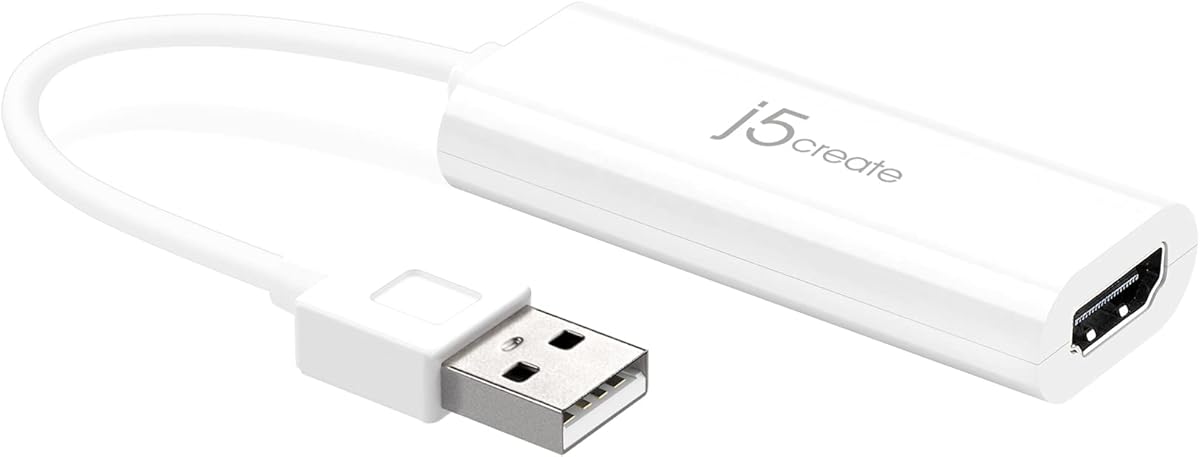
The Reborn USB to HDMI Adapter offers a budget-friendly option for those needing to connect USB ports to HDMI displays. With a rating of 4.1 stars, it provides reliable 1080P@60Hz output suitable for both work and entertainment purposes.
We may earn a commission when you buy through this link, at no additional cost to you.
It supports both Windows and macOS, making it versatile for mixed environments. The adapter allows users to switch between mirror and extended modes, enhancing work efficiency by enabling multiple display configurations easily.
Users must install a driver before use, which adds a step to setup but ensures stable operation. While it cannot be used in BIOS mode, this limitation is minor for most general computing tasks and presentation scenarios.
This adapter is an excellent choice for users seeking a cost-effective solution without compromising on basic functionality. It is ideal for students or home users who need a simple way to connect their laptops to larger screens.
Supporting both Windows and macOS ensures that users across different ecosystems can utilize this adapter for their display needs effectively.
Switching between mirror and extended modes allows users to tailor their visual setup to specific tasks, boosting productivity significantly.
We may earn a commission when you buy through this link, at no additional cost to you.
This USB to HDMI Adapter is designed to connect PC images to various displays including TVs and projectors via USB interfaces. With a rating of 3.8 stars, it offers solid functionality for expanding desktop setups without needing dedicated graphics cards.
We may earn a commission when you buy through this link, at no additional cost to you.
It supports both USB 3.0 and 2.0 ports, delivering 1920×1080 resolution consistently. The ability to support hot-plugging adds convenience, allowing users to connect or disconnect the adapter without restarting their system.
A standout feature is the generous warranty and return policy, providing peace of mind for buyers. While the rating is lower than some competitors, the included support services make it a viable option for budget-conscious users.
We suggest this adapter for users who need a simple way to add a secondary display quickly. It is particularly useful for temporary setups or situations where reliability and customer support are more important than cutting-edge features.
Being able to connect and disconnect without rebooting saves time and enhances flexibility during daily computer usage.
A 36-month warranty and unconditional return policy reflect manufacturer confidence and offer significant protection for your investment.
We may earn a commission when you buy through this link, at no additional cost to you.
The WAVLINK adapter is ideal for users needing to connect multiple monitors simultaneously. With a rating of 4.4 stars, it supports up to six displays and offers resolutions up to 2560×1440, making it perfect for complex work setups.
We may earn a commission when you buy through this link, at no additional cost to you.
It features built-in audio in and out, enhancing usability for presentations and media consumption. The compatibility spans Windows, macOS, ChromeOS, and even Android devices with USB OTG mode, offering broad flexibility across platforms.
Users must install the DisplayLink driver, which adds a step but ensures smooth performance. The adapter includes an LED status display, providing visual confirmation of connection status for added convenience.
We recommend this for professionals or enthusiasts who need a powerful multi-monitor setup without internal hardware changes. It is an excellent solution for traders, designers, or anyone needing extensive screen real estate.
Connecting up to six monitors expands workspace significantly, allowing for complex workflows and multitasking across various applications.
Support for multiple operating systems ensures that the adapter works across different devices, making it a versatile choice for diverse environments.
We may earn a commission when you buy through this link, at no additional cost to you.
This adapter from StarTech delivers exceptional performance with 4K and 1080p dual outputs. With a rating of 4.5 stars, it is designed for IT professionals who need reliable high-resolution displays for critical tasks.
We may earn a commission when you buy through this link, at no additional cost to you.
It supports 4K at 30Hz on one port and 1080p at 60Hz on another, providing flexibility for various display needs. The three-year warranty and free lifetime technical assistance highlight the manufacturer's confidence in the product quality.
While it requires administrator rights for installation, this ensures secure and stable operation within corporate environments. The lack of macOS support is a limitation, but for Windows-based IT setups, it offers top-tier performance.
We suggest this for enterprise users or power users who need robust multi-monitor capabilities. It is an excellent investment for those who prioritize long-term reliability and high-quality video output over cost.
Built for IT professionals, this adapter ensures stable performance in demanding environments, reducing downtime and support requests.
Supporting both 4K and 1080p on dual ports allows users to balance high-resolution content with responsive secondary displays.
We may earn a commission when you buy through this link, at no additional cost to you.
This adapter ensures compatibility with any USB-A laptop through its DisplayLink certification. With a rating of 4.4 stars, it delivers reliable 1080p video and supports extended mode setups for enhanced productivity.
We may earn a commission when you buy through this link, at no additional cost to you.
It includes HDCP 1.4 support, allowing for playback of protected content through HDMI. The compact design and USB bus power feature make it convenient for travel and everyday office use without extra cables.
Users should note that automatic driver installation is required, which can take a few minutes. Despite this minor setup step, the performance and compatibility make it a strong choice for users needing reliable display expansion.
We recommend this for users with older systems or those requiring specific certified solutions. It is particularly valuable for professionals who need a guaranteed working connection across various laptop configurations.
DisplayLink certification ensures the adapter works seamlessly with a wide range of USB-A devices, reducing compatibility headaches.
HDCP 1.4 support allows users to view protected content safely, expanding the utility of the adapter beyond simple presentations.
We may earn a commission when you buy through this link, at no additional cost to you.
This adapter is tailored for iPhone and iPad users needing to connect to TVs or projectors easily. With a rating of 4.2 stars, it supports 4K@60Hz output and includes a dedicated charging port for uninterrupted use.
We may earn a commission when you buy through this link, at no additional cost to you.
The plug-and-play design means no drivers or apps are required, making setup incredibly straightforward. It supports various video apps for streaming, although DRM-protected content from services like Netflix is not supported.
The aluminum alloy casing and braided cable provide durability and better heat dissipation. This makes it suitable for both professional presentations and home entertainment sessions where quality and longevity are important.
We suggest this for iPhone 15/16 users who need a reliable way to display content on larger screens. It is perfect for sharing videos or documents during meetings or family gatherings.
Having a dedicated charging port ensures your device stays powered during long presentation or streaming sessions.
No driver installation is required, allowing for immediate connection and display output with minimal setup time.
We may earn a commission when you buy through this link, at no additional cost to you.
This adapter delivers crisp 1080P 60Hz video with support for 3D displays. With a rating of 4.3 stars, it ensures lag-free video sync making it suitable for gaming or media consumption.
We may earn a commission when you buy through this link, at no additional cost to you.
It works with both Windows and macOS systems, offering broad compatibility for different users. The driver installation process is designed to be user-friendly and runs locally to preserve privacy.
While it is limited to 1080P resolution, the high refresh rate supports smooth motion in videos and games. This makes it a strong option for users looking for fluid visuals rather than higher static resolutions.
We recommend this for casual gamers or home users who want a reliable display solution. It is especially useful for connecting to projectors or large TVs for immersive viewing experiences.
The 1080P 60Hz output ensures smooth motion without delays, providing a better experience for movies and interactive tasks.
Drivers run locally without internet access, ensuring your data remains private during the setup process.
We may earn a commission when you buy through this link, at no additional cost to you.
The BENFEI adapter offers excellent value with support for 4K@60Hz at a budget-friendly price. With a rating of 4.4 stars, it is compatible with a wide range of devices including MacBooks and Samsung Galaxy phones.
We may earn a commission when you buy through this link, at no additional cost to you.
It supports Thunderbolt 3/4/5, ensuring high-speed data and video transmission. The compact design makes it easy to carry in a bag, perfect for business presentations or travel.
Users must ensure their USB-C device supports DP Alt mode for video output. The included 18-month warranty adds peace of mind and reflects the manufacturer's confidence in the product's quality.
We suggest this for budget-conscious users needing high resolution output. It is a versatile choice for anyone with a modern USB-C laptop or phone looking to connect to a monitor or TV.
Supporting 4K@60Hz ensures sharp visuals, making it suitable for detailed work or high-definition media viewing.
Works with various brands and models, ensuring flexibility if you switch devices or use multiple gadgets.
We may earn a commission when you buy through this link, at no additional cost to you.
This adapter allows you to add an additional monitor without opening your computer. With a rating of 4.5 stars, it is designed for environments where multitasking is critical for productivity and efficiency.
We may earn a commission when you buy through this link, at no additional cost to you.
The hot-swappable feature enables you to add or remove monitors without rebooting the system. This flexibility is crucial for professionals who need to switch setups quickly throughout the day.
Driver installation is required to enable functionality, but the process is straightforward. It is an excellent solution for stock markets or editing work where screen space is at a premium.
We recommend this for office workers who need a simple way to expand their workspace. It is an ideal choice for anyone needing to view multiple documents or applications simultaneously.
Connecting or disconnecting the monitor without rebooting saves time and allows for seamless transitions between work setups.
Adding a monitor without internal hardware changes simplifies setup and makes it easy to upgrade your display capability.
We may earn a commission when you buy through this link, at no additional cost to you.
Choosing the right adapter requires understanding your specific needs regarding resolution, compatibility, and usage scenarios. We have identified key factors to help you narrow down your options effectively.
Resolution determines the clarity of your display output. Look for adapters supporting at least 1080p to ensure sharp visuals. If you need higher detail, consider models offering 4K support for a better viewing experience.
Prioritize high resolution if you work with graphics or media frequently.
Check if the adapter supports your OS such as Windows or macOS. Some models are Windows only, while others work across multiple platforms. Ensure the adapter matches your primary device to avoid connection issues.
Always verify system requirements before purchasing to guarantee seamless integration.
Some adapters require driver installation before use. This adds a setup step but often improves stability and performance. Others offer plug-and-play features for immediate use without extra software.
Decide based on whether you prefer convenience or maximum performance stability.
Verify your computer has the correct USB port type such as USB 3.0 or USB-C. Newer standards offer faster data transfer and better video quality. Mismatched ports may limit performance or prevent connection entirely.
Match the adapter to your device's available ports for optimal functionality.
A solid warranty protects your investment against defects. Look for manufacturers offering at least 12 months of coverage and responsive customer support. This ensures you can resolve issues quickly if the device fails.
Prioritize products with good reputations for after-sales service and reliability.
Many modern adapters transmit audio through the HDMI cable. Check if the specific model includes audio pass-through if you plan to use external speakers. This feature simplifies setup by reducing extra cable connections.
Ensure audio support is present if sound is important for your presentations.
Durable materials like aluminum or braided cables prevent wear and tear. A sturdy build ensures the adapter lasts longer under frequent plugging and unplugging. Consider the physical design if you travel often with the device.
Choose a robust design to extend the lifespan of your connectivity solution.
Compare prices against the features offered to find the best value. Sometimes spending more yields better reliability or higher resolution support. Balance your budget with your specific performance needs to avoid overspending.
Focus on value rather than just the lowest price for long-term satisfaction.
First, connect the USB end of the adapter into your computer's USB port. Next, connect an HDMI cable between the adapter and your monitor or TV. Finally, switch your display input to the correct HDMI source to see your screen.
Install any necessary drivers if prompted by the system to enable full functionality. Adjust your display settings in the operating system to extend or mirror your screen as needed for your workflow.
Avoid bending the cable sharply and unplug gently to prevent damage. Store the adapter in a safe place when not in use to keep the connectors clean and functional for future connections.
Not all adapters require drivers, but many need them for full functionality. Always check the product description to confirm driver requirements. Installing drivers ensures stability and enables features like audio support.
It depends on the model as some adapters work with macOS while others are Windows only. Look for compatibility with macOS versions before purchasing. Always verify the supported operating systems listed in the product details.
Check your connections and try switching the HDMI input on your display. Ensure you installed any required drivers correctly on your computer. Restarting your device after connection can also resolve temporary detection issues.
Some adapters allow connecting multiple monitors if your computer has enough ports. Specialized models support up to six displays with the right setup. Check if the adapter supports multi-monitor configurations specifically.
Higher-end adapters support 4K while budget ones may cap at 1080p. Look for specs mentioning 4K or 2160p for high detail. Confirm refresh rates too since some 4K adapters run at lower frequencies.
Many models are plug and play but require a quick driver install on first use. This step ensures stability but takes a few minutes. Once installed, the device works seamlessly without further setup.
Yes, most adapters work with any display featuring an HDMI port including projectors. Simply connect the adapter to the projector via HDMI to use it. Ensure your projector supports the resolution you intend to use.
Use a dry cloth to wipe the exterior gently and avoid liquids. Compressed air can remove dust from ports without risking damage. Keep the connectors clean to ensure a reliable connection with your devices.
We reviewed ten top options ranging from budget-friendly choices to premium multi-monitor solutions. Each model brings unique strengths tailored to different user needs and setups for maximum productivity.
Prioritize resolution and compatibility when making your final decision to ensure the adapter fits your workflow perfectly. Consider the warranty and support options as well for peace of mind during daily use.
Remember to check current prices and availability before buying since these change frequently. Investing in the right adapter now can significantly improve your display experience and workflow efficiency today.