
Bewinner External Optical Drive Enclosure
Fits 9.5mm ultra thin laptop drives
Integrated USB C and USB 3.0 cable
Plug and play without external power
Finding the right external optical drive enclosure is essential for repurposing old disc drives. A good enclosure offers reliable connectivity, robust build quality, and universal compatibility with various drive sizes.
We compared ten highly rated models focusing on USB speed, power requirements, and ease of installation. Our analysis covers both slim laptop drives and full desktop 5.25 inch units.
Each pick below highlights unique strengths and ideal use cases for different users. Keep in mind that availability and pricing may fluctuate over time on major retail platforms.
4.6Editor score

4.6Editor score
As an Amazon Associate we earn from qualifying purchases.
The following table provides a side by side comparison of all ten external optical drive enclosure models reviewed in this guide.




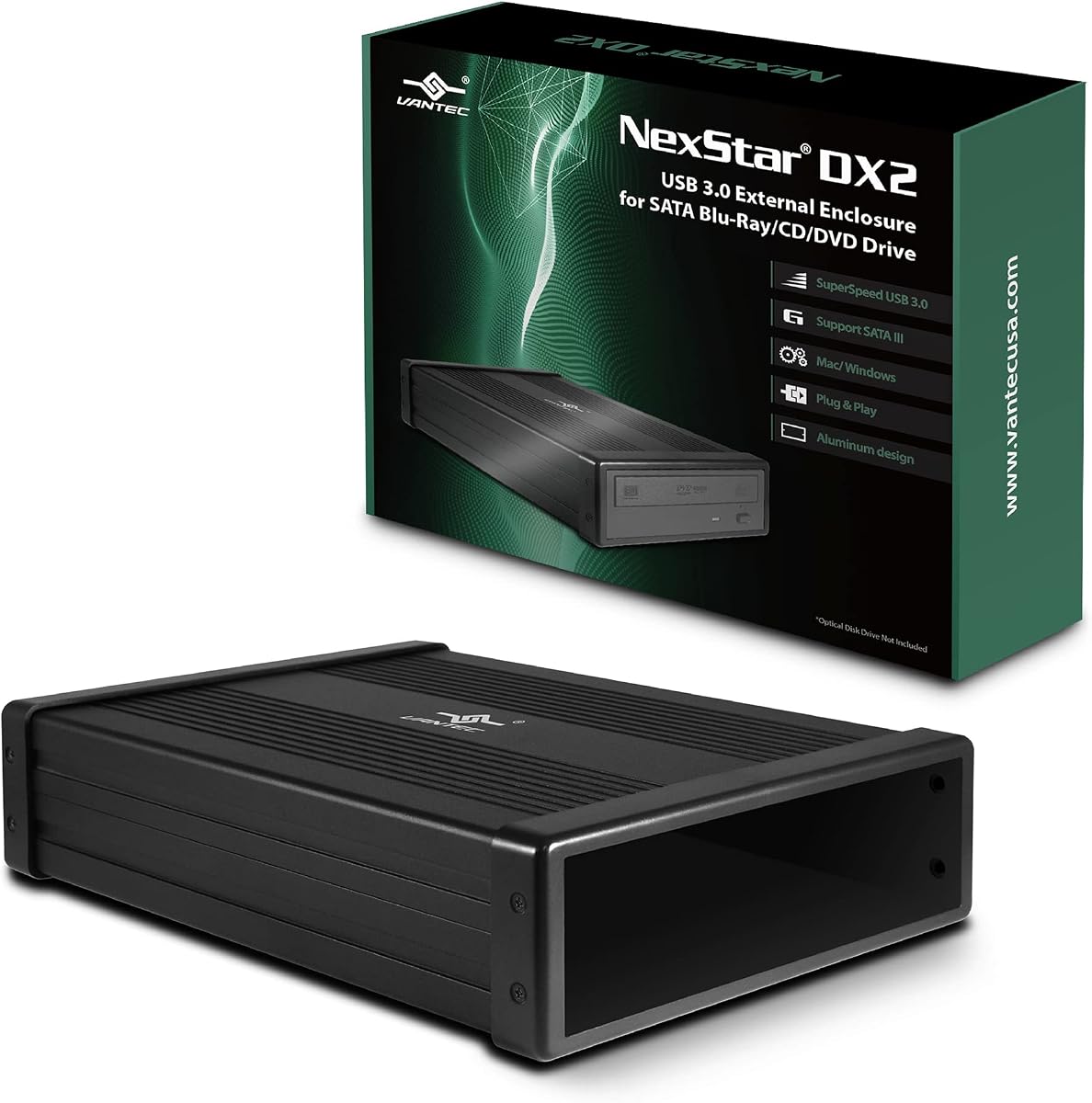
The NexStar DX2 stands out as a top choice for desktop users needing a reliable enclosure for 5.25 inch optical drives. It scores high for its versatility in accommodating different drive depths without requiring precise alignment during installation.
We may earn a commission when you buy through this link, at no additional cost to you.
This enclosure is built with a robust aluminum alloy casing that effectively reduces noise and vibration during read write operations. The included 12V 3A AC adapter ensures stable power delivery which is crucial for full size Blu Ray and DVD drives that draw more current.
One trade-off is that the need for external power makes it less portable than slim drive enclosures. However, for a stationary home or office setup where reliability matters most, this is a minor inconvenience that ensures consistent performance.
If you need to keep an old internal drive working as an external unit without worrying about compatibility issues the NexStar DX2 is the recommended solution. Its plug and play design and tool-free mounting make it ideal for non technical users.
The enclosure features a flexible SATA cable design that allows drives of various depths to be mounted securely without custom brackets or modifications.
By using a dedicated AC adapter this model avoids power throttling issues that can occur when relying solely on USB bus power for high consumption optical drives.
We may earn a commission when you buy through this link, at no additional cost to you.
This enclosure offers a practical solution for converting desktop optical drives into external units with support for drive depths up to 171mm. The aluminum construction ensures effective heat dissipation which helps maintain stable performance during extended burning sessions.
We may earn a commission when you buy through this link, at no additional cost to you.
Users appreciate the inclusion of both USB Type A and Type C ports providing flexibility for modern and older computers. The hot swappable feature allows you to change drives without rebooting your system which is convenient for multi drive setups.
Some users may find the installation process slightly tricky if screw holes do not align perfectly but the provided video guides help resolve these issues. The requirement for external power is expected for full size drives but adds to cable clutter.
For anyone looking to repurpose existing desktop drives without investing in new hardware this enclosure provides excellent value. Its robust design and versatile connectivity options make it a reliable choice for home offices.
The aluminum alloy casing not only protects the drive but also acts as a heatsink to lower operating temperatures and reduce noise during operation.
By offering USB C alongside traditional Type A this model future proofs your setup ensuring compatibility with newer laptops and devices.
We may earn a commission when you buy through this link, at no additional cost to you.
The Bewinner enclosure is an affordable option designed specifically for ultra thin 9.5mm optical drives found in many laptops. Its plug and play nature and lack of external power requirements make it perfect for users on the go.
We may earn a commission when you buy through this link, at no additional cost to you.
This model supports USB 3.0 speeds up to 5Gbps ensuring fast data transfer for reading discs. The woven data cable minimizes signal loss and is designed to fold neatly into the enclosure for easy storage and travel.
While the ABS material is lightweight it may not be as durable as aluminum options under heavy use. Additionally it only fits slim drives so it is not suitable for converting older desktop optical units.
If you have a spare laptop drive and need a quick portable solution this enclosure is an ideal pick. Its simple design and broad system support make it accessible for everyday media playback and file access.
The integrated cables and compact footprint allow this enclosure to fit easily into laptop bags without taking up much space.
You can quickly swap the front panel and insert your drive without tools making setup straightforward for users with limited technical experience.
We may earn a commission when you buy through this link, at no additional cost to you.
Zunate offers a sleek enclosure tailored for 9mm ultra slim SATA drives commonly extracted from laptops. It provides a clean and simple way to reuse old drives without needing additional power bricks or bulky hardware.
We may earn a commission when you buy through this link, at no additional cost to you.
The enclosure comes with an integrated Type C plus USB 3.0 cable that can be folded inside the unit for portability. Its premium brushed material gives it a stylish look while protecting the drive from scratches.
Since this is a bus-powered device it may struggle with older drives that require more power but modern SATA drives work well. The lack of explicit reviews in the data suggests it is a newer model but specs indicate solid performance.
This enclosure is best suited for Mac or Windows users who want a portable way to read CDs or DVDs from a laptop drive. Its straightforward design and OS compatibility make it a convenient choice for media access.
Compatible with both Windows and OS X systems this drive works out of the box on most computers without requiring extra software installation.
The woven data cable helps maintain a stable connection and reduces interference ensuring reliable data transfer during read and write tasks.
We may earn a commission when you buy through this link, at no additional cost to you.
This JOTEC enclosure uses a premium aluminum alloy shell to ensure heat dissipation which is vital for sustained drive operation. It supports both USB 3.0 and Type C connections to adapt to different laptop ports effectively.
We may earn a commission when you buy through this link, at no additional cost to you.
The inclusion of dual data cables and bottom non-slip feet adds convenience and stability to the setup. Users can rely on its plug and play functionality across Windows Linux and Mac OS systems without installing drivers.
It is designed specifically for 12.7mm thick SATA drives so checking your drive dimensions before purchase is necessary. While it lacks external power it works well for standard slim drives that draw minimal current.
For users seeking a balance between durability and modern connectivity this enclosure is a strong contender. Its robust build and wide compatibility make it a practical option for converting spare laptop drives into external units.
Built with INIC1618 solution this drive supports power-saving sleep mode which helps reduce energy usage during idle periods.
It handles various disc formats including CD DVD and BD allowing for versatile playback and burning capabilities across multiple media types.
We may earn a commission when you buy through this link, at no additional cost to you.
The Tbest enclosure stands out for its ability to accommodate both 12.7mm and 9.5mm SATA DVD RW drives. This flexibility makes it a versatile choice for users who may have different spare drives available.
We may earn a commission when you buy through this link, at no additional cost to you.
Powered by the INIC3609 chipset solution it automatically enters sleep mode to save energy and extend hardware life. The dual interface support for SATA I and II ensures it works with a wide range of older and newer drives.
However the product has a lower average rating compared to others in this guide which may indicate occasional build quality issues. Users should be prepared to ensure their drive thickness matches the enclosure capabilities before use.
Despite the mixed ratings it offers a cost-effective way to restore functionality to old optical drives. If you need a budget-friendly option that supports multiple drive sizes it is worth considering for casual use.
The automatic sleep mode reduces power consumption when the drive is idle helping to maintain efficiency during long term storage or travel.
Fully compatible with Windows Linux and OS X systems it ensures that you can use it across different computer environments without hassle.
We may earn a commission when you buy through this link, at no additional cost to you.
Vantec delivers a high-performance adapter designed for SATA optical and storage drives including Blu Ray and DVD units. Its optimized support for SATA I II and III ensures compatibility across a wide range of drive generations.
We may earn a commission when you buy through this link, at no additional cost to you.
One standout feature is the support for UASP which enhances transfer speeds on SuperSpeed USB 3.0 connections. This makes it faster than standard USB bridge controllers especially for large file transfers or data backups.
The anti-slip mat helps dampen noise and protect your drives from movement during use. However users with high power drives might need a separate AC adapter if the provided one is insufficient for their specific model.
For users prioritizing speed and reliability this adapter is a premium choice. Its compact lightweight design makes it easy to store while its hot-swappable feature adds convenience for frequently changing drives.
By leveraging UASP technology this adapter maximizes USB 3.0 performance ensuring quicker data access and improved overall system responsiveness.
The included anti-slip mat not only stabilizes the adapter but also helps reduce vibration noise protecting both the drive and your desk surface.
We may earn a commission when you buy through this link, at no additional cost to you.
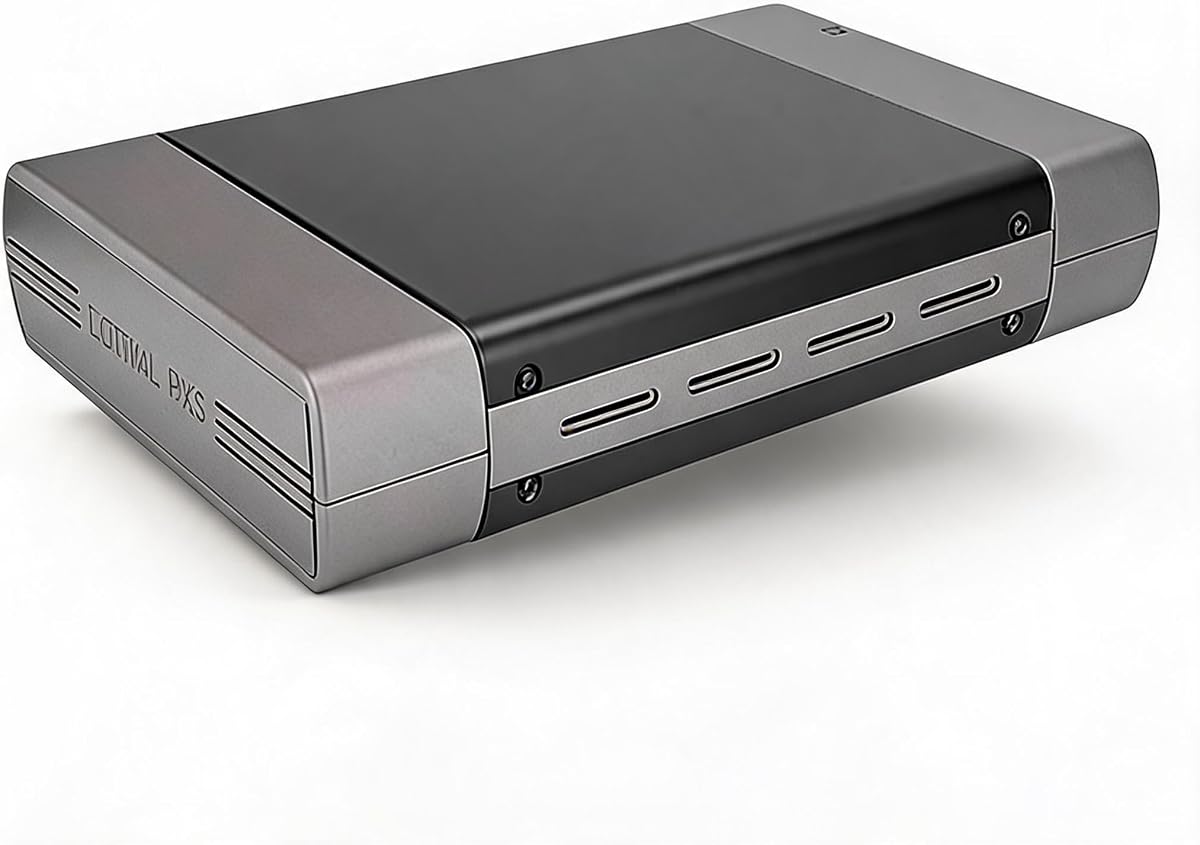
This enclosure is tailored for standard 5.25 inch optical drives and also supports 3.5 inch hard drives for versatile storage solutions. It features a robust aluminum housing that protects the internal drive from wear and bumps.
We may earn a commission when you buy through this link, at no additional cost to you.
The included AC adapter ensures stable power which is essential for desktop drives that often require more energy than USB ports can provide. Setup is simple with all necessary screws and cables included in the package.
One limitation is the reliance on USB 2.0 which is significantly slower than USB 3.0 alternatives. While this is acceptable for occasional reading it may not suit users requiring fast backup or burning speeds.
If you primarily need a stable connection for reading discs or installing software this unit provides reliable performance. Its compact design fits neatly into home offices making it a practical choice for legacy drive usage.
By including an AC adapter this enclosure prevents power drops that can cause read errors or drive failures during intensive use cases.
The aluminum housing helps shield your drive from physical damage while maintaining a lightweight profile that is easy to move around.
We may earn a commission when you buy through this link, at no additional cost to you.
This detachable enclosure is engineered for 9mm ultra slim Serial ATA drives found in most laptops. Its plug and play detection allows for immediate use without needing external power or additional drivers for setup.
We may earn a commission when you buy through this link, at no additional cost to you.
The integrated detachable cable folds neatly into the bottom of the unit providing a clutter-free experience for travel. It supports USB 3.0 speeds up to 5Gbps ensuring efficient data transfer during read and write operations.
While the brushed metal finish adds durability and style it is designed specifically for slim drives so checking your drive thickness is critical. Users can benefit from broad system compatibility ranging from older Windows versions to macOS.
For anyone looking to turn a spare laptop drive into a portable external solution this unit is an excellent option. Its simple installation and reliable performance make it a practical upgrade for accessing optical media on the go.
The cable storage design and slim profile make this enclosure easy to carry in a laptop bag without adding bulk to your travel kit.
Built-in woven cable minimizes signal loss ensuring a stable connection that prevents interruptions during file access or media playback.
We may earn a commission when you buy through this link, at no additional cost to you.
This enclosure offers a tool-free detachable design allowing you to swap drives quickly without screws or technical skills. Its sleek brushed finish resists fingerprints and scratches keeping the unit looking polished on your desk.
We may earn a commission when you buy through this link, at no additional cost to you.
It features an integrated USB 3.0 Type A and Type C cable that folds into the base for tidy storage. The dedicated eject key prevents disc jamming and ensures smooth operation every time you need to access media.
As a budget-friendly option it provides basic functionality without frills making it accessible for casual users. However it is limited to 12.7mm drives so verifying compatibility before purchase is recommended.
For those seeking a no-fuss way to extend the life of an existing optical drive this enclosure is a practical choice. Its simplicity and portability make it well suited for home or office use where convenience matters.
The tool-free design means you can insert and remove drives in seconds making maintenance and replacement incredibly easy for non technical users.
By storing the cable inside the enclosure this unit reduces clutter keeping your desk neat and preventing cable tangles during daily use.
We may earn a commission when you buy through this link, at no additional cost to you.
Selecting the right enclosure depends on your drive size, connectivity needs, and portability requirements. This guide breaks down key factors to help you make an informed decision.
The first critical factor is matching the enclosure to your drive's physical dimensions. Full-size desktop drives are typically 5.25 inches wide and vary in depth from 150mm to 180mm. Slim laptop drives are narrower at 9.5mm or 12.7mm thickness. Always measure your drive before purchasing to ensure a snug fit.
Check the product specifications carefully to confirm whether it supports 5.25 inch or slim drives. Some enclosures are universal but many are designed for one specific form factor.
USB 3.0 offers transfer speeds up to 5Gbps which is significantly faster than USB 2.0. If you plan to read or write large files or use Blu-ray drives opt for USB 3.0 models. USB 2.0 is only suitable for very basic reading tasks.
Modern enclosures often include Type-C ports for better compatibility with newer laptops. Ensure the cable included supports the speed you need.
Slim drives usually draw enough power from the USB port to function without external adapters. Full-size desktop drives often require a dedicated 12V AC adapter to operate correctly. Using an enclosure without proper power can lead to read errors or failure to spin.
Check if the listing includes an AC adapter or if you need to purchase one separately. Always verify the voltage and amperage matches your drive's specifications.
Aluminum alloy cases provide better heat dissipation and protection against impacts compared to plastic. They are heavier but ideal for stationary setups. Plastic enclosures are lighter and more affordable but may wear faster over time.
Look for features like anti-slip feet or vented designs that help keep the drive cool during extended use. A solid build extends the lifespan of your optical drive.
Most modern enclosures are plug and play meaning they work without installing drivers. Ensure the product description states driver-free compatibility with your operating system such as Windows, Mac, or Linux.
This feature saves time and avoids compatibility issues. If drivers are required it may indicate an older model or specific chipset that needs extra steps to function.
Portable enclosures often have integrated cables that fold into the base to reduce clutter. Detachable cables offer flexibility but can get lost. Woven cables are more durable and less prone to signal interference than standard plastic ones.
Consider how you will store the enclosure. If it is for travel a compact design with built-in cable storage is highly beneficial.
Hot swapping allows you to connect or disconnect drives without rebooting the computer. This is useful if you have multiple drives and need to switch between them frequently. It enhances workflow efficiency in multi-drive setups.
Ensure your computer supports USB hot swapping though most modern systems do. This feature adds convenience for users who manage large data archives.
Verify that the enclosure supports your specific operating system. While most support Windows versions from 7 to 11, some may have limited functionality on macOS or Linux without additional software.
Check the product details for system requirements. Universal compatibility ensures the drive works seamlessly across different devices you may own.
To install your optical drive, open the enclosure panel and align the drive with the internal SATA connector. Slide it in gently and snap the panel back into place. For desktop models, ensure all mounting screws are tightened to secure the drive.
Connect the enclosure to your computer using the provided USB cable. If it is a desktop drive, plug in the AC adapter and connect it to a power outlet. Your system should detect the drive automatically without requiring additional software installation.
To maintain the device, avoid exposing it to dust or moisture. Store it in a cool place when not in use. Handle the disc tray carefully to prevent jams and keep the lens clean with a soft dry cloth if reading issues arise.
No, desktop drives are much wider and thicker than slim laptop drives. Enclosures are designed for specific form factors. Using a desktop drive in a slim case is physically impossible and may damage the hardware.
This usually indicates a power issue. Desktop drives often require a separate AC adapter which might not be included. Ensure your USB port provides enough power or try using an external power source.
Most modern enclosures are plug and play and do not require drivers. They use standard USB storage controllers that are supported by Windows, Mac, and Linux out of the box.
Enclosures support either SATA or IDE interfaces. Most new drives use SATA. Check your drive label for a flat data cable connector (SATA) or wide ribbon cable (IDE) to buy the correct enclosure type.
Measure the drive from the front panel to the back connector with a ruler. Most enclosures specify a maximum depth they can accommodate. If your drive exceeds this it will not fit securely.
Yes but optical drives are slower than hard drives. They are best used for writing data to discs like backups on CD or DVD rather than storing system files directly on the enclosure.
You can use a high-quality USB extension cable to reach your computer. Ensure the extension supports USB 3.0 if your enclosure requires high speeds to avoid data transfer issues.
Use the manual eject hole on the drive face with a paperclip or use the eject button on the enclosure if available. Avoid forcing the disc out as this can damage the internal mechanism.
Whether you need a robust desktop solution or a portable slim enclosure there is a model for every requirement. The NexStar DX2 and Vantec adapters offer premium performance while budget-friendly options like Bewinner provide great value.
Prioritize compatibility and power needs before making a purchase. Ensure the enclosure matches your drive dimensions and interface type to avoid issues. Choosing the right model extends the life of your old drives.
Prices and stock levels fluctuate regularly so check current availability before buying. With the right enclosure you can keep your optical media accessible without investing in new hardware.