
UGREEN Ethernet Coupler 10Gbps
4.7Editor score
Supports PoE power delivery
Extends up to three hundred feet
Compatible with Cat8 Cat7 cables
This guide compares the top ten Ethernet Line Extender options for 2026 helping you choose the right solution for extending network range across your home.
Finding reliable network connectivity in large homes or offices often requires more than standard routers can provide. An Ethernet Line Extender offers a practical solution by leveraging existing wiring to push data further without new cabling. This guide explores ten top options to help you decide.
We evaluated each product based on speed performance distance reach and ease of setup. Our analysis includes powerline adapters VDSL extenders and copper cable boosters suited for various environments. We considered real world constraints like electrical interference and wall thickness to ensure accurate recommendations.
Each pick highlights key features pros and cons along with ideal use cases. Prices and availability change frequently so always verify current listings before purchasing. Our goal is to provide clear unbiased information to support your networking upgrade decisions this year.
4.7Editor score

4.2Editor score

4.8Editor score
The table below summarizes key specifications for all ten Ethernet Line Extender models we reviewed. Compare speed range and compatibility to find the device that best fits your specific networking needs.



This TP-Link AV1000 kit offers a reliable way to extend network connectivity without new cabling. With a strong rating of 4.2 stars it remains a popular choice for home users needing consistent wired access in distant rooms.
We may earn a commission when you buy through this link, at no additional cost to you.
The device delivers AV1000 speeds through existing electrical wiring making it ideal for streaming and gaming. It supports distances up to 750 feet and includes a Gigabit port to ensure your connected devices can fully utilize your internet plan speed.
While performance depends on wiring quality it avoids common pitfalls like power strip use. Just ensure both adapters plug directly into wall outlets on the same circuit for best results. This straightforward requirement simplifies setup significantly.
Ideal for those who want fast stable connections without running cables through walls. If you have a multi story home or need connectivity in garages this kit provides a secure robust solution that integrates well with most routers.
This device is built with advanced security as a core requirement to protect your data.
The compact design ensures the adapter does not block adjacent outlets in your electrical panel.
We may earn a commission when you buy through this link, at no additional cost to you.
The NETGEAR PLP2000 kit delivers exceptional speeds up to 2000 Mbps making it suitable for bandwidth heavy tasks. With a 4.2 star rating it is trusted by users who demand fast reliable connections for gaming and 4K streaming.
We may earn a commission when you buy through this link, at no additional cost to you.
It uses Homeplug AV2 technology with MIMO and Beamforming to direct signals effectively through your electrical wiring. This helps maintain stable speeds even when dealing with interference or distance limitations within larger home layouts.
The pass-through outlet lets you plug other devices into the adapter without losing an electrical socket. This small detail saves space and adds convenience especially in rooms where outlets are scarce or hard to reach.
Choose this kit if you need maximum speed potential and are willing to invest in a higher end powerline solution. It works well with existing internet setups and provides a secure alternative to Wi-Fi extenders for stationary devices.
Beamforming directs the signal where you need it improving coverage through household electrical wiring.
IEEE 1901 and 802.3 compliant ensuring broad compatibility with modern networking standards.
We may earn a commission when you buy through this link, at no additional cost to you.
This VDSL kit is designed to push Ethernet signals over much longer distances than standard cables allow. Rated at 4.4 stars it serves well for industrial or large residential setups where running new cable is difficult or expensive.
We may earn a commission when you buy through this link, at no additional cost to you.
It improves the standard 328 foot limit up to 7000 feet using existing twisted copper or phone lines. This flexibility allows you to leverage existing infrastructure like alarm wires or telephone cabling for network extension.
Setup requires no software or drivers making it accessible for non-technical users. Just connect the preset pair and you are ready to extend your network to remote devices like cameras or modems without extra configuration steps.
Best suited for scenarios requiring long range stability such as connecting remote buildings or large warehouses. It provides a reliable bridge for devices that need consistent wired connections far beyond typical Ethernet limitations.
Improve range limits from 328ft up to 7000ft using existing wiring infrastructure.
Provides stable connections for remote devices like computers cameras VoIP phones and modems.
We may earn a commission when you buy through this link, at no additional cost to you.
The StarTech extender is a robust solution for IT professionals needing to extend networks over vast distances. With a high rating of 4.8 stars it is built for reliability in environments where standard cabling falls short.
We may earn a commission when you buy through this link, at no additional cost to you.
It allows reach of up to 0.5 miles using single or two pair cabling depending on speed requirements. This capability is perfect for connecting remote equipment or surveillance systems where distance is a primary constraint.
Features like VLAN tag pass-through and LED indicators help administrators monitor network status efficiently. It acts as a transparent device passing protocols seamlessly so existing network configurations remain unaffected by the extension.
Ideal for government or enterprise projects due to its TAA compliance and rugged design. While costly it delivers unmatched range and manageability for complex installations where uptime and monitoring are critical factors.
LED indicators allow IT admins to monitor and assess network connectivity easily.
Supports RJ11 phone line cabling for versatile deployment in existing building infrastructures.
We may earn a commission when you buy through this link, at no additional cost to you.
This AV600 kit from TP-Link provides a budget friendly entry into powerline networking for home users. With a 4.2 star rating it offers a solid balance of cost and functionality for basic internet extension needs.
We may earn a commission when you buy through this link, at no additional cost to you.
It delivers speeds up to 750 feet through existing electrical wiring making it effective for typical home layouts. While limited to 100Mbps ports it still supports standard web browsing streaming and light gaming effectively.
The power saving mode automatically reduces consumption when not in use which helps lower energy bills. This eco-friendly feature adds value especially for users who leave their systems running for long periods daily.
Perfect for those on a tight budget who need wired connectivity in a spare room or basement. It works with other TP-Link adapters and requires no configuration so you can get started instantly.
Automatically switches to power saving mode reducing energy consumption by up to 85 percent.
Provides secure wired networks for desktops smart TVs and game consoles safely.
We may earn a commission when you buy through this link, at no additional cost to you.
This hybrid kit combines AV1000 powerline speeds with AX1500 Wi-Fi 6 for flexible whole-home coverage. Rated at 4.1 stars it is excellent for those needing to extend both wired and wireless networks to distant areas.
We may earn a commission when you buy through this link, at no additional cost to you.
The powerline part delivers stable wired connections to 980 feet while the Wi-Fi 6 side handles wireless clients. This dual approach ensures that both smart TVs and phones get optimal connectivity without new cabling.
Support for EasyMesh lets you sync settings with your main router for a unified network. You can clone SSID settings instantly making management much simpler across different parts of your home environment.
Best for users who want a comprehensive solution that covers both wired and wireless needs simultaneously. It is particularly useful in multi-story homes where signal drops occur on upper floors or distant wings.
Connect up to 64 devices at a time ensuring seamless HD streaming and gaming.
Easily create a Mesh network by connecting to EasyMesh-compatible routers for whole-home coverage.
We may earn a commission when you buy through this link, at no additional cost to you.
The Passthrough version of this adapter saves space by allowing you to plug other devices directly into it. With a 4.0 rating it offers a practical solution for rooms where electrical outlets are limited and need saving is key.
We may earn a commission when you buy through this link, at no additional cost to you.
It delivers AV1000 powerline speeds and includes a Gigabit port for wired devices like consoles or TVs. The AC1200 Wi-Fi 5 capability ensures decent wireless coverage for mobile devices in that specific location.
One-Click Wi-Fi Configuration simplifies setup by cloning your router SSID instantly. This saves time compared to manual configuration and keeps your network name consistent across all connected access points.
Select this model if you have tight outlet constraints and need both Wi-Fi extension and power availability. It is a convenient all-in-one tool for expanding network reach without sacrificing essential electrical access.
The Passthrough design allows you to simply plug in a device into the integrated power socket.
Designed built and maintained with advanced security as a core requirement for protection.
We may earn a commission when you buy through this link, at no additional cost to you.
This UGREEN coupler offers a simple cost effective way to join two Ethernet cables without extra power. Rated 4.7 stars it is ideal for extending cable runs within the 328 foot limit of standard Ethernet limits.
We may earn a commission when you buy through this link, at no additional cost to you.
It supports up to 10Gbps speeds and is compatible with all cable types from Cat5 to Cat8. This high speed compatibility ensures it works with modern high bandwidth networks without causing any performance bottlenecks.
The PoE support is a standout feature allowing you to power devices like cameras through the cable itself. This eliminates the need for extra power supplies making installation cleaner and more efficient for surveillance setups.
Best for users who need a quick affordable fix for missing cable lengths without complex configurations. It is a passive tool that simply extends your physical link maintaining signal integrity without active electronics.
Supports PoE power supply function so you do not need an additional power supply for cameras.
Compatible with Cat8 Cat7 Cat6A Cat6 Cat5e and Cat5 network cables for versatility.
We may earn a commission when you buy through this link, at no additional cost to you.
This kit is an active extender designed to cross 600 meters over 2-wire twisted pairs or coax. With a 4.6 rating it is highly valued for field installations where standard cabling is unavailable or impractical to run.
We may earn a commission when you buy through this link, at no additional cost to you.
Both units are mains powered which allows the signal to be regenerated and re-transmitted at each end. This active process ensures the link stays up even with mixed patchwork of cables that passive extenders might fail on.
It supports up to 92 Mbps link rate and handles VLAN tags and DHCP transparently. This means your existing network devices behave as if connected directly without needing configuration changes or special drivers.
Ideal for industrial or outdoor environments where long distance connectivity is needed without high speed demands. It provides a reliable bridge for remote sensors VoIP or video surveillance across large distances effectively.
The signal is received regenerated and re-transmitted at each unit for stable long distance links.
Uses any two copper conductors including alarm cables bell wires or coax shield and core.
We may earn a commission when you buy through this link, at no additional cost to you.
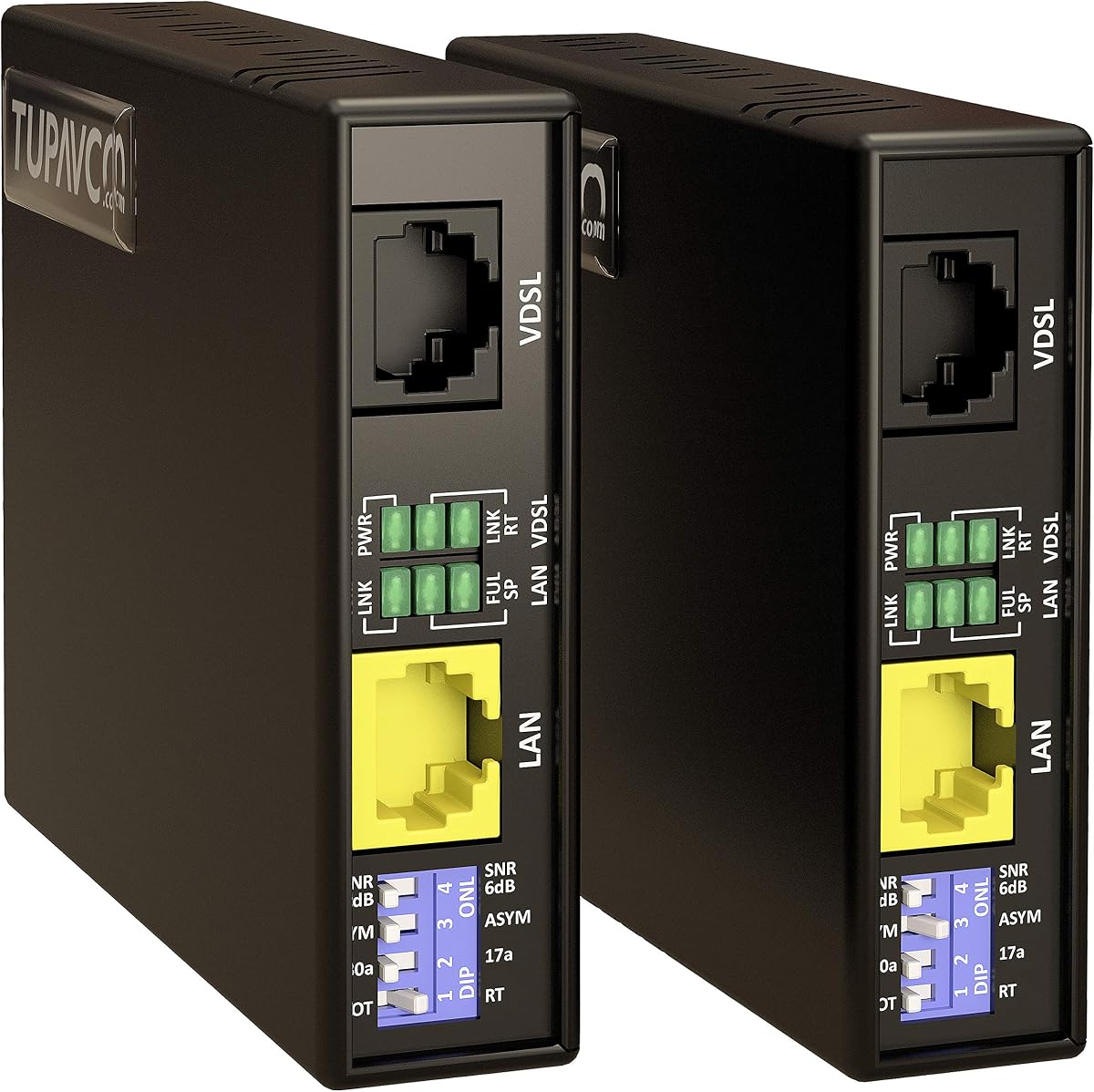
This VDSL extender kit offers a strong balance of range and speed for long distance network extensions. With a 4.6 rating it is designed to boost standard cabling limits up to 5000 feet effectively using phone or Cat5 wiring.
We may earn a commission when you buy through this link, at no additional cost to you.
It supports speeds up to 300Mbps and uses G.INP technology to keep signals less sensitive to noise. This ensures consistent performance even in electrically noisy environments like industrial or rural areas with long cable runs.
The DIP switches offer eight different profile settings allowing you to adjust for specific cable qualities. This adaptability helps maximize speed and distance based on the specific infrastructure available at your location.
Best for large properties or commercial sites where running new Cat6 cable is too costly. It leverages existing phone or network cabling to provide a clean efficient long range connection for remote devices easily.
Supports G.INP making broadband signal significantly less sensitive to noise and interference.
Equipped with 4-position DIP switch offering 8 different profile settings for cable types.
We may earn a commission when you buy through this link, at no additional cost to you.
Choosing the right Ethernet Line Extender depends on your home layout wiring type and speed needs. This section breaks down the critical factors to help you select a device that delivers reliable connectivity.
Different extenders support vastly different distances. Powerline adapters usually reach up to 750 feet while VDSL kits can go up to 7000 feet. Check your required distance before buying to avoid purchasing a device that cannot bridge the gap.
Always measure the distance between your router and the target room to ensure the extender covers it.
Speeds vary from 100 Mbps to 2000 Mbps depending on the technology. Powerline kits like AV1000 or AV2000 offer high speeds for streaming but passive couplers may cap at lower limits. Match the speed to your internet plan.
If your internet plan is under 100 Mbps a slower extender may suffice for basic tasks.
Powerline adapters require existing electrical wiring and work best on the same circuit. VDSL extenders can use phone or twisted pair cables. Ensure your home infrastructure matches the extender type for optimal performance.
Verify you have accessible outlets or wiring paths for the chosen extender type.
Many extenders include Gigabit ports while others are limited to 100 Mbps. For gaming or large file transfers a Gigabit port is essential to prevent bottlenecks. Check the port speed listed in product specs.
Choose models with Gigabit ports for future proofing your network speeds.
Most modern extenders offer plug and play setup without needing software. However some enterprise models like StarTech require DIP switch configuration. Consider your technical comfort level when selecting a device.
Look for simple setup processes if you want to avoid complex configuration steps.
Active extenders need external power adapters for each unit while passive ones do not. If running power to remote areas is difficult a passive coupler may be more practical for your setup.
Ensure you have power access at both ends for active units to function properly.
Powerline adapters often include encryption keys to protect your data over the electrical grid. Verify that the device supports secure standards like Secure-by-Design or dedicated encryption buttons.
Security is critical for preventing neighbors from accessing your network connection.
Some models offer Wi-Fi extensions passthrough outlets or VLAN support. These extras can add convenience or flexibility depending on your needs. Evaluate if you need these advanced features beyond basic extension.
Passthrough outlets help save space in rooms with limited wall sockets.
Begin by identifying the closest electrical outlet to your router. Plug the first adapter directly into the wall and connect your router to it using an Ethernet cable. Avoid using power strips as they can interfere with the signal.
Move to the remote room and plug the second adapter directly into a wall outlet. Wait for the powerline indicator lights to show a stable connection before attaching your device. This ensures the link is established before use.
Periodically check your connection lights and replace old adapters if signal drops occur. Keep adapters away from large appliances like washing machines to reduce interference. Regular checks help maintain peak network performance over time.
No most Ethernet Line Extenders use your existing electrical wiring to transmit data. This eliminates the need to drill holes or run new cables through your walls making installation simpler.
Generally yes because powerline offers a more stable wired connection through electrical walls. Wi-Fi extenders can suffer from signal loss due to distance and interference more often than powerline solutions.
No you should plug adapters directly into wall outlets. Power strips can filter out the signal and prevent the adapters from communicating effectively.
Yes older or noisy wiring can reduce speeds and range. Ensure your electrical system is in good condition for the best possible connection quality and reliability.
Check the maximum distance listed in the product specs. Measure your distance from the router to the target room and compare it to the adapter's range capability.
Most modern adapters work plug and play without needing drivers. Simply plug them in and connect your device to begin using the network extension.
We reviewed ten distinct Ethernet Line Extender options ranging from powerline kits to VDSL boosters. The TP-Link AV1000 stands out as the top choice for general home use while StarTech offers premium enterprise range.
Prioritize your specific needs like distance and speed when making a final decision. If you need high speed connectivity choose Gigabit models but if distance is key consider VDSL solutions for long reach.
Prices and availability change so always check current listings before you buy. Our guide provides the essential facts to help you find a reliable solution for your home or office network.