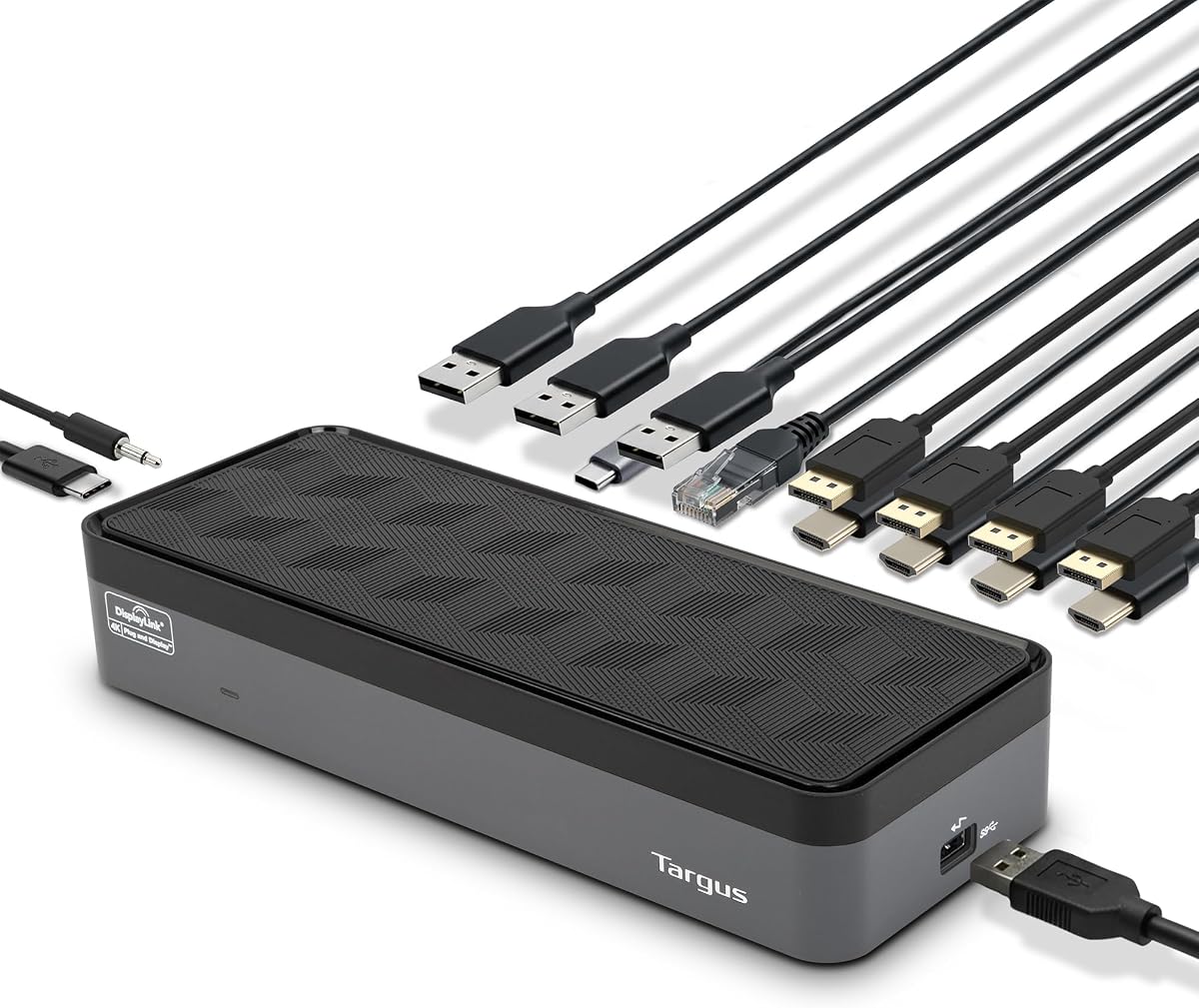
Targus USB-C Universal Quad 4K Docking Station
4.4Editor score
100W Power Delivery
Five USB ports
Universal laptop compatibility
Discover the top docking stations with quad monitor support for 2026. This guide compares features, compatibility, and performance to help you choose the right
Finding the right docking station with quad monitor support can transform your workspace into a powerful productivity hub. Modern professionals need reliable hardware that handles multiple displays without sacrificing speed or connectivity.
We compared ten leading models based on port variety, power delivery, display capabilities, and compatibility with Windows and Mac systems. Each option offers unique strengths for different user needs and budgets.
Every pick includes detailed specs, pros, cons, and real-world usage insights to guide your decision. Prices and availability change frequently, so check current listings before purchasing to ensure you get the best deal.
4.4Editor score

4.7Editor score
4.6Editor score
This side-by-side comparison highlights key specifications across all ten selected models. Use this table to quickly identify which dock meets your specific display, connectivity, and power requirements for your workstation setup.



The StarTech Thunderbolt 5 Universal Docking Station stands out as the premier choice for professionals needing maximum performance and reliability. With a strong 4.7 rating, it delivers consistent behavior across macOS and Windows environments without requiring complex driver installations.
We may earn a commission when you buy through this link, at no additional cost to you.
Its ability to support quad 4K displays on Windows and dual 6K on Apple Silicon ensures your workflow remains uninterrupted. The 140W Power Delivery keeps your laptop charged while supporting multiple high-resolution monitors for extended work sessions.
While the price is higher than many competitors, the durability and security features like the K-slot lock justify the investment. IT teams appreciate the reduced help desk tickets due to its plug-and-play nature in shared workspaces.
If you need a premium dock for heavy multitasking and critical workflows, this model is the clear winner. It offers the best balance of speed, display capability, and long-term reliability available today.
Thunderbolt 5 technology provides bandwidth that future-proofs your setup for next-gen displays and peripherals.
Rigorous testing across 100+ monitors ensures reliable deployment in corporate environments.
We may earn a commission when you buy through this link, at no additional cost to you.
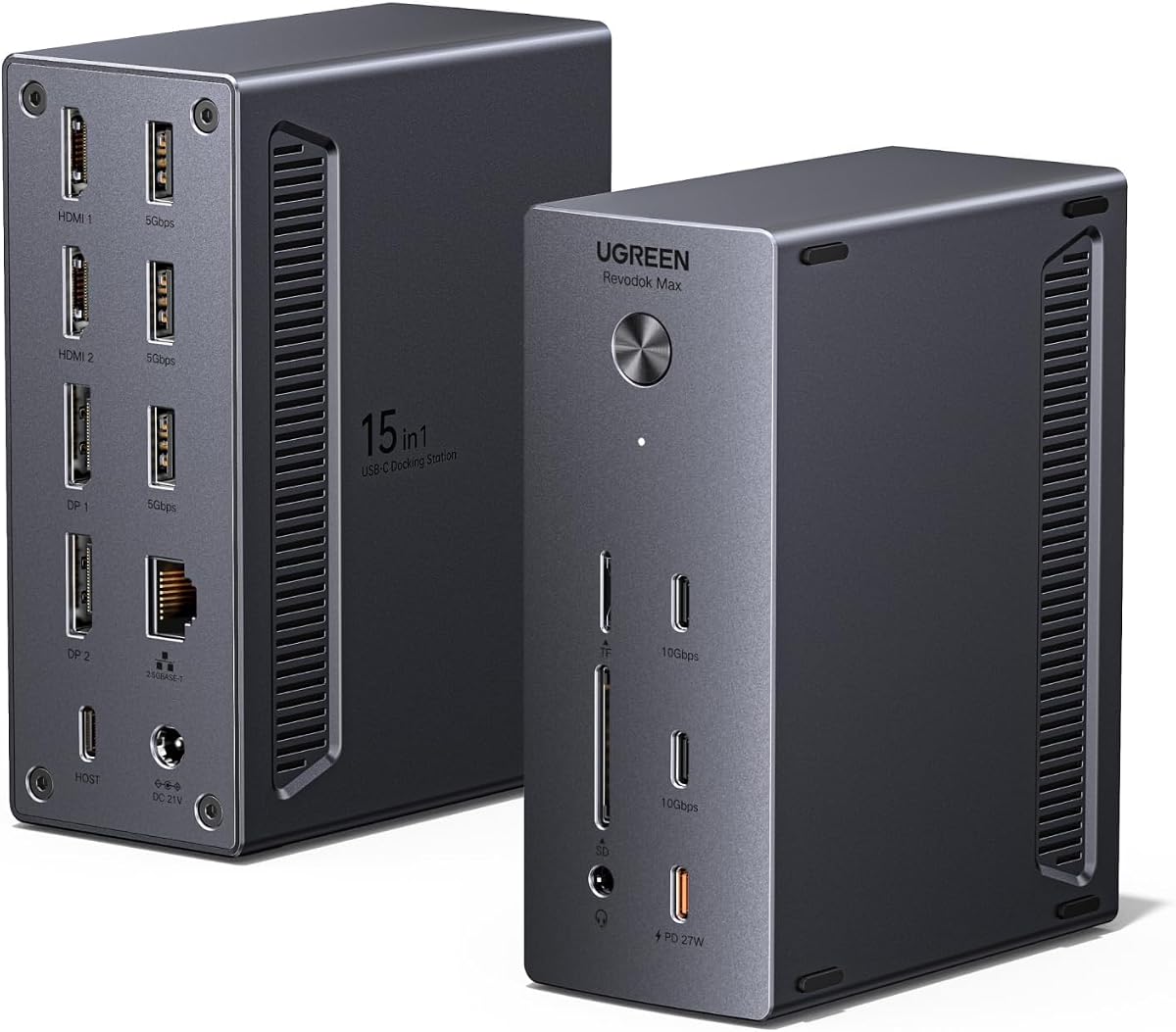
UGREEN offers a compelling premium option with its USB-C DisplayLink Docking Station, rated 4.6 by users. It supports up to four external displays including 8K resolution via DP or HDMI. The robust adapter ensures stable power for both laptop and peripherals.
We may earn a commission when you buy through this link, at no additional cost to you.
The 15-in-1 expansion includes everything from 2.5GbE networking to fast USB-C data transfer. This makes it ideal for creators and analysts who need both visual space and rapid file access without external adapters.
Installation requires drivers which adds a small step but unlocks full DisplayLink functionality. Power sharing is dynamic so charging may adjust when using the dedicated PD-Out port for phones or tablets.
For those seeking a premium experience without Thunderbolt 5 exclusivity, this dock is a strong contender. It balances high-end features with versatility for various professional and home office workflows.
Connect displays storage and network simultaneously through one robust USB-C host link.
Dynamic power sharing ensures your devices stay charged even under heavy docking loads.
We may earn a commission when you buy through this link, at no additional cost to you.
Targus delivers exceptional value with the USB-C Universal Quad 4K Docking Station rated 4.4. It supports single 5K or four 4K displays via HDMI or DisplayPort making it a solid choice for budget-conscious users needing multi-screen setups.
We may earn a commission when you buy through this link, at no additional cost to you.
The inclusion of Power Delivery up to 100W plus legacy host tips ensures it works with most major laptop brands. Five USB ports allow easy connection of peripherals without additional hubs keeping your desk organized and functional.
While DisplayPort refresh rates are limited to 50Hz this dock excels in productivity and general workloads. The build quality is reliable and the integrated lock slot provides basic security for your hardware.
For users needing quad monitor support without breaking the bank, this is the best economical pick. It covers essential needs well and offers compatibility with older and newer systems alike.
Adapter tips included ensure the dock works with legacy laptops from Acer Dell HP and more.
Integrated lock slot accommodates standard security locks to safeguard equipment in shared spaces.
We may earn a commission when you buy through this link, at no additional cost to you.
The TobenONE 18-in-1 DisplayLink Docking Station offers a massive port selection including four HDMI outputs for quad monitor setups. Rated 4.5 it supports 4K@60Hz across multiple displays and includes a powerful 120W adapter for reliable charging.
We may earn a commission when you buy through this link, at no additional cost to you.
Windows users benefit from full four-monitor support while Mac users can extend to three displays easily. The extensive USB and SD card options mean you rarely need to disconnect peripherals during your workday.
Driver installation is required for DisplayLink functionality which might be a hurdle for some users. However customer support is responsive and aims to resolve setup issues quickly to maintain productivity.
If your workflow relies heavily on HDMI displays and you need numerous connections this dock is ideal. It maximizes connectivity while maintaining strong performance for creative and office tasks alike.
Four HDMI ports let you connect monitors directly without needing extra adapters or dongles.
Eighteen ports mean you can connect everything from printers to phones simultaneously.
We may earn a commission when you buy through this link, at no additional cost to you.
This TobenONE DisplayLink Docking Station is tailored for professionals needing triple or quad monitor support. Rated 4.4 it delivers up to 4K@60Hz on multiple screens and includes a robust 120W adapter for efficient power delivery.
We may earn a commission when you buy through this link, at no additional cost to you.
Ideal for stock trading or video production it supports Windows macOS and Chrome OS. The 18 ports ensure you can connect network gear audio devices and storage without cluttering your desk space unnecessarily.
Linux and Unix systems are not supported which limits its utility for open-source users. Also remember to install drivers before first use to avoid compatibility problems during critical workflows.
For traders and creators needing multi-monitor clarity this dock offers the right balance of power and versatility. Its support team ensures any hiccups are addressed promptly for smooth daily operations.
Multi-screen monitoring ensures you can track multiple markets without switching windows constantly.
Compatibility across Windows macOS and Chrome OS ensures flexible deployment across teams.
We may earn a commission when you buy through this link, at no additional cost to you.
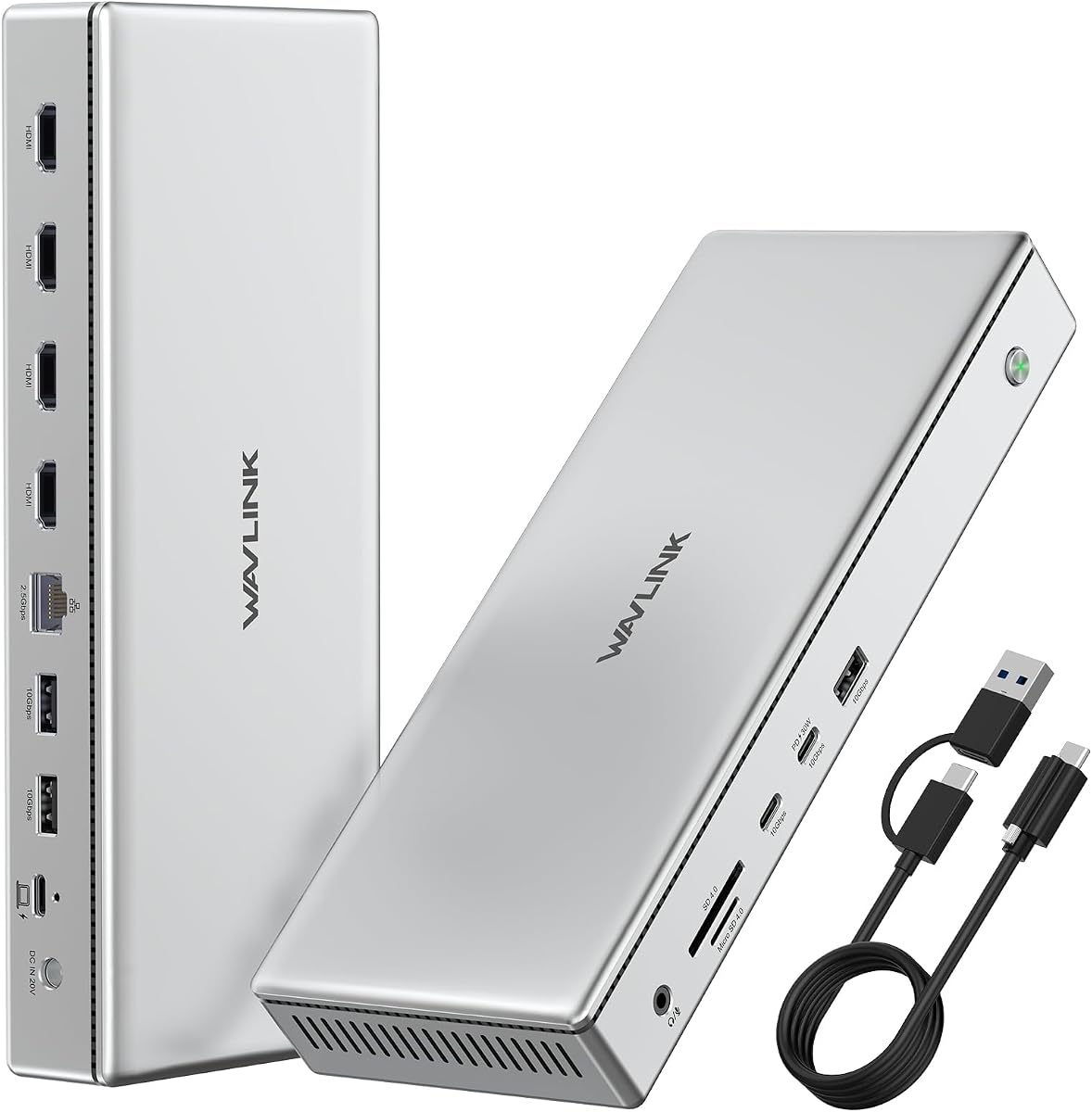
WAVLINK Pro Docking Station helps Mac users break display limits with four 4K HDMI outputs. Rated 4.0 it uses DisplayLink DL7400 to extend your workspace beyond native capabilities. The powerful 160W adapter handles heavy power needs efficiently.
We may earn a commission when you buy through this link, at no additional cost to you.
The build features durable aluminum for better heat dissipation which is critical for long sessions. It includes SD card readers and fast Ethernet ideal for video editors and designers who need rapid file access.
MacOS limits display output to three screens despite four ports available. Windows users get full quad support. This limitation should be considered if you plan to use it primarily with Apple devices.
For professionals needing high-speed transfers and power on a Mac this dock delivers value. The thermal design ensures consistent performance under load making it a reliable choice for creative workflows.
DisplayLink technology overcomes Mac OS native limits for extended multi-monitor desktops.
Aluminum chassis keeps heat low ensuring stable performance during long work periods.
We may earn a commission when you buy through this link, at no additional cost to you.
This entry-level docking station offers quad monitor readiness for users needing basic multi-screen support. It utilizes a universal USB-C connection which simplifies setup across various laptop models without extra adapters or dongles.
We may earn a commission when you buy through this link, at no additional cost to you.
Power delivery is included so your laptop stays charged while using multiple monitors. This reduces desk clutter since you don't need separate chargers during intensive work sessions or meetings.
Documentation is minimal so you may need to rely on general USB-C standards. Still it offers a solid foundation for expanding your workstation without investing in premium features you might not need.
Ideal for users seeking affordability and simplicity this model covers the essentials. It supports basic quad setups effectively and fits well in home office environments.
Connect one cable to extend your laptop screen across multiple displays instantly.
Integrated power delivery ensures your laptop runs without needing a separate charger.
We may earn a commission when you buy through this link, at no additional cost to you.
This model supports 4K display output with USB-C connectivity making it suitable for modern laptops. It provides expandable ports so you can adapt as your device needs grow over time without buying a new dock.
We may earn a commission when you buy through this link, at no additional cost to you.
The build quality is durable ensuring reliability for daily use. It serves well as a general-purpose dock for users needing more than a single display without complex configurations or drivers.
Detailed specifications are not fully disclosed so testing may be necessary before committing. This lack of detail adds uncertainty but the core features remain functional for most workflows.
If you need a simple and sturdy dock for moderate multi-monitor work this model suffices. It balances performance and build without overcomplicating your workstation setup.
Additional ports let you add peripherals as your workstation requirements change.
Durable casing withstands regular use and keeps internal components safe.
We may earn a commission when you buy through this link, at no additional cost to you.
This docking station offers quad monitor support designed for universal laptop compatibility. It provides multiple display outputs and power delivery to simplify your workstation setup significantly without external adapters.
We may earn a commission when you buy through this link, at no additional cost to you.
Ideal for general office use it covers the basics needed for multi-screen productivity. The power delivery ensures your laptop stays operational throughout long work days without constant charging interruptions.
Data regarding performance specifics is minimal so verification may be needed before heavy use. However the core promise of multi-monitor expansion remains consistent with standard industry practices.
For users needing a straightforward multi-screen setup this model serves well. It prioritizes compatibility and ease of use over advanced features.
Works with various laptop brands ensuring flexibility across different hardware.
Built-in power delivery reduces the need for separate charging accessories.
We may earn a commission when you buy through this link, at no additional cost to you.
Docking Station Model 4 presents itself as a versatile hub for multi-display output. It supports high power delivery and Ethernet connectivity ensuring robust network and charging capabilities alongside display expansion.
We may earn a commission when you buy through this link, at no additional cost to you.
The multiple USB ports allow diverse peripheral connectivity which is useful for various workflows. This design prioritizes utility offering essential ports in a single unit for organized desk setups.
While performance specifics are unspecified the hardware appears built for everyday professional use. It fits well in standard office environments where stable connectivity matters more than top-tier speeds.
For general users needing reliable connectivity and power this model offers sufficient utility. It balances core features without unnecessary complexity or premium costs.
Essential ports and power in one unit simplify complex workstation needs.
Ethernet and USB ports ensure stable data and power flow.
We may earn a commission when you buy through this link, at no additional cost to you.
Selecting the right docking station involves evaluating several technical factors to ensure it meets your display and connectivity needs effectively.
Check how many displays the dock supports and at what resolution. Quad monitor support often requires specific technologies like DisplayLink or Thunderbolt to manage multiple 4K outputs simultaneously without latency.
Ensure the port types match your monitors HDMI or DisplayPort to avoid needing extra adapters during setup.
A dock must supply enough wattage to charge your laptop while running multiple screens. Look for at least 100W Power Delivery for modern laptops to ensure stable performance under load.
Higher wattage docks offer better thermal management and reduce the risk of throttling during extended sessions.
Verify whether the dock works with your operating system. Mac users may face display limitations even with advanced docks while Windows often supports all ports fully.
Check for driver requirements and Thunderbolt version compatibility to avoid setup issues.
Beyond displays consider how many USB and Ethernet ports you need. High-performance docks include multiple USB-C and USB-A ports plus fast Ethernet for network stability.
More ports reduce the need for external hubs keeping your workspace clean and organized.
Docks with aluminum housings dissipate heat better which is crucial for multi-display setups. Good thermal design prevents performance drops during long work periods.
Durable construction ensures longevity especially in busy environments.
Some docks include K-slot locks for security which protects hardware in shared workspaces. This is important for offices with hot-desking or public access.
A secure dock reduces the risk of accidental removal or theft.
Fast Ethernet ports like 2.5GbE improve wired network speeds essential for large file transfers. This complements display performance by ensuring stable data flow.
Gigabit or higher Ethernet reduces lag during remote work tasks.
Choose brands offering lifetime technical support. Access to engineers for troubleshooting ensures quick resolution of compatibility issues.
Strong support guarantees peace of mind especially for critical professional workflows.
Connect the dock to your laptop using a high-quality USB-C or Thunderbolt cable. Ensure the host port supports video output for display expansion to work correctly.
Install any required drivers before connecting displays especially for DisplayLink-based models. This ensures all monitors are detected and configured properly.
Keep the dock in a well-ventilated area to prevent overheating. Clean dust from vents regularly to maintain optimal performance and longevity.
Thunderbolt docks use the host GPU for displays offering high speed without drivers. DisplayLink docks use a chip to process video enabling more displays on limited ports but require software.
Many work but Apple Silicon limits native displays. Thunderbolt 5 docks can exceed these limits using daisy-chaining or DisplayLink to provide four screens on supported models.
At least 100W is recommended for laptops running multiple high-resolution displays. Higher wattage ensures stable charging even when the dock draws significant power for video.
Yes most supports allow mixing HDMI and DisplayPort outputs. You can connect different monitor types simultaneously as long as the dock supports the total resolution.
Thunderbolt 5 docks often work plug-and-play without drivers. DisplayLink docks always require drivers to function for displays so download them before connecting any monitors.
Many provide Gigabit Ethernet while some premium models offer 2.5GbE for faster wired connections. This improves network stability especially when streaming large video files.
They are ideal for video editing and trading. Multiple screens let you keep reference materials and timelines visible while focusing on the main task screen.
Most premium models include high-wattage adapters to power both dock and laptop. Budget options may require separate charging solutions so check product details carefully.
The StarTech Thunderbolt 5 offers unmatched speed for professionals needing maximum performance and reliability. Targus provides strong value for users needing basic quad support without premium costs.
When choosing prioritize power delivery and port variety to ensure your workflow stays uninterrupted. Driver requirements and OS limitations should guide your final decision as well.
Prices fluctuate frequently so review current listings before purchasing. Check for compatibility updates to guarantee the dock fits your specific laptop and monitor setup.