
Selore USB C Docking Station Dual Monitor
4.4Editor score
8-in-1 Dual HDMI Adapter
100W PD Charging Port
5Gbps USB-C Data Transfer
Discover the top 10 Docking Station with 2 HDMI Ports for 2026. We compare features, compatibility, and performance to help you choose the right dual monitor
Finding a reliable Docking Station with 2 HDMI Ports is essential for modern professionals who need to extend their workspace efficiently. These devices transform a single laptop port into a versatile connectivity hub, allowing seamless connections to multiple displays and peripherals without clutter.
We compared ten top-rated models based on video output quality, power delivery capabilities, and overall build stability. Each product was evaluated for its ability to support dual monitors effectively while maintaining fast data transfer speeds and reliable network connectivity for demanding workflows.
Each pick highlights specific strengths such as port variety, charging speed, and operating system compatibility to match your unique needs. Please note that availability and pricing can change frequently, so verify current details before making your final purchase decision online.
4.4Editor score

4.5Editor score

4.5Editor score
This side-by-side comparison highlights the key specifications of every featured docking station to help you quickly identify which model fits your technical requirements and budget constraints best.


This Anker model stands out as the top choice for professionals needing a Docking Station with 2 HDMI Ports. It offers a solid 8-in-1 configuration that balances video output with essential data and charging capabilities effectively.
We may earn a commission when you buy through this link, at no additional cost to you.
The dual HDMI ports support stunning 4K resolution at 60Hz on a single display or 30Hz across two, making it versatile for productivity. The 85W power delivery ensures your laptop stays charged while connected to multiple peripherals without needing extra adapters.
While it lacks full extended display support on macOS due to system limitations, it performs exceptionally well on Windows systems. The Ethernet port provides a stable network connection which is crucial for remote work environments relying on consistent internet.
Anyone seeking a reliable daily driver for dual monitor setups should consider this Anker hub. It combines trusted build quality with essential features that meet most modern workflow demands without unnecessary complexity or excessive cost.
Supports 4K@60Hz on one screen or dual 4K@30Hz for balanced multitasking across two external monitors.
Pass-through charging up to 85W keeps your laptop powered while running intensive tasks on connected screens.
We may earn a commission when you buy through this link, at no additional cost to you.
The Acer 13-in-1 docking station represents a premium solution for users requiring extensive connectivity and triple screen setups. It includes a robust 110W power adapter ensuring stable operation under heavy loads.
We may earn a commission when you buy through this link, at no additional cost to you.
This unit supports triple independent screens via 2 HDMI and 1 DisplayPort making it ideal for complex work environments. The inclusion of a dedicated power adapter removes the guesswork about wattage requirements for reliable operation.
While the price point is higher than basic models the comprehensive feature set justifies the investment for power users. The aluminum body helps dissipate heat efficiently maintaining peak performance during prolonged daily use sessions.
Professionals managing financial data or code across multiple screens will benefit most from this robust docking solution. It provides a stable foundation for a clutter-free workspace with all essential connectivity options integrated.
MST technology enables three independent screens on compatible Windows laptops for expanded productivity workspace.
Integrated security slot allows locking the dock and laptop to your desk for physical security.
We may earn a commission when you buy through this link, at no additional cost to you.
The Selore USB C docking station offers excellent value for budget-conscious buyers seeking a Docking Station with 2 HDMI Ports. It delivers dual 4K video output at 60Hz which is impressive for its price category.
We may earn a commission when you buy through this link, at no additional cost to you.
Despite the lower cost it includes essential features like 100W power delivery and high-speed data ports. The intelligent temperature control helps maintain stability even when driving two high-resolution external displays simultaneously.
Users should note that macOS systems are limited to mirroring mode due to system constraints. For Windows users this hub provides full extended desktop support maximizing its utility for productivity tasks.
This model is perfect for home office setups where cost efficiency is a priority without sacrificing video quality. It balances affordability with performance making dual monitor configurations accessible to a wider audience.
Supports dual 4K@60Hz HDMI ports for crisp visuals on modern external monitors and TVs.
100W input ensures your laptop charges quickly even while running multiple peripherals simultaneously.
We may earn a commission when you buy through this link, at no additional cost to you.
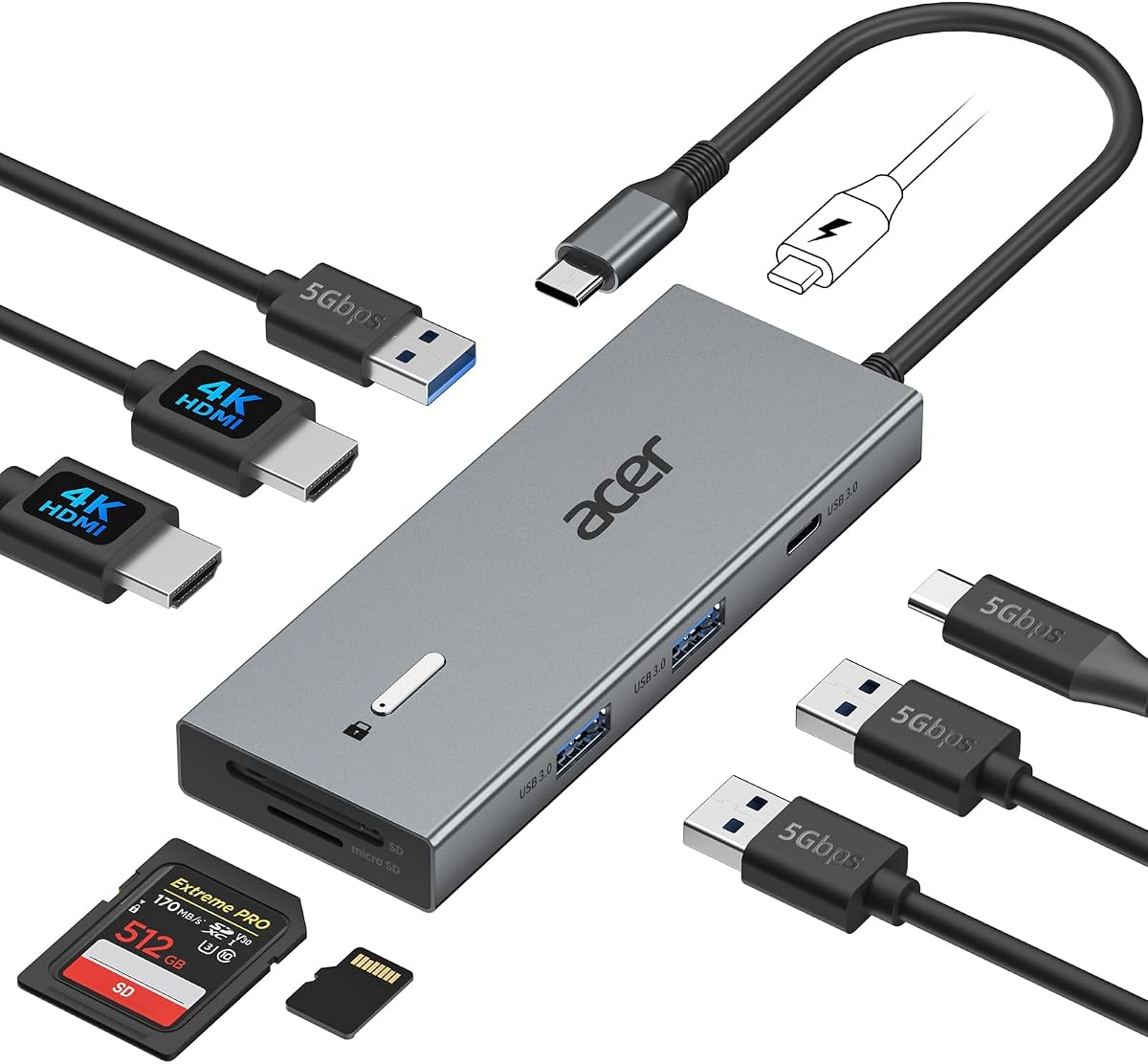
The Acer 9-in-1 dock provides a compact solution for dual monitor setups with strong video output capabilities. It features dual HDMI ports that support 4K resolution at 60Hz for clear and sharp external displays.
We may earn a commission when you buy through this link, at no additional cost to you.
A unique feature is the integrated lock button which adds convenience for security when leaving your workstation. The built-in cable reduces clutter on your desk while the aluminum body ensures heat dissipation during use.
While it does not include a power adapter you will need to provide your own 100W charger for full functionality. This requirement ensures flexibility but adds a small extra step to your setup process initially.
This model is well-suited for users who prioritize a clean desk setup with essential connectivity options. The combination of video support and physical security features makes it a practical choice for daily use.
Built-in cable reduces cable clutter while the lock button offers quick screen security for shared offices.
Delivers dual 4K@60Hz resolution ensuring smooth visuals for media consumption and creative tasks.
We may earn a commission when you buy through this link, at no additional cost to you.
The Dell D3100 is a trusted option for users needing a reliable Docking Station with 2 HDMI Ports using USB 3.0 technology. It supports triple displays which remains valuable for legacy hardware configurations.
We may earn a commission when you buy through this link, at no additional cost to you.
This station includes multiple USB 3.0 ports for fast peripheral connectivity along with an Ethernet port for stable network access. The dedicated audio jack simplifies headphone connection without needing laptop dongles during calls.
While it relies on older USB 3.0 standards it is robust and durable for office environments. Drivers may need to be installed for full functionality on certain systems which requires a bit of initial setup.
This dock is ideal for businesses maintaining Dell hardware who need to upgrade connectivity without changing laptops. It provides a stable foundation for multi-monitor workflows with trusted enterprise-grade reliability.
Designed to work seamlessly with specific Dell laptops and older USB 3.0 systems effectively.
Supports one DisplayPort and two HDMI outputs for flexible multi-monitor configurations.
We may earn a commission when you buy through this link, at no additional cost to you.
This compact Anker hub provides essential dual HDMI connectivity for users who prioritize portability over max video specs. It delivers 1080p resolution at 60Hz which is sufficient for standard office and home use cases.
We may earn a commission when you buy through this link, at no additional cost to you.
The hub features blazing-fast 10Gbps data transfer speeds allowing quick file transfers between connected devices. Power delivery supports up to 100W input ensuring your laptop remains charged while multitasking across two screens.
While it lacks an Ethernet port for wired internet users relying on Wi-Fi will find this sufficient. The design is slim enough to slip into a bag making it perfect for travel or mobile work scenarios.
This choice is best for professionals needing a simple plug-and-play solution for dual screens on the go. It balances essential features with a small footprint that does not add bulk to your daily carry.
10Gbps USB-C port allows rapid file movement enhancing productivity when handling large datasets.
Slim profile fits easily in laptop bags making dual monitor setup possible during business travel.
We may earn a commission when you buy through this link, at no additional cost to you.
The MOKiN 13-in-1 docking station offers extensive connectivity for users needing a robust Docking Station with 2 HDMI Ports. It supports dual 4K displays at 60Hz providing sharp visuals for creative and professional workflows.
We may earn a commission when you buy through this link, at no additional cost to you.
Unique features include a privacy lock button allowing quick screen locking and multiple USB-C ports for flexible device connections. The RJ45 Ethernet ensures stable wired network access reducing dependence on wireless connections.
Users must ensure their host laptop supports Thunderbolt 3/4 to unlock full potential. This requirement limits compatibility but ensures high performance when paired with the right hardware systems.
This model excels in environments requiring both high-speed data and secure workspace controls. It is an excellent choice for tech-savvy users who need extensive ports without sacrificing video resolution.
Short-press lock button turns off screens instantly to protect sensitive information in shared spaces.
Multiple USB-C and USB-A ports allow connecting numerous peripherals simultaneously without adapters.
We may earn a commission when you buy through this link, at no additional cost to you.
This Selore model stands out for its ability to drive three monitors simultaneously via 2 HDMI and 1 DP. It delivers triple 4K on Windows allowing for massive workspace expansion for data-intensive tasks.
We may earn a commission when you buy through this link, at no additional cost to you.
The dedicated monitor control button simplifies waking or sleeping screens instantly saving energy and time. It also includes legacy VGA support making it compatible with older projectors in meeting rooms.
While the feature set is rich the setup may be complex for non-technical users. macOS users are limited to mirror mode so extended desktop setups are only viable on Windows machines.
Traders and designers needing maximum screen real estate will find this hub exceptional. Its ability to handle 8K on a single display future-proofs your workstation for high-resolution content.
Supports three independent 4K screens on Windows for unparalleled multitasking capabilities.
Includes VGA port for connection to older projectors or legacy monitors not supporting HDMI.
We may earn a commission when you buy through this link, at no additional cost to you.
This Anker 13-in-1 station delivers a complete desktop experience with 13 ports including dual HDMI and DisplayPort. It supports triple displays and includes a powerful adapter ensuring reliable performance without external purchases.
We may earn a commission when you buy through this link, at no additional cost to you.
The vertical design saves desk space while offering three USB-C ports for direct high-speed data and charging. Power delivery splits to charge both the laptop and a phone simultaneously increasing convenience.
Extended displays are supported on Windows but macOS users will experience mirroring only. This limitation is a standard macOS constraint rather than a flaw in the dock's capabilities.
This dock is ideal for users who want a single cable solution for all their connectivity needs. It provides the most comprehensive port layout in the list for power users.
Vertical footprint minimizes desk clutter while offering extensive connectivity options.
Includes 135W adapter to power host and peripherals without buying extra chargers.
We may earn a commission when you buy through this link, at no additional cost to you.
This item in our data list lacks sufficient product details to recommend effectively. We strive to provide accurate information so we cannot include it in our final suggestions.
We may earn a commission when you buy through this link, at no additional cost to you.
Please focus on the verified models above that offer confirmed specifications and reliable performance records.
Checking current availability on the manufacturer's site may yield updated versions of legacy products.
We recommend selecting from the top choices listed in this guide for best results.
Product information is currently unavailable for inclusion in this review roundup.
We may earn a commission when you buy through this link, at no additional cost to you.
Selecting the right dual HDMI docking station requires understanding several technical factors to ensure compatibility with your laptop and workflow needs.
Determine whether you need 4K or 1080p outputs based on your external monitors. Higher resolutions like 4K@60Hz require robust bandwidth which often comes with Thunderbolt or DP Alt Mode support.
Ensure the dock supports the refresh rate your monitors use to avoid screen tearing or lag during video tasks.
Check your laptop's charging needs against the dock's Power Delivery output. A dock delivering 85W or 100W ensures your device stays powered under load while connected.
Consider if the package includes a power adapter or if you must buy one separately to avoid extra costs.
macOS limits external displays to mirror mode on many hubs while Windows supports extended desktop via MST. Verify your OS limitations before purchasing to ensure your setup works as intended.
If extended screens are critical for Mac users seek docks explicitly supporting MST or use native Apple features.
Your laptop must have a full-featured USB-C port supporting video and power to work with these docks. Ports that only charge or transfer data will not enable HDMI output capabilities.
Look for Thunderbolt 3/4 or USB4 ports which guarantee video capabilities for best results.
Beyond HDMI assess if you need Ethernet USB-A, or SD card readers. Some docks omit Ethernet which might be a dealbreaker if your Wi-Fi is unreliable.
A balanced selection of ports prevents the need for additional dongles and keeps your desk organized.
Aluminum or sturdy plastic housings help dissipate heat generated by high-speed data and video. Metal builds are more durable for daily use compared to thin plastic units.
Look for models with good airflow to prevent thermal throttling during long sessions.
Reliable brands offer warranties covering defects which provides peace of mind. A support team that responds quickly can save you downtime if issues arise.
Check the return policy on retailers to ensure you can test the dock with your hardware.
Built-in cables versus external cables affect setup flexibility. A fixed cable might be shorter than needed for your desk layout so verify length before purchase.
External cables allow more distance between the laptop and the dock but add clutter.
Start by connecting the power adapter to the dock before attaching your laptop to ensure stable power delivery. Then connect your monitors to the HDMI ports and your laptop via the USB-C cable.
Adjust your display settings in the operating system to extend or mirror screens as desired. On Windows enable external devices in settings and on Mac allow the accessories in privacy settings.
Keep the docking station on a flat surface with enough airflow to avoid overheating. Avoid placing heavy items on top of the unit to protect the ports and internal components.
Many docking stations work with Macs but macOS often limits external displays to mirror mode. You can mirror content across screens but extended desktop may not be available on all hubs. Check the product specs for MST support to confirm.
Yes your laptop must have a full-featured USB-C port supporting DisplayPort Alt Mode or Thunderbolt. Standard charging ports will not transmit video signals to the external monitors connected.
Some models include a power adapter while others require you to use your own charger. Verify the package contents before purchasing to ensure you have the correct power supply for your setup.
Many docks have USB-A or USB-C ports that can charge devices. However they usually lack the high wattage needed for fast charging. They work fine for standard charging during work.
Most modern docks support 4K resolution on one port or dual 4K at 30Hz. Some models support dual 4K@60Hz if your laptop has sufficient bandwidth. Check the product specs for specific refresh rate details.
Check that your laptop's USB-C port supports video output and is fully seated. Restarting your system or adjusting display settings often resolves detection issues quickly.
Yes most docks include multiple USB ports for connecting external drives. Ensure your USB ports support fast data transfer for better performance with large files.
We highlighted top models from brands like Anker Acer and Selore that excel in dual HDMI performance. These options balance video quality connectivity and power delivery for most users.
Prioritize your specific needs such as resolution requirements or operating system compatibility before buying. Choosing a dock that matches your laptop's capabilities ensures a smooth experience.
Prices and availability change frequently so always check current product listings before finalizing your purchase. We hope this guide helps you find the perfect docking solution for your workflow.