
HUION Artist Drawing Glove
4.5Editor score
Ambidextrous fit for both hands
Soft Lycra and Nylon material
Classic black soiling resistant color
This guide compares ten top digital drawing gloves for artists, focusing on comfort, friction reduction, palm rejection, and durability to help you find the
Digital drawing gloves are essential accessories for artists who use tablets and styluses. They prevent smudges, reduce friction, and ensure a smooth drawing experience. Choosing the right one can significantly improve your workflow and comfort during long sessions.
We have analyzed ten popular digital drawing gloves based on user reviews, material quality, and design features. Our comparison covers ambidextrous options, sizes, and special features like palm rejection to help you make an informed decision for your art setup.
Each pick in this list highlights specific strengths and ideal use cases for different types of artists. Please note that availability and stock may vary, so checking current listings is recommended before purchasing your next accessory for digital art creation.
4.5Editor score

4.6Editor score
4.4Editor score
This side-by-side comparison table lists all ten digital drawing gloves we reviewed, highlighting their key specifications and unique features to help you quickly identify the best option for your needs.


The HUION Artist Drawing Glove is a reliable choice for artists seeking a cost-effective solution for digital drawing. With a rating of 4.5, it offers a balance of comfort and functionality that suits many users.
We may earn a commission when you buy through this link, at no additional cost to you.
Its ambidextrous design allows it to be used on either the left or right hand, making it versatile for different users. The soft Lycra and Nylon material ensures flexibility and reduces friction between your hand and the tablet surface.
While it effectively prevents smudges, it is important to note that it cannot prevent accidental touches on touch screens. This means you may need to adjust settings on your device to avoid unintended inputs during use.
This glove is ideal for sketching, inking, and coloring on graphics tablets. The black color is resistant to soiling, meaning you do not need to wash it frequently, which adds to its convenience and longevity.
The glove is designed to be comfortable for extended use, with materials that are soft and flexible to prevent hand fatigue during long drawing sessions.
The soiling resistant black color helps maintain the appearance of the glove over time, reducing the need for frequent cleaning and extending its usable life.
We may earn a commission when you buy through this link, at no additional cost to you.
This Artist Drawing Glove stands out with its 3-layer palm rejection design, earning a high rating of 4.6. It is engineered to prevent accidental palm touches and smudges, ensuring a clean and precise drawing experience.
We may earn a commission when you buy through this link, at no additional cost to you.
The glove features a two-finger design that works for both hands, adapting to your hand shape comfortably. It is crafted from soft, stretchy fabric with moisture-wicking properties, making it suitable for long creative sessions without discomfort.
While it offers excellent performance, you may need to choose the correct size from the available options to ensure a perfect fit. The set includes two gloves and an extra cleaning cloth, adding value to the purchase.
Ideal for digital artists, this glove reduces friction and enhances precision in every stroke. It works seamlessly with iPads and drawing tablets, elevating your digital art experience with its smooth and scratch-free design.
The 3-layer design enhances grip and prevents accidental palm touches, which is crucial for maintaining precision when working on touch-sensitive devices.
Moisture-wicking properties keep your hand dry during extended use, ensuring comfort and allowing you to focus on your artwork without distraction.
We may earn a commission when you buy through this link, at no additional cost to you.
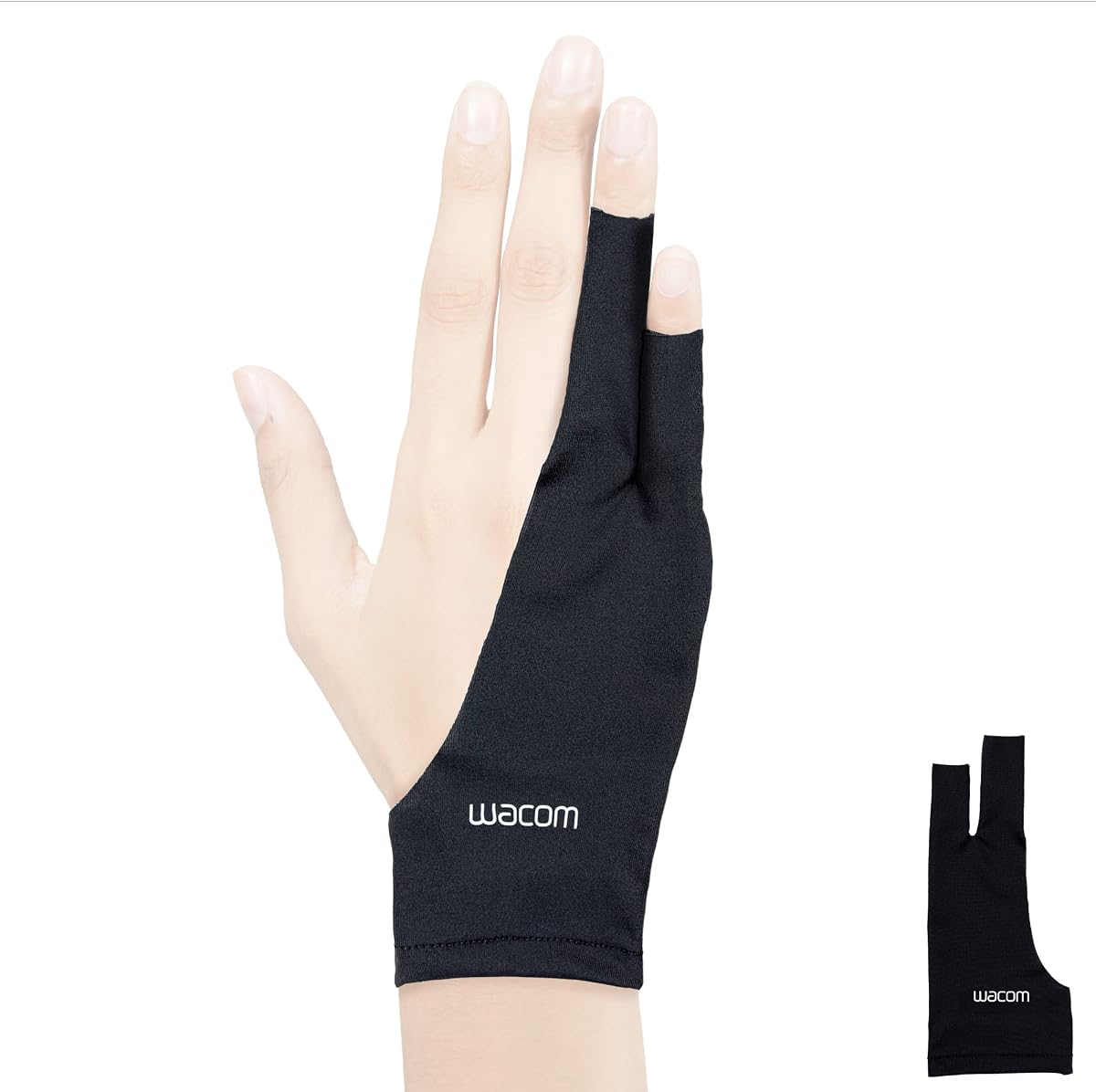
The Wacom Artist Drawing Glove is a premium option with a rating of 4.4, made from 90% recycled material for those who value sustainability. It is designed to reduce friction and prevent smudges, ensuring a clear view of your screen.
We may earn a commission when you buy through this link, at no additional cost to you.
Its exposed fingertip design allows you to access touchscreen capabilities and type with ease, offering functionality beyond just drawing. The ambidextrous fit works for either right or left-handed users, making it versatile for a wide range of artists.
While it is one-size fits most, it may not provide a perfect fit for everyone due to hand size variations. The recycled polyester and spandex construction offers comfort, stretch, and durability, aligning with eco-conscious choices.
This glove is ideal for artists who need to interact with touchscreens while drawing. It ensures hours of comfort while creating, allowing you to see your screen clearly without unnecessary smudges from oils or sweat on your hand.
Made from 90% recycled material, this glove supports sustainability efforts while providing the comfort and durability needed for professional digital art work.
The exposed fingertip design allows for easy access to touchscreen features, enabling you to navigate and type without removing the glove.
We may earn a commission when you buy through this link, at no additional cost to you.
XPPen Artist Drawing Glove offers a comfortable and functional solution for digital drawing, with a rating of 4.5. Its high elastic material ensures excellent air permeability, keeping your hand comfortable during extended use.
We may earn a commission when you buy through this link, at no additional cost to you.
Designed to fit both left and right hands, it adapts to your drawing habits effectively. The soft skin-friendly texture stops smudging on drawing tablets, allowing for an easier glide and smoother creative process.
Available in three sizes, you can choose the best fit for your hand to ensure optimal comfort and performance. The black color is resistant to dirt, meaning you do not need to wash it frequently, adding to its convenience.
This glove is suitable for right and left-handed users, making it a versatile choice for various artists. Its focus on comfort and cleanliness helps maintain the quality of your work and the longevity of your drawing tablet.
The high elastic material provides excellent air permeability, ensuring your hand stays comfortable and dry during long drawing sessions.
The black color is resistant to dirt, reducing the need for frequent washing and helping the glove maintain its appearance over time.
We may earn a commission when you buy through this link, at no additional cost to you.
OTraki 4 Pack Artist Drawing Gloves provide excellent value with four soft gloves included in the package, rated at 4.6. They are designed to reduce friction between your hand and the tablet screen, improving efficiency during drawing.
We may earn a commission when you buy through this link, at no additional cost to you.
The gloves are universal for both hands, allowing you to wear them on either the left or right hand comfortably. Made of high-elastic lycra fiber, they offer good air permeability and strong tensile strength for durability.
Note that these gloves cannot prevent the palm from being sensed by your device, so you may need to close the built-in palm detect function before drawing. The black color is soiling resistant, reducing the need for frequent washing.
This set is perfect for artists who need multiple gloves or want a backup option. They work well for sketching, inking, and coloring on various graphics monitors and tablets, enhancing your overall drawing experience.
The package includes four soft painting gloves, offering great value for money and ensuring you have a backup when needed.
The lightweight design allows your hand to slide smoothly over the tablet screen, eliminating friction and improving work efficiency.
We may earn a commission when you buy through this link, at no additional cost to you.
XPPen Digital Drawing Glove with Cute Cat Print offers a unique style option for artists, rated at 4.5. It features a charming cat print that sets it apart from normal styles while maintaining high functional standards.
We may earn a commission when you buy through this link, at no additional cost to you.
The flexible cloth is high elastic material with excellent air permeability, ensuring comfort for your fingers during use. Designed to fit both left and right hands, it adapts to your drawing habits effectively.
The soft skin-friendly texture stops smudging on drawing tablets, allowing for an easier glide. The black color is resistant to dirt, meaning you do not need to wash it frequently, adding convenience to your routine.
This glove is suitable for right and left-handed users, making it a versatile choice. The cute cat print adds a personal touch to your drawing accessories, making it a charming and unique choice for art lovers.
The cute cat print design offers a unique and charming alternative to standard black gloves, appealing to artists who like a touch of personality.
Despite its unique design, the glove maintains high elasticity and softness, ensuring comfortable and effective use during drawing sessions.
We may earn a commission when you buy through this link, at no additional cost to you.
This product entry currently lacks available data for a detailed review. It is important to check the product page for the most current information regarding specifications and user feedback.
We may earn a commission when you buy through this link, at no additional cost to you.
Without specific details, we cannot assess the comfort or functionality of this glove. Future updates may provide more information for a complete evaluation.
Users should rely on verified products with clear descriptions when making purchasing decisions. This entry serves as a placeholder for potential future data updates.
Always check the latest listings on the retailer site to confirm availability and product details before considering this option for your digital art setup.
This product currently has no detailed specifications or review data available, limiting our ability to provide a comprehensive assessment.
We may earn a commission when you buy through this link, at no additional cost to you.
OTraki 4 Pack Drawing Gloves offer a comprehensive set with multiple sizes available, rated at 4.6. The lightweight design reduces friction between the screen and hand, allowing your hand to slide smoothly over the tablet screen.
We may earn a commission when you buy through this link, at no additional cost to you.
The dexterous two-finger design ensures you can focus on creating without distraction. It serves as a protective barrier against unsightly smudges, especially when using touchscreen devices or digital tablets.
The high elastic lycra fibre features soft texture and great air permeability. Moisture-wicking fabric ensures comfort for long sessions of drawing. The black color is stain resistant to reduce cleaning needs.
These gloves are perfect for sketching and digital drawing on various surfaces. They are ideal for artists who need reliable protection for their artwork and devices while maintaining comfort during extended use.
The design includes coverage of the palm and fingers, effectively shielding your artwork from unintentional smearing during use.
Moisture-wicking fabric ensures comfort for long sessions of drawing, keeping your hands dry and focused on your creative work.
We may earn a commission when you buy through this link, at no additional cost to you.
Choosing the right digital drawing glove involves considering several factors such as material, size, and functionality to ensure it meets your specific needs and comfort requirements.
The material of the glove is crucial for comfort during long drawing sessions. Look for soft, high-elastic materials like Lycra or Nylon that offer air permeability to keep your hands dry and comfortable.
Prioritize gloves made from breathable fabrics that reduce sweat and friction, ensuring you can focus on your artwork without discomfort or distraction.
Ensure the glove fits well to prevent it from slipping or being too tight, which can affect your drawing precision. Many gloves come in multiple sizes or are designed to be ambidextrous.
Check the size chart and measure your hand to find the perfect fit that allows for natural movement and comfort during extended use.
Ambidextrous gloves are suitable for both left and right-handed users, making them versatile options for artists who may switch hands or share accessories.
Look for designs that adapt to your hand shape comfortably to ensure a good fit regardless of which hand you use for drawing.
A primary function of digital drawing gloves is to reduce friction between your hand and the tablet surface, allowing for smooth gliding and better control of your stylus.
Choose gloves with smooth surfaces that minimize drag, enabling you to draw effortlessly and maintain precision in your strokes.
Gloves should effectively prevent smudges and sweat from transferring to the tablet or monitor, keeping your screen clean and ensuring uninterrupted work.
Select gloves with materials that are resistant to oils and sweat to maintain a clear and unblemished drawing surface.
Look for gloves that are durable and easy to clean, as frequent washing can degrade the material over time. Some gloves are designed with soiling-resistant colors to reduce cleaning needs.
Prioritize options with stain-resistant features to extend the lifespan of the glove and maintain its appearance with minimal maintenance.
Some gloves offer extra features such as moisture-wicking properties or exposed fingertips for touchscreen access. These features can enhance functionality and comfort based on your specific device requirements.
Consider whether you need gloves that allow for screen interaction or those that focus solely on friction reduction to match your workflow.
Some packs include multiple gloves, offering better value and ensuring you have a backup when one needs cleaning or replacement. This is especially useful for artists who draw frequently.
Evaluate whether a single glove or a multi-pack suits your needs best based on how often you plan to use the accessory.
To use your digital drawing glove effectively, slide it over your hand so that the palm and two fingers are covered while leaving the other fingers exposed. Ensure the fit is snug but not too tight to allow for natural movement.
For care, wash the glove gently by hand or according to the manufacturer's instructions to maintain its elasticity and functionality. Air dry it completely before wearing it again to prevent damage to the fabric.
Store the glove in a cool, dry place away from direct sunlight to preserve its material quality. Avoid using harsh chemicals or bleach that can degrade the fibers and reduce the glove's effectiveness over time.
A digital drawing glove is used to prevent smudges and reduce friction between your hand and a drawing tablet or monitor. It ensures a smooth drawing experience and keeps your screen clean during use.
Many digital drawing gloves are designed to be ambidextrous, meaning they can be used on either the left or right hand. Check the product description to confirm if the glove fits both hands.
Clean your digital drawing glove gently by hand using mild soap and water. Avoid harsh chemicals and air dry it completely before using it again to maintain its elasticity and function.
Most digital drawing gloves reduce friction but may not prevent all palm rejection issues on touchscreens. Some models have specific palm rejection features, but you may need to adjust device settings.
Digital drawing gloves are typically made from high-elastic materials like Lycra or Nylon that are soft and breathable. These materials ensure comfort and reduce sweat and friction during use.
Some digital drawing gloves have exposed fingertips that allow for touchscreen interaction, while others may not. Check the product details to ensure compatibility with your specific device needs.
We reviewed ten digital drawing gloves, highlighting top choices like the HUION Artist Drawing Glove for budget-conscious buyers and the Wacom Artist Drawing Glove for those seeking eco-friendly options.
When choosing a glove, prioritize factors like comfort, material quality, and functionality to ensure it enhances your digital art workflow and provides the support you need during long sessions.
Always check current listings for the most accurate pricing and availability before purchasing. This ensures you get the best product that meets your needs and expectations for digital drawing.