
Power Strips with Surge Protection
4.8Editor score
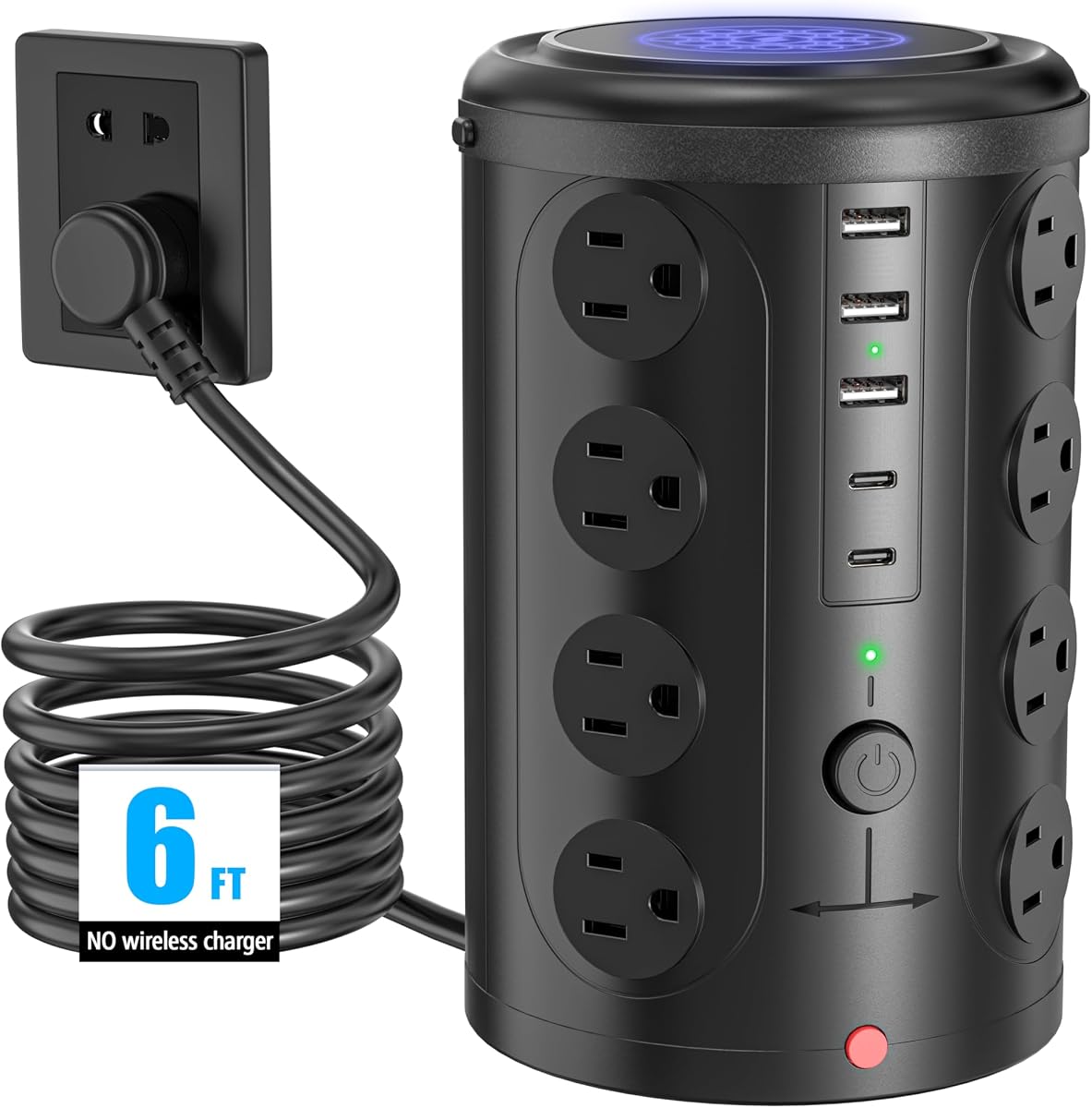
Twelve AC outlets with wide spacing
Four smart USB charging ports included
Ultra-slim flat wall plug design
Discover the best desk mounted outlet towers for 2026. We compare top models with USB ports, surge protection, and smart charging to organize your workspace.
Desk mounted outlet towers transform cluttered workspaces into organized hubs by consolidating multiple power needs into one vertical unit. These devices replace traditional horizontal strips that often block adjacent outlets or create cable tangles across your desk surface.
We evaluated ten top-rated models based on port variety, safety features, build quality, and space-saving designs. Our analysis focused on real-world usability for offices, dorms, and home setups where efficient power management is essential for productivity.
Each pick highlights unique strengths like fast charging, compact profiles, or unique mounting options. Prices and availability fluctuate daily so check current listings before purchasing to ensure you get the best value for your specific power needs.
4.8Editor score

4.5Editor score

4.8Editor score
This side-by-side comparison highlights key specifications across all ten models. Use this table to quickly identify which tower meets your specific power requirements and space constraints.




The TenTrend Power Strip Tower stands out as the top choice for users needing extensive charging capacity in a compact vertical form. With a 230W total output and fourteen total ports it handles nearly every device simultaneously without requiring multiple adapters.
We may earn a commission when you buy through this link, at no additional cost to you.
Its standout feature is the dual-orange 65W USB-C ports capable of charging laptops directly. The six AC outlets are spaced well enough to accept bulky power bricks while the remaining USB ports handle phones tablets and accessories with intelligent fast charging.
While it lacks a specific joule surge rating the built-in overcurrent and overheat protections provide solid safety for daily use. The ultra-slim flat plug ensures it fits snugly behind furniture without blocking adjacent wall outlets which is a common issue with standard strips.
Ideal for home offices and dorms this tower keeps desks organized and clutter free. Its reasonable price point combined with high wattage makes it the best all around solution for power hungry setups needing reliable centralized charging.
The inclusion of two 65W USB-C ports allows direct laptop charging eliminating the need for separate bulky power bricks on your desk surface.
With a footprint of only 3.15 inches square this tower uses vertical space efficiently to keep your desk surface clear for work and creative tasks.
We may earn a commission when you buy through this link, at no additional cost to you.
This tower offers exceptional value for budget conscious shoppers who still need reliable surge protection and ample ports. It powers up to sixteen devices simultaneously with twelve AC outlets and four smart USB ports ensuring every gadget stays charged.
We may earn a commission when you buy through this link, at no additional cost to you.
The wide spacing between AC outlets prevents bulky adapters from blocking each other a common frustration with cheaper models. The 1080J surge rating provides peace of mind against voltage spikes while the braided cord adds durability and a touch of style.
Smart USB technology automatically detects connected devices to deliver optimal charging speed without manual switching. While it lacks individual outlet switches the main reset switch offers convenient control for turning off all power when leaving the workspace.
Perfect for students and shared spaces this model delivers premium features at a entry level price. Its compact footprint and safety features make it a smart investment for protecting electronics without breaking the bank.
Despite its low cost this unit includes 1080J surge protection and overload safeguards ensuring your devices stay safe from electrical irregularities.
The built-in smart USB system adjusts power output for each connected device ensuring efficient charging for phones tablets and other electronics.
We may earn a commission when you buy through this link, at no additional cost to you.
The Anker Nano Power Strip represents the premium tier with its innovative desk clamp design and high wattage USB-C output. It frees up desk surface area entirely by attaching securely to the edge of your work surface allowing easy access to ports.
We may earn a commission when you buy through this link, at no additional cost to you.
Its 70W USB-C port using GaN technology can charge laptops tablets and phones rapidly without generating excessive heat. The dual-zone layout separates AC and USB outlets to reduce cable clutter and simplify device management across your workspace.
While the clamp design requires flat desk edges it provides unmatched stability and prevents the tower from sliding around. The 1500J surge protection rating is among the highest available ensuring robust defense against electrical surges and grid fluctuations.
Best suited for professionals and power users this model combines convenience with high performance. The premium price is justified by its unique mounting system and advanced charging capabilities that keep your desk clean and your devices fully powered.
The adjustable desk clamp attaches securely to flat edges freeing up valuable desk space for your keyboard notebook and other essential tools.
Gallium Nitride technology enables faster charging with smaller form factors and improved efficiency reducing energy waste and heat generation.
We may earn a commission when you buy through this link, at no additional cost to you.
This tower solves cable tangles with a built-in auto-retracting extension cord that rewinds automatically when released. This unique mechanism keeps your floor and desk edges completely clear of loose wires that can cause tripping hazards or mess.
We may earn a commission when you buy through this link, at no additional cost to you.
The upright cube design stays stable on desks and shelves while the mountable feet allow it to be fixed to walls or undersides of workbenches. It provides essential power with four AC outlets and two USB-C ports for daily device charging.
With a perfect five star rating users appreciate the convenience of the retractable system. While it offers fewer AC ports than competitors its focus on cord management makes it ideal for minimalist setups where neatness is a top priority.
Best for those who hate managing cables this model offers a clever solution to traditional power strip problems. Its compact footprint and innovative cord system make it a standout choice for clean organized workspaces.
The built-in reel allows you to pull out only the cord length you need and it automatically rewinds to keep surfaces completely clear.
Mountable feet enable wall or under-desk installation reclaiming precious desk space for your actual work and equipment.
We may earn a commission when you buy through this link, at no additional cost to you.
This tower distinguishes itself with four separate switches that control different sections of outlets independently. This allows you to power down unused devices without unplugging them which saves energy and reduces wear on your equipment.
We may earn a commission when you buy through this link, at no additional cost to you.
Its 6.5-foot extension cord offers greater reach than standard models allowing flexible placement away from the wall while still accessing multiple outlets. The vertical design accommodates large power bricks better than horizontal strips preventing blockage issues.
Safety is robust with built-in overload short-circuit and over-current protection that cuts power when irregularities are detected. The lifetime technology support and 24-hour customer service add extra confidence in long-term reliability.
Ideal for energy conscious users this model helps manage consumption by switching off zones you are not using. Its combination of switches reach and safety features makes it a practical choice for home offices and classrooms.
Four separate switches allow you to turn off specific groups of outlets saving energy and simplifying power management across your workspace.
A 6.5-foot cord provides ample length to place the tower where it is most convenient without being restricted by outlet proximity.
We may earn a commission when you buy through this link, at no additional cost to you.
This tower offers the highest number of AC outlets with sixteen wide-spaced sockets that accommodate even the largest power adapters. It ensures that every plug has room without obstructing neighbors making it ideal for power-intensive setups.
We may earn a commission when you buy through this link, at no additional cost to you.
The compact vertical design keeps the footprint small while maximizing capacity. Five USB ports supplement the AC outlets for charging smaller devices directly without needing extra adapters on your desk or nightstand.
Safety features include 10A overload protection and lightning safeguards to maintain a stable power supply. The warranty adds an extra layer of assurance ensuring quality and durability over time.
Perfect for studios and shared offices this model handles heavy loads with ease. Its focus on spacing ensures you can plug in everything you need without fighting for room around bulky connectors.
With sixteen AC sockets this tower provides more connection points than any other model in our roundup for complex setups.
Generous spacing between outlets prevents large transformers from blocking adjacent sockets ensuring all ports remain usable.
We may earn a commission when you buy through this link, at no additional cost to you.
The TESSAN tower features an ultra-thin flat plug that sits flush against the wall to avoid obstructing nearby outlets. This design allows it to fit behind furniture and in tight spots where standard bulky plugs would fail.
We may earn a commission when you buy through this link, at no additional cost to you.
Its four-side compact profile takes up minimal desk space while keeping cords organized. The 45-degree right angle plug creates extra space below the outlet for other plugs ensuring you do not lose wall access.
With 1050J surge protection and multiple safety features this model safeguards expensive electronics from power surges. Rubber feet prevent sliding ensuring the tower stays stable even with heavy loads plugged in.
Best for tight corners and crowded walls this unit solves common outlet blocking issues. Its slim profile and safety features make it a reliable choice for bedrooms and office nooks.
The 0.31-inch flat plug fits snugly against walls allowing furniture to sit closer and preventing tripping hazards from protruding connectors.
A 45-degree angled plug design provides extra clearance below the socket for other plugs ensuring maximum wall outlet utility.
We may earn a commission when you buy through this link, at no additional cost to you.
This model offers dual-layer versatility allowing under-desk or desktop clamping without drilling tools. The clamps attaches securely to flat edges up to 1.6 inches thick providing stable access to power while keeping surfaces clear.
We may earn a commission when you buy through this link, at no additional cost to you.
Ten AC outlets and three USB ports handle daily charging needs efficiently. The dual-layer design organizes outlets to reduce tangling making it easier to plug and unplug devices from different sides.
With 700J surge protection and a built-in circuit breaker it guards against voltage spikes and overloads. The fire-resistant ABS shell ensures durability and safety even during extended use.
Ideal for sit-stand desks and clean setups this clamp-on design frees up desk space for creative work. Its easy installation and solid build make it a practical solution for organized workstations.
Outlets are arranged across two layers allowing cables to exit in different directions reducing tangles and improving workflow.
The clamp mechanism secures easily to desk edges without tools allowing quick setup and repositioning as needed.
We may earn a commission when you buy through this link, at no additional cost to you.
This tower boasts an 1800J surge rating offering superior protection against electrical spikes compared to standard models. Twelve wide-spaced AC outlets and four USB ports ensure all devices charge safely without interference.
We may earn a commission when you buy through this link, at no additional cost to you.
Its ultra-slim 0.30-inch flat plug fits tight spaces and creates extra room for adjacent sockets. The compact 5.79-inch height keeps it unobtrusive while the rubber feet ensure it stays firmly in place.
The reset-off switch automatically cuts power during overloads protecting your gear from damage. A 6-foot cord provides flexible placement for home or office setups without stretching across floors.
Best for areas prone to power fluctuations this model prioritizes device safety above all. Its high joule rating and space-saving design make it a smart choice for protecting expensive electronics.
With 1800J protection this tower offers one of the highest safety ratings available guarding devices against significant power spikes.
A 0.30-inch flat plug fits easily into tight wall spots ensuring you do not lose access to nearby power sockets.
We may earn a commission when you buy through this link, at no additional cost to you.
This tower features a 6.5-foot pure copper extension cord that reaches further than standard five-foot units. It allows placement in larger rooms or around obstacles while maintaining reliable power delivery and durability.
We may earn a commission when you buy through this link, at no additional cost to you.
Twelve AC outlets and four USB ports support multiple devices simultaneously. Reinforced design at the junction prevents wear and tear ensuring the cord lasts longer under heavy use conditions.
The fire-resistant PC shell with flame retardant properties ensures safety against overheating. Overload protection automatically cuts power if voltage irregularities occur protecting your connected gear from damage.
Ideal for larger spaces this model offers extended reach without sacrificing safety or port count. Its durable build and long cord make it a dependable choice for home offices and dorm rooms.
A 6.5-foot pure copper cord provides extra distance for flexible placement without stretching across walkways or causing tangles.
Strong junctions between the stand and wire prevent fraying and wear ensuring long-term durability and safe operation.
We may earn a commission when you buy through this link, at no additional cost to you.
Selecting the right desk mounted outlet tower involves evaluating port types safety features and physical design to match your workspace needs.
Look for towers with enough AC outlets for bulky plugs and USB-C ports for modern devices. Aim for at least six AC and two USB-C ports to avoid running out of sockets.
Ensure the mix of ports matches your devices to reduce the need for extra adapters and keep your desk clutter free.
Choose a model with at least 1000 joules of surge protection to shield electronics from power spikes. Higher ratings provide better defense during storms or grid instability.
A solid joule rating ensures your laptop and monitors stay safe from voltage fluctuations over time.
Measure the distance from your outlet to your desk before buying. Towers with 6-foot or longer cords offer more flexibility for placing the unit wherever needed.
A longer cord prevents stretching across walkways and ensures safe cable management in larger rooms.
Flat plugs sit flush against walls and prevent blocking adjacent outlets. This is critical if you share a power strip with others or have limited wall space.
A slim plug design ensures your tower fits snugly behind furniture without creating tripping hazards.
Check for USB-C ports with Power Delivery for faster charging speeds. A minimum of 20W per port is ideal for tablets while 60W plus handles laptops effectively.
Fast charging support saves time and keeps your devices powered up throughout the day.
Look for wide rubber feet or clamp options to prevent sliding. A stable base is essential when multiple heavy adapters are plugged in.
Secure mounting keeps the tower upright and prevents accidental unplugging of devices.
Models with individual outlet switches let you power off unused devices to save energy. Total switches are useful but less flexible for saving power.
Switch control helps manage energy use and extends the lifespan of your electronics.
Fire-resistant materials like PC shells and pure copper wiring ensure safety and durability. Avoid models with flimsy plastic that may crack under heat.
Quality construction guarantees the tower lasts longer and operates safely under heavy loads.
Place the tower in a well-ventilated area away from direct sunlight or heat sources. Ensure the base sits on a flat stable surface to prevent tipping when plugging in devices.
Plug in devices evenly across available outlets to distribute the load. Avoid overloading the tower with high-wattage appliances like heaters which may exceed capacity.
Periodically check the cord for signs of wear or fraying. Dust the outlets occasionally with a dry cloth to prevent buildup that could affect connections.
Yes towers with high wattage USB-C ports can charge laptops directly. Check the USB-C rating to ensure it supports your device charging requirements without needing extra adapters.
Most models have automatic shutdown features that cut power during overloads. However it is best practice to unplug non essential devices when not in use to save energy.
Yes most towers include surge protection measured in joules. Choose a model with at least 1000J to ensure adequate protection for sensitive electronics.
Use cable ties to bundle unused cords. Keep the tower upright and plug heavy adapters lower to maintain stability and prevent tipping.
While possible it is safer to use one high capacity tower. Plugging multiple strips into the same wall socket may overload the circuit and cause hazards.
Flat plugs sit flush against walls to avoid blocking adjacent outlets. Standard plugs may protrude and interfere with other appliances or wall sockets.
Use a small dry brush to gently remove dust from ports. Never use liquid cleaners as moisture can damage the internal electronics.
Most manufacturers offer warranties ranging from one to two years. Check product listings for specific coverage and support details.
The TenTrend Uncaged Ergonomics and Anker Nano models represent the top choices for performance versatility and premium features respectively.
Prioritize safety ratings and USB-C wattage when selecting a tower to ensure long-term reliability and fast charging for modern devices.
Always verify current pricing and availability before buying to get the best deal for your specific power and space requirements.