
Memory Card Reader BENFEI 4in1 USB 3.0 and USB-C
4.5Editor score
4 cards simultaneous read
USB-C and USB 3.0
18-month warranty included
This guide compares the top ten compact flash card reader options available in October 2026, evaluating speed, compatibility, and build quality for professional
Finding a reliable compact flash card reader is essential for photographers and videographers who need quick access to their media files. A good reader should offer high-speed transfers, support multiple card formats, and maintain durability during heavy use on set or in the field.
We evaluated ten top-rated models based on transfer speeds, compatibility with modern devices like USB-C laptops and smartphones, and build quality. Each product was assessed for its ability to handle simultaneous card reading and its overall value for money in the current market.
Each pick below highlights specific strengths such as budget-friendliness, premium features, or universal connectivity. Please note that prices and availability can change frequently, so verify current details before making your final purchase decision online.
4.5Editor score

4.7Editor score

4.3Editor score
The following table provides a side-by-side comparison of all ten selected models. It highlights key specifications such as card slots, connection types, and transfer speeds to help you identify the best fit for your specific workflow needs.



The Lexar Multi-Card 3-in-1 stands out as the top choice for professionals who demand speed and reliability. With a rating of 4.7 stars, users consistently praise its ability to handle high-volume data transfers without overheating or stuttering.
We may earn a commission when you buy through this link, at no additional cost to you.
Its standout quality is the support for transfer speeds up to 312MB/s for SD and microSD cards. This ensures that large 4K video files or RAW photo bursts are offloaded quickly, saving valuable time during production schedules.
However, the reader is limited to three card types: SD, microSD, and CompactFlash. While this covers most modern needs, users with older Memory Stick or XD cards will need a different solution. The price is also higher than budget options.
If you prioritize performance and need a durable device for daily professional use, this Lexar reader is the recommended investment. It balances speed, compatibility, and build quality better than any other model in this list.
Transfer speeds reach up to 312MB/s for SD and microSD cards, ensuring rapid data access.
The device is built with durability in mind, offering a two-year limited warranty for peace of mind.
We may earn a commission when you buy through this link, at no additional cost to you.
For those on a tight budget, the BENFEI 4in1 USB 3.0 offers incredible value without sacrificing essential performance. It earns a 4.5-star rating from users who appreciate its versatility and ease of use across multiple device types.
We may earn a commission when you buy through this link, at no additional cost to you.
The integrated design allows you to connect via USB-C or USB 3.0, making it compatible with modern laptops and older PCs alike. You can read and write to four different card types simultaneously, which is rare at this price point.
The main trade-off is the plastic housing, which feels less durable than metal alternatives. Additionally, transfer speeds are capped at 160MB/s for UHS-I mode, which is slower than the Lexar model but sufficient for most casual users.
Buy this if you need a reliable, multi-format reader that works with iPhone 15 series and MacBooks without breaking the bank. The 18-month warranty ensures you have support if any issues arise during normal use.
Supports both USB-C and USB 3.0 ports, ensuring compatibility with a wide range of modern and older devices.
Can read and write to four cards simultaneously, eliminating the need to swap cards during bulk transfers.
We may earn a commission when you buy through this link, at no additional cost to you.
The 6-in-1 Compact Flash Card Reader is a powerhouse for professionals who work with legacy and modern card formats. With a 4.3 rating, it appeals to users who need to access CFast cards alongside standard SD and CompactFlash options.
We may earn a commission when you buy through this link, at no additional cost to you.
Its aluminum chassis not only looks premium but also helps dissipate heat during long transfers. The dual USB connectors mean you can plug into a PC with USB-A or a newer device with USB-C without needing extra adapters.
The downside is the price, which reflects its specialized features. If you only use modern SD cards, this device offers more than you need. The complexity of managing six slots might also confuse casual photographers.
This is the best choice if you are a videographer or photographer with a diverse archive of card types. It future-proofs your workflow by supporting CFast 2.0 while still reading older formats that other readers ignore.
Dedicated slot for CFast 2.0 cards ensures compatibility with professional cinema cameras and high-end DSLRs.
Built from robust aluminum alloy, it effectively dissipates heat during prolonged data transfers to prevent overheating.
We may earn a commission when you buy through this link, at no additional cost to you.
UGREEN is known for reliable accessories, and this SD Card Reader is no exception. It holds a 4.6-star rating and is designed to act as a central hub for your memory card needs. The black finish looks professional on any desk.
We may earn a commission when you buy through this link, at no additional cost to you.
The USB 3.0 device port reaches up to 5Gbps, which allows for fast transmission of large files. It supports reading four different memory cards simultaneously, eliminating the need to plug and unplug different cards constantly.
The cable is fixed at 1.7 ft, which offers a good balance of length and portability, but it is not detachable for longer runs. The design is purely functional, so it lacks aesthetic flair compared to aluminum models.
Choose this if you need a fast, reliable hub that works across Windows, Mac, and Linux without drivers. It is an excellent addition for workers on the go who need quick access to multiple card types.
USB 3.0 technology ensures transfer rates up to 5Gbps, allowing you to move large files in mere seconds.
Fully compatible with Windows, Mac OS, Linux, and Chrome OS, making it a versatile tool for any user.
We may earn a commission when you buy through this link, at no additional cost to you.
The ZIYUETEK CF Card Reader offers a sleek, slim design that fits easily into a camera bag. With a 4.5 rating, it is appreciated for its build quality and intelligent protection features that safeguard your data and connected equipment.
We may earn a commission when you buy through this link, at no additional cost to you.
Its high-quality aluminum alloy cover makes it durable and helps with heat dissipation. The reader supports five card slots including M2 and MS, which is useful for users with a mix of legacy and modern formats.
While the protection against over-current and short circuits is impressive, the grey finish might show fingerprints or wear over time. Some users have noted that certain older operating systems might require manual driver installation for full functionality.
If you want a reader that balances durability with protection features, this is a strong candidate. It is particularly good for users who frequently swap between M2 and standard SD cards in professional environments.
Built-in protection against over-current, over-voltage, and short circuits protects your device and connected equipment.
The high-quality aluminum alloy cover makes the device delicate, durable, and perfect for carrying anywhere.
We may earn a commission when you buy through this link, at no additional cost to you.
This UGREEN reader is designed specifically for the shift to USB-C on devices like the iPhone 15 and MacBooks. It carries a 4.5 rating for its seamless integration with these modern ecosystems and its ability to handle various card types.
We may earn a commission when you buy through this link, at no additional cost to you.
It supports SD, Micro SD, CF, and MS cards, allowing you to access almost any card you might have. The 5Gbps speed ensures you can view photos instantly without waiting for long loading times on your phone.
Because it lacks a USB-A port, it is not suitable for older laptops without adapters. Users also note it is great for trail cameras but might be overkill for simple SD card transfers due to its multi-slot design.
Choose this if you primarily use USB-C devices and want a dedicated reader that works without extra drivers. It is a fantastic option for mobile photographers who need to offload images directly to their phones.
Born for all USB-C devices including iPhone 15, MacBook, iPad, and Android phones with USB-C ports.
The drive-free design works seamlessly across Windows, Mac OS, Linux, and Chrome OS without installation.
We may earn a commission when you buy through this link, at no additional cost to you.
The SmartQ C368 is a straightforward option that prioritizes ease of use. With a 4.6 rating, it is popular among users who want a no-fuss solution for accessing their camera cards quickly during travel or work.
We may earn a commission when you buy through this link, at no additional cost to you.
It includes a blue LED light that lights up when powered on, so you always know the device status is clearly visible. The package even comes with a cable organizer to keep your workspace tidy and prevent cable tangling.
However, the plastic build feels basic compared to aluminum options, and the cable is quite short which limits flexibility. You might find yourself needing to move your computer closer to the USB port for comfortable use.
If you want a simple, affordable reader that just works without extra features, this is a good pick. It is ideal for home use or occasional travel where you need a compact tool to access your media files.
A blue LED light indicator lights up when powered on, ensuring the device status is always visible to you.
The box includes a cable organizer and user manual, making setup simple and convenient for new users.
We may earn a commission when you buy through this link, at no additional cost to you.
This reader is designed for high-end professional workflows that include CFast 2.0 memory cards. With a 4.4 rating, it is recognized for its blazing-fast 5Gbps data transfer capabilities which are essential for 4K and 8K video footage.
We may earn a commission when you buy through this link, at no additional cost to you.
It features a dedicated CFast 2.0 slot alongside support for SD, Micro SD, XD-Picture Card, and Compact Flash cards. This extensive compatibility makes it a reliable backup tool for photographers who use a mix of old and new cameras.
The main drawback is the cost, which is higher than general readers. If you do not use CFast cards, this device offers more speed than you will utilize. It is also specialized for video production rather than general photography.
Invest in this if you work with CFast 2.0 cards regularly and need a reliable way to offload footage quickly. The 2-year warranty and aluminum housing ensure it can withstand the rigors of daily professional use.
Dedicated CFast 2.0 slot for professional-grade speed ensures your workflow remains efficient during shoots.
Solid aluminum housing dissipates heat effectively during large transfers and provides superior durability.
We may earn a commission when you buy through this link, at no additional cost to you.
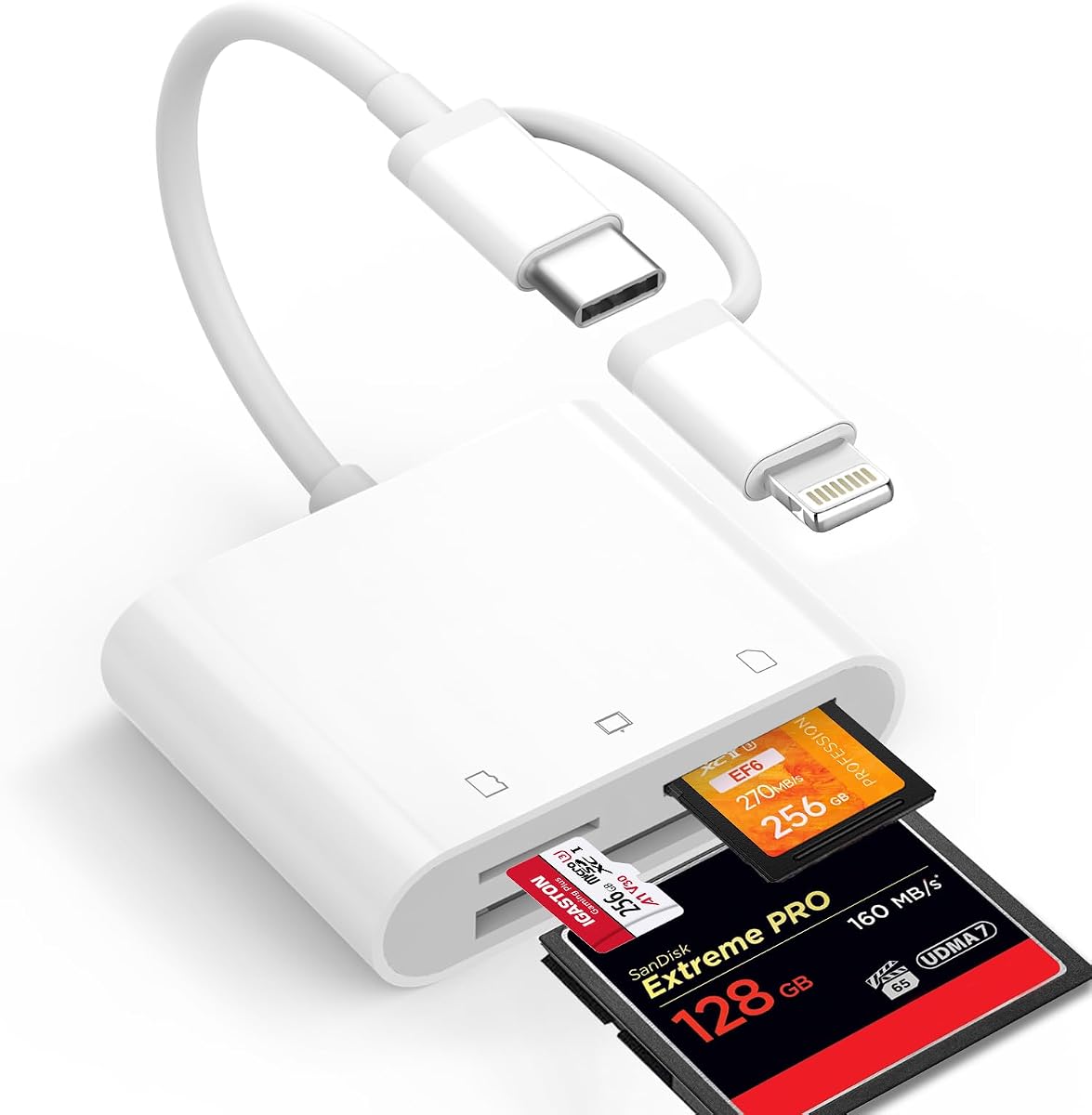
The Denlane reader is unique because it includes both Lightning and USB-C connectors in one device. With a 4.3 rating, it caters to users who need to access photos on both older iPhones and newer USB-C devices without buying two readers.
We may earn a commission when you buy through this link, at no additional cost to you.
It supports CF, SD, and MicroSD cards, allowing you to view multiple types of card types. The bi-directional transfer means you can also move photos from your phone to the card to free up storage space instantly.
Note that the two connectors cannot be used simultaneously, and they are fixed and cannot be removed. This saves you from losing adapters but means you must be careful not to strain the cable when switching between devices.
This is ideal for traveling creators who need to access files on the go regardless of their device type. The Apple MFi certification ensures stable transmission and compatibility with all supported Apple devices.
Upgraded reader has both USB-C and Lightning connectors, meeting all device needs without extra adapters.
You can transfer photos from your phone to the memory card to free up storage space on your device.
We may earn a commission when you buy through this link, at no additional cost to you.
The ChiaoPio reader is designed with a built-in USB-C cord that does not block your other ports on your iPad or Mac. With a 4.5 rating, it is favored for its convenience and ability to work directly with Apple devices.
We may earn a commission when you buy through this link, at no additional cost to you.
It supports Compact Flash, SD, and MicroSD cards, allowing you to easily view photos and videos from a variety of memory cards. The design requires no additional power, making it perfect for wireless devices where power is limited.
The built-in cord is convenient but fixed, so you cannot swap it for a longer one if needed. It is also not compatible with Lightning ports, so older iPhones will need the Denlane model instead of this one.
Choose this if you use an iPad Pro with USB-C and want a seamless way to view camera photos. It is a photographer's assistant that lets you instantly view the best moments of your shots on the go.
Built-in USBC cord does not block your other ports, allowing simultaneous charging or data connection.
Easily transfer photos and videos to your USB-C iPad Pro, Air, or Mini without any extra power.
We may earn a commission when you buy through this link, at no additional cost to you.
Choosing the right compact flash card reader depends on your specific workflow, card types, and devices. This section outlines the key factors to consider before making a purchase.
Ensure the reader supports all the card formats you currently use. If you work with both modern SD cards and legacy CompactFlash or CFast cards, look for a multi-slot model that covers all bases.
Check the product description for specific slot types to avoid buying a reader that lacks compatibility with your existing memory cards.
Transfer speed is critical for professionals handling large video files. Look for USB 3.0 or USB-C ports that support speeds up to 5Gbps or higher to reduce wait times during offloading.
Even the fastest reader cannot exceed the speed of your card, but a fast reader ensures you get the maximum possible speed from your media.
Modern laptops and phones often use USB-C, while older devices still rely on USB-A. Consider if you need a reader with dual connectors or an adapter to work across different setups.
A universal connector design provides the most flexibility for travel and ensures you can use the reader with both current and legacy computers.
A durable build is essential for a tool that travels in bags and gets plugged in frequently. Metal housings are generally more durable and better at dissipating heat than plastic ones.
Look for readers with reinforced ports or protective covers to extend the lifespan of the device under heavy professional use.
Some readers allow you to read multiple cards at once, which can save time if you have several cards to offload. This feature is useful for photographers who shoot with multiple cameras simultaneously.
Verify if the specific reader supports simultaneous writing or just reading, as some models may have limitations on multi-card operations.
Most modern readers are plug and play, meaning they work without installing drivers. However, always check compatibility with your specific operating system such as Windows, Mac, or Linux.
Some advanced features or specific legacy card formats might require drivers on certain systems, so ensure the device works out of the box with your OS.
A good warranty provides peace of mind for electronic accessories. Look for options with at least a one-year warranty to protect against defects or early failure.
Check the manufacturer's reputation for customer support in case you encounter issues with compatibility or performance after purchase.
While price is a factor, prioritize reliability over the lowest cost. A cheap reader might fail during an important shoot, costing more in lost work than the price of a higher-end model.
Assess the value based on features like multi-card support and build quality to determine the best balance for your budget.
To use your reader, simply plug it into an available USB or USB-C port on your computer or device. The system should recognize the connected card as an external drive automatically, allowing you to drag and drop files.
Avoid removing the card while data is being transferred to prevent corruption. Always safely eject the device from your system before unplugging to ensure all processes are complete and data is secure.
Keep the card slots clean and free of dust. Use a small brush or compressed air occasionally to clear out debris that might prevent cards from inserting properly or cause connectivity issues.
Most modern readers support standard CompactFlash cards, but you should check for compatibility with older Type II cards or specific formats like CFast. Some models are designed only for Type I cards, so verify the product description before buying.
Many multi-slot readers allow simultaneous reading of multiple cards, which speeds up offloading. However, check the specific model to ensure it supports simultaneous writing if you need to copy data back to cards.
USB-C offers faster speeds and reversible connectivity, making it ideal for modern laptops and phones. USB-A is still widely supported and useful for older devices, so dual connector options provide the most versatility.
Most card readers are plug and play and do not require driver installation on Windows or Mac. However, some specific legacy formats might need drivers on certain systems, so check the compatibility details provided by the manufacturer.
If a card is not recognized, try cleaning the contacts on the card or checking the slot for debris. Ensure the card is formatted in a file system compatible with your computer, such as FAT32 or exFAT.
Yes, if you have a USB-C phone or an iPhone 15, many modern readers connect directly to the device. For older iPhones, you may need a reader with a Lightning connector or an appropriate adapter.
CompactFlash cards are larger and were common in professional DSLRs, while SD cards are smaller and more common in modern cameras. You need a reader with the correct physical slot to accommodate each specific card type.
It is generally safe to leave the reader plugged in when not in use, but it is better to unplug it to save power. Some readers have indicator lights that show they are still active even when idle.
We have reviewed ten excellent options for compact flash card readers ranging from budget-friendly models to high-performance professional tools. The Lexar Multi-Card leads for speed, while the BENFEI offers the best value for most users.
When choosing, prioritize the card types you use most and the connection ports on your devices. If you work with CFast cards or need multi-card support, consider the specialized models listed in the premium category.
Remember that prices and stock levels can change quickly. Always verify the latest details and current price before making your final purchase to ensure you get the best deal available today.