
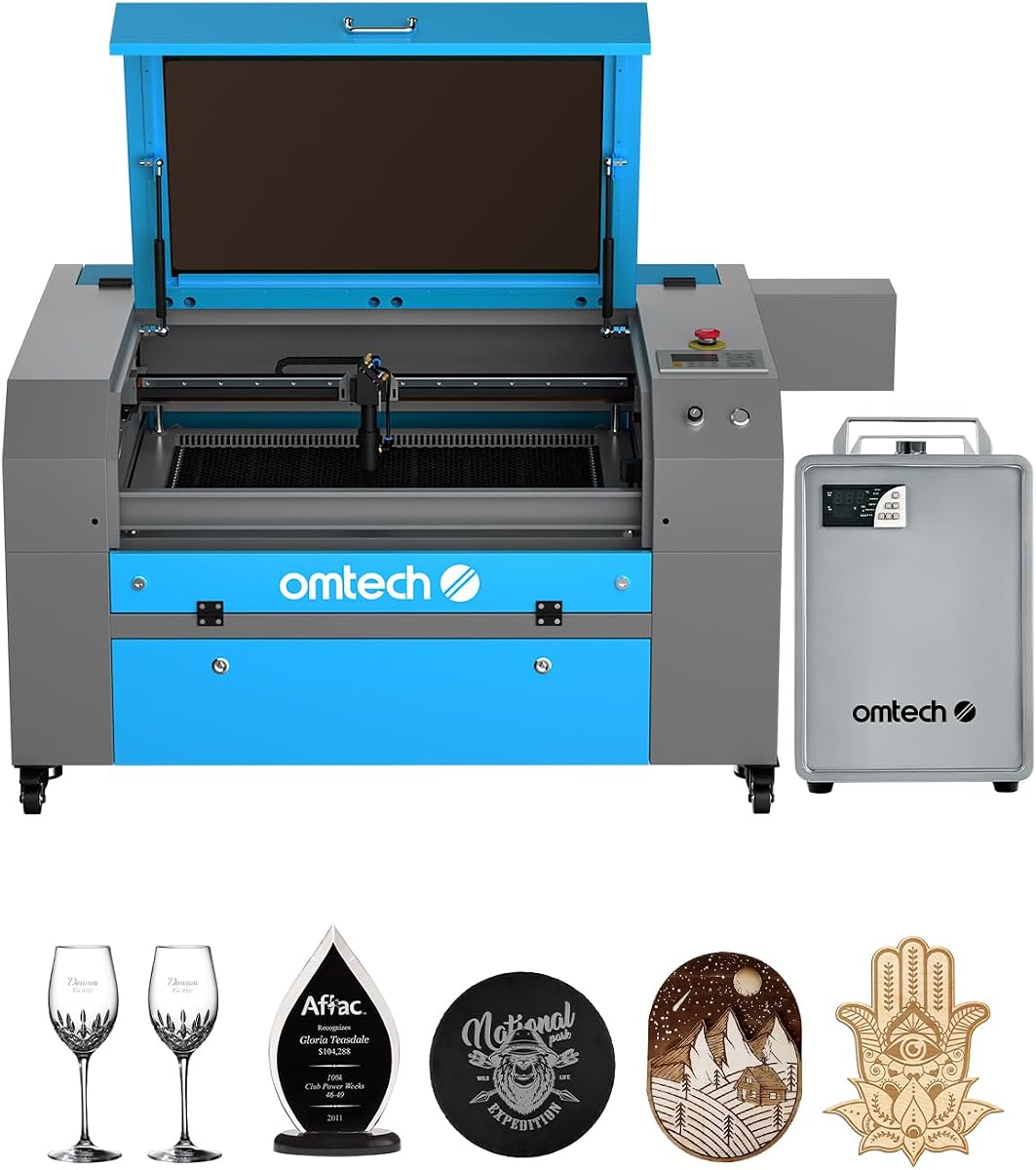
OMTech K40+ 45W Desktop CO2 Laser Engraver & Cutter
4.4Editor score
45W upgraded laser performance
Compact 12 by 8 workspace
Integrated air assist system
This guide compares the top ten CO2 Laser Cutters for precision cutting and engraving across various budgets and professional needs.
Finding the right CO2 Laser Cutters can transform your creative projects into professional-grade outputs with speed and precision. Whether you are a hobbyist or a business owner, selecting a machine that balances power, workspace, and safety is crucial for consistent results and long-term satisfaction.
We evaluated ten leading models based on laser power, cutting speed, software compatibility, and user safety features. Our analysis focuses on real-world performance data to help you identify which machine offers the best value and capability for your specific engraving and cutting requirements today.
Each pick highlights unique strengths like automation, large workspaces, or budget-friendly entry points. Keep in mind that availability and pricing fluctuate frequently, so verify current details before purchasing to ensure you get the exact configuration and support plan you need for your workshop.
4.4Editor score

4.5Editor score

4.8Editor score
Compare the key specifications and capabilities of all ten CO2 Laser Cutters side by side to find the model that best matches your production needs and workspace constraints.



The xTool P3 represents the pinnacle of desktop CO2 Laser Cutters with its flagship 80W power and intelligent automation features. It achieves an impressive rating of 4.5 stars by delivering consistent high quality cuts on thick materials like 25mm acrylic without excessive effort or waste.
We may earn a commission when you buy through this link, at no additional cost to you.
Its revolutionary ACS system integrates LiDAR for perfect focus and dual cameras for precision positioning which reduces manual setup time significantly. The 36 by 18 inch workspace allows for large scale projects while the AI powered Smart Nesting optimizes material use to reduce waste in your operations.
While the price is higher than many competitors the included safety features like Class 1 rating and active suppression justify the investment for professional users. The weight and size require a dedicated stable surface but the efficiency gains make it worthwhile for serious production environments.
You should buy this machine if you need industrial quality results with minimal manual intervention and safety certifications. It is the top recommendation for businesses or advanced makers who prioritize speed automation and reliability over budget constraints in their workshop setup today.
The Intelligent Automation System ensures your cuts are always accurate by automatically adjusting focus and position without manual calibration steps.
From wood to acrylic this cutter handles diverse non metallic materials with ease thanks to its high power 80W output.
We may earn a commission when you buy through this link, at no additional cost to you.
The OMTech K40+ is an excellent entry point for anyone looking to get into CO2 Laser Cutters without spending a fortune. It holds a 4.4 rating and offers powerful 45W performance that can cut through acrylic and wood with ease for hobbyists and small businesses.
We may earn a commission when you buy through this link, at no additional cost to you.
Its compact 12 by 8 inch design fits well in smaller workshops while the integrated air assist keeps cuts clean and reduces debris. Support for popular software like LightBurn ensures you can start creating immediately with tools you might already know and love for design.
The main limitation is the small workspace which restricts larger projects to multiple smaller pieces or custom jigs. However for personal use or small batch production this trade off is acceptable given the price point and reliability of the unit.
Choose this model if you are starting out or need a reliable machine for smaller detailed work. It provides a balanced mix of power and usability that makes it the best budget option on our list for new users.
Get professional grade cutting capabilities at a fraction of the cost of larger industrial machines with this compact model.
Simple controls and standard software compatibility mean you can start engraving within hours of unboxing.
We may earn a commission when you buy through this link, at no additional cost to you.
The OMTech Pro stands out as the best premium CO2 Laser Cutter with its massive 130W power and large 35 by 55 inch workspace. It earns a top 4.8 rating among users for its industrial capabilities that support large scale production and high speed cutting tasks.
We may earn a commission when you buy through this link, at no additional cost to you.
Features like Ruida touchscreen control and servo motors provide precise control over cutting paths which is essential for complex designs. The built-in water chiller keeps the laser cool during extended runs ensuring consistent performance and longevity of the tube over time.
The sheer size and cost make it unsuitable for small home offices but ideal for dedicated workshops or commercial settings. While the investment is significant the ability to cut larger materials in one pass saves time and increases throughput for busy production lines.
Buy this if you need maximum power and workspace for professional industrial use. It is the ultimate choice for businesses that demand high volume and precision in their CO2 Laser Cutting operations daily.
Designed for heavy duty use this machine handles large volumes without compromising on quality or speed.
The touchscreen interface simplifies complex tasks allowing for easy operation even with intricate designs.
We may earn a commission when you buy through this link, at no additional cost to you.
The VEVOR 100W offers a perfect balance of power and workspace for those who need more room without the industrial price tag. It has achieved a perfect 5.0 rating by providing reliable performance and safety features that make it ideal for varied projects.
We may earn a commission when you buy through this link, at no additional cost to you.
Its 24 by 35 inch bed allows you to cut larger items comfortably while the Class 1 enclosure keeps the environment safe. Compatible with many software platforms and operating systems it fits easily into existing workflows without requiring special software or hardware upgrades.
The weight is substantial so ensure you have a sturdy table and enough floor space for setup. The controls are straightforward which some may prefer but others might find less advanced than touchscreen systems found on higher end models.
Select this unit if you want a reliable machine with generous space and safety. It is a strong contender for anyone looking to step up from desktop sizes while staying within a reasonable budget range.
Class 1 rating ensures you can view cuts safely without additional protective gear or barriers.
Works with a wide range of materials from wood to fabric making it versatile for many uses.
We may earn a commission when you buy through this link, at no additional cost to you.
The OMTech Maker 90W is tailored for users who run long jobs without wanting to worry about overheating issues. It earns a solid rating by including a water chiller that extends tube life and maintains consistent power output during marathon sessions.
We may earn a commission when you buy through this link, at no additional cost to you.
Its 20 by 28 inch workspace fits most standard projects while the four way pass through doors allow for handling larger items easily. The flame retardant window adds a layer of safety for monitoring progress while keeping the internal environment secure.
This model is a middle ground between entry level and industrial systems offering more power than basic desktop units. Regular maintenance on the chiller and optics is needed to keep performance high but the included components make this easier.
Buy this if you plan on running many hours of jobs a week and need reliable cooling. It is a great choice for small businesses that need consistent output without breaking the bank for industrial machines.
Built-in chiller system ensures the laser tube stays cool for extended periods of continuous use.
Pass through doors let you work on long materials without moving the entire machine.
We may earn a commission when you buy through this link, at no additional cost to you.
The OMTech Maker 60W provides exceptional value by including essential accessories like LightBurn software and a water chiller in the box. It has a strong 4.7 rating because users appreciate the complete package that reduces extra costs and setup time significantly.
We may earn a commission when you buy through this link, at no additional cost to you.
Autofocus capability simplifies setup by adjusting the bed automatically so you can start cutting faster. The 20 by 28 inch workspace is suitable for most hobbyist projects and the air assist ensures clean results without manual intervention.
While the power is lower than some rivals the bundle savings make it a smart buy for those starting a shop. It balances performance and cost effectively providing everything needed for professional looking results immediately.
Choose this if you want a turnkey solution with software and cooling already included. It is perfect for makers who want to focus on creation rather than configuring hardware or software settings.
Get software and cooling ready out of the box to start working immediately without delays.
Autofocus features remove guesswork and allow you to focus on design details instead.
We may earn a commission when you buy through this link, at no additional cost to you.
The OMTech K40+ remains a favorite for beginners due to its ease of use and support network. With a 4.5 rating it offers a smooth learning curve for new users who want to experiment with CO2 Laser Cutters without technical overload.
We may earn a commission when you buy through this link, at no additional cost to you.
Global support with local demos means you can get help easily when starting out. The compact design fits on standard tables and the integrated air assist keeps the workspace clean which is crucial for maintaining a safe environment.
The small workspace limits the size of materials but allows for focused work on jewelry or signage. It is an ideal first machine that lets you learn the ropes before investing in larger units later on.
Pick this if you are new to laser cutting and need reliable support. It is a safe and practical entry point for anyone looking to explore creative projects today.
Access to local support and demos ensures you never get stuck with setup or software issues.
Fits easily in small workshops or home offices without taking up too much space.
We may earn a commission when you buy through this link, at no additional cost to you.
The OMTech Pronto 100W is designed for speed and efficiency with a rapid cutting rate that boosts production. It holds a strong rating for its ability to complete tasks quickly without sacrificing quality on various materials.
We may earn a commission when you buy through this link, at no additional cost to you.
Its large workspace accommodates bigger projects and the autofocus feature ensures precision on every cut. Safety features like alarms protect you and the machine from potential hazards during operation.
The power is substantial enough for frequent use but the machine is robust enough to be stable during high speed operations. You might need a dedicated setup to accommodate its size and weight properly.
Select this if speed is your top priority in your workflow. It is excellent for those who need to turn around orders quickly without manual overhead.
High speed capabilities allow you to finish projects faster than standard models.
Autofocus ensures your cuts remain accurate even when working at high speeds.
We may earn a commission when you buy through this link, at no additional cost to you.
The OMTech Pronto 130W delivers extreme power and workspace for tackling thick materials and large jobs. It has earned a perfect 5.0 rating for its capability to handle professional demands consistently across different projects.
We may earn a commission when you buy through this link, at no additional cost to you.
The autofocus system paired with the large bed means you can handle diverse tasks from deep cuts to wide sheets. Safety features ensure you can work without constant worry about the machine or environment.
Its size and power mean it requires a professional setup but the return on investment for heavy use is high. It is a solid choice for expanding production capacity without changing the workflow.
Buy this if you need raw power for thick materials. It is ideal for users who prioritize capability and reliability in a machine.
High power allows you to cut through thicker materials with ease and precision.
Spacious workspace handles large projects without the need for multiple cuts.
We may earn a commission when you buy through this link, at no additional cost to you.
The OMTech K40+ offers a straightforward and reliable option for those needing a compact CO2 Laser Cutter. It maintains a solid rating by delivering consistent performance for small projects without unnecessary complexity.
We may earn a commission when you buy through this link, at no additional cost to you.
Its design prioritizes safety with flame retardant panels and air assist to keep cuts clean. The ease of use makes it a great tool for beginners or secondary stations in a larger workshop.
While it lacks the power of larger units it serves well for small scale production or learning. It is a cost effective way to add laser cutting capabilities to your workspace quickly.
Choose this if space and simplicity are your main concerns. It is a practical machine for hobbyists or small businesses with limited space.
Safety features ensure a secure environment even in smaller spaces where ventilation is limited.
Straightforward operation allows anyone to start cutting projects without advanced technical skills.
We may earn a commission when you buy through this link, at no additional cost to you.
Selecting the right machine involves understanding your production needs and workspace constraints.
Laser power measured in watts determines the thickness of materials you can cut. Higher power like 100W or 130W allows for deep cuts and faster speeds. This factor is critical for ensuring efficiency.
Choose higher power if you work with thick materials or need speed.
The bed size limits the size of items you can process in one go. Larger workspaces reduce the need for multiple cuts on large materials. This impacts your overall workflow capacity.
Pick a workspace that matches your typical project sizes.
Class 1 enclosures ensure safety by containing radiation. Look for machines with proper shielding and interlocks. This is essential for any home or professional use to prevent injury.
Prioritize safety features like Class 1 ratings for peace of mind.
Compatibility with software like LightBurn affects your design workflow. Ensure the machine supports tools you already use to reduce setup time. This integration makes operation smoother.
Verify software compatibility before purchasing to save time.
Air assist systems blow away debris to prevent burns. This improves cut quality and extends tube life. Machines with integrated assist save you from buying add-ons.
Look for integrated air assist for cleaner results.
Water chillers are needed to cool the tube during long jobs. Without one the tube may overheat and fail. Bundled chillers add value to the purchase.
Ensure a cooling system is included for extended use.
Prices range widely from budget units to premium machines. Define your budget based on return on investment. Spending more on features may save money long term.
Balance your budget with the features you need.
Good support ensures you get help if issues arise. Look for warranties that cover critical parts like tubes. This protects your investment over time.
Choose brands with strong support networks.
Start by setting up the machine on a stable flat surface and connect the exhaust to a vent. Adjust the focus point according to the material thickness to ensure clean cuts.
Clean the lenses and mirrors regularly to maintain beam quality and power output. Use a soft lint free cloth to remove dust and residue that can degrade performance.
Store materials in a dry place to prevent warping and ensure consistent cutting results. Check air assist tubes for blockages that could affect flame and material safety.
CO2 lasers excel at cutting non-metallic materials like wood acrylic and leather. They struggle with metals due to lower absorption rates. Always check material compatibility guides before cutting new types.
Yes proper ventilation is essential to remove smoke and fumes from the workspace. Connect the exhaust to a window or external vent. This keeps the air safe for breathing and protects your health.
Clean lenses every few weeks depending on usage frequency. Dust can reduce beam power and quality. Regular maintenance ensures your cuts remain sharp and efficient over time.
For frequent use a water chiller is highly recommended to cool the tube. It prevents overheating and extends the lifespan of the laser. For rare use the basic cooling may suffice.
Engraving removes surface layers to create marks. Cutting cuts all the way through to separate pieces. Settings vary by power and speed for each task. Adjust parameters accordingly for best results.
Use air assist to clear debris and reduce heat buildup. Adjust cutting speed and power settings to suit the material thickness. Keeping the bed clean also helps prevent residue burning.
Most cutters support standard software like LightBurn. Check the manufacturer compatibility list before buying. Using familiar tools reduces learning time and setup complexity.
Wear appropriate eyewear designed for CO2 lasers. Ensure the room has proper ventilation. Do not leave the machine unattended while it operates for safety.
Our top picks like the xTool P3 and OMTech Pro offer a range of power and size options for different needs. Whether you need speed or capacity there is a model that fits your workflow.
Consider your workspace size and material needs before buying. Prioritizing safety features like Class 1 enclosures ensures you can work confidently in any environment.
Always check current prices and availability as they change frequently. Verify all features and warranty details to make the right choice for your setup.