
Nettbe 60 PCS 6 Inches Reusable Cable Ties
4.8Editor score
Reusable nylon adhesive material
Versatile multipurpose use
Adjustable and easy remove
A clean gaming setup starts with organized cables. Without proper management, wires clutter your desk and floor. This creates a messy look and potential safety hazards for everyone.
We compared ten top-rated products based on durability and ease of use. Each item offers unique features like split sleeves or under desk trays to fit your needs.
Every pick highlights key strengths and ideal use cases for gamers. Prices fluctuate frequently so check current listings before buying to ensure you get the best value today.
4.8Editor score
4.6Editor score
4.6Editor score
As an Amazon Associate we earn from qualifying purchases.
This side-by-side comparison details ten essential products to organize your gaming cables. Each item varies in design capacity and installation method to suit different desk setups.




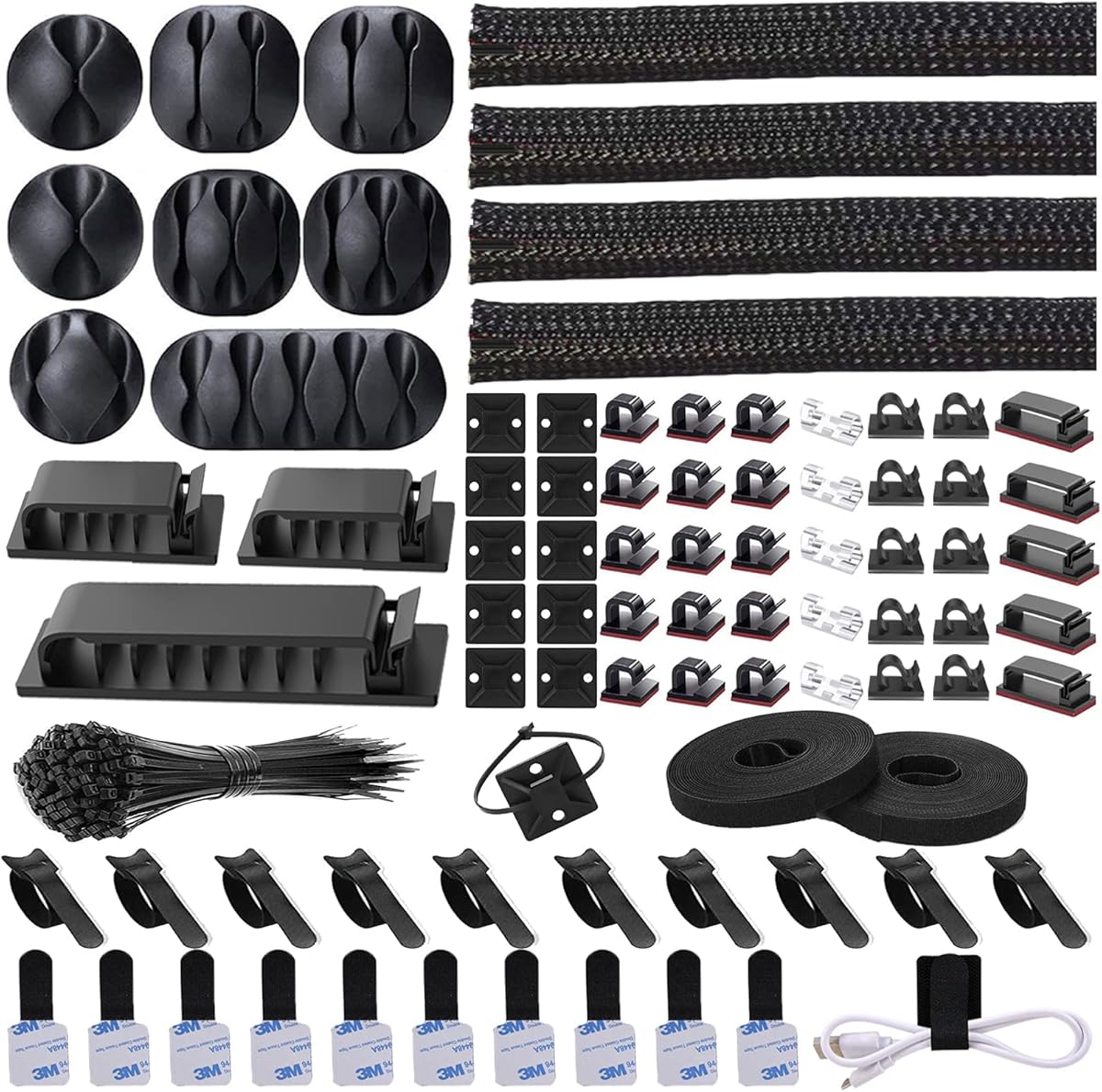
The NOROCME kit is a top rated solution for comprehensive cable management. It holds a high rating for its extensive variety of organizing tools included in one box.
We may earn a commission when you buy through this link, at no additional cost to you.
It features four sleeves and various clips made from strong polyamide. The self-adhesive ties offer flexibility for securing bundles in hard to reach gaming areas.
While it includes many parts which can be overwhelming initially the quality ensures long term use. The adhesive pads remain sticky even under heavy loads over time.
Buy this if you need an all-in-one solution for a full gaming PC setup. It handles power cords and peripheral wires effectively without needing additional purchases.
This kit provides multiple types of ties and clips to fit every cable route in your room.
The polyamide clips are designed to be nontoxic and extra strong for lasting performance.
We may earn a commission when you buy through this link, at no additional cost to you.
The Nettbe ties are a highly rated budget choice for gamers who need simple solutions. They offer a high number of pieces at a very low cost.
We may earn a commission when you buy through this link, at no additional cost to you.
Made from premium nylon adhesive materials they can be used multiple times without losing grip. Their versatility makes them suitable for garage or office spaces too.
They lack the structural support of rigid sleeves or trays. You will need to rely on them to bundle wires rather than hide them completely from view.
Choose these if you want to bundle loose cords quickly without spending much. They are perfect for temporary setups or supplementing a larger organization system.
You get sixty pieces in one pack ensuring you have enough for every cable in your desk.
The strap design allows you to tighten or loosen the grip on cables instantly.
We may earn a commission when you buy through this link, at no additional cost to you.
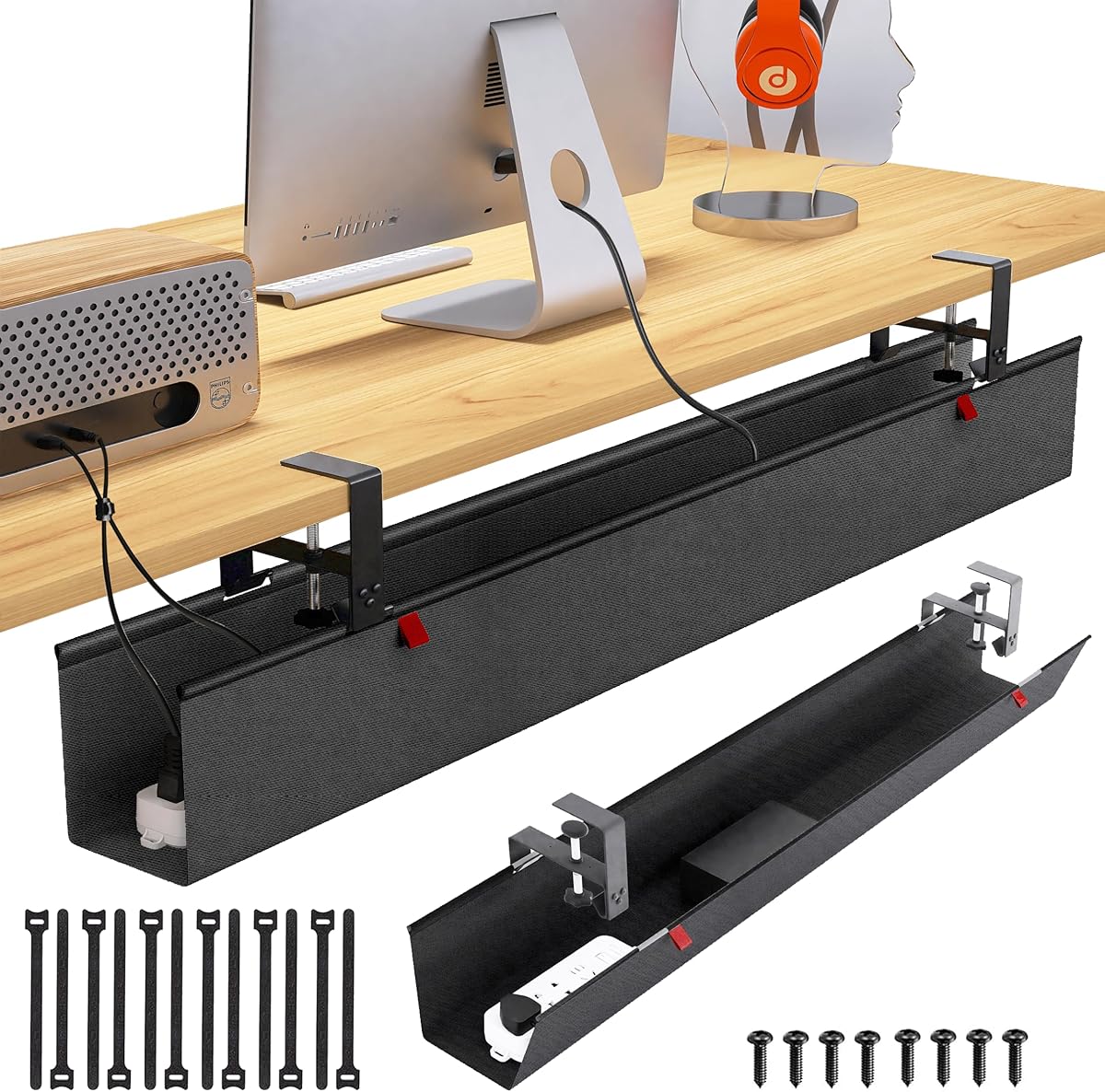
This tray is a top rated premium option for serious gamers wanting a stealthy setup. It stands out for its massive size and heavy duty construction designed for battlestations.
We may earn a commission when you buy through this link, at no additional cost to you.
The reinforced anti-sag base supports power bricks and converters without bowing. The high-density black fabric blocks wires completely to maintain a clean dark aesthetic.
It may not fit under every desk due to space needs for clips. The installation requires measuring your table to ensure the clamps have enough room to attach.
Invest in this if you need to hide a large amount of gear and cables. It transforms your under-desk area into a professional looking clean space instantly.
Built to handle heavy power bricks and transformers without deforming under long-term load.
The blackout fabric hides all wires so only your RGB lights are visible from below.
We may earn a commission when you buy through this link, at no additional cost to you.
This kit offers a comprehensive solution for organizing cables at home or office. It provides a wide range of components to handle different types of wire bundles effectively.
We may earn a commission when you buy through this link, at no additional cost to you.
The components are made from sturdy quality materials for long term use. The holders feature strong sticky pads that stay affixed to surfaces securely.
Users may find the variety of items takes time to organize initially. The adhesive pads require clean surfaces to ensure a permanent bond during installation.
Buy this if you need to organize multiple cables and want a ready-made set. It covers basic needs for desk and wall wire management without extra parts.
Split sleeves allow you to load wires easily without disconnecting them first.
Thirty-six holders offer enough anchors for a large desk or entertainment center.
We may earn a commission when you buy through this link, at no additional cost to you.
The YECAYE set provides a practical solution for hiding wires under desks. It includes six channels designed to keep cords neat and off the floor.
We may earn a commission when you buy through this link, at no additional cost to you.
Each channel offers ample space to theoretically hold up to ten cables. The PVC material is flame-retardant which adds an extra layer of safety for electronics.
Removal might require a hairdryer if the adhesive bond becomes too strong. The channels are rigid which means they cannot bend around tight corners easily.
Choose this if you want a tidy surface for office or home desks. It helps protect children and pets from exposed cables effectively.
The unique opening allows effortless placement and removal of cables daily.
Premium quality PVC prevents ignition during electrical fires for peace of mind.
We may earn a commission when you buy through this link, at no additional cost to you.
The Scanfield trays are top rated for reducing visible cable clutter. Users reported improved desk aesthetics after installation in gaming or office rooms.
We may earn a commission when you buy through this link, at no additional cost to you.
The adhesive backing is praised for its strength and durability over time. You do not need to drill holes to install them under your desk.
Each tray is small which might limit how many adapters it holds. They are fixed in place which makes rearranging cables difficult later.
Buy these if you want a quick tool free way to hide power strips. They fit multiple cables and keep your floor looking clean and organized.
Strong adhesive backing makes it easy to install without needing extra tools.
Robust design secures various cables without bending or losing grip over time.
We may earn a commission when you buy through this link, at no additional cost to you.
This tray offers flexible installation options for wood metal or glass tables. It is ideal for hiding everything under your table including large adapters.
We may earn a commission when you buy through this link, at no additional cost to you.
You can unfold the tray for easier adding or removing items quickly. The 600D oxford fabric is flame retardant for extra safety with electronics.
There needs to be space along the edges for the clips to work. The installation might leave small marks depending on your desk surface.
Choose this if you want to hide heavy items without drilling holes. It supports various table materials and holds a large amount of wires.
Use clamps or screws to fit any table top material securely and stably.
Thick 600D oxford fabric resists flames and handles heavy weight well.
We may earn a commission when you buy through this link, at no additional cost to you.
This tray uses a sturdy metal mesh structure to keep cables organized. It supports standing desks and home setups with non-slip rubber pads on clamps.
We may earn a commission when you buy through this link, at no additional cost to you.
The mesh structure allows good ventilation to prevent power supply overheating. It also helps reduce dust accumulation inside the tray over time.
The open design lets cables pass through freely but exposes them visually. You must assemble the two parts with screws which takes about three minutes.
Buy this if you need to keep wires cool and accessible under a desk. It maintains a tidy floor and keeps sockets away from kids safely.
Metal mesh provides ventilation to prevent overheating and reduce dust build-up.
The side design allows cables to pass through freely for easy changes.
We may earn a commission when you buy through this link, at no additional cost to you.
These clips are top rated for their reusable elastic loops and secure grip. They hold everything from single chargers to big bunches of cords effectively.
We may earn a commission when you buy through this link, at no additional cost to you.
You can attach them to flat surfaces with adhesive pads or screws. The elastic loop allows you to add or remove cables without waste.
The elastic may wear out over years compared to rigid ties. You will need to replace the pads if you move them frequently.
Choose this if you need to organize cables around a home or office. The clips are versatile enough to hold various sizes of chargers and cables.
The elastic loop allows you to swap and change cables without creating waste.
Use adhesive pads screws or zip ties to attach clips to any surface.
We may earn a commission when you buy through this link, at no additional cost to you.
The Alex Tech sleeve is a highly rated simple solution for protecting wires. It features a split design that makes loading cables easy and quick.
We may earn a commission when you buy through this link, at no additional cost to you.
Once loaded the sleeve closes on itself for a perfect wire wrap. It keeps cats from chewing cables due to its insulated durable material.
It only covers one set of wires which might limit its utility. You may need multiple lengths to cover all cables in a room.
Buy this if you want to protect power cords from pets or wear. It ensures organized cords with no more messy cables in your home.
Our wire loom is split and easy to load wires quickly.
Our cord protector keeps cat from chewing cables effectively.
We may earn a commission when you buy through this link, at no additional cost to you.
Choosing the right cable management system depends on your specific setup needs and budget. Each type offers unique benefits for organizing wires around your gaming desk.
Decide if you need a full kit with sleeves and ties or a standalone tray. Kits are versatile for bundling while trays are better for holding power strips.
Consider trays if you have multiple heavy items to hide under your desk.
Check the dimensions of trays or sleeves to ensure they fit your cables. A 17-inch tray holds fewer items than a 36-inch model for large setups.
Measure your desk width to pick a tray that fits without overhang.
Look for adhesive options if you want no drill installation on your desk. Clamp styles are useful for desks with edges but require enough clearance.
Choose clamps if you need to move the tray later without damage.
Opt for durable materials like nylon or polyamide that resist wear over time. Flame-retardant plastics add safety for power cords in your setup.
Avoid cheap plastics that might degrade quickly under heat or weight.
Select black options to blend with your gaming gear or RGB setups. Fabric trays hide wires completely while mesh trays show them but offer ventilation.
Prioritize blackout materials if you want a stealthy professional look.
Simple ties are the most affordable option while large trays cost more. Determine how much you can spend before buying to stay within budget.
Invest more in trays if you need to hide multiple heavy components.
Choose split sleeves or side-opening trays to add or remove cables easily. You should not have to unplug devices to adjust wires later.
Look for designs that allow flexible adjustment of cable layouts.
Start by unplugging all your devices and laying out the wires on the floor. Group similar cables together to plan your routes from the desk to the PC.
Install trays using adhesive or clamps ensuring the surface is clean and dry. Wait at least 24 hours before loading heavy gear into the organizer.
Periodically check that adhesive pads are still sticky and secure any loose ties. Replace any worn out clips to keep your cables safe and tidy.
The best way is to use an under desk tray that holds power strips and wires. You can combine it with split sleeves to bundle cables before routing them to the desk.
Most modern trays use strong adhesive backing or clamps that do not need drilling. Check the product details to confirm if it supports no-screw installation for your setup.
Yes, most adhesive clips work well on wood and other clean surfaces. Ensure the wood is free of dust or wax for the adhesive to bond properly.
Yes, split sleeves allow you to remove and reattach them easily. However, some zip ties may not be reusable if they are designed for single use.
Measure your desk width and the total length of cables you need to hide. Larger trays fit more items but require more space underneath for installation.
Yes if the tray is made of flame-retardant material like PVC. Ensure there is enough ventilation to prevent overheating during heavy use.
We reviewed ten products that offer distinct ways to organize your gaming cables effectively. Each pick brings unique strengths for budgets ranging from simple ties to full trays.
Prioritize durability and ease of use when selecting your ideal solution for your setup. Ensure your choice fits the physical constraints of your desk and room.
Remember to check current listings before buying to confirm prices and availability. A clean setup is achievable with the right tools for your needs today.