
LG 24U411A-B
4.5Editor score
120Hz Refresh Rate
Full HD Resolution
IPS Panel Technology
Finding a monitor that remains visible under direct sunlight is crucial for outdoor professionals and remote workers. Standard screens often fail when exposed to bright ambient light, making tasks difficult or impossible. You need a display specifically engineered to combat glare and maintain clarity.
We evaluated ten top-rated monitors based on brightness, color accuracy, and portability. Each model was assessed for its ability to perform in challenging lighting conditions. Our comparison focuses on real-world usability for fieldwork and creative tasks.
Each review highlights key strengths and potential limitations to help you choose wisely. Prices and availability change frequently so verify details before purchasing. This guide ensures you find the right tool for your specific lighting needs.
4.5Editor score
4.8Editor score

4.4Editor score
As an Amazon Associate we earn from qualifying purchases.
This side-by-side comparison highlights the critical specifications of each model to help you make an informed decision quickly. We focus on resolution, refresh rates, and specific features that enhance visibility in bright conditions.


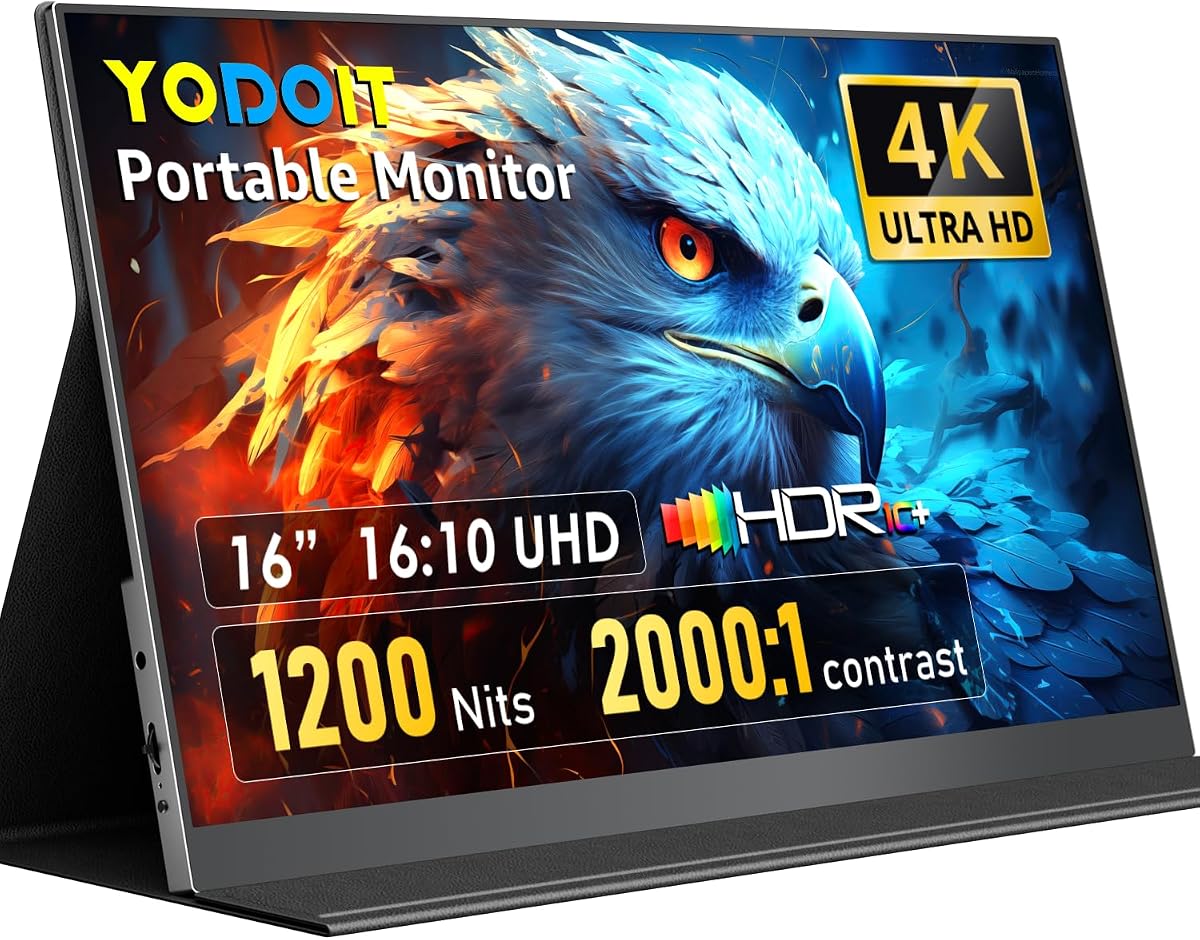
This portable monitor stands out with its exceptional 1200 nit peak brightness making it ideal for bright environments. Its 4K resolution and wide color gamut ensure that details remain sharp and vibrant even outdoors.
We may earn a commission when you buy through this link, at no additional cost to you.
The matte anti-glare coating effectively eliminates reflections allowing you to work comfortably under direct sunlight. The 16:10 aspect ratio provides extra vertical space which is beneficial for editing tasks and productivity.
While it requires an external power adapter for full performance this ensures stable output during intensive use. The included magnetic cover serves as a sturdy stand adding convenience for travel scenarios.
Photographers and field workers seeking a reliable outdoor screen will find this model unmatched in performance. It balances professional-grade specs with true portability for a versatile solution.
The 1200 nit display is significantly brighter than standard monitors ensuring visibility even in direct sunlight.
With 145% sRGB coverage this monitor delivers precise colors essential for photo editing and design work.
We may earn a commission when you buy through this link, at no additional cost to you.
This Dell monitor offers excellent value with a fast 144Hz refresh rate and TÜV certification for eye comfort. The IPS panel ensures consistent colors across wide viewing angles suitable for collaborative workspaces.
We may earn a commission when you buy through this link, at no additional cost to you.
The ultra-thin bezels maximize screen real estate making it a great choice for multi-monitor setups. Tilt adjustment allows for ergonomic positioning to reduce strain during long work sessions.
While it lacks the extreme brightness of specialized outdoor models it performs well in well-lit indoor environments. The 1ms response time makes it suitable for casual gaming and smooth scrolling.
Office users and casual gamers looking for a reliable everyday screen will appreciate its performance and design. It provides a balanced mix of features without breaking the budget.
The 144Hz refresh rate combined with 1ms MPRT ensures fluid motion ideal for gaming and video.
TÜV Rheinland certification reduces harmful blue light protecting eyes during extended viewing periods.
We may earn a commission when you buy through this link, at no additional cost to you.
This 27-inch 4K monitor delivers stunning clarity perfect for detailed creative work and productivity. The ComfortView Plus feature reduces blue light emissions while preserving color accuracy for comfortable all-day use.
We may earn a commission when you buy through this link, at no additional cost to you.
The 120Hz refresh rate and FreeSync Premium support create a smooth experience for both work and entertainment. HDR readiness enhances depth and detail in supported content making it versatile for media consumption.
The built-in speakers offer decent audio quality eliminating the need for external speakers in some cases. Ultra-thin bezels provide a sleek modern aesthetic that fits well in any office setup.
Professionals needing high resolution for design or data analysis will find this model highly capable. It balances premium features with a user-friendly design for daily tasks.
4K resolution and HDR readiness bring vivid colors and deep contrasts to your content.
ComfortView Plus technology minimizes harmful blue light to reduce eye fatigue significantly.
We may earn a commission when you buy through this link, at no additional cost to you.
This monitor stands out with its comprehensive ergonomic stand offering height tilt pivot and swivel adjustments. The 144Hz refresh rate ensures smooth visuals making it suitable for both office tasks and gaming.
We may earn a commission when you buy through this link, at no additional cost to you.
Integrated dual 3W speakers provide convenient audio for meetings and media without cluttering the desk. The TÜV-certified eye comfort features help reduce strain during long hours of focused work.
The Ash White finish adds a modern touch that complements contemporary office setups effectively. While it does not have 4K resolution the FHD display remains crisp and clear for standard tasks.
Users prioritizing comfort and a clean desk setup will appreciate the build quality and adjustability. It is an excellent choice for those needing flexibility without paying a premium price.
Full range stand adjustments allow you to find the perfect viewing position effortlessly.
Built-in speakers offer immediate sound for presentations and calls without extra hardware.
We may earn a commission when you buy through this link, at no additional cost to you.
This LG monitor delivers impressive performance for its price point with a 120Hz refresh rate and vibrant colors. The IPS panel provides consistent visuals across angles making it reliable for various tasks.
We may earn a commission when you buy through this link, at no additional cost to you.
Features like Reader Mode and Flicker Safe technology enhance comfort during extended use. The slim base design saves desk space and supports a cleaner workspace aesthetic.
While it lacks the brightness of higher-end models it handles typical indoor lighting conditions well. The HDR10 support adds depth to compatible media content making it versatile for home use.
Budget-conscious buyers looking for a capable daily driver will find this model highly appealing. It balances cost and functionality effectively for general productivity and entertainment.
High refresh rate and IPS technology deliver quality without the premium price tag.
Reader Mode and Flicker Safe reduce eye strain ensuring comfortable viewing sessions.
We may earn a commission when you buy through this link, at no additional cost to you.
This 27-inch monitor offers a large workspace ideal for multitasking and office productivity. The zero-frame design maximizes screen visibility making it excellent for multi-monitor configurations.
We may earn a commission when you buy through this link, at no additional cost to you.
Adaptive-Sync support ensures smooth playback and gaming without screen tearing or stuttering issues. The 120Hz refresh rate provides fluid motion which enhances the overall user experience significantly.
While it is designed primarily for office use its response time makes it suitable for casual gaming. The IPS panel offers good viewing angles ensuring clarity from different positions around the desk.
Professionals needing extra screen real estate without a 4K price tag will find this model useful. It delivers reliability and size efficiently for general office environments.
The 27-inch zero-frame design offers expansive visibility for efficient multitasking.
Adaptive-Sync and 120Hz refresh rate ensure smooth and tear-free motion.
We may earn a commission when you buy through this link, at no additional cost to you.
This 32-inch QHD monitor provides ample screen space perfect for creative professionals and power users. The USB Type-C connection simplifies setup allowing video transmission and charging through a single cable.
We may earn a commission when you buy through this link, at no additional cost to you.
With 99% sRGB coverage and HDR10 support colors appear vibrant and true-to-life on the large display. Reader Mode helps alleviate eye strain ensuring comfort during extended periods of content creation or review.
While it only offers tilt adjustment the sheer size of the screen compensates by providing detailed imagery. The 100Hz refresh rate ensures fluid motion for video editing and casual gaming tasks.
Users needing a large versatile canvas for multitasking will find this model highly rewarding. It balances premium color quality with convenient connectivity options for modern workstations.
USB Type-C simplifies cable management by supporting both video and power delivery.
99% sRGB and HDR10 bring rich and accurate colors to your creative projects.
We may earn a commission when you buy through this link, at no additional cost to you.
This monitor combines QHD resolution with a high refresh rate offering a sharp and fluid visual experience. The comprehensive ergonomic stand supports height tilt pivot and swivel adjustments for optimal viewing angles.
We may earn a commission when you buy through this link, at no additional cost to you.
Integrated speakers provide convenient audio for meetings and media saving space on your desk. The Ash White finish ensures a clean modern look that suits contemporary office aesthetics perfectly.
While it lacks advanced HDR features its clarity and motion performance make it ideal for office tasks. The 144Hz rate ensures smooth scrolling and fast-paced content without distracting stutter.
Professionals needing high resolution and ergonomic comfort will find this model highly capable. It offers a premium workstation experience at a competitive price point.
2560×1440 resolution delivers crisp text and precise imagery for professional work.
Full range adjustments ensure you can customize your viewing angle for maximum comfort.
We may earn a commission when you buy through this link, at no additional cost to you.
This compact monitor is designed for efficiency making it perfect for smaller desks or dual setups. The 120Hz refresh rate provides smooth visuals that reduce motion blur during scrolling and gaming.
We may earn a commission when you buy through this link, at no additional cost to you.
The zero-frame design maximizes screen visibility and adds a sleek modern touch to your workspace. IPS technology ensures consistent colors and wide viewing angles for better collaboration.
While it does not offer advanced features like HDR it delivers reliable performance for daily tasks. The affordable price point makes it accessible for budget-conscious office users.
Users needing a reliable space-saving display will find this model highly practical. It balances essential features with a clean design for effective everyday use.
The 23.8-inch form factor with zero frame offers maximum visibility in minimal space.
120Hz refresh rate ensures smooth motion for improved productivity and gaming.
We may earn a commission when you buy through this link, at no additional cost to you.
This portable monitor rivals the top pick with its 1200 nit peak brightness and 4K resolution. The matte screen reduces glare effectively ensuring clear visibility in bright environments.
We may earn a commission when you buy through this link, at no additional cost to you.
VESA mounting options and a protective cover make it versatile for both desktop and travel use. It supports various devices via USB-C and Mini HDMI ensuring wide compatibility with modern hardware.
While it requires external power for peak brightness this ensures stable performance during critical tasks. The aluminum alloy shell provides durability and better heat dissipation than plastic alternatives.
Travelers and professionals needing a bright portable screen will find this model highly effective. It offers a robust alternative for outdoor and on-the-go work scenarios.
1200 nit brightness ensures visibility even in direct sunlight without screen washout.
Aluminum alloy build and magnetic cover provide protection and heat management on the go.
We may earn a commission when you buy through this link, at no additional cost to you.
Choosing the right monitor for bright environments requires careful consideration of several key technical factors.
Brightness measured in nits is the most critical factor for outdoor visibility. Standard monitors often range between 250 and 350 nits which can become invisible under direct sunlight. For reliable outdoor use look for displays with 1000 nits or higher to ensure the screen remains readable.
Prioritize models with high peak brightness to overcome ambient light challenges effectively.
In-Plane Switching (IPS) panels offer better color accuracy and wider viewing angles than TN or VA panels. This is essential for creative work where precise color representation matters under varying light conditions.
Choose IPS technology for consistent visuals across different viewing angles.
A matte anti-glare coating helps diffuse reflections from windows or sunlight preventing distracting glare. This feature is crucial for outdoor work or bright indoor spaces where glossy screens become unusable.
Ensure the monitor has a quality matte finish for better readability.
If you need to move your monitor frequently consider lightweight portable options under 20 inches. Larger screens provide more workspace but are heavier and harder to transport for fieldwork.
Balance screen size with weight and dimensions for your specific travel needs.
Versatile connectivity like USB-C and HDMI ensures compatibility with laptops consoles and cameras. USB-C allows for single-cable power and video reducing clutter during mobile setups.
Verify the ports match your devices to avoid extra adapter costs.
Higher refresh rates like 120Hz or 144Hz ensure smooth motion which is beneficial for video editing and gaming. While not strictly necessary for text work it improves the overall viewing experience.
Select a refresh rate that aligns with your primary usage patterns.
Adjustable stands with height tilt and swivel features help maintain a comfortable viewing posture. Poor ergonomics can lead to strain especially during long outdoor work sessions.
Opt for monitors with full stand adjustability if they will be used on fixed desks.
Outdoor work exposes hardware to dust and physical stress so a robust build is important. Look for reinforced chassis and protective covers to prolong the monitor's lifespan.
Invest in models with sturdy construction to withstand travel conditions.
Start by connecting the monitor using the recommended cables for best performance. For portable high-brightness models ensure you connect the external power adapter to achieve peak brightness.
Regularly clean the screen with a soft microfiber cloth to prevent dust buildup from affecting clarity. Avoid using harsh chemicals that could damage the anti-glare coating over time.
Store portable monitors in their protective cases when not in use to prevent scratches and impact damage. This simple habit will significantly extend the lifespan of your display.
Ideally you should look for monitors with at least 1000 nits of brightness. Standard 250 nit screens will wash out completely in direct sunlight making work impossible.
Yes matte anti-glare screens are far superior for outdoor use as they diffuse reflections. Glossy screens reflect light sources making them difficult to read in bright conditions.
Many portable monitors rely on USB-C power which may not be enough for peak brightness. Using the included external power adapter ensures stable performance in demanding environments.
Use a soft dry microfiber cloth to wipe away dust and smudges gently. Avoid alcohol-based cleaners which can degrade the coating and reduce effectiveness over time.
4K resolution provides sharper text and detailed imagery beneficial for photo editing and design. For simple spreadsheets lower resolutions may suffice but 4K enhances clarity significantly.
Many models support VESA mounting allowing you to secure them to walls or arms. Check the specifications to confirm the mount pattern matches your stand or bracket needs.
Most models with HDMI ports support consoles like PS5 and Xbox for gaming. Ensure the refresh rate matches the console's output for the best experience.
HDR is a signal standard while brightness is measured in nits. High nits are crucial for sunlight visibility whereas HDR improves contrast in compatible content.
Finding the right monitor for bright environments involves balancing brightness resolution and portability. The models highlighted offer excellent options for various professional and creative needs.
Prioritize high nits and matte coatings if you plan to work outdoors regularly. These features make the most significant difference in usability under harsh lighting.
Always verify current specifications and availability before making a purchase to ensure the best fit. Selecting the right tool will enhance your productivity and comfort in any lighting condition.