
Creality Ender 3 V3 SE
3.8Editor score
CR Touch auto leveling
250mm/s print speed
Sprite direct extruder
3 step assembly
Compare the top auto bed leveling 3D printers for beginners. We analyze speed, ease of use, and reliability to help you find the perfect printer.
Starting your 3D printing journey can feel overwhelming without the right tools. Auto bed leveling technology removes the guesswork from setup, ensuring perfect first layers every time. This guide highlights the best models designed specifically for newcomers seeking reliability and ease of use.
We evaluated ten leading printers based on setup simplicity, leveling accuracy, and overall print quality. Our analysis focuses on machines that minimize manual calibration while maximizing output consistency. Each product offers unique features tailored to different budget levels and project needs within the hobbyist community.
Every pick showcases specific strengths like speed, build volume, or material compatibility. We also note potential trade-offs to help you make an informed decision. Prices and availability change frequently, so verify current details before purchasing to ensure you get the best value for your investment.
3.8Editor score

4.3Editor score

4.3Editor score
This side-by-side comparison highlights key specifications across all ten selected printers. We focus on leveling methods, build sizes, and special features to help you distinguish between similar models quickly.


The FLASHFORGE Adventurer 5M stands out as a top contender for beginners seeking speed and reliability. Its full-auto one-click leveling ensures a perfect first layer without manual tweaks. Users praise its rapid setup and consistent output quality across various filament types.
We may earn a commission when you buy through this link, at no additional cost to you.
This printer delivers exceptional performance with speeds reaching 600mm/s and high acceleration. The Core XY motion system combined with vibration compensation minimizes ghosting. The direct extruder handles flexible materials well, making it versatile for creative projects.
While it lacks an enclosure, the open design suits well-ventilated spaces. Beginners might need to manage odors separately when printing certain materials. However, the convenience of automatic calibration outweighs this minor drawback for most entry-level users.
Ideal for those wanting professional results without complex tuning. The quick-swap nozzle and robust build quality ensure long-term usability. We recommend this model for anyone prioritizing ease of use and rapid project completion.
The one-click leveling saves hours of manual adjustment time. This feature reduces frustration for new users learning the ropes.
Accelerating to 600mm/s in just 0.025 seconds allows rapid prototyping. This speed does not compromise print surface quality significantly.
We may earn a commission when you buy through this link, at no additional cost to you.
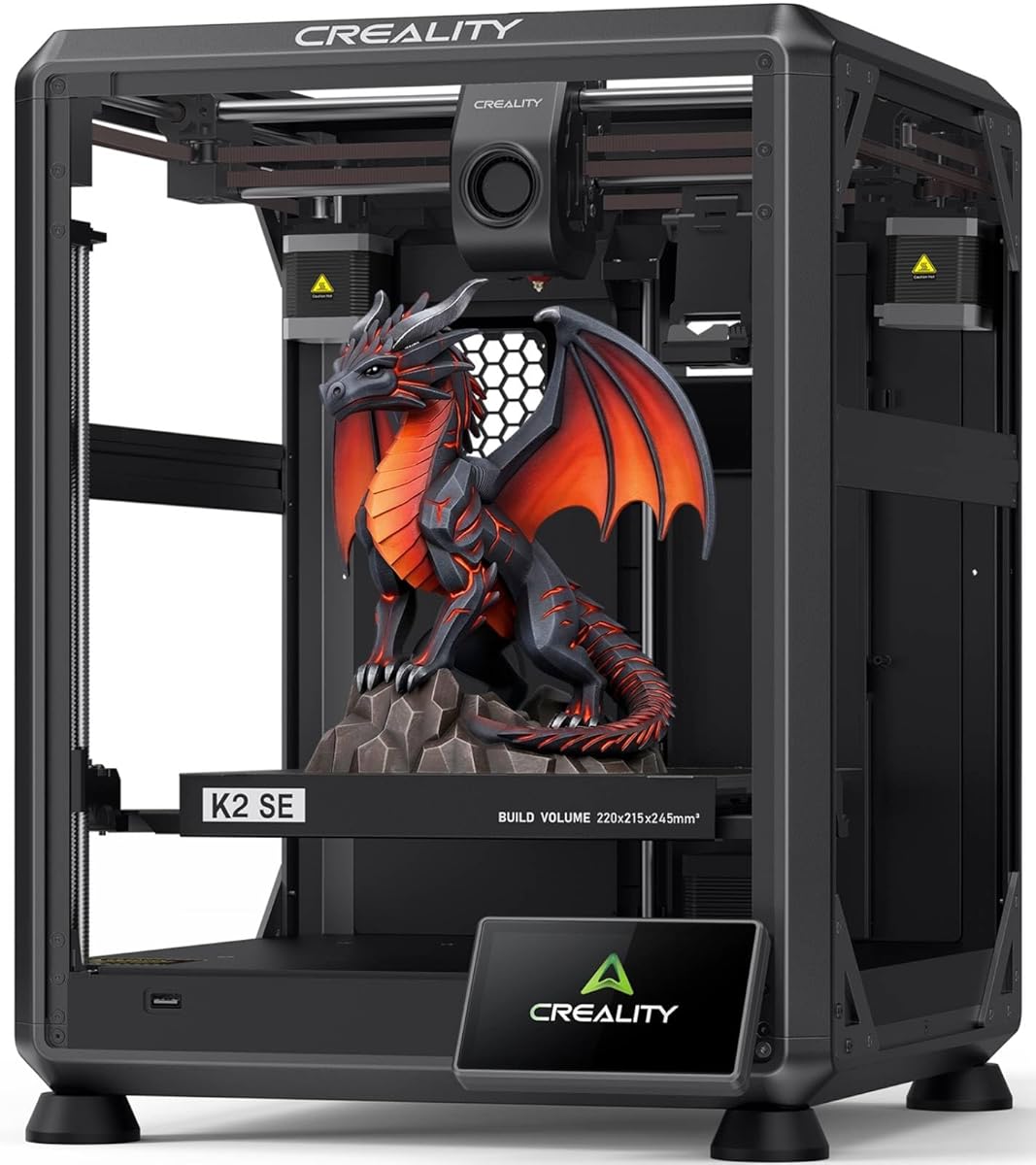
The Creality K2 SE offers a robust metal build suitable for precision printing. It supports up to 500mm/s speeds with input shaping to reduce ringing. Auto leveling simplifies setup for beginners interested in expanding their capabilities later.
We may earn a commission when you buy through this link, at no additional cost to you.
Its direct drive extruder ensures consistent feeding for detailed prints. The ability to connect to a Creality CFS opens doors for multi-color projects. This forward-thinking design makes it a strong option for growing makers.
Users note the need for initial assembly which might deter some. The software ecosystem can be complex for absolute novices. However, the hardware stability and expandability justify these minor hurdles for many.
Best for users planning to upgrade to multi-material printing eventually. The quick-swap nozzle and large bed volume add significant value. Choose this if you want a machine that grows with your skills.
Compatibility with CFS allows future multi-color expansion easily. This modularity extends the printer lifespan significantly for hobbyists.
Die-cast aluminum frames reduce flex during rapid movements. This ensures consistent dimensional accuracy even at high speeds.
We may earn a commission when you buy through this link, at no additional cost to you.
This tool assists beginners using manual leveling printers by providing clear visual cues. It eliminates the guesswork often involved in paper slip tests. Perfect for those upgrading old machines to include auto-leveling assistance.
We may earn a commission when you buy through this link, at no additional cost to you.
The LED indicator signals when the bed is properly adjusted relative to the nozzle. Its universal design fits most printers with manually adjustable beds. The battery holder and improved design make it reliable for daily use.
It does not automate the process fully but aids precision during calibration. Users must still manually adjust screws based on the signal. Despite this, it significantly reduces trial and error time.
A must-have accessory for anyone with a manual leveling printer. It bridges the gap between old tech and modern convenience. Pair it with existing gear to improve print reliability instantly.
The LED feedback makes leveling much more intuitive. New users find this far easier than traditional paper tests.
Designed to work with most manual adjustable bed printers. This versatility adds value beyond specific machine brands.
We may earn a commission when you buy through this link, at no additional cost to you.
The AD5M combines new technology with superior craftsmanship for all user levels. Its auto one-click leveling system measures offsets precisely to ensure consistency. Users appreciate the ease of starting prints without manual intervention.
We may earn a commission when you buy through this link, at no additional cost to you.
High speeds up to 600mm/s are supported by a stable CoreXY structure. The nozzle swaps in seconds, simplifying maintenance and upgrades. Orca-Flashforge slicer supports efficient batch file transmission and monitoring.
Power loss recovery and app control add peace of mind during long jobs. Beginners may need to learn the network features first. These advanced features ensure reliability but require initial configuration effort.
Ideal for those needing precision and speed without compromise. The flexible PEI plate aids easy print removal effectively. Choose this for stress-free creative journeys from idea to reality.
Automatically calculates nozzle-to-plate distance for accuracy. This guarantees a smooth surface on every print job.
Tool-free nozzle replacement takes mere seconds. This reduces downtime during complex multi-material projects.
We may earn a commission when you buy through this link, at no additional cost to you.
QIDI Q2 redefines the standard for professional-quality results out of the box. Its nozzle acts as the leveling sensor for true plug-and-play precision. This eliminates common bed surface issues found in other machines.
We may earn a commission when you buy through this link, at no additional cost to you.
The 65°C heated chamber and 370°C nozzle unlock high-performance materials like PPS and Carbon Fiber. Linear rails reduce vibration artifacts for ultra-smooth surfaces. Filament run-out and tangle detection ensure uninterrupted printing runs.
Safety features like triple filtration make it suitable for indoor environments. While powerful, it might be overkill for basic PLA printing only. The investment is justified for those seeking engineering-grade prototypes consistently.
Best for users needing high reliability and diverse material support. It covers entry-to-expert projects seamlessly within one machine. Choose this if you require professional results without extensive manual tuning.
Heated chamber minimizes warping for ABS and Nylon parts. This ensures strong layer adhesion and dimensional stability.
High temp nozzle unlocks carbon fiber and PPS filaments. This expands creative possibilities far beyond standard plastics.
We may earn a commission when you buy through this link, at no additional cost to you.
The AD5M Pro focuses on safety and noise reduction for home or classroom use. Its closed structure with dual filtration blocks 99% of particulate matter. Auto leveling ensures a flawless first layer every single time.
We may earn a commission when you buy through this link, at no additional cost to you.
Quiet silent mode allows uninterrupted focus during work or study sessions. It supports multi-material applications with high-temp direct drive extruder. Flexible control via Orca-Flashforge slicer enhances network monitoring efficiency.
The enclosed design may limit quick access compared to open frames. Some users might prefer more standard nozzle variety initially. However, safety and noise benefits are significant for shared spaces.
Ideal for schools, homes, or quiet offices prioritizing air quality. The remote monitoring features help track prints easily from anywhere. Choose this if health and environment are primary concerns.
HEPA filters remove harmful particles effectively. This makes printing safer for sensitive indoor environments.
Low-speed silent mode minimizes operational noise. This allows concentration during study or work periods.
We may earn a commission when you buy through this link, at no additional cost to you.
This model offers a reliable entry into auto leveling without high costs. CR Touch sensor and strain sensor eliminate manual Z-offset adjustments. The Sprite extruder handles various filaments like PLA and TPU smoothly.
We may earn a commission when you buy through this link, at no additional cost to you.
Dual Z-axis screws reduce wobbling for consistent prints over time. Assembly takes only 20 minutes from unpacking to printing. The quiet mainboard and flexible plate simplify the user experience effectively.
Speed is lower than premium models which might limit large batch jobs. However, it remains robust for general hobbyist and educational needs. Official support service ensures help is available when required.
Best for beginners on a budget needing reliable performance. The quick assembly process reduces initial frustration significantly. Choose this for a straightforward start to 3D printing.
Preassembly solves major hassle of building from scratch. You can start printing in less than half an hour.
Sprite extruder proven by half million units shipped. This ensures smooth feeding for common materials.
We may earn a commission when you buy through this link, at no additional cost to you.
Upgrade your existing Ender printer with this independent research kit. It performs multi-point detection to calculate tilt angles for compensation. This stable solution works over 100,000 times reliably.
We may earn a commission when you buy through this link, at no additional cost to you.
Requires downloading and installing specific firmware for your motherboard version. The process is straightforward once confirmed your machine compatibility. It transforms manual leveling into an automated process smoothly.
Not universal for all machines; check version numbers before buying. Users comfortable with basic troubleshooting will find this valuable. It extends the life of older printers effectively.
Best for existing Creality owners wanting auto leveling cheaply. The included brackets and screws make physical mounting easy. Choose this to modernize older hardware without buying new.
Multi-point detection creates virtual plane for accuracy. This ensures consistent height across the entire print area.
Cheaper than buying a new auto-leveling printer. This allows smart upgrades for budget-conscious makers.
We may earn a commission when you buy through this link, at no additional cost to you.
The AD5X offers vibrant models through innovative multi-color printing technology. IFS manages filament refills automatically minimizing production downtime. Fully auto leveling ensures precision across all color layers.
We may earn a commission when you buy through this link, at no additional cost to you.
High speeds and acceleration reduce turnaround times for complex designs. The CoreXY structure maintains stability during rapid movements. Versatile printing supports TPU and other flexible materials well.
Artists benefit from the ability to produce intricate designs without post-painting. Setup might take longer than single-color models due to tuning. This is a trade-off for advanced creative output.
Best for designers seeking visual impact directly from the printer. The large build size supports diverse project requirements effectively. Choose this to expand creative boundaries with color.
Four colors simultaneously unlock vibrant model possibilities. This eliminates the need for tedious painting later.
IFS manages refills seamlessly during printing. This ensures uninterrupted production of multi-color projects.
We may earn a commission when you buy through this link, at no additional cost to you.
Designed for straightforward setup, this model offers CR Touch auto leveling. It achieves a reliable first layer with minimal manual adjustments. The silent mainboard ensures a comfortable experience during operation.
We may earn a commission when you buy through this link, at no additional cost to you.
Dual synchronized Z-axis lead screws and Y-axis shafts reduce vibration. The flexible PC plate allows quick model removal with minimal effort. Proven direct drive extruder handles everyday materials smoothly.
Limited build volume restricts very large prints but suits smaller models. Speed is standard compared to high-end competitors but sufficient for learning. Ideal for personal prototyping or educational use cases.
Best for quick starts needing consistent results immediately. The simplified assembly reduces initial learning curves significantly. Choose this for a reliable, quiet, and beginner-focused experience.
32-bit silent mainboard reduces operating noise. This creates a comfortable environment for long printing jobs.
Flexible PC spring steel plate aids model removal. You avoid damaging prints or tools when retrieving parts.
We may earn a commission when you buy through this link, at no additional cost to you.
Selecting the right printer involves balancing speed, ease of use, and reliability. This guide outlines the critical factors to consider before purchasing your first auto-leveling machine.
Auto leveling systems vary from sensor-based to nozzle probing methods. Sensor-based systems like CR Touch use a probe to measure bed height manually. Nozzle-based systems utilize the hot end itself as a sensor for direct measurement. Both types eliminate manual paper testing and improve first-layer accuracy significantly.
For beginners, any automatic system is superior to manual leveling. Prioritize models offering one-click calibration to save time and reduce errors. Verify if the system requires firmware updates or software configuration.
Modern printers advertise speeds ranging from 150mm/s to 600mm/s. Higher acceleration means the printer can reach top speeds quickly without losing precision. Fast printing reduces project turnaround time allowing for quicker iterations. However, speed should not compromise the quality of the final output.
Look for Core XY motion systems which offer better stability at high speeds. Ensure the printer supports input shaping to prevent vibration artifacts at rapid velocities. Balance speed needs with budget constraints when making a choice.
Build volume determines the maximum size of objects you can print in one piece. Common sizes range from small desktop models to large functional parts. Beginners often start with standard 220mm cubes before moving to larger volumes. Consider your intended projects when selecting physical dimensions.
Larger beds require more rigorous leveling accuracy to maintain flatness. If space is limited in your room, a compact printer might be preferable. Always measure your workspace before purchasing a large volume machine.
Standard printers handle PLA and PETG well but some struggle with flexible filaments. Direct drive extruders are preferred for TPU due to better filament control. High-temperature nozzles are required for engineering materials like ABS or Nylon. Check the max nozzle temperature specified by the manufacturer.
Flexible materials can be difficult to feed with Bowden setups. Ensure the extruder is powerful enough to handle the specific filament types you plan to use. Expandable compatibility future-proofs your machine against new material trends.
Some printers arrive pre-assembled while others require significant setup time. Look for models that promise assembly in under 30 minutes for beginners. Pre-assembled machines reduce the risk of incorrect setup errors initially. This factor is crucial if you lack technical confidence.
Quick-swap nozzles and modular parts simplify maintenance tasks significantly. Review user feedback regarding setup difficulty before buying. A well-documented process saves frustration during your first print attempts.
Enclosed printers provide consistent temperatures essential for materials like ABS. Open frames offer better ventilation but are more prone to warping on sensitive materials. Some models come with filtration systems to reduce odors and particulates. Safety is a major concern for indoor environments.
If you have children or pets, an enclosed design provides physical protection. Verify if the printer includes HEPA filters for air quality. Consider noise levels alongside enclosure type for comfortable operation.
Remote monitoring and Wi-Fi control are standard features in many new models. Slicing software compatibility influences how easily you can prepare print files. Ensure the printer integrates well with popular slicers like Cura or Orca. Network printing allows you to start jobs from your phone.
Cloud integration can simplify file transfers but requires internet access. Local network printing offers more security and independence from external servers. Test the user interface of the printer's screen for intuitiveness.
Prices vary widely based on features like multi-color support or heated chambers. Entry-level models provide essential functionality without expensive add-ons. Premium models offer reliability and advanced features but at a higher cost. Determine how much you are willing to invest initially.
Consider long-term maintenance costs like nozzles or heated beds. High-quality materials may save money by reducing failed prints. Balance upfront cost with expected performance and durability for best value.
Start by calibrating the auto-leveling system according to the manufacturer's manual. Ensure the build surface is clean and free of dust before running the leveling routine. This initial step guarantees accurate sensor readings for optimal first layers.
Regularly check nozzle temperatures and filament quality to maintain consistent extrusion. Store filament spools in dry containers to prevent moisture absorption which causes poor prints. Clear debris from the nozzle after every print session to avoid clogs.
Update firmware periodically to benefit from bug fixes and performance improvements. Monitor the printer during the first few layers of any new project to catch issues early. Following these habits extends the lifespan of your machine and improves print reliability.
Most modern auto leveling printers handle calibration automatically through sensors. However, you may need to perform a coarse leveling using the screws occasionally. This ensures the sensors read accurate baseline data for better results.
Auto leveling measures the exact height of the print bed at multiple points. It adjusts the Z-offset dynamically so the nozzle sits perfectly over the surface. This prevents gaps or blobs on the first layer which are common manual issues.
Yes, auto leveling works well with flexible filaments provided you use a direct drive extruder. Some Bowden systems struggle with flexible materials regardless of leveling features. Always check if the printer supports TPU explicitly before purchasing.
A dirty probe can lead to inaccurate readings and failed prints. Clean the probe tip gently with rubbing alcohol if you notice errors. Regular maintenance of sensors ensures consistent and reliable calibration results.
Higher speed allows faster completion but may introduce artifacts if not tuned properly. Beginners benefit more from reliable standard speeds than maximum theoretical speeds. Focus on accuracy first then explore speed upgrades as you gain experience.
Inspect the sensor every few months or if you notice print inconsistencies. Physical knocks or moving the printer can shift alignment over time. A quick calibration run is faster than troubleshooting failed prints later.
Auto leveling usually calculates the offset automatically but fine-tuning might be needed. You can adjust the Z-offset manually in the printer's menu if prints stick poorly. Small adjustments help achieve the perfect first layer adhesion.
Both capacitive and inductive probes are reliable when paired with solid firmware. Nozzle-based sensors are becoming popular as they remove separate hardware parts. Research user reviews on specific printer models for real-world reliability data.
We have explored ten top models ranging from budget-friendly options to premium machines. Each printer offers distinct advantages tailored to different needs and skill levels. Whether you prioritize speed or color capabilities there is a suitable choice here.
Focus on ease of use and reliability when selecting your first auto-leveling machine. A simple setup process helps you learn printing concepts without constant troubleshooting. Avoid models requiring complex calibration that might discourage early progress.
Prices and availability can change so always verify the latest deals before buying. Check current stock and warranty terms to ensure you get a supported product. Investing in the right printer sets a solid foundation for future creativity.