
ASRock 760GM-HDV
4.3Editor score
Affordable MicroATX form factor
Supports up to 8-Core CPUs
Includes AMD Overdrive ACC feature
This guide compares ten top Asrock AM3 Motherboard options for performance, features, and compatibility to help you choose the right platform for your AMD
Choosing the right motherboard is crucial for any PC build, especially when working with legacy AMD platforms. The Asrock AM3 Motherboard options provide reliable support for older Phenom and Athlon processors, ensuring stability and efficiency for budget-conscious builders or specific industrial use cases.
We evaluated ten distinct models based on chipset capabilities, expansion slots, connectivity options, and user ratings. Each product was assessed for its ability to handle multi-core CPUs, memory speeds, and peripheral support. This list covers various form factors and feature sets to meet diverse computing needs.
Each pick highlights specific strengths like overclocking support, USB versions, and audio quality. Prices may vary over time due to market demand and availability. Always verify compatibility with your specific CPU model before purchasing to ensure a smooth installation and optimal performance for your system.
4.3Editor score

4.2Editor score

5.0Editor score
The following table provides a side-by-side comparison of all ten selected motherboards. It highlights key specifications such as chipset, memory support, and expansion slots to help you quickly identify the model that fits your specific requirements.




The ASRock 970A-G/3.1 stands out as a top choice for builders needing modern connectivity on an older platform. It offers a robust feature set including M.2 and USB 3.1 which are rare in this segment. With a 4.2 rating, users appreciate its versatility and solid build quality for daily tasks.
We may earn a commission when you buy through this link, at no additional cost to you.
This board supports AMD Phenom II X6 processors and allows for significant memory expansion up to 64GB. The inclusion of SATA3 and USB 3.1 ensures your storage and peripherals run at optimal speeds. The Quad CrossFireX capability provides flexibility for multi GPU setups without breaking the bank.
While it lacks native NVMe boot support due to older BIOS limitations, the M.2 slot is still useful for cache drives or secondary storage. The absence of on board video headers might be a limitation for systems relying on integrated graphics, but dedicated cards work flawlessly.
If you need a reliable AM3+ platform with future proof connections, this is the ideal pick. It balances cost and features effectively. We recommend it for users upgrading older systems who want to keep their AMD CPUs while gaining modern port options.
The inclusion of USB 3.1 and M.2 slots allows users to utilize faster SSDs and external drives even with older AMD CPUs.
Support for up to 64GB of DDR3 memory and Quad CrossFireX ensures the system can handle demanding multitasking and graphical tasks.
We may earn a commission when you buy through this link, at no additional cost to you.
The ASRock 760GM-HDV is an excellent budget option for those looking to maximize value. It supports a wide range of AM3+ processors including powerful 8-core units. With a high user rating of 4.3, it is known for reliability and ease of use in entry level systems.
We may earn a commission when you buy through this link, at no additional cost to you.
Features like AMD Overdrive with ACC allow for tuning CPU performance without complex software. The MicroATX form factor makes it perfect for smaller cases. While it lacks modern ports, it provides all the essential connectivity needed for basic computing and light gaming tasks.
The main trade-off is the absence of SATA3 and USB3.0 which can limit transfer speeds for modern SSDs. Additionally, fewer PCIe slots restrict multiple GPU setups. However, for single GPU systems or office PCs, these limitations are often negligible and do not impact daily performance.
For builders on a tight budget who need stable performance from AMD AM3 CPUs, this board is a strong contender. It offers a balanced mix of features and cost. We suggest it for home theater PCs or entry level workstations.
This motherboard delivers reliable performance for daily tasks and light gaming without requiring a high investment in hardware.
The MicroATX design saves space in your case while maintaining support for high TDP CPUs for better cooling and efficiency.
We may earn a commission when you buy through this link, at no additional cost to you.
The ASRock 890FX Deluxe4 represents the pinnacle of AM3 motherboards with its robust feature set. It is one of the few boards to offer IEEE 1394 FireWire ports which are rare today. With a perfect 5.0 rating, it is highly regarded by enthusiasts for stability and high-end capabilities.
We may earn a commission when you buy through this link, at no additional cost to you.
This board supports Quad CrossFireX allowing for intense graphical performance on older hardware. It features 6x SATA3 ports providing ample high speed storage connections. The 890FX chipset ensures excellent power delivery and overclocking potential for AMD Phenom II X6 processors.
A notable limitation is that it supports AM3 sockets rather than the newer AM3+ which limits CPU compatibility. The high price point might be difficult to justify given the age of the platform. However for specific legacy needs or unique port requirements it remains unmatched.
For users needing FireWire support or maximum multi GPU capability on AM3, this is the only viable high-end choice. It is best suited for enthusiasts who need specific legacy features. We recommend checking CPU compatibility carefully before purchasing.
The AMD 890FX chipset enables Quad CrossFireX for users wanting to maximize graphical performance on legacy hardware.
Inclusion of IEEE 1394 FireWire ports makes this board essential for users with older external video capture or audio equipment.
We may earn a commission when you buy through this link, at no additional cost to you.
The ASRock 970M PRO3 bridges the gap between compact design and feature richness. It supports AM3+ processors and includes essential modern ports like USB 3.0. Users rate it at 4.0 stars citing its reliability in small form factor builds as a key advantage over larger boards.
We may earn a commission when you buy through this link, at no additional cost to you.
This board offers a robust chipset that supports Quad CrossFireX and provides three SATA3 ports for fast storage. The inclusion of USB 3.0 ensures your drives run at full speed which is vital for daily performance. It is ideal for builders who want a smaller case without sacrificing power.
The limited number of PCIe slots may restrict extensive expansion needs. Additionally the audio codec is not as high end as premium models. However for most users these compromises are acceptable given the price and size benefits. It fits well into budget friendly gaming PCs.
If you need a smaller board that still handles powerful CPUs, this is a smart choice. It balances size and function well. We recommend it for home theater PCs or space constrained gaming setups requiring AM3+ support.
The MicroATX form factor allows for smaller cases while still supporting high-end AM3+ CPUs and graphics cards.
Inclusion of USB 3.0 and SATA3 ensures your storage and peripherals perform quickly despite the smaller size.
We may earn a commission when you buy through this link, at no additional cost to you.
The ASRock 970 EXTREME3 is designed for users who need robust power delivery for demanding tasks. It features a solid VRM design to handle high TDP CPUs effectively. While the user rating is lower at 3.6, enthusiasts value its stability and extensive expansion capabilities for complex builds.
We may earn a commission when you buy through this link, at no additional cost to you.
This board supports RAID configurations which is useful for storage redundancy. The inclusion of an eSATA3 port provides additional external connectivity options. It offers ample space for multiple graphics cards and expansion cards making it versatile for specialized computing needs.
One drawback is the lack of USB 3.0 ports which limits peripheral speeds. The older design also lacks some modern convenience features found in newer boards. However for users prioritizing raw power and storage features these limitations may not matter as much.
If you need a board that can handle intense workloads or RAID setups, this is a good option. It is best for users with specific storage needs. We suggest it for workstation builds or enthusiasts who need extra SATA ports.
The robust VRM design ensures consistent power to the CPU which is essential for stable overclocking and heavy multitasking.
Support for RAID arrays allows users to create safer and faster storage setups for critical data or applications.
We may earn a commission when you buy through this link, at no additional cost to you.
The ASRock 960GM-VGS3 FX offers a great balance of cost and features for budget builds. It supports AM3+ CPUs and includes useful utilities like X-Boost for better performance. With a rating of 3.7, it is appreciated for its reliability and compact design in entry level systems.
We may earn a commission when you buy through this link, at no additional cost to you.
This board features 5.1 channel audio which is excellent for home theater setups. The use of solid capacitors ensures long term durability even under load. It provides a stable platform for everyday computing tasks without unnecessary bloat or complex configurations.
The older chipset means fewer high-speed ports compared to newer models. There are also limited expansion slots which restrict future upgrades. However for users who do not need high bandwidth connections, this board provides all the essentials for a smooth experience.
For those building a budget PC or media center, this is a solid choice. It offers essential features without a high price tag. We recommend it for home office PCs or media centers requiring AM3+ compatibility.
The use of solid capacitors ensures the board remains stable and reliable over time even during extended usage periods.
ASRock X-Boost utility helps improve system performance by optimizing data transfer speeds for connected storage devices.
We may earn a commission when you buy through this link, at no additional cost to you.
The ASRock 880GXH/USB3 is designed for systems that rely on integrated graphics. It includes the Radeon HD4250 controller which supports 1080p playback. With a rating of 3.0, it is a basic but functional option for users who do not need a dedicated graphics card.
We may earn a commission when you buy through this link, at no additional cost to you.
Features like Hybrid CrossFireX allow for a combination of integrated and discrete graphics. The inclusion of USB 3.0 ensures decent peripheral speeds. It also offers multiple video outputs including HDMI and DVI which provides flexibility for connecting various monitors.
The integrated graphics are quite basic by modern standards and may struggle with newer games. The user rating reflects some limitations in BIOS usability or power delivery. However for basic office work or media playback it serves its purpose well without extra cost.
If you need a board with integrated video and HDMI output this is a viable choice. It avoids the need for a separate GPU in simple builds. We recommend it for basic office PCs or media centers with low graphics needs.
The integrated Radeon HD4250 controller allows for video playback and basic gaming without needing a separate graphics card.
Multiple video outputs including HDMI and DVI make it easy to connect modern monitors and TVs for media consumption.
We may earn a commission when you buy through this link, at no additional cost to you.
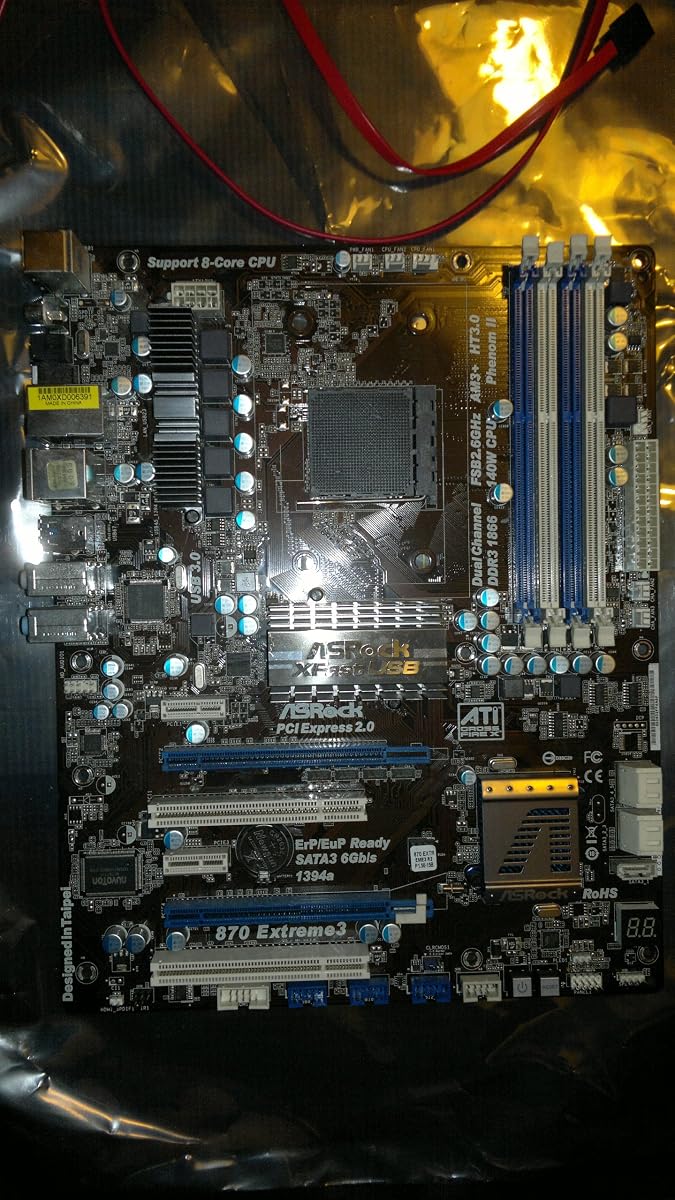
The ASRock 870 EXTREME3 R2.0 offers a solid mid-range option with good connectivity. It supports AM3+ CPUs and includes FireWire which is rare in many boards. With a rating of 3.9, users appreciate its balance of features and stability for general purpose computing tasks.
We may earn a commission when you buy through this link, at no additional cost to you.
This board includes USB 3.0 for faster peripheral transfers and supports Quad CrossFireX. The audio codec is high quality supporting premium Blu-ray audio for media enthusiasts. It also offers RAID support for users needing data redundancy without enterprise gear.
While it lacks the top-tier performance of the 990FX models it covers most essential needs. The presence of older FireWire ports limits its appeal to niche users. However for general use and gaming it provides a reliable platform for AMD Phenom processors.
For users who need specific ports like FireWire and USB 3.0 this board is a strong contender. It balances well between performance and connectivity. We recommend it for gamers or media users with legacy peripheral needs.
The combination of USB 3.0 and IEEE 1394 ensures compatibility with both new and old peripheral devices.
The premium audio codec supports high-fidelity sound for movies and music making it ideal for media centers.
We may earn a commission when you buy through this link, at no additional cost to you.
The ASRock 990FX EXTREME3 is built for extreme gaming and multi GPU setups. It supports Quad SLI and Quad CrossFireX making it one of the few options for high-end legacy graphics. With a 3.8 rating it is respected for power delivery and raw performance capabilities.
We may earn a commission when you buy through this link, at no additional cost to you.
This board can handle 140W TDP processors ensuring high-end CPUs run without throttling. The 990FX chipset provides ample bandwidth for multiple graphics cards. It includes modern USB 3.0 and SATA3 ports to ensure storage and peripherals keep up with the GPU power.
The main drawback is the high cost given the age of the AM3 platform. BIOS updates may be limited compared to modern boards. However for users who need extreme multi GPU performance on an AMD AM3 system this is the most capable board available.
If you are building a legacy gaming rig with multiple GPUs this is the only viable choice. It offers unmatched features for this specific use case. We recommend it only for enthusiasts with specific hardware requirements.
Support for Quad SLI and CrossFireX allows users to push graphical performance to its limits on legacy hardware.
The robust power design supports up to 140W TDP processors ensuring maximum performance without thermal throttling.
We may earn a commission when you buy through this link, at no additional cost to you.
The ASRock 970DE3/U3S3 is a reliable option for systems needing legacy ports. It includes a Serial Port which is useful for industrial or specific legacy hardware. With a 3.9 rating it is valued for stability and basic functionality in older system upgrades.
We may earn a commission when you buy through this link, at no additional cost to you.
This board supports AM3+ processors and includes USB 3.0 for decent peripheral speeds. It also offers RAID support which is useful for basic data management. The inclusion of USB 3.0 on a budget board is a nice touch for users needing faster drive access.
The feature set is limited compared to higher-end models. There are fewer PCIe slots and basic audio. However for users needing a specific port or simple upgrade path it serves its purpose. It is not ideal for gaming but works well for general use.
If you need a board with a Serial Port and basic USB 3.0 this is a strong choice. It is best for industrial or office upgrades. We recommend it for specific legacy system needs where modern ports are less critical.
The inclusion of a Serial Port makes this board essential for connecting industrial devices or legacy equipment.
RAID support and USB 3.0 ensure reliable storage performance even without high-end modern features.
We may earn a commission when you buy through this link, at no additional cost to you.
Selecting the right motherboard requires understanding the specific features that match your needs. Here are key factors to consider when buying an Asrock AM3 Motherboard.
Ensure the motherboard supports your specific CPU socket type. While most AM3 boards support AM3+, some older models only support AM3. Check the product details to confirm compatibility with Phenom II or Athlon II processors before purchasing.
Always verify socket type to avoid compatibility issues with your chosen processor.
The chipset determines the feature set available such as USB versions and expansion capabilities. Higher end chipsets like 990FX or 890FX offer more features like SLI and CrossFireX while lower ones like 760G focus on budget performance.
Choose a chipset that matches your performance needs and budget.
Select a form factor that fits your case. ATX boards offer more expansion slots while MicroATX boards save space. Consider your case size and whether you need room for multiple graphics cards or additional storage drives.
Match the form factor to your case size and expansion requirements.
Check the maximum memory capacity and supported speeds. DDR3 is standard for AM3 boards but capacity varies. Ensure the board can handle the amount of RAM you plan to install for multitasking.
Verify maximum capacity and speed to ensure future proofing.
Look for necessary ports like USB 3.0 or USB 3.1 for faster peripherals. Some boards also include legacy ports like Serial or FireWire which may be required for specific industrial applications.
Prioritize the ports you need most for daily use or specific hardware.
Consider the number and type of PCIe slots available. If you plan to use multiple graphics cards or capture cards, ensure the board has enough space and bandwidth for them.
Count your required expansion cards to ensure sufficient slots.
High performance CPUs require robust power delivery. Look for boards with solid capacitors and good VRM designs to ensure stable operation under load. This is especially important for overclocking or 120W+ processors.
Check power design stability for high-end CPUs.
Most boards come with integrated Realtek audio and Gigabit Ethernet. High-end models may offer better audio codecs or additional network features. Determine if you need premium audio for media or standard networking.
Evaluate if standard integrated features meet your media and web needs.
When installing the motherboard, ensure the power supply is unplugged and use an anti-static mat to protect components. Align the board properly with the standoffs and connect all necessary power cables securely before powering on.
Keep the system clean by regularly dusting the fans and heat sinks. Ensure adequate airflow in the case to prevent overheating which can affect the longevity of the motherboard and CPU.
Update the BIOS to the latest version to ensure compatibility with newer CPUs and fix potential bugs. Check the manufacturer website for the latest firmware updates that match your specific motherboard model.
No, AM3 motherboards are designed for legacy AMD CPUs like the Phenom II and Athlon II series. They do not support modern Ryzen or APUs which require different sockets and chipsets.
Yes, most AM3 motherboards support DDR3 memory. Always check the maximum supported speed and capacity in the specifications before buying RAM.
Some newer AM3 boards like the 970A-G/3.1 include an M.2 slot but older models do not. Always check the product details for M.2 support if you need NVMe storage.
Yes, many AM3 boards include USB 3.0 ports. Higher end models may have USB 3.1. Check the product specs to confirm the version available.
Most AM3 boards support overclocking for unlocked processors. Features like AMD Overdrive or BIOS tuning options are common. Ensure your cooling solution is adequate for overclocked temperatures.
They are best for legacy system upgrades, industrial machines, or budget builds where modern features are not needed. They provide a stable platform for older processors.
The ASRock 970A-G/3.1 stands out as the overall best choice for its modern connectivity and broad CPU support. The 760GM-HDV is perfect for budget builds needing compact size. The 890FX Deluxe4 is the top pick for enthusiasts needing unique legacy features.
Prioritize your specific needs such as modern ports or legacy compatibility when selecting a model. The right board ensures stability and efficiency for your build. Always check CPU compatibility carefully before making a purchase.
Prices and availability change frequently so verify current stock and details on the product pages. We hope this guide helps you find the perfect AM3 motherboard for your computing needs.