
Thrustmaster T-Flight Hotas X
4.4Editor score
Detachable throttle design
12 programmable buttons
Adjustable stick resistance
This guide compares the top 10 airplane controllers for PC to help you find the perfect flight simulator setup with realistic controls and precision.
Finding the right airplane controllers for PC can transform your flight simulation experience from basic gameplay into a professional cockpit environment. High-quality controllers offer realistic feedback, precise axis control, and ergonomic designs that reduce fatigue during long sessions.
We compared ten top-rated products based on build quality, programmability, sensor accuracy, and compatibility with major simulation software. Our analysis focuses on how well each device replicates real-world aviation controls for both civilian and military flight scenarios.
Each pick highlights unique strengths, from budget-friendly options to premium yoke systems. While pricing may vary over time, these models consistently deliver reliability and performance that serious sim pilots demand for immersive training and entertainment.
4.4Editor score
4.6Editor score

4.4Editor score
Below is a detailed side-by-side comparison of all ten airplane controllers for PC evaluated in this guide. Each entry includes key specifications and direct links to product pages for easy reference and purchase.






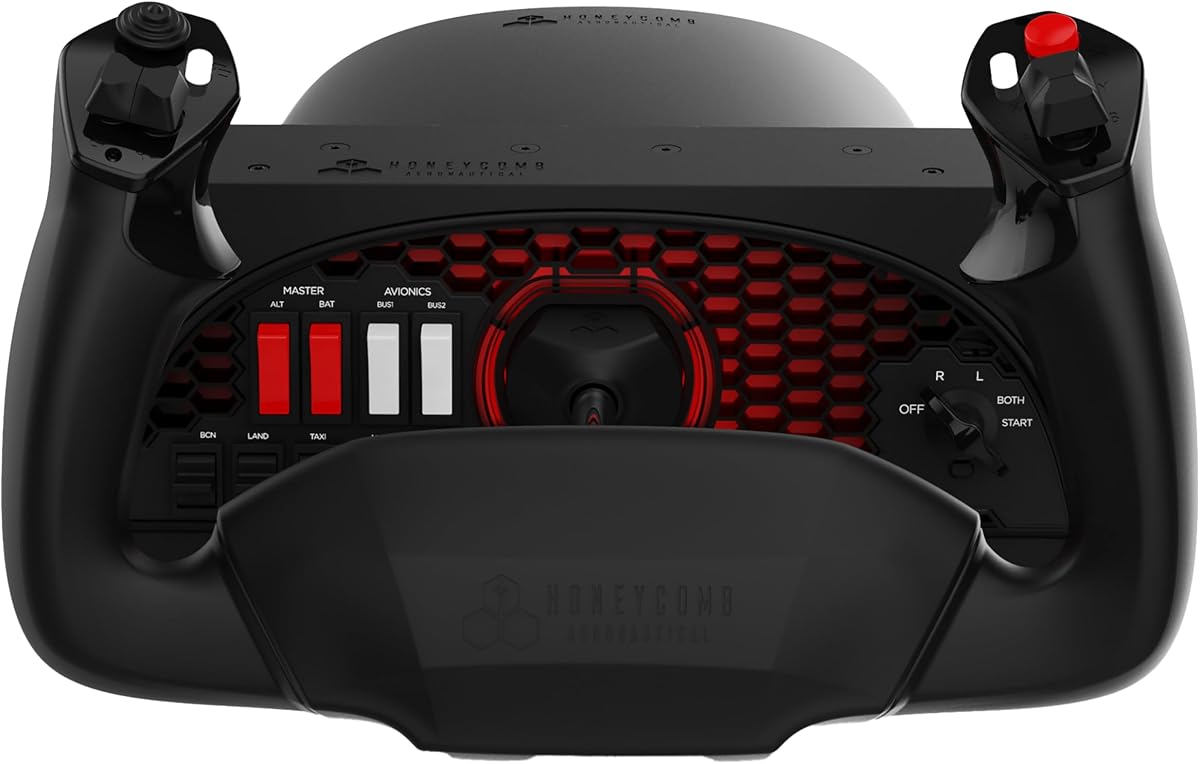
The Honeycomb Alpha Flight Controls Yoke stands out as the top choice for serious flight simulation enthusiasts seeking realistic controls. With a 4.6 rating from users, it delivers exceptional precision and durability that mimics real aircraft systems.
We may earn a commission when you buy through this link, at no additional cost to you.
Its solid steel shaft with linear ball bearings ensures smooth, drift-free movement across all axes. The integrated switch panel includes essential avionics and ignition switches with red LED backlighting for night operations, eliminating the need for separate peripheral panels.
While the price is higher than entry-level joysticks, the investment pays off in long-term reliability and immersion. The dual mounting solution offers flexibility with heavy-duty clamps or micro-suction pads for varied desk setups without compromising stability during intense maneuvers.
This yoke is ideal for pilots training for certification or enthusiasts wanting an authentic experience. The combination of responsiveness, build quality, and included switches makes it the definitive standard for PC flight simulators in 2026.
The 180-degree rotation range and self-centering mechanism with no dead zone replicate real commercial aircraft yokes accurately.
All essential cockpit switches are built into the handle, allowing quick access without reaching for keyboard shortcuts or external devices.
We may earn a commission when you buy through this link, at no additional cost to you.
The Thrustmaster TCA Yoke & Quadrant Boeing Edition brings the iconic Dreamliner cockpit into your home with official licensing and 1:1 scale replication. Its 4.4 rating reflects high satisfaction among users seeking commercial airliner realism on PC.
We may earn a commission when you buy through this link, at no additional cost to you.
The unique PENDULUM mechanism simulates the pendular movement of a real Boeing 787, offering fluid and responsive control that feels distinct from standard joysticks. The full throttle quadrant with autopilot controls allows comprehensive management of altitude, airspeed, and heading during flights.
Constructed with a 100 percent metal internal structure, this system ensures balanced weight and professional durability. The additional axes and magnetic technology provide precise inputs for takeoffs and landings without the latency found in potentiometer-based sensors.
Ideal for those focused on commercial aviation simulation, this bundle transforms any setup into a true airliner cockpit. While costly, the combination of yoke and quadrant delivers unmatched immersion for Boeing enthusiasts and training pilots alike.
The adjustable spring tension and suspended mechanism replicate real aircraft dynamics, enhancing realism during turbulence and banking turns.
The bundled quadrant includes authentic Boeing autopilot features, giving you full command over thrust and flight planning without extra accessories.
We may earn a commission when you buy through this link, at no additional cost to you.
The Thrustmaster T-Flight Hotas X offers an excellent entry point for new pilots seeking quality airplane controllers for PC without breaking the bank. With a strong 4.4 rating, it balances affordability with essential features needed for immersive flight simulation.
We may earn a commission when you buy through this link, at no additional cost to you.
Its detachable throttle allows flexible configurations, letting you mount it separately or keep it connected for compact desktop use. The adjustable resistance dial on the joystick lets you fine-tune tension to match your personal preference, enhancing precision during maneuvers.
Plug-and-play compatibility means you can start flying immediately with preconfigured controls and built-in memory that saves profiles offline. The weighted base provides stability on smooth surfaces, though the plastic construction may feel less premium than metal alternatives.
This controller is perfect for casual gamers or those upgrading from a keyboard and mouse. It delivers solid performance for titles like Microsoft Flight Simulator and War Thunder while remaining budget-friendly and space-efficient.
The detachable throttle design adapts to your desk space, allowing a modular HOTAS setup or a unified stick for tighter environments.
A resistance dial lets you adjust joystick force, catering to different hand strengths and simulating varied aircraft control sensitivity.
We may earn a commission when you buy through this link, at no additional cost to you.
The Logitech G X56 H.O.T.A.S system delivers unmatched customization for complex flight sims with over 189 programmable controls. Its 4.0 rating highlights strong features despite some setup complexity, appealing to users who need extensive control surface options.
We may earn a commission when you buy through this link, at no additional cost to you.
Hall-effect sensors on the axes ensure long-term accuracy and prevent wear common in potentiometer-based sticks. The advanced 4-spring system allows adjustable stick force, letting you tailor resistance for different aircraft types from light trainers to heavy transports.
RGB backlighting integrates with gaming rigs for visual cohesion, while the design places controls under fingers for VR navigation. The twin throttles with friction adjusters and locks provide realistic throttle management for multi-engine scenarios.
This system suits pilots needing every function accessible without keyboard switching. While expensive and software-dependent, the sheer number of programmable inputs makes it ideal for deep simulation setups and immersive cockpit builds.
Hall-effect sensors on aileron and elevator axes provide precise, non-contact control that resists wear over thousands of hours.
Four spring options let you change resistance levels, adapting the feel to different aircraft classes or pilot strength.
We may earn a commission when you buy through this link, at no additional cost to you.
The Logitech G PRO Flight Yoke System offers a realistic setup for new and experienced pilots seeking to build muscle memory. With a 4.3 rating, its stainless steel shaft and robust construction provide the smooth, accurate control essential for professional training.
We may earn a commission when you buy through this link, at no additional cost to you.
The yoke includes 54 programmable controls via a POV hat, buttons, and mode switch, giving you most aircraft functions under fingertips. A 2-position desk clamp ensures secure mounting across various desk thicknesses, keeping the unit stable during aggressive maneuvers.
The bundled throttle quadrant uses a PS/2 cable, which may require adapters on modern PCs. Software download is optional but necessary for full compatibility with Flight Simulator, FSX, and X-Plane. Despite minor setup quirks, the ergonomic design supports long sessions without fatigue.
This system is ideal for those focusing on commercial aviation training. The combination of yoke and quadrant provides a comprehensive cockpit interface that bridges the gap between home gaming and real-world flight instruction.
The stainless steel yoke shaft ensures durability and smooth movement, replicating the resistance of real aircraft control columns.
Including a throttle quadrant with the yoke delivers a full dual-control experience, essential for realistic multi-engine flight simulation.
We may earn a commission when you buy through this link, at no additional cost to you.
The Logitech G X52 Flight Control System remains a strong mid-range option for pilots needing precision without premium pricing. Its 4.3 rating reflects reliable performance from magnetic sensors and programmability that handles complex sim requirements effectively.
We may earn a commission when you buy through this link, at no additional cost to you.
Magnetic non-contact sensors on X and Y axes enhance longevity and pinpoint accuracy compared to traditional potentiometers. The multifunction LCD display lets you view programmed commands before activation, reducing mistakes during critical flight phases or mission planning.
With 282 programmable commands across three modes, you can manage nearly every function without switching to keyboard. The 3D twist with rudder lock is essential for simulation, allowing you to disable axis input if using separate rudder pedals.
This stick fits well in setups wanting balanced features and price. While the throttle lacks detents for afterburner control, the overall control precision and programmable depth make it a dependable choice for diverse aircraft simulators.
Non-contact magnetic sensors prevent wear and ensure consistent axis response over years of frequent use.
The built-in LCD screen displays active commands, helping you confirm inputs quickly without checking external software interfaces.
We may earn a commission when you buy through this link, at no additional cost to you.
The Thrustmaster TCA Sidestick Airbus Edition brings authentic Airbus cockpit ergonomics to your PC with official licensing and 1:1 scale replication. Its 4.3 rating highlights the realistic feel and drift-free magnetic sensors that maintain calibration over time.
We may earn a commission when you buy through this link, at no additional cost to you.
Contactless magnetic sensor technology eliminates potentiometer wear, ensuring flawless accuracy across all maneuvers. The integrated throttle axis with thrust reverser mechanism and rudder control via rotating handle provide a complete flight solution in one compact unit.
Seventeen action buttons with braille identification allow quick access, while swappable joystick head modules adapt the layout for different scenarios. Plug-and-play setup gets you airborne in minutes, though dedicated throttle quadrants add further realism for commercial flights.
This sidestick suits pilots focused on Airbus aircraft realism. The combination of build quality, integrated controls, and authentic layout makes it a top choice for those seeking an immersive commercial aviation experience on a standard desk.
The 1:1 scale Airbus A320 sidestick replication ensures familiar button placement and ergonomics for Airbus pilots.
Magnetic sensors maintain perfect calibration indefinitely, preventing the gradual drift that affects traditional potentiometer sticks.
We may earn a commission when you buy through this link, at no additional cost to you.
The Logitech G Saitek X52 Pro Flight Control System offers advanced features like an LCD multi-function display and progressive throttle for detailed cockpit management. While rated 3.8, its durable build and smart tech software remain appealing to specific simulation niches.
We may earn a commission when you buy through this link, at no additional cost to you.
No-contact technology on X and Y axes improves control consistency, while the progressive throttle includes detents for afterburner and idle positions. The 5-position handle adjustment system suits all hand sizes, ensuring ergonomic comfort during long flight sessions.
Program controller settings using powerful software to map commands for specific games. The illuminated buttons and intuitive display enhance gameplay, though some users find the overall feel less refined compared to newer models in the current market.
This system fits users prioritizing display feedback and throttle detents. For those needing a dedicated afterburner throttle or visible status screens, the X52 Pro provides solid functionality at a competitive price point in the mid-range market.
Detents for afterburner and idle settings allow precise thrust management, essential for fighter jet simulation accuracy.
The multi-function display shows active commands and status, giving visual confirmation without looking away from the screen.
We may earn a commission when you buy through this link, at no additional cost to you.
The Turtle Beach VelocityOne Flightstick is a universal controller compatible with Xbox and PC, making it ideal for cross-platform gamers. Its 4.2 rating reflects strong versatility with non-contact axes and OLED display that streamline flight management.
We may earn a commission when you buy through this link, at no additional cost to you.
High-precision non-contact main axes ensure long-lasting accuracy, while the OLED flight management display keeps you informed without alt windows. The integrated throttle with customizable flap levers offers solid control for various aircraft types, supported by rapid-fire triggers.
Twenty-seven programmable buttons and an intuitive configuration wheel allow quick setup across games. The touchpad navigation sensor adds cursor control for menu navigation, and RGB lighting matches your gaming rig. Ambidextrous design suits both jets and airliners.
This flightstick excels for versatile setups requiring console compatibility. While it lacks the deep tactile feedback of pro systems, its universal support and integrated display features make it a practical choice for mixed-platform flight enthusiasts.
Works seamlessly with Xbox Series X|S, Xbox One, and PC, allowing one controller for multiple gaming ecosystems.
The OLED screen provides in-game data and settings on the controller itself, enhancing immersion during complex missions.
We may earn a commission when you buy through this link, at no additional cost to you.
The PXN 2113PRO serves as an entry-level option for those testing flight sims before investing in premium gear. Rated 3.6, it offers vibration feedback and 12 programmable buttons that make it accessible for beginners starting their aviation journey.
We may earn a commission when you buy through this link, at no additional cost to you.
With four-axis control and an 8-way hat switch, you get essential inputs for maneuvering aircraft. The ergonomic design and solid grip feel provide comfort during sessions, while suction cups keep the base fixed on smooth tables.
Setup is straightforward with no driver required for basic use, though advanced mapping needs the official software. Note that vibration strength must be set to 50 percent or higher to feel effects properly during simulation activities on PC.
This joystick fits casual gamers or those on tight budgets. While it lacks the precision of higher-end sticks, its simplicity and low cost make it a viable starting point for exploring flight simulation mechanics.
No driver installation needed for basic play, allowing quick connection and immediate gameplay on Windows systems.
Realistic vibration effects add immersion during turbulence or collisions when enabled in the driver settings.
We may earn a commission when you buy through this link, at no additional cost to you.
Selecting the right airplane controllers for PC depends on your simulation goals, budget, and desk space. This guide outlines key factors to consider before making a purchase.
Consider whether you focus on commercial airliners or military jets. Commercial sims often benefit from yokes and throttle quadrants, while military flights work better with HOTAS sticks and rudder pedals for precise control.
Match your controller type to the aircraft class you fly most to maximize realism and reduce setup friction.
Metal internal structures and steel shafts ensure durability and smoother movement. Plastic units are lighter and cheaper but may wear faster under heavy use.
Prioritize metal components if you plan frequent or intensive training sessions.
Hall-effect and magnetic sensors provide non-contact axis detection that resists wear and maintains calibration. Potentiometer sensors are cheaper but prone to drift over time.
Choose non-contact sensors for long-term accuracy and reliability.
Count programmable buttons and axes to ensure they cover your needs. Complex sims require many inputs for systems management without keyboard fallback.
Look for software that lets you create custom profiles for each aircraft.
Adjustable handles, soft-touch grips, and weight distribution reduce fatigue during long sessions. Comfort is vital for immersive experiences.
Test ergonomics if possible to ensure the controller fits your hand comfortably.
Desk clamps and suction bases keep controllers steady. Larger setups need sturdy mounts to prevent movement during aggressive maneuvers.
Check mounting requirements based on your desk thickness and surface.
Confirm support for your simulation software and operating system. Some require optional downloads for full feature access.
Ensure the controller supports Windows 10 or 11 and major sim platforms.
Balance cost against features. Budget models offer basic functionality, while premium options deliver realism and durability.
Invest in higher-tier controllers if you plan to train professionally or simulate frequently.
Connect the controller to a USB port before launching your simulation software. Allow drivers to install automatically or download them from the manufacturer's site if needed for full functionality.
Calibrate the device using system tools or provided software to ensure accurate axis ranges. Test all buttons and axes to confirm they respond correctly before starting a flight session.
Clean the controller regularly with a soft, dry cloth to remove dust and oils. Store it in a cool, dry place to prevent damage to sensors and electronic components over time.
Yes, most modern airplane controllers for PC are fully compatible with Microsoft Flight Simulator. Ensure you download any required drivers and map the controls within the game settings for optimal performance.
Yokes offer a more realistic experience for commercial aircraft simulation, while joysticks suit military or fighter jets. Choose based on the type of flight you primarily simulate.
Use the calibration tools built into Windows or the manufacturer's software. Follow on-screen prompts to center axes and set extremes for precise movement mapping.
Yes, many controllers support separate rudder pedals for more realistic control. Check compatibility lists to ensure your specific model works with pedals from the same manufacturer.
Magnetic and hall-effect sensors last indefinitely as they lack contact wear. Potentiometer sensors may degrade over several years depending on usage frequency.
Basic plug-and-play works without software, but advanced features need the manufacturer's utilities. Install drivers to access full programmability and customization options.
The Honeycomb Alpha, Thrustmaster TCA Boeing Edition, and Thrustmaster T-Flight Hotas X represent the top choices across premium, professional, and budget categories. Each delivers unique strengths for different pilot needs.
Prioritize sensor technology, build quality, and ergonomics when evaluating options. The right controller transforms your setup into a realistic cockpit that enhances immersion and performance.
Check current pricing and availability before purchasing as models and deals evolve frequently. Investing in a quality controller ensures long-term satisfaction for all your flight simulation adventures.