
CENMATE Aluminum 8 Bay Hard Drive Enclosure
4.3Editor score
USB 3.0 interface with UASP support
Tool-free drive installation design
Hot swappable drive bays included
This guide compares ten top 8 Bay Hardware RAID Enclosures for storage expansion, performance, and reliability across different use cases and budgets.
Finding reliable storage expansion is critical for professionals and enthusiasts alike. An 8 Bay Hardware RAID Enclosure offers the capacity and redundancy needed for large media libraries or business data management without compromising speed.
We evaluated ten distinct models based on connectivity options, drive compatibility, cooling efficiency, and overall build quality. Our analysis focuses on real-world performance metrics and user feedback to ensure you select the right hardware for your workflow.
Each entry in this list highlights key specifications, standout features, and potential drawbacks to help you make an informed decision. Please note that availability and pricing may fluctuate, so verify current details before purchasing your preferred unit.
4.3Editor score

5.0Editor score

3.7Editor score
The following table provides a side-by-side comparison of all ten products evaluated in this guide. Review each specification to identify the model that best aligns with your storage capacity, speed, and connectivity requirements.



This enclosure ranks highly for users needing substantial storage capacity without enterprise-level costs. It supports 2.5 and 3.5 inch drives with a maximum capacity of 160TB when using 20TB drives.
We may earn a commission when you buy through this link, at no additional cost to you.
The built-in hardware RAID functionality allows for data redundancy and performance optimization. Users can select from eight different modes including RAID 0, 1, 5, and 10 depending on their specific redundancy needs.
Heat management is handled by two integrated fans within an aluminum alloy chassis. While effective at keeping drives cool during extended operation, the noise level may be distracting in silent office environments.
Ideal for professionals and hobbyists needing expandable storage for media files or backups. The tool-free design ensures you can swap drives quickly without needing extra hardware or technical expertise.
Supports up to 160TB total capacity using eight 20TB drives for extensive media libraries.
Eight configurable RAID modes offer flexibility between performance and data redundancy needs.
We may earn a commission when you buy through this link, at no additional cost to you.
This unit delivers top-tier performance with Thunderbolt 3 connectivity providing speeds up to 2000MB/s for write operations. It comes pre-configured with RAID 5 to balance performance and data safety out of the box.
We may earn a commission when you buy through this link, at no additional cost to you.
The removable Ultrastar hard drives are enterprise-class rated for reliability and longevity. This feature allows for easy physical transport of your entire storage array without needing to unmount drives individually.
Additional connectivity includes USB-C support for compatibility with devices lacking Thunderbolt ports. The unit can also power a MacBook via USB-C Power Delivery reducing the need for separate power bricks.
Best suited for video editors and creatives handling 4K or 8K footage where speed is critical. The high price reflects its premium build and performance capabilities for mission-critical workflows.
Thunderbolt 3 interface delivers read speeds up to 1900MB/s and write speeds up to 2000MB/s.
Removable Ultrastar drives allow you to transport massive 160TB storage volumes securely.
We may earn a commission when you buy through this link, at no additional cost to you.
This DAS enclosure offers excellent value by focusing on direct attached storage without complex RAID configurations. It supports hot swapping so you can replace drives without shutting down the system.
We may earn a commission when you buy through this link, at no additional cost to you.
Users benefit from a USB HOST port allowing them to connect additional enclosures in a daisy chain for massive expansion up to 480TB total. The tool-free design ensures quick access to all eight drive bays.
Cooling is managed via two 2.9 inch fans within an aluminum chassis to protect data during continuous use. While effective, the noise level might be a consideration for quiet recording environments.
Perfect for users needing simple mass storage without the complexity of RAID management. The plug and play compatibility with Windows Mac and Linux makes it versatile for various operating systems.
Hot swappable design allows for drive replacement without powering off the enclosure or system.
Daisy chain capability connects up to three devices for massive combined storage capacity.
We may earn a commission when you buy through this link, at no additional cost to you.
OWC provides a versatile enclosure capable of housing both 2.5 and 3.5 inch drives in universal bays. The dual Thunderbolt 3 ports enable chaining up to six units for an impressive total storage capacity.
We may earn a commission when you buy through this link, at no additional cost to you.
Setup is straightforward with plug-and-play functionality requiring no additional drivers on Mac or Windows. Each drive bay features thumb screw trays for quick swapping and secure mounting during transport.
The enclosure supports Thunderbolt 2 and older standards ensuring compatibility with existing peripherals. This backward compatibility helps extend the life of legacy devices while upgrading storage infrastructure.
Recommended for Mac users needing expandable high-speed storage. The ability to chain six units makes it ideal for studios managing huge media archives needing physical separation or tiering.
Accommodates both 2.5 and 3.5 inch SSDs and HDDs without drive cages or adapters.
Daisy chaining up to six units allows for up to 1152TB total storage potential.
We may earn a commission when you buy through this link, at no additional cost to you.
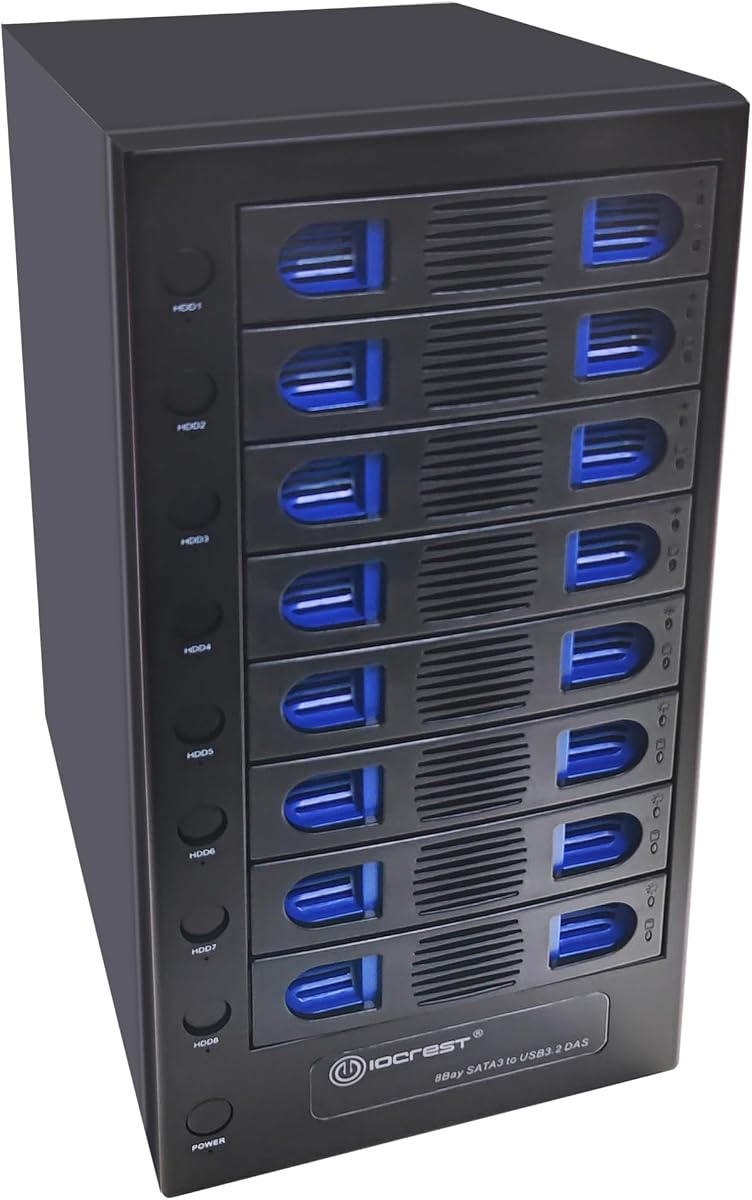
This model upgrades connectivity to USB 3.2 Gen 2 providing up to 10Gbps transfer speeds for faster file access. It maintains the DAS design so users get speed without RAID complexity.
We may earn a commission when you buy through this link, at no additional cost to you.
The USB HOST port allows daisy chaining up to three devices expanding capacity to 480TB. Compatibility spans USB 3.0 to Thunderbolt 4 ensuring it works with most modern laptops and desktops.
Drive swapping remains tool-free and hot swappable for minimal downtime during maintenance. The aluminum alloy chassis keeps heat dissipation efficient while protecting internal components from physical damage.
Ideal for users needing faster USB transfer rates without investing in Thunderbolt hardware. It serves well for backup repositories or media servers requiring quick data access across multiple drives.
USB 3.2 Gen 2 interface provides double the speed of standard USB 3.0 connections.
Type-C interface supports USB 3.0 3.1 3.2 and Thunderbolt 3 and 4 connections.
We may earn a commission when you buy through this link, at no additional cost to you.
This enclosure stands out with smart fan functionality allowing users to choose between auto and manual modes with three speed levels. The thermal sensor adjusts cooling based on actual drive temperature.
We may earn a commission when you buy through this link, at no additional cost to you.
Independent control switches for each drive allow powering off specific drives to save energy or reduce heat. It supports massive 22TB drives per bay maximizing total storage without replacing the unit.
The steel housing dissipates heat efficiently while maintaining a quiet fan operation for better acoustic comfort. This makes it suitable for home office environments where noise levels are a concern.
Perfect for users needing high capacity drives without the need for complex RAID setups. The 10Gbps connection ensures fast transfers even with the largest capacity drives available today.
Built-in thermal sensor allows auto or manual fan speed adjustment for optimal cooling.
Independent switches let you power off specific drives without shutting down the whole unit.
We may earn a commission when you buy through this link, at no additional cost to you.
This model offers the most versatility with a PCIe expansion slot for adding capture cards or storage controllers internally. It supports U.2 and M.2 NVMe drives in the top bays for extreme speed.
We may earn a commission when you buy through this link, at no additional cost to you.
Front-facing ports include USB-C and USB-A for peripherals alongside SD and CFexpress card readers for direct media import. This design streamlines workflows for content creators handling multiple file sources.
Users can manage RAID sets using SoftRAID which offers advanced monitoring and notifications. While powerful, it requires software installation and configuration which might be complex for beginners.
Best for professional production environments needing multi-function hardware. The mix of storage expansion and peripheral connectivity reduces desk clutter while increasing workflow efficiency.
Includes PCIe x16 slot for audio video capture or networking hardware inside the chassis.
Front USB and card reader ports allow quick access to peripherals without reaching the back.
We may earn a commission when you buy through this link, at no additional cost to you.
Designed primarily for QNAP NAS users this enclosure expands storage capacity directly to your existing NAS infrastructure. It supports both 3.5 and 2.5 inch SATA HDDs and SSDs for flexible drive choices.
We may earn a commission when you buy through this link, at no additional cost to you.
Management is handled via the free QNAP JBOD Manager utility allowing drive health monitoring and configuration. This integration ensures seamless compatibility with QNAP operating systems without third-party software.
The desktop tower design fits easily on desks or shelves without requiring rack mounting. Users can manage JBOD configurations easily for simple linear storage expansion or backup repositories.
Recommended for existing QNAP owners needing to scale storage. The 10Gbps connection ensures rapid file access during backups or media streaming from the NAS system.
Designed specifically to integrate seamlessly with QNAP NAS systems for easy expansion.
Use the JBOD Manager utility to view drive health and system information remotely.
We may earn a commission when you buy through this link, at no additional cost to you.
This is a DIY case allowing you to build a full NAS system with motherboard and CPU. It supports Mini-ITX and Micro-ATX boards with flexible power supply options for customization.
We may earn a commission when you buy through this link, at no additional cost to you.
Dual independent air channels separate heat from drives and the motherboard preventing thermal interference. It comes with three silent temperature-controlled fans to keep the system quiet during operation.
Each drive bay features indicator lights for power and read/write status for real-time monitoring. Assembly accessories like cables and screws are included so you only need to source motherboard components.
Ideal for tech enthusiasts wanting total control over their NAS build. It supports hot swap bays so you can add drives to the system without powering down the server.
Separated air ducts ensure drives and motherboard stay cool without affecting each other.
Compatible with Mini-ITX Micro-ATX boards and various low-power power supply units.
We may earn a commission when you buy through this link, at no additional cost to you.
Unlike the others this unit is designed to fit inside a desktop tower using a 5.25 inch external bay. It provides eight bays for 2.5 inch drives within a fully metal cage for maximum protection.
We may earn a commission when you buy through this link, at no additional cost to you.
The locking trays ensure drives stay secured during transport or heavy use. It supports SATA and single channel SAS drives providing compatibility for both consumer and enterprise storage options.
Installation requires access to the PC case but offers a compact solution for high-density internal storage. It uses standard SATA power connectors simplifying power routing inside your existing workstation.
Perfect for workstation builders needing dense internal SSD or HDD capacity. The robust build quality ensures longevity and protects data even in demanding industrial or server environments.
Fits into standard 5.25 inch external bay of desktop towers for internal storage density.
Full metal structure with locking trays protects drives against vibration and physical damage.
We may earn a commission when you buy through this link, at no additional cost to you.
Selecting the right enclosure depends on your specific connectivity needs, capacity requirements, and whether you prefer hardware RAID or simple DAS solutions.
Check your computer ports before purchasing. Thunderbolt 3 and 4 offer the highest speeds but require specific ports. USB 3.2 Gen 2 offers good speed for general use while USB 3.0 is slower but widely compatible.
Ensure the enclosure interface matches your available ports to avoid bottlenecks. If you plan to daisy chain multiple devices confirm the enclosure supports chaining to expand further.
Hardware RAID enclosures manage data redundancy internally without needing software. This protects data if a drive fails but may require complex setup. Direct Attached Storage (DAS) lacks redundancy but is simpler to manage.
Choose RAID if data safety is critical. Choose DAS if you manage backups separately or prefer full control over drive configuration via your operating system.
Confirm the enclosure supports both 2.5 and 3.5 inch drives if you plan to mix SSDs and HDDs. Check maximum drive capacity limits per bay to ensure your chosen drives will be recognized.
Verify if specific brands are excluded as some enclosures have compatibility quirks. Using enterprise drives may require specific models designed for 24/7 operation to avoid failures.
Eight drives generate significant heat so cooling fans are essential. Look for models with adjustable fans or smart thermal sensors to balance noise and temperature effectively.
If the unit sits on a desk in a quiet room consider models with lower decibel ratings. Overheating can degrade drive performance and lifespan so effective thermal management is non-negotiable.
Hot swapping allows you to replace drives without powering down the enclosure or computer. This feature is vital for servers or workstations that need to stay online during maintenance.
Verify that the enclosure supports hot swapping properly to avoid data corruption. Some models require specific sequences to safely eject drives before removal to prevent system errors.
Aluminum alloys dissipate heat better than plastic or steel housings. Full metal construction protects against physical shock and vibration which is important for transportable storage.
Look for tool-free trays if you swap drives frequently. Locking trays add security but may complicate access if you need quick removal of drives during operation.
Eight drives require a stable power source so check the included power adapter rating. Insufficient power can lead to drive failures or system instability during high load.
Ensure your outlet can handle the power draw if the unit lacks power delivery. Some units support USB-C power but this might not be enough for eight spinning drives.
Some enclosures come with management software for RAID configuration and monitoring. Ensure compatibility with your operating system to avoid using incompatible drivers or utilities.
Check if the software is free or requires a license. Open-source or built-in OS support is preferred for long-term maintenance and ease of updates.
Connect the enclosure to a power source and ensure the power adapter is properly seated before connecting the data cable. Verify all cables are secure to prevent intermittent connectivity issues during operation.
Format drives properly according to your operating system requirements before initializing. If using hardware RAID initialize the array through the enclosure's control interface following the manufacturer's specific steps.
Regularly monitor drive health using provided utilities to catch failures early. Keep fans clean from dust to maintain optimal cooling and avoid thermal throttling over long periods of use.
Most modern enclosures are plug-and-play and do not require driver installation. However, check if specific RAID management tools are needed for your operating system to access advanced features.
Technically yes but performance is limited by the smallest drive. It is best to use identical drives to prevent capacity loss or performance degradation during RAID operations.
USB-C is the physical port shape while Thunderbolt 3 is a protocol offering faster speeds. Ensure your computer supports Thunderbolt to utilize the higher bandwidth available on these devices.
Typically you must power down the unit toggle a physical switch or use a button combination then power back on. Always back up data before changing modes as it will likely erase existing data.
Most enclosures support both Windows and macOS. Formatting drives to exFAT or APFS ensures compatibility across both systems without needing additional software drivers.
Yes if the enclosure supports hot swapping properly. Always eject the drive logically from the OS before removing it physically to prevent data corruption or file system errors.
In RAID 1 5 or 10 data remains accessible while the failed drive is replaced. The array usually rebuilds automatically once the new drive is inserted to restore redundancy.
Eight drives draw significant power exceeding USB port limits. External power supplies ensure stable voltage for all drives preventing failures due to power insufficiency during operation.
We have reviewed ten top models ranging from budget DAS options to high-performance Thunderbolt arrays. Each offers distinct features tailored to different needs such as capacity speed or portability.
Prioritize connectivity and cooling when selecting your unit to ensure long-term reliability. Match the enclosure to your specific workflow requirements rather than just focusing on drive count.
Verify current availability and compatibility details before finalizing your purchase. Technology standards evolve so checking recent user feedback ensures you choose a model that meets today's demands.