
SABRENT USB 3.0 4-Bay 2.5in SATA SSD/HDD Docking Station, Fan (DS-4SSD)
4.2Editor score
USB 3.0 5Gbps speed
Tool-free drive access
Whisper-quiet built-in fan
Finding reliable external storage is essential for professionals and enthusiasts managing large media libraries or critical business data. A 4 Bay Hard Drive Enclosure with Cooling Fans offers expandable capacity while maintaining drive health through active thermal management systems designed for sustained operation.
We evaluated ten leading models based on transfer speeds, cooling performance, build materials, and compatibility with various operating systems. Our analysis focuses on real-world usability, hot-swapping capabilities, and the efficiency of fan systems in preventing overheating during heavy data workloads.
Each pick highlights specific strengths like USB-C support, RAID options, or hybrid NVMe compatibility to match diverse workflow needs. Note that product availability and pricing may vary over time, so verify current stock and offers before finalizing your purchase decision.
4.2Editor score

4.3Editor score
4.1Editor score
As an Amazon Associate we earn from qualifying purchases.
This side-by-side comparison outlines key specifications across all ten evaluated models. From transfer protocols to maximum capacity limits and cooling mechanisms, these details help you identify the enclosure that best aligns with your specific storage demands and hardware ecosystem.


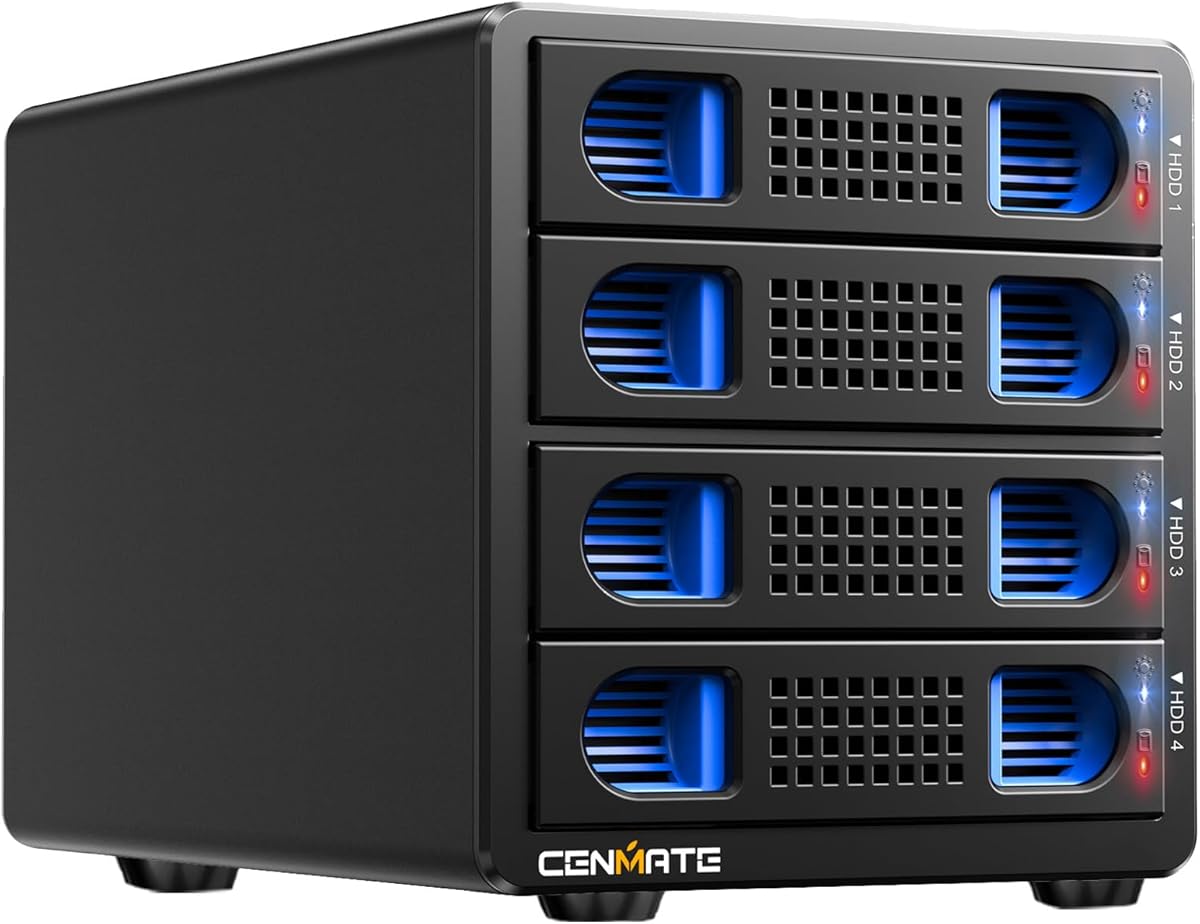
This CENMATE enclosure stands out as a reliable external storage system for individuals and businesses managing large data sets. With a solid 4.3 rating from verified users, it delivers consistent performance using aluminum-alloy materials that help dissipate heat effectively during intensive operations.
We may earn a commission when you buy through this link, at no additional cost to you.
The unit supports both 2.5 and 3.5 inch drives allowing up to 80TB total capacity which is ideal for expanding desktop storage without compromising desk space. Its USB 3.0 interface enables transfer speeds up to 5Gbps making it ten times faster than older USB 2.0 connections.
While the built-in 2 inch fan ensures thermal safety, it does generate noise around 40 to 50 decibels which might be noticeable in quiet environments. However, this trade-off ensures data security by preventing overheating during prolonged use or high-speed transfers.
Ideal for users needing a plug-and-play solution compatible with Windows Mac and Linux systems. The tool-free design and 24 hour technical support offer peace of mind for professionals relying on stable external storage for daily workflows.
The enclosure supports 2.5 and 3.5 inch HDDs and SSDs with up to 80TB total capacity for maximum data security.
Built-in 2 inch fan and aluminum-alloy materials maximize data security by preventing overheating during intensive use.
We may earn a commission when you buy through this link, at no additional cost to you.
The CENMATE 10Gbps model elevates performance with advanced chips delivering transfer speeds up to 10Gbps through USB 3.2 Gen 2. This makes it a premium choice for professionals moving large video files or complex datasets efficiently without bottlenecks.
We may earn a commission when you buy through this link, at no additional cost to you.
It supports up to 80TB total capacity with read/write speeds reaching 1016MB/s across four hard drives. The USB Type-C interface ensures broad connectivity supporting Thunderbolt 3 and 4 for future-proofing your storage investments against evolving hardware standards.
Similar to other CENMATE units, the 2 inch fan provides necessary cooling but generates noise around 40 to 50 decibels. While this is a minor inconvenience, it ensures drive longevity and data integrity during sustained high-load operations or backups.
Best suited for users prioritizing speed and compatibility across Windows Mac and Linux systems. The hot-swappable feature enhances workflow efficiency by allowing drive replacements without powering down the entire device.
Advanced chips and USB 3.2 Gen 2 interface deliver transfers up to 10Gbps which is 20 times faster than USB 2.0.
Equipped with USB A/C 3.2 Gen 2 cable compatible with Windows 7 and above Mac 9.1 and above and Linux.
We may earn a commission when you buy through this link, at no additional cost to you.
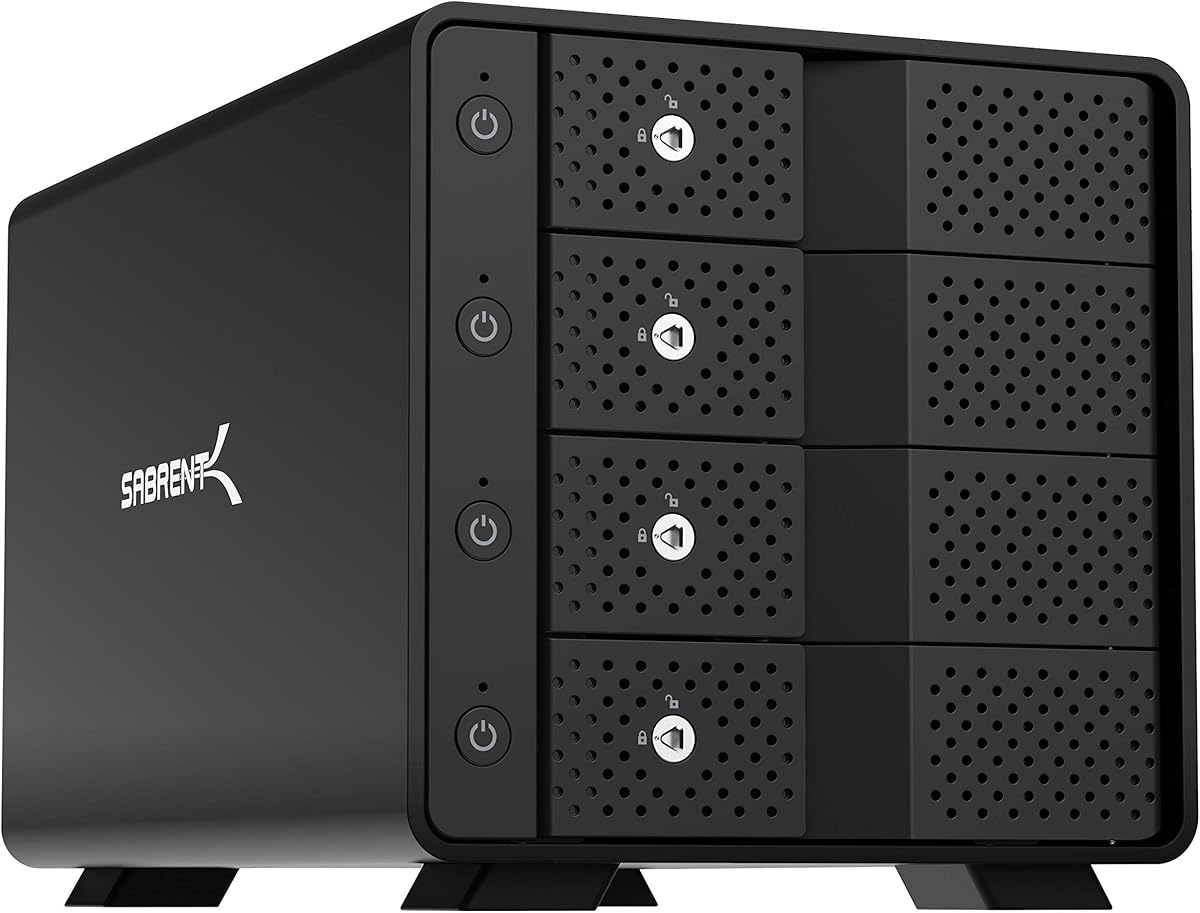
SABRENT offers an affordable entry point into 4-bay storage with this USB 3.0 docking station rated 4.2 by users. It balances cost and performance making it ideal for home users needing reliable access to multiple drives without complex configurations.
We may earn a commission when you buy through this link, at no additional cost to you.
The station supports up to 4x 16TB 2.5 inch drives with USB 3.0 delivering speeds up to 5Gbps. Its tool-free magnetic cover design ensures quick access to drive bays while the built-in whisper-quiet fan keeps hardware cool during extended operation periods.
Although it lacks RAID support or compatibility with 15mm thick drives its simplicity is a strength for users focused on individual drive access. The optional on/off switch for noise and power control adds flexibility for varying usage environments.
Perfect for those needing a plug-and-play solution with Windows macOS and Linux. Its engine designed for continuous 24/7 operation ensures reliability for users needing round-the-clock data availability without expensive enterprise hardware.
Supports up to 4x 16TB 2.5 inch SATA SSDs or HDDs with maximum 12.5mm thickness for extensive storage expansion.
Built-in whisper-quiet fan keeps drives cool and healthy with an optional on/off switch for noise and power control.
We may earn a commission when you buy through this link, at no additional cost to you.
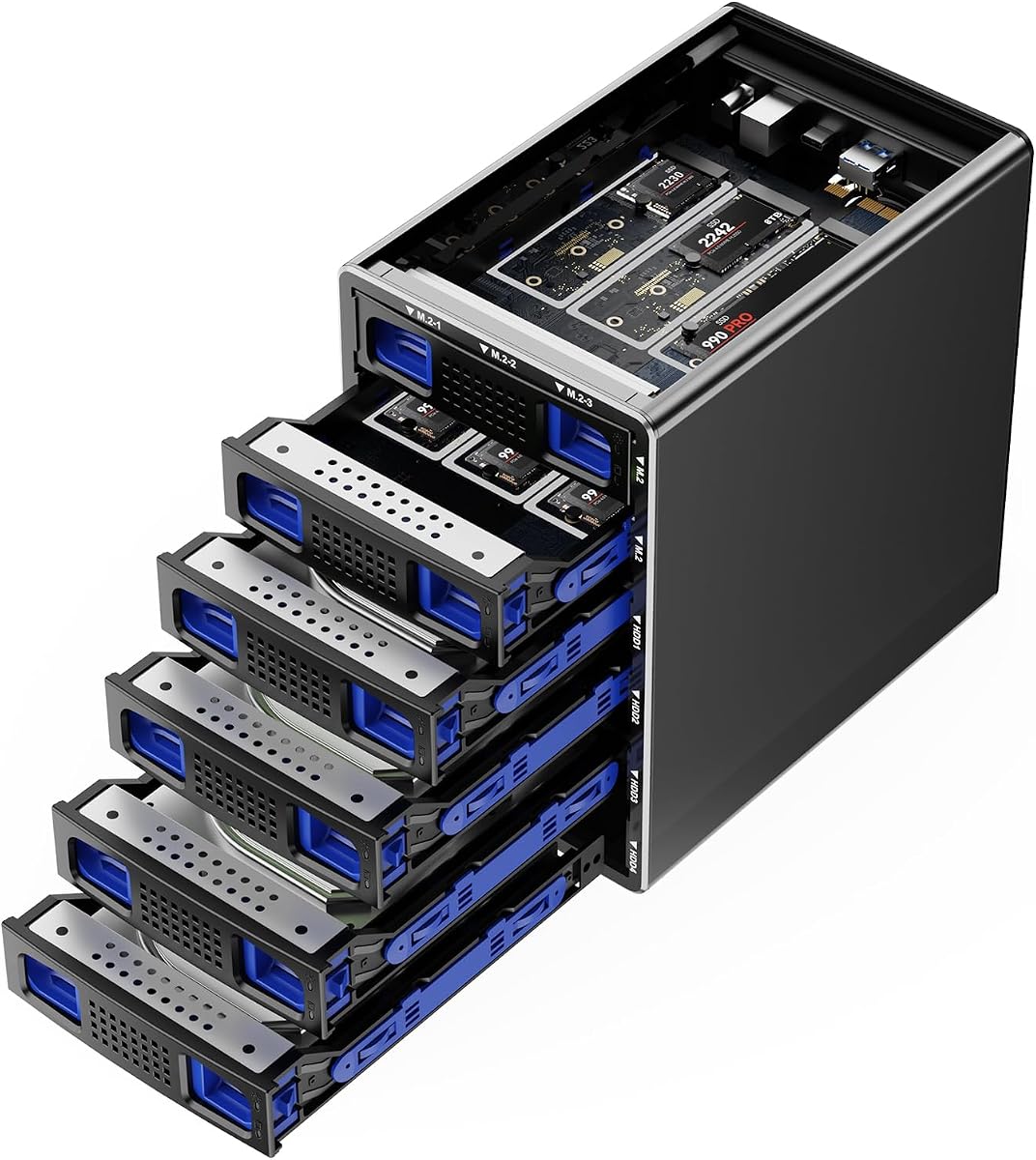
This hybrid enclosure combines traditional SATA drives with M.2 NVMe SSDs for a massive 136TB total capacity. Rated 4.1 by users it offers a unique solution for those needing both high capacity storage and rapid access speed in a single chassis.
We may earn a commission when you buy through this link, at no additional cost to you.
It features 4 SATA bays for up to 22TB per drive and 6 M.2 slots for up to 8TB per SSD. The USB 3.2 Gen 2 interface supports full load read rates of 200 to 300MB/s making it versatile for mixed workload scenarios.
Silent fans ensure continuous cooling without the noise common in other models though they do not sleep during operation. The tool-free design simplifies drive installation while ensuring compatibility with Windows Mac and Linux systems for broad utility.
Ideal for professionals requiring a unified storage solution that balances bulk archival storage with high-speed active working files. The 24-hour technical support provides reliability for enterprise or creative workflows needing minimal downtime.
The enclosure can hold 4 SATA HDDs and 6 M.2 NVMe SSDs for a maximum capacity of 136TB total.
Equipped with USB A/C 3.2 Gen 2 cable compatible with Windows 7 Mac 9.1 and Linux systems universally.
We may earn a commission when you buy through this link, at no additional cost to you.
WAVLINK delivers a sleek aluminum shell enclosure with HDMI output supporting 4K video making it perfect for media centers. Rated 4.0 it stands out for its versatility in both data storage and entertainment applications without needing extra hardware.
We may earn a commission when you buy through this link, at no additional cost to you.
It supports up to 88TB capacity using 4x 22TB drives with USB 3.2 Type-C providing transfer speeds up to 10Gbps. The dual fans activate at 48 degrees Celsius ensuring optimal drive performance during intensive tasks like video editing or large file transfers.
An additional USB-C port allows daisy chaining while the independent ON/OFF switches enable hot-swapping without powering down. However, note that 2.5 inch drives need brackets not included and HDMI requires host port support for proper function.
Best for content creators or home theater users needing high-speed storage and direct TV output. The 12-month warranty and 8-hour support response time add value for those needing dependable service for media projects.
Supports both 3.5 and 2.5 inch drives with up to 4x 22TB capacity for ample storage space for all data needs.
Features an HDMI interface supporting 4K@60Hz resolution creating a seamless workspace with high-speed connectivity.
We may earn a commission when you buy through this link, at no additional cost to you.
The MAIWO 4 bay DAS enclosure features two cooling fans that activate when temperatures exceed 48 degrees ensuring efficient heat dissipation. Rated 3.5 it offers a cost-effective storage solution with daisy chaining for extensive expansion options for larger needs.
We may earn a commission when you buy through this link, at no additional cost to you.
Supporting up to 24TB per disk totaling 96TB it is ideal for large data processing tasks. The HD-TV port allows connecting to smart TVs for multimedia playback making it versatile for work and entertainment needs without extra adapters.
Equipped with an 84W external power supply it ensures stability for larger capacity drives. Independent power switches give users complete control over individual drives while supporting Windows Mac and Linux systems for broad compatibility.
Best for users needing daisy chain expansion and media playback capabilities on a budget. The energy-efficient fan activation balances cooling and environmental friendliness making it practical for extended daily use.
Features aluminum alloy design with 2 cooling fans activating when temperature exceeds 48 degrees Celsius for optimal protection.
Supports daisy chaining with other devices allowing up to 96TB capacity for extensive cost-effective storage solutions.
We may earn a commission when you buy through this link, at no additional cost to you.
This CENMATE model includes an eSATA cable in addition to USB 3.0 offering versatile connectivity options for older systems. Rated 4.0 it maintains the reliable aluminum build quality and cooling fan design found across the brand's 4-bay series.
We may earn a commission when you buy through this link, at no additional cost to you.
It supports up to 80TB capacity using 2.5 or 3.5 inch drives making it ideal for expanding storage. The JMS567+JMB575 chip ensures transfer speeds up to 5Gbps which is ten times faster than USB 2.0 connections for quick data access.
Users should note the eSATA port does not support adapters and hot-swapping is not supported. This limitation means users must power down for drive changes though the 12V adapter ensures stable power for high-speed transmission.
Ideal for users with legacy equipment or needing multiple interface options for redundancy. The 24-hour technical support provides assurance for businesses relying on stable external storage for daily operations.
Supports 2.5 and 3.5 inch drives with up to 80TB capacity making it ideal for personal or enterprise usage.
Equipped with USB A/C 3.0 and eSATA cable compatible with Windows 7 Mac 9.1 and Linux systems universally.
We may earn a commission when you buy through this link, at no additional cost to you.
This WAVLINK model scales capacity to 128TB using 4x 32TB drives offering massive storage for enterprise media files. Rated 4.2 it shares premium features with other models including HDMI output for direct video playback on TVs or monitors.
We may earn a commission when you buy through this link, at no additional cost to you.
USB 3.2 Type-C delivers speeds up to 10Gbps ensuring seamless handling of large files. The aluminum shell provides superior heat dissipation while dual fans activate at 48 degrees to maintain drive health during intensive operations or backups.
Independent ON/OFF switches enable hot-swapping without system shutdown though 2.5 inch drives require additional brackets. HDMI output requires host port support but creates a convenient workspace integrating storage and display capabilities without extra hardware.
Best for power users needing maximum capacity and display output in one unit. The 12-month warranty and 8-hour support response time add reliability for professional workflows requiring continuous operation.
Supports both 3.5 and 2.5 inch drives with up to 4x 32TB capacity for ample storage space for all data needs.
Features an HDMI interface supporting 4K@60Hz resolution creating a seamless workspace with high-speed connectivity.
We may earn a commission when you buy through this link, at no additional cost to you.
CENMATE adds 8 RAID modes including RAID 0 1 3 5 and 10 to the standard enclosure design offering flexible data protection strategies. Rated 3.8 it balances RAID functionality with the brand's reliable aluminum build and active cooling systems.
We may earn a commission when you buy through this link, at no additional cost to you.
Supporting up to 80TB capacity it allows users to switch between RAID modes for redundancy or performance using a paddle switch. The USB 3.0 and eSATA interfaces ensure compatibility with various systems though eSATA requires specific port support.
Switching modes requires power cycling and using a screwdriver which can be technical. However, the 12V adapter ensures stable power and the 24-hour technical support assists users in configuring their desired storage layout effectively.
Ideal for users needing RAID functionality without dedicated NAS hardware. The plug-and-play nature on Windows Mac and Linux simplifies setup while offering data protection options typically found in more expensive systems.
Supports 2.5 and 3.5 inch drives with up to 80TB capacity making it ideal for personal or enterprise usage.
Supports RAID 0 1 3 5 10 CLONE LARGE and NORMAL modes with a manual switch for flexible data protection.
We may earn a commission when you buy through this link, at no additional cost to you.
SABRENT offers a premium docking station with dedicated ASM1351 controllers for each bay ensuring stable independent connections. Rated 4.1 it stands out for its reliable multi-drive access and tool-free hot-swap design making it a solid choice for frequent drive changes.
We may earn a commission when you buy through this link, at no additional cost to you.
It supports up to 80TB capacity using 3.5 inch SATA drives with USB-C 10Gbps speeds. The 92mm fan ensures active cooling for 24/7 operation while the aluminum and metal build provides structural integrity and durability for long-term use.
Features like activity LEDs per bay and a Kensington slot enhance security and usability. While it operates as direct-attached storage rather than RAID it offers robust performance and reliability for individual drive access without hardware RAID limitations.
Best for professionals needing dependable storage with frequent drive swaps. The 1-year warranty extendable to 2 years and Windows macOS Linux compatibility ensure it fits well into diverse workstation environments.
A dedicated ASMedia ASM1351 controller for each bay gives every drive its own stable independent connection for reliability.
Tool-free drive insertion with on/off switches and activity LEDs per bay for secure and efficient workflow.
We may earn a commission when you buy through this link, at no additional cost to you.
Selecting the right 4-bay enclosure requires balancing speed capacity cooling and connectivity. This guide outlines key factors to help you match a unit to your specific storage needs and technical environment.
Look for enclosures with USB 3.2 Gen 2 or Type-C ports which support speeds up to 10Gbps for faster data transfers. Ensure your computer has compatible ports to avoid bottlenecking performance. USB 3.0 offers 5Gbps which is still sufficient for many tasks but slower than newer standards.
Verify the maximum supported drive capacity per bay such as 20TB or 32TB to ensure you can expand storage as needed. Confirm it supports both 2.5 and 3.5 inch drives if you plan to mix form factors. Some units exclude brackets for 2.5 inch drives so check what is included.
Active cooling via fans is essential for multi-bay enclosures to prevent overheating during heavy use. Look for units with temperature-controlled fans that activate only when necessary to balance noise and efficiency. Aluminum shells also help dissipate heat naturally during operation.
Hot-swapping allows you to replace drives without powering down the device improving workflow efficiency. Check if the enclosure has independent power switches or trays that support this feature. Not all models support hot-swapping so confirm this requirement before purchase.
Aluminum-alloy or metal builds offer superior durability and heat dissipation compared to plastic. A solid casing also helps reduce vibrations from spinning drives ensuring quieter operation. Look for robust construction if you plan on using the unit on a desktop or shared space.
Ensure the enclosure includes a stable DC power adapter such as 12V to handle high-capacity drives reliably. Adequate power prevents dropouts or data loss during transfers. Some units feature auto-switching adapters for worldwide use which is helpful for international travelers.
Some enclosures offer RAID support while others operate as DAS for individual drive access. Decide if you need data redundancy or just capacity expansion. RAID switching often requires manual steps or tools so factor in the complexity of your data management needs.
Consider additional ports like HDMI for media output or eSATA for legacy connections. Daisy-chaining support allows you to connect multiple enclosures for even more storage. Ensure the enclosure matches your specific hardware setup and peripheral requirements for a seamless experience.
Before installation ensure your computer has a compatible USB port such as USB 3.0 or Type-C to achieve advertised transfer speeds. Connect the enclosure to a stable power source using the included adapter to prevent power fluctuations. Install drives by sliding them into the bays without tools if the model supports tray-less design.
After connecting plug the enclosure into your computer and wait for the operating system to recognize the drives. If necessary format the drives using Disk Management or Disk Utility before storing data. For models with RAID options use the provided switch to set your desired mode before first use.
To maintain performance clean dust from the vents and fans regularly using compressed air to ensure efficient cooling. Avoid placing the enclosure in hot environments like direct sunlight. If the unit is used for long periods ensure ventilation is not obstructed to extend hardware life.
Yes to achieve 10Gbps speeds you need a USB 3.2 Gen 2 or Type-C port on your computer. Older USB 3.0 ports will limit speeds to 5Gbps. Check your device specifications or try a different port if performance seems slower than expected.
Most enclosures support both 2.5 and 3.5 inch drives but may require mounting brackets for the smaller ones. Check if brackets are included in the box. Some models note that brackets are sold separately so plan accordingly for installation.
Only specific models offer hardware RAID support while others operate in DAS mode for individual drive access. If you need redundancy choose a unit that explicitly lists RAID modes. Be aware that switching RAID modes can wipe data so back up first.
Fan noise typically ranges from 40 to 50 decibels during active cooling which may be noticeable in quiet rooms. Some units have fans that activate only when the drives get warm to reduce noise. If you are sensitive to sound place the unit in a ventilated area away from desks.
Many enclosures support hot-swapping allowing you to insert or remove drives without powering down the system. Check if the unit has independent power switches per bay for this feature. Not all models support this so verify before purchase if it is critical for your workflow.
Most enclosures are plug-and-play requiring no drivers for Windows macOS and Linux systems. They appear as external drives once connected. Some advanced RAID modes may require specific software or manual configuration steps to function correctly across different operating systems.
Our top picks highlight the CENMATE Aluminum 4-bay enclosure as the best overall option balancing speed capacity and cooling. The SABRENT 3.0 docking station offers the best budget value while the CENMATE Hybrid model provides unique hybrid storage capabilities.
When choosing prioritize the interface speed and drive capacity that match your workflow needs. Consider how important hot-swapping and RAID support are for your data management routine. Adequate cooling and build quality remain critical factors for long-term reliability.
Prices and availability change frequently so verify current stock before buying. Read recent user reviews to ensure the product meets your expectations for noise and performance. Investing in the right enclosure ensures your data remains accessible and protected as your storage needs grow.