
KPXOS OSU3X Custom Gaming Keyboard
3.4Editor score
Magnetic switch support
0.05mm trigger distance
RGB backlighting included
This guide compares the best keyboard for Geometry Dash players, focusing on rapid trigger, magnetic switches, and precision needed to master challenging
Finding the right keyboard for Geometry Dash can transform your gaming experience significantly. Players need devices that offer instant response times and precise control to navigate complex levels. A good keyboard ensures your inputs register exactly when you intend them to during intense gameplay sessions.
We evaluated ten top-rated keyboards specifically for rhythm and precision gaming. Our analysis focused on switch technology, polling rates, and customization options. Each product was assessed for its ability to handle rapid inputs and support player-specific configurations for better performance.
Every pick in this list highlights unique features suited for different playstyles. We included options ranging from compact keypads to full layouts with advanced magnetic switches. Note that prices may fluctuate, so verify current details before making your final purchase decision today.
3.4Editor score
4.7Editor score

4.5Editor score
This side-by-side comparison highlights the critical specifications of each keyboard to help you find the perfect match for your Geometry Dash setup. We focused on switch types, polling rates, and unique features like screens and knobs.





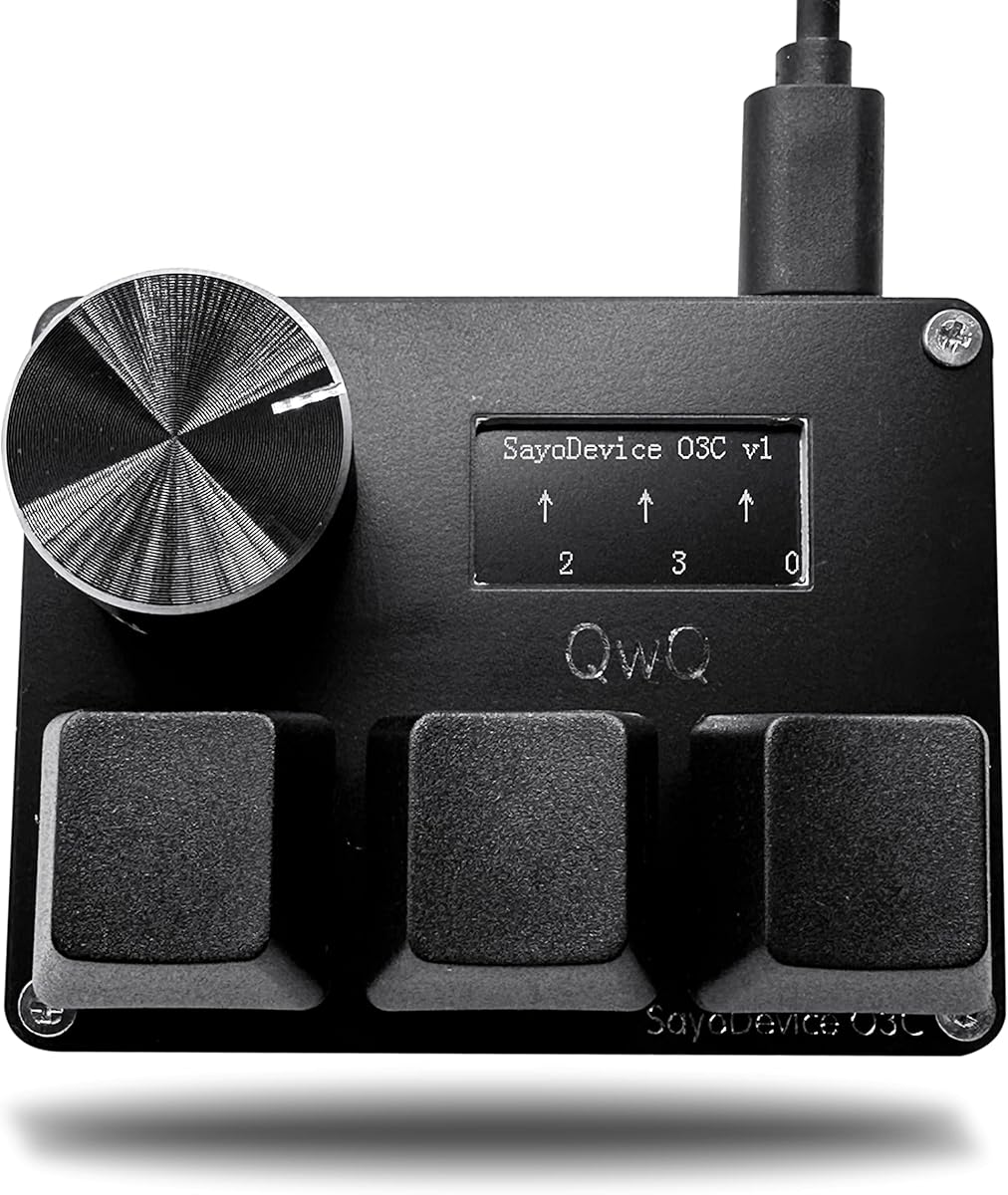
This keyboard stands out as the top choice for Geometry Dash players seeking precision. It features three Hall magnetic linear switches that deliver rapid trigger capabilities essential for fast-paced rhythm games. The built-in screen adds a unique layer of feedback and control to your setup.
We may earn a commission when you buy through this link, at no additional cost to you.
The high polling rate of 8000Hz ensures that every keypress is registered with minimal latency. This speed is critical when navigating the tight timing windows found in Geometry Dash levels. The magnetic switches allow for adjustable actuation points to match your specific finger pressure.
While the layout is compact, it includes a customizable knob and screen that enhance usability. You can set the knob to scroll through song lists or perform macros quickly. However, you must calibrate the device before first use which may take a few minutes to configure.
Players who prioritize speed and customization should consider this keyboard immediately. It offers the perfect balance of performance and unique features tailored for rhythm gaming. This model provides a reliable foundation for mastering difficult geometry dash tracks consistently.
Rapid trigger technology allows keys to reset instantly once released improving your reaction times during complex sections.
The color screen shows key counts and status in real time helping you track your performance without distractions.
We may earn a commission when you buy through this link, at no additional cost to you.
This model offers an affordable entry point into magnetic switch technology for rhythm gamers. It supports rapid trigger and customizable trigger distances that can be set as low as 0.05mm. The RGB backlighting adds visual appeal to your gaming desk setup.
We may earn a commission when you buy through this link, at no additional cost to you.
The flexible calibration setup allows you to tweak the keys independently to match your play style. A visual feedback display helps you understand how the keyboard reacts to your inputs in real time. This feature is useful for optimizing your performance during practice sessions.
Despite the lower rating, the hardware capabilities are promising for budget-conscious players. The plug-and-play setup makes it easy to get started without complex driver installations. You should check software compatibility for customization options on your specific operating system.
Gamers on a tight budget will appreciate the value provided by this keyboard. It brings high-speed technology to a lower price point while maintaining essential gaming features. This choice is ideal for those wanting to test magnetic switches before investing in premium options.
Get the benefits of rapid trigger technology without breaking the bank with this affordable gaming keyboard model.
Personalize your setup with RGB lighting that can be adjusted to match your game aesthetic or mood.
We may earn a commission when you buy through this link, at no additional cost to you.
This keyboard shares many strengths with the top pick but stands out for its customization features. The ability to write your own ID on the screen adds a personal touch to your gaming experience. It also supports any Hall magnetic switches for maximum flexibility.
We may earn a commission when you buy through this link, at no additional cost to you.
With a high rating of 4.7, users consistently praise its responsiveness and build quality. The screen displays key range and button counting which helps monitor your usage and performance. It connects via USB 2.0 and supports high-speed polling rates for smooth gameplay.
The compact design means it is best suited for gaming rather than general typing. You will need to calibrate it before first use to ensure the sensors work correctly. Once set up, the switches offer a smooth and consistent feel for rapid inputs.
Players who want a reliable keyboard with personal flair will find this option appealing. It balances performance with unique features that enhance the overall user experience. This keyboard is a strong contender for anyone focused on precision gaming.
Write your own name or ID on the screen to make your setup truly unique and recognizable.
Swap out switches easily to find the perfect feel without needing to solder or replace the entire board.
We may earn a commission when you buy through this link, at no additional cost to you.
This keyboard delivers professional-grade performance in a small package ideal for dedicated gaming stations. The magnetic switches allow for custom trigger release settings between 0 and 4mm to match your comfort level. It includes an IPS screen that can display custom animations during use.
We may earn a commission when you buy through this link, at no additional cost to you.
With a high polling rate and USB 2.0 connectivity, input lag is kept to a minimum. The ability to calibrate each switch with a simple click ensures accuracy across the board. Users can set the keys to specific functions or shortcuts easily through the interface.
The compact form factor might be limiting for those who need a full layout for daily tasks. However, for Geometry Dash players it provides enough space to execute complex moves efficiently. Remember to check for firmware upgrades and perform calibration before your first session.
Those seeking a high-end magnetic switch experience at a competitive price should look at this model. It offers advanced features typically found in more expensive boards. This choice is perfect for players focused on speed and precision in their gaming.
Adjust the release point of each key to fine-tune responsiveness for different types of gameplay scenarios.
Use the screen to display custom animations that can enhance your visual immersion during gameplay.
We may earn a commission when you buy through this link, at no additional cost to you.
This premium keyboard leverages advanced Hall Effect magnetic switches for superior performance and longevity. It features a web-based driver that allows for deep customization without bulky software downloads. The 60% layout saves desk space while retaining essential gaming functions and arrow keys.
We may earn a commission when you buy through this link, at no additional cost to you.
With a polling rate of 8000Hz, this keyboard ensures ultra-fast response times for competitive play. The dynamic RGB lighting adds visual flair with 16.8 million customizable colors. Magnetic switches eliminate physical contact wear ensuring consistent performance over time.
While it lacks a built-in screen, the focus is on raw performance and flexibility. The hot-swappable design lets you upgrade switches without soldering which adds long-term value. It is designed for FPS games but excels in any precision gaming scenario.
Players looking for a high-end experience without extra gimmicks will appreciate this board. It provides the speed and precision needed for challenging Geometry Dash levels. This keyboard is a robust choice for serious gamers prioritizing performance over extra features.
Manage all settings through a browser driver making customization accessible on any device with internet.
Use lightweight drivers that do not consume system resources allowing more power for your games.
We may earn a commission when you buy through this link, at no additional cost to you.
This keyboard offers unique versatility with wireless modes and a large TFT screen for info display. It connects via Bluetooth or 2.4G wireless providing freedom from cables when needed. The gasket design provides a softer and more comfortable typing feel compared to standard boards.
We may earn a commission when you buy through this link, at no additional cost to you.
A massive 8000mAh battery supports long usage periods with or without RGB backlighting. The programmable software allows for deep customization of keys and macros on Windows systems. Side-printed PBT keycaps ensure durability and vibrant colors that resist fading over time.
While it does not have magnetic rapid trigger, the high polling rate and linear switches still offer smooth input. The screen can display various information including screen images and animations on Windows. This makes it a great all-rounder for both gaming and productivity.
Users wanting a wireless option with rich visual features should consider this model. It balances functionality with comfort to provide a pleasant user experience. This keyboard is ideal for those who need flexibility in how they connect and interact with their device.
Switch seamlessly between wired and wireless modes to fit your workspace and gaming setup.
Experience a softer typing feel with shock absorption that reduces fatigue during long sessions.
We may earn a commission when you buy through this link, at no additional cost to you.
This keyboard delivers exceptional precision with Hall Effect magnetic switches adjustable down to 0.01mm. It includes advanced features like DKS and SOCD that enhance control for competitive gaming. The 60% layout maximizes desk space for your mouse while keeping arrow keys accessible.
We may earn a commission when you buy through this link, at no additional cost to you.
With an ultra-low latency of 0.1ms and a polling rate of 8000Hz, every input is processed instantly. The gasket structure ensures a quiet and refined acoustic sound which reduces disturbance during late night gaming. PBT keycaps add durability and shine-through effects for the RGB lighting.
The web-based driver allows you to customize actuation points and RGB effects without installing software. While it is primarily for Windows, the hardware quality is high for any precision gaming setup. The linear switches are pre-lubed for a smooth feel right out of the box.
Players needing the lowest possible latency and advanced control features should choose this board. It supports rapid trigger and key customization to match your playstyle exactly. This keyboard is a top choice for competitive gamers seeking performance.
Unlock DKS and SOCD features to gain an edge in fast-paced gaming scenarios.
Enjoy a quiet gaming environment with shock-absorbing design that dampens harsh vibrations.
We may earn a commission when you buy through this link, at no additional cost to you.
This gaming keyboard offers an industry-leading polling rate for instant command execution. Magnetic switches allow you to personalize the actuation point on each key for precise input. The web driver enables quick customization of RGB and macros without complex installation steps.
We may earn a commission when you buy through this link, at no additional cost to you.
It features 16.8 million RGB colors with south-facing LEDs for a better visual experience. The 60% design saves significant desk space while retaining arrow keys and basic functions. A detachable USB cable makes it easy to transport or replace if needed.
The focus on speed makes it ideal for fast-paced titles that demand immediate reactions. However, the web driver is currently limited to Windows systems which may restrict some users. Despite this, the performance specs remain competitive for most gaming needs.
Gamers wanting a portable yet powerful keyboard should look into this model. It provides the speed necessary for precision tasks while keeping a clean desk setup. This is a strong option for those who prioritize response time in their hardware.
Experience 8 times faster response times than traditional keyboards for instant command execution.
Set lighting effects to match your game mood or sync with music for enhanced immersion.
We may earn a commission when you buy through this link, at no additional cost to you.
This white variant offers a clean look while providing the essential features for rhythm gaming. It includes a visual feedback display to help you monitor key travel and action status. The interface can be fully customized through software to match your preferences.
We may earn a commission when you buy through this link, at no additional cost to you.
Precise magnetic calibration allows independent adjustment of each key for a tailored feel. It supports high-frequency polling to ensure smooth inputs during complex gameplay. The plug-and-play setup makes it easy to connect and start using right away.
The lower rating suggests that some users may encounter setup or software quirks. However, the hardware offers solid capabilities for those willing to tweak settings for optimal performance. The minimalist design keeps the desk clean and focused on the screen.
Players looking for a white keyboard with magnetic switch support might find this appealing. It combines style with functionality to support high-speed inputs. This model is worth considering for those prioritizing aesthetics alongside performance.
Track key travel and counts in real time to improve your rhythm and timing during gameplay.
Personalize startup screens and device names to create a unique setup for your gaming.
We may earn a commission when you buy through this link, at no additional cost to you.
This keypad features a customizable boot interface where you can modify text and screen content. It supports rapid trigger with individual button calibration for precise adjustment of each key. The screen can display key travel status and counting for better user interaction.
We may earn a commission when you buy through this link, at no additional cost to you.
With an 8000Hz polling rate, the keyboard ensures high-speed input processing for rhythm games. It comes with a 2m type-C cable for flexible connection options across your desk. You can use the knob to scroll through song lists or set specific shortcuts.
The compact design means it is best suited for dedicated gaming tasks rather than typing. Some users may need to troubleshoot setup issues to get the best performance. However, the feature set is comprehensive for a device of this size.
Players who want a dedicated rhythm game keypad with robust customization should consider this. It provides the necessary speed and control for challenging levels. This option is a practical choice for those focusing specifically on Geometry Dash and similar titles.
Calibrate each button independently to ensure consistent and accurate triggering across the board.
Personalize your startup screen to show your name or key status for a tailored experience.
We may earn a commission when you buy through this link, at no additional cost to you.
Choosing the right keyboard involves understanding several key features that impact gameplay performance. This section details the factors you should consider before making your purchase.
Switch technology is crucial for Geometry Dash as rapid inputs define success in the game. Magnetic switches allow for adjustable actuation points and rapid reset features that mechanical switches often lack. Look for Hall Effect sensors which provide consistent performance and durability over time.
Prioritize magnetic switches for the best experience in rhythm and precision gaming scenarios.
Polling rate determines how often your keyboard sends data to your computer. A higher rate like 8000Hz ensures minimal delay between your press and the game reaction. This speed is essential for navigating tight timing windows without input lag affecting your score.
Choose a keyboard with at least 1000Hz but ideally 8000Hz for competitive play.
Layout size affects how much desk space you have for your mouse and movement. Compact 60% layouts save space and keep keys within reach which improves your hand positioning. However, ensure the layout includes necessary function keys if you use them during play.
Select a compact layout to maximize mouse movement area and ergonomic positioning.
Customization options like key remapping and macros can simplify complex commands. Some keyboards offer screens and knobs to display stats or control volume quickly. A web-based driver can make these adjustments easier without installing heavy software on your PC.
Look for customizable features that help streamline your workflow during practice and play.
Build quality ensures the keyboard withstands repeated rapid inputs without failure. PBT keycaps resist wear and shine over time compared to cheaper ABS alternatives. Gasket mount designs often provide a more comfortable typing experience and reduced noise during use.
Invest in solid build materials to ensure longevity and consistent performance over years.
Connection type determines how your keyboard links to your computer. Wired options offer the most stable connection which is vital for competitive gaming. Wireless models provide flexibility but may have higher latency or require battery management during sessions.
Choose a wired connection for the most reliable and latency-free gaming experience.
Budget considerations help you balance cost with the features you need for performance. Entry-level magnetic keyboards can offer great value without breaking the bank. Premium models often include extra features like screens or advanced lighting effects to enhance usability.
Set a realistic budget that allows for necessary features without unnecessary add-ons.
Software support allows you to customize settings and update firmware easily. Web-based drivers are becoming popular as they avoid system compatibility issues and reduce clutter. Ensure the software works with your operating system to unlock full keyboard functionality.
Verify software compatibility to ensure you can fully customize and update your device.
Start by calibrating your keyboard after setup to ensure accurate sensor readings. Follow the on-screen or manual instructions to adjust key trigger points if supported.
Keep your keyboard clean by gently brushing away dust between keys to maintain switch performance. Avoid exposing it to excessive moisture or direct sunlight to prevent damage.
Regularly update firmware and drivers to access new features and improve stability. Check for official software or web drivers from the manufacturer for the best experience.
Magnetic switches offer rapid trigger technology which resets keys faster than traditional mechanical switches. This allows for quicker inputs during complex gameplay sections. They also provide adjustable actuation points so you can tailor the feel to your finger pressure.
While lower rates work for casual play, 8000Hz provides the lowest latency for competitive scenarios. This speed ensures your inputs are registered instantly reducing potential delays. It is ideal for precision games where timing is critical to your success.
Compact layouts can be used for typing but require familiarity with function layers. They save desk space but might take adjustment for daily work tasks. For gaming they offer better mouse movement and ergonomic positioning.
A screen on a keyboard is not necessary but offers useful visual feedback like key counts. It allows you to customize startup screens and monitor status during use. These features enhance immersion but do not directly impact game performance.
Calibration usually involves pressing specific keys while the software adjusts sensor thresholds. Follow the manufacturer instructions to ensure all keys register correctly. This step is vital for achieving the intended rapid trigger experience.
Wireless keyboards provide flexibility but wired options offer more stable connections for gaming. High-end wireless models have improved but latency can still be a factor. For competitive precision gaming wired connections are generally recommended.
Rapid trigger mode resets a key as soon as it is released instead of waiting for a fixed point. This allows for faster repeated inputs without delay between presses. It is ideal for games requiring quick and repetitive key actions.
Extend lifespan by keeping your keyboard clean and avoiding heavy pressure on keys. Regular updates to firmware and drivers can also maintain performance. Proper cable management prevents physical damage during transport or use.
This guide reviewed ten excellent keyboards suitable for Geometry Dash players. Top picks like the BTXETUEL SayoDevice and Aula WIN60 offer high precision and rapid trigger technology essential for success.
Prioritize magnetic switches and high polling rates to ensure your inputs register without delay. Look for features like compact layouts and customizable options that fit your playstyle and desk setup.
Remember to check current prices and availability before purchasing to secure the best deal. Investing in the right hardware can significantly improve your performance and enjoyment in Geometry Dash.