
Thermalright Assassin X120 Refined SE
4.7Editor score
AGHP heat pipe technology
Low noise PWM fan
Wide socket compatibility
This guide compares ten top CPU Air Cooler Fan Heatsink models for performance, noise, and compatibility to help you choose the perfect cooling solution.
Choosing the right CPU Air Cooler Fan Heatsink is crucial for maintaining optimal system performance and longevity. Effective cooling prevents thermal throttling and ensures your processor runs at peak efficiency under heavy workloads.
We evaluated ten leading models based on thermal performance, build quality, noise levels, and socket compatibility. Each product was analyzed for its ability to handle modern high TDP processors without compromising on quiet operation.
Every pick highlights unique strengths such as dual tower designs, advanced heat pipe technology, or digital monitoring features. Note that availability and specific model details may change over time, so always verify compatibility before purchasing.
4.7Editor score

4.8Editor score

4.8Editor score
This side-by-side comparison evaluates the top ten CPU Air Cooler Fan Heatsink models across key specifications including dimensions, fan types, heat pipe counts, and platform support.
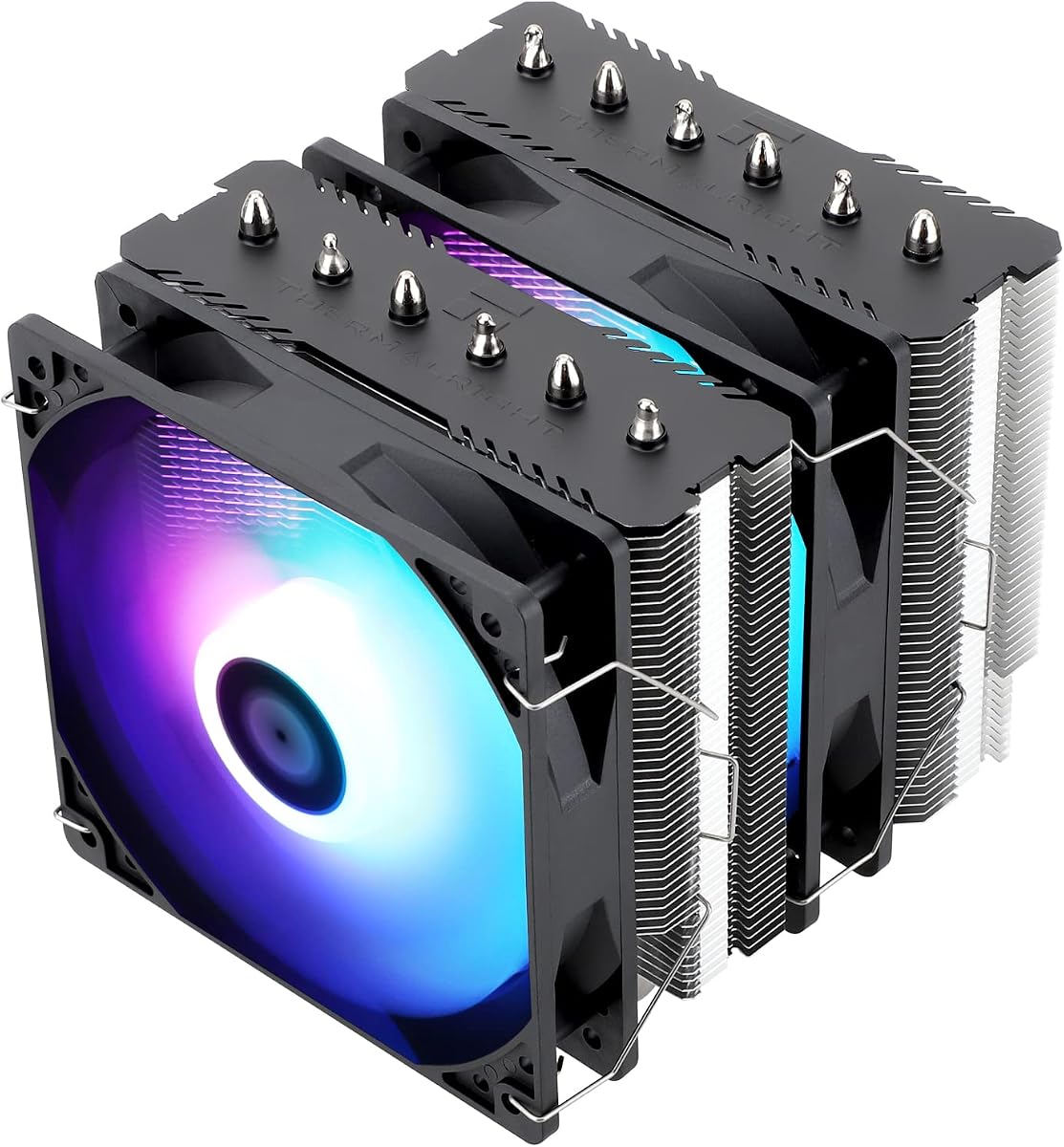


The Thermalright Assassin X120 Refined SE offers outstanding cooling performance at an entry-level price point. With a solid 4.7 rating, it stands out as a reliable choice for budget-conscious builders seeking efficient heat dissipation.
We may earn a commission when you buy through this link, at no additional cost to you.
It features four heat pipes utilizing AGHP technology to solve gravity issues in any orientation. The TL-C12C PWM fan ensures low noise levels while delivering sufficient airflow for standard desktop processors.
While it lacks dual tower architecture and visual flair, its thermal efficiency rivals more expensive units. The compact 148mm height ensures compatibility with most cases without blocking memory modules.
This cooler is ideal for office PCs or mid-range gaming rigs where silence and cost matter most. It provides a trustworthy foundation for cooling without breaking the bank.
AGHP technology allows the cooler to work effectively regardless of orientation, ensuring consistent thermal performance in all case configurations.
The TL-C12C fan is engineered for whisper-quiet operation, keeping noise levels low even under moderate processor loads.
We may earn a commission when you buy through this link, at no additional cost to you.
The Thermalright Peerless Assassin 120 SE ARGB delivers robust dual tower cooling suitable for high-performance CPUs. Its 4.7 rating reflects consistent performance across various workloads and thermal scenarios.
We may earn a commission when you buy through this link, at no additional cost to you.
Six heat pipes paired with dual TL-C12C-S PWM fans provide exceptional heat dissipation capabilities. The ARGB lighting adds a customizable aesthetic touch to builds seeking visual impact alongside thermal efficiency.
While powerful, its 155mm height demands careful case selection to avoid RAM interference. The dual fan setup offers superior cooling but may require tuning to balance noise with performance.
This model suits enthusiasts who want premium cooling features without the premium price tag. It strikes a great balance between style, silence, and raw thermal power.
Two fans working in tandem increase airflow significantly, allowing the heatsink to handle higher thermal loads with ease.
The RGB fan supports synchronization with motherboard lighting, offering a vibrant look that matches other system components.
We may earn a commission when you buy through this link, at no additional cost to you.
The Noctua NH-D15 chromax.Black remains a benchmark in air cooling, earning a 4.8 rating for exceptional performance and reliability. Its all-black design seamlessly integrates into modern dark-themed builds.
We may earn a commission when you buy through this link, at no additional cost to you.
It employs six heatpipes and two NF-A15 fans to achieve cooling performance comparable to liquid solutions. The SecuFirm2 mounting system simplifies installation across Intel and AMD platforms.
Despite its size, the cooler manages to stay remarkably quiet. The included NT-H1 thermal paste ensures optimal contact for maximum heat transfer from the CPU to the heatsink.
This is the perfect choice for silent enthusiasts and overclockers alike. If you value top-tier cooling and long-term reliability, this model is hard to beat.
Noctua's NF-A15 fans use advanced blade designs to minimize turbulence and noise while maximizing static pressure.
The chromax.Black finish ensures the cooler blends into dark cases without clashing with black components or cables.
We may earn a commission when you buy through this link, at no additional cost to you.
The Noctua NH-U12A chromax.Black combines compact dimensions with powerful cooling capabilities. With a strong 4.8 rating, it delivers reliable performance for standard high-end CPUs.
We may earn a commission when you buy through this link, at no additional cost to you.
Its dual NF-A12x25 fans provide efficient airflow across the 120mm tower, ensuring adequate heat dissipation without excessive bulk. This makes it highly compatible with various case sizes.
While not as massive as dual tower models, it manages heat effectively for mainstream usage. The 158mm height avoids overhang issues, preserving access to RAM and PCIe slots.
This unit is ideal for users needing a balance between cooling efficiency and internal case clearance. It suits office PCs and gaming rigs alike without compromising on quality.
Designed to fit most towers, the cooler avoids blocking vital motherboard components while maintaining top-tier thermal performance.
Two smaller fans create better pressure distribution than a single large fan, optimizing cooling across the heatsink fins.
We may earn a commission when you buy through this link, at no additional cost to you.
The Thermalright Assassin X 120R Digital ARGB brings a unique digital display feature to traditional air cooling. Its 4.7 rating highlights its ability to merge practicality with modern aesthetics.
We may earn a commission when you buy through this link, at no additional cost to you.
The top digital screen provides instant access to CPU temperature and usage metrics without needing external software overlays. This enhances user control and monitoring during gaming or heavy workloads.
Cooling performance is handled by four heat pipes and a high-speed TL-P12-S PWM fan. While not the tallest model, its thermal efficiency meets the needs of most mid-range setups.
This cooler is perfect for users who want functional monitoring and style in one package. It stands out as a conversation starter without sacrificing essential cooling capabilities.
The LCD panel displays real-time metrics, offering a unique way to monitor system health directly from the cooler.
Four heat pipes ensure heat is transferred quickly from the base to the fins for efficient dissipation.
We may earn a commission when you buy through this link, at no additional cost to you.
The Noctua NH-D15 continues to define high-end air cooling standards. With a 4.8 rating, it offers class-leading performance suitable for demanding processors and overclocking enthusiasts.
We may earn a commission when you buy through this link, at no additional cost to you.
Its dual tower configuration coupled with two NF-A15 fans ensures superior heat dissipation. The SecuFirm2 mounting system provides a secure fit across multiple motherboard generations.
Despite its size and premium price, the cooler delivers ultra-quiet operation that rivals liquid cooling. It is built to last with high-quality materials and extensive testing.
This model is recommended for users seeking the absolute best air cooling available. It is an investment in silence and long-term system stability.
The massive dual tower design and optimized fan curve allow it to outperform many liquid coolers in thermal tests.
Built to last, the NH-D15 comes with a reputation for durability that justifies its premium market position.
We may earn a commission when you buy through this link, at no additional cost to you.
The Noctua NH-D15S chromax.Black uses an asymmetrical design to improve compatibility while maintaining dual tower performance. It holds a 4.8 rating for excellent thermal results across different platforms.
We may earn a commission when you buy through this link, at no additional cost to you.
By shifting the right tower, it provides 65mm RAM clearance for taller memory modules. This unique layout ensures the cooler fits where standard dual towers might fail.
It includes a single NF-A15 fan to balance cooling with case compatibility. The design allows users to prioritize memory height without sacrificing significant thermal efficiency.
This cooler is perfect for builds with tall RAM or tight internal space. It solves common clearance issues without compromising much on performance.
The offset design clears RAM and PCIe slots effectively, making it ideal for motherboards with tall heat spreaders.
Despite the offset, cooling remains consistent thanks to optimized fin spacing and airflow direction.
We may earn a commission when you buy through this link, at no additional cost to you.
The Noctua NH-D9L is a compact dual tower cooler designed for small form factor systems. With a 4.7 rating, it proves that size does not dictate cooling efficiency completely.
We may earn a commission when you buy through this link, at no additional cost to you.
Its 110mm height allows it to fit in many HTPC and ITX cases. The dual tower design helps maximize surface area within the limited vertical space available.
While the NF-A9 92mm fan has lower airflow than larger models, it remains whisper-quiet. This makes it ideal for systems where silence is more important than raw cooling power.
This unit is best suited for mini builds where space is premium. It provides a reliable cooling option without dominating the internal chassis.
The 110mm height is tailored for mini cases, offering dual tower benefits without compromising case clearance.
The fan operates with minimal noise, ensuring the system remains suitable for living room environments.
We may earn a commission when you buy through this link, at no additional cost to you.
The Noctua NH-U12S is a classic single tower cooler known for its slim design and effective cooling. It earns a 4.8 rating for consistent performance and robust build quality.
We may earn a commission when you buy through this link, at no additional cost to you.
The NF-F12 Focused Flow fan ensures high static pressure to push air through the fins effectively. This design helps maintain cooling efficiency even with restrictive case airflows.
Its slim tower does not overhang RAM or PCIe slots on most motherboards. This makes installation straightforward for builders who need maximum component clearance.
This model is a safe choice for standard builds needing reliable cooling. It balances performance and size well for those avoiding bulky towers.
The NF-F12 fan concentrates airflow through the center of the tower, improving cooling efficiency without increasing noise.
The narrow tower ensures it clears most RAM and PCIe slots, making it versatile for various board layouts.
We may earn a commission when you buy through this link, at no additional cost to you.
The Thermalright Peerless Assassin 120 SE delivers impressive dual tower cooling at a competitive price. With a 4.8 rating, it rivals more expensive models in thermal tests and real-world usage.
We may earn a commission when you buy through this link, at no additional cost to you.
Six soldered heat pipes ensure rapid heat transfer from the base to the fins. The nickel plating adds durability and aesthetic appeal to the cooling structure.
Two TL-C12C PWM fans provide substantial airflow for high TDP processors. This setup ensures the cooler can handle modern CPUs without thermal throttling or excessive noise.
This cooler is perfect for budget builders seeking premium performance. It stands as a strong contender for those looking to maximize thermal efficiency within a limited budget.
Soldering the heat pipes to the base improves thermal transfer efficiency compared to press-fit designs.
Nickel plated pipes resist corrosion and provide a clean look that matches modern system aesthetics.
We may earn a commission when you buy through this link, at no additional cost to you.
Selecting the right CPU Air Cooler Fan Heatsink requires evaluating several key factors to ensure optimal performance and compatibility with your system.
Thermal performance depends on heat pipe count, fin surface area, and fan airflow. Look for models with multiple heat pipes and high-quality fans to handle your CPU's TDP effectively.
Ensure the cooler supports your specific CPU socket type such as LGA1700, AM5, or AM4. Always verify mounting hardware availability before purchasing.
Measure your case's maximum cooler height to avoid physical conflicts. Taller coolers require larger cases and may interfere with RAM modules.
Select a cooler with quiet fans, typically indicated by low dB(A) ratings. PWM fans allow for automatic speed adjustments to balance noise and cooling.
Look for materials like copper heat pipes and aluminum fins for durability. A solid construction ensures long-term reliability and resistance to corrosion.
A longer warranty indicates manufacturer confidence in product quality. Aim for at least a 6-year warranty to protect your investment against defects.
Models with comprehensive mounting kits and clear instructions simplify the installation process. Check if backplate installation is required for your motherboard.
Determine your budget range before browsing. High performance does not always require high cost as several budget models offer premium results.
Install the cooler on a clean CPU surface and apply the provided thermal paste evenly. Ensure tight mounting screws for maximum contact between the base and the processor.
Connect the fan's PWM cable to the CPU fan header on the motherboard. This allows BIOS control of fan speeds based on temperature readings for optimal operation.
Regularly clean dust from the heatsink fins and fan blades using compressed air. Accumulated dust reduces airflow and causes higher operating temperatures over time.
Most coolers support major sockets like LGA1700, AM4, and AM5 but you must verify compatibility. Always check if your board needs a specific backplate or adapter kit included with the cooler.
Dual tower coolers offer larger surface area and better thermal performance. However single towers save space and are ideal for cases with limited clearance.
Modern PWM fans operate under 25 dB(A) at idle or low loads. High performance settings increase noise but stay within acceptable limits for most users.
Yes thermal paste can dry out over years. Replacing it every few years maintains optimal heat transfer and keeps CPU temperatures in check.
AGHP ensures consistent cooling regardless of the heatsink's orientation. It solves gravity issues by optimizing fluid flow inside the heat pipes.
Some models include ARGB fans synchronized via motherboard headers. If your cooler lacks RGB you can add external strips if your case supports them.
We highlighted ten top CPU Air Cooler Fan Heatsink models including the Thermalright Assassin X120 Refined SE for budget builds and Noctua NH-D15 for premium performance.
Prioritize thermal performance and case clearance when selecting a model. Noise levels and ease of installation also play vital roles in long-term satisfaction.
Always check current availability and compatibility details before buying. Your ideal cooler depends on your specific CPU needs and system constraints.