
10Gtek 10Gb Dual RJ45 Port Network Card
4.1Editor score
Intel X540 controller chip
Dual copper RJ45 ports
Low profile bracket included
Compare the top 10GB Ethernet cards for speed and reliability. This guide reviews ten leading models for NAS, servers, and desktop upgrades with detailed specs.
Upgrading your network infrastructure often requires a robust 10GB Ethernet Card to handle modern data demands efficiently. These adapters deliver significantly faster speeds than standard Gigabit options, ensuring smooth transfers for large files and high-bandwidth applications like 4K video editing or gaming.
We evaluated ten leading models based on chipset performance, compatibility with various operating systems, and physical design features like bracket options. Our analysis focuses on real-world reliability, heat management, and support for multi-gigabit auto-negotiation to ensure seamless integration with your existing router or switch setup.
Each selection below highlights specific strengths such as dual ports for redundancy, compact form factors for small builds, or specialized fiber connectivity. Prices and availability fluctuate frequently due to market conditions, so verify current listings before making a final purchase decision for your specific networking needs.
4.1Editor score

4.2Editor score

4.6Editor score
This side-by-side comparison reviews all ten selected 10GB Ethernet Card models to help you identify the right fit for your specific hardware environment and performance requirements.




The TP-Link TX401 stands out as a top contender in the 10GB Ethernet Card market with its robust PCIe network card design and promising 4.2 star rating. It delivers extreme speeds of up to 10 Gbps using the latest 10GBase-T Technology ensuring smooth data transmissions for internet access and local data transfers.
We may earn a commission when you buy through this link, at no additional cost to you.
This adapter shines in its versatility by automatically negotiating between higher and lower speed connections like 10 Gbps down to 100 Mbps. The included 1.5 meter CAT6A Ethernet Cable maximizes performance ensuring you get the full 10 Gbps potential without bottlenecking on inferior cabling.
While it offers comprehensive system support for Windows and Linux the requirement for specific cable quality is a trade-off to consider. However the included cable mitigates this issue making it a convenient package for users upgrading from standard Gigabit setups.
Gamers and power users seeking reliable throughput will appreciate the Quality of Service technology prioritized performance for gamers and prioritized congestion. This makes the TX401 a highly recommended choice for those needing consistent high-speed connectivity without excessive complexity.
With speeds 10x faster than typical Gigabit adapters this card guarantees smooth data transmission for bandwidth heavy tasks.
QoS technology ensures prioritized bandwidth for gamers to avoid network congestion during intense online sessions.
We may earn a commission when you buy through this link, at no additional cost to you.
The 10Gtek 10Gb Dual RJ45 Port Network Card offers exceptional value for budget-conscious users needing reliable enterprise-grade performance. Featuring an original Intel X540 controller chip it supports Intelligent Offloads making servers more stable and efficient for data center environments.
We may earn a commission when you buy through this link, at no additional cost to you.
Equipped with dual copper RJ45 ports this card allows flexible connectivity and redundancy options essential for high-availability setups. The inclusion of both standard and low profile brackets ensures easy installation in various form factors including small form factor cases.
Users should note that Windows 11 support requires manual setup which adds a slight hurdle during installation. Despite this the card backed by a 3 Year Free Warranty and lifetime technical support remains a cost-effective solution for expanding network capacity.
For IT professionals or home lab enthusiasts looking to avoid costly proprietary solutions this card provides a solid foundation. Its compatibility with Linux and ESX servers further cements its role as a versatile budget choice for diverse operating environments.
Dual copper RJ45 ports enable flexible connections and backup options for mission critical server tasks.
The Intel X540 controller delivers stable performance at a price point that rivals more expensive adapters.
We may earn a commission when you buy through this link, at no additional cost to you.
The Synology E10G30-T2 represents the pinnacle of specialized networking hardware designed specifically for Synology network attached storage systems. With a stellar 4.6 rating this adapter supports high-performance storage applications and ensures robust connectivity for demanding data environments.
We may earn a commission when you buy through this link, at no additional cost to you.
Its dual 10GbE ports enable automatic negotiation between 10 Gbps and 1 Gbps providing flexibility and reliability. The purpose-built nature means seamless integration with DSM operating systems removing many common compatibility hurdles found with generic adapters.
While the price point is higher than generic options the included 5-year warranty justifies the investment for professional users. Compatibility is strictly defined so checking the official list is mandatory before purchase to ensure your specific Synology model supports this adapter.
Organizations relying on Synology NAS for critical storage will find this adapter an essential upgrade. It delivers consistent speeds without the configuration overhead associated with broader generic solutions ensuring maximum uptime and data throughput.
Designed for Synology systems this adapter ensures seamless integration with DSM and storage workflows.
A robust 5-year warranty provides long-term peace of mind for enterprise and professional NAS users.
We may earn a commission when you buy through this link, at no additional cost to you.
The VIMIN 10G PCI-E Network Card leverages the reliable Intel X540-T2 chipset to deliver stable dual Lan 10Gb connections. Its 4.5 rating reflects strong performance reliability ideal for high-speed data transmission requirements in servers and high-end devices.
We may earn a commission when you buy through this link, at no additional cost to you.
A key feature is its excellent heat dissipation using a dedicated heat sink to maintain optimal temperature levels during heavy usage. The flexible compatibility with PCIe x8 and x16 slots allows adaptation to different specifications providing more deployment options for various chassis sizes.
Note that this card does not support 2.5Gbps or 5Gbps speeds which might be a limitation for newer multi-gigabit switches. Users must ensure their network environment supports direct 10Gbps or 1Gbps connections to avoid downgrades to slower speeds.
For servers requiring dual ports and stable throughput the VIMIN card offers a strong balance of features. It supports VMware and Linux environments making it a versatile choice for virtualized home lab or small business network setups.
Dual 10Gbps RJ45 ports offer high bandwidth and redundant connections for demanding server applications.
Heat sink design ensures consistent operation without overheating even during intensive data transfers.
We may earn a commission when you buy through this link, at no additional cost to you.
The Asus NADACA0140 brings Hyper-fast 10Gbps networking to desktops allowing for up to 10X-faster data-transfer speeds for bandwidth-demanding tasks. Its full compatibility with current network standards ensures seamless backward compatibility with older devices and cabling.
We may earn a commission when you buy through this link, at no additional cost to you.
Prioritize your data with built-in Quality-of-Service technology allowing you to prioritize bandwidth and supported data packets for a smooth online experience. This feature is particularly useful for users who want to ensure gaming or video conferencing traffic is not slowed by bulk file transfers.
The card requires standard copper network cables to upgrade your desktop to 10Gbps networking keeping installation simple and familiar. It supports Windows and Linux providing flexible OS integration for diverse development or workstation environments.
While it offers only a single port it excels in simplicity and performance for single connection needs. The QoS technology adds a valuable layer of control making it a solid pick for power users needing optimized network traffic management.
Built-in QoS ensures critical data packets get priority bandwidth for smoother online experiences.
RJ45 port design allows easy upgrades using standard network cables without fiber conversion.
We may earn a commission when you buy through this link, at no additional cost to you.
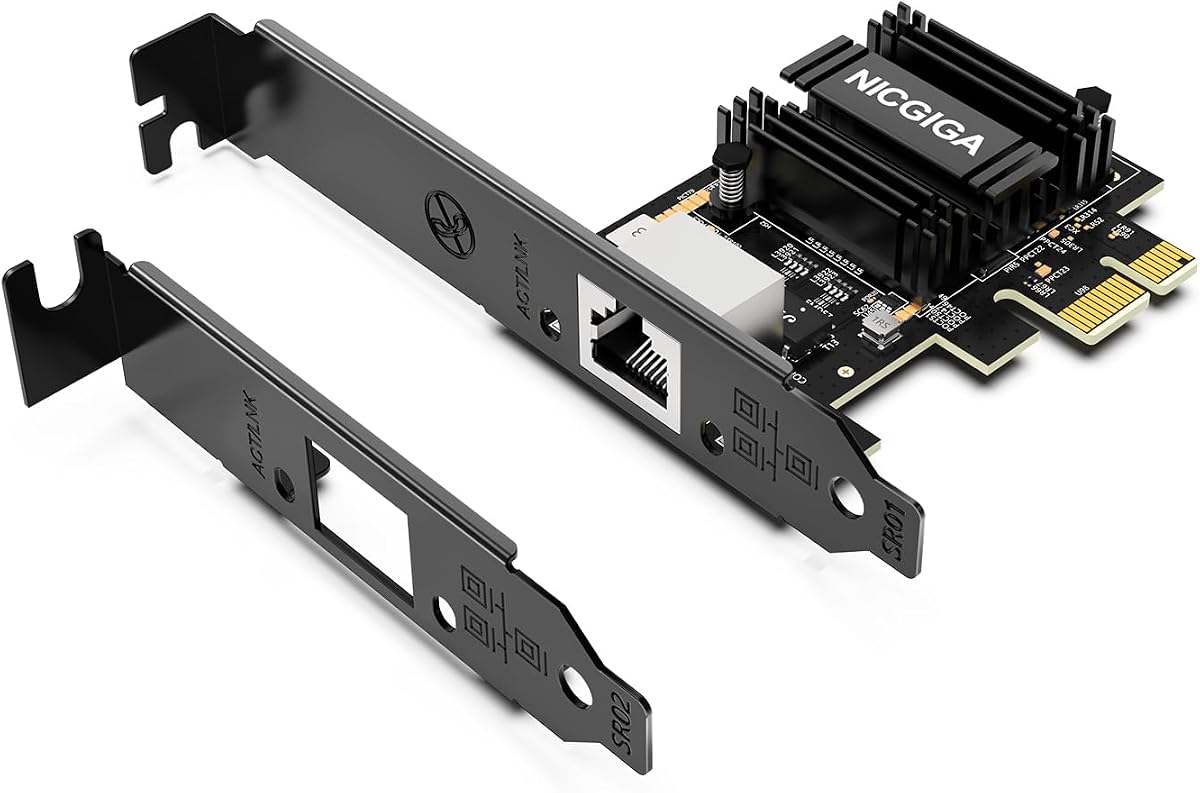
The NICGIGA 10Gb PCIe 4.0 x1 Network Card adopts the latest Realtek RTL8127 controller to deliver blazing-fast speeds up to 10Gbps with extreme stability. It supports Wake-on-LAN making it perfect for NAS storage home labs and gaming setups requiring remote access capabilities.
We may earn a commission when you buy through this link, at no additional cost to you.
Its PCIe 4.0 x1 interface is designed for compact systems easily converting a standard x1 slot into a 10G RJ45 Ethernet port. This design prevents occupying GPU lanes making it ideal for Mini PCs ITX builds and compact workstations where space is limited.
Multi-Gig Auto-Negotiation ensures seamless backward compatibility with routers switches or NAS systems supporting speeds from 100Mbps to 10Gbps. Standard Cat6a or high-quality Cat6 cabling allows cost-effective network upgrades without needing specialized fiber cables.
Native Linux support on modern kernels simplifies setup for open-source users while Windows plug-and-play remains straightforward. The low power consumption ensures non-stop stability making it a reliable choice for continuous server or home lab operations.
PCIe 4.0 x1 fits into small slots saving space for GPUs in compact Mini PC builds.
Auto-negotiation allows connection to both 10G switches and older Gigabit routers seamlessly.
We may earn a commission when you buy through this link, at no additional cost to you.
The VunLink 10GbE RJ45 Card is powered by the Realtek RTL8127AT chipset delivering up to 10Gbps Ethernet connectivity for NAS servers and workstations. It features an Energy-Efficient Design engineered for lower power consumption and reduced heat output compared with traditional 10GbE solutions.
We may earn a commission when you buy through this link, at no additional cost to you.
Support for 10Gbps 5Gbps and 2.5Gbps speeds with automatic negotiation ensures seamless integration with existing routers switches and desktop PCs. This flexibility makes it adaptable to evolving network standards without requiring immediate infrastructure overhauls.
Designed with a PCIe 4.0 x1 interface it maximizes slot efficiency by allowing full-featured networking without blocking other expansion slots. This design choice makes it an ideal adapter for Mini PCs ITX builds and desktop computers where slot availability is a concern.
Windows and Server compatibility ensures broad usability while driver installation may be required depending on specific OS versions. The included standard and low-profile brackets facilitate flexible installation in both full-height and compact desktop systems.
Advanced controller design reduces power draw and heat making it safer for compact cases.
PCIe 4.0 x1 uses minimal motherboard resources while delivering full 10Gbps speeds.
We may earn a commission when you buy through this link, at no additional cost to you.
The Asus XG-C100F offers blazing fast 10 Gbps speeds using fiber optic technology which carries high speed transmissions over a much greater distance than traditional copper cables. This makes it ideal for environments requiring longer reach or immunity to electromagnetic interference.
We may earn a commission when you buy through this link, at no additional cost to you.
Its SFP+ cage allows for both fiber optic and Direct-Attach copper connections providing hardware flexibility. The stylish aluminum heatsink keeps the card cool during high performance tasks ensuring stable operation under continuous heavy load conditions.
Built-in QoS technology automatically boosts bandwidth to important streams or games ensuring critical data flows without interruption. This prioritization helps manage network traffic effectively especially in shared or congested network environments.
Note that fiber optic cabling and modules are sold separately so initial setup requires additional investment. However for users needing long-distance reliable high-speed links this adapter offers a professional grade solution without compromising on throughput.
Fiber optic compatibility extends network reach beyond standard copper cable limits.
Aluminum heatsink ensures the card stays cool even during sustained high data transfers.
We may earn a commission when you buy through this link, at no additional cost to you.
The TRENDnet TEG-10GECTX converts a PCIe 3.0 x4 slot into a 10G Ethernet Port with robust NDAA and TAA compliance for government customers. It supports 2.5G BASE-T specification allowing 2.5G and 5G speeds over standard Cat5e cables at distances up to 100m.
We may earn a commission when you buy through this link, at no additional cost to you.
Its LED indicators provide clear visibility of link status making troubleshooting easier in dense server rack environments. The manufacturer offers 3 years of protection ensuring reliable tech support and product quality backed by English speaking advisors during normal business hours.
Compatibility spans Windows and Windows Server versions including the latest updates ensuring broad deployment options. The 10G PCIe card adapter supports standard speeds allowing seamless integration with existing Cat5e infrastructure for cost-effective upgrades.
For organizations needing compliant hardware this adapter meets strict regulatory requirements without sacrificing performance. The support for older Cat5e cables makes it a practical choice for offices looking to maximize existing cabling investments.
NDAA and TAA compliance ensures this card meets strict U.S. government networking standards.
2.5G BASE-T allows faster speeds over existing Cat5e cabling without immediate replacement.
We may earn a commission when you buy through this link, at no additional cost to you.
The Cable Matters USB C to 10Gb Ethernet Adapter upgrades laptops and tablets with fast wired networking via USB-C. Supported by the Realtek RTL8159 controller it manages heat efficiently ensuring low-heat and silent performance during typical operation.
We may earn a commission when you buy through this link, at no additional cost to you.
It supports broad auto-negotiation for compatibility with 10G 5G 2.5G 1G and 100M speeds allowing flexible connection to various routers. The rugged aluminum housing with integrated thermal silicone and heat sink helps dissipate heat withstand daily wear and scuffs.
While real-world Windows throughput typically reaches around 7Gbps on a USB 3.2 Gen 2×2 port it remains significantly faster than standard Gigabit options. The braided USB-C pigtail cable adds strength and flexibility reducing port strain ideal for travel kits or mobile workstations.
Plug-and-play setup on macOS and Windows simplifies adoption without needing manual drivers on modern systems. It is not designed for Android or Xbox One S so verifying your host device compatibility is crucial before purchase.
Compact USB-C design delivers desktop-grade speeds to laptops for travel or temporary setups.
Aluminum housing and thermal silicone help maintain stable performance in varying environments.
We may earn a commission when you buy through this link, at no additional cost to you.
Selecting the right 10GB Ethernet Card requires understanding your system slots cabling and software needs to ensure compatibility and performance.
Check your motherboard for available PCIe slots. Some cards need x4 or x8 lanes while others like newer models work in x1 slots. Ensure the interface generation like 2.0 3.0 or 4.0 matches your board speed to avoid bottlenecks.
Verify slot availability and lane requirements before buying to guarantee the card fits physically and performs at maximum speed.
Dual port cards offer redundancy and failover capabilities ideal for servers or mission critical workstations. Single port cards suffice for basic home upgrades. Consider whether you need backup connections for uninterrupted network access.
Choose dual ports for reliability in servers and single ports for standard desktop performance needs.
Most cards support Windows and Linux but drivers may vary by kernel version. Some specialized cards only work with specific NAS systems like Synology. Check the vendor's compatibility list to ensure support for your OS version.
Confirm driver availability and system support details to avoid installation headaches on your specific OS.
RJ45 ports use standard Cat6a cables for copper connections while SFP+ cards need fiber optics. Ensure you have or are willing to buy the correct cables for your network switch. Fiber options cost more but offer longer distances.
Match your port type to your existing switch and cabling infrastructure to ensure correct connectivity.
High speed networking generates heat so look for cards with built-in heatsinks or cooling fans. Small form factor cases may require low profile cards with passive cooling to avoid overheating. Good thermal design ensures stable long-term performance.
Prioritize models with robust cooling solutions to maintain stability especially in enclosed cases.
Cards with Multi-Gig Auto-Negotiation connect to both 10G and 2.5G/5G switches. This feature ensures the card adjusts speed to match your router or switch for seamless integration. Without it older switches may limit speed to 1G.
Select cards supporting auto-negotiation to avoid speed bottlenecks with older network equipment.
Branded cards often include multi-year warranties and dedicated tech support compared to generic options. A longer warranty period protects your investment and ensures access to help during setup. Check vendor reputation for reliability and service.
Opt for brands with strong warranty policies and customer support for long-term reliability.
Ensure the card includes both standard and low profile brackets for your case type. Full height cards fit standard towers while low profile is needed for small form factor PCs. Missing brackets can make installation impossible.
Check included bracket options to guarantee physical fit in your desktop or server chassis.
Power down your computer and unplug it before inserting the card into a free PCIe slot on your motherboard. Secure the card firmly and attach the bracket screw to keep it stable during operation.
Connect a Cat6a Ethernet cable from the card to your router or switch to ensure you receive maximum speeds. If using SFP+ ports insert the appropriate fiber or direct attach copper module before connecting cables.
Install the latest drivers from the manufacturer website if your operating system does not auto-detect the device. Restart your computer and verify the connection status in your network settings to confirm successful installation.
Yes you need a switch or router with 10G ports to achieve full speeds. However cards with auto-negotiation will work at lower speeds on standard 1G routers. Ensure your network hardware supports Gigabit speeds to benefit from the upgrade.
Standard PCIe cards fit desktops and servers not laptops unless your laptop supports Thunderbolt with a PCIe enclosure. For laptops consider USB-C adapters which offer similar speeds in portable form factors for portable use.
Cat6a cables are rated for 10 Gbps up to 100 meters. Standard Cat6 can support 10Gbps but only up to 55 meters. Ensure your cables meet these standards to maintain consistent high-speed connectivity.
Yes many cards are designed specifically for NAS systems like Synology for faster data access. Check the vendor's NAS compatibility list to ensure seamless integration with your specific storage device operating system.
Most modern cards support Windows 11 but some may require manual driver setup. Verify the vendor's supported OS list and check for official Windows 11 drivers to ensure compatibility without issues.
Turn off and unplug your PC then press the case power button to drain residual electricity. Insert the card into the PCIe slot and secure the bracket screw before connecting any network cables.
Your router switch or cable may only support 1G speeds. Check your network hardware and ensure Cat6a cabling is used. Also verify auto-negotiation settings on your network adapter in system settings.
Newer Realtek cards are designed to be energy efficient with low power usage. Older Intel models may consume slightly more. Check the specific power draw details in the product specs before purchasing.
We identified the TP-Link TX401 Synology E10G30-T2 and 10Gtek models as top picks for general use specialized NAS and budget efficiency respectively. Each card offers unique strengths depending on whether you prioritize speed reliability or cost.
When choosing consider your existing network cabling and hardware compatibility to ensure smooth operation. Prioritize cards with strong warranties and support to protect your investment against hardware failures or setup issues.
Prices for networking gear fluctuate based on market supply and demand so check current listings before purchasing. This ensures you get the best deal for your specific needs today.