
Redragon K617 HE
4.3Editor score
Rapid Trigger Technology
Adjustable Actuation Point
Compact 60 Percent Layout
Discover the best keyboard for CS2 with this expert guide comparing top Hall Effect and mechanical models for speed, precision, and competitive advantage.
Choosing the right keyboard for Counter-Strike 2 is critical for competitive players who need fast, precise inputs. The best models offer rapid trigger technology, adjustable actuation, and durable switches to give you an edge in intense matches.
We compared ten top-rated keyboards based on performance features, build quality, and user feedback. This guide covers Hall Effect models, traditional mechanical options, and specialized layouts to help you find the perfect fit for your setup.
Each pick includes detailed specs, pros, cons, and real-world usage insights. Prices and availability change frequently, so check current listings before purchasing to ensure you get the best deal for your budget and play style.
4.3Editor score
4.4Editor score
4.5Editor score
This side-by-side comparison highlights the key specifications and unique features of each top-rated keyboard to help you make an informed decision based on your specific needs and preferences.


The Redragon K617 HE is an excellent entry-level choice for Counter-Strike 2 players looking for Hall Effect technology without a premium price tag. With a solid 4.3 rating from users, it delivers reliable performance and fast response times that are essential for competitive gaming.
We may earn a commission when you buy through this link, at no additional cost to you.
Its standout feature is the dedicated Hall Effect magnetic switches which sense keypresses without physical contact. This enables rapid trigger technology allowing you to reset keys instantly for faster direction changes and peek-and-fire maneuvers. The software-adjustable actuation lets you fine-tune sensitivity for aiming or typing.
While the build is functional, it lacks the premium feel of higher-end models. The driver software is sufficient but may not offer as much depth as competitors. These trade-offs are acceptable given the price, making it a great value for budget-conscious gamers.
Buy this if you want to try rapid trigger technology without spending much. It is perfect for students or casual players who need responsive inputs for CS2. For the price, it offers a significant performance boost over standard membrane keyboards.
The rapid trigger feature allows keys to reset at the slightest lift of a finger, giving you a distinct advantage in movement-heavy FPS games like CS2.
You can adjust actuation between 0.1mm and 3.4mm via software, letting you create profiles for different keys or play styles.
We may earn a commission when you buy through this link, at no additional cost to you.
The Redragon K686 HE brings a focus on user experience with its dual-module floating structure and noise dampening layers. Users rate it at 4.4 stars, praising the soft, Hi-Fi bounce it provides compared to the harsh clack of traditional mechanical keyboards.
We may earn a commission when you buy through this link, at no additional cost to you.
Key strengths include the one-knob simplicity for adjusting backlight brightness and media playback. The next-gen UltraMag POM magnetic switches provide the same rapid trigger and rapid polling benefits as other models in this lineup, ensuring fast inputs for CS2 gameplay.
The noise dampening is a significant advantage for late-night gaming sessions or shared spaces. However, to unlock its full potential you will need to use the software for actuation tuning. This adds a slight complexity for those who prefer plug-and-play setups.
This keyboard is ideal for players who value a quieter, more comfortable typing experience alongside competitive features. It is a strong step up from basic models without jumping to premium pricing. If you spend time typing as well as playing, this feel is worth it.
Independent switch-plate design paired with dampening layers reduces harsh sounds for a softer, more satisfying keypress experience.
A single control knob manages backlight and media playback, so you can adjust volume without memorizing extra key combos.
We may earn a commission when you buy through this link, at no additional cost to you.
The Redragon K673 HE is positioned as a solid mid-range option for those wanting more features than the budget models. It shares the UltraMag POM switches and rapid trigger capabilities but adds a dedicated control knob for media and lighting adjustments.
We may earn a commission when you buy through this link, at no additional cost to you.
Performance is consistent with the rest of the Redragon HE lineup, offering 8,000Hz hyper-polling and dynamic key activation to cut redundant keystrokes. The dual-module structure ensures the keys feel responsive yet comfortable during long gaming sessions.
Some users note it has a slightly lower rating compared to its siblings, possibly due to driver quirks or initial setup needs. These issues are usually resolved by checking firmware and calibrating switches through the web-based driver.
Buy this if you want the Redragon performance with added media convenience. It is a balanced choice for general gaming and productivity. For CS2 specifically, the rapid trigger and polling rate ensure you stay competitive without breaking the bank.
Adjust backlight brightness and media playback with a single knob, simplifying your desk setup and reducing the need for key combos.
Calibrate magnetic switches through a desktop or web-based driver to keep your setup consistent across different games.
We may earn a commission when you buy through this link, at no additional cost to you.
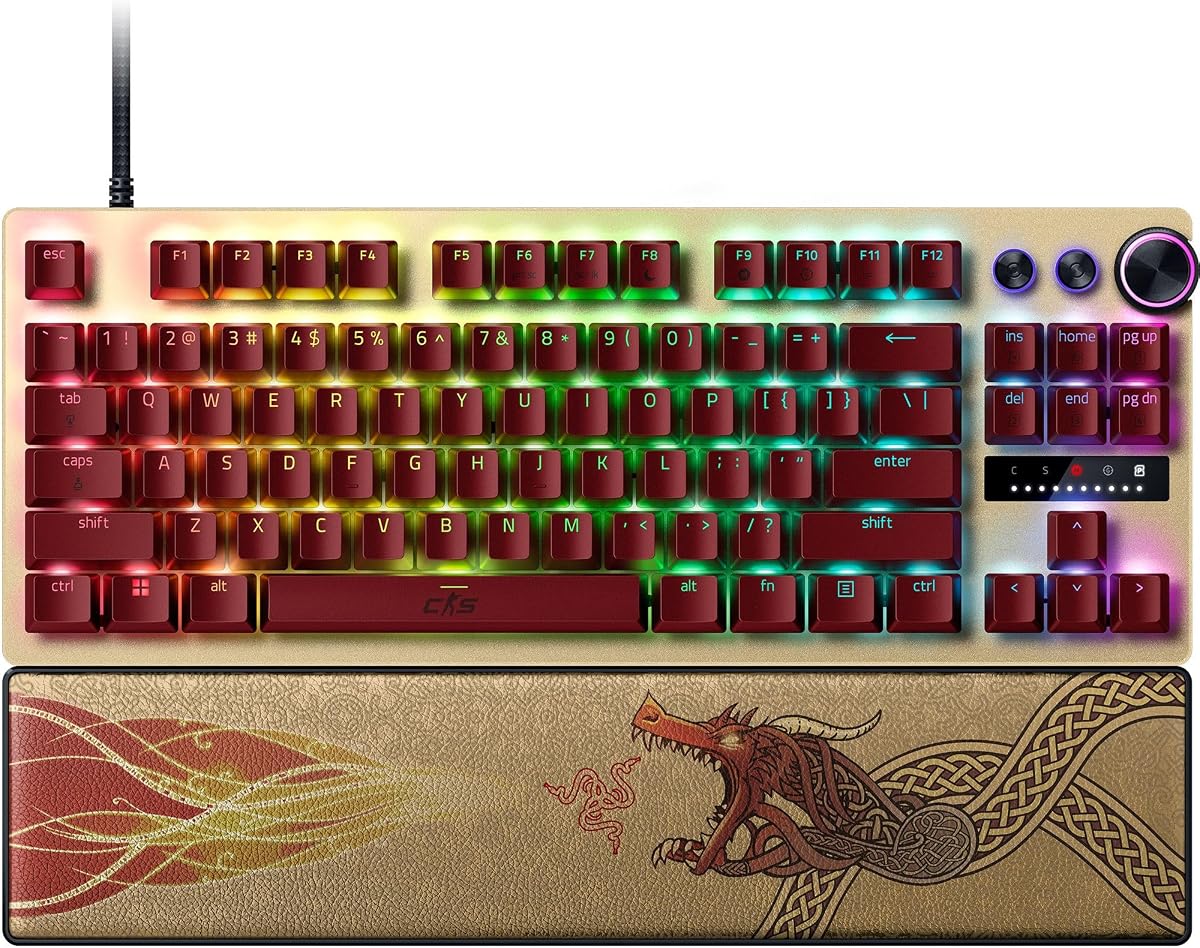
The Razer Huntsman V3 Pro TKL Counter-Strike 2 Edition is engineered specifically for elite competitive play. With a 4.4 rating, it stands out for its advanced features like Snap Tap, which prioritizes the latest input between two keys for instant directional changes.
We may earn a commission when you buy through this link, at no additional cost to you.
Its analog optical switches offer a wide adjustable actuation range from 0.1mm to 4.0mm. The onboard LED array lets you make precise adjustments without software, saving settings directly to the keyboard for a streamlined workflow during tournaments.
The high price reflects its premium features and build quality. While Snap Tap is game-changing for movement, it may be disallowed in some competitive leagues, so check rules before using. The PBT keycaps resist wear and shine over time.
This is the ultimate weapon for serious CS2 players who demand the best. It combines pro-level tech with a dedicated edition aesthetic. If budget is not a concern, this keyboard provides an unbeatable edge in speed and customization.
Prioritize the latest input between two keys without releasing the previous one for near-instant directional changes in FPS games.
Make precise adjustments to actuation height or Rapid Trigger sensitivity with visual LED feedback and no software required.
We may earn a commission when you buy through this link, at no additional cost to you.
The Corsair Clipper PRO MINI is a space-saving 60% keyboard designed for FPS setups that prioritize mouse movement. It features MGX Hyperdrive core Hall Effect switches with adjustable actuation from 0.2mm to 3.8mm for consistent performance.
We may earn a commission when you buy through this link, at no additional cost to you.
Advanced features include FlashTap SOCD for cleaner directional inputs and counter-strafing. It also offers Multi-Action and Smart Tap to reduce finger fatigue. The IP57 rating provides water and dust resistance for durability during intense sessions.
The compact size means you lose dedicated function and arrow keys which might be a drawback for non-gaming tasks. However, for pure CS2 gameplay it maximizes desk space for low-sensitivity aiming. The sound dampening keeps it distraction-free.
Buy this if you have a limited desk space or prefer low-sensitivity mouse usage. It delivers reliable Hall Effect performance in a tiny package. Corsair build quality ensures it lasts through years of competitive play.
FlashTap SOCD enables cleaner directional inputs and sharper counter-strafing, ensuring every movement lands exactly when you need it.
Built with IP57 water and dust resistance plus durable PBT double-shot keycaps to handle intense gameplay over long sessions.
We may earn a commission when you buy through this link, at no additional cost to you.
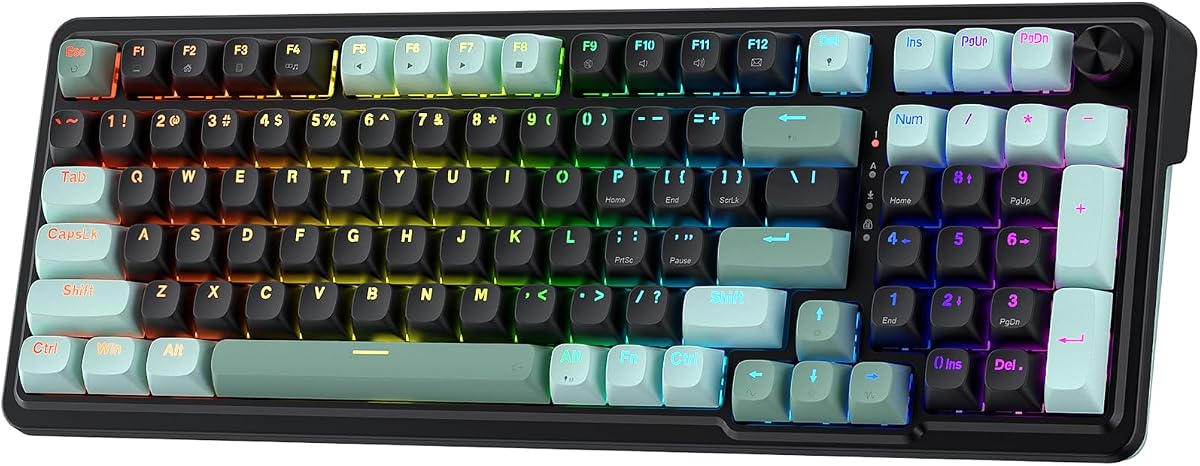
The Redragon K745 HE focuses on visual appeal with vibrant RGB lighting modes that bring your desk to life day or night. It shares the core performance features of the Redragon HE family including UltraMag switches and rapid trigger support.
We may earn a commission when you buy through this link, at no additional cost to you.
Its 5-layer noise dampening and anti-wobble switch-plate design ensure a soft bounce during play. The software allows you to save multiple actuation profiles between 0.1mm and 3.4mm to tailor the feel for each key.
Users rate it lower than other models possibly due to minor driver issues or RGB inconsistency. These are manageable for most but worth noting. The price remains competitive, offering great value for those who prioritize lighting and feel.
This keyboard suits gamers who want a colorful setup without spending a lot. It provides the essential speed features for CS2. If you enjoy customizing RGB themes and need rapid trigger at a low cost, this is a strong choice.
Adjustable brightness and lighting modes bring your desk to life, creating an immersive environment for gaming or streaming.
Save multiple actuation profiles and calibrate switches through desktop or web driver for consistent setups across games.
We may earn a commission when you buy through this link, at no additional cost to you.
The Keychron C0 HE is a unique one-handed keypad built for high-level FPS gameplay and productivity. With 35 programmable keys, it keeps essential commands within reach while freeing up your main hand for mouse movement.
We may earn a commission when you buy through this link, at no additional cost to you.
It features Hall Effect magnetic switches with adjustable actuation precision and an 8K polling rate for ultra-low latency. The web-based configurator means no software installation is required, making it ideal for multi-system setups on Windows and macOS.
This device is great for MMO players or streamers needing OBS scene control alongside gaming. For pure CS2 it complements a main keyboard well but cannot replace one entirely. The cross-platform support adds flexibility for users.
Buy this if you want extra macro access without desk clutter. It is perfect for creators or gamers who need quick access to shortcuts. For CS2, use it alongside a main keyboard for enhanced control.
Compact layout keeps essential commands within reach ideal for MMO and MOBA players who rely on fast skill access.
Customize key mapping and RGB lighting through a browser-based configurator with no software installation required.
We may earn a commission when you buy through this link, at no additional cost to you.
This renewed version of the Razer Huntsman V3 Pro TKL offers the same advanced features as new but at a lower price. It includes Snap Tap mode and analog optical switches that reset keys at the slightest lift for speed.
We may earn a commission when you buy through this link, at no additional cost to you.
Features like onboard adjustments and a magnetic wrist rest ensure ergonomic support and quick settings changes. The tenkeyless design gives more room for mouse movement which is critical for low-sensitivity CS2 players.
Renewed products can have minor cosmetic issues or limited warranties which explains the lower user rating. Inspect carefully upon arrival to ensure all components are functional. It is a risk but high reward option for budget premium fans.
Choose this if you want flagship tech at a discounted rate. It is best for those comfortable with renewed electronics. The performance is identical to new, so your CS2 gameplay benefits fully regardless of box condition.
Enjoy responsive inputs for near-instant directional changes in FPS games with prioritization of the latest input between keys.
A magnetic firm leatherette wrist rest provides firm ergonomic support especially vital for long periods of training.
We may earn a commission when you buy through this link, at no additional cost to you.
The Corsair K55 RGB PRO is a classic budget option that relies on membrane technology instead of mechanical switches. It offers six dedicated macro keys and dynamic RGB backlighting that you can customize with iCUE software.
We may earn a commission when you buy through this link, at no additional cost to you.
Its IP42 spill-resistant design guards against accidents so gameplay never has to stop. A detachable palm rest reduces stress on hands for longer comfort. Media keys allow fine-tuning volume without interrupting matches.
Without rapid trigger or adjustable actuation it lacks the speed advantages of Hall Effect models. For casual CS2 play it is sufficient but competitive players may notice slower inputs. The durability is high for its price range.
Buy this if you need a simple reliable keyboard on a tight budget. It works well for beginners or secondary setups. For serious ranked play consider upgrading to a Hall Effect model for better performance.
Six dedicated macro keys and five RGB lighting zones program with iCUE or use streaming commands via Elgato software.
A detachable palm rest reduces hand stress and IP42 design guards against spills so you can play longer comfortably.
We may earn a commission when you buy through this link, at no additional cost to you.
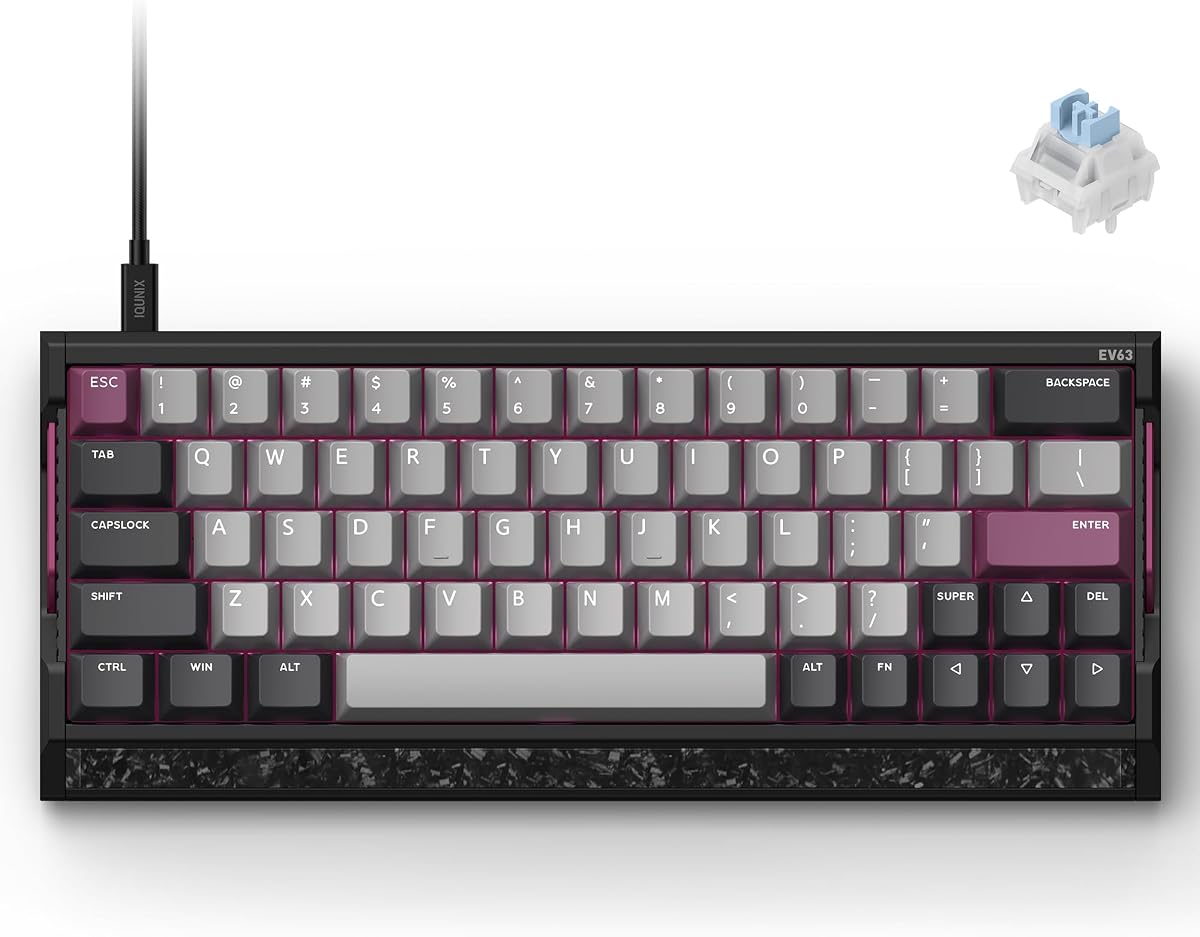
The IQUNIX EV63 stands out with its aircraft-grade CNC aluminum case and real forged carbon front plate. With a 4.5 rating, it delivers premium quality and stability that prevents desk movement during intense sessions.
We may earn a commission when you buy through this link, at no additional cost to you.
Its self-developed M.A.T. 2.0 algorithm reduces missed inputs and sticky behavior. Driver 3.0 offers pro-tuned FPS presets based on champion settings plus advanced customization for actuation and sensitivity. The Magnetic X Ultra switches are tuned for smooth rapid response.
The compact 64-key layout saves desk space but might take time to adjust for full-size users. The weight of 2.65 lbs gives a custom-like feel. While pricey the build quality justifies the cost for enthusiasts.
Buy this if you want a custom keyboard feel without the modding effort. It is perfect for FPS players who need stability. The combination of aesthetics, weight, and tuning options makes it a top choice for serious gamers.
M.A.T. 2.0 checks each key in real time and separates sensor power to reduce voltage fluctuation and missed inputs.
EV Driver 3.0 makes setup easier with pro-tuned FPS presets and advanced players can fine-tune actuation and SOCD.
We may earn a commission when you buy through this link, at no additional cost to you.
Selecting the right keyboard involves understanding key technical features that impact speed and comfort. This section breaks down the most important factors to consider.
For CS2 Hall Effect switches are increasingly popular due to their rapid trigger capability. They use magnetic sensors to detect keypresses without physical contact allowing for faster resets. Optical switches also offer speed but mechanical are more common for general use.
Prioritize Hall Effect or optical for competitive play. Mechanical switches work well for casual gaming but may lack the instant reset needed for advanced movement.
Adjustable actuation allows you to customize how far a key must press before registering. In CS2 a shorter actuation point helps with rapid tapping and quick stops. This feature is vital for fine-tuning your control.
Look for keyboards that let you adjust actuation via software or onboard controls. This ensures you can adapt the keyboard to your specific play style and comfort needs.
Polling rate determines how often the keyboard reports inputs to the computer. Higher rates like 8000Hz reduce latency which is crucial for fast-paced shooters. Standard 1000Hz is often sufficient but higher is better for minimal delay.
Choose models with high polling rates like 8K if you want the fastest possible response. It ensures your inputs register exactly when you intend them to during critical moments.
Compact layouts like 60% or TKL free up desk space for mouse movement. This is beneficial for low-sensitivity players who need wide swipes. Full-size keyboards offer more keys but take up more room.
Pick a layout based on your desk size and mouse usage. If you prioritize movement a smaller keyboard is often the better choice for competitive play.
Durability matters for long-term use. Keyboards with aluminum cases or PBT keycaps resist wear and feel more solid. Plastic builds can flex over time which affects typing consistency.
Check for sturdy materials like aluminum plates or metal frames. High-quality keycaps ensure legends stay clear and surfaces feel comfortable over hours of play.
Software lets you save profiles for different games and adjust lighting. Good software should be user-friendly and allow quick switching. Onboard memory is a plus for using settings without the PC.
Ensure the keyboard has reliable software or onboard storage. This lets you switch between gaming and typing profiles easily without reconfiguring every time.
Comfort prevents fatigue during long sessions. Look for wrist rests or angled designs that support your hands. A good keyboard should reduce strain on wrists and fingers.
Prioritize comfort features if you play for hours. Ergonomic designs help maintain consistent performance by reducing physical fatigue over time.
Prices vary widely from budget to premium. You can find good Hall Effect models at affordable points but premium builds cost more. Determine how much you want to spend before shopping.
Balance features with cost to find the best value. Investing in a durable keyboard often saves money in the long run compared to replacing cheap models frequently.
To get the most from your keyboard start by calibrating the switches via the manufacturer's software. Adjust actuation points to match your play style and save these profiles to onboard memory for easy access.
Keep the keyboard clean by regularly wiping keys with a dry cloth. Use compressed air to remove dust between switches which prevents debris from affecting performance. Avoid spills to maintain the internal electronics.
Update firmware periodically to ensure features like rapid trigger work correctly. Check the manufacturer's website for new drivers or patches that improve stability. Proper care extends the life of your keyboard.
Rapid trigger allows keys to reset instantly when lifted so you can change direction faster without releasing keys fully. In CS2 this helps with counter-strafing and quick peek-and-fire movements giving you a speed advantage.
Hall Effect switches offer adjustable actuation and rapid trigger which mechanical switches typically lack. They provide more customization and faster response making them ideal for competitive FPS games like CS2.
Yes higher polling rates like 8000Hz reduce input latency ensuring your movements register immediately. This can improve reaction times and make the game feel more responsive during critical moments.
A TKL or 60% layout is often best as it frees up desk space for wide mouse swipes. This allows for smoother aiming without hitting keyboard edges during movement.
Most Hall Effect keyboards offer software or onboard controls to adjust actuation. Use the provided app to set a range for each key and save these profiles to the keyboard for consistent settings.
Special editions often come with preset configs or aesthetics tailored for CS2 but functionally they may be similar to standard versions. Pay extra only if specific features or designs appeal to you.
In this guide we reviewed ten top keyboards ranging from budget to premium options. Models like the Redragon K617 HE and Razer Huntsman V3 Pro offer excellent rapid trigger and customizable features.
When choosing prioritize speed features like rapid trigger and adjustable actuation along with comfort for long sessions. Balance build quality with your specific play style needs to get the best results in competitive matches.
Prices and availability change frequently so check current listings before making a purchase. This ensures you get the best value for your investment while enjoying the performance edge you need.