
M.2 Heatsink Cooler 2280 SSD Double-Sided Heat Sink
4.6Editor score
Aluminum alloy body
Double-sided clip design
Thermal silicone pad included
This guide compares the top M2 2280 SSD Heatsink models for PS5 and PC builds to help you find the right cooling solution for your storage.
Modern M.2 SSDs run hot under load, causing throttling and reduced lifespan. A quality heatsink ensures stable performance and protects your valuable data from heat damage during intense tasks.
We evaluated ten top-rated cooling solutions based on materials, compatibility, and real-world thermal performance. Our analysis highlights models that work best with PS5, desktop PCs, and workstations.
Each pick shows key specs, installation ease, and thermal benefits. Note that product availability and prices change frequently, so check the latest details before making your final purchase decision.
4.6Editor score

4.7Editor score

4.7Editor score
This side-by-side comparison lists all ten reviewed models with their core specifications to help you quickly identify the right cooling option for your specific system setup.


This affordable heatsink offers reliable cooling for standard M.2 2280 SSDs. It features a durable aluminum alloy body that effectively dissipates heat without breaking the bank.
We may earn a commission when you buy through this link, at no additional cost to you.
The double-sided clip design ensures a stable fit on both single and double-sided drives. Users report significant temperature drops during intensive gaming or data transfer tasks.
While it lacks premium aesthetics, the functional design performs well. The included thermal pads are low viscosity to avoid damaging your SSD labels during installation.
Ideal for budget-conscious builders needing reliable thermal protection. It works seamlessly with PS5 and PC setups to prevent thermal throttling during long sessions.
This model provides essential cooling features at a fraction of the cost of branded alternatives.
The clip design allows quick mounting without specialized tools or complex screw arrangements.
We may earn a commission when you buy through this link, at no additional cost to you.
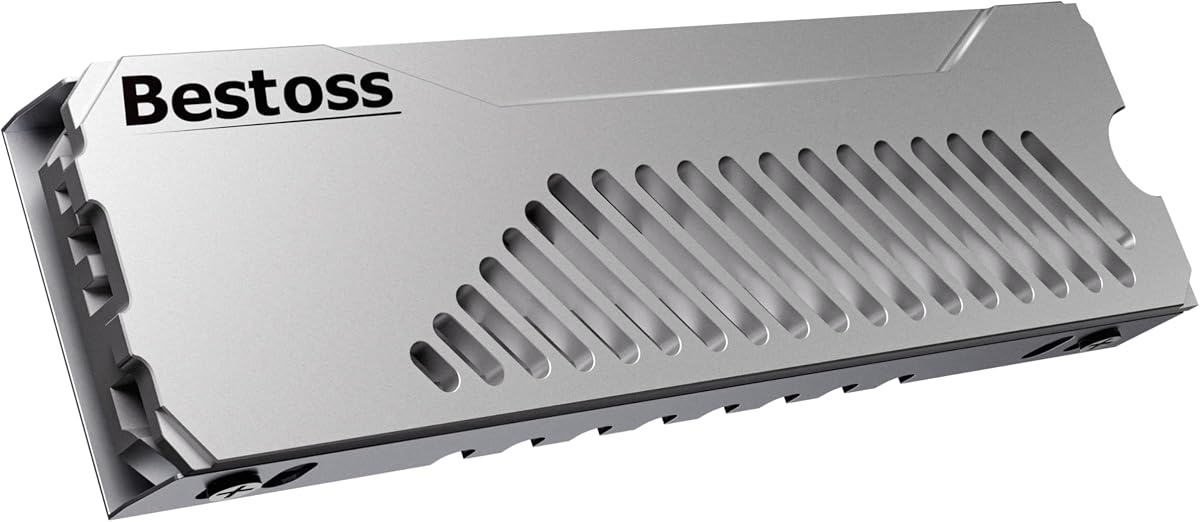
Bestoss offers a distinctive hollow design that maximizes surface area for heat dissipation. The three-sided hollowed-out structure promotes better airflow around the drive components.
We may earn a commission when you buy through this link, at no additional cost to you.
Testing shows temperature reductions of up to thirteen degrees under heavy loads. The silicone pad fills air gaps effectively to ensure instant heat transfer from the SSD controller.
The minimalist look fits modern case aesthetics well. However, thermal results may vary depending on case airflow and ambient room conditions.
Recommended for users seeking a unique cooling solution with decent performance. It balances visual appeal with functional heat management for standard 2280 drives.
The hollowed-out top and bottom enhance natural convection cooling inside your computer case.
A deep matte texture gives a clean look that complements high-end build themes.
We may earn a commission when you buy through this link, at no additional cost to you.
SABRENT delivers a robust heatsink designed specifically for desktop computers. The combination of copper and aluminum ensures maximum thermal conductivity for high-performance NVMe drives.
We may earn a commission when you buy through this link, at no additional cost to you.
It supports both single and double-sided configurations with included screws and tape. This makes it a versatile choice for various motherboard layouts and drive types.
The installation kit simplifies setup for non-technical users. While effective for desktops, it is not optimized for the constrained space of a PS5 console.
Choose this for reliable cooling on PC systems. Its sturdy build and trusted brand reputation make it a safe investment for critical storage drives.
Combining copper and aluminum optimizes both heat transfer and overall dissipation efficiency.
Includes necessary screws and tape to ensure a secure fit without buying extra parts.
We may earn a commission when you buy through this link, at no additional cost to you.
be quiet! brings their expertise in thermal solutions to M.2 SSDs with this premium cooler. The integrated heatpipe efficiently transfers heat away from the drive controller.
We may earn a commission when you buy through this link, at no additional cost to you.
It maintains maximum read and write speeds by preventing thermal throttling under heavy workloads. The matte black finish matches modern PC builds perfectly.
Installation is straightforward with a simple mounting system. The design fits both single and double-sided modules securely without risk of loosening.
Ideal for users prioritizing quiet and efficient cooling. The quality of materials justifies the price for those demanding top-tier performance and style.
The built-in heatpipe moves heat faster than standard solid aluminum designs.
Passive cooling ensures zero noise generation while maintaining low SSD temperatures.
We may earn a commission when you buy through this link, at no additional cost to you.
This five-pack set offers exceptional value for multi-drive workstations. Each unit features an aluminum fin-type design that increases surface area for better cooling.
We may earn a commission when you buy through this link, at no additional cost to you.
Silicone elastic bands provide tool-free installation, making swaps easy. The thermal pads ensure low resistance for effective heat transfer from the drive.
While basic in appearance, they deliver reliable performance for standard tasks. The extra units are handy for future upgrades or spare replacements.
Perfect for server racks or multi-bay setups. Buying in bulk saves money and ensures you always have a cooling option ready.
Purchasing five units together significantly reduces the per-item cost compared to single buys.
Silicone bands secure the heatsink without requiring screws or specific tools for mounting.
We may earn a commission when you buy through this link, at no additional cost to you.
ARCTIC designed this model specifically to meet Sony's PS5 specifications. It offers efficient heat dissipation that maintains high performance during intensive read and write processes.
We may earn a commission when you buy through this link, at no additional cost to you.
The click mechanism secures the drive without screws or rubber bands. This makes installation clean and reduces the risk of lost small parts during setup.
TP-3 thermal pads adapt to height differences of controller and RAM chips. Users report reduced thermal throttling risks during long gaming sessions.
Best for PS5 owners needing guaranteed compatibility. Its reliable design ensures your console's SSD stays cool without complex installation steps.
Certified to meet the exact size and thermal requirements for PlayStation 5 expansions.
Adaptable thermal pads ensure contact across uneven components on the SSD board.
We may earn a commission when you buy through this link, at no additional cost to you.
Thermalright brings decades of cooling expertise to this robust SSD cooler. The double-sided heat sink design laminates the drive for optimum cooling performance.
We may earn a commission when you buy through this link, at no additional cost to you.
High-performance thermal film and anodized aluminum increase the heat dissipation area. This combination effectively lowers temperatures by up to thirty degrees.
Installation is quick with provided screws and clear instructions. The design fits M.2 2280 drives perfectly without interfering with nearby PCIe slots.
Great for desktop enthusiasts seeking high performance. The brand's reputation for quality radiators extends well to this SSD cooling solution.
Anodized surfaces and thermal films work together to maximize cooling efficiency.
Step-by-step guides and videos simplify the setup process for all users.
We may earn a commission when you buy through this link, at no additional cost to you.
This model features an 8mm pure copper heat pipe for exceptional thermal transfer. The solid all-aluminum radiator provides durability while maintaining high performance.
We may earn a commission when you buy through this link, at no additional cost to you.
Anodized sandblasting enhances the surface for better heat radiation. The double layer silicone sheet ensures consistent contact across the entire drive surface.
Testing confirms reliable cooling for standard 2280 drives. It may have limited compatibility with smaller 2260 or 2242 form factors.
Recommended for heavy load PC users. The copper pipe significantly boosts cooling power over solid aluminum alternatives.
The 8mm copper pipe rapidly transfers heat from the SSD controller to the fins.
All-aluminum body ensures longevity and consistent thermal conductivity over time.
We may earn a commission when you buy through this link, at no additional cost to you.
The HR09 represents a top-tier option with advanced cooling features. Its reverse gravity heat pipe and 32 fins maximize the heat dissipation area significantly.
We may earn a commission when you buy through this link, at no additional cost to you.
Nano thermal pads deliver up to 14.8 watts per meter-kelvin conductivity. This advanced tech ensures instant heat transfer even under extreme load conditions.
Adjustable height screws offer flexibility for different SSD heights. The stainless steel fixed bottom ensures durability and stable mounting on the motherboard.
Best for enthusiasts seeking ultimate cooling. The premium materials and design justify the cost for those prioritizing peak performance.
Reverse gravity allows efficient cooling regardless of PC orientation or case position.
Nano silicone grease provides ductility and low viscosity without damaging labels.
We may earn a commission when you buy through this link, at no additional cost to you.
This unique model combines a heatsink with a 20mm micro blower fan. It provides active cooling for users needing maximum temperature reduction.
We may earn a commission when you buy through this link, at no additional cost to you.
A high-performance copper heat pipe transfers heat to the fins. A stainless steel reinforced backplate adds rigidity and protection to the drive.
Requires a power source for the fan which can add complexity. The fan also introduces some noise during operation unlike passive models.
Suitable for extreme cooling needs. Ideal when passive cooling cannot keep temperatures low enough for sustained heavy loads.
The micro blower fan actively pushes air through the fins for faster cooling.
A reinforced backplate protects the SSD and improves overall structural integrity.
We may earn a commission when you buy through this link, at no additional cost to you.
Selecting the right heatsink requires evaluating compatibility, material quality, and your specific system needs.
Ensure the heatsink fits your exact SSD form factor such as 2280. Some models support only single-sided drives while others handle double-sided configurations with thicker padding. Always verify if it works with your motherboard or console like PS5.
Check physical dimensions to ensure it fits within your case clearance without blocking other PCIe slots or RAM sticks.
Aluminum alloys are common for their light weight and corrosion resistance. Premium options may include copper heat pipes for faster heat transfer from the controller to the fins.
Look for anodized or sandblasted finishes that improve durability and heat dissipation surface area for better long-term performance.
Clips offer quick tool-free installation while screws provide a more secure fit. Some models use elastic bands for easy access which is useful for frequent maintenance.
Choose a mechanism that balances ease of use with stability to prevent loose connections during transport or vibration.
High-conductivity thermal pads are essential for filling microscopic gaps between the SSD and heatsink. Better pads transfer heat more efficiently preventing thermal throttling.
Check that pads are easy to clean and non-damaging to warranty labels on your drive components.
Passive heatsinks rely on airflow and natural convection which is silent and simple. Active coolers include small fans for extreme cooling but require power and produce noise.
Most users benefit from passive models unless their case airflow is extremely poor or the drive runs exceptionally hot.
Heatsinks come in various colors and textures to match your PC build theme. Black matte finishes are popular for sleek builds while silver options offer a classic look.
Select a finish that complements your system components without sacrificing thermal performance for visual appeal.
Established brands often provide better quality control and customer support. They tend to use reliable materials and offer more consistent thermal results across batches.
Check reviews for common issues like warping or poor fit before choosing a less known generic option.
Higher cost does not always guarantee better cooling but often indicates better materials. Budget models can suffice for standard usage while premium ones suit heavy workloads.
Consider the overall value including included accessories like screws or extra pads when comparing different price points.
Begin by removing any existing thermal tape or dust from your SSD surface. Ensure the drive is cool before touching it to avoid burns or static discharge.
Apply the included thermal pad evenly without stretching or tearing it. Position the heatsink carefully to align with mounting holes or clips.
Regularly check for dust buildup on the fins and clean gently with compressed air to maintain airflow and cooling efficiency over time.
Yes, especially for high-speed NVMe drives that generate significant heat. A heatsink prevents thermal throttling which can slow down performance and extend the lifespan of your drive.
Only models specifically designed with compact dimensions and low profile heights will fit. Always check product specifications for PS5 compatibility before purchasing for console expansion.
Use compressed air to blow dust out of the fins. Avoid using liquid cleaners as moisture can damage electronics and reduce thermal conductivity.
Match the pad thickness to the distance between your SSD controller and the heatsink base. Most kits include standard pads that work for typical M2 drives.
It is better to replace them as they lose adhesion and conductivity. Reusing old pads can lead to poor thermal contact and increased temperatures.
Check your motherboard manual for clearance height limits. Some cases have restricted space above the M2 slot that can block larger heatsink models.
Using proper mounting screws with moderate torque is safe. Overtightening can crack components so follow manufacturer guidelines for secure mounting.
Most users see drops ranging from ten to thirty degrees depending on airflow. High-performance models may achieve larger reductions under heavy load conditions.
We reviewed ten excellent models offering varied features and price points. From budget-friendly clips to premium active cooling these options cover most user needs effectively.
Prioritize compatibility and thermal quality over minor aesthetic differences. A reliable heatsink ensures your investment in fast storage lasts longer and performs consistently.
Always verify current pricing and availability before purchasing as these details can change quickly. Check the latest product pages for any updated specifications.