
YAWYORE Gaming PC
4.5Editor score
Ryzen 7 5700X CPU
RTX 5060 8GB GPU
32GB DDR4 3200 RAM
This guide compares ten top gaming PCs for playing Kenshi, evaluating performance, cooling, and value to help you find the ideal system for your needs.
Finding the right gaming PC for Playing Kenshi requires balancing CPU power, memory capacity, and storage speed. This game demands significant resources for its complex simulation and large open world, making hardware selection critical for smooth gameplay and immersive exploration without interruptions.
We evaluated ten prebuilt gaming systems based on processor architecture, graphics capabilities, and thermal management. Each model was assessed for its ability to handle dense populations, physics calculations, and long-term stability. Our analysis ensures you get a machine ready for demanding simulations right out of the box.
Each pick highlights unique strengths, from budget-friendly builds to high-end powerhouses. You will see detailed breakdowns of components and real-world performance expectations. Please note that product availability and pricing may vary over time, so verify details before making your final purchase decision today.
4.5Editor score

4.5Editor score
4.8Editor score
The following table provides a side-by-side comparison of all ten systems. You can quickly see key specifications like processor type, graphics card model, memory amount, and storage capacity to determine which build fits your performance requirements and budget constraints effectively.


This Skytech Gaming PC Desktop stands out as a top choice for playing Kenshi due to its powerful AMD Ryzen 7 9850X3D processor. With 32GB of DDR5 RAM and a 2TB SSD, it handles large maps and complex calculations smoothly. The system arrives fully assembled with Windows 11, making setup quick for any gamer.
We may earn a commission when you buy through this link, at no additional cost to you.
The RX 9070 XT graphics card delivers strong performance at high resolutions. It ensures that graphical settings can be pushed without significant frame drops. The 360mm AIO liquid cooler keeps temperatures low even during long play sessions. This thermal efficiency prevents throttling and maintains consistent performance over time.
While the build quality is solid, there are limited internal spaces for future upgrades. The case design prioritizes airflow but may restrict adding extra drives easily. However, the 2TB storage offers ample room for many games and mods. The included warranty provides peace of mind for new owners.
Gamers looking for a reliable system to run Kenshi will find this build excellent. It balances CPU power and memory well for simulation-heavy titles. The fast storage reduces load times significantly compared to older systems. We recommend this for users seeking performance without building a custom rig.
The X3D processor variant offers extra cache that benefits games with complex physics and AI calculations. This feature ensures smoother gameplay when large armies or cities are active in the world.
The liquid cooling solution actively manages heat output to prevent performance dips. This is crucial for maintaining frame rates during extended gaming sessions without thermal throttling.
We may earn a commission when you buy through this link, at no additional cost to you.
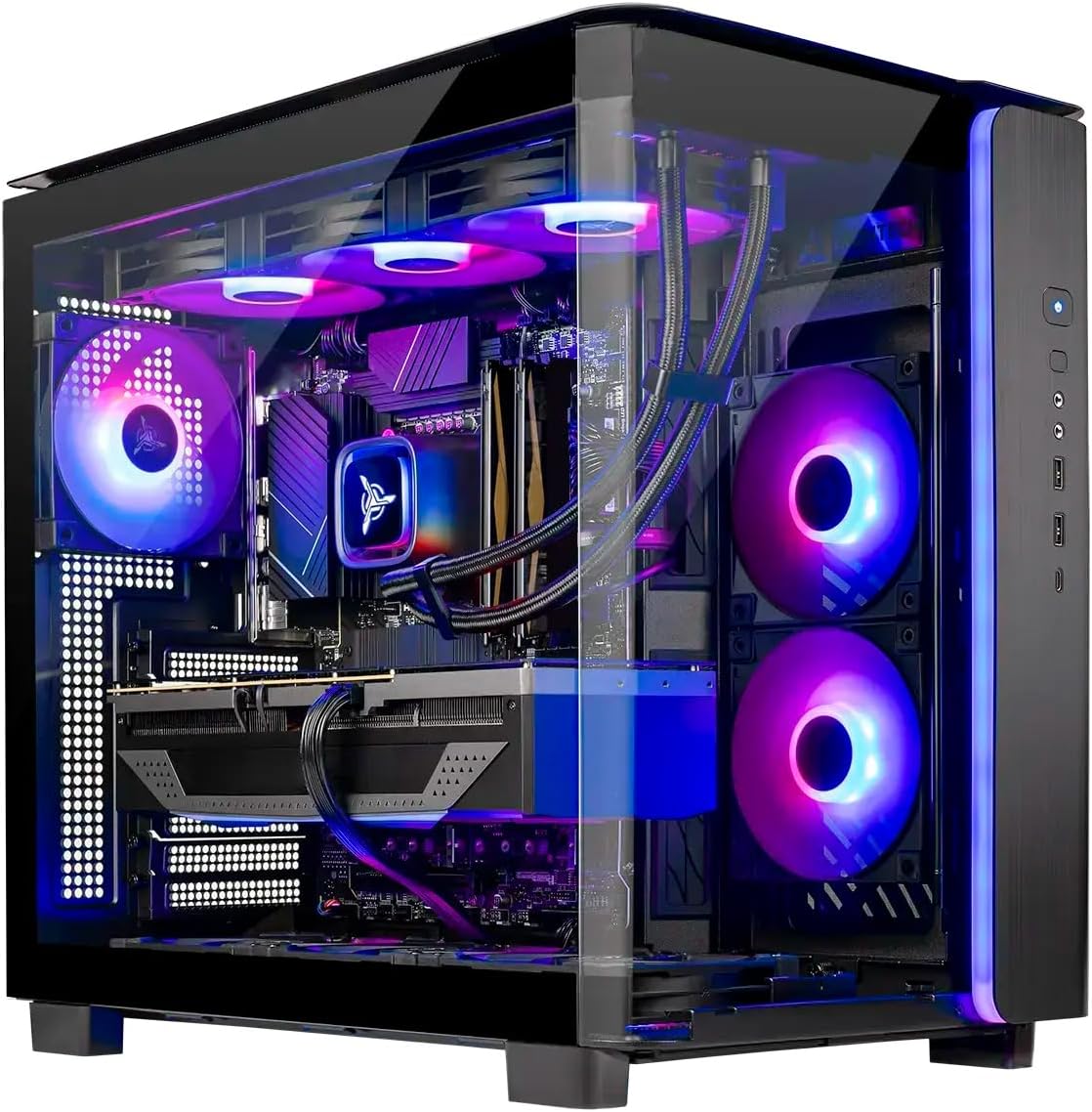
The YAWYORE Gaming PC offers an entry-level option for those wanting to play Kenshi without breaking the bank. It features an AMD Ryzen 7 5700X which provides sufficient cores for simulation tasks. The inclusion of 32GB DDR4 RAM ensures multitasking remains smooth while running the game and other apps.
We may earn a commission when you buy through this link, at no additional cost to you.
This system includes a GeForce RTX 5060 which handles 1080p gaming well. While not the most powerful GPU available, it supports ray tracing and DLSS for better visuals. The 1TB NVMe SSD provides fast boot and load times. Connectivity is enhanced with built-in WiFi and Bluetooth for wireless peripherals.
Using DDR4 memory means raw bandwidth is lower than DDR5 systems. This can slightly impact peak performance in CPU-bound scenarios. However, the price advantage makes it a strong contender for budget builds. The chassis includes protective foam for safe shipping but should be removed before use.
Budget-conscious gamers will appreciate the balance of cost and capability here. It allows running Kenshi at reasonable settings while leaving room for future upgrades. The motherboard supports stable performance for daily use. We suggest this for players prioritizing initial cost savings.
By utilizing previous generation components, this build keeps costs down while maintaining core performance. This approach allows more gamers to enter the hobby without overspending on premium parts.
Built-in WiFi and Bluetooth remove the need for extra cables or dongles. This simplifies the setup process and keeps the desk area clean for a better gaming experience.
We may earn a commission when you buy through this link, at no additional cost to you.
The msi Codex Z2 Gaming Desktop delivers strong performance in a smaller footprint. It uses the AMD Ryzen 7 8700F processor to handle demanding tasks efficiently. With 32GB DDR5 RAM and a 2TB SSD, it offers rapid data access and smooth multitasking capabilities. The system is designed for everyday gaming needs.
We may earn a commission when you buy through this link, at no additional cost to you.
Next-Gen Blackwell Architecture in the RTX 5070 ensures excellent rendering capabilities. You can enjoy ray tracing effects without compromising frame rates significantly. The cooling system uses multiple fans to pull in cool air and push heat out. RGB lighting adds a customizable touch to your desk setup.
While compact, the chassis limits future expansion options like adding more drives. The fan configuration is effective but may generate noise during intense gaming sessions. Windows 11 Home is pre-installed for immediate use. The overall design prioritizes aesthetics and performance balance.
Gamers needing a space-saving solution will find this model suitable. It handles modern titles well and provides a clean look. The DDR5 memory helps maintain speed for future-proofing. We recommend this for users valuing design alongside raw power.
The small form factor fits easily on desks while maintaining high thermal performance. This is ideal for gamers with limited room who still want robust hardware.
MSI Center software allows detailed control over lighting patterns and effects. This personalization helps the PC blend with your room decor or gaming setup theme.
We may earn a commission when you buy through this link, at no additional cost to you.
This KOTIN Prebuilt Gaming PC includes a unique built-in smart display for monitoring system stats. It features the AMD Ryzen 7 9700X processor paired with 32GB DDR5 RAM. The 1TB NVMe SSD ensures quick loading times. The system arrives fully assembled and tested with Windows 11 Home ready to go.
We may earn a commission when you buy through this link, at no additional cost to you.
The RTX 5070 12GB graphics card provides high visual fidelity and frame stability. The 850W 80+ Gold power supply offers stable power for current and future upgrades. Cooling is managed by a 360mm AIO liquid cooler to keep the CPU fresh. WiFi 7 ensures fast connectivity for streaming or downloads.
The smart display adds a functional aesthetic by showing CPU and GPU temps in real-time. This helps you monitor system health while gaming without opening software. However, storage is limited to 1TB which may fill up quickly with many games. Note that connecting the monitor to the correct ports is essential.
Tech enthusiasts who like monitoring tools will appreciate this design. It offers a complete package ready for immediate use. The high wattage supply allows room for future component changes. We suggest this for users wanting advanced features out of the box.
The integrated screen offers real-time data on system temperatures and usage. This helps users quickly identify thermal issues without digging into software interfaces.
An 80+ Gold certified supply reduces energy waste while delivering stable power. This efficiency helps maintain system reliability and lowers electricity usage during long sessions.
We may earn a commission when you buy through this link, at no additional cost to you.
The Skytech Gaming PC Desktop stands as a premium option with the RTX 5080 graphics card. It uses the Ryzen 7 9850X3D processor to ensure maximum gaming responsiveness. The 32GB DDR5 RAM and 2TB SSD provide ample speed and space for any load. This build is capable of running games at 4K Ultra HD smoothly.
We may earn a commission when you buy through this link, at no additional cost to you.
High-spec AIO liquid coolers deliver unmatched cooling performance to prevent throttling. The RGB gaming keyboard and mouse add convenience for immediate use. Windows 11 Home 64-bit ensures compatibility with modern software. The showcase case design allows for easy viewing of internal components and lighting effects.
This system targets users who want the highest performance without compromise. The RTX 5080 handles ray tracing and high resolutions with ease. While the price is high, the components justify the cost for enthusiasts. Note that it includes standard Wi-Fi 5 rather than the latest Wi-Fi 7.
Gamers seeking top-tier graphics will find this machine unmatched. It offers a complete experience with accessories and robust cooling. The thermal design supports consistent performance over long periods. We recommend this for those prioritizing visual fidelity and speed.
The RTX 5080 allows for ray tracing at high resolutions without frame drops. This ensures stunning visuals in games that support advanced lighting features and shaders.
Free gaming keyboard and mouse are included to save money on peripherals. This bundle makes the setup complete for new users starting their journey.
We may earn a commission when you buy through this link, at no additional cost to you.
This Skytech Gaming PC Desktop features the Ryzen 7 9800X3D processor known for gaming efficiency. The 3D V-Cache technology improves frame rate stability in simulation games. Paired with the RTX 5070 Ti and 32GB DDR5 RAM, it handles modern titles smoothly. The 2TB NVMe SSD ensures rapid loading and data access.
We may earn a commission when you buy through this link, at no additional cost to you.
High-spec AIO liquid coolers maintain low temperatures to prevent thermal throttling. The King 95 case showcases the components with tempered glass panels. Free gaming keyboard and mouse are provided for setup convenience. Windows 11 Home comes pre-installed for quick start without extra configuration.
The X3D processor variant is particularly beneficial for games with large simulations. This helps avoid stuttering when managing complex game worlds. While the GPU is slightly lower than top tiers, it remains strong for 1440p gaming. Standard Wi-Fi 5 is included rather than newer standards.
Gamers focused on CPU performance will find this build excellent. It balances heat management and raw processing power well. The included accessories save time and money for new users. We suggest this for players prioritizing processor speed over GPU power.
The large L3 cache helps games with complex physics run more smoothly. This reduces latency in CPU-bound titles and improves overall responsiveness.
The tempered glass panels allow for viewing the internal components clearly. This design enhances the visual appeal of the system on any desk.
We may earn a commission when you buy through this link, at no additional cost to you.
This KOTIN Gaming PC Desktop uses the Ryzen 7 9800X3D to optimize frame rates. It comes with 32GB DDR5 RAM and a 1TB NVMe SSD for fast access. The RTX 5070 12GB card supports ray tracing and high resolution gaming. It is fully assembled in California with Windows 11 Home ready.
We may earn a commission when you buy through this link, at no additional cost to you.
The smart display shows real-time system info like CPU usage and temperatures. This functional touch adds value to the battlestation setup. Liquid cooling with a 360mm AIO keeps temperatures low during intense sessions. WiFi 7 ensures fast connectivity for streaming and multiplayer games.
The CPU architecture helps maintain stability during long gaming sessions. The display themes allow customization to match your setup style. However, storage space is limited compared to larger SSDs. The 1-year warranty and lifetime support provide additional assurance.
Gamers valuing monitoring tools and CPU performance will find this strong. It offers a clean look with integrated glass panels. The cooling system supports heavy workloads without overheating. We recommend this for users wanting a balance of features and power.
Real-time stats on the screen help track performance and temperatures instantly. This allows users to detect thermal spikes without opening management software.
WiFi 7 offers higher throughput for online gaming and streaming. This reduces latency and ensures a smooth connection for multiplayer titles.
We may earn a commission when you buy through this link, at no additional cost to you.
The Skytech Gaming O11 Vision features a popular Lian Li case design for aesthetics. It uses an AMD Ryzen 7 7700X processor to handle gaming loads efficiently. With 32GB DDR5 RAM and 1TB NVMe SSD, it ensures fast data access. The RTX 5070 12GB delivers smooth visuals for modern games.
We may earn a commission when you buy through this link, at no additional cost to you.
The 360mm AIO liquid cooler keeps the CPU cool under load. The Gold PSU provides stable power for consistent performance. ARGB lighting allows customization to match your room theme. Windows 11 Home comes pre-installed for quick setup.
This build focuses on high quality components and visual appeal. The clean design hides wires effectively for a tidy look. While cable management is solid, future expansion may require removing covers. The fan setup balances noise and cooling efficiency well.
Gamers prioritizing aesthetics will appreciate the case design and RGB. It offers reliable performance for 1440p gaming comfortably. The cooling system is robust enough for sustained sessions. We suggest this for users wanting a stylish system.
The Lian Li PC-O11 Vision case is famous for its open airflow design. This allows for excellent cooling while showcasing the internal components clearly.
The 850W Gold PSU delivers clean power for stable component operation. This ensures that your PC runs without power fluctuations during peak load.
We may earn a commission when you buy through this link, at no additional cost to you.
The Horizon Autherium Dragon Gaming PC stands out with massive storage and RAM. It includes 64GB RAM which is double the standard high end average. The 5TB storage combines NVMe and HDD for speed and volume. The Core i9 unlocked CPU boosts up to 5.4GHz for high performance.
We may earn a commission when you buy through this link, at no additional cost to you.
VR support is strong with RTX 5070 OC graphics capabilities. The 360mm liquid cooling keeps the system quiet during operation. Windows 11 Pro provides advanced security features for power users. The 3-year parts and 5-year labor warranty ensures long term support.
Having such high memory allows for heavy multitasking or future expansion. The storage mix offers fast boot times and large capacity for libraries. However, the CPU generation is older compared to Ryzen 9000 series. The system is heavy and requires careful handling when moving.
Users needing extensive storage and high RAM will find this ideal. It supports professional workflows alongside gaming comfortably. The warranty coverage is excellent for long term peace of mind. We recommend this for power users prioritizing memory.
The 5TB total storage allows for massive game libraries and media files. This removes the need for external drives or constant file management.
Windows 11 Pro offers tools like BitLocker and Hyper-V for advanced users. This adds value for those who use the PC for work or virtual machines.
We may earn a commission when you buy through this link, at no additional cost to you.
The Lenovo Legion Tower 5i features AI-Powered architecture for optimized gaming. It uses the Intel Core Ultra 7 265F processor for power boosts. The RTX 5070 Ti handles lifelike virtual worlds efficiently. It supports up to 128GB of expandable DDR5 memory for future needs.
We may earn a commission when you buy through this link, at no additional cost to you.
The transparent side panel allows easy upgrades and component viewing. You can easily swap parts without tools to customize the system. It includes 3 months of PC Game Pass for instant access to new games. The air-cooling solution keeps the system quiet during long sessions.
Toolless design makes maintenance simple for users of any skill level. The AI features help boost workflow acceleration and gaming performance. While the price is higher, the expandability adds long term value. The system is ready for streaming and creative projects too.
Gamers who value easy upgrades will find this Legion tower appealing. It offers flexibility for future hardware improvements without tools. The included game subscription is a nice bonus for new users. We suggest this for users planning to upgrade their machine.
AI acceleration helps speed up tasks and game performance automatically. This ensures your system runs efficiently without manual configuration.
Transparent side panels and tool-less design make swapping parts easy. This simplifies maintenance and allows users to upgrade memory or storage quickly.
We may earn a commission when you buy through this link, at no additional cost to you.
Selecting a system for Kenshi involves balancing CPU speed, RAM amount, and cooling efficiency. This guide breaks down the key factors to help you choose a machine that handles simulations smoothly without overheating.
Kenshi relies heavily on single-core speed and cache size for simulation calculations. Look for processors with X3D variants or high clock speeds to ensure smooth gameplay in large maps.
Prioritize CPUs with strong single-thread performance to avoid frame drops.
Large open world simulations require ample memory to load assets without stalling. 32GB is the recommended minimum for multitasking and running mods efficiently.
Choose at least 32GB to maintain system stability during long play sessions.
NVMe SSDs provide the fast read speeds needed for quick map loads. Traditional HDDs will slow down your boot and game loading times significantly.
Select a system with an NVMe SSD as the primary drive for performance.
Heat management is critical to prevent thermal throttling during extended gaming. AIO liquid coolers are often better than air coolers for dense builds.
Ensure the case has good airflow and adequate fans to manage heat.
While Kenshi is CPU heavy, a capable GPU ensures smooth visuals at high resolutions. Look for cards with VRAM to handle textures and shadows well.
Choose a GPU that matches your monitor resolution for best results.
Future upgrades are important for longevity. Check if the motherboard has spare slots for extra RAM or storage drives.
Verify the case has room for additional components before buying.
A reliable PSU protects your hardware and provides stable energy. Look for 80+ Gold certification and enough wattage for your components.
Always check that the PSU capacity meets your system requirements.
Modern systems should support WiFi 6 or 7 for stable connections. USB ports should be ample for peripherals like controllers and keyboards.
Ensure the ports meet your needs for external devices and internet.
To ensure optimal performance, keep your PC in a well-ventilated area away from heat sources. Regular dusting of vents and fans helps maintain airflow and prevents overheating during long sessions.
Monitor your system temperatures using software tools to catch any thermal issues early. Adjusting fan curves can help balance noise levels with cooling efficiency for your environment.
Keep your drivers updated regularly to get the latest performance improvements and stability fixes. This ensures your GPU and CPU work together effectively when running demanding simulations.
For a smooth experience with mods or large maps, 32GB of RAM is recommended. This amount allows the game to run alongside other applications without slowing down. Systems with less than 16GB may struggle with complex simulations.
Kenshi relies heavily on CPU processing power for its simulation mechanics and physics calculations. While a decent GPU is needed for visuals, a strong CPU ensures stable frame rates in large worlds.
A liquid cooler is highly recommended for long play sessions to prevent thermal throttling. It keeps the CPU cooler than air coolers, maintaining consistent performance over hours of gameplay.
Most gaming PCs have extra M.2 or SATA slots for adding more storage. However, check the specific motherboard specs before buying to confirm availability of free slots for expansion.
Modern WiFi 6 or 7 standards provide stable connectivity for online features. While Ethernet is best for latency, good WiFi performance is usually sufficient for most players.
The Power Supply Unit is critical for system stability and longevity. Choosing a high-quality unit with enough wattage protects your components from power surges and ensures reliable operation.
We have reviewed ten powerful gaming PCs that offer excellent performance for Kenshi. Each system balances CPU power and memory to handle the complex simulations this game requires effectively.
Prioritize processors with high single-core speeds and sufficient RAM to avoid bottlenecks. A good cooling solution will ensure your system stays reliable during long gaming marathons.
Always check current availability and prices before making your final decision. These configurations are subject to change so verify details before purchasing your new machine today.