
HP OmniBook 3 17 inch FHD Laptop
5.0Editor score
WiFi 7 Connectivity
17.3 inch Display
AMD Ryzen 5 Processor
Up to 12 Hours Battery
WiFi 7 technology is revolutionizing how laptops connect to the internet, offering unprecedented speeds and reduced latency. As we move through 2026, finding a laptop that supports this next-gen standard ensures you stay ahead in productivity and entertainment.
We have carefully reviewed ten leading models that integrate WiFi 7 capabilities. Our selection process focused on real-world performance, build quality, display clarity, and overall value to provide a reliable resource for buyers seeking modern connectivity.
Each pick in this list highlights unique strengths tailored to different user needs. Please note that availability and pricing can fluctuate, so checking current stock is recommended before making your final decision.
5.0Editor score

5.0Editor score

4.7Editor score
As an Amazon Associate we earn from qualifying purchases.
This side-by-side comparison highlights key specifications across all ten selected models, helping you quickly identify which device aligns best with your specific computing requirements.




The HP OmniBook 3 is a standout choice for budget-conscious buyers needing next-gen connectivity. It holds a perfect 5.0 rating thanks to its robust WiFi 7 support and expansive screen.
We may earn a commission when you buy through this link, at no additional cost to you.
Its 17.3-inch Full HD display offers 300 nits brightness ideal for content consumption. The AMD Ryzen 5 processor handles office tasks efficiently while maintaining low power consumption.
While 8GB RAM may limit heavy multitasking, the SSD ensures quick boot times. Users appreciate the full port selection including HDMI 2.1 for external monitors.
This laptop is ideal for students or remote workers who need reliability without breaking the bank. Its long battery life ensures productivity even during long days away from outlets.
WiFi 7 delivers speeds up to 3x faster than previous standards ensuring smooth streaming and video calls.
Multiple ports including USB-C with DisplayPort support allow easy connection to various peripherals and displays.
We may earn a commission when you buy through this link, at no additional cost to you.
This model bridges the gap between standard productivity and advanced AI capabilities. It features the powerful Intel Core Ultra 7 processor designed for modern business workflows.
We may earn a commission when you buy through this link, at no additional cost to you.
With 16GB DDR5 RAM and 1TB storage, multitasking is smooth and file access is rapid. The backlit keyboard adds convenience for low-light environments.
The device is engineered to support demanding applications like video conferencing and data analysis. Its thin design makes it portable for on-the-go professionals.
Ideal for business users needing substantial storage and memory without compromising on speed. The inclusion of AI noise reduction enhances communication quality during meetings.
Designed for professionals with high-speed ports and a full-size keyboard for efficient daily tasks.
The PCIe SSD provides quick responsiveness allowing rapid application loading and data transfer.
We may earn a commission when you buy through this link, at no additional cost to you.
The OmniBook 7 sets a new standard for AI-enhanced productivity. It earns the Editor's Choice badge for its exceptional combination of power and next-gen connectivity.
We may earn a commission when you buy through this link, at no additional cost to you.
With a 47 TOPS NPU and 32GB RAM, it handles on-device AI tasks effortlessly. The large touchscreen display facilitates intuitive navigation and multitasking.
Battery life is extended by the efficient CPU and large battery pack. The inclusion of Thunderbolt 4 ensures ultra-fast data transfer and docking capabilities.
This device is perfect for creative professionals and power users who demand top-tier performance. Its high-end specs ensure longevity and future-proofing for years.
Powered by Copilot+ PC capabilities for smarter workflows and real-time assistance on device.
400 nits brightness on a large IPS display ensures crisp visuals even in bright environments.
We may earn a commission when you buy through this link, at no additional cost to you.
Acer Aspire 14 offers an impressive balance of portability and power. It supports next-gen AI features with its Intel Core Ultra 7 processor and robust NPU.
We may earn a commission when you buy through this link, at no additional cost to you.
The 14-inch WUXGA display provides vibrant visuals suitable for creative work. Battery life is a standout feature, lasting up to 22 hours in video playback.
While it uses WiFi 6E, performance remains strong for most users. The aluminum chassis feels durable and modern for everyday carry.
Ideal for students or professionals needing a portable machine with long endurance. The integration of Copilot+ features enhances productivity significantly.
Lightweight chassis combined with a powerful processor ensures mobility without sacrificing performance.
Extended battery ensures all-day usage without needing constant access to a power outlet.
We may earn a commission when you buy through this link, at no additional cost to you.
This model delivers strong performance with a crisp 2K touchscreen. It holds a perfect 5.0 rating due to its reliable AMD Ryzen 7 processor and ample memory.
We may earn a commission when you buy through this link, at no additional cost to you.
Users benefit from 16GB RAM and fast SSD storage ensuring smooth multitasking. The screen offers sharp visuals and touch functionality for intuitive navigation.
While it lacks WiFi 7, WiFi 6 provides solid connectivity for most homes and offices. The design is functional and comfortable for long sessions.
It is an excellent choice for general users prioritizing display quality and responsiveness. The build supports everyday tasks efficiently without unnecessary complexity.
2K resolution provides crisp details ideal for reading documents and watching media.
Touchscreen capability allows easy navigation and content creation directly on the display.
We may earn a commission when you buy through this link, at no additional cost to you.
The Dell 16 Plus stands out as a premium business machine. It earns the Best Premium badge for its high-end specs and robust build quality.
We may earn a commission when you buy through this link, at no additional cost to you.
Equipped with an Intel Core Ultra 9 processor, it delivers exceptional performance for complex tasks. The 32GB memory supports heavy workloads effortlessly.
WiFi 7 ensures rapid data transfer speeds crucial for large file handling. The design includes comfort features like a backlit keyboard and fingerprint reader.
This laptop is perfect for IT departments and professionals needing secure and stable devices. Its durability and performance justify the investment for serious users.
Intel vPro platform ensures multilayer security and remote manageability for IT efficiency.
LPDDR5X memory runs at 8533MT/s ensuring ultra-fast processing and responsiveness.
We may earn a commission when you buy through this link, at no additional cost to you.
This HP model focuses on raw power with 32GB of RAM. It is designed for users who need to keep many applications open simultaneously.
We may earn a commission when you buy through this link, at no additional cost to you.
The AMD Ryzen 7 processor handles demanding tasks like spreadsheets and video calls easily. The 1TB SSD provides ample space for files and media.
While it lacks WiFi 7, the connectivity remains reliable for standard use. The lightweight design makes it portable despite the high specs.
Ideal for students and professionals who prioritize multitasking capabilities. The touchscreen adds convenience for interactive workflows and presentations.
32GB RAM ensures you can switch between projects without slowdowns.
Eight core processor handles complex workloads efficiently for daily productivity.
We may earn a commission when you buy through this link, at no additional cost to you.
The Acer Aspire Go 15 offers a balance of speed and portability. It is praised for its responsive performance and modern design aesthetics.
We may earn a commission when you buy through this link, at no additional cost to you.
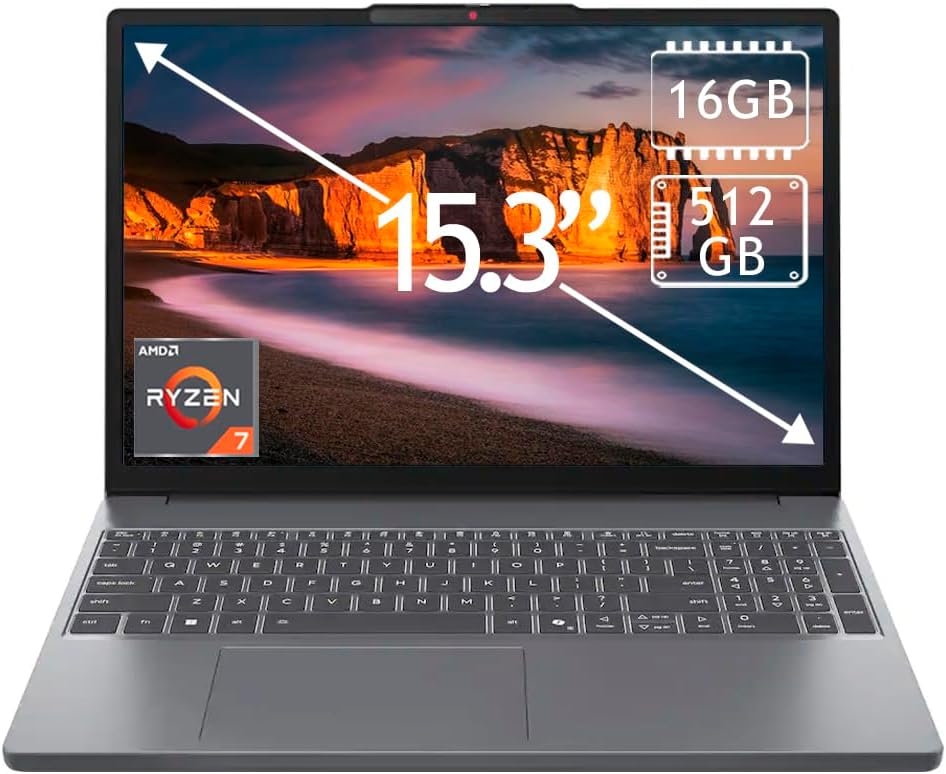
With 16GB RAM and a 512GB SSD, daily tasks are handled swiftly. The AMD Ryzen 7 processor ensures efficiency without excessive power consumption.
WiFi 6 provides stable connectivity for browsing and streaming. The chassis is slim and easy to carry to different locations.
Suitable for home and office use where reliability is key. The lightweight form factor enhances mobility for frequent travelers.
Slim chassis combines portability with dependable performance for on-the-go use.
PCIe NVMe SSD ensures rapid boot times and application loading speeds.
We may earn a commission when you buy through this link, at no additional cost to you.
Apple brings cutting-edge efficiency with the M5 chip and WiFi 7. It is a top contender for those seeking a premium portable experience.
We may earn a commission when you buy through this link, at no additional cost to you.
Battery life is outstanding, lasting up to 18 hours on a single charge. The Liquid Retina display offers vibrant colors and sharp text clarity.
Apple Intelligence features enhance writing and productivity while maintaining privacy. The build quality feels durable and refined for professional settings.
Ideal for creatives and professionals who need a reliable machine anywhere. The seamless ecosystem integration adds significant value for existing Apple users.
Incredible battery life allows power through a full day of classes or work.
Powerful Neural Engine and next-generation GPU provide a platform for AI.
We may earn a commission when you buy through this link, at no additional cost to you.
This model emphasizes value with solid specs and AI readiness. It offers Copilot integration for enhanced productivity at a competitive price.
We may earn a commission when you buy through this link, at no additional cost to you.
The 15.6-inch display provides a good workspace for browsing and streaming. Acer BluelightShield helps reduce eye strain during long sessions.
Connectivity options include full-function USB Type-C for versatile charging. The device is intuitive to use for both home and office settings.
Ideal for users seeking a cost-effective solution for daily tasks. Its features balance performance and usability without unnecessary complexity.
Copilot in Windows acts as an AI companion to help do more quickly.
Seamlessly connect devices through full-function USB Type-C ports easily.
We may earn a commission when you buy through this link, at no additional cost to you.
Choosing a laptop with WiFi 7 involves evaluating several technical factors to ensure it meets your specific needs and budget.
WiFi 7 offers significantly faster speeds and lower latency than previous standards ensuring smooth streaming and remote work. Look for devices that explicitly mention this protocol to future-proof your purchase.
Ensure the router you plan to use also supports WiFi 7 to fully leverage these speeds.
Processors like Intel Core Ultra or AMD Ryzen 7 handle heavy multitasking and AI features efficiently. Higher clock speeds and more cores contribute to better performance under load.
Select a processor that matches the intensity of your daily tasks to avoid bottlenecks.
At least 16GB of RAM is recommended for modern workflows to ensure smooth multitasking. More RAM allows you to run multiple applications without slowdowns or lag.
Consider 32GB if you work with large files or use resource-intensive software regularly.
PCIe SSDs provide fast boot times and quick access to files. Aim for a minimum of 512GB to store your system files, applications, and personal data.
1TB is preferable if you work with large media files or need extensive local storage.
A high-resolution screen with good brightness ensures comfortable viewing. Look for IPS panels and higher nits for clarity in various lighting conditions.
Touchscreen features can enhance interaction for users who prefer direct manipulation.
Long battery life is essential for productivity when away from power sources. Aim for devices that promise all-day usage to reduce dependency on chargers.
Check independent reviews to verify manufacturer claims on battery duration.
A variety of ports including USB-C, HDMI, and Thunderbolt ensures compatibility with peripherals. Avoid models that require too many dongles for basic connectivity.
Ensure the ports support fast data transfer rates for external drives and displays.
Sturdy materials like aluminum or magnesium alloy enhance longevity and feel. A well-designed hinge and keyboard layout contribute to long-term user satisfaction.
Check warranty terms to ensure protection against potential defects or issues.
To maximize WiFi 7 performance, ensure your router firmware is updated to support the latest protocols. Place your router in a central location to reduce signal interference.
Regularly update your laptop's operating system and drivers to maintain security and performance. This helps resolve bugs and optimizes battery consumption effectively.
Clean the display and keyboard gently with a microfiber cloth to prevent damage. Avoid exposing the device to extreme temperatures or moisture to extend its lifespan.
WiFi 7 provides up to three times faster speeds and lower latency compared to WiFi 6. This ensures smoother streaming faster file transfers and more reliable connections for video conferencing.
If you frequently transfer large files or stream high-definition content it can improve your experience. It also ensures your device stays relevant as networks upgrade to newer standards.
AI features like Copilot assist with writing data analysis and routine tasks automatically. They streamline workflows reducing the time spent on manual operations and searches.
Yes 16GB is sufficient for most users including multitasking and general productivity. It offers a good balance between performance and cost for daily workloads.
Touchscreens allow intuitive navigation and direct interaction with content. They are useful for presentations and creative tasks where precision touch control is beneficial.
Look for claims of all-day battery life ideally over 10 hours of use. Check reviews to verify real-world performance since settings affect actual battery duration.
These top picks represent the best balance of connectivity and performance available today. Whether you need budget-friendly power or premium features there is a model here for you.
Prioritize the specs that matter most to your workflow such as screen size or battery life. Choosing the right device ensures satisfaction and productivity for years to come.
Prices and availability change frequently so verify current details before purchasing. Stay tuned for updates as technology continues to evolve rapidly.