
Harvopu for iPad Pro 13 Inch
4.4Editor score
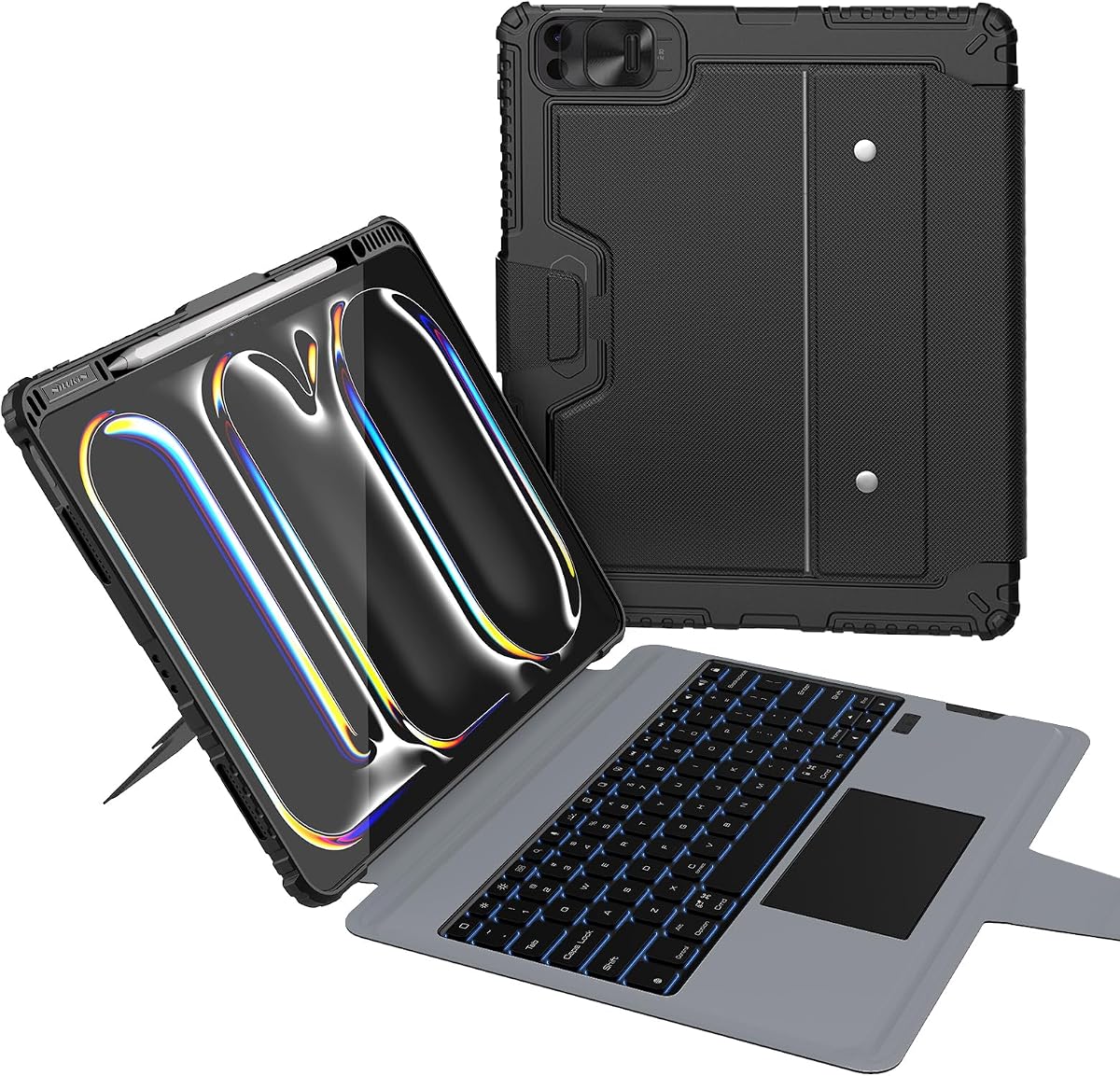
7-color backlit keys
Magnetic detachable design
Long life battery
Finding the right Keyboard Case for iPad Pro 13 M4 transforms your tablet into a powerful workstation. Look for responsive keys, sturdy stands, and seamless connectivity to maximize productivity on the go.
We evaluated ten leading models based on build quality, typing comfort, and unique features. Each option offers distinct advantages for different workflows, from creative drawing to heavy document editing.
Every pick highlights key strengths and potential trade-offs to guide your decision. Keep in mind that availability and pricing can shift frequently, so check current listings before purchasing your ideal case.
4.4Editor score

4.3Editor score

3.7Editor score
As an Amazon Associate we earn from qualifying purchases.
This side-by-side comparison highlights the distinct features of each top-rated keyboard case to help you decide which model best fits your specific workflow and protection needs.



This keyboard case stands out as the top choice for iPad Pro 13 M4 users seeking a seamless laptop experience. With a 4.3 rating, it delivers professional-grade performance right out of the box.
We may earn a commission when you buy through this link, at no additional cost to you.
The glass trackpad with haptic feedback offers precise cursor control that rivals dedicated laptops. A dedicated function row and backlit keys enhance productivity for complex tasks.
While it comes at a higher cost, the seamless magnetic connection and USB-C pass-through charging justify the investment for heavy users. The sleek design maintains the tablet's thin profile.
Professionals who need reliable typing and touch navigation will find this case indispensable. It transforms your tablet into a powerful workstation without added complexity.
Access system controls quickly with the dedicated function row, streamlining workflows for media and app management.
No pairing or charging required for the keyboard itself, ensuring you are always ready to type instantly.
We may earn a commission when you buy through this link, at no additional cost to you.
This ESR case offers a versatile solution for iPad Pro 13 M4 users on a budget. It balances functionality and protection effectively, earning a solid 4.2 rating from satisfied customers.
We may earn a commission when you buy through this link, at no additional cost to you.
The magnetic stand allows for quick adjustments between typing and browsing modes. The case detaches easily for hands-on use, providing flexibility during creative work.
While the trackpad is functional, it lacks the advanced gestures of higher-end models. However, the extended touch surface still allows for precise navigation and scrolling.
Ideal for students or casual users who need a reliable accessory without breaking the bank. It provides essential protection and typing comfort for daily tasks.
The ultra-strong magnets ensure the case stays secure while offering easy adjustment for comfortable viewing angles.
Switch between keyboard mode and standalone tablet mode instantly for greater versatility.
We may earn a commission when you buy through this link, at no additional cost to you.
Rated highly at 4.4 stars, this ESR case focuses on durability and precision. It is a strong contender for users who prioritize robust protection and enhanced navigation tools.
We may earn a commission when you buy through this link, at no additional cost to you.
The trackpad is significantly larger than standard models, allowing for comfortable gestures and cursor control. Reinforced Air Guard corners add extra protection against drops and bumps.
The included pencil holder is a practical addition for creative professionals who need quick access to their stylus. Magnetic attachment remains secure during daily movement.
This case is perfect for those who value long-term reliability and expanded input options. It delivers a premium feel at a competitive price point.
Enjoy smoother navigation with a trackpad that offers 65% more surface area than competitors.
The built-in stylus holder prevents loss and ensures your Apple Pencil is always within reach.
We may earn a commission when you buy through this link, at no additional cost to you.
The typecase Edge combines style with functionality, featuring an 11-color backlight system. It appeals to users who want a personalized and modern look for their iPad Pro 13 M4.
We may earn a commission when you buy through this link, at no additional cost to you.
The floating cantilever design provides smooth angle adjustments, ensuring comfort during long typing sessions. The lightweight profile makes it easy to carry in a bag.
While it lacks some connectivity features like pass-through charging, the battery life and responsiveness compensate well. The magnetic closure ensures your device remains secure.
This case is ideal for creative professionals who value aesthetics alongside performance. It offers a unique blend of protection and style.
Adjust backlight colors and brightness to match your environment or mood instantly.
The instant wake and sleep feature conserves energy effectively when opening or closing the case.
We may earn a commission when you buy through this link, at no additional cost to you.
Logitech brings its expertise to the iPad Pro with the Combo Touch, featuring a standout trackpad size. Despite a mixed 3.7 rating, many users appreciate its robust build and practical features.
We may earn a commission when you buy through this link, at no additional cost to you.
The flexible kickstand allows for a wide range of viewing angles, adapting to any desk or lap setup. The smart connector ensures power without extra batteries or pairing steps.
Its heavier build is a trade-off for the protection and stability it offers. The recycled materials in the build also appeal to eco-conscious buyers seeking sustainable tech accessories.
Best suited for office professionals who prioritize typing and touch precision over portability. It remains a strong option for enterprise or study environments.
The large trackpad supports familiar gestures for intuitive app switching and window management.
Constructed with certified post-consumer recycled plastic to reduce environmental impact.
We may earn a commission when you buy through this link, at no additional cost to you.
Harvopu delivers an excellent budget-friendly option for the iPad Pro 13 M4. With a 4.4 rating, it proves that affordability does not mean sacrificing essential features.
We may earn a commission when you buy through this link, at no additional cost to you.
The rechargeable keyboard includes a 500mAh battery, lasting weeks on a single charge. Stain-resistant materials make it easy to wipe clean after spills or heavy use.
Bluetooth connectivity requires pairing, but the connection remains stable once established. The flexible TPU inner shell offers good protection against drops and scratches.
This is the ideal choice for students or families looking for cost-effective productivity. It provides all the basics needed for work and school.
An automatic sleep mode after 15 minutes conserves power for extended usage periods.
The stain-resistant surface resists dirt and oils, keeping the case looking new longer.
We may earn a commission when you buy through this link, at no additional cost to you.
The Edge+ stands out for its ultra-lightweight design, weighing just 110g. This makes it one of the most portable options available for the iPad Pro 13 M4.
We may earn a commission when you buy through this link, at no additional cost to you.
N54H magnets ensure the keyboard stays firmly attached even when moving. The wider hinge adds stability, preventing wobble during intense typing sessions.
The back case is detachable for reading or sketching modes, providing versatility. While the trackpad is slightly smaller than others, it covers key gestures efficiently.
Perfect for travelers who prioritize weight and convenience over heavy-duty protection. It balances style and function without unnecessary bulk.
High-grade magnets provide a secure bond that feels nearly seamless during use.
Minimal weight allows you to carry the iPad case anywhere without added strain.
We may earn a commission when you buy through this link, at no additional cost to you.
With a high 4.6 rating, this wireless case offers impressive flexibility for iPad Pro 13 M4 owners. Its 360-degree rotating stand is a standout feature for diverse viewing needs.
We may earn a commission when you buy through this link, at no additional cost to you.
The transparent design showcases the device's original look while protecting it from scratches. The wireless keyboard and trackpad offer a lag-free experience for daily tasks.
You will need to keep a charging cable handy for the keyboard battery. However, the brightness adjustment ensures visibility in any lighting condition.
Ideal for users who value adaptability and modern design. It supports a wide range of activities from media consumption to work.
Rotate the stand completely to find the perfect angle for any situation.
A clear back allows your iPad's original color to shine through visibly.
We may earn a commission when you buy through this link, at no additional cost to you.
Nillkin delivers a rugged solution for those who need extra durability. Rated at 4.3 stars, this case protects the iPad Pro 13 M4 from drops and rough handling.
We may earn a commission when you buy through this link, at no additional cost to you.
The 0-180-degree kickstand offers versatile positioning for typing or watching videos. A sliding camera cover adds an extra layer of privacy and lens protection.
The battery lasts up to 100 hours, reducing the need for frequent charging. However, the added protection means it is bulkier than slim alternatives.
This is a top pick for field workers or outdoor users. It ensures your device survives demanding conditions without compromising functionality.
Tested against 1.2-meter drops to ensure reliable protection in tough environments.
The camera shutter keeps your lens clean and private when not in use.
We may earn a commission when you buy through this link, at no additional cost to you.
TSQQST combines clear design with wireless utility for the iPad Pro 13 M4. With a 4.3 rating, it offers a stylish way to protect your device while boosting productivity.
We may earn a commission when you buy through this link, at no additional cost to you.
The shock-absorbent edges guard against accidental drops effectively. A 360-degree rotating stand provides five adjustable angles for ergonomic comfort.
Fingerprints may show more easily on the clear surface, requiring regular cleaning. Despite this, the tech-inspired look appeals to those wanting a modern aesthetic.
Perfect for creative professionals who want visibility of their device. It balances style and function well for everyday tasks.
A transparent acrylic panel highlights your iPad's original design beautifully.
Choose from five angles to reduce strain during long typing or reading sessions.
We may earn a commission when you buy through this link, at no additional cost to you.
Selecting the right keyboard case depends on your specific needs for protection, typing quality, and portability. Consider these key factors to narrow down your choices effectively.
Decide between Bluetooth and Smart Connector options. Bluetooth keyboards require occasional pairing and charging but work with many devices. Smart Connectors use the iPad's power for seamless, cable-free connectivity without battery worries.
Choose Smart Connector for convenience and Bluetooth for broader compatibility with other tablets.
Assess your daily environment to determine the needed protection level. Rugged cases offer drop resistance for outdoor or industrial use. Slimmer cases provide basic scratch protection and are lighter for office or home settings.
Prioritize impact-resistant materials if you travel frequently or work in demanding environments.
Evaluate the trackpad size and gesture support. Larger trackpads allow for smoother scrolling and more precise cursor control. Ensure the model supports multi-touch gestures for efficient app switching and window management.
Opt for a high-sensitivity trackpad if you rely on mouse-like navigation daily.
Look for scissor-switch mechanisms that mimic laptop keyboards. Backlit keys are essential for low-light productivity. Check key travel distance for comfort during long typing sessions.
Test reviews to ensure the keys offer tactile feedback without excessive noise.
Consider if you want the keyboard to detach easily. Detachable designs allow you to use the iPad as a tablet for drawing or reading. Magnetic attachment ensures the keyboard stays secure when reattached.
Select a detachable model if you use the iPad for both work and creative tasks.
Check the battery capacity and charging time for wireless keyboards. Models with auto-sleep modes conserve energy effectively. A long battery life reduces the need for frequent charging interruptions.
Choose a keyboard with at least 100 hours of active usage for uninterrupted work.
Adjustable stands provide ergonomic comfort for different tasks. Look for wide-angle hinges that support both portrait and landscape modes. Stability is key to prevent wobbling during use.
Pick a case with multiple viewing angles to reduce neck strain.
High-quality materials like PU or polycarbonate ensure durability. Check if the material is stain-resistant for easy maintenance. Lightweight options reduce strain during travel.
Prioritize materials that offer a balance of protection and weight.
Start by ensuring your iPad is properly aligned with the case magnets or Smart Connector for a secure fit. Verify that all cutouts match the ports and cameras perfectly.
Clean the keyboard keys regularly with a soft microfiber cloth to prevent dust buildup. Avoid using harsh chemicals on the trackpad or screen surfaces.
Store the case in a dry place when not in use to prevent moisture damage. Charge the keyboard battery fully before long trips to ensure continuous usage.
Most cases listed are specifically designed for the M4 and M5 iPad Pro 13-inch models released in 2024 and 2025. Always check the model number on the back of your device before purchasing to ensure a perfect fit.
Bluetooth keyboards require initial pairing with your iPad via Settings. Models with Smart Connectors connect automatically without any pairing steps, offering a seamless experience.
Many cases include a dedicated pencil holder or slot for storage. Ensure the magnet or design does not interfere with the Pencil's charging capabilities.
Most premium and mid-range models feature adjustable backlighting. Look for options with multiple brightness levels or color customization to suit your lighting needs.
Trackpads are generally made from durable glass or smooth plastic resistant to wear. Clean them gently to maintain responsiveness and avoid scratching the surface.
Yes, most cases fold over to cover both the front and back. This design protects against scratches and accidental impacts when the iPad is not in use.
The Apple iPad Magic Keyboard Case remains the top choice for those seeking premium typing and trackpad performance. Its seamless integration justifies the investment for heavy users.
Budget-conscious buyers will appreciate the Harvopu or ESR options which offer solid features at lower price points. These alternatives provide essential protection and typing comfort.
Remember to verify compatibility with your specific iPad model before purchasing. Prices and availability can change, so check current listings to secure the best deal.