
ASUS Business Desktop Computer PC
5.0Editor score
Intel 10-Core i7-13620H
16GB DDR5 RAM 5600MT/s
Windows 11 Pro with Wi-Fi 6
This guide compares the top ASUS Desktop PC models for business and gaming, analyzing performance specs, connectivity options, and value to help you choose the
Choosing the right computer for your needs is critical for productivity and entertainment. ASUS offers a wide range of desktop towers designed for various workloads from office tasks to heavy gaming. This guide helps you find the perfect fit.
We evaluated ten distinct ASUS Desktop PC models based on processor power, memory capacity, storage speed, and connectivity options. Our analysis focuses on real-world performance metrics and build quality to ensure you get reliable hardware for your specific use case.
Each pick highlights key strengths and potential trade-offs so you can make an informed decision. Note that product availability and pricing can fluctuate frequently so always check the current listing before purchasing to ensure you get the best deal available today.
5.0Editor score
5.0Editor score

4.8Editor score
Below is a detailed side-by-side comparison of all ten ASUS Desktop PC models. This table breaks down the core specifications including processors memory and graphics to help you quickly identify which system meets your performance requirements.


This ASUS V500 Business Tower Desktop Computer stands out as the top choice for users seeking a balanced mix of power and practicality. It earns a perfect rating due to its robust Intel Core i7 processor and ample DDR5 memory which ensure smooth operation even under heavy workloads. The system is designed to handle modern office tasks and light creative work with ease.
We may earn a commission when you buy through this link, at no additional cost to you.
The 10-core Intel Core i7-13620H processor delivers lightning-fast performance with a max turbo frequency of up to 4.9 GHz. Paired with 16GB of DDR5 RAM the system handles multitasking effortlessly allowing you to run multiple applications without lag. The storage configuration includes a fast SSD for the operating system and programs while the external drive offers additional space for archives and backups.
One trade-off is the reliance on an external storage component for the full 1TB capacity which might be less convenient than a single internal drive. However this setup provides flexibility for users who want to separate their data from their primary boot volume. The included keyboard and mouse bundle add immediate value making it ready to use out of the box.
Ideal for small businesses and professionals who need a reliable workstation this PC combines performance with convenience. The inclusion of Office 365 for the Web ensures you have access to essential productivity tools immediately. We recommend this model for anyone looking for a hassle free setup that does not compromise on speed or reliability.
The 10-core processor ensures that demanding business applications run smoothly without slowdowns or delays.
Multiple USB ports and dual video outputs support a wide range of peripherals and multi-monitor setups.
We may earn a commission when you buy through this link, at no additional cost to you.
The ASUS ROG G700 Gaming Desktop PC is a powerhouse built for enthusiasts who demand high frame rates and visual fidelity. It leverages the latest Intel Core Ultra 7 265F processor to deliver exceptional multitasking and gaming performance. The system is designed to handle AAA titles at 1080p and 1440p resolutions with smooth ray tracing capabilities.
We may earn a commission when you buy through this link, at no additional cost to you.
With 32GB of DDR5 RAM this machine ensures that you can stream or run background applications while gaming without performance hits. The NVIDIA GeForce RTX 5060 graphics card provides realistic lighting and shadows thanks to AI powered DLSS technology. The 1TB NVMe SSD offers ultra-fast boot times and rapid game loading which is critical for competitive play.
While the price is higher than basic desktops the inclusion of RGB accessories and extended protection plan adds significant value. The 12 Month CPS Protection covers mechanical failures which provides peace of mind for high usage gaming environments. Users should note that the chassis design may limit future component swaps compared to standard tower cases.
This PC is perfect for gamers who want a ready-to-play solution without needing to build their own system. The advanced cooling system maintains stable performance under heavy loads ensuring longevity. We recommend this for anyone seeking a premium gaming experience with reliable support and cutting edge hardware features.
The RTX 5060 GPU delivers immersive visuals and high frame rates for competitive and AAA titles.
The 12-month extended plan covers mechanical failures beyond the standard warranty for added security.
We may earn a commission when you buy through this link, at no additional cost to you.
The ASUS S501MER Desktop PC offers a compelling entry point into the latest generation of Intel computing with its 14th Gen Core i7-14700 processor. This model is ideal for users who want the most recent architecture to ensure longevity and performance in software demanding environments. It balances modern features with practical connectivity options for home and office use.
We may earn a commission when you buy through this link, at no additional cost to you.
Powered by the Intel Core i7-14700 with speeds up to 5.3GHz this system provides fast processing for multitasking and content creation. The 16GB of DDR5 RAM supports smooth operation and can be expanded up to 64GB for future needs. Connectivity is enhanced by the inclusion of Wi-Fi 6E which offers faster wireless speeds and lower latency than previous standards.
While it comes with standard storage it does feature a robust set of ports including USB Type-C and DisplayPort for versatile peripheral connections. The ability to expand memory makes this a smart choice for professionals who anticipate heavier workloads over time. However the price point may be slightly higher than previous generation equivalents for similar performance levels.
We recommend this PC for users prioritizing future-proofing with the latest Intel technology. It is a strong contender for those who need reliable performance without the premium price of a dedicated gaming rig. The combination of speed and expandability makes it a versatile tool for various computing needs.
The 14th Gen Intel Core i7-14700 ensures compatibility with upcoming software and demanding applications.
RAM can be upgraded to 64GB ensuring smooth performance even with heavy multitasking requirements.
We may earn a commission when you buy through this link, at no additional cost to you.
The ASUS V500 Home & Business Desktop is optimized for users who need substantial memory for multitasking and productivity. With 32GB of RAM it allows you to run multiple heavy applications simultaneously without system slowdowns. This makes it an excellent choice for power users who manage large datasets or multiple creative tools at once.
We may earn a commission when you buy through this link, at no additional cost to you.
The Intel Core i7-13620H processor ensures that everyday tasks are handled with speed and efficiency. It features integrated Intel UHD Graphics which are sufficient for 4K streaming and general use but not for demanding gaming. The storage solution is a fast PCIe SSD which provides instant boot-ups and rapid file access for all your important documents.
One consideration is that the integrated graphics limit the machine to basic visual tasks rather than high-end gaming. However this ensures cost efficiency and stable performance for business applications. The dual-monitor support via HDMI and DisplayPort makes it easy to expand your workspace and increase productivity significantly.
We recommend this model for home offices and business environments where reliability and memory capacity are key. It delivers a streamlined experience designed to enhance productivity and connectivity. Users who need a robust workstation for daily tasks will find this system to be a reliable and efficient companion.
With 32GB of RAM the system ensures smooth performance even when running multiple applications simultaneously.
Dual monitor support allows you to organize your workflow across two screens for better efficiency.
We may earn a commission when you buy through this link, at no additional cost to you.
The ASUS ROG G700 (2026) Gaming Desktop represents the pinnacle of home gaming hardware with its premium components and advanced thermals. It is equipped with the Intel Core Ultra 7 265KF processor and NVIDIA GeForce RTX 5070 GPU for seamless gaming and multitasking. This machine is designed for enthusiasts who demand top tier performance and aesthetics.
We may earn a commission when you buy through this link, at no additional cost to you.
Its dual-glass chassis showcases iconic ROG design with Aura Sync RGB lighting that adds visual flair to any setup. The cooling system is robust featuring a quad-fan system and a 240mm liquid cooler to maintain low temperatures even during intense gaming sessions. This ensures long-term reliability and consistent performance under heavy loads.
While the price is high the design includes tool-less access which makes upgrades easier than in typical pre-built systems. The large 58L capacity supports triple-slot GPUs allowing for future hardware upgrades without needing a new case. However the large physical footprint requires ample desk space which might be a constraint for some users.
We recommend this PC for serious gamers who want a high-performance machine with excellent build quality. The plug and play setup with included RGB accessories ensures you can start playing immediately. It stands out as a premium choice for those who value performance thermals and style in equal measure.
The liquid cooler and quad-fan system ensure the system stays cool during intensive gaming and creative work.
Tool-less access allows you to swap components easily ensuring the system remains future-proof.
We may earn a commission when you buy through this link, at no additional cost to you.
The ASUS ROG GM700 (2025) Gaming Desktop brings the power of AMD Ryzen 7 9800X3D processing to your desk. This model is perfect for those who prefer AMD architecture for its efficiency in gaming and creative workflows. It offers a balanced setup with ample storage and memory to handle demanding tasks effortlessly.
We may earn a commission when you buy through this link, at no additional cost to you.
Powered by the AMD Ryzen 7 9800X3D processor this desktop delivers seamless multitasking and blazing-fast performance for gaming and editing. The 2TB of PCIe Gen 4.0 SSD storage ensures near-instant load times for games and applications. You get enough space for your growing library without needing external drives immediately.
The Radeon RX 9070 XT GPU delivers immersive gaming with enhanced ray tracing and AV1 encoding for stunning visuals. While the price is steep the combination of high-end components justifies the cost for users who need top performance. Some users may find the AMD ecosystem requires specific software optimization for certain workflows.
We recommend this PC for AMD enthusiasts who want a high-capacity storage solution right out of the box. It is ideal for content creators and gamers who need robust performance without compromise. The system ensures you spend more time creating and playing with less time waiting for files to load.
The AMD Ryzen 7 9800X3D provides efficient multitasking for streaming and editing workloads.
With 2TB of SSD storage you have room for extensive media libraries and game collections.
We may earn a commission when you buy through this link, at no additional cost to you.
The ASUS V500 Home & Business Tower is an excellent value proposition for those needing a professional desktop at a competitive price. It comes with Windows 11 Pro offering advanced security features and system management tools for modern business environments. The inclusion of a USB flash drive bundle adds extra convenience for portable data transfer.
We may earn a commission when you buy through this link, at no additional cost to you.
Powered by the Intel Core i7-13620H processor this tower delivers responsive performance for multitasking and business applications. The 16GB DDR5 memory and 1TB SSD ensure smooth system performance and quick startup times. You also get HDMI and DisplayPort outputs to create an organized and efficient workstation for office productivity.
A note of caution is that some units have been opened for upgrades which may affect the standard warranty terms. The upgraded components carry a one-year warranty from PCOnline US which is good to verify before purchase. However the core machine remains reliable and the bundle value is hard to beat for budget-conscious buyers.
We recommend this model for small businesses or students who need professional features without a high cost. The secure environment provided by Windows 11 Pro ensures your data stays protected. It is a practical choice for users who want essential high-performance specs and useful accessories included.
Windows 11 Pro provides enhanced security and productivity tools designed for modern business environments.
The included 64GB USB flash drive offers high-speed data transfer and extra portable storage.
We may earn a commission when you buy through this link, at no additional cost to you.
The ASUS ROG Strix G700 Desktop is a unique system designed for users who need immense storage and memory capacities. With 11TB of storage and 128GB of DDR5 RAM this machine is built for heavy data processing and creative workflows. It combines the latest Intel Core Ultra 9 processor with high-end connectivity options.
We may earn a commission when you buy through this link, at no additional cost to you.
The Intel Core Ultra 9 285K processor offers Turbo Boost speeds up to 6.00GHz ensuring extreme performance for rendering and simulations. The massive 11TB of storage ensures you can keep extensive libraries of games and media locally. Connectivity is excellent with triple band Wi-Fi 6E and Bluetooth 5.3 for reliable wireless performance.
While the specifications are impressive the price is very high which limits its appeal to professionals or enthusiasts with specific needs. It is also a large system that requires significant desk space. However for users who need massive local storage without relying on cloud services this is an ideal solution.
We recommend this PC for professionals who need a local workstation with extensive storage capabilities. The high memory and processor speeds ensure that data-intensive tasks are handled with speed. It stands out as a powerful option for those who demand the highest specifications available.
The Intel Core Ultra 9 285K delivers extreme performance for the most demanding professional tasks.
11TB of storage allows you to keep extensive media libraries locally without cloud reliance.
We may earn a commission when you buy through this link, at no additional cost to you.
The ASUS V500 Home & Business Desktop stands out for its high capacity RAM which is perfect for heavy multitasking. With 64GB of memory this system allows professionals to run complex applications simultaneously without any slowdown. It is a reliable choice for users who need maximum efficiency in their daily workflow.
We may earn a commission when you buy through this link, at no additional cost to you.
Powered by the Intel Core i7-13620H processor this desktop handles demanding tasks with ease. The 1TB PCIe SSD provides ample storage and fast boot times for all your files. It supports dual 4K monitors allowing you to expand your workspace and boost productivity significantly.
The main trade-off is the high price associated with the increased memory capacity. However for users who need substantial RAM for video editing or virtual machines this is a necessary investment. The included accessories and modern Windows 11 Home interface make it ready to use immediately.
We recommend this model for power users who need maximum RAM for demanding professional tasks. It offers a streamlined interface designed to enhance productivity and connectivity. This system ensures you have the resources to handle any workload efficiently.
64GB RAM ensures smooth performance even with heavy multitasking and complex professional applications.
Dual 4K monitor support helps you organize your workflow for better efficiency and productivity.
We may earn a commission when you buy through this link, at no additional cost to you.
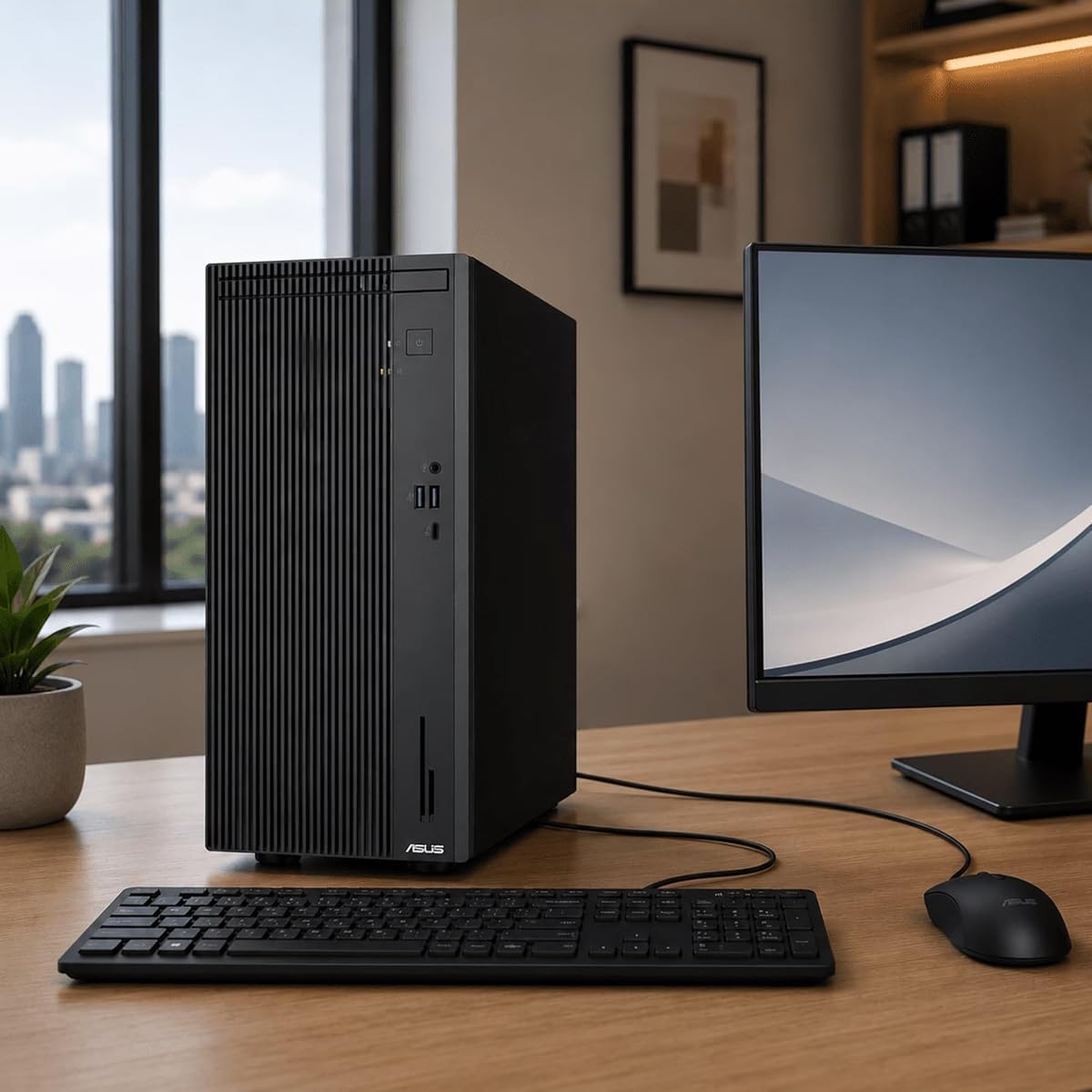
The ASUS Business Desktop Computer PC is designed to balance performance and space efficiency for modern office environments. It features a compact tower design that fits easily on or under a desk. The machine includes Windows 11 Pro for enhanced security and productivity suitable for business users.
We may earn a commission when you buy through this link, at no additional cost to you.
Powered by the Intel Core i7-13620H processor this system delivers fast multitasking performance for office productivity. The 16GB DDR5 5600MT/s memory ensures quick file access and smooth multitasking for business workloads. Connectivity is rich with USB-C multiple USB-A ports and Wi-Fi 6 support.
One consideration is that while the system is expandable it is primarily designed for standard business use cases. The compact design may limit large internal hardware upgrades compared to full-size towers. However for most business environments the provided capacity and speed are more than sufficient.
We recommend this PC for businesses needing a reliable and secure computing solution without taking up much space. The balanced design ensures a modern office environment remains organized. It is an ideal choice for everyday business tasks and professional applications.
The compact tower design balances performance and space efficiency for modern office environments.
Windows 11 Pro provides advanced security and system management tools for secure environments.
We may earn a commission when you buy through this link, at no additional cost to you.
Selecting the right ASUS Desktop PC depends on balancing your specific needs with budget constraints. Consider these key factors to ensure you choose a system that performs well for your daily tasks.
The processor is the brain of your computer and dictates how well it handles tasks. For general office work the Intel Core i5 or i7 processors provide sufficient speed. If you are a gamer or video editor look for the latest Intel Core Ultra or AMD Ryzen models for maximum power.
Always check the clock speed and core count when comparing models. Higher core counts allow for better multitasking and smoother performance during demanding applications.
RAM is crucial for multitasking. Modern desktops start at 16GB which is great for most users. Power users or those running virtual machines should look for 32GB or even 64GB options to ensure smooth operation without lag.
Choose models with DDR5 memory for better speeds and efficiency. Ensure the RAM is expandable if you plan to upgrade your system in the future.
Solid State Drives (SSDs) are now the standard for boot drives due to their speed. Look for NVMe PCIe SSDs which offer the fastest load times. A 1TB drive is a good baseline for most users but ensure there is room to add more storage if needed.
Some models include hybrid storage with HDDs for mass storage. This can be cost effective but ensure your primary OS is on an SSD for performance.
Integrated graphics are sufficient for office tasks and video streaming. However if you plan to game or edit 3D models you will need a dedicated GPU. Look for NVIDIA RTX or AMD Radeon cards depending on your preference.
Check if the power supply can support high end graphics cards. Some compact models may limit upgrade options for powerful GPUs.
A desktop is only as good as its connections. Ensure the system has enough USB-A and USB-C ports for your peripherals. Look for Ethernet ports if you require stable wired internet connections.
Video outputs like HDMI and DisplayPort are essential for multi-monitor setups. Verify that the ports support the resolution you need such as 4K.
Most desktops come with Windows 11 Home which is suitable for general use. Business users may prefer Windows 11 Pro for additional security and management tools.
Ensure the OS version meets your software requirements. Some enterprise applications require Pro features for proper network integration.
Physical build quality affects the longevity of your machine. Look for cases with good airflow and robust materials. Larger cases often allow for easier upgrades and better cooling.
Consider the aesthetic design if the PC will be visible on your desk. ASUS ROG models often feature RGB lighting that adds style to a setup.
Some desktops are more upgradeable than others. Check if the RAM and storage are easily accessible for future expansion. Tool-less designs make it easier to swap components.
Research warranty terms regarding upgrades. Some bundled components may have separate warranties that differ from the main system.
Set up your desktop on a stable surface with good airflow to prevent overheating. Ensure you have enough clearance around the vents. Connect your monitor keyboard and mouse securely to the appropriate ports to start using your new system immediately.
Update your drivers and operating system regularly to maintain security and performance. Use Windows Update to get the latest patches. Regularly scan your system for malware to keep your data safe. Organize your files into folders to keep your storage clean and efficient.
Clean your PC occasionally to prevent dust buildup. Use compressed air to clear dust from vents and fans. Do not open the case unless you are comfortable with hardware. A clean system runs cooler and lasts longer over time.
Windows 10 Home is designed for general use with standard features. Windows 10 Pro adds advanced security features like BitLocker and remote desktop capabilities. It is better for business users who need to manage networks or protect sensitive data.
Most models allow RAM upgrades up to 64GB. You must check the specific motherboard limits and available slots before purchasing new modules. DDR5 memory must be compatible with the motherboard speed requirements for proper function.
Yes models with dedicated NVIDIA RTX or AMD Radeon GPUs support ray tracing. This technology creates realistic lighting and shadows in compatible games. Ensure your monitor supports the resolution for the best visual experience.
Most ASUS desktops come with a standard one-year limited warranty. Extended protection plans like the 12 Month CPS are available for some models. Always check the specific listing for warranty details before purchasing.
Yes models with high core count CPUs and at least 32GB of RAM are suitable for video editing. Look for systems with dedicated GPUs and fast SSD storage for smooth rendering. Business models may lack the power required for professional editing.
Many business and gaming models include a keyboard and mouse bundle. Always check the product title and features list to confirm inclusion. Some higher end models may require you to purchase peripherals separately.
Most models support up to 4TB of internal storage depending on the chassis and slots. Check the motherboard documentation for available SATA and M.2 slots. External drives can be added via USB for unlimited expansion.
Gaming models have robust cooling systems which can be louder under load. ASUS uses advanced thermal designs to manage noise and heat. You can often adjust fan curves in the BIOS to find a balance.
We highlighted the ASUS V500 Business Tower for its balanced performance and the ROG G700 for its premium gaming capabilities. Each system offers unique strengths tailored to specific user needs ranging from office productivity to high-end creative work.
Prioritize your specific workflow requirements when selecting a model. If you need massive storage look at the ROG Strix G700 but if you need reliable business tools the V500 Business Tower is ideal. Ensure the RAM and storage match your daily tasks.
Remember that technology moves fast and prices change frequently. Always check current listings and reviews before finalizing your purchase to ensure you get the best value available today.