
Fosmon Fast Charging for Xbox Controller Charger Station Dock
4.5Editor score
SGS certified safety standards
40 to 45 hours playtime
Dual charging slots with LEDs
This guide compares the top controller charging station for Xbox options available in October 2026 to help you choose the best dock for your gaming setup.
Finding the right controller charging station for Xbox can significantly enhance your gaming experience by keeping your controllers powered and organized. Whether you play on Series X, Series S, or One, a reliable dock ensures you never run out of battery mid-game. This guide explores the best options on the market to help you make an informed decision.
We have analyzed ten top-rated charging stations based on battery capacity, charging speed, compatibility, and design. Each product was evaluated for its ability to provide consistent power, safety features, and ease of use. Our goal is to highlight the most practical and efficient solutions for Xbox players looking to upgrade their accessory setup.
Each pick in this list includes detailed specifications, pros, cons, and real-world performance insights. We focus on models that offer rechargeable batteries, LED indicators, and secure charging mechanisms. Please note that prices and availability may change over time, so check the current listings before making your purchase.
4.5Editor score

4.6Editor score

4.4Editor score
The following table provides a side-by-side comparison of all ten products evaluated in this guide. Each entry highlights key specifications, compatibility, and unique features to help you quickly identify the best match for your specific Xbox console and controller needs.



This controller charging station for Xbox stands out due to its impressive battery capacity and dual-pack inclusion. With a rating of 4.6, it offers users a reliable way to keep controllers powered without frequent interruptions. The standout quality is the extended playtime it provides per charge.
We may earn a commission when you buy through this link, at no additional cost to you.
The 6200mWh batteries ensure you can game for up to 25 hours on a single charge. The unique X-shaped LED indicators provide a clear visual cue without being distracting during gameplay. Additionally, it includes covers for both Series X and One models.
One trade-off is that the batteries are integrated into the dock bottom, which may limit flexibility. It also does not support third-party controllers, which could be a drawback for some users. However, for official Xbox controller owners, it is a robust solution.
This station is ideal for gamers who prioritize long play sessions and need multiple charged controllers ready. If you want maximum uptime without buying disposable batteries, this is a top choice. Check the current listing to confirm compatibility with your specific setup.
The high capacity batteries allow for nearly two full days of moderate gaming before needing a recharge.
The X-shaped LEDs glow red during charging and green when full, offering clear status at a glance.
We may earn a commission when you buy through this link, at no additional cost to you.
The Fosmon Fast Charging Dock offers an exceptional value with its high playtime capacity and safety certifications. Rated 4.5 by users, it ensures you can game for up to 45 hours on a charge. This makes it a cost-effective alternative to disposable batteries.
We may earn a commission when you buy through this link, at no additional cost to you.
Its SGS certification guarantees consistent safety standards and reliable performance over time. The simple place and charge design means you just set the controller down to start charging immediately. It also includes two batteries to keep one charged while the other is in use.
The main limitation is incompatibility with the Elite 2 controller, which uses a different charging mechanism. The LED indicators are standard but functional. Despite this, the lifetime warranty adds significant peace of mind for buyers.
This dock is perfect for budget-conscious gamers who still want premium battery life and safety. If you own standard One or Series controllers and need a reliable charger, this is a strong contender. Verify your controller model before purchasing.
SGS certification ensures the dock meets rigorous international safety standards for overheating and short circuits.
A limited lifetime warranty covers the product, reflecting confidence in its durability and build quality.
We may earn a commission when you buy through this link, at no additional cost to you.
This Razer stand combines premium build quality with a magnetic contact system that ensures secure charging. Rated 4.4, it is designed to match your Xbox controller color scheme perfectly for a seamless look. The quick charge feature minimizes downtime significantly.
We may earn a commission when you buy through this link, at no additional cost to you.
The magnetic design holds the controller firmly in place, preventing accidental dislodgement during charging. You can even navigate the dashboard with one hand while the controller is docked, which is convenient for quick menu checks. The stand is compatible with almost all Xbox controllers.
The main trade-off is the price, which is higher than many third-party options. It also excludes the Elite 2 model due to its unique charging port. However, for style and functionality, it remains a top pick for dedicated Xbox enthusiasts.
This stand is ideal for users who value aesthetics and want a premium accessory that complements their setup. If you want a reliable dock that looks as good as it works, consider this option. Check the listing for color availability.
The stand uses the same durable material and colors as official Xbox controllers for a unified look.
Ergonomic engineering allows you to use the controller while it is docked, enhancing usability.
We may earn a commission when you buy through this link, at no additional cost to you.
The PowerA Solo Charging Stand offers an officially licensed solution for your Xbox controllers. With a 4.6 rating, it is trusted by many for its quality and direct compatibility. It eliminates the need for disposable batteries with a single rechargeable pack.
We may earn a commission when you buy through this link, at no additional cost to you.
This stand features a clean, compact design that fits well in any gaming setup. It includes a 1100 mAh battery and a 3.3 ft USB cable for immediate use. The official license ensures it meets Microsoft standards for safety and performance.
The main limitation is that it only charges one controller at a time, which might be slow for families. The battery capacity is standard compared to dual-pack options. However, it is a reliable choice for single-player setups or as a spare dock.
This stand is great for those who prefer official accessories and want a simple, no-fuss charging solution. If you only need to charge one controller at a time, this is an excellent option. Check the listing for specific model compatibility.
As an officially licensed product, this stand guarantees compatibility and safety standards set by Microsoft.
Its small footprint ensures it does not take up much space on your desk or entertainment center.
We may earn a commission when you buy through this link, at no additional cost to you.
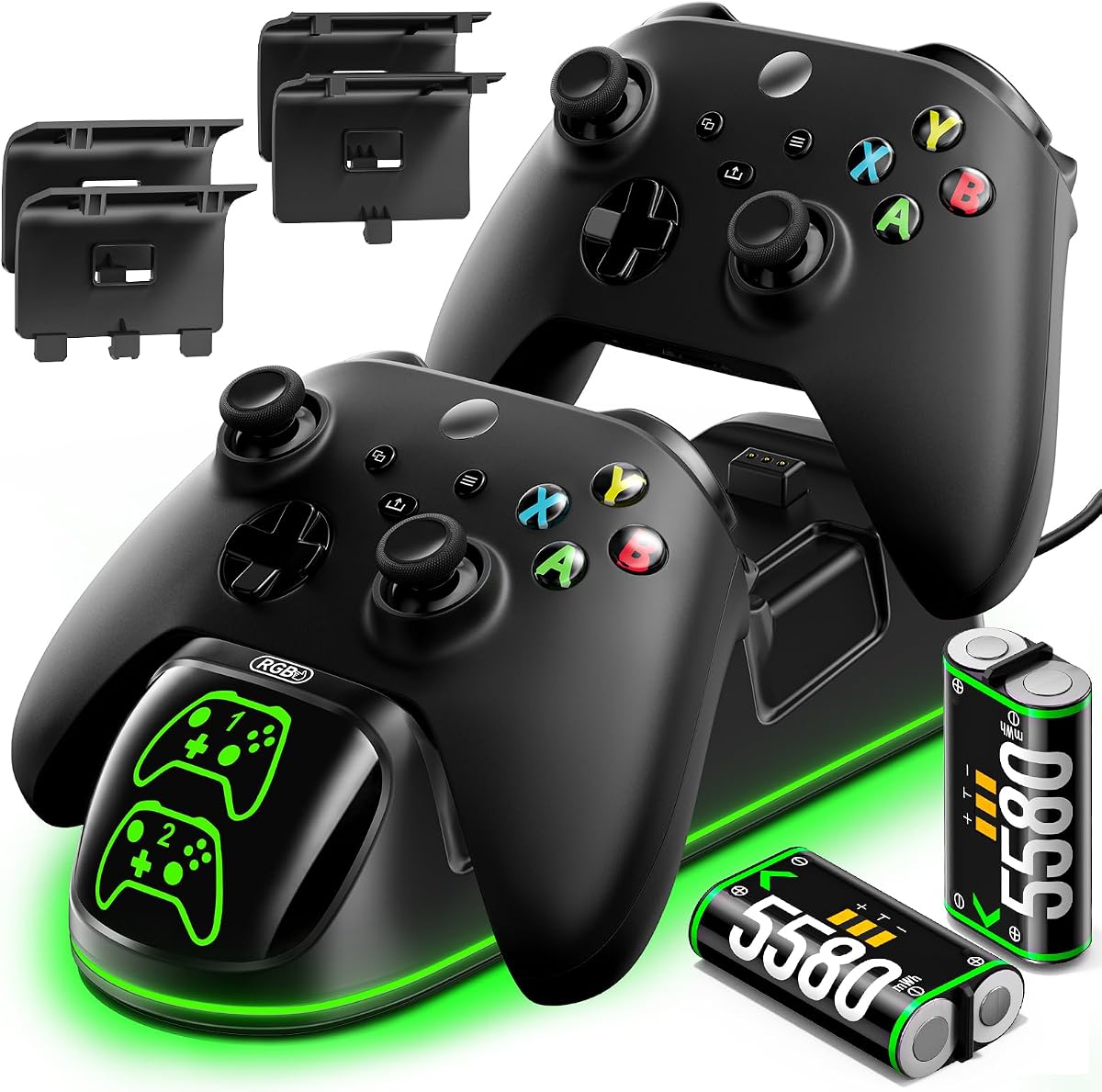
The OlVO XSX Controller Charger boasts a perfect 5.0 rating from users, reflecting high satisfaction with its performance. It charges fully in under 2.5 hours, which is faster than many competitors. This makes it ideal for gamers who need quick power-ups.
We may earn a commission when you buy through this link, at no additional cost to you.
It includes two 5580mWh rechargeable batteries that provide 20 hours of playtime each. The LED indicators clearly show charging status with red for charging and green for full. The package also includes covers for both One and Series models.
The main drawback is that it only supports official Xbox controllers, limiting third-party options. The batteries are part of the dock structure, which may not suit everyone. However, the speed and capacity make it a strong contender.
This dock is perfect for households that need fast charging and high capacity for multiple players. If you want a dock that charges quickly and lasts long, consider this model. Check compatibility before buying to ensure it fits your needs.
Charging two batteries in 2.5 hours ensures you rarely have to wait long before resuming play.
The included USB-C cable provides a modern connection option that is widely available today.
We may earn a commission when you buy through this link, at no additional cost to you.
This 8BitDo Charging Dock combines sleek design with magnetic secure charging for a reliable experience. With a 4.6 rating, it is well-regarded for its seamless fit with Xbox controllers. The official license ensures compatibility and safety.
We may earn a commission when you buy through this link, at no additional cost to you.
The magnetic system secures the controller in place, ensuring a stable connection during charging. It includes a 1100 mAh battery and storage for the battery doors. The amber and white LEDs provide clear status updates for the user.
The only downside is that it only holds one controller at a time, which may not suffice for multiplayer needs. The battery capacity is standard, so expect moderate playtime. However, the build quality is high for a compact dock.
This dock is ideal for users who prefer a single-controller setup and value clean design. If you want a reliable official accessory that looks good, this is a great choice. Verify it matches your controller color preferences.
The magnetic contact ensures the controller stays aligned and charging without sliding off.
Built-in storage keeps battery doors and cables organized, reducing clutter on your desk.
We may earn a commission when you buy through this link, at no additional cost to you.
This charging station features a unique robot helmet-inspired design that adds flair to your setup. Rated 4.6, it offers a solid performance with two 5520mWh batteries. The package includes four battery covers to match different controller generations.
We may earn a commission when you buy through this link, at no additional cost to you.
The bottom battery compartment ensures you never lose spare batteries, adding convenience. It charges fully in about four hours and offers up to 25 hours of playtime. You can toggle LED lights off using the top button if you prefer dim lighting.
The main trade-off is that it does not support third-party controllers, which limits versatility. Also, the LED lights are always on unless manually toggled. However, the aesthetic and included accessories make it a strong pick.
This station is perfect for gamers who want a fun design and good value. If you like the robot look and need covers for multiple controllers, this fits well. Check the listing for current design color availability.
The robot helmet front design adds a distinctive superhero vibe to your gaming station.
A dedicated bottom compartment stores batteries securely, ensuring you have spares ready always.
We may earn a commission when you buy through this link, at no additional cost to you.
The Nyko Charging Station is a budget-friendly option that includes an extra USB port for other devices. With a 4.2 rating, it offers straightforward dual controller charging. The two included batteries provide up to 15 hours of playtime each.
We may earn a commission when you buy through this link, at no additional cost to you.
It features a drop and charge design that makes it easy to use without fiddling with cables. The green LEDs indicate charging status clearly. The extra USB port allows you to charge additional accessories like headsets.
The main limitation is the lower playtime per charge compared to higher capacity docks. The design is more basic and may not suit premium setups. However, it remains a practical choice for general gaming needs.
This dock is ideal for casual gamers or families who need a simple and affordable solution. If you want to charge two controllers and use a USB port, this fits well. Check the listing for current price and stock.
The additional USB port lets you charge other devices while your controllers dock, adding versatility.
The drop and charge system ensures anyone can start charging by just placing the controller down.
We may earn a commission when you buy through this link, at no additional cost to you.
This Controller Gear Stand is designed to match the Pulse Red Xbox Series controller perfectly. With a 4.6 rating, it offers a premium look and magnetic charging hold. It is officially licensed, ensuring quality and compatibility.
We may earn a commission when you buy through this link, at no additional cost to you.
The magnetic contact system ensures the controller sits securely while charging. You can navigate menus with one hand even while the controller is docked. It includes a 1100 mAh battery and a sleek, premium material finish.
The main trade-off is that it only charges one controller at a time. The battery capacity is standard, so expect typical playtime hours. However, for color-matching aesthetics, it is a standout option.
This stand is ideal for those with Pulse Red controllers who want a cohesive look. If you value design and official licensing, consider this model. Check the listing to ensure the color matches your setup.
Made from the same high-quality material as your controller, the stand looks and feels premium.
The magnetic system keeps your controller aligned and charging reliably without manual adjustment.
We may earn a commission when you buy through this link, at no additional cost to you.
This controller charging station features 9 RGB lighting modes to enhance your gaming atmosphere. Rated 4.5, it includes high-capacity 6200mWh batteries for long play sessions. The package offers covers for both Series and One models.
We may earn a commission when you buy through this link, at no additional cost to you.
The lighting modes include single colors and multi-color cycling, allowing personalization. It charges fully in 3 to 3.5 hours and supports over 3000 recharge cycles. The automatic power adjustment ensures your controllers stay safe during charging.
The main limitation is that third-party controllers are not supported. The LEDs can be toggled on or off, but default behavior may vary. However, the customization and capacity make it a strong choice for RGB setups.
This dock is perfect for gamers who want RGB lighting and high battery capacity. If you like to match your setup lighting, this fits well. Check the listing for the current lighting options and color availability.
With 9 modes including red, blue, green, and cycling effects, you can match your room lighting easily.
The 6200mWh batteries provide up to 30 hours of use, minimizing recharge frequency.
We may earn a commission when you buy through this link, at no additional cost to you.
Selecting the right charging station involves considering battery capacity, speed, compatibility, and design features. This section breaks down the key factors to help you find the best option for your needs.
Battery capacity determines how long your controller will last before needing a recharge. Look for models with at least 5000mWh or higher to ensure extended playtime of 20 hours or more. Higher capacity reduces the frequency of charging interruptions during long sessions.
Prioritize docks with high capacity batteries if you play for many hours daily. This ensures you get value for money and avoid frequent recharge waits.
Charging speed is crucial if you need your controllers ready quickly. Faster docks can fully charge batteries in under 3 hours, while others take longer. Check the specifications to see the charge time included in the product data.
Choose a station that aligns with your daily routine. If you often play after work, a fast charger ensures your controllers are ready by the time you sit down.
Ensure the station supports your specific controller model. Most docks support Xbox One, Series X, and Series S, but some may not support the Elite 2. Verify compatibility before purchasing to avoid returns or extra expenses.
Select a dock that covers all your controllers. This saves you from needing multiple chargers and ensures a consistent setup.
Dual slots allow you to charge two controllers at once, which is essential for multiplayer sessions. Single slots are simpler and take less space but may require swapping batteries to keep play going.
Opt for dual slots if you play with others. This keeps both controllers ready without needing extra steps.
Safety features like overcharge protection and short-circuit prevention protect your controllers and console. Look for certifications such as SGS to ensure the product meets rigorous safety standards.
Always choose a dock with safety certifications. This prevents potential damage and ensures the longevity of your gear.
Design affects how well the station fits your gaming setup. Look for models that match your controller color or offer customizable options like RGB lighting. A clean design also helps with cable management.
Choose a design that complements your existing hardware. This creates a more cohesive and visually pleasing environment.
Some stations come with battery covers for multiple controller models, charging cables, and batteries. This adds value and saves you from buying extras separately. Check the package contents before buying.
Prioritize packages that include necessary accessories. This ensures you can start using the dock immediately.
A good warranty indicates the manufacturer's confidence in their product. Look for models with at least a one-year warranty and accessible customer support for any issues.
Select a dock with a reliable warranty. This protects your investment and provides peace of mind.
To use your charging station, first ensure the dock is connected to a power source via USB. Place your controller on the dock aligning it with the contacts or magnets. Most stations have LED indicators that show when charging has started. This simple process ensures your controller is always ready for use.
Regularly inspect the charging contacts on both the dock and controller for dirt or debris. Gently clean them with a dry cloth if needed to ensure good conductivity. Avoid using water or harsh chemicals. This maintenance step helps prolong the life of your charging setup.
Store spare batteries in a cool, dry place to maintain their capacity. Avoid leaving them in direct sunlight or extreme heat. If you plan to use the dock less often, it is a good idea to discharge the batteries to around 50% before storage. These practices help ensure your charging station remains reliable.
Most official and licensed charging stations are designed specifically for Microsoft's official controllers. They may not work with third-party models due to different charging ports. Always check the product specifications to confirm compatibility before buying. Some universal options exist but verify them carefully.
The charging time varies by model but typically ranges from 2.5 to 5 hours. Higher capacity batteries may take longer to charge fully. Look for fast-charge options if you need quicker turnaround times. Always check the product details for exact charging duration.
Yes, most modern charging stations have safety features that prevent overcharging. Once the battery is full, the dock stops supplying power to prevent damage. It is safe to leave the controller on the dock until you need it. This ensures your controller stays ready at all times.
A dock usually charges the controller by connecting it via a physical port or magnetic contacts while on the base. A stand might hold the controller but not necessarily charge it. Ensure the product specifies charging functionality. Some stands combine both features for added convenience.
Many popular charging stations include rechargeable batteries in the package. However, some models may require you to purchase them separately. Check the product description to confirm if batteries are included. This helps you avoid additional costs upon purchase.
Most stations use LED indicators to show charging status. Green usually means fully charged while red indicates charging is still in progress. Some models also stop charging automatically when full. Refer to the user manual for specific indicator meanings for your model.
Yes, most modern docks are designed to work with both Series X and S as they share the same controller design. Always verify in the product data for specific compatibility. This ensures you get a dock that fits your new console setup perfectly.
Some docks include extra USB ports that allow you to charge other devices like headsets. However, these ports may provide limited power for charging controllers themselves. Check the specific product details to confirm this feature. This can add convenience to your setup.
The top picks in this guide offer a range of solutions from high-capacity battery docks to premium magnetic stands. Each product balances speed, design, and price to suit different needs. The Upgraded Controller Charger Station and Fosmon Fast Charging Dock stand out for their value and performance.
When choosing, prioritize battery capacity and speed if you play frequently. For aesthetic value, consider models that match your controller color or offer RGB options. Ensure the station is compatible with your specific controller model before purchasing. This helps avoid any compatibility issues.
Remember to check current prices and availability as they may change over time. Regularly review product updates to ensure you are getting the latest features. With the right charger, you can enjoy uninterrupted gaming sessions without worrying about battery levels.