
V-one Wired USB Gaming Controller Gamepad Joystick for PC
4.2Editor score
Multi-mode support for PC and Android
Vibration feedback included
Plug and play setup
Discover the top joysticks for Windows 11 tested for precision, comfort, and performance across flight sims, gaming, and industrial simulations.
Finding the right joystick for Windows 11 means balancing precision, comfort, and compatibility. Whether you play flight sims or industrial simulations, a quality controller enhances immersion and control.
We compared ten popular models based on build quality, button layout, sensor accuracy, and Windows 11 support. Each pick serves a distinct budget and use case for serious gamers and professionals.
Every section highlights key strengths, trade-offs, and ideal users. Prices fluctuate frequently, so check current listings before purchasing. This guide helps you choose the right controller for your setup.
4.2Editor score

4.4Editor score

4.0Editor score
This side-by-side comparison shows key specifications and features across all ten models to help you decide which controller matches your specific gaming or simulation needs.






The PXN 2113PRO offers a budget-friendly path into flight simulation on Windows 11. With a 3.6 star rating it delivers core controls without breaking the bank. Its standout quality lies in combining stick and throttle in one affordable unit.
We may earn a commission when you buy through this link, at no additional cost to you.
Users enjoy 12 programmable buttons and an 8-way hat switch for precise aircraft control. The vibration function adds immersion when enabled properly in the driver. Suction cups on the base keep the unit steady during intense maneuvers.
The main trade-off is the need to install drivers to activate vibration features. Some users report weak vibration if settings are below 50 percent. Still, this is a reasonable compromise for the low price point.
Casual flight sim pilots and those new to the genre should buy this controller. It provides essential inputs and a comfortable feel. For Windows 11 users on a budget it remains a solid recommendation.
Adjusting driver settings ensures full vibration feedback. Testing with popular sim titles confirms compatibility with most flight games. This controller balances cost and performance well for home setups.
This model brings flight stick features to users who cannot afford premium models.
Power-grip suction cups keep the joystick firmly in place during flight.
We may earn a commission when you buy through this link, at no additional cost to you.
The Thrustmaster T-Flight Hotas One earns a 4.4 star rating for its versatile modular build. It excels at providing realistic flight simulation control on Windows 11. The standout quality is the detachable throttle allowing lap or desk setups.
We may earn a commission when you buy through this link, at no additional cost to you.
Its adjustable resistance mimics real aircraft handling. Multiple programmable buttons and a responsive trigger enable smooth takeoff and combat maneuvers. The hat switch adds essential camera and movement control for immersion.
While the design is flexible it does require sufficient desk space. The S.M.A.R.T. rail system works best with compatible pedals sold separately. These limitations do not overshadow the value for most sim pilots.
Beginners and seasoned pilots alike should buy this for its balance of cost and quality. It suits both commercial aviation and combat flight scenarios. Windows 11 users will appreciate the plug and play ease.
Connectivity is seamless across Windows PC and Xbox Series systems. The modular approach ensures you can expand later with additional hardware. This makes it a future proof choice for growing flight sim setups.
Detach the throttle to use on a lap or keep it on a desk.
Adjustable resistance ensures accurate simulation of aircraft handling forces.
We may earn a commission when you buy through this link, at no additional cost to you.
The V-one Wired USB Gaming Controller stands out with a 4.2 star rating and budget-friendly pricing. It is ideal for casual gamers on Windows 11 who want basic joystick functionality. Its standout quality is broad compatibility across PC and Android.
We may earn a commission when you buy through this link, at no additional cost to you.
This controller supports Xinput Dinput Android and PS3 modes without needing extra adapters. Vibration feedback and turbo functions enhance gameplay on supported titles. Plug and play on Windows ensures quick setup.
The trade-off is a basic design that lacks advanced simulation features. It does not suit serious flight or racing sims needing precise axes. For general gaming and budget users it remains a solid pick.
Budget-conscious gamers should buy this for everyday gaming on Windows 11. It provides reliable input and comfort for casual use. Android device owners also benefit from its versatile mode support.
OTG adapters enable mobile use but require purchase separately. The controller is lightweight and comfortable for extended play. This model delivers value by focusing on essential functions without extra costs.
Supports PC Android and PS3 to match your existing hardware.
Plug into USB and start playing without driver installation steps.
We may earn a commission when you buy through this link, at no additional cost to you.
The Thrustmaster USB Joystick provides a solid entry point with a 3.9 star rating. It focuses on simplicity for Windows 11 users needing basic flight or arcade controls. Its standout quality is the dedicated point of view button.
We may earn a commission when you buy through this link, at no additional cost to you.
Ergonomic handle design ensures comfort during play. Three axis controls and one trigger allow core movement. The enlarged rest adds stability for precise aiming and maneuvers.
The limited button count restricts complex simulation tasks. Users needing many inputs may find it lacking. For basic use this design remains reliable and easy to set up.
New pilots and casual gamers should buy this for straightforward operation. It offers essential controls without overwhelming complexity. Windows 11 recognition is fast and seamless.
Setup takes seconds without driver hassle. The build quality resists daily wear well. This controller suits users prioritizing comfort and ease over advanced features.
Point of view button enables instant camera switching during play.
Enlarged rest fits the hand securely for long sessions.
We may earn a commission when you buy through this link, at no additional cost to you.
The Microsoft Sidewinder Precision 2 holds a 4.0 star rating for its classic reliable build. It suits Windows 11 users who prefer traditional controls. Its standout quality is the rotating handle for precise rudder control.
We may earn a commission when you buy through this link, at no additional cost to you.
Sixteen programmable functions allow extensive customization. The throttle offers 146 degrees of movement. Game profiles save commands for quick switching between titles.
This model lacks modern hall-effect sensors and advanced vibration. It may feel dated compared to newer models. Still its sturdy design ensures consistent performance over time.
Classic sim enthusiasts should buy this for its proven comfort. It provides ample inputs for complex tasks. Windows 11 compatibility is solid via USB connection.
Setup requires minimal configuration. The rotating handle differentiates it from standard sticks. This controller remains a dependable choice for traditional flight gaming.
Built to last with a proven design that stands the test of time.
Save and download game commands for each profile quickly.
We may earn a commission when you buy through this link, at no additional cost to you.
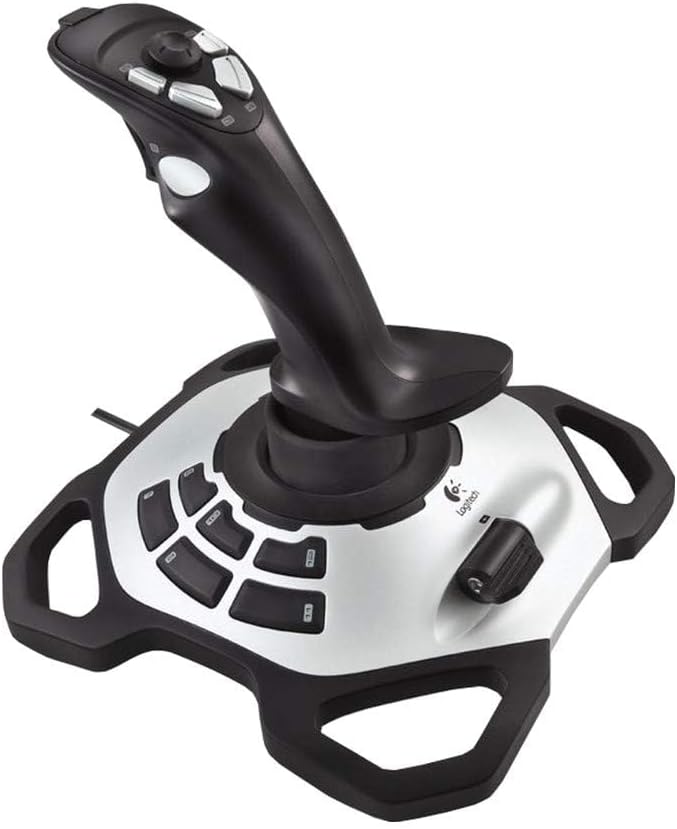
The Logitech Extreme 3D Pro earns a 4.2 star rating for its precision build. It excels at delivering accurate flight control on Windows 11. Its standout quality is the durable construction and refined stick feel.
We may earn a commission when you buy through this link, at no additional cost to you.
This fightstick offers smooth axis response and minimal drift. The ergonomic grip supports extended sessions. USB connection ensures seamless recognition across Windows versions.
It lacks an integrated throttle so users must buy separately. This adds to the total setup cost. The design remains ideal for dedicated cockpit setups.
Serious flight sim gamers should buy this for reliable accuracy. It avoids the limitations of cheaper models. Windows 11 users will appreciate the consistent performance.
Setup is straightforward with no drivers needed. The build quality stands up to intense use. This controller balances performance and value well.
Accurate axis response ensures smooth and responsive flight control.
Built to withstand rigorous daily use over long periods.
We may earn a commission when you buy through this link, at no additional cost to you.
The VOYEE PC Controller achieves a 4.3 star rating for familiar Xbox style ergonomics. It suits Windows 11 users preferring gamepad-style joysticks. Its standout quality is the responsive trigger and trigger sensitivity.
We may earn a commission when you buy through this link, at no additional cost to you.
Grip contours fit hands comfortably during extended use. Rumble feedback matches game events. The 7.2ft cord allows flexible seating positions.
This controller does not suit traditional flight sticks needing hat switches. It focuses on general gaming inputs. For arcade titles and shooter games it performs well.
Casual gamers should buy this for comfort and responsiveness. Windows 11 compatibility is seamless via USB. The cable length avoids desk clutter.
Setup requires no drivers on Windows 11. It offers a low-cost entry for Xbox fans. This controller delivers solid performance for everyday gaming.
Grip contours designed for comfort during long gaming sessions.
Upgraded triggers respond quickly without delay for precise actions.
We may earn a commission when you buy through this link, at no additional cost to you.
The Thrustmaster SimTask FarmStick holds a 4.3 star rating tailored to agricultural simulations. It excels at providing precise machinery control on Windows 11. Its standout quality is the Hall Effect magnetic sensors for durability.
We may earn a commission when you buy through this link, at no additional cost to you.
Up to 33 programmable inputs manage complex functions. A mini-stick and rocker switches add versatility. Ambidextrous design fits both left and right-handed users.
This model suits farming simulators more than flight games. A racing wheel is required for full cockpit setups. The sensors ensure long-term precision without drift.
Farming enthusiasts should buy this for specialized accuracy. Windows 11 users will find setup seamless. It supports dedicated sim builds with compatible hardware.
The Hall Effect technology reduces wear significantly. Controls are mapped to match tractor and loader functions. This controller delivers lifelike operation for construction and farming games.
Designed specifically for Farming Simulator 25 on PC and Xbox.
Hall Effect sensors eliminate drift for consistent long-term accuracy.
We may earn a commission when you buy through this link, at no additional cost to you.
The Logitech G X56 H.O.T.A.S earns a 4.0 star rating for premium flight control. It excels at delivering military-grade precision on Windows 11. Its standout quality is over 189 programmable controls for total customization.
We may earn a commission when you buy through this link, at no additional cost to you.
Mini analog sticks control pitch and yaw independently. Adjustable force via the spring system enhances tactile feedback. Twin throttles with lock add realism.
This setup demands significant desk space and budget. The complexity may overwhelm casual users. Still it remains unmatched for serious flight sim enthusiasts.
Professional pilots and hardcore gamers should buy this for depth. Windows 11 users benefit from dedicated USB ports. It is ideal for VR setups requiring precise navigation.
RGB lighting matches gaming rigs. Software allows per-game profiles for quick switching. This controller sets the bar for high-end simulation hardware.
Over 189 inputs let you control every function without a keyboard.
Hall-effect sensors and adjustable force ensure accurate and durable control.
We may earn a commission when you buy through this link, at no additional cost to you.
The Thrustmaster T.16000M FCS holds a 4.4 star rating for precision build. It excels at delivering consistent control on Windows 11. Its standout quality is the H.E.A.R.T technology preventing sensor degradation.
We may earn a commission when you buy through this link, at no additional cost to you.
Sixteen action buttons offer tactile braille-style feedback. Fully ambidextrous design supports left and right-handed pilots. TARGET software enables detailed mapping profiles.
This model lacks an integrated throttle. Users must purchase a separate unit for full HOTAS setups. Despite this it remains a top flight stick choice.
Serious sim pilots should buy this for precision reliability. Windows 11 support ensures seamless integration. It serves as a base for expandable cockpit builds.
Setup is easy with USB plug and play. The precision remains stable over years. This controller balances accuracy and value effectively.
H.E.A.R.T technology ensures precision levels do not decrease over time.
Removable components allow tailoring for left or right-handed use.
We may earn a commission when you buy through this link, at no additional cost to you.
Selecting the right joystick requires evaluating key factors beyond just the price tag. Below are the essential elements to consider before purchasing.
Ensure the joystick explicitly supports Windows 11. Some models list Windows 7 through 11 or note exceptions for Mac or console use. Checking the product description confirms seamless recognition.
Prioritize models with native plug and play to avoid driver issues.
Flight simulators demand throttles and rudder pedals. Farm sims focus on specialized axes and buttons for machinery. General gaming controllers may lack needed axes.
Choose a model aligned with your primary game genre.
Look for at least 8 to 12 programmable buttons for flight tasks. Some models support mapping software for profiles. Complex sims benefit from more inputs.
Select a layout with enough buttons to match your needs.
High-end sticks use hall-effect sensors to prevent drift. Entry models may wear faster. Check materials like metal or reinforced plastic.
Invest in durable construction to avoid replacements over time.
An ergonomic grip reduces strain during long sessions. Consider base stability with suction cups. Some models fit ambidextrous or right-handed users.
Prioritize comfort to enjoy extended play without fatigue.
Some models include throttles while others are standalone. Check if pedals or extra modules are sold separately. This impacts total cost.
Decide whether an all-in-one unit or modular system fits your budget.
USB connection should be stable with minimal lag. Some controllers offer 2 meter or longer cables. Ensure ports match your PC's available slots.
Verify connectivity requirements match your desk layout and ports.
Budget options start near $25 while premium sets exceed $200. Consider the long-term value and included features. Higher price often brings advanced sensors.
Set a realistic budget that balances features and cost.
Connect your joystick to an available USB port before launching games. Windows 11 should recognize the device automatically. Use system settings to confirm axes and buttons are mapped.
Calibrate the joystick via the manufacturer software or Windows game controller settings. Adjust thresholds and sensitivity for a comfortable response. Test buttons individually to verify functionality.
Keep the base and sticks clean using a soft dry cloth. Avoid spills or humidity to protect internal components. Store in a dry place when not in use to maintain sensor accuracy.
Most models listed support Windows 11 officially. Check product details for exceptions like Mac or console-only units. Plug and play recognition usually occurs on installation.
Many controllers work out of the box without extra drivers. Some advanced models require software for calibration or mapping. Visit the manufacturer site if issues arise.
Yes, dedicated flight sticks work well with sims like Microsoft Flight Simulator. Look for throttle integration and hall-effect sensors for best results. Ensure game supports controller input.
A joystick offers axes and hat switches for flight or arcade use. Gamepads focus on dual sticks and fewer axes. Joysticks provide more control for simulations.
Some models include throttles while others do not. Modular systems let you add throttles later. Check product descriptions for full kit details before purchase.
Open Control Panel or Settings then search for Game Controllers. Use the Properties tab to test and calibrate axes. Adjust sensitivity based on your gameplay experience.
Most joysticks work with VR setups requiring motion inputs. Check game support for controller integration. Ensure your PC has enough USB ports.
Most sellers provide 30 to 90-day return policies. Manufacturer warranties vary by brand and model. Check listings for specific coverage and repair options.
This guide reviewed ten top controllers ranging from budget-friendly options to premium systems. Each model offers distinct strengths for flight simulation and general gaming on Windows 11.
Prioritize accuracy and customization needs over raw price. A reliable controller enhances immersion and reduces input fatigue. Invest in features that match your most-played games.
Check current listings before purchase to confirm availability. Prices change regularly and deals may shift. Ensure compatibility with your setup before finalizing your choice.