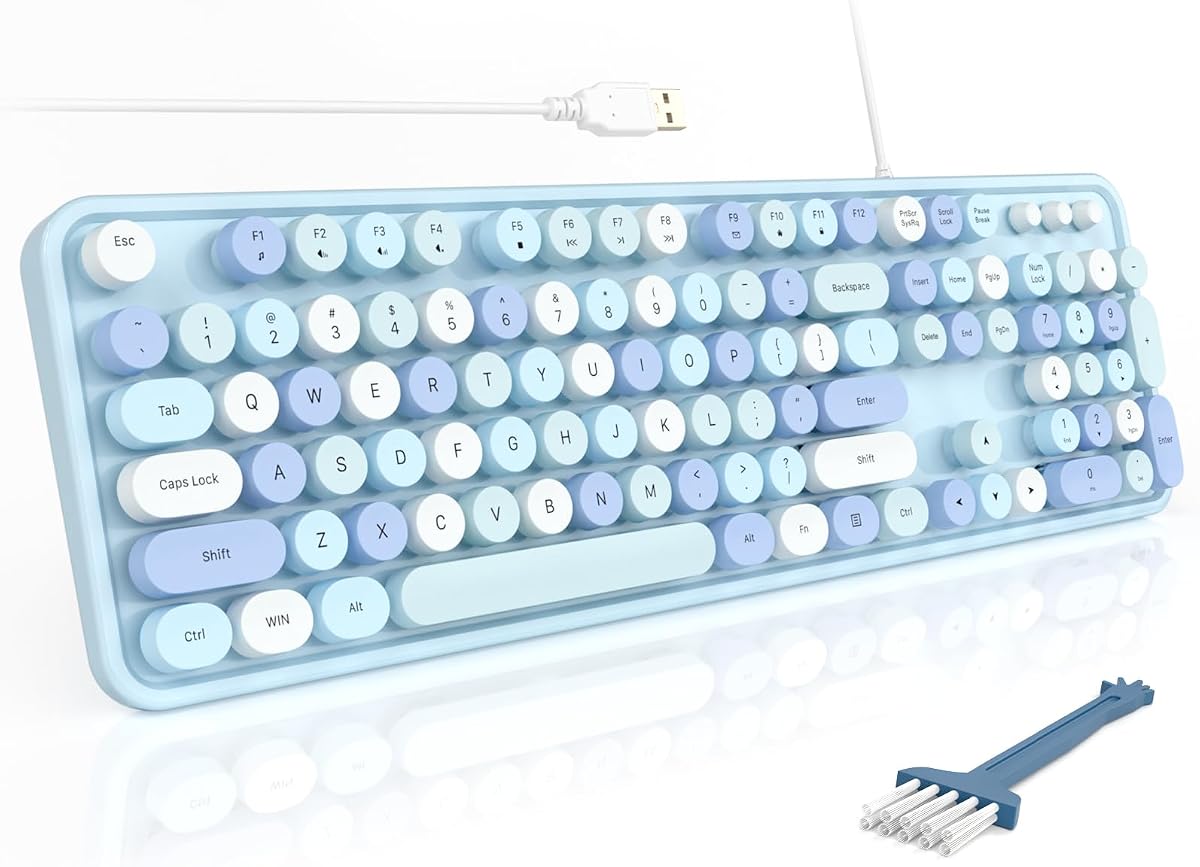
MOFII Computer Keyboards Wired
4.6Editor score
Retro typewriter styling
Foldable ergonomic stand
Plug and play USB
Discover the top colorful keyboards for 2026. We compare design, typing feel, connectivity, and durability across ten vibrant models to help you find your
Colorful keyboards transform your workspace into a vibrant personal studio. Whether you seek retro charm or modern neon flair, these devices blend function with artistic expression to elevate your daily computing experience.
We evaluated ten standout models based on build quality, typing comfort, connectivity stability, and aesthetic appeal. Each pick offers unique traits like wireless freedom, full-size layouts, or multimedia features for diverse user needs.
Every review highlights key strengths and honest trade-offs to guide your decision. Prices fluctuate regularly so check current listings before buying. Your perfect desk setup awaits with the right colorful keyboard choice today.
4.6Editor score

4.4Editor score

4.7Editor score
This side-by-side comparison highlights the core specifications and design features of all ten selected colorful keyboards to help you quickly identify the model that aligns with your workspace needs.


The KNOWSQT Wireless Keyboard and Mouse Combo leads our list with its striking Milk Tea design that turns any desk into a visual treat. With a solid 4.4 rating users appreciate the retro vibe combined with modern wireless reliability for daily productivity tasks.
We may earn a commission when you buy through this link, at no additional cost to you.
Its standout feature is the fully detachable keycaps which allow easy cleaning and maintenance without damaging the device. The 2.4GHz connection ensures stable performance across a 35 foot range while the automatic power saving mode extends battery life significantly for long term use.
While the wireless convenience is excellent remember you must replace batteries when the low indicator lights up which happens periodically. Also some modern Type C devices need adapters for the USB receiver adding slight setup complexity for newer laptops and tablets.
This combo is ideal for anyone wanting a colorful upgrade without sacrificing functionality or desk space. Its plug and play simplicity makes it perfect for offices and home setups needing a tidy wire-free workspace that also looks stylish.
The typewriter style floating buttons provide a quiet soft feel that reduces typing fatigue during long sessions while maintaining a unique aesthetic appeal.
Included cleaning tools and removable caps ensure the keyboard stays fresh and debris free so your setup looks great every day.
We may earn a commission when you buy through this link, at no additional cost to you.
The MOFII Computer Keyboards Wired offers a fantastic entry point into colorful typing setups with its bright Blue aesthetic and nostalgic round keycaps. Rated 4.6 it delivers reliable performance without the cost or complexity of wireless components making it a top budget choice.
We may earn a commission when you buy through this link, at no additional cost to you.
Its ergonomic foldable stands adjust the typing angle to reduce wrist strain during extended work hours. The wide compatibility ensures it works seamlessly across Windows Linux Chrome OS and even smart TVs without needing drivers or software installation.
The main trade-off is the fixed cable which might limit desk flexibility compared to wireless models. If you value simplicity and lower cost over mobility this keyboard handles daily typing and multimedia control tasks with quiet efficiency.
Choose this if you need a dependable stylish keyboard for a fixed workstation. Its sturdy build and easy cleaning features ensure long term value while keeping your desk looking vibrant and organized.
The wired connection eliminates battery anxiety and interference ensuring your input response remains consistent during critical work periods.
Included multimedia shortcuts and a full numpad make this a complete solution for office productivity without extra peripherals.
We may earn a commission when you buy through this link, at no additional cost to you.
This Retro Typewriter Keyboard combo stands out with an extended 98 foot wireless range that keeps your device usable even across large rooms. Its 4.4 rating reflects satisfaction with the comfortable round keycaps and quiet operation ideal for shared living spaces.
We may earn a commission when you buy through this link, at no additional cost to you.
The shared receiver design keeps your USB ports free while still connecting both keyboard and mouse simultaneously without extra software. Auto sleep mode ensures power savings so the included batteries last up to 36 months reducing replacement frequency significantly.
Batteries are not included which means initial setup requires a quick trip to the store or a stock of AAA and AA cells. The keycaps are fixed unlike some competitors so cleaning might require brushing rather than washing for thorough maintenance.
Best for users seeking a reliable clean wireless setup for home office tasks. Its simple plug and play nature and durable build make it a strong contender for anyone prioritizing connectivity and comfort over flashy design.
The powerful 2.4GHz signal maintains stability even with obstacles making it great for flexible desk arrangements or large home setups.
Both devices work from one receiver so you get full control without cluttering your ports with multiple dongles or cables.
We may earn a commission when you buy through this link, at no additional cost to you.
The UBOTIE Wireless Keyboards and Mouse Combo impresses with its Purple Rainbow design that resists fading even with daily exposure to light and use. Rated 4.2 it offers a nostalgic typewriter feel that appeals to users wanting both style and tactile feedback.
We may earn a commission when you buy through this link, at no additional cost to you.
Independent power switches on both keyboard and mouse allow you to turn them on or off individually to save battery when not in use. The wireless connection is stable up to 33 feet ensuring smooth operation without the clutter of wires on your desk.
While the aesthetic appeal is high the lower rating suggests occasional connectivity or battery inconsistencies for some users. Also the lack of backlighting means it works best in well lit environments rather than dim rooms or night shifts.
Perfect for students or home users wanting a fun reliable colorful setup. Its durability and simple design make it a practical choice for those who value long lasting style and straightforward wireless functionality.
Upgraded materials keep the rainbow colors fresh over time so your desk setup looks vibrant without frequent replacements.
Separate switches give you control over energy use helping you avoid accidental battery drain when one device sits idle.
We may earn a commission when you buy through this link, at no additional cost to you.
The MOFII Wireless Keyboard and Mouse Combo features a distinct Green colorful look paired with an ergonomic folding stand that adjusts your typing angle to reduce wrist strain. Rated 4.2 it balances comfort and style well for users who prioritize posture during long typing sessions.
We may earn a commission when you buy through this link, at no additional cost to you.
Its auto-sleep feature kicks in after 8 to 10 minutes of inactivity to extend battery life up to 18 months. The removable keycaps allow for simple dust removal keeping the device looking clean and functioning smoothly in shared or busy workspaces.
Battery life depends heavily on usage patterns so frequent typists might need to replace batteries sooner than expected. The single color option limits customization compared to other rainbow or multicolor models available in the same category.
Ideal for office workers or students seeking a comfortable wireless typing experience. Its solid build and ergonomic design ensure you stay productive while enjoying a vibrant aesthetic that brightens your daily workspace.
The adjustable folding stand lets you find the optimal angle to prevent wrist pain and fatigue during extended work hours.
A reliable wireless connection lets you move freely around your desk without cords getting in the way of your workflow.
We may earn a commission when you buy through this link, at no additional cost to you.
The FOPETT 2.4GHz Wireless Keyboard and Mouse Set offers exceptional peace of mind with a three-year warranty and splash resistant design that guards against spills and accidental liquid exposure. Rated 4.3 it combines reliability with a quiet operation suited for shared offices.
We may earn a commission when you buy through this link, at no additional cost to you.
The silent micro-motion technology ensures mouse clicks are nearly noiseless preventing distractions for others nearby. The laser-engraved keycaps stay clear and readable over time while the power-saving switch helps conserve battery life during periods of inactivity.
The keyboard lacks backlighting which limits usability in low light environments. Also while the color is pleasant it does not offer the same retro charm as typewriter style models which some users might find less engaging.
Perfect for businesses or families needing a durable and practical setup. Its robust build and long warranty make it a smart investment for high-use areas where reliability and quiet performance are essential daily requirements.
The waterproof conductive film allows liquid to flow out safely protecting the internal electronics from damage and extending device life.
Silent switches reduce noise pollution so you can work or play without disturbing colleagues or family members nearby.
We may earn a commission when you buy through this link, at no additional cost to you.
The Atelus Computer Wired Keyboard delivers a crisp satisfying sound with its retro round keycaps that mimic a classic typewriter feel. Rated 4.6 it is praised for its simple plug-and-play setup and vibrant Purple finish that adds a touch of personality to any workspace.
We may earn a commission when you buy through this link, at no additional cost to you.
Its detachable design allows for quick cleaning and maintenance without complex disassembly steps. The foldable stands let you adjust the tilt for a comfortable typing angle while the wide compatibility ensures it works with almost any modern PC or laptop.
Because it lacks multimedia keys and advanced features it might not satisfy power users who need quick access to volume or playback controls. Also the wired connection restricts your placement options compared to wireless alternatives in the same price range.
Best for basic home or office use where reliability and aesthetics matter most. Its simple design and solid construction make it a great gift option or upgrade for anyone needing a straightforward colorful typing tool.
The keycaps provide a sweet crisp knock that brings back nostalgic typing memories while ensuring a smooth tactile experience.
Works seamlessly with Windows 7 8 10 and later versions so you can integrate it into existing setups without extra tools.
We may earn a commission when you buy through this link, at no additional cost to you.
The Womier SK80 75% Keyboard stands apart with a colorful multimedia display screen that lets you show custom GIFs connection modes, and system status. Rated 4.7 it offers a premium mechanical experience with hot-swap sockets for easy switch customization without soldering.
We may earn a commission when you buy through this link, at no additional cost to you.
Its gasket mount design reduces typing noise and enhances stability so each keystroke feels immersive and satisfying. The extensive RGB lighting options allow you to personalize brightness and color to match your mood or gaming sessions perfectly.
Customization software is limited to Windows which restricts full feature access for macOS users. Also the Type-C connection requires a compatible port or adapter for older devices making setup slightly more complex than standard USB plugs.
Ideal for gamers and enthusiasts wanting a high-end customizable setup. Its unique screen and robust build deliver a superior tactile experience that transforms typing into a truly interactive and visually engaging activity.
The display shows real-time system info and custom images adding a dynamic visual layer to your desktop setup.
Hot-swappable sockets let you change switches freely to tailor the sound and feel to your personal preference.
We may earn a commission when you buy through this link, at no additional cost to you.
The UBOTIE Colorful Wireless Keyboard and Mouse Combo features a sleek mirror surface panel that reflects light and creates a modern elegant desktop aesthetic. Rated 4.3 it delivers a stylish typewriter inspired look that appeals to users valuing both comfort and visual flair.
We may earn a commission when you buy through this link, at no additional cost to you.
Its updated 2026 coating resists fading ensuring the multicolor design remains vibrant over time. The stable wireless chip version ensures quick response for typing and daily tasks without delays making it reliable for work and casual browsing sessions.
Some macOS users report minor shortcut key compatibility issues which can affect workflow efficiency on Apple devices. Also the battery life is standard so you might need to change batteries more frequently than with models featuring advanced power saving features.
Best for users wanting a stylish and modern wireless setup. Its unique mirror finish and easy maintenance make it a standout choice for anyone looking to add a touch of sophistication and color to their workspace.
The mirror-finish panel adds an elegant touch that sets your setup apart from standard matte keyboards.
Updated chip technology ensures fast input and smooth navigation so you stay productive without lag or disconnects.
We may earn a commission when you buy through this link, at no additional cost to you.
The HUO JI Wired Gaming Keyboard excels with its Rainbow LED backlit modes that provide excellent visibility in dark environments. Rated 4.4 it is built for durability with double-shot injection keycaps that prevent fading and offer strong tactile feedback for long gaming sessions.
We may earn a commission when you buy through this link, at no additional cost to you.
Its water-resistant triple protection design safeguards the internal components against spills and liquids ensuring the keyboard lasts longer in active setups. The ergonomic arc keycap shape reduces hand fatigue making it comfortable for extended typing or gaming hours.
This model focuses heavily on gaming which might limit its appeal for office users who prefer a more neutral design. Also the wired connection means you must manage cable placement on your desk to avoid clutter during intense use.
Perfect for gamers or night workers needing visibility and durability. Its colorful lighting and robust construction make it a practical choice for those who spend long hours at the computer in low-light conditions.
Adjustable RGB modes let you set the perfect brightness to see clearly without straining your eyes at night.
Water-resistant design means accidental spills won't immediately ruin the device giving you time to clean and recover.
We may earn a commission when you buy through this link, at no additional cost to you.
Choosing the right colorful keyboard involves balancing visual appeal with practical features to suit your workflow.
Wireless models offer clean setups but need batteries while wired ones ensure steady power without maintenance. Consider your workspace size and whether you prefer cable-free freedom or consistent plug-in power.
Pick wireless for minimal clutter and wired for uninterrupted reliability.
Retro round keycaps provide a nostalgic typewriter feel while standard square keys offer traditional ergonomics. Detachable keycaps are easier to clean and maintain over time.
Select detachable caps for easy maintenance and round ones for retro charm.
Fade-resistant coatings ensure colors stay vibrant even under light or daily wear. Check product details for coating quality if you want long-lasting color.
Prioritize fade-resistant finishes for setups with high light exposure.
Longer battery life reduces maintenance frequency but some models offer auto-sleep to conserve power. Check expected duration before buying to match usage patterns.
Look for models with power-saving modes for efficiency.
Ensure the keyboard supports your operating system especially if using macOS or older Windows versions. Some wireless adapters might need extra drivers.
Verify OS support before purchasing to avoid setup issues.
Adjustable stands help reduce wrist strain during long typing sessions. Contoured designs fit hands better and prevent fatigue.
Choose models with adjustable tilt for comfort.
Multimedia keys allow quick control of volume and playback while RGB lighting adds visual flair. Decide if these features justify the cost.
Prioritize extras you actually use regularly.
Longer warranties protect your investment against defects and failures. Check the seller's support response time.
Opt for longer warranty periods for peace of mind.
Connect the keyboard to your computer using USB or wireless receiver and ensure it is detected properly. For wireless models insert fresh batteries and power on before pairing.
Use the included brush to remove dust from between keycaps regularly and wipe surfaces with a damp cloth to maintain color vibrancy.
Enable power saving modes if available and store devices in dry environments to prevent moisture damage and extend battery life.
Most colorful keyboards operate plug and play without needing extra software. However models with RGB or display screens may require drivers for full customization features on supported systems.
Many models work with macOS but some multimedia keys might be limited. Always verify system compatibility in the product specs before purchasing to ensure full functionality.
Remove the keycaps carefully and wash them gently in warm water then dry completely before reattaching. Use the included brush for surface debris.
Modern wireless keyboards use stable 2.4GHz connections that offer lag-free performance. Battery life varies so check reviews for real-world usage.
High-quality coatings resist fading but prolonged direct sunlight may accelerate wear. Keep your setup away from direct sun to preserve color vibrancy.
Most colorful keyboards support gaming but dedicated gaming models offer faster response rates. Choose based on your primary usage needs.
These ten colorful keyboards offer diverse options from budget wired to premium wireless models. Each brings unique visual flair and functional traits to elevate your workspace.
Prioritize comfort and compatibility based on your daily tasks to ensure the device serves you well. Consider battery life and ergonomics for long-term satisfaction.
Always check current pricing and availability since offers change frequently. Finding the right colorful keyboard transforms your daily computing into a visually engaging experience.