
4K AI-Powered Conference Webcam
4.1Editor score
Zoom Certified for teams
120 degree wide angle
Physical lens cover included
This guide compares the top ten auto tracking conference camera models for professional meetings and live streaming in 2026 based on performance and value.
Modern meeting spaces require reliable video solutions that adapt to dynamic environments. An auto tracking conference camera uses intelligent software to follow speakers automatically. This technology ensures every participant stays framed without manual adjustments during calls.
We evaluated ten leading models based on image quality, tracking accuracy, and audio integration. Each system was assessed for ease of setup, compatibility with major platforms, and build quality. Our goal is to help you find the right tool for your room size.
Each pick highlights specific strengths like optical zoom range or microphone array capabilities. Real-world usage scenarios guide our recommendations for offices and churches. Prices vary by retailer so check current listings before purchasing to confirm availability.
4.1Editor score

4.8Editor score

4.6Editor score
The following table provides a side-by-side comparison of all ten models. It highlights key specifications such as zoom type, connectivity options, and tracking capabilities to help you differentiate between the options quickly.


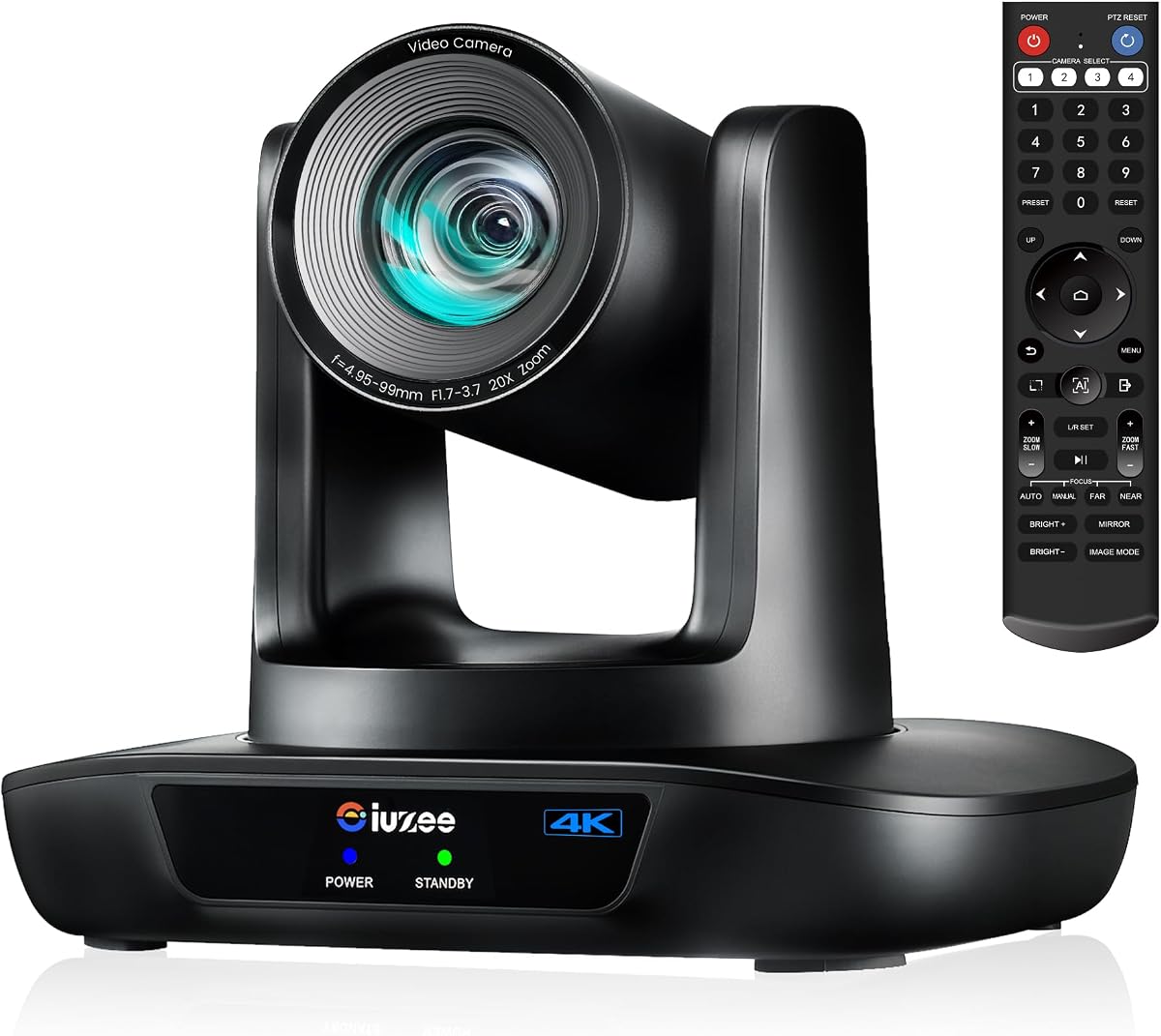


This system offers a complete solution for video conferencing with 4K resolution and AI tracking. It includes a PTZ camera and a wireless speakerphone for seamless integration. The rating of 4.8 reflects its reliability in professional settings.
We may earn a commission when you buy through this link, at no additional cost to you.
The camera features a 1/2.8 inch CMOS sensor delivering sharp imagery. Its AI algorithm tracks human faces and bodies effectively to keep speakers centered. You can connect via USB 3.0 or HDMI for flexible setup options.
While the speakerphone provides clear audio it relies on a battery that lasts around six hours. This may require charging during long days of meetings. The camera tracking is excellent but not perfect in low light.
Ideal for small to medium rooms this kit simplifies your conferencing needs. It works well for worship services and medical teleconsultations. You get professional quality without needing separate audio equipment.
The system uses advanced algorithms to detect faces and bodies accurately.
The included speakerphone ensures everyone is heard clearly during calls.
We may earn a commission when you buy through this link, at no additional cost to you.
Designed for small meeting spaces this webcam ensures every participant is visible. It features AI auto framing to keep the group in view during team discussions. The price makes it accessible for smaller businesses seeking quality video.
We may earn a commission when you buy through this link, at no additional cost to you.
The 120 degree field of view covers the entire room without repositioning. Dual microphones reduce background noise to capture voices clearly across the table. It works instantly with Zoom and Teams without needing drivers.
Tracking is functional but less advanced than premium PTZ models. It suits static meetings better than dynamic presentations where people move frequently. The lens cover adds a layer of security for shared office environments.
This is a great entry-level option for teams needing reliable video calls. It balances cost with essential features like high resolution and privacy. If you need basic framing this model fits the bill well.
The wide angle lens captures all attendees without extra setup.
Zoom certification ensures smooth integration with major conferencing tools.
We may earn a commission when you buy through this link, at no additional cost to you.
This system delivers smooth 60fps video which is great for dynamic content. It combines a PTZ camera with a speakerphone for a full room solution. The tracking locks onto speakers effectively to maintain focus during presentations.
We may earn a commission when you buy through this link, at no additional cost to you.
Outputting via HDMI or USB allows flexibility in how you connect to displays. The microphones pick up voices clearly within a reasonable range for meetings. Setup is straightforward for both laptops and smart TVs.
The main tradeoff is the resolution compared to 4K models available in this list. For general business meetings the clarity is sufficient. The speakerphone requires power which adds to the cable count.
Buy this if you prioritize smooth motion over maximum pixel count. It works well for training sessions where movement is frequent. The included speakerphone makes it a complete package for conferencing.
60fps video ensures smooth playback during active presentations.
Dual outputs let you connect to various devices easily.
We may earn a commission when you buy through this link, at no additional cost to you.
This camera adds gesture controls to standard AI tracking for hands-free operation. You can start or stop tracking with hand signals which is useful for presenters. The 120 degree view ensures the whole room is captured.
We may earn a commission when you buy through this link, at no additional cost to you.
Video quality is sharp at 4K resolution for professional broadcasts. The speakerphone provides full duplex audio so everyone can speak naturally. It integrates well with Zoom and OBS for streaming needs.
Using gestures might take practice to avoid accidental commands during calls. The camera does not have optical zoom which limits framing flexibility. However the digital zoom covers basic needs for closeups.
Choose this if you want interactive features for a dynamic meeting style. It suits training environments where speakers move around frequently. The remote offers an alternative to gestures for easier control.
Hand signals allow you to toggle tracking without touching a remote.
Compatible with streaming software like OBS for live events.
We may earn a commission when you buy through this link, at no additional cost to you.
With 20x optical zoom this camera captures distant details without losing quality. It is ideal for large churches or conference rooms where subjects vary. The system includes a wireless speakerphone for clear audio pickup.
We may earn a commission when you buy through this link, at no additional cost to you.
PoE support allows power and data over a single cable reducing clutter. The AI tracking follows pastors or presenters smoothly across the stage. Output options include HDMI and USB for flexible integration.
You will need a PoE switch to utilize the network power feature. The cost is higher than standard webcams but justified for large spaces. Tracking can be complex if multiple people are moving at once.
Invest in this model if you need to cover wide areas effectively. It handles stage lighting and movement well for streaming. The audio and video combine for a professional broadcast setup.
20x optical zoom maintains clarity when capturing distant subjects.
Power over Ethernet simplifies cabling for large rooms.
We may earn a commission when you buy through this link, at no additional cost to you.
This camera is designed for broadcast applications with robust IP streaming. It supports RTMP and SRT protocols to stream directly to platforms. The 20x optical zoom and wide angle lens capture every detail.
We may earn a commission when you buy through this link, at no additional cost to you.
You get simultaneous outputs via USB HDMI and LAN for versatile setups. Tracking adjusts automatically to frame speakers effectively. It works well for classrooms and conference events requiring high quality feeds.
Note that it lacks a built-in microphone so you need external audio. Setup requires configuring network settings which may challenge non-technical users. However the performance in low bandwidth environments is strong.
Perfect for dedicated streaming rooms this camera offers professional flexibility. It handles live feeds efficiently with stable performance. Pair it with a dedicated microphone for a complete broadcast solution.
Supports RTMP and SRT for direct live streaming.
Three output types let you connect to multiple devices.
We may earn a commission when you buy through this link, at no additional cost to you.
This model offers official NDI integration for seamless video workflows in studios. You can use it with vMix and OBS without extra hardware. It provides SDI output which is rare for this price range.
We may earn a commission when you buy through this link, at no additional cost to you.
The AI tracking keeps the subject framed even if the body is blocked. Video quality reaches 4K over HDMI for broadcast grade visuals. PoE support simplifies power delivery across long network cables.
Setting up NDI and SDI requires a compatible network infrastructure. It is not just for simple video calls but for production environments. The price reflects the advanced connectivity and build quality.
Buy this if you run a multi-camera production or broadcast setup. It ensures professional reliability for large events and services. The included license saves cost compared to adding NDI tools later.
Official license ensures stable streaming with major production software.
SDI allows long cable runs for professional installations.
We may earn a commission when you buy through this link, at no additional cost to you.
A robust PTZ camera designed for worship and educational streaming. It features 20x optical zoom to capture details from a distance. The interface allows you to control settings directly from a browser.
We may earn a commission when you buy through this link, at no additional cost to you.
You can adjust the field of view to suit group shots or solo presentations. Connectivity includes HDMI USB and PoE for versatile integration. It works seamlessly with OBS and Zoom for meetings.
The browser password defaults to admin which you should change for security. It does not include audio so plan for an external speaker system. The zoom quality is consistent across different focal lengths.
This is a reliable choice for institutions needing wide coverage. It balances professional features with ease of use. Ensure you have your audio needs covered before purchasing.
You can configure settings via a web browser without extra software.
20x optical zoom brings distant subjects into sharp focus.
We may earn a commission when you buy through this link, at no additional cost to you.
This system combines camera microphones and speakers into one unit. It reduces cable clutter and simplifies setup for medium to large rooms. The AI auto framing adjusts the view to include all participants.
We may earn a commission when you buy through this link, at no additional cost to you.
The 120 degree lens covers the full room without repositioning. Four microphones with noise reduction ensure clear voice pickup across the table. Dual speakers provide playback so external audio is not needed.
Digital zoom offers flexibility but lacks the detail of optical zoom. Connectivity is simplified but you may want more ports for complex setups. It works well for standard conference rooms.
Ideal for teams that want a complete solution in a single box. It balances video and audio quality effectively. Check current listings to confirm availability and specifications.
Built-in speakers and mics simplify room setup.
AI adjusts framing to keep everyone visible in group meetings.
We may earn a commission when you buy through this link, at no additional cost to you.
A compact all-in-one webcam suitable for individual desks. It offers 4K resolution and adjustable field of view for group calls. Voice tracking follows the active speaker to enhance clarity.
We may earn a commission when you buy through this link, at no additional cost to you.
You can switch between three FOV modes using the remote control. The privacy cover protects the lens when not in use. Speakers and mics are built in for a self-contained experience.
Tracking is limited compared to PTZ models but functional for desks. It works well for hybrid workers needing a quick setup. The digital zoom allows basic framing adjustments without moving the camera.
Buy this for personal workstations or small home offices. It provides essential features without occupying much space. Ideal for online classes and regular team meetings.
Three modes let you switch between wide and narrow views.
Focuses on the active speaker to improve audio clarity.
We may earn a commission when you buy through this link, at no additional cost to you.
Selecting the right camera requires understanding your room size and usage needs.
Optical zoom uses lenses to magnify the image without losing quality. Digital zoom crops the image which can reduce sharpness during calls. For large rooms always prioritize optical zoom for better detail.
Check the zoom ratio to ensure it meets your distance needs.
Most cameras support USB and HDMI for direct connections. Some advanced models offer LAN or PoE for network setups. Ensure the camera fits your existing infrastructure to avoid adapters.
Verify your computer or display ports before purchasing the device.
AI tracking uses algorithms to detect faces or bodies and follow them. Higher end models handle movement better in low light or crowds. Check if the camera supports multi-person framing for group meetings.
Test the tracking range to ensure it covers your speaking area.
Some systems include microphones and speakers while others do not. All-in-one kits simplify setup but may limit audio quality. Standalone cameras need external audio for clear conversations.
Look for noise cancellation to reduce background distractions.
Higher resolution like 4K provides sharper images for presentations. Frame rates affect how smooth motion appears during calls. Aim for 30fps or higher for standard video conferencing.
Ensure your software supports the camera output resolution.
Cameras may support wall mounting or desktop placement. Look for kits with mounts if you need to save desk space. Ceiling mounts are common for professional large room setups.
Check the package list for included mounting hardware.
Ensure the camera works with your conferencing software like Zoom or Teams. Some models have specific certifications for smoother operation. Check OS support for Windows or Mac environments.
Avoid devices that require complex drivers for simple setups.
Reliable vendors offer warranties and technical support. Check the length of the warranty to cover your investment. Support response time matters for resolving issues during critical meetings.
Read user reviews for real-world support experiences.
Begin by placing the camera on a stable surface at eye level. Connect it to your computer using the provided USB or HDMI cable. Install any required software if the camera does not work immediately.
Configure the tracking settings to match your room layout. Adjust the field of view to ensure all speakers are within range. Test the AI tracking by moving around to see how well it responds.
Clean the lens regularly with a soft cloth to maintain clarity. Avoid touching the lens with fingers to prevent smudges. Store the camera in a cool place when not in use to protect it from damage.
Most cameras perform best in well-lit rooms but high-end models use sensors to handle dimmer conditions. If your room is dark consider adding extra lighting for better tracking accuracy. Some AI systems can still detect movement in moderate light.
Yes most cameras in this guide are compatible with Zoom and Teams. Some models are specifically certified for smoother integration. Check the product details to confirm supported platforms before buying.
Optical zoom uses lenses to magnify the image maintaining quality. Digital zoom crops the image which can reduce resolution. Optical is better for capturing distant details clearly.
Not all cameras come with built-in mics. Some all-in-one systems include audio while others require external speakers. Check the specs to see if audio is included.
Many models support wall mounts using included brackets. Verify the package contents to ensure the mount is provided. Wall mounts help save desk space in conference rooms.
Firmware updates are usually available through the manufacturer website or software. Check the support page for the latest versions. Keeping firmware updated improves security and tracking performance.
The top picks highlight strong options for different needs from budget to premium. The Editor's Choice offers a balance of 4K quality and audio integration. The Premium option provides NDI support for professional broadcasts.
Consider your room size and budget when choosing between optical and digital zoom. Ensure you have the necessary connectivity and mounting options for your space. Good audio is just as important as video clarity.
Prices vary by retailer so check current listings to confirm availability. This guide is updated for November 2026 to reflect current models. Make sure to verify specs before purchasing to meet your needs.