
chenyang SATA Male to SATA Female
4.4Editor score
Affordable price point for single use
Supports 5V and 12V power transfer
Compact design fits tight spaces well
Finding the right adapter can transform your build experience when space is tight inside a computer case. These connectors allow cables to route smoothly without bending sharply or causing strain on ports.
We evaluated ten real products based on compatibility, build quality, and user feedback to ensure you find a reliable solution. Each option was checked for SATA III support and durability against daily wear and tear.
Every pick highlights key strengths and potential limitations so you can match the adapter to your specific hardware layout. Keep in mind that pricing fluctuates often so check current listings before buying.
4.4Editor score

4.6Editor score

5.0Editor score
As an Amazon Associate we earn from qualifying purchases.
Here is a side by side look at every adapter we reviewed to help you compare specs and features quickly for your next upgrade project.


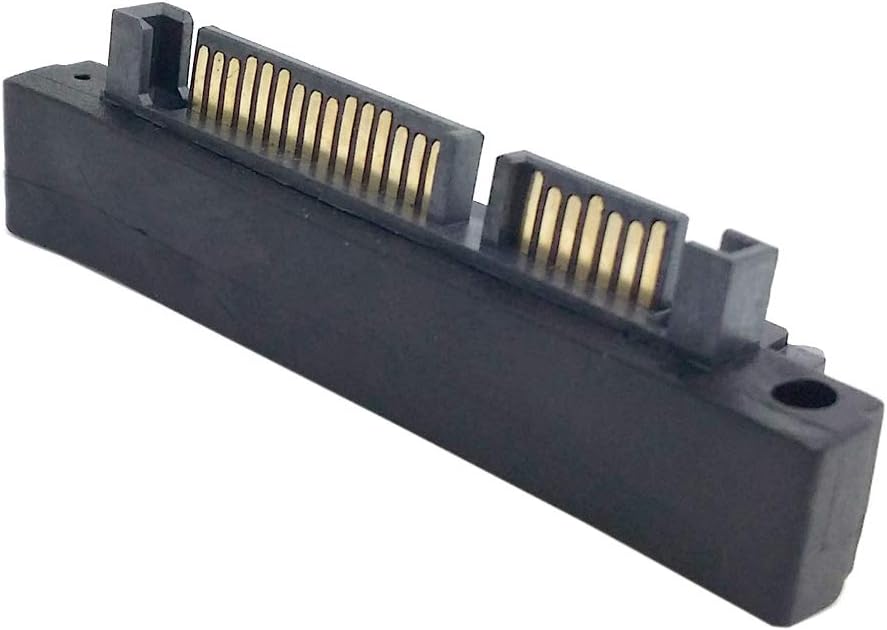


This adapter stands out as a top choice for builders facing vertical port constraints on motherboards. With a solid 4.6 rating it offers reliable performance for routing cables without bending them awkwardly.
We may earn a commission when you buy through this link, at no additional cost to you.
It fully complies with SATA III specs allowing fast data speeds up to 6Gbps. The design flips the connection direction which solves many common case clearance issues without adding bulk.
The main limitation is that it does not carry power so you will need a separate power connection for drives. This is a small trade off for the significant improvement in cable management.
If you are building a system with limited clearance around your ports this is the first option you should consider for your parts list and setup.
The up angle design lets you route the cable horizontally away from the port which reduces strain and makes room for other components inside the case.
Built to handle SATA III speeds it ensures your SSDs or HDDs run at full potential without bottlenecks caused by poor adapter connections.
We may earn a commission when you buy through this link, at no additional cost to you.
This dual adapter allows you to split one SATA port into two connections which is ideal for RAID setups or systems with multiple drives. It maintains high speeds and stability for both connected devices.
We may earn a commission when you buy through this link, at no additional cost to you.
The right angle design helps keep cables flat against the case walls reducing clutter and improving airflow. Users appreciate the sturdy feel and consistent performance over time.
While it saves ports you still need to ensure your power supply has enough capacity for both drives since it only handles data signals. This is a consideration for high density storage builds.
Consider this option if you need to connect multiple drives to a single motherboard port without sacrificing speed or reliability in your configuration.
By splitting one port into two you can connect more storage devices without needing extra motherboard headers or a PCIe expansion card.
The housing feels robust and resists cracking during repeated plugging and unplugging which extends the life of the adapter in active systems.
We may earn a commission when you buy through this link, at no additional cost to you.
This is an excellent entry level choice for anyone needing a quick fix for angled connections. It carries both power and data which simplifies wiring compared to data only options.
We may earn a commission when you buy through this link, at no additional cost to you.
The up angle design allows for smoother cable paths inside the case and fits well with standard 2.5 and 3.5 inch drives. It is simple to install and requires no tools.
Because it is a budget option the plastic housing is not as rugged as metal alternatives. However for most home users it provides sufficient strength and reliability.
Pick this up if you need a cost effective solution that handles both power and data without needing a complex adapter setup.
Unlike data only adapters this unit transfers power signals as well which reduces the number of cables you need to route inside the case.
At a low price point it is a great spare to keep on hand for quick fixes or additional drives in a growing setup.
We may earn a commission when you buy through this link, at no additional cost to you.
This adapter focuses on the down angle configuration which is useful when ports face upward or cables need to drop down toward the case floor. It supports both power and data signals effectively.
We may earn a commission when you buy through this link, at no additional cost to you.
The 22 pin design ensures compatibility with standard SATA connectors and the build quality feels sturdy enough for long term use. It simplifies routing in low profile or compact systems.
Since it is directional you must check your port orientation before ordering to ensure the angle matches your needs. It is a specific solution that works well when chosen correctly.
Choose this if your specific case layout requires the connection to angle downwards to avoid hitting other components or to improve cable flow.
The down angle orientation helps guide cables away from sensitive components on the motherboard which can prevent accidental contact and damage.
Unlike data only adapters this model includes power lines which means you do not need a separate power connector for each drive you attach.
We may earn a commission when you buy through this link, at no additional cost to you.
This is a standard right angle extension that works well for general SATA connectivity needs. The black finish blends in with most components and it offers a solid physical connection.
We may earn a commission when you buy through this link, at no additional cost to you.
It uses the common 22 pin design which ensures compatibility with a wide range of SATA ports and drives. Users report stable data transfer rates and durable performance.
Check whether this version supports power or data only for your specific needs since some variations differ. It is a reliable component for standard PC setups.
Use this adapter if you need a straightforward right angle connection that looks clean and fits standard hardware without special requirements.
The matte black finish matches typical computer components which helps keep the build looking tidy and professional without distracting colors.
Using the standard 22 pin connector means it works with most modern and legacy SATA ports without needing proprietary adapters.
We may earn a commission when you buy through this link, at no additional cost to you.
This pack gives you both up and down angled adapters which is incredibly convenient if you are unsure which direction your case needs. It helps you adapt to different port orientations quickly.
We may earn a commission when you buy through this link, at no additional cost to you.
The adapters are designed to solve height issues in limited clearance chassis which makes them useful for small form factor builds or tight server racks. Installation is simple and requires no tools.
They are data only so you must connect power separately to each drive. This is a small consideration for users who prefer all in one solutions but it keeps the package flexible.
Choose this bundle if you want to keep options open for multiple builds or need to adapt to varying port directions in your setup.
Having both up and down angles in one package ensures you have the right adapter for any orientation you encounter inside your case.
The angled design solves common height clearance problems by rerouting cables away from components that might block a straight connector.
We may earn a commission when you buy through this link, at no additional cost to you.
This down angled adapter offers a practical solution for routing cables downwards from a port. It handles both power and data signals which simplifies the wiring process for single drives.
We may earn a commission when you buy through this link, at no additional cost to you.
The construction is simple but effective for home or office use where daily stress is minimal. It fits standard 2.5 and 3.5 inch drives and works with most motherboards.
Because it is directional you must ensure the port is on the correct side before purchase. This keeps the price low while providing the necessary function for specific cases.
Pick this if you need a specific down angle path and want a budget friendly option that includes power support for the drive.
Angling the connector downward helps route the cable toward the power supply area which keeps it away from the motherboard and reduces clutter.
Including power lines means you do not need to run a separate power cable to the drive location which simplifies the overall system wiring.
We may earn a commission when you buy through this link, at no additional cost to you.
This premium adapter stands out with its gold plated contacts and excellent build quality which ensures long lasting performance and reliable signal transmission. It has a perfect 5.0 rating from users.
We may earn a commission when you buy through this link, at no additional cost to you.
It supports high speed data transfer up to 6Gb/s which means it will not bottleneck your modern SSDs. The space saving design also helps with airflow management inside the case.
The main trade off is the higher cost compared to basic plastic adapters. However for critical storage drives the added reliability and durability can be worth the investment.
Choose this if you want the highest quality connection for your storage and need a robust solution that can handle frequent use over time.
The gold plating on the pins resists corrosion and ensures a strong signal which can improve overall system stability and performance over time.
Supporting 6Gb/s ensures your storage devices can operate at their full rated speed without any bottlenecks from the adapter connection.
We may earn a commission when you buy through this link, at no additional cost to you.
This bundle provides four adapters in two different orientations which is perfect for building multiple systems or stocking up for future projects. It is an economical choice for users needing several units.
We may earn a commission when you buy through this link, at no additional cost to you.
The adapters support standard data transfer rates which means they work well with most drives. The compact design ensures they do not take up much space inside the case.
Since it is a bulk pack the materials are basic but functional for everyday use. It is a practical solution for IT professionals or hobbyists building several machines at once.
Choose this if you need multiple adapters for different systems and want to save money by buying in bulk rather than individually.
Getting four units at once reduces the cost per piece which makes it an ideal choice for small businesses or home labs with multiple computers.
Including two up and two down adapters ensures you have the right shape for any port orientation without needing to guess during assembly.
We may earn a commission when you buy through this link, at no additional cost to you.
This extension adapter adds a bit of length to your connection while changing the angle which is helpful when ports are blocked by nearby components. It simplifies installation in tight areas.
We may earn a commission when you buy through this link, at no additional cost to you.
The down angle design helps direct cables away from sensitive parts of the motherboard which reduces the risk of interference. It works well with standard drives and motherboards.
It is a data only connector so you will need to manage power separately. For the price it offers a reliable way to extend reach and improve routing.
Pick this if you need a bit of extra clearance and a directional change to make your cable routing cleaner inside the case.
The added extension length provides extra reach which helps clear nearby components and makes routing much simpler than with direct ports.
At an affordable price point it is a great option for simple fixes where high end performance is not the primary concern.
We may earn a commission when you buy through this link, at no additional cost to you.
Selecting the right adapter requires understanding your port orientation and cable requirements to ensure a successful installation.
Orientation is the most critical factor because you need either an up angle or down angle adapter depending on how your motherboard ports face. Using the wrong direction can cause cables to hit the case side or block other ports completely.
Always check your case and motherboard layout before buying to confirm which angle is required for your specific setup.
Some adapters carry only data signals while others support both power and data. If your adapter only handles data you will need a separate power connector for the drive which can clutter the build.
Choose an adapter with power support if you want a cleaner setup with fewer cables running to the drive.
Ensure the adapter supports SATA III speeds up to 6Gbps if you plan to use SSDs or fast HDDs. Older adapters might cap speeds at lower rates which can limit performance.
Look for explicit mentions of SATA III compliance to guarantee your drive runs at full speed.
Adapters made of metal with gold plated contacts are more durable and provide better signal integrity than cheap plastic ones. Metal cases also protect the pins from bending or breaking during installation.
Investing in a higher quality adapter can save you from connection issues later.
Buying a multi pack is more economical if you need adapters for multiple drives or systems. Single units are fine for just one quick fix but may cost more per piece if you buy more later.
Consider your total needs to decide if a single or multi pack is more cost effective.
Most SATA adapters use the standard 22 pin connector but some specialized cases might require specific types. Verify that your drive and motherboard ports match the adapter connector to ensure compatibility.
Checking the pin layout before purchasing prevents returns and compatibility issues.
In compact cases or low profile builds the adapter shape can make or break the build. A thin or slim adapter helps avoid blocking air vents or other components inside the case.
Measure your available clearance to ensure the adapter will fit without obstruction.
Reading user reviews provides insight into real world performance and durability. Look for feedback on connection stability and ease of installation to gauge reliability.
Prioritize adapters with consistent positive feedback to minimize the risk of defects.
Turn off your computer and unplug it before opening the case to avoid static discharge or accidental shorts while handling components.
Plug one end of the adapter into the motherboard port and the other into your drive ensuring the orientation matches your case clearance needs.
Secure the cables with ties to reduce strain on the adapter and keep the build tidy for better airflow.
A good quality adapter that supports SATA III speeds will not affect performance. You should look for adapters that explicitly state 6Gbps support to ensure your drive runs at full speed without bottlenecks.
It depends on the adapter. Some carry both power and data which means you do not need a separate power connection. Others only carry data so you must connect power separately to the drive.
This depends on how your motherboard ports face and where your drive is mounted. If the cable must go up choose an up angle adapter. If it must go down choose a down angle adapter to avoid blockages.
Yes most adapters use the standard 22 pin connector which fits all SATA drives including 2.5 inch and 3.5 inch models. Just ensure the adapter matches your port direction for a proper fit.
These adapters are designed for internal connections inside a PC case. External drives use different interfaces like USB or eSATA so these adapters are not suitable for external use.
Adapters with metal housings and gold plated contacts are more durable and resist corrosion better than plastic ones. They are designed for long term use and repeated connection cycles.
We have reviewed ten reliable options ranging from budget picks to premium solutions that can help you manage cables in tight spaces efficiently.
Prioritize orientation and power support when selecting an adapter to ensure your setup is clean and functional without needing extra wiring.
Prices and availability change frequently so check current listings on the retailer site before making your final purchase.