
ASUS ROG Raikiri II Pro PC Controller
4.0Editor score
8K Sampling Rate Speed
Hot-Swappable Joysticks
Full Color Display Screen
Finding the right controller for your gaming setup is crucial for performance and comfort. The ASUS ROG Ally Controller lineup offers versatile options designed to enhance your experience across PC and Xbox platforms with advanced features.
Our team evaluated ten distinct models based on connectivity, build quality, and customization options. We focused on real-world usability, battery life, and specific technologies like TMR joysticks and OLED displays to ensure accurate recommendations for every player.
Each pick highlights unique strengths ranging from budget-friendly mobile solutions to premium desktop gaming tools. Keep in mind that product availability and pricing fluctuate frequently, so verify the latest details before making your final purchase decision today.
4.0Editor score

3.9Editor score

4.1Editor score
As an Amazon Associate we earn from qualifying purchases.
This side-by-side comparison details the key specifications and features of each ASUS ROG controller model available today. Use this table to quickly identify which device matches your specific gaming needs and budget requirements.


The ASUS ROG Raikiri II stands out as a versatile gaming controller designed for both PC and Xbox users. With a rating of 3.9 stars, it delivers reliable performance through its tri-mode connectivity and advanced TMR joysticks that prevent drift effectively.
We may earn a commission when you buy through this link, at no additional cost to you.
Key strengths include the 1000Hz polling rate for ultra-low latency in wired and wireless modes. The four programmable rear buttons and dual-mode triggers allow for deep customization, ensuring you can tailor controls to specific games and play styles seamlessly.
While the controller is robust, users should note that extensive RGB usage can reduce battery life significantly below the rated 30 hours. Additionally, the price point sits higher than standard controllers, which may be a consideration for budget-conscious gamers.
This controller is ideal for enthusiasts who prioritize low latency and ergonomic comfort during long sessions. Its compatibility with the ROG Xbox Ally and certified Xbox support makes it a strong recommendation for hybrid PC console gaming setups.
The TMR joysticks consume less power than Hall Effect counterparts while offering exceptional accuracy and drift resistance for lasting reliability.
Switch seamlessly between short travel micro-switch triggers and full travel TMR triggers depending on the game genre or preference.
We may earn a commission when you buy through this link, at no additional cost to you.
The ASUS ROG Raikiri II Pro is built for competitive gamers seeking the highest performance available in a controller. With a 4.0 rating, it boasts an 8K sampling rate and hot-swappable joysticks that allow for easy maintenance and customization without tools.
We may earn a commission when you buy through this link, at no additional cost to you.
Its standout feature is the full color display which lets users customize profiles and calibrate joysticks directly on the device. Combined with a massive 79-hour battery life in 2.4GHz mode, it ensures you can game for days on a single charge without interruption.
However, the premium price tag reflects these advanced features and may not appeal to casual players. The complexity of managing multiple bumpers and button assignments might also overwhelm users looking for a simple plug-and-play experience.
For serious PC gamers who need every millisecond of response time and want total control over their hardware, this is the top tier choice. It pairs exceptionally well with high-end setups and offers future-proofing through its modular design.
ROG SpeedNova technology delivers an 8K sampling rate for extremely responsive control and reduced latency in wired and wireless modes.
Interchangeable joystick modules allow you to replace worn parts quickly while maintaining anti-drift function and power efficiency.
We may earn a commission when you buy through this link, at no additional cost to you.
The ASUS ROG Tessen offers an affordable entry point for mobile gamers seeking console-quality control on Android phones. Rated at 4.1 stars, it folds into a compact pocket-sized unit while securely holding devices for landscape play during extended gaming sessions.
We may earn a commission when you buy through this link, at no additional cost to you.
Its console-grade sticks and analog triggers provide fine-tuned accuracy for titles like Call of Duty and Minecraft. The 500Hz polling rate via wired USB-C ensures lightning-fast responsiveness without battery anxiety, thanks to the included 18W pass-through charging feature.
Since it is designed exclusively for mobile use, it lacks the versatility of desktop controllers. The lack of wireless connectivity means you must remain tethered to your phone, which might limit setup flexibility compared to Bluetooth alternatives.
This controller is perfect for mobile gamers who want a reliable hardware upgrade for their favorite apps. Its eco-friendly packaging that converts to a stand and durable aluminum bridges make it a thoughtful and sustainable choice for portable play.
Experience lightning-fast responsiveness with a 500Hz polling rate via wired USB C to eliminate input lag during competitive matches.
Easily folds for pocket-sized portability and securely holds your phone in landscape orientation while safeguarding the USB-C connector.
We may earn a commission when you buy through this link, at no additional cost to you.
The ASUS ROG Raikiri Pro integrates a built-in OLED display to enhance the gaming interface with customizable animations and status indicators. With a 3.9 rating, it offers tri-mode connectivity and an ESS DAC for immersive audio directly through the controller hardware.
We may earn a commission when you buy through this link, at no additional cost to you.
Its step triggers can be set to short or full-range modes, providing flexibility for different game types. The rear buttons are intuitive for on-the-fly sensitivity shifts, making it a strong choice for players who value tactile feedback and deep software customization.
Users should be aware that the OLED screen can impact battery life compared to standard controllers. Additionally, fully utilizing its features requires the Armoury Crate app, which adds a layer of software dependency for setup and adjustment.
This model is ideal for those who want a visually engaging controller experience alongside high-fidelity audio. It serves well as a versatile option for PC and Xbox setups where personalization and sound quality are top priorities.
Built-in ESS DAC provides immersive audio quality with a 3.5mm earphone jack and mute button for clear in-game sound.
Switch profiles on the fly via the OLED display to change settings without needing to access a computer screen constantly.
We may earn a commission when you buy through this link, at no additional cost to you.
The ASUS ROG Raikiri Pro Gaming Controller combines a built-in OLED display with versatile tri-mode connectivity to enhance user interaction. Rated at 3.4 stars, it offers up to 48 hours of battery life and premium audio support via an ESS DAC for clearer sound.
We may earn a commission when you buy through this link, at no additional cost to you.
Key features include selectable step triggers and intuitive rear controls that allow for quick adjustments during gameplay. The ability to view status indicators and switch profiles on the fly makes it a convenient tool for managing multiple gaming setups efficiently.
However, some users may find the lower rating indicates potential quality control or software issues that need monitoring. The power usage from the display might also require careful management to maximize the battery during long sessions.
This controller is best for players who value visual feedback and audio clarity over pure performance specs. It fits well in environments where quick status checks and profile changes are frequent and beneficial for gaming workflow.
Up to 48-hour battery life enables nonstop gaming sessions without needing frequent recharges between matches.
View status indicators and switch profiles on the fly without navigating through menus on your main display.
We may earn a commission when you buy through this link, at no additional cost to you.
This Renewed ASUS ROG Raikiri Pro offers the full feature set of the original controller including an OLED display and tri-mode connectivity. While it lacks a user rating, the product undergoes functionality testing and repackaging to ensure it works like new for users.
We may earn a commission when you buy through this link, at no additional cost to you.
The 90-day warranty provides additional peace of mind for buyers concerned about refurbished electronics. It retains all key specifications such as the 48-hour battery life and ESS DAC audio, making it a solid value alternative to buying brand new hardware.
The main drawback is the uncertainty of physical condition which can vary slightly between units. Additionally, availability for renewed items is often more limited than standard products, potentially affecting delivery times and purchase options.
This option is ideal for budget-conscious shoppers who want high-end features without paying full retail prices. It serves well for those who do not mind verified refurbished condition in exchange for significant savings on premium gaming accessories.
Tested and certified to look and work like new with limited to no signs of wear for reliable performance.
The product comes with a 90-day warranty to protect your investment in case of functionality issues.
We may earn a commission when you buy through this link, at no additional cost to you.
The ASUS ROG Xbox Ally is a handheld gaming system rather than a standalone controller, but it serves as an essential companion. With a 4.3 rating, it offers a full Xbox experience powered by an AMD Ryzen Z2 A processor and a 120Hz display for smooth motion.
We may earn a commission when you buy through this link, at no additional cost to you.
Its integration with Xbox Game Bar and Windows 11 ensures you can access your full library of PC and Xbox games seamlessly. The device includes a 512GB SSD and 16GB RAM, providing ample space and speed for multitasking and large game files.
While not a controller itself, its built-in ergonomics and weight distribution are designed for hours of play without fatigue. The main consideration is that it represents a significant investment compared to standalone accessory controllers for existing PCs or Xbox units.
This handheld is perfect for gamers who want a standalone console experience that runs PC games effortlessly. It is ideal for travel or living room use where plugging into a TV with its USB-C ports is preferred over a traditional console setup.
The Xbox gaming legacy meets ROG design allowing you to boot straight into the Xbox experience like a console.
From fast-paced battles to chill exploration, the 120Hz display with FreeSync Premium keeps every frame smooth and clear.
We may earn a commission when you buy through this link, at no additional cost to you.
This renewed version of the ASUS ROG Raikiri II retains the TMR joysticks and travel case found in the standard model. While it lacks a specific user rating, it is designed for Xbox X|S, Ally, and PC use with up to 50 hours of battery life.
We may earn a commission when you buy through this link, at no additional cost to you.
The inclusion of a travel case makes it ideal for portable gaming sessions. Web-based configuration allows for easy customization without needing heavy software, making it accessible for users who want a straightforward setup process for their device.
Buyers should be aware that renewed products can have minor cosmetic imperfections. Additionally, the battery life claim of 50 hours is a theoretical maximum that will depend heavily on usage patterns and peripheral connectivity.
This option is suitable for travelers and budget-conscious gamers who want premium features at a reduced cost. It serves well for those who value the included carrying case and want a certified refurbished item from a trusted brand.
Comes with a portable protective case that supports charging the controller while inside for easy portability.
Use web-based configuration tools to customize settings without installing complex desktop software applications.
We may earn a commission when you buy through this link, at no additional cost to you.
The CRKD NEO S offers a collectible design approach with Hall Effect thumbsticks that ensure no stick drift during use. Rated at 4.3 stars, it supports multiple devices including the Rog Ally and features swappable stick tops for personalization.
We may earn a commission when you buy through this link, at no additional cost to you.
Its Hall Effect triggers allow you to fine-tune the actuation point to achieve your perfect feel for different game genres. The wireless connection allows seamless switching between consoles and PCs, making it a versatile option for multi-platform gamers.
Since it is not an official ASUS controller, some features may differ from the native ecosystem. The collectible nature means availability might be limited and designs could sell out quickly for popular themes or colors.
This controller is ideal for those who value unique aesthetics alongside high-quality performance components. It serves well for gamers who want to customize the look of their device while maintaining reliable input accuracy across multiple platforms.
Hall Effect sensor thumbsticks means no stick drift while guaranteeing precise and responsive control over time.
Easily swappable stick tops allow for easy customization making your controller look and feel new for longer.
We may earn a commission when you buy through this link, at no additional cost to you.
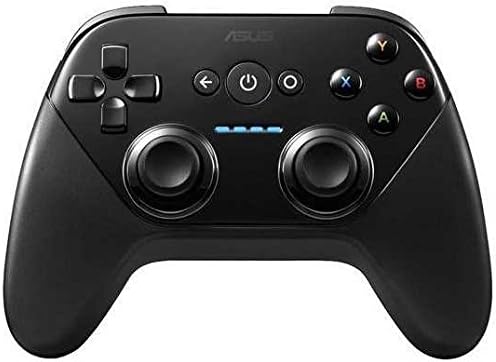
The ASUS TV500BG is a classic wireless controller designed for Android TV and PC gaming experiences. With a 4.2 rating, it is engineered for accurate control in Android TV games and offers simple wireless connectivity for a clutter-free setup.
We may earn a commission when you buy through this link, at no additional cost to you.
It supports Google Play Games for tracking progress and achievements across devices. The straightforward design focuses on functionality rather than extra features like RGB lighting or programmable buttons, making it easy to use for all ages.
While it lacks modern features like TMR sticks or OLED displays, it remains a solid option for casual play. Its price point is significantly lower than premium options, which is suitable for secondary setups or older devices.
This controller is perfect for living room setups where you want a reliable input device for streaming apps and games. It serves well for those who prioritize simple wireless functionality and affordability over high-end customization.
Gamepad for both Android Lollipop and Windows operating systems providing broad compatibility for various apps.
Track your progress and earn achievements across your Android phone, tablet, and TV seamlessly.
We may earn a commission when you buy through this link, at no additional cost to you.
Choosing the right controller involves understanding your primary platform and gameplay needs. This guide breaks down key factors to consider when selecting from the diverse ROG lineup available today.
Look for controllers that offer tri-mode connectivity including 2.4GHz RF Bluetooth and wired USB-C to ensure you can connect to PC Xbox or mobile devices easily. Wireless flexibility is critical if you switch between gaming environments frequently.
Prioritize models with low-latency RF technology to maintain responsiveness similar to wired connections while enjoying the freedom of wireless play.
TMR and Hall Effect joysticks are superior to traditional potentiometers because they prevent drift and reduce wear over time. Check if the controller supports anti-drift features for long-term reliability.
Hot-swappable joysticks allow you to replace worn modules easily without opening the device or voiding warranties.
Dual-mode or step triggers let you switch between short travel for shooters and full travel for racing games. Adjustability in dead zones helps fine-tune your control scheme for specific games.
Ensure the controller allows you to configure these settings via software or on-the-fly switches for better gameplay flexibility.
Battery capacity varies significantly between models some offering up to 79 hours while others may be shorter due to features like OLED displays. Check estimated playtimes with and without lighting active.
Fast charging or pass-through charging capabilities ensure you spend less time waiting for power and more time gaming.
Contoured grips and anti-slip materials are essential for comfort during extended sessions. Look for models designed with balanced weight distribution to reduce hand fatigue.
Adjustable handle shapes or ergonomic rear buttons should feel natural in your hand during long periods of play.
Verify that the controller is certified for your target system such as Xbox or PC to ensure full feature support. Some models work best with the ROG Ally ecosystem while others are universal.
Check for official Xbox certification if you plan to use the controller with Xbox consoles directly without compatibility issues.
Premium controllers often include features like OLED displays or ESS DACs for enhanced audio and visual feedback. Consider whether these extras justify the higher cost for your specific needs.
Software support via Armoury Crate is crucial for deep customization of button mapping and lighting effects.
Look for durable materials such as aluminum bridges or reinforced components that resist wear from daily use. Warranty coverage and refurbished options can also indicate manufacturer confidence.
Premium builds often withstand heavy usage better and provide a more stable feel during intense gaming scenarios.
Start by pairing your controller via 2.4GHz RF dongle or Bluetooth depending on your device preference. For PC users ensure the Armoury Crate software is installed to access advanced customization features and profile management.
Charge the controller fully before first use using the included USB-C cable or charging stand. Avoid draining the battery completely regularly to maintain health and longevity of the internal components.
Store the device in a protective case when not in use to prevent scratches and dust accumulation. Regularly clean the joysticks and buttons with a soft dry cloth to remove oils and debris that may affect performance.
Yes the ASUS ROG Raikiri II and Pro models are certified for Xbox via USB-C and 2.4GHz RF connections. They work seamlessly with Xbox Series X and S consoles for full controller functionality.
If your controller uses TMR joysticks drift is minimal but you can recalibrate via Armoury Crate. For older models consider replacing worn sticks or using software calibration tools provided by ASUS.
Absolutely the ROG Raikiri series works excellently on PC via USB-C or wireless modes. You can use Armoury Crate to map buttons for any PC game or platform you prefer to play.
The Pro version adds an OLED display for status info and often includes better battery life or higher sampling rates. It also features additional customization options like hot-swappable sticks on some models.
Most ASUS ROG controllers support wired USB-C charging and come with charging stands. Wireless charging is not standard on these models but you can charge while using the included cable.
Replacement joysticks are available for hot-swappable models like the Raikiri II Pro. You can order genuine parts directly from ASUS to ensure compatibility and maintain performance standards.
The ASUS ROG lineup provides exceptional options ranging from the versatile Raikiri II to the portable Tessen. Top picks include the Raikiri II for connectivity the Raikiri II Pro for premium features and the Tessen for mobile gaming needs.
Prioritize what matters most such as low latency battery life or OLED displays based on your primary gaming platform. Consider how many extra buttons and customization options you require to enhance your specific play style.
Prices and availability fluctuate frequently so verify the current details before making your final purchase decision today. Always check for renewed options to save money without sacrificing essential performance features for your setup.