
ASRock J4125M Intel Quad-Core Processor Motherboard
3.4Editor score
Quad-Core J4125 Processor
DDR4 Memory Support
Compact Micro ATX Design
This guide compares the top low power motherboards for 2026, evaluating efficiency, performance, connectivity, and build quality for NAS, home servers, and
Finding the right low power motherboard is essential for building energy efficient systems that run quietly and cool. These boards often feature specialized CPUs or chipsets designed to minimize electricity usage without sacrificing core functionality for daily tasks.
We evaluated ten top rated options based on thermal design, port availability, memory support, and networking capabilities. Each selection balances power efficiency with expandability to ensure your build meets specific needs while keeping energy bills low over time.
Each pick highlights unique strengths whether you need industrial durability, multi gigabit networking, or standard desktop flexibility. Note that availability and pricing change frequently so verify current stock and offers before placing your order.
3.4Editor score

4.4Editor score

4.5Editor score
This side by side comparison breaks down key specifications across all ten models to help you identify the best fit for your energy conscious computing requirements.




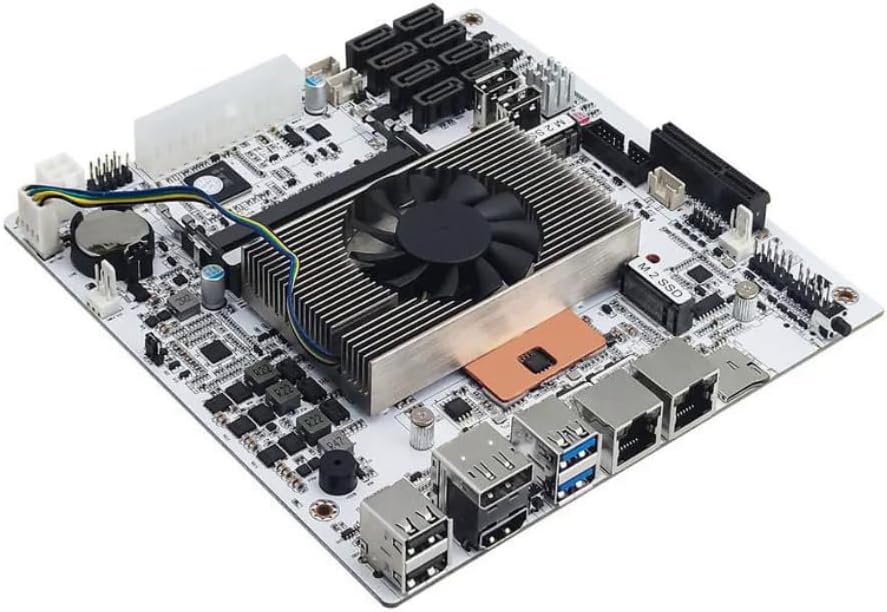
This industrial grade motherboard offers exceptional networking capabilities with four 2.5GbE ports making it ideal for NAS or firewall setups. It features the Celeron N5105 processor which balances performance and efficiency for continuous operation environments.
We may earn a commission when you buy through this link, at no additional cost to you.
The board supports dual 4K displays and includes six SATA ports alongside M.2 slots for flexible storage configurations. Built with high density moisture proof materials it ensures durability in demanding industrial or home server conditions.
Initial boot times may vary as the system reads memory information so patience is required during setup. Power delivery requires both 24PIN and 4PIN connectors which might add complexity for simpler builds.
Buy this if you need robust networking and storage expansion in a compact low power form factor. It is a strong choice for advanced users building dedicated network appliances or media servers.
Four 2.5GbE ports provide massive bandwidth for file transfers and network security applications without bottlenecks.
Dual 4K display support allows for multi-monitor setups useful for monitoring systems or media centers.
We may earn a commission when you buy through this link, at no additional cost to you.
This budget focused board uses the J1800 dual core processor providing reliable basic computing tasks without high energy demands. It is suitable for legacy systems or simple office workstations where cost is a primary factor.
We may earn a commission when you buy through this link, at no additional cost to you.
The board includes HDMI DVI and VGA ports ensuring compatibility with a wide range of older and newer monitors. USB 3.0 and USB 2.0 ports offer decent connectivity for peripherals without needing expansion cards.
Using DDR3 memory means you may need to source older RAM modules which can be less efficient than modern standards. The lack of NVMe support limits storage speed options for high throughput applications.
Consider this model if you are building a low cost entry level PC with minimal performance requirements. It remains a functional option for specific retro or light duty computing scenarios.
Multiple video outputs including VGA allow connection to older displays without adapters.
Seven total USB ports provide ample space for keyboards mice and external drives.
We may earn a commission when you buy through this link, at no additional cost to you.
This AM4 platform board delivers excellent performance efficiency with support for Ryzen 5000 and 3000 series CPUs. The 3+3 digital VRM ensures stable power delivery for efficient computing without excessive heat generation.
We may earn a commission when you buy through this link, at no additional cost to you.
It features PCIe 4.0 readiness allowing you to take advantage of high speed graphics cards and storage devices. Two M.2 slots offer fast NVMe storage options while retaining classic SATA support for additional drives.
The board lacks built-in wireless connectivity so users will need a separate card if they require Wi-Fi or Bluetooth. Audio capabilities are standard rather than premium focusing on core functionality over high fidelity sound.
Choose this board if you want a balanced build with modern features and reasonable power consumption. It is ideal for home offices or compact gaming systems needing expandability and longevity.
Support for multiple Ryzen generations allows easy upgrades without replacing the motherboard.
Advanced thermal armor helps keep the chipset cool during extended use.
We may earn a commission when you buy through this link, at no additional cost to you.
The PRO B550M-P is designed for users who need reliable performance with smart cooling solutions. It supports high speed memory overclocking up to 4400+ MT/s which enhances system responsiveness for multitasking.
We may earn a commission when you buy through this link, at no additional cost to you.
Frozr AI cooling automatically adjusts fan settings based on temperature readings reducing noise while maintaining efficiency. Core Boost technology optimizes power delivery to ensure stability during demanding workloads without spikes.
While it has a dedicated M.2 Gen4 slot for ultra fast storage the chipset relies on passive cooling which may limit heat dissipation in poorly ventilated cases. Audio is functional but lacks advanced enhancement features found on premium boards.
This model is best suited for builders prioritizing memory performance and intelligent thermal management. It works well for office PCs or light creative work where reliability is key.
Four DDR4 slots allow for large capacity builds and high speed overclocking.
Core Boost ensures voltage stability for consistent performance over time.
We may earn a commission when you buy through this link, at no additional cost to you.
This board offers a cost effective solution for basic computing tasks with the J4125 quad core processor. It is particularly suited for embedded applications or compact media centers requiring minimal power usage.
We may earn a commission when you buy through this link, at no additional cost to you.
The inclusion of M.2 Key E allows for easy WiFi integration which is rare on such budget friendly boards. DDR4 memory support provides a slight edge over older DDR3 boards in terms of performance and future proofing.
Review ratings suggest potential compatibility or feature limitations that might affect ease of use. The PCIe 2.0 slots limit expansion card speeds which could be a bottleneck for high throughput devices.
Opt for this if you need a small low cost board for light tasks like browsing or media playback. It is not recommended for heavy multitasking or modern gaming needs.
M.2 Key E slot supports Intel CNVi for integrated wireless connectivity.
Compact design fits into small enclosures ideal for space constrained setups.
We may earn a commission when you buy through this link, at no additional cost to you.
The B550M-HDV stands out with three video outputs including DVI-D and VGA alongside HDMI making it versatile for older displays. It supports high speed memory overclocking up to 4733+ MHz which improves system responsiveness.
We may earn a commission when you buy through this link, at no additional cost to you.
Stable power delivery is ensured by a 6 power phase design with premium chokes to handle supported processors effectively. Full Spike Protection guards ports against electrical surges adding a layer of safety for your peripherals.
While it offers a fast M.2 slot it does not support Gen4 speeds limiting NVMe drive potential compared to newer boards. The micro ATX layout is compact but might not fit all cases so check dimensions first.
This board is excellent for users needing legacy display support with modern performance capabilities. It is a strong candidate for budget conscious builds requiring stability and connectivity.
Three video ports ensure compatibility with virtually any monitor type you own.
Spike Protection safeguards your devices from unexpected power surges.
We may earn a commission when you buy through this link, at no additional cost to you.
This Mini-ITX board brings powerful features to a tiny footprint ideal for small form factor PCs. It supports Ryzen processors and includes integrated Intel Wi-Fi and Bluetooth which eliminates the need for extra cards.
We may earn a commission when you buy through this link, at no additional cost to you.
The direct 6 phase digital PWM with DrMOS provides efficient power delivery reducing heat generation in compact cases. Dual DDR4 slots are sufficient for most tasks but limit maximum RAM capacity compared to larger boards.
Lack of PCIe 4.0 support means you might not utilize the full speed of newer GPUs or SSDs. However for standard daily use this limitation is often negligible given the overall low power profile.
Choose this if you are building a compact home theater PC or desktop that needs wireless connectivity. It balances size and features well for enthusiasts who value efficiency and design.
Integrated Intel Wi-Fi and Bluetooth keep your system clutter free.
Digital PWM ensures stable power with minimal heat output.
We may earn a commission when you buy through this link, at no additional cost to you.
This motherboard offers premium connectivity with WiFi 6E support enabling low latency connections for streaming or gaming. It supports up to 128GB of DDR4 memory and offers eight USB 3.2 ports for extensive peripheral support.
We may earn a commission when you buy through this link, at no additional cost to you.
Hyper M.2 slots allow for Gen4 storage speeds ensuring your data access is fast enough for modern applications. The board also includes Nahimic audio for an immersive sound experience without needing external DACs.
While it carries a higher price tag the feature set justifies the cost for users needing top tier connectivity. BIOS settings might require some adjustment for optimal performance so patience during setup is advised.
Invest in this board if you need maximum USB ports and future proof wireless standards. It is an excellent choice for high performance home offices or media centers.
WiFi 6E utilizes the 6GHz band for reduced interference and faster speeds.
Hyper M.2 supports Gen4 speeds for rapid application loading times.
We may earn a commission when you buy through this link, at no additional cost to you.
This board is engineered for server environments featuring an 8-thread low power CPU that supports virtualization technologies. Dual 2.5GbE LAN ports provide network redundancy and high bandwidth essential for data heavy tasks.
We may earn a commission when you buy through this link, at no additional cost to you.
Eight SATA ports plus M.2 NVMe options allow for massive storage arrays ideal for home servers or backup solutions. The compact Mini-ITX design saves space while maintaining industrial grade durability for 24/7 operation.
Known sleep mode bugs may interrupt power savings features so continuous operation modes are often preferred. A specific cooling fan is included to manage heat effectively in tight chassis environments.
Select this model if you need a robust platform for virtualization or large scale storage. It is a reliable choice for DIY network administrators requiring high throughput and flexibility.
Dual 2.5GbE ports ensure fast and reliable data transfer for servers.
VT-x and VT-d support enable smooth operation of multiple virtual machines.
We may earn a commission when you buy through this link, at no additional cost to you.
This NAS focused board uses an 8th gen Core i5 processor delivering strong single core performance with low power draw. Eight SATA ports and two NVMe slots provide versatile storage options for growing data needs.
We may earn a commission when you buy through this link, at no additional cost to you.
Dual 2.5GbE LAN controllers support link aggregation ensuring high bandwidth for network storage transfers. A dedicated Clear CMOS button simplifies troubleshooting without needing to open the case or remove batteries.
Lack of sleep mode support limits power saving capabilities which might be a concern for always-on systems. No ratings are currently available so buyer discretion is advised based on user experience.
Opt for this if you are building a dedicated NAS with need balanced performance and efficiency. It is well suited for open source systems like TrueNAS or unraid requiring reliable hardware.
Eight SATA ports allow for large RAID arrays or backup storage.
Clear CMOS button makes resetting BIOS settings quick and easy.
We may earn a commission when you buy through this link, at no additional cost to you.
Choosing the right low power motherboard requires balancing efficiency with the features you actually need for your build.
The CPU integrated or socketed is the primary driver of power consumption. Look for TDP ratings below 35W to ensure minimal electricity use while still meeting performance needs.
Prioritize processors designed for embedded or mobile use as they offer better efficiency per watt than desktop parts.
Smaller boards like Mini-ITX often consume less power and fit compact cases but may have fewer expansion slots. Micro ATX boards offer more ports while still maintaining a small footprint.
Ensure your chosen case supports the board size to avoid installation issues that could compromise airflow and cooling.
Modern low power boards often include Gigabit or 2.5GbE ports essential for fast file transfers on NAS systems. Check if link aggregation is supported for higher combined bandwidth.
Integrated Wi-Fi is convenient but can draw extra power so wired connections might be better for static server setups.
SATA ports are standard for mechanical drives while M.2 slots provide speed for OS and cache drives. Ensure there are enough ports for your anticipated drive count.
NVMe support with PCIe 3.0 or 4.0 ensures future compatibility with faster storage technologies as prices drop.
Quality VRMs and chokes prevent voltage spikes and heat which are critical for systems running 24/7. Digital VRM designs often offer more precise control than analog ones.
Check power connectors; some boards require both 24PIN and 4PIN which adds complexity to your power supply requirements.
Passive cooling reduces noise and power usage but may limit performance under load. Active cooling fans increase power draw but improve longevity and stability.
Evaluate your case airflow and ambient temperature to decide between fanless and active cooling solutions.
PCIe slots allow adding extra cards like capture cards or network adapters. Ensure the slot version matches your needs as PCIe 3.0 is often enough for most add-ons.
USB header availability ensures you can connect front panel ports without external hubs which save power and clutter.
Prices vary widely based on features; define your must haves to avoid paying for unused capabilities. Longer warranties indicate manufacturer confidence in the board's durability.
Consider total cost of ownership including power savings over time rather than just the upfront price of the board.
Install the motherboard in a well ventilated case to allow heat to escape naturally which is critical for passive cooling models.
Connect all power requirements including the CPU 4PIN connector to prevent startup issues or potential hardware damage.
Update the BIOS regularly using manufacturer tools to ensure compatibility with newer CPUs and optimize power management settings.
Yes if you select models with modern PCIe interfaces and strong CPU support like Ryzen options. They may not support high end graphics cards but work well for light gaming or media centers.
Some models include integrated WiFi or Bluetooth but many budget options require an external card. Always check the specific product specs before purchasing to ensure connectivity needs are met.
With proper cooling and power these boards can last five to ten years. Industrial grade boards tend to last longer due to higher quality components and moisture resistant designs.
Socketed models allow CPU upgrades but limited power designs may not support high wattage parts. Integrated CPU boards do not allow upgrades but offer simpler and more efficient builds.
Most modern options use DDR4 for better efficiency and bandwidth compared to DDR3. Ensure the board supports the specific speed and type you plan to use for stability.
Many do include at least one M.2 slot for NVMe drives but check for PCIe 3.0 vs 4.0 support. Budget models may only support SATA SSDs through M.2 which limits speed.
The top picks highlight distinct advantages whether you need network heavy features or budget friendly simplicity. Each board delivers efficiency tailored to specific use cases like NAS or compact desktops.
Prioritize your most critical needs such as port count or CPU type to narrow down the options effectively. Balancing performance with power consumption ensures your system runs efficiently for years.
Always check current pricing and stock levels before buying as availability fluctuates frequently on online marketplaces.