
Silverstone Technology RM4A
3.6Editor score
Supports SSI-EEB motherboards
Supports 360mm radiators
Eight PCI expansion slots
Selecting the right chassis is critical for high-performance computing workloads. A 4U rackmount GPU server chassis provides the physical structure and airflow needed to house multiple accelerators safely.
We evaluated ten distinct models based on thermal design, motherboard support, drive bay flexibility, and build quality. Our analysis focuses on real-world compatibility with modern GPU architectures.
Each pick highlights specific strengths such as liquid cooling support or hot-swap capabilities. Prices fluctuate often so verify current listings before making your final procurement decision.
3.6Editor score

4.3Editor score

5.0Editor score
As an Amazon Associate we earn from qualifying purchases.
The following table compares key specifications across all ten selected models to help you identify the right fit for your rack deployment needs.


The SilverStone Technology RM44 is a top choice for users needing advanced thermal management. Its rating reflects strong user satisfaction with its build and cooling features.
We may earn a commission when you buy through this link, at no additional cost to you.
This chassis supports up to a 360mm radiator which is rare in 4U enclosures. It also includes a USB Type-C interface for modern connectivity needs.
While it carries a higher price tag the added cooling capacity justifies the cost for heavy workloads. The weight may require robust rack mounting solutions.
Buy this if you need liquid cooling in a compact 4U form factor. It is ideal for high-density compute nodes requiring superior thermal performance.
Support for 360mm radiators allows high-end CPUs to run cooler under sustained loads without throttling.
The inclusion of USB Type-C ensures compatibility with newer peripherals and management tools.
We may earn a commission when you buy through this link, at no additional cost to you.
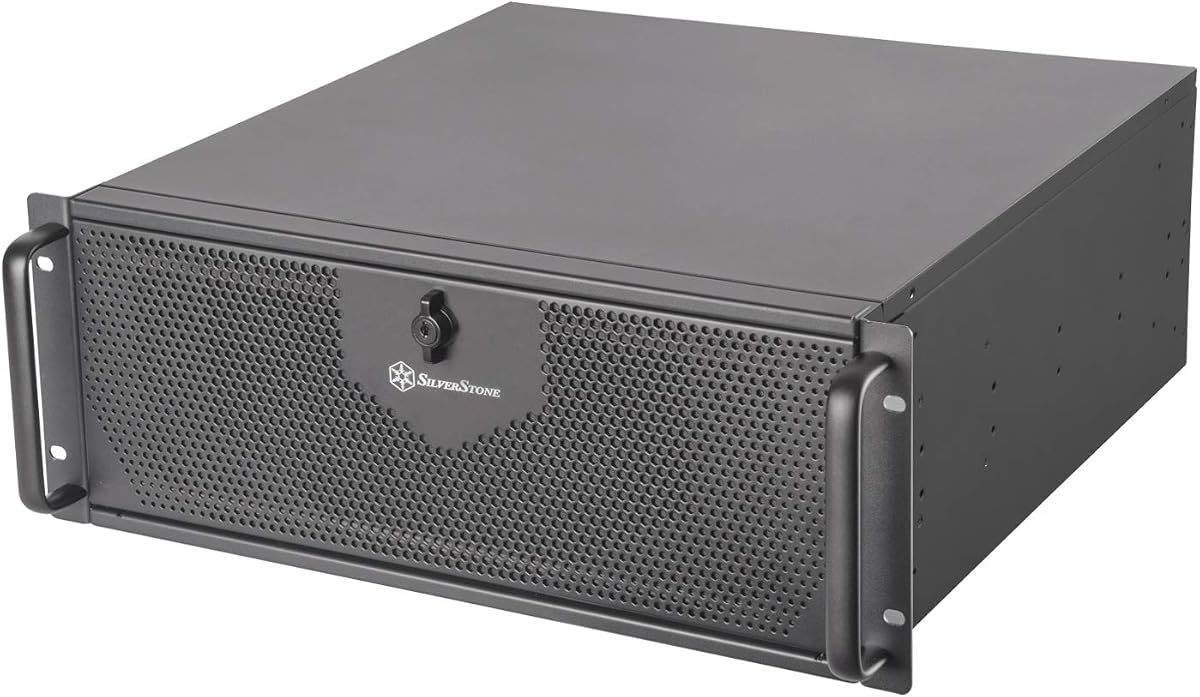
The Silverstone Technology RM4A offers great value for those needing basic 4U functionality. It is a solid entry-level chassis with key features like radiators support.
We may earn a commission when you buy through this link, at no additional cost to you.
It supports 360mm radiators which is impressive for its price class. The USB Type-C interface adds a modern touch to an otherwise standard build.
Some users report mixed experiences with assembly quality. Ensure you check mounting hole alignment before finalizing installation.
Consider this for smaller deployments where budget is a primary constraint. It delivers essential cooling without breaking the bank.
You get high-end cooling features at a mid-range price which makes it a cost-effective solution for startups.
The USB Type-C port allows for easy connection of management devices without needing adapters.
We may earn a commission when you buy through this link, at no additional cost to you.
This chassis is designed for storage-heavy workloads with 12 drive bays and NVMe support. It is a robust choice for servers needing massive data capacity.
We may earn a commission when you buy through this link, at no additional cost to you.
The inclusion of 2000W power modules ensures you have enough wattage for heavy GPUs. The 11 expansion slots allow for multiple add-on cards.
Shipping can take up to 40 days which might delay your deployment. Installation requires careful handling due to the heavy components.
Ideal for enterprise storage arrays where density is key. Verify stock availability before committing to long lead times.
With 12 bays you can configure mixed U.2 SAS and SATA drives for flexible storage tiers.
The included power modules provide ample wattage to run high TDP GPU cards simultaneously.
We may earn a commission when you buy through this link, at no additional cost to you.
This model is tailored for small businesses needing reliable hot-swap capabilities. It offers a user-friendly setup process with clear instructions.
We may earn a commission when you buy through this link, at no additional cost to you.
It supports EATX motherboards which gives you flexibility in processor choices. The included MiniSAS cables simplify initial cabling tasks.
Cooling relies on standard 120mm fans which may need upgrades for extreme loads. The limited expansion slots might constrain future growth.
Perfect for SMB data centers needing quick storage expansion. Check if your PSU matches the CRPS support requirements.
User-friendly design and included cables mean you can deploy this server quickly without external tools.
Support for multiple motherboard sizes ensures you can choose the exact performance level you need.
We may earn a commission when you buy through this link, at no additional cost to you.
Designed specifically for AI tasks this case supports up to four GPUs efficiently. It comes with a rail kit for easy rack installation.
We may earn a commission when you buy through this link, at no additional cost to you.
The 3x 120mm fans provide decent airflow for thermal-heavy components. The USB 3.2 Type-C port is a modern addition.
Some users find the fan configuration difficult to manage. The rating suggests there may be minor quality control issues.
Choose this if you need a ready-made solution for small GPU clusters. Ensure you have the space for the 4 GPU profile.
The internal layout is designed to fit four GPUs with enough clearance for airflow between them.
The rail kit is pre-installed saving you time during the initial mounting process in the rack.
We may earn a commission when you buy through this link, at no additional cost to you.
Supermicro is known for reliability and this chassis reflects that reputation. It holds a perfect rating among users.
We may earn a commission when you buy through this link, at no additional cost to you.
The 11 expansion slots allow for significant customization. Security features like the intrusion switch protect your hardware from tampering.
The chassis is heavy so ensure your rack rails are rated accordingly. It is priced higher than generic options.
Ideal for mission-critical environments where uptime is non-negotiable. Trust this model for enterprise deployments.
Physical security is enhanced by the intrusion switch which triggers alerts if the panel is opened.
With 11 slots you can add multiple RAID cards network cards or accelerators simultaneously.
We may earn a commission when you buy through this link, at no additional cost to you.
This barebone system supports the latest Intel Xeon processors and PCIe 5.0 GPUs. It is designed for high-end data center workloads.
We may earn a commission when you buy through this link, at no additional cost to you.
With 2700W power it can handle heavy GPU acceleration tasks. DDR5 DIMM support ensures fast memory bandwidth.
It is expensive and requires expert configuration for optimal performance. Not suitable for home labs.
Use this for enterprise clusters needing maximum throughput. Verify CPU compatibility before ordering.
Support for PCIe 5.0 ensures you can utilize the latest GPUs without bottlenecking.
Multiple power supplies ensure continuous operation even if one unit fails during operation.
We may earn a commission when you buy through this link, at no additional cost to you.
Similar to the Intel version this model supports AMD EPYC 9005 series processors. It offers a massive 3200W power capacity.
We may earn a commission when you buy through this link, at no additional cost to you.
It supports 16 hot-swap NVMe drives for fast storage access. The 3D V-Cache support can boost gaming or simulation tasks.
It is a significant investment meant for specialized environments. Configuration may need external RAID cards.
Best for companies heavily invested in the AMD ecosystem. Ensure your rack can handle the power requirements.
Designed specifically for AMD EPYC CPUs to maximize memory bandwidth and PCIe lanes.
High-efficiency power supplies reduce electrical costs even under heavy GPU workloads.
We may earn a commission when you buy through this link, at no additional cost to you.
This chassis is designed to handle high TDP GPUs up to 600W. It uses AMD EPYC processors for maximum scalability.
We may earn a commission when you buy through this link, at no additional cost to you.
The 24 DIMM slots allow massive memory configurations. Titanium rated power supplies ensure high efficiency under load.
Heat management can be challenging with such high-power components. Requires careful airflow planning.
Select this for AI clusters using top-tier accelerators. Verify your cooling capacity matches the TDP requirements.
Designed to keep even the hottest GPUs stable without thermal throttling during long training jobs.
24 DIMM slots allow you to expand memory to handle large datasets locally.
We may earn a commission when you buy through this link, at no additional cost to you.
This model stands out with its anti-theft lock design for secure facilities. It supports 240mm liquid cooling radiators.
We may earn a commission when you buy through this link, at no additional cost to you.
A high rating of 4.7 suggests strong satisfaction. The USB Type-C interface ensures modern connectivity.
It lacks high expansion counts compared to others. Not ideal for heavy GPU arrays.
Choose this for secure environments needing basic server stability. The lock design adds physical security value.
The anti-theft lock prevents unauthorized access to the internals which is critical for shared facilities.
Can be placed upright or horizontal giving you more flexibility in non-standard rack setups.
We may earn a commission when you buy through this link, at no additional cost to you.
Choosing the right chassis requires careful evaluation of thermal capacity expansion slots and physical dimensions.
Effective cooling is paramount for GPU servers. Look for cases with support for high-flow fans or liquid cooling radiators to prevent overheating during sustained workloads.
Prioritize models that support 360mm radiators or robust fan arrays to ensure stability.
Check if the chassis supports E-ATX or SSI-EEB motherboards. Larger boards require more space for PCIe slots which impacts GPU placement.
Ensure your chosen motherboard fits within the internal dimensions specified.
Determine if you need hot-swap bays or fixed drive cages. Data-heavy workloads benefit from the ability to swap drives without shutting down.
Select a model with the right mix of SATA SAS and NVMe support for your storage tier.
Count the number of full-height PCIe slots available. GPU arrays often need multiple slots plus network or RAID cards.
Ensure there are enough slots for your planned GPU count and accessories.
Verify PSU wattage and form factor support. High-end GPUs require substantial power often needing CRPS units or redundant modules.
Look for chassis that support high-wattage CRPS power supplies for reliability.
Good airflow relies on clean cable routing. Check for ample rear space and tie-down points to organize cabling effectively.
Prioritize models with ample cable routing paths to avoid airflow blockages.
Steel thickness and construction impact durability. A heavier chassis often indicates better build quality and vibration resistance.
Choose thick gauge steel to ensure long-term durability in a rack environment.
Ease of installation saves time. Look for included rail kits or slide mechanisms that simplify mounting.
Check if rails are included or if you need to buy them separately for your rack.
Begin by mounting the rail kit securely to the rack. Ensure the rails are level and aligned properly before sliding the chassis in.
Install the motherboard and PSU first securing all screws firmly. Connect the power cables to the PSU ensuring a secure fit.
Regularly dust the filters and fans to maintain optimal airflow. Monitor fan speeds via your management interface to detect issues early.
A good chassis must provide ample room for multiple GPUs support robust cooling like radiators or high-flow fans and offer secure mounting rails. It should also support E-ATX motherboards.
Many modern 4U cases like the Silverstone models support radiators up to 360mm. This helps manage the heat of high-performance GPUs more efficiently than air cooling.
Some models come with pre-installed rail kits while others may require separate purchase. Always check the product specs for included accessories before ordering.
E-ATX or SSI-EEB motherboards are common for GPU servers as they offer more PCIe slots. Ensure your chassis supports these larger form factors.
Yes certain models support up to 8 FHFL PCIe GPUs. Ensure the PSU has enough wattage and the cooling is sufficient for that density.
Use the included rails to slide the unit into the rack. Ensure all locking screws are tight to prevent movement or damage during maintenance.
CRPS units with at least 2000W are recommended for GPU setups. Redundant power supplies help maintain uptime during maintenance.
A 4U chassis provides vertical space for tall GPU cards and airflow. It offers a balance of size and density suitable for racks.
The SilverStone RM44 leads for liquid cooling while the Asrock models suit enterprise needs. The Silverstone RM4A offers value for tight budgets.
Prioritize thermal capacity and slot count based on your workload. Ensure your PSU and cooling match the GPU TDP requirements.
Always verify current pricing and stock status before purchase. Specifications and availability change frequently on Amazon.