
Logitech B100
4.6Editor score
Zero setup plug and play
Comfortable ambidextrous shape
High durability construction
This guide compares the top durable computer mouse models for longevity and performance. We review ten highly rated options for office and home use.
Finding a reliable peripheral is essential for productivity. A durable computer mouse ensures your work continues without interruptions caused by hardware failures. We selected top models built to last.
Our team analyzed customer feedback and technical specifications. We compared battery life, build quality, and ergonomic design. This list covers wireless and wired options for every budget.
Each pick highlights key strengths and potential trade-offs. Prices fluctuate frequently so check current listings before buying. Our goal is to help you find a long-lasting solution.
4.6Editor score

4.5Editor score

4.5Editor score
We compared ten durable mouse models side by side. The table below highlights key specs like connectivity, sensor type, and battery life to help you choose.





The Logitech M705 Marathon earns our Editor's Choice award for its exceptional battery life and robust construction. With a rating of 4.5 stars, users praise its ability to last up to three years on a single charge. This makes it a top choice for those seeking reliability.
We may earn a commission when you buy through this link, at no additional cost to you.
Its hyper-fast metal scroll wheel allows you to fly through long documents quickly. The laser grade tracking ensures smooth cursor control even on challenging surfaces like wood grain. The sculpted right hand shape guides your hand to a naturally comfortable position for all day use.
While the design is right hand only, the comfort it provides is worth the trade-off for most users. The Unifying receiver stays in your laptop reducing the worry of losing it. This feature ensures you do not have to unplug it when moving around.
If you need a mouse that works hard and lasts long, the M705 is the ideal pick. It is perfect for heavy document users and professionals who value uptime. We recommend it for anyone prioritizing battery life and durability above all else.
The M705 uses far less power than comparable wireless mice. This allows you to go up to three full years between battery changes.
Hyper-fast scrolling lets you fly through long documents with a single spin. The nearly frictionless metal scroll wheel makes navigation efficient.
We may earn a commission when you buy through this link, at no additional cost to you.
The Logitech B100 stands out as the Best Budget option with a 4.6 star rating. It offers a comfortable ambidextrous shape that feels good in either hand. This design ensures you feel more comfortable even at the end of the work day.
We may earn a commission when you buy through this link, at no additional cost to you.
With 800 DPI sensitivity you get precise cursor control for editing documents efficiently. Side-to-side scrolling plus zoom lets you instantly zoom in or out on spreadsheets. The zero setup flexible connectivity means it works right out of the box.
Built by Logitech the mouse experts it comes with the quality designed into over a billion mice. The flexible connectivity means you just plug it into your USB port. This simplicity is perfect for users who want reliability without complex setup.
If you need an affordable durable mouse for office or home use this is a smart buy. It avoids the cost of batteries by using a wired connection. We recommend it for those seeking value and long-term reliability.
The comfortable ambidextrous shape feels good in either hand. This ensures you feel comfortable even after long hours of work.
Zero setup flexible connectivity means you just plug it into your USB port. It works right out of the box without any drivers.
We may earn a commission when you buy through this link, at no additional cost to you.
The Logitech Signature M650 L offers premium features with a 4.5 star rating. It provides long hours of comfort thanks to its shape and soft thumb area. The SilentTouch technology allows you to enjoy 90 percent less click noise.
We may earn a commission when you buy through this link, at no additional cost to you.
Its SmartWheel lets you switch between super fast or precise scrolling instantly. This versatility is perfect for navigating long documents or web pages. The customizable side buttons can be set to your favorite shortcuts via software.
While it is larger than standard mice it is designed for larger hands to ensure an optimal fit. The battery lasts up to 24 months on a single AA battery. This longevity reduces waste and maintenance for long-term users.
For those seeking a quiet and comfortable premium experience this mouse is ideal. It works seamlessly across Windows macOS and other platforms. We recommend it for office environments where noise reduction is important.
SilentTouch technology reduces 90 percent of click noise. This allows you to work with focus without distracting sounds.
SmartWheel scrolling lets you switch between precision and speed. A simple flick changes modes for different tasks easily.
We may earn a commission when you buy through this link, at no additional cost to you.
The Logitech M185 is a compact choice with a 4.4 star rating. Its contoured shape feels great in either right or left hand. It is far superior to a touchpad for productivity on laptops.
We may earn a commission when you buy through this link, at no additional cost to you.
With up to 1 year of battery life you rarely need to change batteries. The tiny nano USB receiver provides a strong reliable connection. Plug and Play simplicity means you start working in seconds without setup.
While it is small and portable this may limit comfort for users with large hands. However it is suitable for tight workspaces or offices. The recycled plastic parts show a commitment to sustainability.
If you need a portable durable mouse for travel this is a great option. It is perfect for those who switch between laptops frequently. We recommend it for compact setups and on-the-go work.
The compact size and smooth cursor control make it suitable for tight workspaces. It is ideal for busy desktops and travel.
Up to 1 year battery life thanks to smart sleep mode. This ensures reliable performance without frequent battery changes.
We may earn a commission when you buy through this link, at no additional cost to you.
The Logitech M510 provides comfort hour after hour with a 4.6 star rating. Its contoured shape with soft rubber grips gives you support for effortless control. The broad palm area ensures you can relax your hand while working.
We may earn a commission when you buy through this link, at no additional cost to you.
You can scroll side-to-side through maps or music libraries easily. Two years of battery life practically eliminates the need to replace batteries. The Unifying receiver stays in your laptop so you never have to unplug it.
While side-to-side scrolling requires software on some systems the physical control is robust. The smart sleep mode extends battery life further. This mouse is designed for those who spend many hours at the computer.
If comfort is your priority this mouse is an excellent choice. It combines ergonomic design with long-term reliability. We recommend it for users who need a comfortable full-size mouse.
The contoured shape with soft rubber grips supports your hand all day. The broad palm area gives you support you need.
Two years of battery life with smart sleep mode. On/Off switch helps conserve power and reduce battery replacement needs.
We may earn a commission when you buy through this link, at no additional cost to you.
The TECKNET Wired Mouse offers high precision with a 4.5 star rating. Tru-Wave technology provides precise cursor control even on glass surfaces. Tested for over 6 million keystrokes it ensures responsive clicks and a longer lifespan.
We may earn a commission when you buy through this link, at no additional cost to you.
You get 4-level DPI settings to meet needs at home or office. The large easy-to-reach Back/Forward buttons make browsing websites a breeze. Plug and Play connectivity means no software or downloads are required.
Side buttons may not work on Mac systems which is a limitation for some users. However the ergonomic design and soft rubber grips conform to the hand well. The 5-foot USB cable offers ideal length for most desktop setups.
If you need a durable wired mouse with advanced features this is strong. It offers value and reliability for daily office tasks. We recommend it for Windows users wanting high precision.
Tested for over 6 million keystrokes to ensure longevity. This ensures responsive clicks and a longer lifespan for daily use.
Tru-Wave technology provides precise tracking on many surfaces. It works even on smooth surfaces with glass effectively.
We may earn a commission when you buy through this link, at no additional cost to you.
The Logitech Signature M550 L is designed for larger hands with a 4.5 star rating. Its contoured shape and soft thumb area provide long hours of comfort. The rubber side grips keep your hand snug and in place while you work.
We may earn a commission when you buy through this link, at no additional cost to you.
With SmartWheel scrolling you switch modes with a flick for precision or speed. SilentTouch technology allows you to enjoy 90 percent less click noise. This makes it ideal for open workspaces where focus is key.
While the large size may not fit everyone it ensures comfort for those with bigger hands. The 24 month battery life means you work on a single AA battery. This reduces waste and frequent maintenance needs.
If you have larger hands this mouse offers the optimal fit. It combines comfort with quiet operation and reliability. We recommend it for professionals needing a comfortable full-size wireless mouse.
SilentTouch technology reduces 90 percent of click noise. This allows you to enjoy focus while working at the office.
SmartWheel lets you switch modes with a flick. You get precision for documents and fast scrolling for long web pages.
We may earn a commission when you buy through this link, at no additional cost to you.
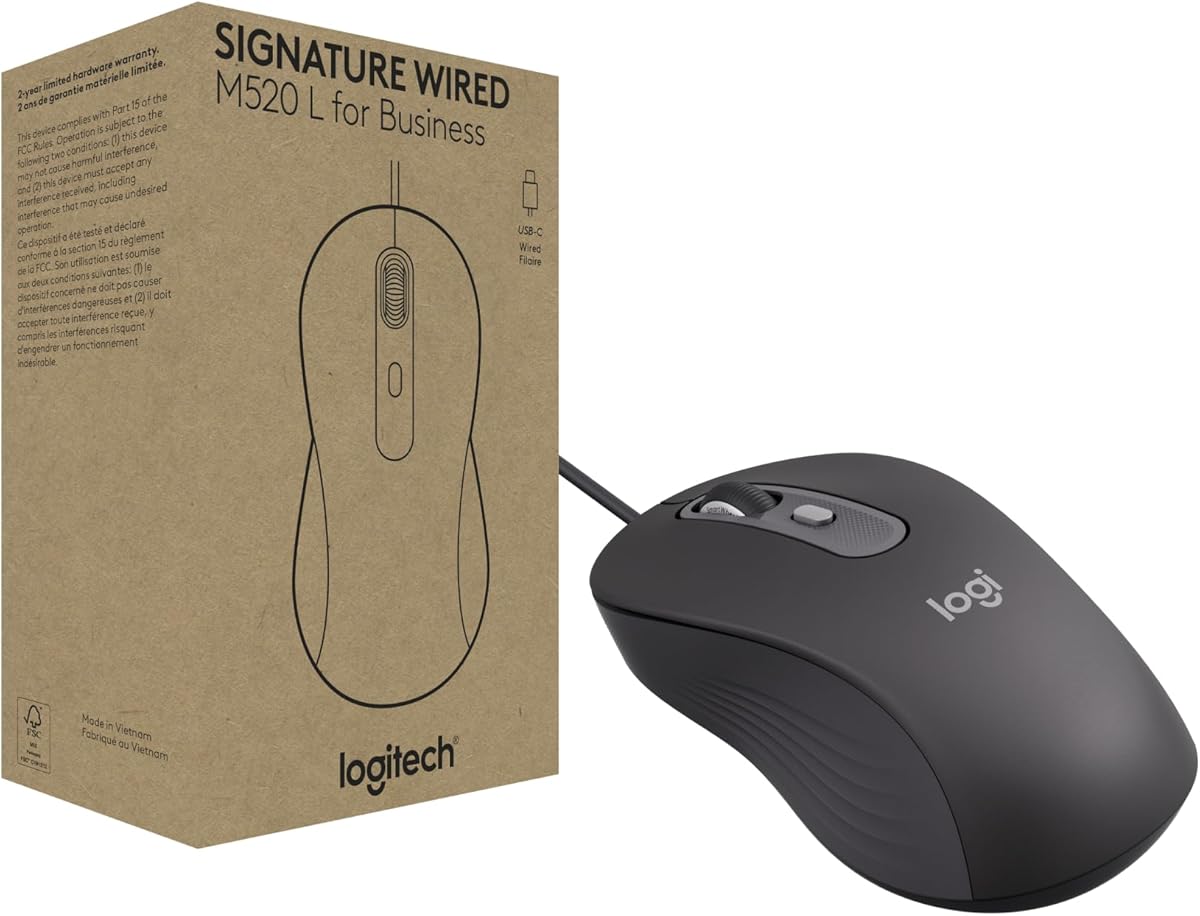
The Logitech Signature M520 L is designed for organizations with a 4.3 star rating. It features a USB-C wired connection for banking and medical industries. SmartWheel scrolling allows switching between super fast or precise line-by-line scrolling.
We may earn a commission when you buy through this link, at no additional cost to you.
Silent Touch technology reduces 90% of clicking noise promoting focus in open workspaces. The ambidextrous design fits both left-handed and right-handed users nicely. It works with Windows macOS ChromeOS and Linux for easy deployment.
While it is a wired mouse it offers power efficiency consuming 68% less energy. The plastic parts include a minimum of 73% post consumer recycled plastic. This supports sustainability goals for corporate environments.
If you need a business-ready durable mouse this is a solid choice. It prioritizes quiet operation and cross-platform compatibility. We recommend it for organizations seeking sustainable ergonomic solutions.
Silent Touch technology reduces 90% of clicking noise. This promotes focus in open workspaces effectively.
Plastic parts include a minimum of 73% post consumer recycled plastic. This supports environmental goals for business users.
We may earn a commission when you buy through this link, at no additional cost to you.
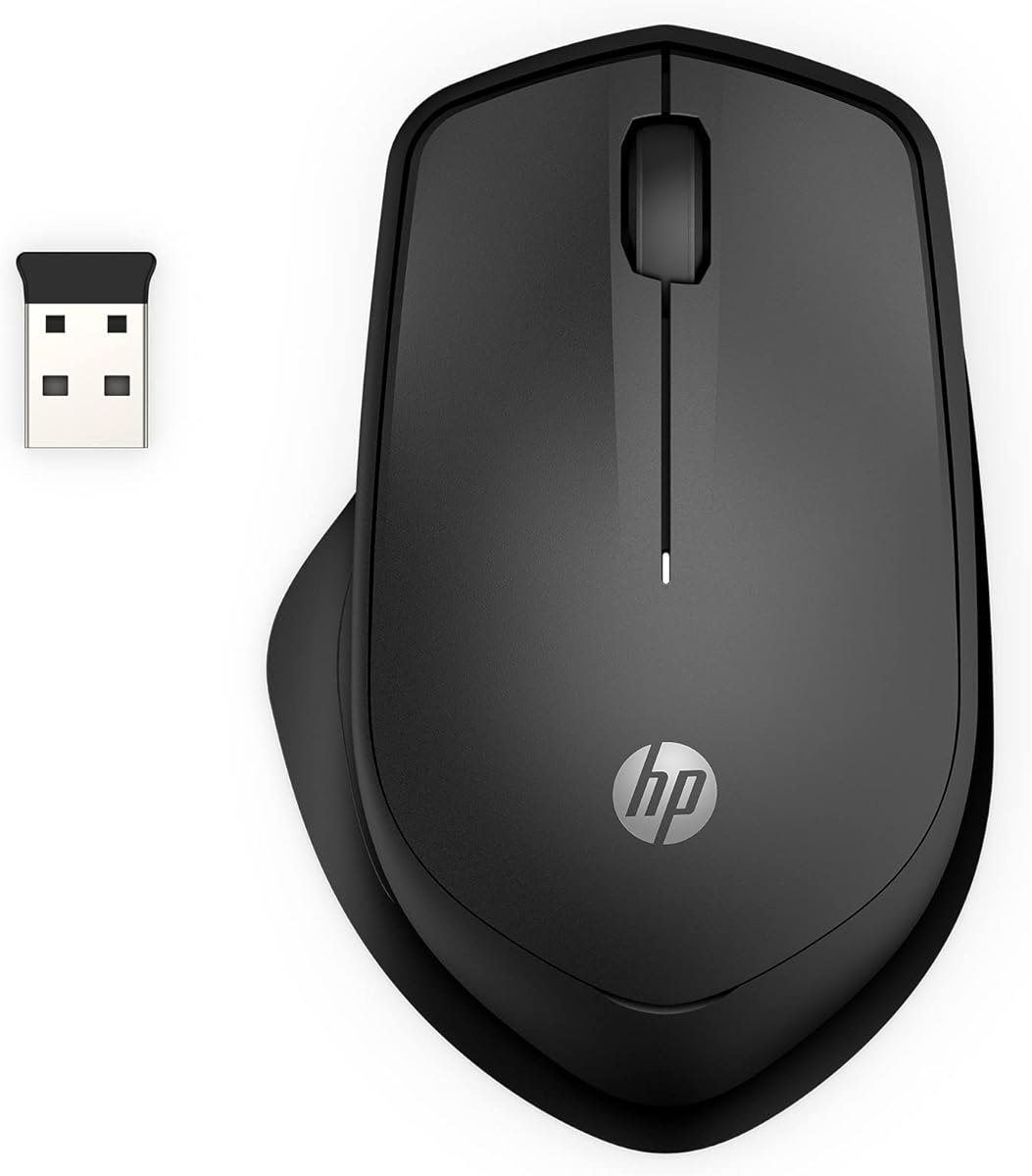
The HP 280 Silent offers quiet clicks with a 4.5 star rating. Up to 90% noise reduction on buttons gives you the same satisfying click feel without distracting sound. This makes it ideal for working in any space.
We may earn a commission when you buy through this link, at no additional cost to you.
The ergonomic right-handed design with 3-button navigation makes for comfortable use. Multi-surface technology delivers smooth lag-free movement on virtually any surface. 1600 DPI optical sensor provides reliable tracking and pinpoint accuracy.
While it is right-handed only the comfort it provides is excellent for long use. The nano receiver stores inside the mouse for easy portability. Up to 18 months of use on one AA battery ensures dependability.
If quiet operation is key this mouse is a strong contender. It is perfect for home offices where noise is a concern. We recommend it for users seeking a reliable and silent wireless mouse.
Up to 90% noise reduction on buttons. This gives you satisfying click feel without distracting sound.
Multi-surface technology delivers smooth movement on virtually any surface. No need for a mouse pad here.
We may earn a commission when you buy through this link, at no additional cost to you.
The Acer Wireless Mouse offers versatility with a 4.3 star rating. It features 5 adjustable DPI levels from 800 to 4000. This gives you the flexibility to choose the right sensitivity for detailed design work.
We may earn a commission when you buy through this link, at no additional cost to you.
Rated for up to 10 million clicks this mouse offers exceptional long-term durability. Forward and backward buttons help you quickly navigate web pages and files. The visual indicator light shows current DPI setting and low battery warnings.
While battery is not included the power saving features extend life. The mouse enters standby after 10 minutes of inactivity and wakes with clicks. This saves power and makes it ideal for travel.
If you need adjustable sensitivity this is a great option. It offers value for home and office users seeking efficiency. We recommend it for those needing flexible DPI options.
5 adjustable DPI levels give flexibility for detailed design work. This boosts efficiency across different tasks easily.
Rated for up to 10 million clicks. This offers exceptional long-term durability for daily use.
We may earn a commission when you buy through this link, at no additional cost to you.
Choosing a durable mouse requires considering build quality ergonomics and features. This guide helps you understand key factors for longevity.
Look for materials tested for high click counts such as millions of clicks. Durable mice often feature robust plastics or metal parts that resist wear over time. Check if the manufacturer offers a warranty to cover potential hardware failures.
Ensure the shape fits your hand size and usage style. An ergonomic design prevents strain during long sessions and reduces injury risk. Consider if you need an ambidextrous or right-handed design based on your preference.
Wireless models should offer long battery life to minimize interruptions. Some mice last years on a single battery while others require frequent charging. Look for smart sleep modes that conserve power when the mouse is idle.
Decide between wired and wireless based on your setup. Wired mice avoid battery issues but limit range. Wireless mice offer freedom but need reliable connections like Bluetooth or 2.4GHz dongles.
Check if the mouse works with your operating system. Some mice have drivers for Windows and macOS while others are plug and play. Ensure support for multiple platforms if you switch between devices.
Consider if you need standard or hyper-fast scrolling. Hyper-fast wheels allow you to fly through long documents quickly. Precision wheels are better for detailed work like spreadsheets or design.
For quiet environments look for silent click technology. These mice reduce noise significantly without sacrificing feel. This is essential for shared offices or home use where sound may distract others.
High DPI sensors provide precise cursor control across surfaces. Laser tracking works better on glossy or wood-grain tables. Optical sensors are generally sufficient for standard office tasks.
Clean the sensor lens regularly with a soft cloth to prevent tracking issues. Dust buildup can interfere with the optical tracking performance.
Adjust DPI settings if your model supports them to match your screen resolution. Higher DPI allows for faster movement across large screens.
Store wireless mice with battery covers on to prevent accidental power drain. This extends battery life when not in use for long periods.
Check for manufacturers testing claims such as millions of keystrokes. A long warranty period also indicates confidence in build quality. Look for robust materials like reinforced plastics or metal components.
Wireless mice can last years if they have good battery management. Wired mice avoid battery wear but the cable may fray over time. Durability depends on build quality rather than connection type.
Most durable mice last two to five years with regular use. Heavy use may reduce this to one or two years. Proper care such as cleaning helps extend the lifespan significantly.
Not necessarily but they often have robust construction for comfort. Some ergonomic models have reinforced shells to protect internal electronics. Durability is more about materials than shape.
Use the on/off switch when not in use. Ensure you use recommended battery types. Keep the receiver in your computer so you do not lose it and need replacements.
No modern silent mice use standard switches with dampeners. These switches are built to withstand millions of clicks. Durability is similar to regular models.
Most mice do not allow user replacement of scroll wheels. If it fails you may need a new unit. High-end models sometimes offer better service support.
High quality plastics with reinforced stress points work well. Some premium models use rubber grips that resist tearing. Avoid cheap thin plastics that crack easily.
Our top picks include the Logitech M705 Marathon and M650 L for their reliability and features. The B100 offers an affordable entry point for durable daily use.
Prioritize battery life and ergonomic fit based on your work habits. Choose models with proven durability tests for long-term satisfaction.
Prices may vary so check current listings before purchasing to get the best value. We hope this guide helps you find the perfect mouse.