
DKE Desktop Computer Power Switch
4.7Editor score
Two meter long cable
Lightweight portable design
Standard ATX compatibility
External PC power buttons provide a convenient solution for users whose desktop towers are hidden or placed in hard-to-reach locations. These switches allow you to control your system from a desk or accessible surface without needing to crawl under furniture.
We compared ten highly rated external power switches based on cable length, connector compatibility, build quality, and additional features like USB hubs or wireless remotes. Each product was evaluated for ease of installation and reliability with standard ATX motherboards.
Each pick below highlights specific strengths such as budget value, premium materials, or unique functionalities like integrated USB ports. Prices and availability change frequently so please verify current details on the manufacturer pages before purchasing any item.
4.7Editor score

4.6Editor score

4.5Editor score
As an Amazon Associate we earn from qualifying purchases.
The following table offers a side-by-side comparison of all ten external PC power buttons reviewed in this guide. We highlight key specifications such as cable length, included accessories, and unique features to help you find the perfect match for your desktop setup.

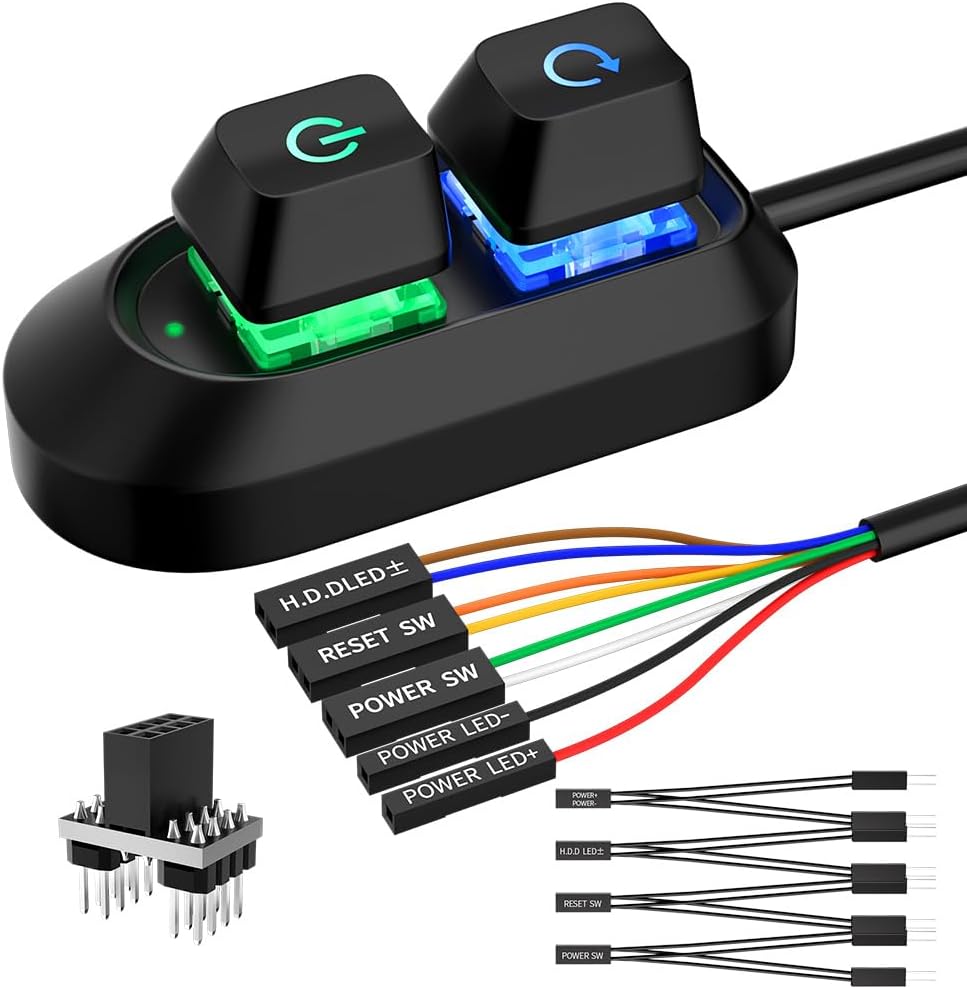


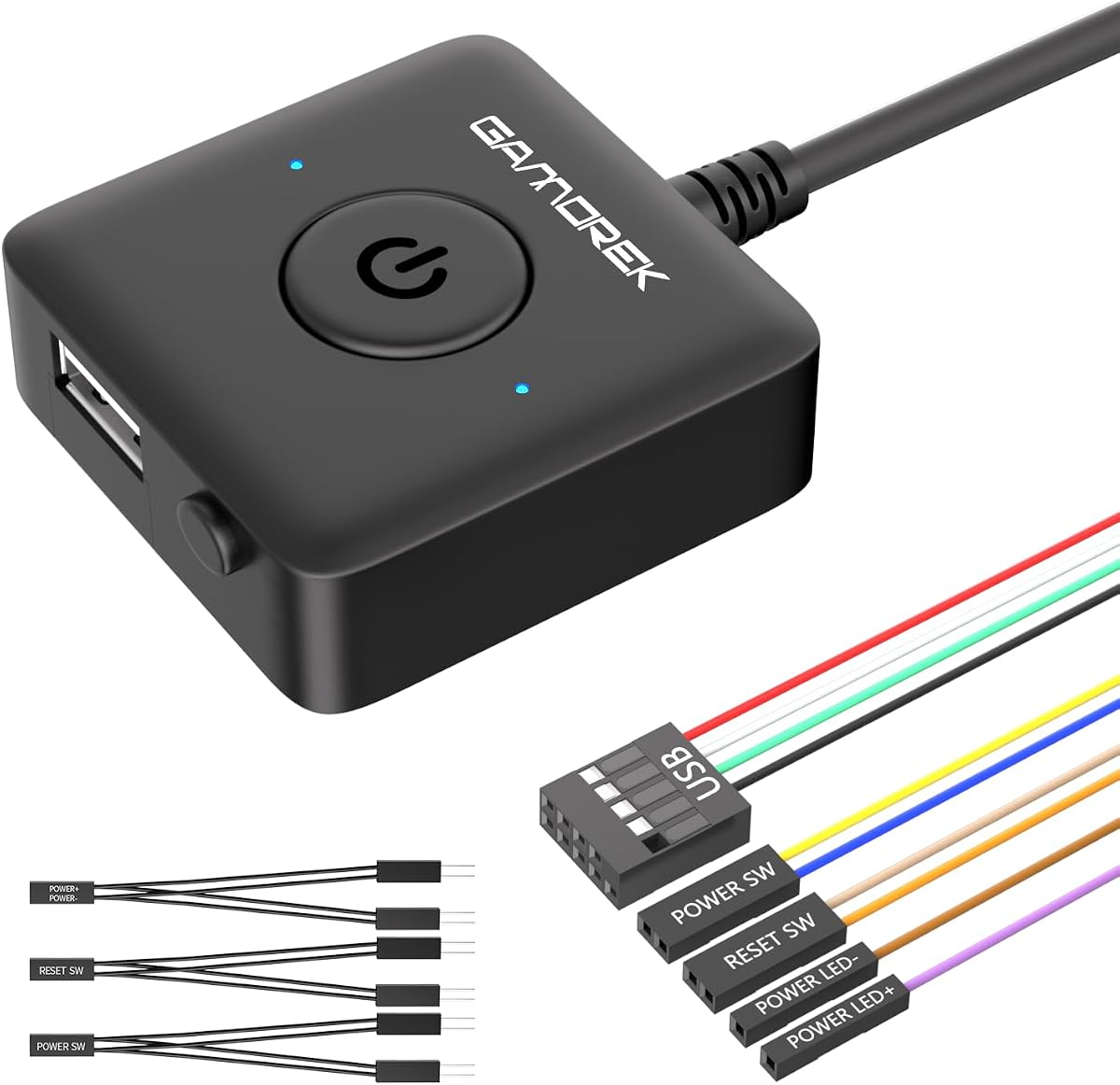


This external desktop PC power switch stands out for its impressive 118-inch extension cable which offers unmatched flexibility for routing power control to any location. With a 4.6 rating from verified users it delivers reliable performance for home users and custom chassis builders alike.
We may earn a commission when you buy through this link, at no additional cost to you.
The standard 4-pin connector ensures compatibility with 90 percent of ATX motherboards making setup straightforward. The included 1 to 2 splitter board allows the power button to work alongside your original supply which is ideal for test benches or dual-system control setups.
While the black finish is universal it may not blend perfectly with white or colorful cases. The splitter adds a step to installation but the included adhesive stickers eliminate the need for drilling keeping your chassis intact during upgrades.
If you need maximum reach and dual-switch capability this model provides the best balance of features and ease of use. It is the top recommendation for anyone wanting to control their PC from a desk or remote surface without compromising functionality.
The 118-inch cable allows you to place the switch on a desk while the PC remains hidden under a table or inside a cabinet.
The included splitter ensures you retain the original case button while adding the external one for added convenience.
We may earn a commission when you buy through this link, at no additional cost to you.
This wireless remote PC power switch offers the ultimate convenience by allowing you to power your desktop on or off from up to 50 feet away. It is exclusively designed for desktop computers and uses a PCIe receiver board to connect directly to your motherboard.
We may earn a commission when you buy through this link, at no additional cost to you.
The intuitive one-button operation lets you short press to power on or long press for five seconds to safely initiate shutdown. Engineered for reliable performance in busy environments it resists interference from other devices for consistent operation without lag.
The need for a PCIe slot may limit compatibility with compact cases lacking expansion slots. The price is higher than wired models but the convenience of wireless control justifies the cost for users who prioritize accessibility above all else.
If you want to avoid crawling under desks and need a sleek solution this wireless option is the best choice. It transforms how you interact with your PC especially in studio or home office setups where distance is a factor.
Forget routing cables through case gaps the wireless receiver connects directly to the motherboard for seamless operation.
The long press shutdown feature ensures you safely close applications before the system powers down.
We may earn a commission when you buy through this link, at no additional cost to you.
This external desktop PC power switch is a budget-friendly solution that delivers core functionality without unnecessary bells and whistles. With a 4.7 rating it is highly reliable for users who need to extend power control from a hard-to-reach case to a desk.
We may earn a commission when you buy through this link, at no additional cost to you.
The 2-meter long cable provides ample range for most setups while the lightweight one-ounce design means it adds no bulk to your space. Simple installation involves connecting POWER SW and HDD- connectors then securing the adhesive plate in your preferred location.
The minimalist plastic build may feel less premium than acrylic or aluminum options but it remains durable enough for daily use. The absence of a reset button is a minor trade-off given the low cost and primary focus on power on-off control.
For anyone seeking a no-fuss affordable upgrade this switch offers the best value for money. It is perfect for students or home users who want to improve access without spending extra on advanced features they may not need.
This model proves you do not need to pay a premium to get a reliable external power control solution.
Its tiny size and light weight allow you to move the switch to different desks or workstations easily.
We may earn a commission when you buy through this link, at no additional cost to you.
This desktop power button offers a straightforward solution for users who need to relocate their power switch due to chassis placement or damage. It is highly recommended for home users computer rooms and water-cooled chassis DIY projects.
We may earn a commission when you buy through this link, at no additional cost to you.
The package includes a 1 to 2 splitter board which ensures the new switch works alongside your original power supply button. Adhesive stickers simplify installation and the 1.7-meter cable provides sufficient length for most standard desk or rack setups.
The LED indicator helps confirm power status but its brightness cannot be adjusted which may be too bright for dark rooms. The cable is shorter than some competitors which could limit flexibility in very large or unconventional workspaces.
If you want a reliable standard switch with dual functionality this is a solid choice. It balances basic needs with essential features making it a trustworthy option for general desktop maintenance and upgrades.
The splitter ensures you keep your original case button while adding the external one for convenience.
The included LED provides a clear visual cue when the system is powered on.
We may earn a commission when you buy through this link, at no additional cost to you.
This external desktop PC power button is a feature-rich choice ideal for home use computer labs and custom chassis builds. It allows you to relocate the power button for easy access and convenient operation when your PC case is in a hard-to-reach location.
We may earn a commission when you buy through this link, at no additional cost to you.
The package includes both a splitter board and a splitter cable giving you flexibility to route connections based on available space. It also adds reset and HDD LED functions which are not always present in basic external switches.
Wiring can be routed through optical drive bays or rear vents making installation versatile for various case types. The complexity of managing multiple LEDs and wires might challenge absolute beginners but the result is a more complete front panel replacement.
If you need a full replacement for damaged chassis panels this model offers superior functionality. It is perfect for enthusiasts who want to replicate all original front panel controls in an external form factor.
Includes reset and HDD LEDs so you do not lose any front panel functionality when moving the switch.
Multiple routing options allow you to choose the cleanest path for your specific case design.
We may earn a commission when you buy through this link, at no additional cost to you.
This switch stands out for its acrylic material which offers a concise exquisite and practical design for any desktop setup. It is recommended for home users computer rooms and water-cooled chassis DIY projects where aesthetics matter as much as function.
We may earn a commission when you buy through this link, at no additional cost to you.
The package includes power and reset buttons plus a hard disk indicator giving you full control over your system status. The 1.6-meter cable provides decent reach though it is slightly shorter than the two-meter options found in other models.
The acrylic finish can be prone to scratches if not handled with care during installation. However its high customer rating suggests users appreciate the look and feel enough to accept this minor trade-off for a more stylish external switch.
If you prioritize design this switch is the best choice for custom builds. It adds a touch of elegance to your desk while providing the functionality you need to control your PC from anywhere.
The acrylic body looks premium and matches high-end PC setups better than standard plastic options.
With power reset and HDD indicators you get full front panel functionality in a single device.
We may earn a commission when you buy through this link, at no additional cost to you.
This external PC power button adds a clean glow to your setup with its seven-color breathing LED effect. It works with standard motherboard power switch pins ensuring reliable connection with most desktop PCs and custom builds.
We may earn a commission when you buy through this link, at no additional cost to you.
The low-voltage design delivers consistent performance without risk to your system. The 2-meter extended cable allows flexible routing for large PC cases standing desks and clean cable management without needing additional extensions.
The LED is fixed and does not require software which simplifies setup but limits customization for users who want specific colors. It lacks a reset button focusing purely on power control and visual appeal for gaming desks.
If you want to add visual flair to your power control this model is ideal. It is perfect for gaming setups where lighting effects complement the overall theme without requiring complex RGB controller software.
The breathing LED adds a dynamic touch to your desk setup without cluttering the environment.
No software installation is needed to activate the lighting effects as it runs directly from the header.
We may earn a commission when you buy through this link, at no additional cost to you.
This external desktop power button offers both power on-off and reset switch functions designed for convenient computer startup and control. It is ideal for under-desk PCs office setups gaming desks and test benches.
We may earn a commission when you buy through this link, at no additional cost to you.
A unique feature is the built-in USB function which connects to a motherboard 9-pin USB 2.0 header to extend easy-access functionality. This lets you connect a USB flash drive keyboard or mouse without reaching behind the PC.
The included PCI bracket helps keep your desktop build cleaner and more organized during installation. However the requirement for a 9-pin USB header limits compatibility with newer motherboards that lack standard USB 2.0 headers.
If you need both power control and a convenient USB port this is the most versatile option. It is a fantastic addition for users who frequently connect external devices and want them accessible from the desk surface.
Combined power and reset switches mean you control startup and restart from the same desk unit.
The USB header extension allows you to plug peripherals into the button rather than the back of the PC.
We may earn a commission when you buy through this link, at no additional cost to you.
This PC power switch combines power on-off functionality with a high-speed USB 3.0 hub perfect for office home and industrial use. The USB ports support 5.0Gbps for data transfer making them suitable for keyboards mice flash drives and phone charging.
We may earn a commission when you buy through this link, at no additional cost to you.
Installation involves connecting the POWER SW RESET SW and POWER LED cables along with the USB header cable. The package includes a 1.2-meter cable with USB 3.0 support for quick plug and play connectivity.
The shorter 1.2-meter cable may limit placement options for larger cases. The green USB header requirement ensures compatibility with most ATX boards but users with proprietary connectors should verify before purchase.
If you want to save USB ports on your PC back panel this model is ideal. It centralizes your power control and data access into one compact unit that saves desk space and improves workflow efficiency.
USB 3.0 speeds ensure fast file transfers even when connected to the front-mounted hub.
Centralizing power and USB ports reduces cable clutter behind your desk.
We may earn a commission when you buy through this link, at no additional cost to you.
This external desktop PC power switch is ideal for home use gaming lounges and custom chassis builds. If your PC case is installed in a hard-to-reach area this extension button allows you to relocate the power switch for easier reach.
We may earn a commission when you buy through this link, at no additional cost to you.
The aluminum body offers a sturdy alternative to plastic providing a premium feel and better durability. The package includes a 1-to-2 splitter board and splitter cable enabling the power button to work alongside your original chassis button.
The reset switch is included which is a practical addition for troubleshooting frozen systems. While it lacks an LED indicator the aluminum build and cable length make it a robust choice for daily heavy-duty use.
If you prefer metal over plastic for longevity this is the best option. It is perfect for gaming computers and custom builds where a premium aesthetic and durable materials are preferred over basic plastic alternatives.
The aluminum casing resists wear and tear better than plastic options ensuring longer lifespan.
The splitter ensures you maintain both original and external switch functionality for redundancy.
We may earn a commission when you buy through this link, at no additional cost to you.
Selecting the right external PC power button depends on your specific setup needs and the features you prioritize. We outline the most critical factors to consider before making a purchase to ensure compatibility and satisfaction.
The length of the extension cable determines where you can place the switch relative to your PC tower. Longer cables like 118-inch or 2-meter options provide more flexibility for under-desk or rack-mounted systems.
Ensure the cable is long enough to reach your desired spot without stretching or creating a tripping hazard.
Most ATX motherboards use standard 4-pin headers for power switches. Check that the external button uses the standard POWER SW connectors to avoid adapter issues.
Verify that your motherboard has available headers for any additional features like USB or reset switches.
External buttons usually come with adhesive stickers or screws. Adhesive mounting is safer for cases where drilling is not possible but ensure the surface is clean for a strong bond.
Consider the surface where you plan to mount the switch to avoid damaging furniture or the PC case.
Some models include USB ports reset buttons or LED indicators. Decide if you need these extras or if basic power on-off functionality is sufficient for your needs.
Additional features add convenience but may increase cost and installation complexity.
Materials range from plastic to acrylic and aluminum. Metal or acrylic options offer a more premium look and better durability than standard plastic units.
Choose a material that complements your existing PC case aesthetic and fits your budget.
Splitter boards allow you to keep your original case button while adding the external one. This is useful for redundancy or testing purposes.
Ensure the package includes the necessary splitters if you need to retain the original functionality.
Wireless options eliminate cable clutter but require a PCIe slot for the receiver. Wired options are more reliable and require no software configuration.
Choose wireless only if your case supports the receiver and you prioritize distance over simplicity.
Some switches are plug-and-play while others require routing wires through case gaps. Review the manual to gauge the effort required for your specific setup.
Simpler installations reduce the risk of connection errors during setup.
To install the button first turn off and unplug your PC. Locate the POWER SW pins on your motherboard and connect the switch cables ensuring correct polarity for the LED if present.
Use the included adhesive stickers to mount the button on a clean dry surface like a desk. Press firmly for thirty seconds to ensure a strong bond that will not loosen over time.
Avoid placing the switch in areas prone to excessive heat or moisture as extreme conditions may damage the internal contacts or adhesive. Periodically check connections if you move the PC or the desk setup.
Most external power buttons are designed to work with standard ATX motherboards using the typical 4-pin power switch header. Always check the product description to confirm compatibility with your specific motherboard model.
Yes one of the main uses for these switches is to bypass a faulty built-in button. You simply route the wires from the external button to the motherboard headers to restore power functionality.
No these switches are plug-and-play devices that operate through hardware connections on the motherboard. No software or drivers are required for the power button to function.
The splitter board allows the external switch to work alongside your original case button. This ensures you do not lose the original power function when adding the external convenience.
The LED indicator only draws power when the system is active. It does not drain the power supply when the PC is off because it is connected to the power switch header which is inactive in standby.
You can route cables through optical drive bays rear fan vents or expansion slots to keep them hidden. Use zip ties to secure cables along the case interior for a clean look.
Yes but you must ensure the metal surface is clean and free of paint or rust for the adhesive to stick properly. Some users drill a small hole to secure the button with screws instead of adhesive.
Yes it is safe as long as you route cables away from moving parts like fans or the CPU cooler. Use rubber grommets or plastic clips to protect wires from sharp edges.
The best external PC power button depends on your specific needs for cable length build material and additional features. The wireless model offers top convenience while the 118-inch cable option provides unmatched flexibility for most users.
When choosing prioritize compatibility with your motherboard and the length of the extension cable needed for your workspace. Consider whether you want additional features like USB ports or reset switches before buying.
Always check current prices and reviews on the product pages before making a final decision. Availability and stock change frequently so verify the details to ensure you get the right model for your setup.